• Company
    • About Us
    • Case Studies
    • Press Center
    • Careers
    • Blog
    • Contact us
  • Contact us
  • Login
 
  • English
    • Deutsch
    • Español
    • Français
    • Italiano
    • Português
Paessler
                    - The Monitoring Experts
  • Products
    • Paessler PRTG
      Paessler PRTGMonitor your whole IT infrastructure
      • PRTG Network Monitor
      • PRTG Enterprise Monitor
      • PRTG Hosted Monitor
      • PRTG UVexplorer
      • PRTG extensionsExtensions for Paessler PRTGExtend your monitoring to a new level
    • Icon Features
      FeaturesExplore all monitoring features
      • Maps & dashboards
      • Alerts & notifications
      • Multiple user interfaces
      • Distributed monitoring
      • Customizable reporting
  • Solutions
    • Industries
      IndustriesMonitor various industry sectors
      • Industrial
      • Healthcare
      • Data Center
      • Education
      • Finance
      • Government
    • IT Topics
      IT TopicsMonitor all areas of IT
      • Network Monitoring
      • Bandwidth Monitoring
      • SNMP Monitor
      • Network Mapping
      • WiFi Monitoring
      • Server Monitoring
  • Pricing
  • Resources
    • Getting Started
      Getting StartedModules for self-paced learning
    • How-to Guides
      How-to GuidesGet the most out of PRTG
    • Videos & Webinars
      Videos & WebinarsLearn from Paessler experts
    • IT  Knowledge
      IT KnowledgeExpand your IT knowledge
    • PRTG Manual
      PRTG ManualFull documentation
    • Knowledge Base
      Knowledge BaseShare community knowledge
    • PRTG Sensor Hub
      PRTG Sensor HubGet sensors, scripts & templates
    • Trainings
      PRTG TrainingLearn how to work with PRTG
  • Partners
    • Icon Handshake
      Become a PartnerFor resellers and channel partners
    • Icon MSP
      Become an MSPDeliver monitoring as a managed service
    • icon partner
      Partner PortalLog in to your partner account
    • Deal Registration
      Deal RegistrationRegister your sales opportunities
    • icon search
      Find a PartnerFind partners selling Paessler products
    • icon technology
      Technology AlliancesSee Paessler technology partnerships
    • Partner HubTools for Your Success
  • Company
    • About Us
    • Case Studies
    • Press Center
    • Careers
    • Blog
    • Contact us
  • Contact us
  • Login
  • English
    • Deutsch
    • Español
    • Français
    • Italiano
    • Português
  • Get a quote
  • Free trial
  1. Home>
  2. IT Topics>
  3. Hardware>
  4. Server Monitoring Software

Server Monitoring with PRTG

Monitor all types of servers plus your entire IT infrastructure

  • Accurately map out your entire network device inventory
  • Eliminate problems with server performance & bottlenecks
  • Proactively prevent issues and plan future capacity
Free download
PRODUCT OVERVIEW

Our Users Give Top Ratings for Monitoring With Paessler PRTG

Gartner peer insights
spiceworks
G2
Capterra

PRTG server monitoring: What you will find on this page

Table of content

    PRTG makes server monitoring as easy as it gets

    Custom alerts and data visualization let you quickly identify and prevent server performance issues.

    Free download
    PRODUCT OVERVIEW

    3 reasons to choose PRTG as your server monitoring tool

    Servers

    Integrated monitoring solution

    Paessler PRTG monitors your entire infrastructure & servers, including processors, memory, CPU usage, cooling fans, power supplies, and more.

    • Adapts dynamically to the size of your server landscape
    • Quickly recognizes if a router or switch fails & causes a disruption
    • Virtual servers are automatically discovered & monitored
    Alerts

    Custom alerts via email, SMS and more

    PRTG alerts ensure that system failures are only short-lived or even prevented.

    • Email, SMS, push notifications, and more alert you faster if complications arise
    • Locate errors directly to save time
    • Customize alert threshold values to be notified before an issue leads to a crash
    Reports

    Better future capacity planning

    PRTG simplifies capacity planning to save you time and money.

    • Recognize the need to increase capacity sooner
    • Detailed reports for scheduling and process optimization
    • Dashboards & maps help win over the management

    What server monitoring looks like in PRTG

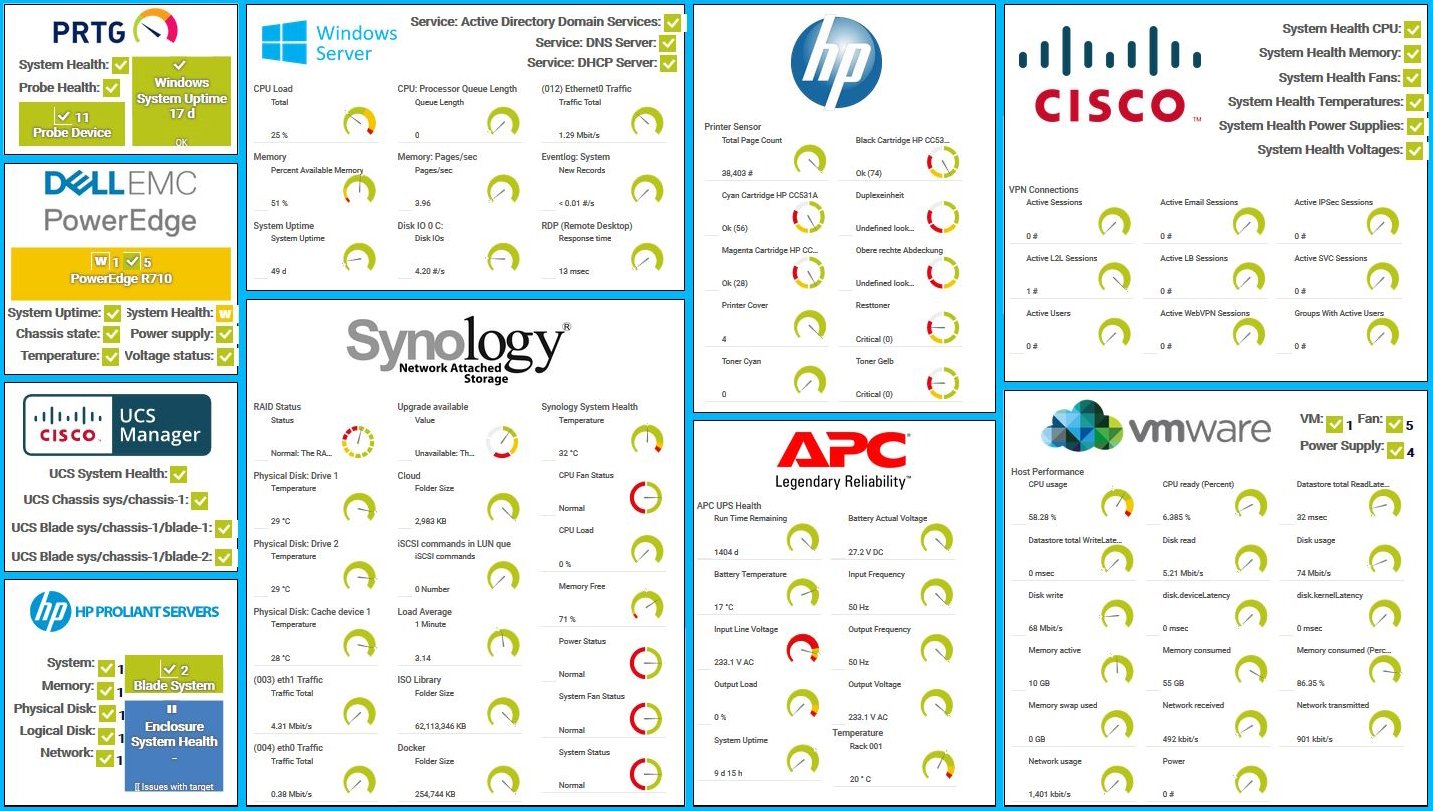
    Diagnose network issues by continuously tracking all your servers and hosts. Show server health and status in real time. Visualize monitoring data in clear graphs and dashboards to identify problems more easily. Gain the overview you need to troubleshoot server issues and prevent problems.
    prtg-screenshot-map-hardware-monitoring

    PRTG map for hardware monitoring

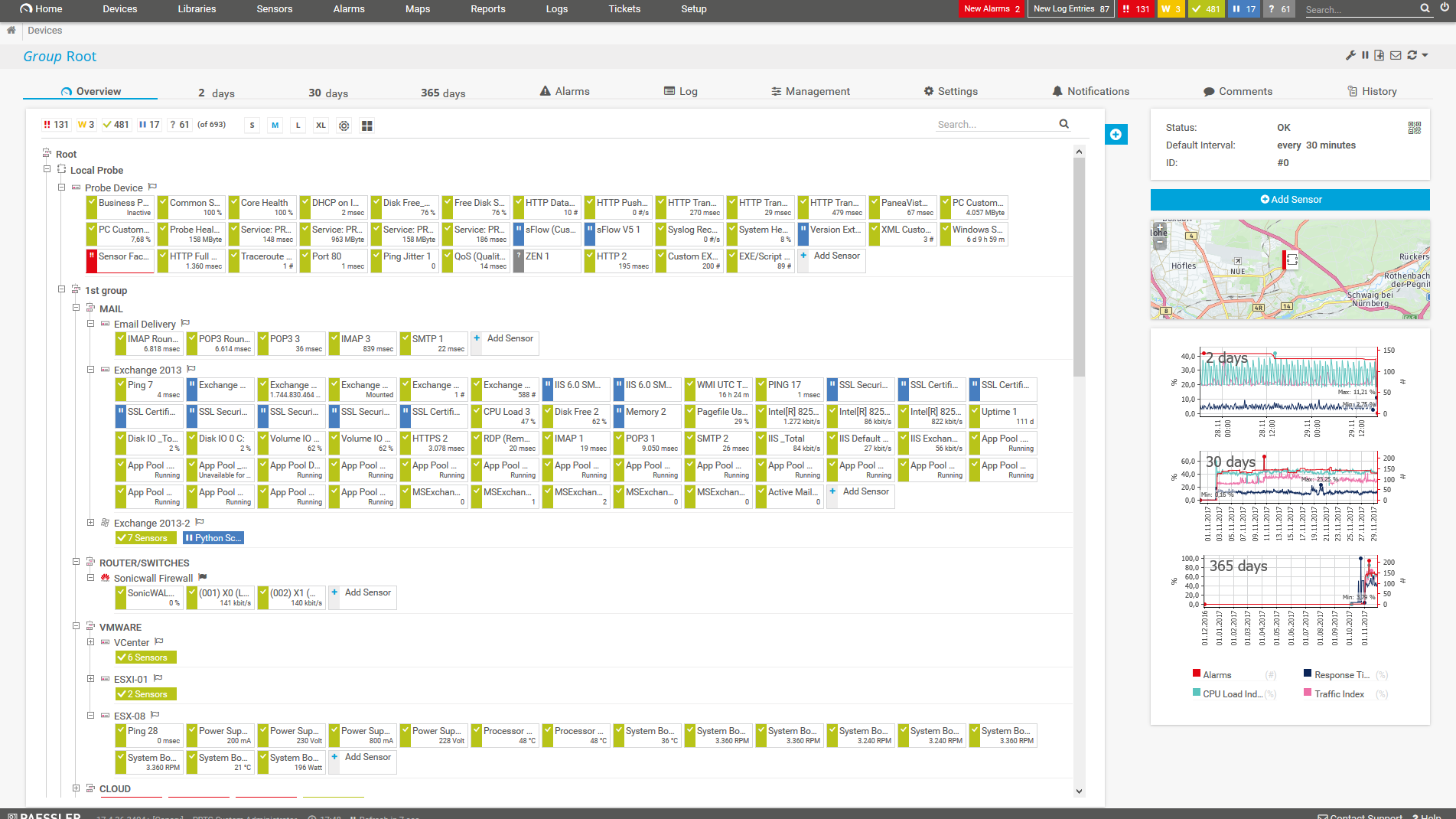
    PRTG Screenshot device tree view

    Device tree view of the complete monitoring setup

    PRTG screenshot map entire it infrastructure

    Custom PRTG dashboard for keeping an eye on the entire IT infrastructure

    Live traffic data graph in PRTG

    Live traffic data graph in PRTG

    Start server monitoring with PRTG and see how it can make your network more reliable and your job easier.

    Free download
    PRODUCT OVERVIEW

    IT experts agree: Paessler PRTG is a great solution for IT infrastructure monitoring

    PCMag

    “All-around winning
     network monitor”

    IT Brief

    “The real beauty of PRTG is the endless possibilities it offers”

    ITPro

    “PRTG Network Monitor 
    is very hard to beat”

    The benefits of PRTG server monitoring

    Update

    Get real-time updates

    Server monitoring lets you monitor your servers in real time with regard to availability, accessibility, capacity, and overall reliability.

    • Status constantly updated
    • Check server status any time
    test

    Improve stability

    Sysadmins monitor their servers because they wish to improve the network performance and stability.

    • Set custom thresholds
    • Get real-time alerts
    • Complete your everyday tasks
    • Have a constant overview of resources
    Performance

    Analyze & optimize

    Sysadmins analyze the values they receive from their monitoring software to develop courses of action.

    • Data-based optimization
    • Capacity planning
    • Custom PRTG reports

    Server types monitored by PRTG

    PRTG monitors all types of servers – even in distributed networks. Here are a few examples of the kinds of servers for which PRTG provides predefined sensors so that you can start monitoring servers immediately.

    Mail server monitoring

    Mail servers pose sensitive issues. When mail server glitches occur, employees are quick to complain, putting the support department under intense strain. With PRTG, you can monitor your mail servers round the clock and be alerted in a timely fashion. IMAP, POP3, SMTP, and more: we supply more than a dozen sensors for your mail server monitoring.

    Sensors for mail server monitoring

    Web server monitoring

    Website performance can determine the fate of many companies. Downtime is costly from the very first moment. That’s why PRTG also makes a whole range of sensors available for your web server monitoring (IIS, Apache, and more).

    Sensors for web server monitoring

    Database server monitoring

    Most departments live & die by database performance. PRTG offers a variety of sensors for immediate use for the monitoring of MySQL, Microsoft SQL, or Oracle SQL. Choose HTTP content or perform database queries for your SQL server monitoring.

    Sensors for database server monitoring

    File server monitoring

    Administrators must ensure that the file server runs smoothly, so it’s common for them to search for a specific FTP server monitoring tool. But PRTG has you covered with around 20 preconfigured sensors for file server monitoring, including NAS devices and storage area networks (SAN). 

    Sensors for file server monitoring

    Virtual server monitoring

    In many companies, virtual servers are already a part of the IT structure. And for good reason: memory, hard disk space, and computing power can be allocated to individual applications dynamically. Resources are thus used in a considerably more efficient manner. PRTG monitors your virtual servers, right down to the very last detail.

    Sensors for virtual server monitoring

    Cloud server monitoring

    Cloud server monitoring ensures that your cloud-based services, including SaaS applications, maintain optimal performance and uptime. With PRTG, you can monitor the uptime and performance of your cloud servers in real-time. Graphs and statistics visualize server metrics and identify potential issues before they affect your users.

    More cloud sensors

    Unlimited server monitoring

    With PRTG, you get several other predefined sensors which provide an overview of your entire server landscape. Create custom sensors whenever you want, and use the API to adapt PRTG to any special use case.

    More server sensors

    Explore our preconfigured PRTG sensors for server monitoring

    PRTG comes with more than 250 native sensor types for monitoring your entire on-premises, cloud, and hybrid cloud environment out of the box. Check out some examples below!

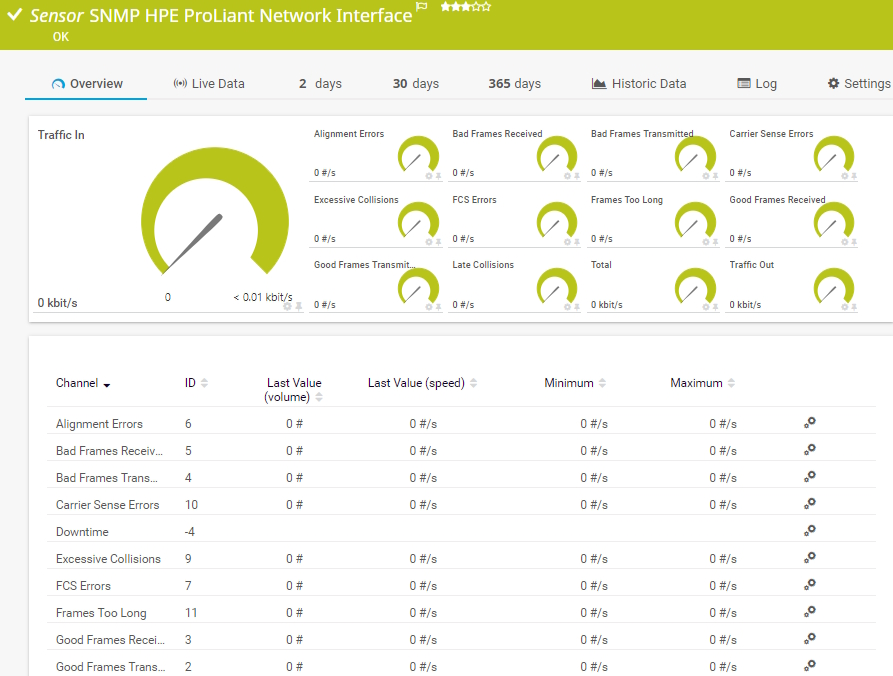
    SNMP HPE ProLiant Network Interface

    The SNMP HPE ProLiant Network Interface sensor monitors a network interface in an HPE ProLiant server. It can show the following:

    • Number of alignment, carrier sense, and FCS errors
    • Number of bad and good frames received and transmitted
    • Number of frames that are too long
    • Number of excessive and late collisions
    • Incoming, outgoing, and total traffic
    SNMP HPE ProLiant Network Interface<
    SNMP HPE ProLiant Network Interface<

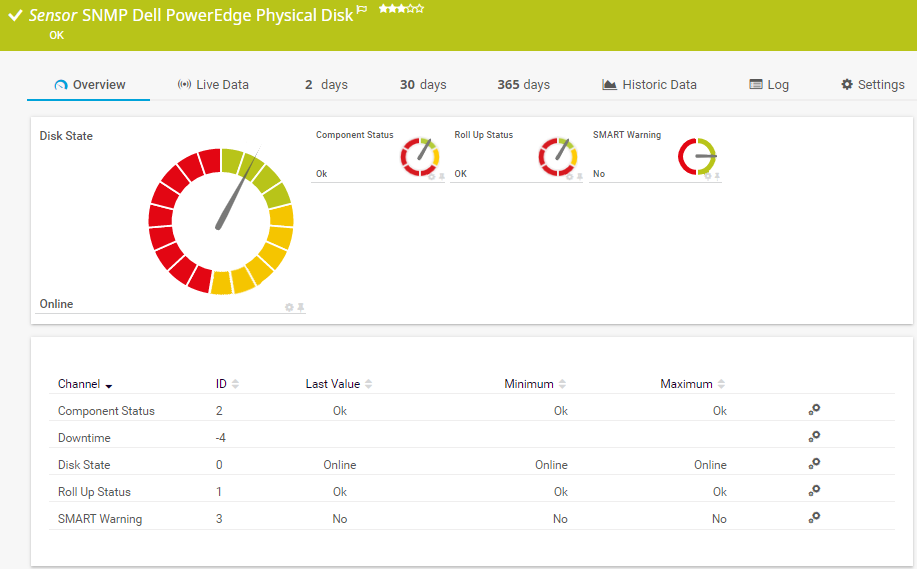
    SNMP Dell PowerEdge Physical Disk

    The SNMP Dell PowerEdge Physical Disk sensor monitors a physical disk in a Dell PowerEdge server. It can show the following:

    • Component status
    • Disk status
    • Roll up status
    • S.M.A.R.T. warning status
    SNMP Dell PowerEdge Physical Disk
    SNMP Dell PowerEdge Physical Disk

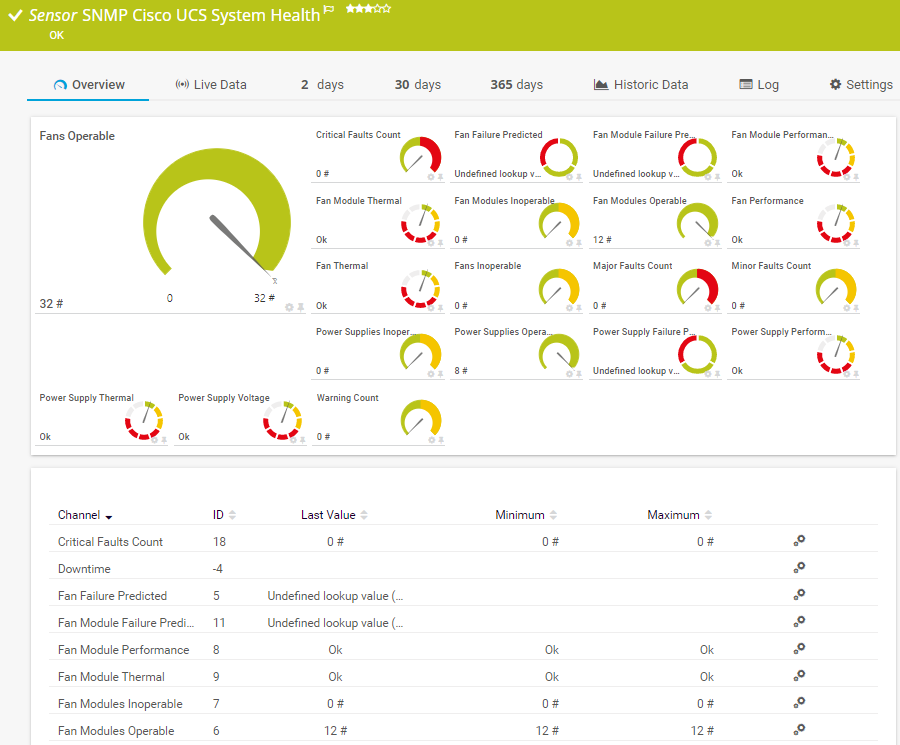
    SNMP Cisco UCS System Health

    The SNMP Cisco UCS System Health sensor monitors the system health of a Cisco Unified Computing System device. It can show the following:

    • Number of minor, major, and critical faults
    • Predicted fan, fan module, and power supply failure status
    • Power supply performance, thermal, and voltage status
    • Number of operable and inoperable fan modules and power supplies
    • Fan performance and thermal status
    SNMP Cisco UCS System Health
    SNMP Cisco UCS System Health

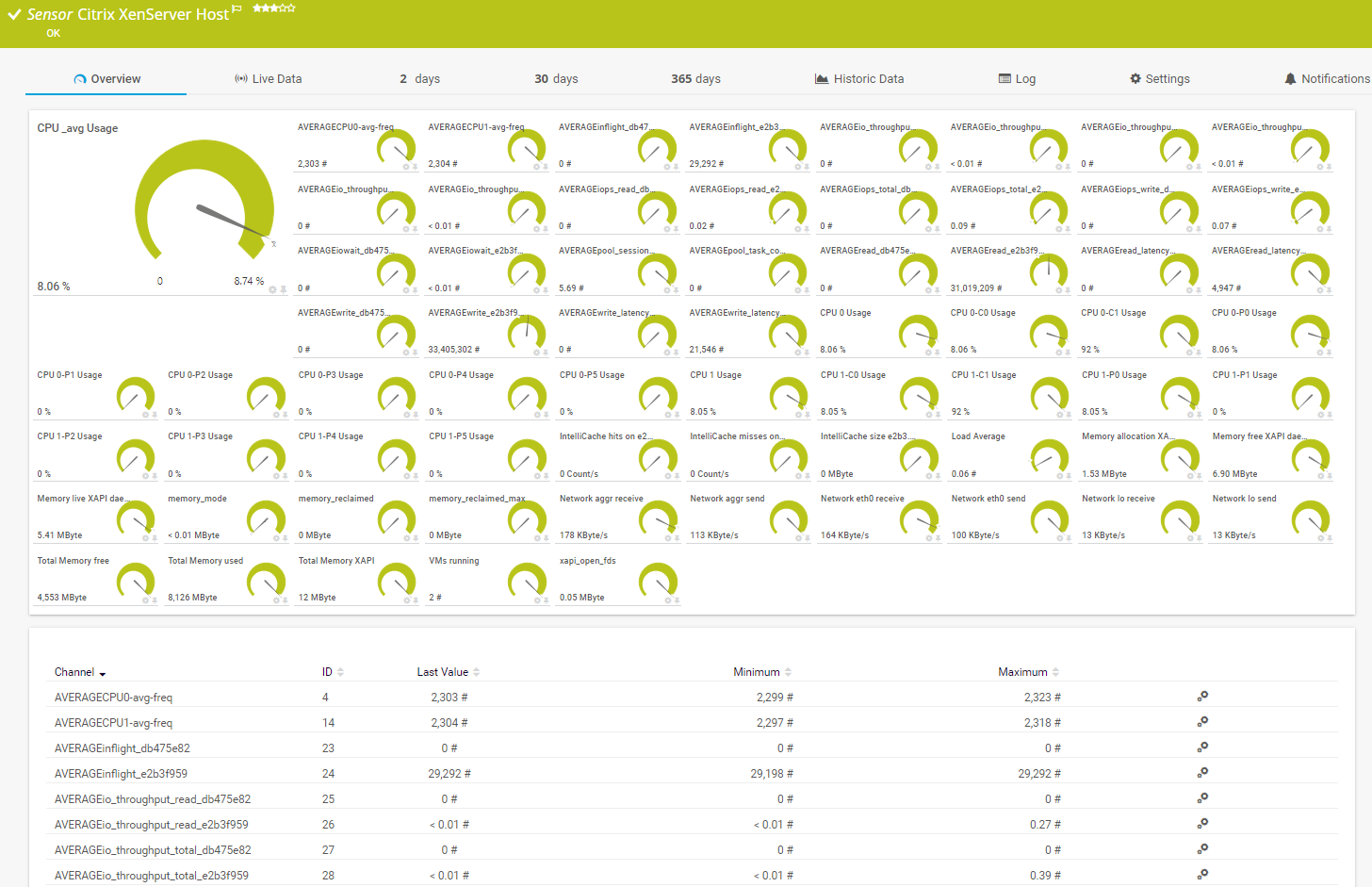
    Citrix XenServer Host

    The Citrix XenServer Host sensor monitors a Xen host server via HTTP. It can show the following:

    • CPU usage
    • Load average amount
    • Number of running virtual machines
    • Total available and used memory
    Citrix XenServer Host
    Citrix XenServer Host

    See the PRTG Manual for a list of all available sensor types.

    Find the root cause of the problem with our PRTG server monitoring solution

    Real-time notifications mean faster troubleshooting so that you can act before more serious issues occur.

    Free download
    PRODUCT OVERVIEW

    PRTG Is Compatible With All Major Vendors, Products, and Systems

    compatible with all major vendors, products, and systems

    Virtual server monitoring with PRTG

    icon dashboard

    Complete overview

    Virtualized servers are complex. Malfunctions at the hardware level also affect virtual machines. PRTG gives you a complete overview at all times as a monitoring solution for your entire virtual environment.

    Create a foundation that enables your efficient data structures to run as smoothly as possible – and watch as the improved utilization pays off.

    Sensors

    Custom fit

    PRTG is one of the server monitor tools that can monitor almost any virtual infrastructure including Microsoft Hyper-V, Citrix XenServer, Nutanix, VMware, and more.

    As a VMware technology partner, our server monitoring tool offers predefined PRTG VMware sensors for different purposes as well as sensors for many other vendors.

    Update

    Great flexibility

    PRTG is fast and easy to upgrade and adapts to your growth dynamically. New sensors can be easily applied in minutes, reducing your time and effort in managing your server monitoring solution. This is particularly important since virtual servers are often introduced when a company is in the midst of vigorous growth.

    icon virtualization

    Host monitoring

    In virtual environments in particular, it's vital to monitor all your hosts. Host monitoring with PRTG allows you to constantly keep track of the availability and performance of your host (CPU, memory usage, and other performance metrics). Especially if multiple VMs are running on one host, it's absolutely crucial to ensure a proper allocation of resources. Host monitoring can also be important for web servers.

    “From a server perspective, we're monitoring all of the key components of our service such as CPU usage, RAM disk space, the Windows services that it's running, and network connectivity of that server. In terms of networks, we’re monitoring all of our switches, firewalls, and access points. It’s really useful to be able to easily pull performance metrics from the PRTG dashboard.”

    Ollie Kerslake, Infrastructure Lead
    Riverford Organic Farmers

    “The tool has given us greater control over all types of devices connected to the network (switches, IP telephony, security cameras, IoT, WiFi) that previously remained opaque when dealing with service incidents. This has improved our ability to diagnose and resolve problems, which has translated into greater efficiency and a better user experience in both internal and public services.”

    Jordi Tolosà Bel, New Technologies Technician
    Vinaroz City Council

    “Our objective was to be able to monitor the health of our most critical servers containing data and applications, but also the flows and bandwidth between headquarters, our 50 servers in the cloud and the 15 servers at our production sites. For us, it is essential to have a proactive approach to understand where the weaknesses of the IT system are to be able to improve them.”

    Marc Boullier, CIO
    Carambar & Co

    Your server monitor at a glance – even on the go

    PRTG is set up in a matter of minutes and can be used on a wide variety of mobile devices.

    device overview
    HPE

    We are an HPE Technology Partner

    Hewlett Packard Enterprises and Paessler are collaborating in a fresh new way to bring increased value to you as our customer.

    What does this mean for you?

    • Easy integration of HPE hardware and software with PRTG
    • State-of-the-art features for monitoring your HPE environment
    • Expert technical support around your HPE monitoring setup

    Create innovative solutions with Paessler’s IT partners

    Partnering with innovative IT vendors, Paessler unleashes synergies to create
    new and additional benefits for joined customers.

    ScriptRunner

    ScriptRunner

    With ScriptRunner Paessler integrates a powerful event automation platform into PRTG Network Monitor.

    Read more
    UVnetworks

    UVnetworks

    UVexplorer integrates tightly with PRTG to bring fast and accurate network discovery, detailed device inventory, and automatic network mapping to the PRTG platform.

    Read more
    KnowledgeRiver

    KnowledgeRiver

    Combining their tools to a powerful solution for advanced analysis and automation, KnowledgeRiver and Paessler enable IT teams to ensure best performance for their infrastructure and networks.

    Read more

    Find the root cause of the problem with our PRTG server monitoring solution

    Real-time notifications mean faster troubleshooting so that you can act before more serious issues occur.

    Free download
    PRODUCT OVERVIEW
    Paessler PRTG

    Paessler PRTG

    Network Monitoring Software – Version 26.1.116.1532 (February 9th, 2026)

    Hosting icon

    Hosting

    Download for Windows and cloud-based version PRTG Hosted Monitor available

    Languages icon

    Languages

    English, German, Spanish, French, Portuguese, Dutch, Russian, Japanese, and Simplified Chinese

    test

    Monitor everything

    Network devices, bandwidth, servers, applications, virtual environments, remote systems, IoT, and more

    test

    Pricing

    Choose the PRTG Network Monitor subscription that's best for you

    Discover more monitoring insights and stories

    Content illustration

    Powerful stories from the monitoring world

    • Easy ways to quickly test your bandwidth
    • Customer success story: Riverford & PRTG
    • Video: Quick overview of PRTG
    Support illustration

    Resources to master your monitoring challenges

    • I run PRTG on VMware. How can I obtain best performance?
    • How can I use the PRTG Application Programming Interface (API)?
    • Quick Start Guide
    Solution illustration

    Solutions for all your monitoring needs

    • Free Server Monitoring
    • Remote Server Monitoring
    • Microsoft Server Monitoring

    Monitor servers: FAQ


    What types of servers can PRTG monitor?

    PRTG can monitor various types of servers including web servers, SQL servers, file servers, mail servers, and virtual servers across different platforms such as Windows, Linux, and macOS.

    Can PRTG monitor cloud-based servers?

    Yes, PRTG can monitor servers hosted on cloud platforms such as Amazon AWS, Microsoft Azure, and Google Cloud. This includes virtual machines, cloud storage, and other cloud services.

    How does PRTG monitor server uptime?

    PRTG uses sensors that can ping servers, track response times, and utilize protocols such as HTTP, SSH, SNMP, WMI, and others to ensure servers are responding correctly. If a server doesn’t respond when pinged, PRTG immediately sends an alert to the administrator.

    Can PRTG predict server failures?

    PRTG can help predict server failures by monitoring trends and performance metrics like CPU load, memory usage, and disk space. If these metrics show unusual patterns, it could indicate a potential issue, allowing administrators to intervene before an actual failure occurs.

    Does PRTG also provide LDAP monitoring?

    Lightweight Directory Access Protocol (LDAP) is a protocol that queries information from ditributed directory services. Directories contain object-related data which monitoring tools like PRTG that support LDAP monitoring can read. One such directory is Active Directory, the Microsoft service created for use in a Windows Server environment.

    PRTG comes with a preconfigured LDAP sensor out of the box. This sensor connects to the LDAP server using distinguished name (DN) authentication, and displays the response time of your LDAP server if both connection attempt and authentication are successful.

    Does PRTG do web server monitoring?

    Yes, it does. HTTP error messages are clear evidence that web server monitoring with PRTG makes sense. All the more so if the website is an important tool for the company. 

    All status codes that begin with “5” (5XX) are server errors – and therefore a problem. Server error 500 is a collective status code for unexpected server errors. All other server errors (501, 502, 503, etc.) are used to flag specific problems. Error 503, for example, means that the website’s web server is currently overloaded or unavailable. For more information, see our Knowledge Base articles about HTTP status codes and HTTP response codes.

    PRTG comes with a full range of HTTP sensors for monitoring websites as well as individual URLs.

    What is a sensor in PRTG?

    In PRTG, “sensors” are the basic monitoring elements. One sensor usually monitors one measured value in your network, for example the traffic of a switch port, the CPU load of a server, or the free space on a disk drive. On average, you need about 5-10 sensors per device or one sensor per switch port.

    We asked: would you recommend PRTG? Over 95% of our customers say yes!

    Paessler conducted trials in over 600 IT departments worldwide to tune its network monitoring software closer to the needs of sysadmins. The result of the survey: over 95% of the participants would recommend PRTG – or already have.

    recommendation

    Still not convinced?

    Love

    More than 500,000 sysadmins love PRTG

    Paessler PRTG is used by companies of all sizes. Sysadmins love PRTG because it makes their job a whole lot easier.

    PRTG

    Monitor your entire IT infrastructure

    Bandwidth, servers, virtual environments, websites, VoIP services – PRTG keeps an eye on your entire network.

    test

    Try Paessler PRTG for free

    Everyone has different monitoring needs. That’s why we let you try PRTG for free.

    PRTG Logo

    Start server monitoring with PRTG and see how it can make your network more reliable and your job easier.

    Free download
    PRODUCT OVERVIEW

    Products

    • Paessler PRTG
      Paessler PRTGMonitor your whole IT infrastructure
      • PRTG Network Monitor
      • PRTG Enterprise Monitor
      • PRTG Hosted Monitor
      • PRTG UVexplorer
      • PRTG extensions
        Extensions for Paessler PRTGExtend your monitoring to a new level
    • Icon Features
      FeaturesExplore all monitoring features

    Monitoring with PRTG

    • Network monitoring
    • Bandwidth monitoring
    • SNMP monitoring
    • Network mapping
    • Wi-Fi monitoring
    • Server monitoring
    • Network traffic analyzer
    • NetFlow monitoring
    • Syslog server

    Useful Links

    • PRTG Manual
    • Knowledge Base
    • Customer Success Stories
    • About Paessler
    • Subscribe to newsletter
    • PRTG Support
    • PRTG Consulting
    • PRTG Feedback & Roadmap

    Contact

    Paessler GmbH
    Thurn-und-Taxis-Str. 14, 
    90411 Nuremberg 
    Germany

    [email protected]

    +49 911 93775-0

    • Contact us
    ©2026 Paessler GmbHTerms & ConditionsPrivacy PolicyImprintReport VulnerabilityDownload & InstallSitemap
    PRTG Network Monitor PRTG Network Monitor PRTG Network Monitor