• Company
    • About Us
    • Case Studies
    • Press Center
    • Careers
    • Blog
    • Contact us
  • Contact us
  • Login
 
  • English
    • Deutsch
    • Español
    • Français
    • Italiano
    • Português
Paessler
                    - The Monitoring Experts
  • Products
    • Paessler PRTG
      Paessler PRTGMonitor your whole IT infrastructure
      • PRTG Network Monitor
      • PRTG Enterprise Monitor
      • PRTG Hosted Monitor
      • PRTG UVexplorer
      • PRTG extensionsExtensions for Paessler PRTGExtend your monitoring to a new level
    • Icon Features
      FeaturesExplore all monitoring features
      • Maps & dashboards
      • Alerts & notifications
      • Multiple user interfaces
      • Distributed monitoring
      • Customizable reporting
  • Solutions
    • Industries
      IndustriesMonitor various industry sectors
      • Industrial
      • Healthcare
      • Data Center
      • Education
      • Finance
      • Government
    • IT Topics
      IT TopicsMonitor all areas of IT
      • Network Monitoring
      • Bandwidth Monitoring
      • SNMP Monitor
      • Network Mapping
      • WiFi Monitoring
      • Server Monitoring
  • Pricing
  • Resources
    • Getting Started
      Getting StartedModules for self-paced learning
    • How-to Guides
      How-to GuidesGet the most out of PRTG
    • Videos & Webinars
      Videos & WebinarsLearn from Paessler experts
    • IT  Knowledge
      IT KnowledgeExpand your IT knowledge
    • PRTG Manual
      PRTG ManualFull documentation
    • Knowledge Base
      Knowledge BaseShare community knowledge
    • PRTG Sensor Hub
      PRTG Sensor HubGet sensors, scripts & templates
    • Trainings
      PRTG TrainingLearn how to work with PRTG
  • Partners
    • Icon Handshake
      Become a PartnerFor resellers and channel partners
    • Icon MSP
      Become an MSPDeliver monitoring as a managed service
    • icon partner
      Partner PortalLog in to your partner account
    • Deal Registration
      Deal RegistrationRegister your sales opportunities
    • icon search
      Find a PartnerFind partners selling Paessler products
    • icon technology
      Technology AlliancesSee Paessler technology partnerships
    • Partner HubTools for Your Success
  • Company
    • About Us
    • Case Studies
    • Press Center
    • Careers
    • Blog
    • Contact us
  • Contact us
  • Login
  • English
    • Deutsch
    • Español
    • Français
    • Italiano
    • Português
  • Get a quote
  • Free trial
  1. Home>
  2. IT Topics>
  3. Network>
  4. Network Monitoring Tool

PRTG network monitoring tool – powerful and easy to use

Keep a 24/7 eye on the health and performance of your network infrastructure

  • Installs in minutes and easy to set up
  • Automatically discovers your entire network
  • Alerts your IT teams before congestion & emergencies occur
Free download
PRODUCT OVERVIEW

Our Users Give Top Ratings for Monitoring With Paessler PRTG

Gartner peer insights
spiceworks
G2
Capterra

PRTG network monitoring tool: What you’ll find on this page

Table of content

    PRTG makes network infrastructure monitoring as easy as it gets

    Custom alerts and data visualization let you quickly identify and prevent network health and performance issues.

    Free download
    PRODUCT OVERVIEW


    What’s included in the free edition of PRTG?


    Many system administrators opt for free network monitoring software, if for nothing else than to avoid having to get a budget approved by a supervisor. With our free monitoring tool, you get:


    • A freeware monitoring solution for up to 100 sensors for life
    • Monitoring of hardware, software, network performance, data traffic included
    • Free alarm, reports, and mapping features


    With the freeware edition of PRTG, you can get started with network monitoring in a matter of minutes. Our auto-discovery function detects all the devices within a given IP address range and automatically incorporates them into your monitoring environment.
    Table of content

    Keep your systems running smoothly with PRTG's network performance monitoring

    Icon Coffee-Tea

    What

    Ensure your computer systems are running smoothly, avoid outages, and increase the efficiency of your network by monitoring bandwidth and resource consumption with Paessler PRTG network monitoring tools.

    Icon Boost

    Why

    With over 500,000 active installations, PRTG is our most powerful and widely-used network monitoring software.

    Icon Finance Pricetag

    How

    Everything you need is contained in one simple installer, no additional downloads are required. Setup is quick and easy in just minutes with the auto-discovery of our network meter. Plus, PRTG fits into any budget and grows with your needs.

    What network monitoring tool looks like in PRTG

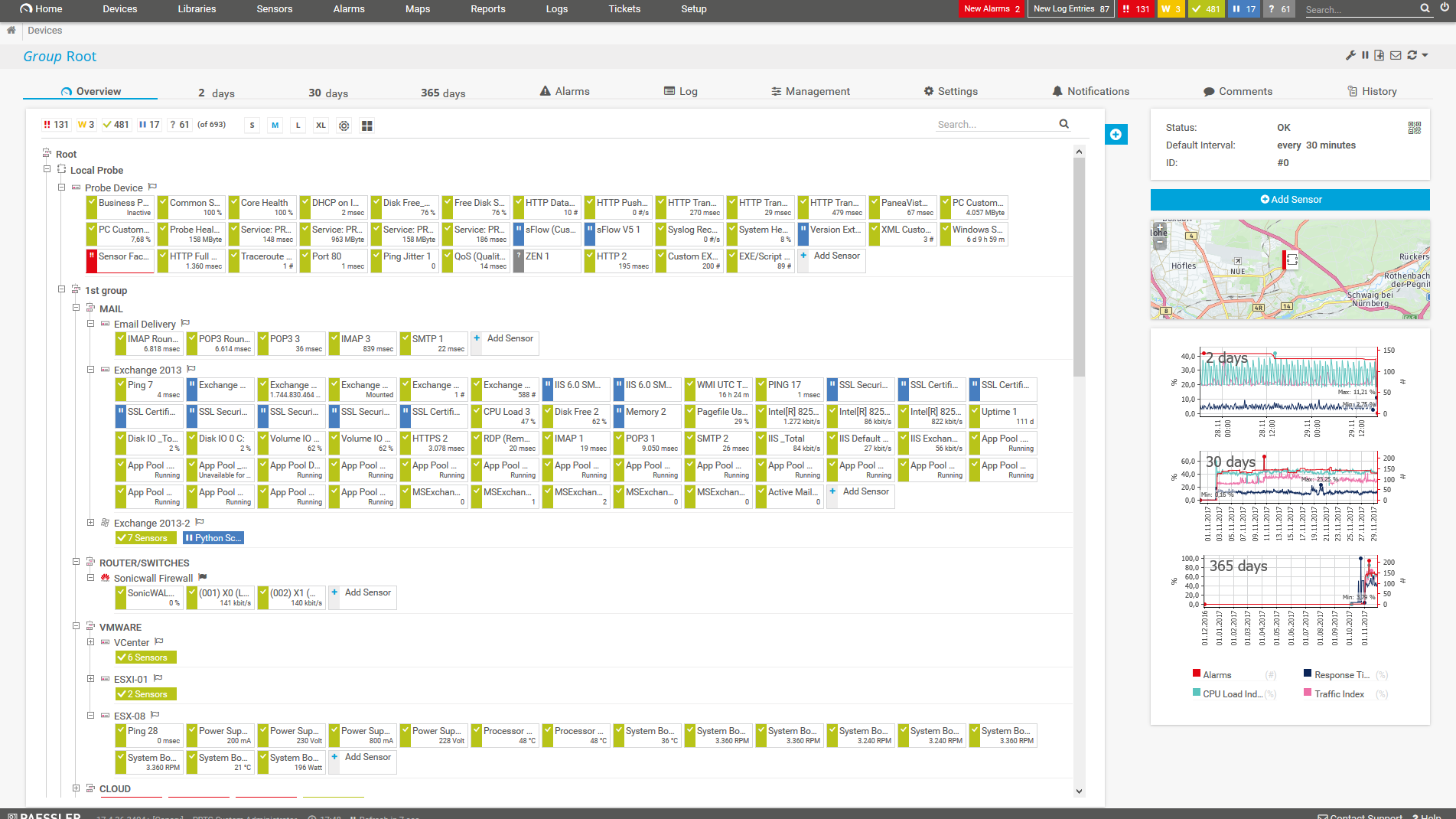
    Diagnose network issues by continuously tracking endpoints like servers, firewalls, routers, switches, applications, services, Windows and Linux systems, and more. Show availability, health, traffic, and other key metrics in real time. Visualize monitoring data in clear graphs, custom network diagrams, and dashboards to identify problems more easily. Gain the overview you need to troubleshoot the root causes of issues with your entire network.
    PRTG Screenshot device tree view

    Device tree view of the complete monitoring setup
    Probe Health sensor in PRTG

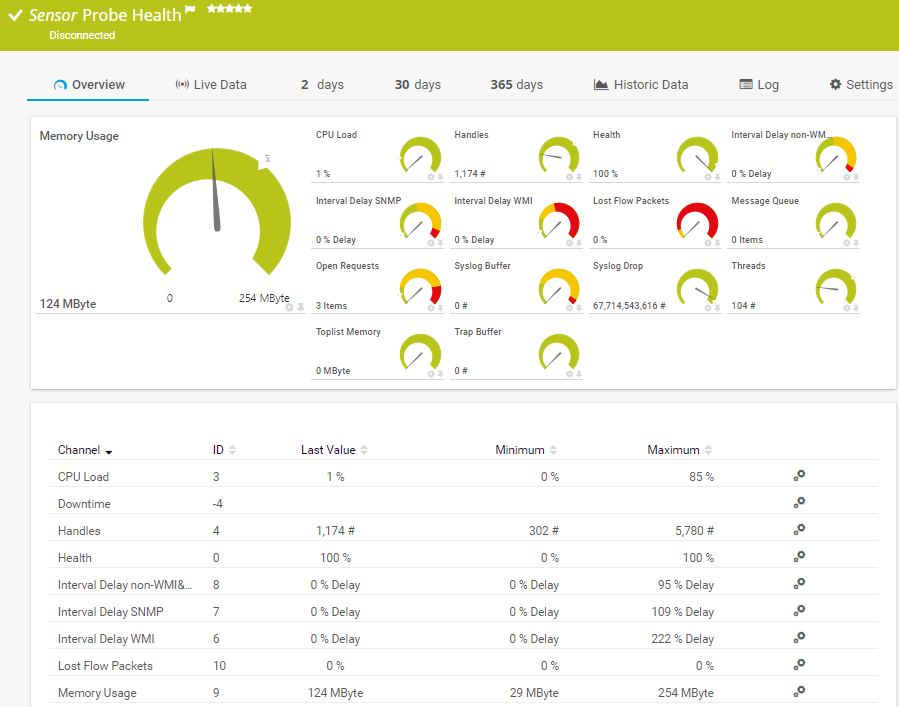
    Probe Health sensor in PRTG

    PRTG screenshot graph live data traffic

    Live traffic data graph in PRTG

    Start enterprise network monitoring with PRTG and see how it can make your network more reliable and your job easier.

    Free download
    PRODUCT OVERVIEW

    IT experts agree: Paessler PRTG is a great solution for IT infrastructure monitoring

    PCMag

    “All-around winning
     network monitor”

    IT Brief

    “The real beauty of PRTG is the endless possibilities it offers”

    ITPro

    “PRTG Network Monitor 
    is very hard to beat”

    Benefits of optimizing your network infrastructure with PRTG network monitoring tool software

    icon 1

    Better performance

    Our network management and monitoring software helps your business perform better by helping you find problems and resolve them before they become a serious threat.

    • Increase profits by avoiding losses caused by undetected system failures.
    • Reduce costs by buying bandwidth and hardware according to actual load.
    • Eliminate server performance problems and bandwidth bottlenecks.
    • Deliver better service to your end users and enhance user experience by preventing emergencies before they occur.
    • Get peace of mind by knowing everything is running fine.
    • Free up time to take care of other important business.
    icon 2

    Comprehensive feature set

    No need for external consultancy. PRTG is easy to install and intuitive to use, with features such as:

    • Remote management via the PRTG web interface or our free PRTG apps for iOS or Android
    • Customizable, central alerting and notifications by email, SMS, push notification, and more
    • Monitoring of multiple distributed locations and networks
    • All common technologies for network usage data acquisition are supported (SNMP, WMI, Packet Sniffing, Flow, SSH, and more)
    • Agentless monitoring
    • No vendor lock-in
    • Customizable reporting system for granular reports in different formats
    • Multiple visualization options such as custom dashboards and network maps
    • Comprehensive set of preconfigured sensors for monitoring every aspect of your network

    Professional network monitoring service for every infrastructure

    Our powerful network monitoring tool PRTG includes all monitoring features to keep track of your entire IT infrastructure, check hardware health, network traffic, the uptime of your websites, monitor the performance of your services, and much more. PRTG is the right network monitoring solution for various settings and environments.

    Icon IoT

    PRTG Network Monitor

    Monitor your IT, OT, & Industrial IT

    • For small and mid-sized infrastructures
    • Monitor up to 1,000 devices and services
    • Classic on-premises deployment
    • Subscription (annual)
    Icon company

    PRTG Enterprise Monitor

    Ideal for distributed monitoring

    • For large & very large environments
    • Monitor thousands of devices and services
    • Monitor multiple distributed infrastructures
    • Flexible subscription license
    Icon cloud

    PRTG Hosted Monitor

    Leave the hosting to us

    • For small and mid-sized infrastructures
    • Monitor up to 1,000 devices and services
    • No dedicated hardware needed
    • Flexible subscriptions

    Explore our preconfigured PRTG sensors for network monitoring tool

    PRTG comes with more than 250 native sensor types for monitoring your entire on-premises, cloud, and hybrid cloud environment out of the box. Check out some examples below!

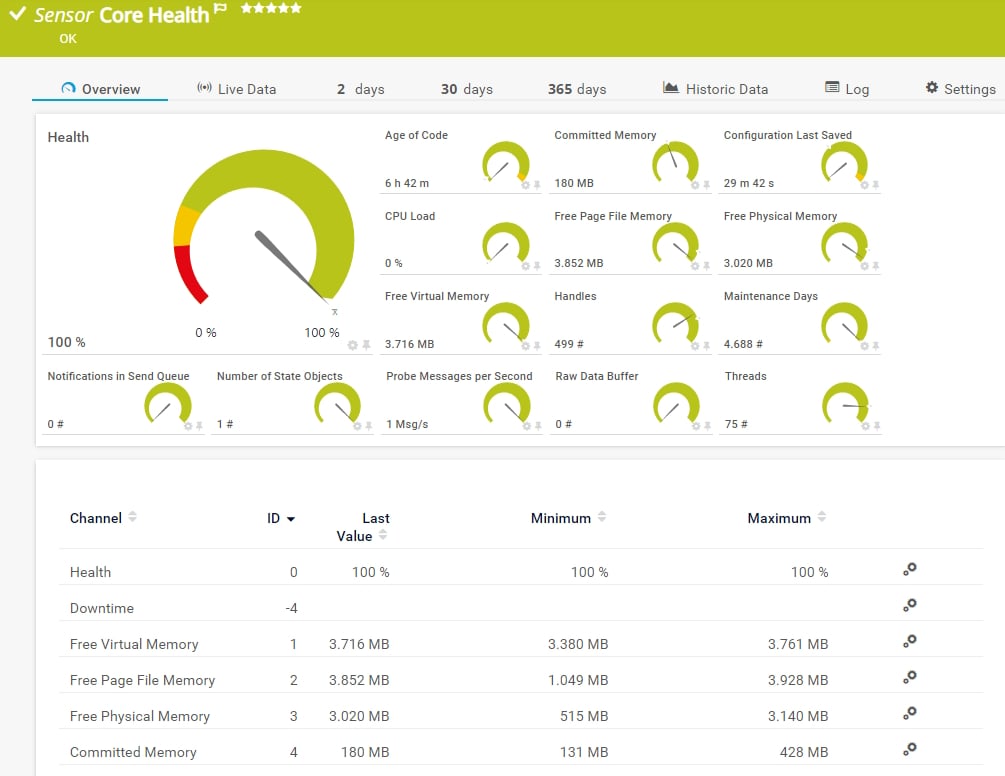
    Core Health

    The Core Health sensor is a probe-dependent sensor that monitors internal PRTG core server parameters. It can show the following and more:

    • Time since the last update and the last configuration backup
    • CPU load
    • Free page file, physical, virtual, and committed memory
    • Number of handles and threads
    • Remaining maintenance days
    Core Health
    Core Health

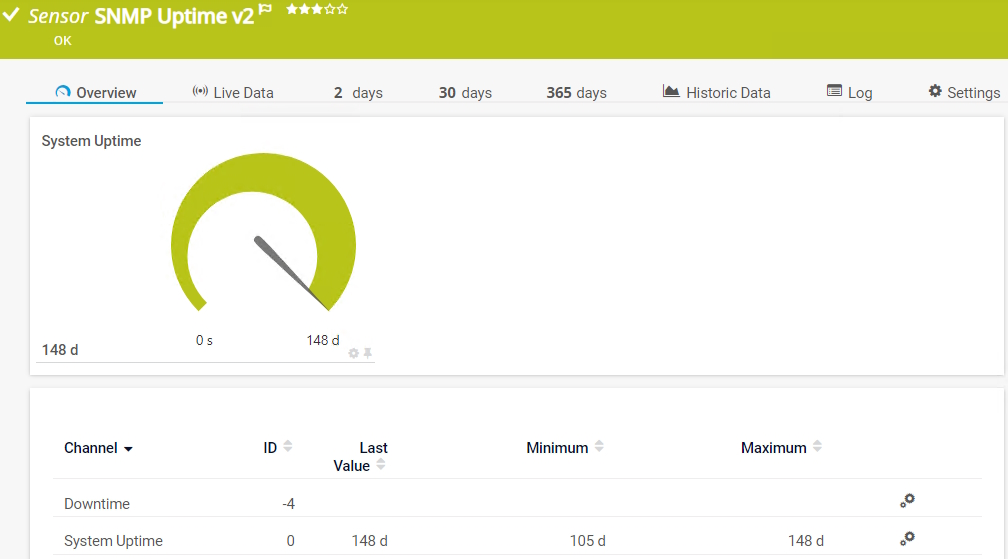
    SNMP Uptime v2

    The SNMP Uptime v2 sensor monitors the uptime of a device. It can show the following:

    • Downtime
    • System uptime
    SNMP Uptime v2
    SNMP Uptime v2

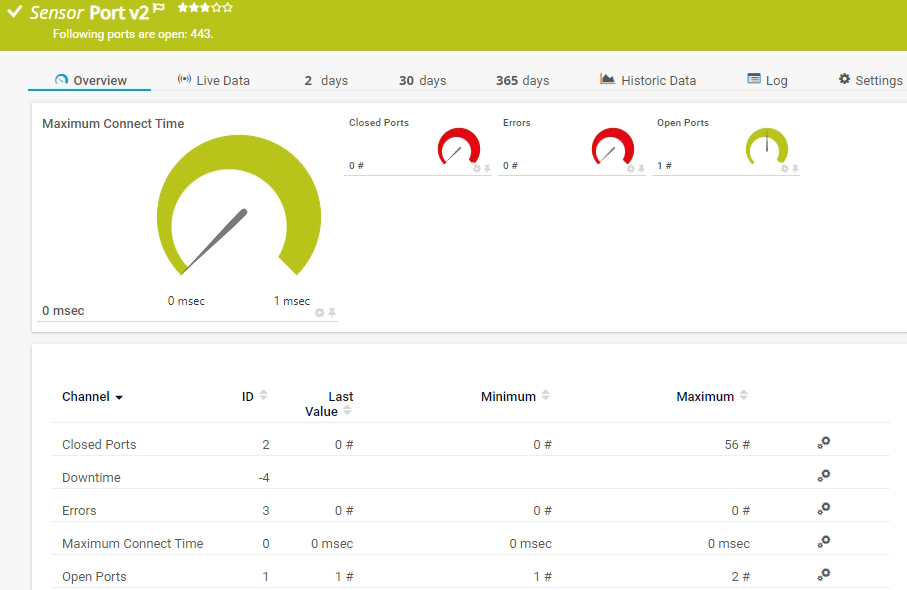
    Port v2

    The Port v2 sensor monitors a network service by connecting to one or more of its TCP/IP ports. It can show the following:

    • Number of open and closed ports
    • Number of errors
    • Maximum time until a request to connect to a port was accepted
    Port v2
    Port v2

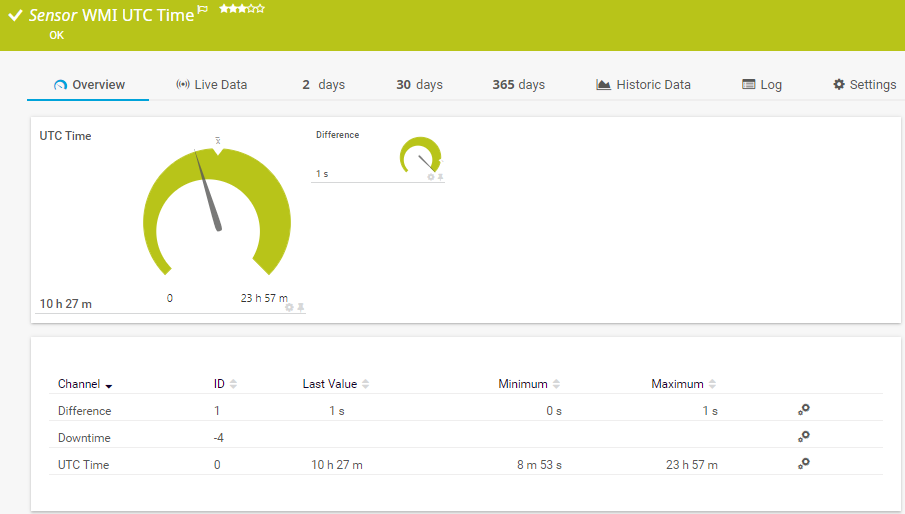
    WMI UTC Time

    The WMI UTC Time sensor monitors the Coordinated Universal Time (UTC) time of a target device. It can show the following:

    • UTC time of the target device
    • Time difference between the PRTG core server system time and the target device
    WMI UTC Time
    WMI UTC Time

    See the PRTG Manual for a list of all available sensor types.

    Find the root cause of the problem with our PRTG network monitoring tool solution

    Real-time notifications mean faster troubleshooting so that you can act before more serious issues occur.

    Free download
    PRODUCT OVERVIEW

    PRTG Is Compatible With All Major Vendors, Products, and Systems

    compatible with all major vendors, products, and systems

    Network Monitoring Tools: Compare PRTG to the competition

    View all product comparisons

    PRTG vs. Nagios

    The basic version of the open-source tool Nagios is free of charge. But most users spent many hours to set up and customize the tool. In case of problems, browsing through forums is often the only solution.

    Comparison with Nagios

    PRTG vs. SolarWinds

    SolarWinds might be interesting for extremely complex network environments. But it also means you need to invest in higher costs for a platform made up of different modules and add-ons (that cost extra).

    Comparison with SolarWinds

    PRTG vs. ManageEngine

    PRTG and ManageEngine might seem similar at first. However, with ManageEngine, you have to choose between individual functions and purchase several modules to access the full range of features.

    Comparison with ManageEngine

    PRTG makes network monitoring tool as easy as it gets

    Custom alerts and data visualization let you quickly identify and prevent network health and performance issues.

    Free download
    PRODUCT OVERVIEW

    ”Adopting PRTG has been like going from being in the dark to being in the light. Before, we had limited visibility into what was happening in the infrastructure and in the network. Now, however, thanks to the comprehensive dashboard and real-time notifications, we receive constant updates on the status of facilities and services, and our way of working has gone from passive to proactive.”

    Luca Meneghesso, Senior IT infrastructure and Security Specialist
    Banca Profilo

    ”GESAC increasingly focuses on innovation to improve the quality of services offered and the experience of passengers handled every day by Naples Airport. Thanks to PRTG, we finally have unified, automatic, and continuous monitoring of the airport network and can guarantee quick and timely interventions.”

    Domenico Ciervo, GESAC ICT Manager
    Naples International Airport

    ”As an international company, PRTG is ideal for us. If something went down half way across the world, we wouldn’t be woken up – we can rely on PRTG to identify the problem and alert us before it occurs – enabling the right person, in the right time zone to resolve the problem. At the end of the day, if we’re to provide an internal network experience for our employees that meets expectations, we need a tool like PRTG to be successful.”

    Barry Kelly, Systems Engineer
    Skyscanner

    “I would recommend PRTG because it has helped us significantly improve service uptime by highlighting important alerts that would otherwise result in a system failure or service disruption if action was not taken. Thanks to PRTG, we can ensure that The Ritz London’s network and IT systems are five-star, just like the hotel.”

    Richard Isted, IT Manager
    The Ritz London

    Your network monitor at a glance – even on the go

    PRTG is set up in a matter of minutes and can be used on a wide variety of mobile devices.

    device overview
    Dell

    We are a Dell Technologies Partner  

    As one of the leading players in the IT monitoring industry, Paessler has also become an authorized Dell partner for building integrated solutions around the Dell technology ecosystem.

    What does this mean for you?

    • Easy integration of Dell hardware and software with PRTG
    • State-of-the-art features for monitoring your Dell environment
    • Expert technical support around your Dell monitoring setup

    Find the root cause of the problem with our PRTG network monitoring tool solution

    Real-time notifications mean faster troubleshooting so that you can act before more serious issues occur.

    Free download
    PRODUCT OVERVIEW
    Paessler PRTG

    Paessler PRTG

    Network Monitoring Software – Version 26.1.116.1532 (February 9th, 2026)

    Hosting icon

    Hosting

    Download for Windows and cloud-based version PRTG Hosted Monitor available

    Languages icon

    Languages

    English, German, Spanish, French, Portuguese, Dutch, Russian, Japanese, and Simplified Chinese

    test

    Monitor everything

    Network devices, bandwidth, servers, applications, virtual environments, remote systems, IoT, and more

    test

    Pricing

    Choose the PRTG Network Monitor subscription that's best for you

    Discover more monitoring insights and stories

    Content illustration

    Powerful stories from the monitoring world

    • Video: PRTG Network Monitor – Smart Setup
    • Understanding MQTT architecture: a deep dive
    • Easy ways to quickly test your bandwidth
    Support illustration

    Resources to master your monitoring challenges

    • How can I speed up PRTG—especially for large installations?
    • How can I propose new features or sensors for PRTG?
    • I run PRTG on VMware. How can I obtain best performance?
    Solution illustration

    Solutions for all your monitoring needs

    • NetFlow Monitoring
    • Bandwidth Monitoring
    • CPU Monitoring

    IT network monitoring: FAQ


    What is network monitoring?

    Network monitoring refers to the monitoring of an entire network environment. Its goal is to allow sysadmins to work in a better, quicker, and more efficient manner. Network monitoring focuses on parameters such as bandwidth consumption and the availability of network devices.

    Some of the monitored devices include the local and Internet-based systems in an IT environment, such as databases, applications, clouds, servers, and network infrastructures. Network monitoring allows admins to ensure their networks run smoothly, effectively, and free of errors.

    What should I monitor in my network?

    The mere implementation of a network monitor is not enough. The key to effective network monitoring in real time is to ensure that your tool has been configured to monitor your network's “vital signs”: availability, speed, and usage.

    • Network availability: Monitoring this allows both internal and external parties to access the services, including websites, and you can determine whether the mail servers and leased lines are working.
    • Network speed: Using bandwidth monitoring prevents your websites and network services from losing visitors or frustrate users due to slow-loading pages, files, or images.
    • Network usage: Monitoring usage enables you to accurately assess CPU load and learn what sort of work the servers are doing at different times of the day.
    • General network status: Check the status of your entire network with just a glance to free up time for other tasks. If a malfunction occurs or the status of a device changes, you'll be notified immediately and can take action at once.
    • Network devices: Large networks contain devices from a variety of manufacturers: switches, servers, workstations, and routers. Most monitoring tools only monitor the devices of specific manufacturers or require expensive add-ons. However, PRTG covers nearly every manufacturer.
    • Network traffic: PRTG shows you which applications, connections, and data types are putting the greatest strain on your network. In the event of disruptions or overloads, PRTG triggers the alarm at once.
    Why do I need network monitoring?

    Downtime and malfunctions can cause the performance of the entire company to suffer. At the same time, IT managers are under more and more pressure. They’re forced to act quickly but often don’t know where the problem lies. Here’s how PRTG helps IT managers get a handle on their network:

    • Identify bottlenecks and eliminate disruptions
      Applications and devices that consume excessive amounts of bandwidth can bring an entire network to a standstill. It is crucial to know exactly how much traffic is running through your network. By monitoring traffic and bandwidth, you’ll keep a constant eye on your network capacity and can prevent disruptions caused by bottlenecks and overloads. As a result, you’ll ensure business goes on as usual.
    • Optimize performance and eliminate downtime
      For business processes to be successful, your servers and databases must always be up and running. If a web or mail server goes down, your company feels the pinch immediately and is forced to free up valuable resources to solve the problem. You should keep a constant eye on the most important aspects of your database, including its query, connection, and response times. With comprehensive network monitoring, you can monitor all your servers around the clock and make sure they are always operational.
    • Ensure devices and applications run properly
      Many applications are critical for your business. With PRTG, you can monitor your network to detect potential problems and errors before they arise. Otherwise, you run the risk of malfunctions causing serious disruptions to your business. Help your coworkers be as productive as possible by ensuring all the devices and applications in your LAN and WAN are running smoothly.
    What network size can PRTG handle?

    PRTG is used by companies with a few dozen workers to several thousand employees. Our PRTG products and licenses are based on the size of your IT infrastructure and the required number of sensors. From very small to extremely large networks – our software provides peace of mind to everyone.

    Can I monitor individual devices such as a router or a switch?

    Yes, you can. You get to choose which devices are monitored by PRTG. You also get to define the scope of your monitoring. For example, you can choose to only monitor the CPU, free disk space, or certain ports of a specific device.Put some clear and concise content in here. Keep your reader in mind. What are they trying to do? What are they hoping to learn? Why are they reading this? Help them out and use the tone and voice of your organization.

    Can PRTG monitor my Windows network?

    Yes. PRTG uses Windows Management Instrumentation (WMI), performance counters, and SNMP to monitor your Windows Servers, operating system, processes, and services. You can monitor the following Windows parameters, for example:

    • System uptime
    • CPU load
    • File system
    • Update status
    • Free disk space
    • Security
    • Event logs
    What is a sensor in PRTG?

    In PRTG, “sensors” are the basic monitoring elements. One sensor usually monitors one measured value in your network, for example the traffic of a switch port, the CPU load of a server, or the free space on a disk drive. On average, you need about 5-10 sensors per device or one sensor per switch port.

    We asked: would you recommend PRTG? Over 95% of our customers say yes!

    Paessler conducted trials in over 600 IT departments worldwide to tune its network monitoring software closer to the needs of sysadmins. The result of the survey: over 95% of the participants would recommend PRTG – or already have.

    recommendation

    Still not convinced?

    Love

    More than 500,000 sysadmins love PRTG

    Paessler PRTG is used by companies of all sizes. Sysadmins love PRTG because it makes their job a whole lot easier.

    PRTG

    Monitor your entire IT infrastructure

    Bandwidth, servers, virtual environments, websites, VoIP services – PRTG keeps an eye on your entire network.

    test

    Try Paessler PRTG for free

    Everyone has different monitoring needs. That’s why we let you try PRTG for free.

    PRTG Logo

    Start network monitoring with PRTG and see how it can make your network more reliable and your job easier.

    Free download
    PRODUCT OVERVIEW

    Products

    • Paessler PRTG
      Paessler PRTGMonitor your whole IT infrastructure
      • PRTG Network Monitor
      • PRTG Enterprise Monitor
      • PRTG Hosted Monitor
      • PRTG UVexplorer
      • PRTG extensions
        Extensions for Paessler PRTGExtend your monitoring to a new level
    • Icon Features
      FeaturesExplore all monitoring features

    Monitoring with PRTG

    • Network monitoring
    • Bandwidth monitoring
    • SNMP monitoring
    • Network mapping
    • Wi-Fi monitoring
    • Server monitoring
    • Network traffic analyzer
    • NetFlow monitoring
    • Syslog server

    Useful Links

    • PRTG Manual
    • Knowledge Base
    • Customer Success Stories
    • About Paessler
    • Subscribe to newsletter
    • PRTG Support
    • PRTG Consulting
    • PRTG Feedback & Roadmap

    Contact

    Paessler GmbH
    Thurn-und-Taxis-Str. 14, 
    90411 Nuremberg 
    Germany

    [email protected]

    +49 911 93775-0

    • Contact us
    ©2026 Paessler GmbHTerms & ConditionsPrivacy PolicyImprintReport VulnerabilityDownload & InstallSitemap
    PRTG Network Monitor PRTG Network Monitor PRTG Network Monitor