
• Company
    • About Us
    • Case Studies
    • Press Center
    • Careers
    • Blog
    • Contact us
  • Contact us
  • Login
 
  • English
    • Deutsch
    • Español
    • Français
    • Italiano
    • Português
Paessler
                    - The Monitoring Experts
  • Products
    • Paessler PRTG
      Paessler PRTGMonitor your whole IT infrastructure
      • PRTG Network Monitor
      • PRTG Enterprise Monitor
      • PRTG Hosted Monitor
      • PRTG UVexplorer
      • PRTG extensionsExtensions for Paessler PRTGExtend your monitoring to a new level
    • Icon Features
      FeaturesExplore all monitoring features
      • Maps & dashboards
      • Alerts & notifications
      • Multiple user interfaces
      • Distributed monitoring
      • Customizable reporting
  • Solutions
    • Industries
      IndustriesMonitor various industry sectors
      • Industrial
      • Healthcare
      • Data Center
      • Education
      • Finance
      • Government
    • IT Topics
      IT TopicsMonitor all areas of IT
      • Network Monitoring
      • Bandwidth Monitoring
      • SNMP Monitor
      • Network Mapping
      • WiFi Monitoring
      • Server Monitoring
  • Pricing
  • Resources
    • Getting Started
      Getting StartedModules for self-paced learning
    • How-to Guides
      How-to GuidesGet the most out of PRTG
    • Videos & Webinars
      Videos & WebinarsLearn from Paessler experts
    • IT  Knowledge
      IT KnowledgeExpand your IT knowledge
    • PRTG Manual
      PRTG ManualFull documentation
    • Knowledge Base
      Knowledge BaseShare community knowledge
    • PRTG Sensor Hub
      PRTG Sensor HubGet sensors, scripts & templates
    • Trainings
      PRTG TrainingLearn how to work with PRTG
  • Partners
    • Icon Handshake
      Become a PartnerFor resellers and channel partners
    • Icon MSP
      Become an MSPDeliver monitoring as a managed service
    • icon partner
      Partner PortalLog in to your partner account
    • Deal Registration
      Deal RegistrationRegister your sales opportunities
    • icon search
      Find a PartnerFind partners selling Paessler products
    • icon technology
      Technology AlliancesSee Paessler technology partnerships
    • Partner HubTools for Your Success
  • Company
    • About Us
    • Case Studies
    • Press Center
    • Careers
    • Blog
    • Contact us
  • Contact us
  • Login
  • English
    • Deutsch
    • Español
    • Français
    • Italiano
    • Português
  • Get a quote
  • Free trial
  1. Home>
  2. Paessler PRTG>
  3. PRTG UVexplorer
PRTG UVexplorer Logo

Paessler PRTG UVexplorer: From Alert to Resolution – Faster than Ever.

Featuring automatic topology, clear dependency visualizations, and configuration change tracking,  PRTG UVexplorer means fewer surprises, faster answers, and less downtime. 

Contact Sales
OverviewBenefitsFAQResources

Cut MTTR and Protect Uptime

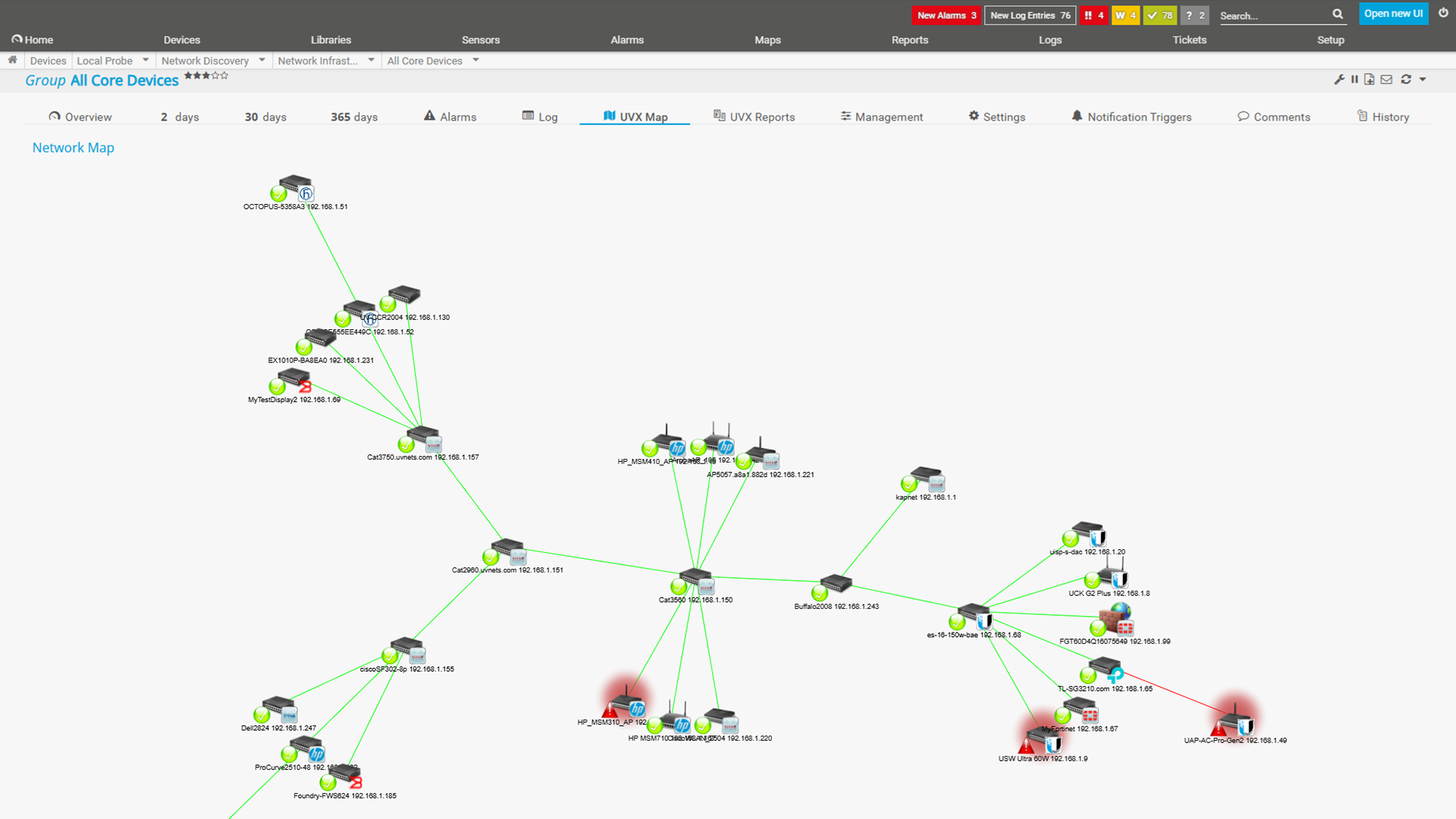
Screenshot PRTG UVexplorer Map2
  • Always know what your network looks like — maps that build and update themselves, no manual effort required.​
  • New devices go straight into PRTG — fully configured, grouped, and ready to monitor. Automatically.​
  • See the full blast radius of an alert in one click — instantly know what's upstream, what's downstream, and what's at risk.​
  • Never lose a config again — automatic backups with side-by-side comparison to spot what changed between discoveries.

Hundreds of Thousands of Customers Worldwide Love Paessler PRTG

customer success stories


What customers say about us

Powerful Network Topology, Config Backup, and Change Tracking

Icon Connection

Automated Network Topology  

No manual mapping, no guesswork. Always-current Layer 2 & 3 maps, built automatically from real data 

Icon Link

Dependency Visualization 

See the area to investigate and the impact of any failure in one click on the topology map — no manual tracing needed. 

Icon Update

Configuration Backup & Comparison 

Automatically backs up device configurations and enables comparison across scheduled discoveries. 

Icon Alert

Network Change Tracking & Alerting 

Detects topology changes and alerts you when differences are found.
Know What’s Down, What’s Impacted, and What Changed. Instantly.

Share monitoring queries

Faster Troubleshooting. Lower MTTR.

  • Click on any device in your topology map and see what’s upstream and what’s downstream, based on your latest scheduled discovery. No guesswork, no manual tracing
  • Identify the blast radius of a failing device in seconds, so you can prioritize the right fix at the right time
  • Spend less time figuring out what’s affected and more time resolving the actual issue
icon document

Always-Current Network Documentation.

  • Paessler PRTG UVexplorer discovers your network on a scheduled basis and keeps your topology maps and device inventory up to date automatically
  • Export point-in-time snapshots to support audits, compliance reviews, and change management processes
  • Stop maintaining Visio diagrams by hand. Your documentation stays current without any manual updates
icon search

Know What Changed, and Why It Broke.

  • Back up device configurations automatically and compare any two versions side by side with the built-in diff viewer
  • Get alerted after each scheduled discovery run when a network change is detected, so you know about it before it becomes an incident
  • When something breaks, you have a clear change history to narrow down the area to investigate. Not just a timestamp and a guess
icon troubleshooting

One Platform. No Tool Sprawl.

  • Paessler PRTG UVexplorer works directly within your existing PRTG environment
  • No additional IT infrastructure monitoring platform to learn, or manage. Topology, dependency visualization, config backup, and change tracking all in one place
  • One vendor, one renewal, and less cognitive load for already-stretched IT teams

Visualize Network Dependencies to Reduce MTTR

UVX PRTG Map

Automatically generated network topology map
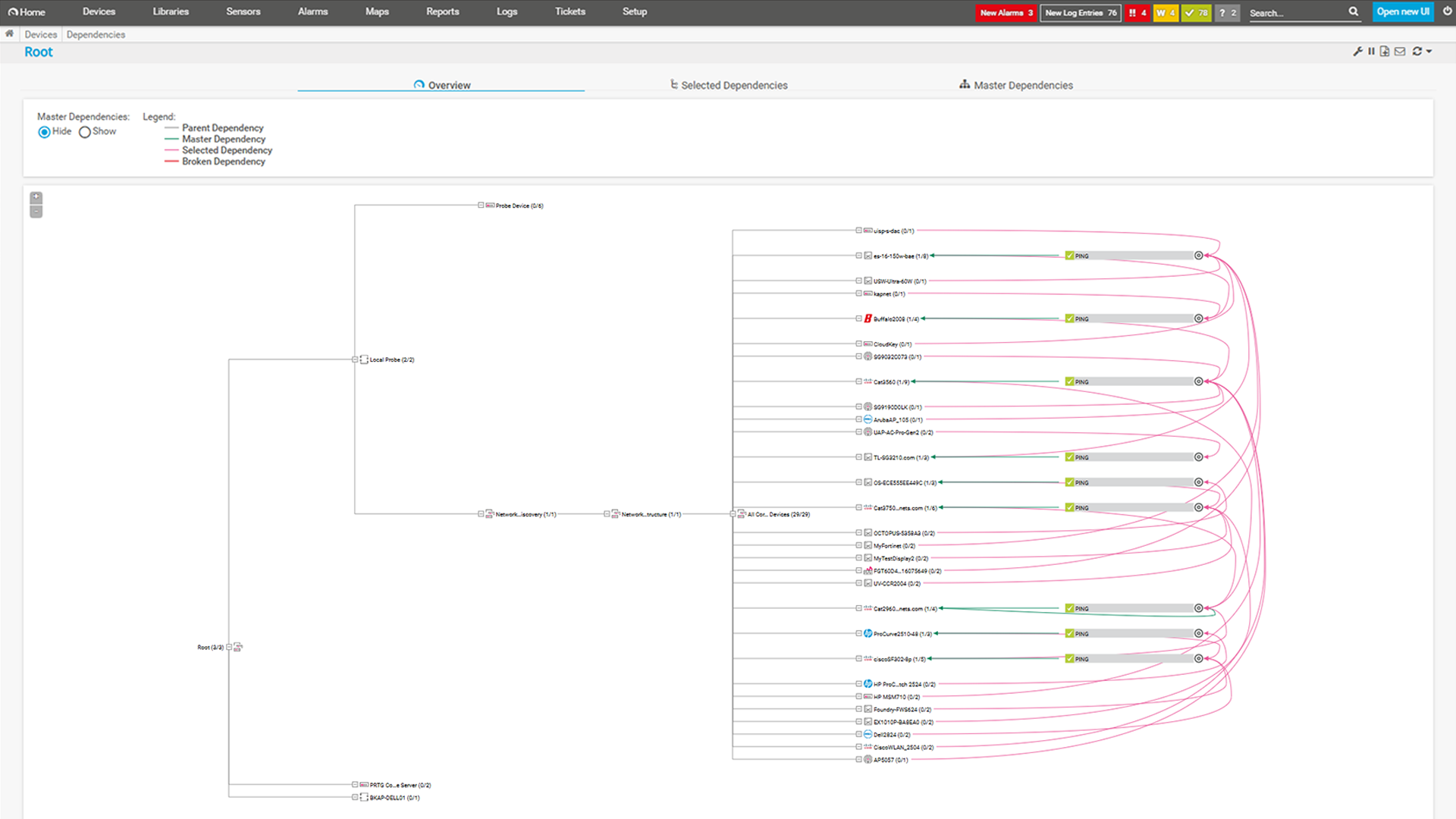
UVX Dependency Map

Dependency visualization with upstream and downstream context
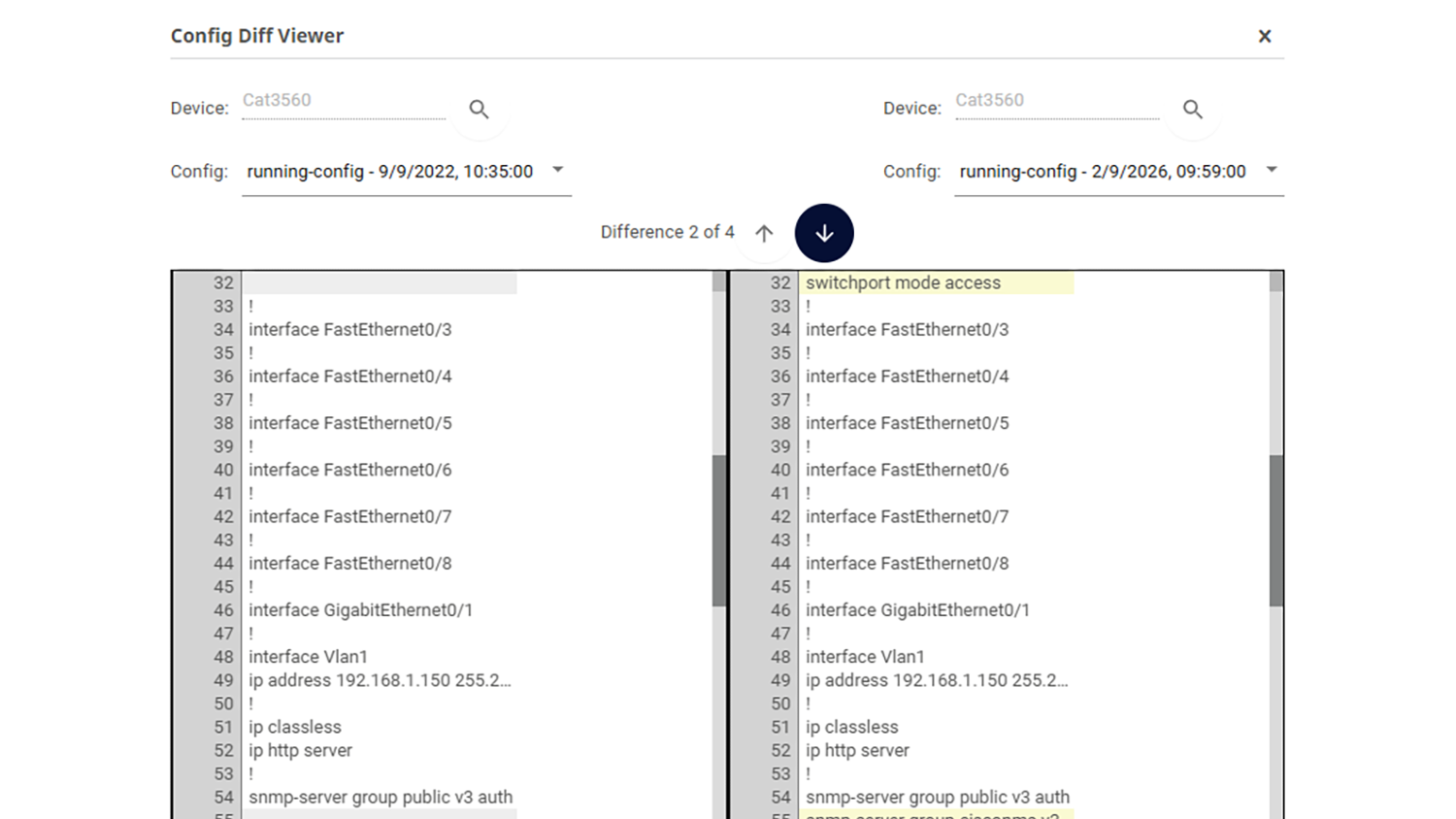
UVX PRTG ConfigDiff

Configuration backup and diff comparison view
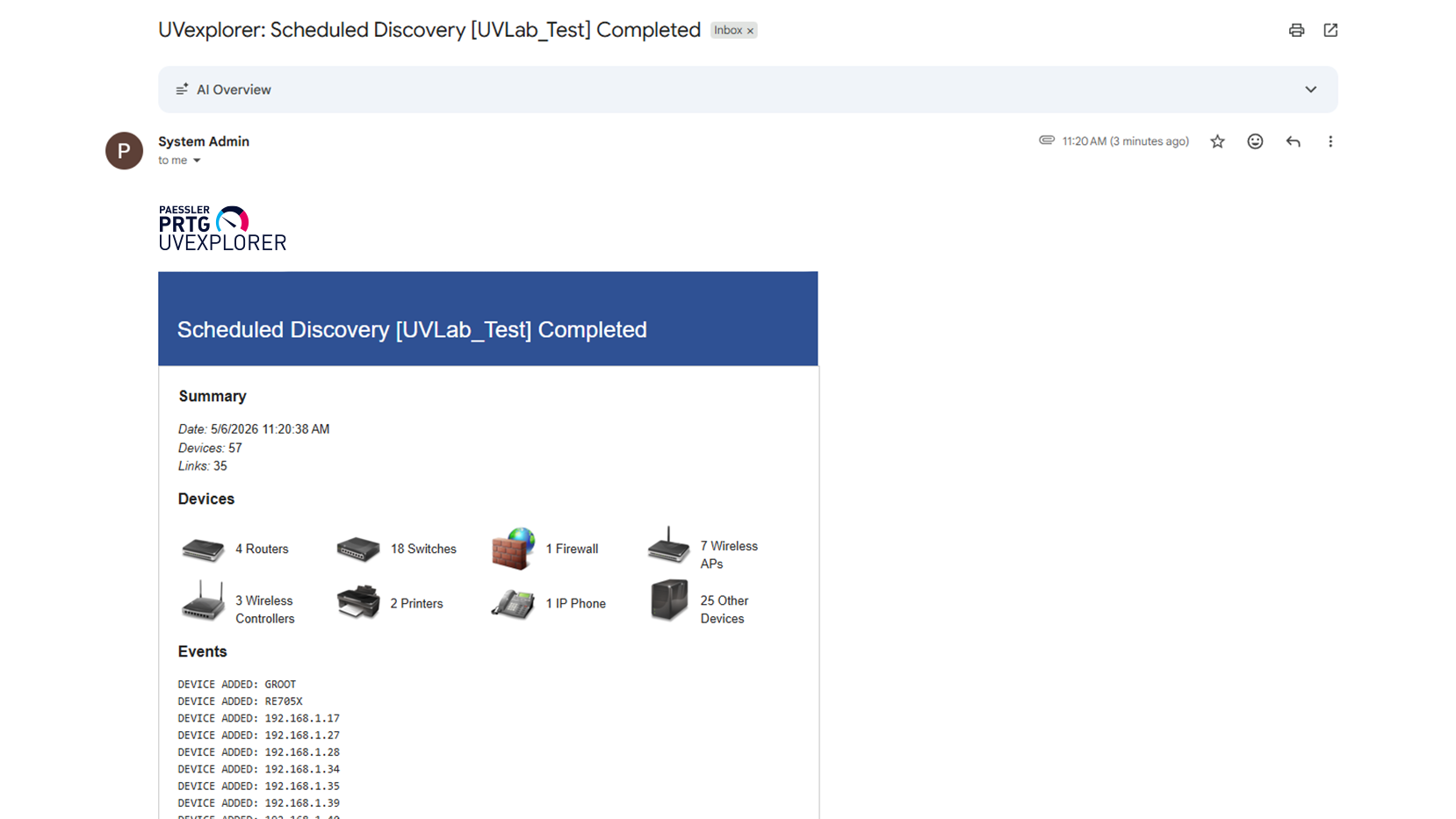
UVX PRTG notification discoverychange

Network change tracking and alert overview

Your Network Map Is One Click Away

Try Paessler PRTG UVexplorer and get an always-current topology map of your network — automatically discovered, always up to date.


Contact Sales

Our Users Give Top Ratings for Monitoring With Paessler PRTG

Gartner peer insights
spiceworks
G2
Capterra

Paessler PRTG UVexplorer: FAQ

What is Paessler PRTG UVexplorer?

Paessler PRTG UVexplorer adds automated network topology mapping, dependency visualization, configuration backup and comparison, and network change tracking and alerting to your PRTG environment.  

Is Paessler PRTG UVexplorer free?

Please contact our team for pricing details and to discuss the right option for your environment. 

What are the advantages of Paessler PRTG UVexplorer?

Paessler PRTG UVexplorer has several benefits:

  • Automatically discover and map your network topology. No manual effort required
  • Visualize device dependencies to instantly see what’s upstream and downstream during an incident
  • Back up device configurations and compare versions to spot changes at a glance
  • Track network changes on a schedule and get alerted when something unexpected shifts
  • Push discovered devices into PRTG and have device groups, sensors, and dependencies configured automatically, right in the interface you already use
What can you use Paessler PRTG UVexplorer for?

You can use Paessler PRTG UVexplorer to extend your PRTG monitoring environment with automated network topology and visibility capabilities. It helps you reduce troubleshooting time by visualizing device dependencies, keeps your network documentation current through scheduled discoveries, gives you a clear change history when incidents occur, and backs up device configurations so you can compare versions and spot what changed.

Learning Resources and Help

Do you need more deep-dive information, or do you have any questions? Here you'll find what you are looking for. And if you'd like to talk to one of our experts, just contact us – we're always happy to help.


support

Technical Details

  • System requirements for Paessler PRTG
support

Support

  • Find a partner
  • Contact our team
PRTG UVexplorer Logo
Contact Sales

Products

  • Paessler PRTG
    Paessler PRTGMonitor your whole IT infrastructure
    • PRTG Network Monitor
    • PRTG Enterprise Monitor
    • PRTG Hosted Monitor
    • PRTG UVexplorer
    • PRTG extensions
      Extensions for Paessler PRTGExtend your monitoring to a new level
  • Icon Features
    FeaturesExplore all monitoring features

Monitoring with PRTG

  • Network monitoring
  • Bandwidth monitoring
  • SNMP monitoring
  • Network mapping
  • Wi-Fi monitoring
  • Server monitoring
  • Network traffic analyzer
  • NetFlow monitoring
  • Syslog server

Useful Links

  • PRTG Manual
  • Knowledge Base
  • Customer Success Stories
  • About Paessler
  • Subscribe to newsletter
  • PRTG Support
  • PRTG Consulting
  • PRTG Feedback & Roadmap

Contact

Paessler GmbH
Thurn-und-Taxis-Str. 14, 
90411 Nuremberg 
Germany

[email protected]

+49 911 93775-0

  • Contact us
©2026 Paessler GmbHTerms & ConditionsPrivacy PolicyImprintReport VulnerabilityDownload & InstallSitemap
Pricing Pricing Pricing