Custom alerts and data visualization let you quickly identify and prevent all kinds of network issues.
PRTG is a comprehensive monitoring tool for your entire IT infrastructure. It lets you keep a constant eye on your servers, applications, virtual environment, and important hardware, as well as many other endpoints (routers, firewalls...).
Get built-in sensor types for the most important manufacturers, providers, and services such as Microsoft, Dell, Cisco, AWS, or Azure.
With other tools like LogicMonitor, you have to pay more to access the full range of features This can quickly drive up costs and make it difficult to decide upon the right version.
PRTG solves all this with its unparalleled set of included features, its intuitive feel, easy-to-read dashboards, enhanced end-user experience, customizable alarms, network mapping, and more. This means you can stop juggling separate specialized tools that offer only isolated solutions and cost precious time.
LogicMonitor’s out-of-the-box monitoring is much more limited. With PRTG, you get more than 250 preconfigured sensor types, and you can add devices or services to your monitoring environment with just a few clicks. PRTG lets you customize your monitoring in many different ways and even create your own sensors.
Quick installation with automatic network discovery and smart setup for instant monitoring
Custom dashboard creation via drag & drop with easy-to-read visualized overviews
Different user interfaces for web, desktop, and mobile apps for monitoring on the go
Network of qualified implementation partners to support you with a smooth migration to PRTG
Diagnose network issues by continuously tracking the health, availability, and performance of your entire IT infrastructure. Show hardware parameters, application performance, network traffic, bandwidth usage, and other key metrics in real time. Visualize data in clear graphs and dashboards to identify problems more easily. Gain the overview you need to troubleshoot all kinds of issues in your network.
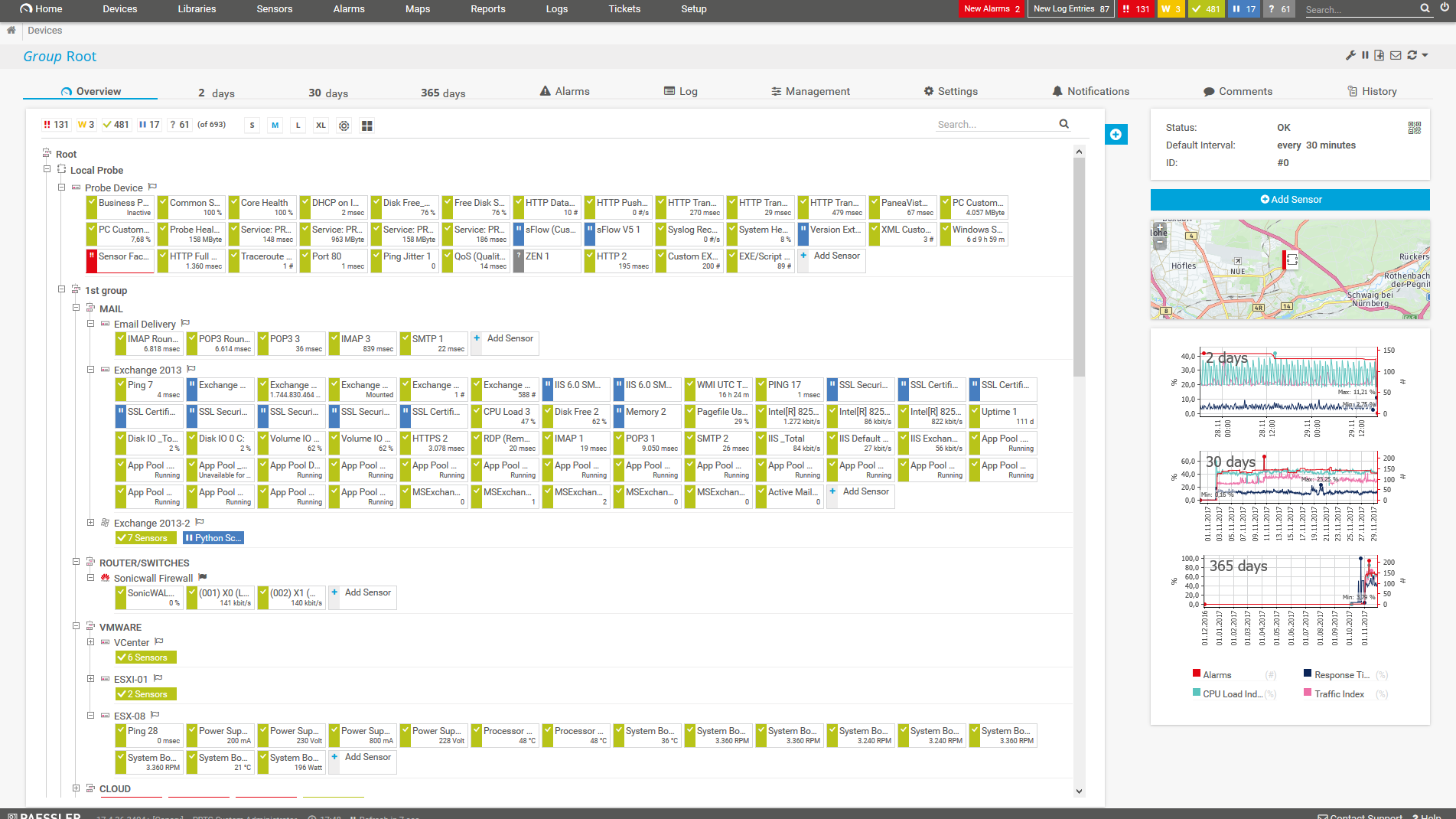
Device tree view of the complete monitoring setup

Custom PRTG dashboard for keeping an eye on the entire IT infrastructure

Live traffic data graph in PRTG
FEATURE | PRTG PRTG | LogicMonitor LogicMonitor |
|---|---|---|
One tool for your entire network | PRTG All monitoring features included | LogicMonitor Monitors different environments but requires separate collectors for distributed networks |
Easy setup, intuitive monitoring | PRTG User-friendly interfaces for web, desktop, and mobile | LogicMonitor Cloud-based interface with somewhat complex configuration requirements |
Automatic network discover | PRTG Included | LogicMonitor Requires detailed configuration |
Real-time alerts & notifications | PRTG Advanced, highly customizable alerting via different notification methods | LogicMonitor Standard alerts only |
Custom maps & dashboards | PRTG Custom dashboard creation via drag & drop | LogicMonitor Standard customizations options only |
Agentless monitoring | PRTG No need to install agents on the monitored systems | LogicMonitor Manual configuration required |
On-premises or cloud-based | PRTG Flexible deployment options available | LogicMonitor Both options possible |
Enterprise version | PRTG Available | LogicMonitor Available |
Freeware version | PRTG Available for up to 100 sensors, free for life | LogicMonitor No freeware available |
Distributed network monitoring | PRTG Monitoring an unlimited number of remote locations included | LogicMonitor Supported |
Server & application monitoring | PRTG Out-of-the-box integration, no extra cost | LogicMonitor Supported |
Network performance monitoring | PRTG Out-of-the-box integration, no extra cost | LogicMonitor Supported, but you often need additional modules for full functionality |
Bandwidth monitoring | PRTG Out-of-the-box integration, no extra cost | LogicMonitor Supported, but you need additional plugins for full functionality |
Network traffic analyzer | PRTG Out-of-the-box integration, no extra costs | LogicMonitor Additional Plugins needed for full functionality |
Cloud services monitoring | PRTG Out-of-the-box integration, no extra cost | LogicMonitor Multiple tools required to get full functionality |
Virtual infrastructure monitoring | PRTG Out-of-the-box integration, no extra cost | LogicMonitor Possbile, but detailed configuration required |
Storage resource monitoring | PRTG Out-of-the-box integration, no extra cost | LogicMonitor Possible, but detailed configuration and additional tools required |
Database monitoring | PRTG Out-of-the-box integration, no extra cost | LogicMonitor Possible, but detailed configuration required |
Web performance monitoring | PRTG Out-of-the-box integration, no extra cost | LogicMonitor Possible, but additional configuration required |
Supports leading technologies | PRTG SNMP, flow protocols, packet sniffing, WMI, HTTP, ping, SQL, and much more | LogicMonitor SNMP, Flow protocols (NetFlow, jFlow, sFlow, and IPFIX), packet sniffing, WMI and Windows performance counters, HTTP requests, SSH for Linux and macOS, REST APIs for XML and JSON, Ping, SQL, and more |
Create your own scripts | PRTG Own PRTG API included for custom sensors and scripts | LogicMonitor Deeper technical knowledge required to write custom scripts |
Includes technical support | PRTG Expert support included, no extra costs | LogicMonitor Available |

“All-around winning
network monitor”

“The real beauty of PRTG is the endless possibilities it offers”

“PRTG Network Monitor
is very hard to beat”
LogicMonitor is only available as SaaS. With PRTG, you can choose between the on-premises or cloud-based version.
Both come with the full range of monitoring features, are quick and easy to set up, and provide for flexible billing based on the number of sensors you use for your monitoring.
Choose PRTG Network Monitor or PRTG Enterprise Monitor for full control of your on-prem monitoring environment – even offline. Or choose PRTG Hosted Monitor, which is hosted by us and comes with minimal hardware and software requirements.
Unlike LogicMonitor, every PRTG license comes with the full range of features to monitor your whole network in a single application – from storage systems, multi-cloud environments, virtual systems, and databases, to medical devices, CCTV systems, industrial environments, data centers, and more.
PRTG’s intuitive user interface, extensive configuration possibilities, and mobile apps for monitoring while on the go make it the perfect choice for sysadmins in search of a convenient, affordable, and powerful tool.
LogicMonitor license costs are based on the number of monitored devices. Most of the time, however, you won't need to collect from every single interface on each and every device. PRTG licenses are therefore based on the total number of sensors (or monitored values) you use, allowing for much more flexibility.
Our customers usually need between 5 and 10 sensors per device. What’s more: You can easily scale if your network infrastructure grows, and pay only for what you really need. On the whole, PRTG licenses are much more flexible and much less expensive than comparable licenses by LogicMonitor.
Unlike LogicMonitor, which only saves monitoring data for a limited period of time, PRTG lets you generate statistics as far back as you like (depending on the configuration of the system).
This means PRTG not only shows you if your network is underperforming or a service is down, but it also provides you with detailed, long-term statistics to help you determine how your bandwidth consumption has evolved over months or years. This can also be very useful for convincing higher-ups of the need for upgrades to your IT infrastructure.
You are interested to know if PRTG could be an alternative to your LogicMonitor implementation?
Custom alerts and data visualization let you quickly identify and prevent all kinds of network issues.
“We had been monitoring our environment with LogicMonitor, but it was inflexible and unreliable. It did not offer a wide enough range of sensor types, and had the additional downside of needing connectivity. PRTG, on the other hand, provides much needed insight into the health of our systems and applications, and gives us advance notice of potential issues.”
PRTG is set up in a matter of minutes and can be used on a wide variety of mobile devices.

We also compared PRTG with other monitoring tools:
The basic version of the open-source tool Nagios is free of charge. But most users spent many hours to set up and customize the tool. In case of problems, browsing through forums is often the only solution.
SolarWinds might be interesting for extremely complex network environments. But it also means you need to invest in higher costs for a platform made up of different modules and add-ons (that cost extra).
Zabbix is open-source software with a strong community support. But it requires lots of manual configuration work to install and set it up. You also need to install agents on the monitored systems.
PRTG and ManageEngine might seem similar at first. However, with ManageEngine, you have to choose between individual functions and purchase several modules to access the full range of features.
Real-time notifications mean faster troubleshooting so that you can act before more serious issues occur.
Partnering with innovative IT vendors, Paessler unleashes synergies to create
new and additional benefits for joined customers.

Combining PRTG’s broad monitoring feature set with IP Fabric’s automated network assurance creates a new level of network visibility and reliability.

Rhebo and PRTG offer a comprehensive monitoring solution for IT and OT environments: from condition monitoring through to anomaly and threat detection.

UVexplorer integrates tightly with PRTG to bring fast and accurate network discovery, detailed device inventory, and automatic network mapping to the PRTG platform.
Network Monitoring Software – Version 26.3.124.1727 (September 16, 2026)
Download for Windows and cloud-based version PRTG Hosted Monitor available
English, German, Spanish, French, Portuguese, Dutch, Russian, Japanese, and Simplified Chinese
Network devices, bandwidth, servers, applications, virtual environments, remote systems, IoT, and more
Choose the PRTG Network Monitor subscription that's best for you
Choosing between Paessler PRTG and LogicMonitor depends on several factors, such as your specific network monitoring needs, budget, and technical resources available in your organization.
PRTG is ideal:
LogicMonitor might be your choice:
PRTG offers a comprehensive overview of your IT systems in real time. It supports all the leading monitoring technologies, including:
With our free monitoring tool, you get:
With the freeware edition of PRTG, you can get started with network monitoring in a matter of minutes. Our auto-discovery function detects all the devices within a given IP address range and automatically incorporates them into your monitoring environment.
PRTG’s flexible subscription licensing makes it easy to scale up or down as needed. You pay only for the number of sensors you need. After your 30-day free trial of the unlimited version of PRTG, you can still use the free version with 100 free sensors. View our pricing.
In PRTG, “sensors” are the basic monitoring elements. One sensor usually monitors one measured value in your network, for example the traffic of a switch port, the CPU load of a server, or the free space on a disk drive. On average, you need about 5-10 sensors per device or one sensor per switch port.
Paessler conducted trials in over 600 IT departments worldwide to tune its network monitoring software closer to the needs of sysadmins. The result of the survey: over 95% of the participants would recommend PRTG – or already have.


You are interested to know if PRTG could be an alternative to your LogicMonitor implementation?