• Company
    • About Us
    • Case Studies
    • Press Center
    • Careers
    • Blog
    • Contact us
  • Contact us
  • Login
 
  • English
    • Deutsch
    • Español
    • Français
    • Italiano
    • Português
Paessler
                    - The Monitoring Experts
  • Products
    • Paessler PRTG
      Paessler PRTGMonitor your whole IT infrastructure
      • PRTG Network Monitor
      • PRTG Enterprise Monitor
      • PRTG Hosted Monitor
      • PRTG UVexplorer
      • PRTG extensionsExtensions for Paessler PRTGExtend your monitoring to a new level
    • Icon Features
      FeaturesExplore all monitoring features
      • Maps & dashboards
      • Alerts & notifications
      • Multiple user interfaces
      • Distributed monitoring
      • Customizable reporting
  • Solutions
    • Industries
      IndustriesMonitor various industry sectors
      • Industrial
      • Healthcare
      • Data Center
      • Education
      • Finance
      • Government
    • IT Topics
      IT TopicsMonitor all areas of IT
      • Network Monitoring
      • Bandwidth Monitoring
      • SNMP Monitor
      • Network Mapping
      • WiFi Monitoring
      • Server Monitoring
  • Pricing
  • Resources
    • Getting Started
      Getting StartedModules for self-paced learning
    • How-to Guides
      How-to GuidesGet the most out of PRTG
    • Videos & Webinars
      Videos & WebinarsLearn from Paessler experts
    • IT  Knowledge
      IT KnowledgeExpand your IT knowledge
    • PRTG Manual
      PRTG ManualFull documentation
    • Knowledge Base
      Knowledge BaseShare community knowledge
    • PRTG Sensor Hub
      PRTG Sensor HubGet sensors, scripts & templates
    • Trainings
      PRTG TrainingLearn how to work with PRTG
  • Partners
    • Icon Handshake
      Become a PartnerFor resellers and channel partners
    • Icon MSP
      Become an MSPDeliver monitoring as a managed service
    • icon partner
      Partner PortalLog in to your partner account
    • Deal Registration
      Deal RegistrationRegister your sales opportunities
    • icon search
      Find a PartnerFind partners selling Paessler products
    • icon technology
      Technology AlliancesSee Paessler technology partnerships
    • Partner HubTools for Your Success
  • Company
    • About Us
    • Case Studies
    • Press Center
    • Careers
    • Blog
    • Contact us
  • Contact us
  • Login
  • English
    • Deutsch
    • Español
    • Français
    • Italiano
    • Português
  • Get a quote
  • Free trial
  1. Home>
  2. IT Topics>
  3. Network>
  4. Home Network Monitoring

Home Network Monitoring with PRTG

Keep track of your network setup at home – for free

  • Comprehensive network monitoring for your entire IT infrastructure at home
  • Customizable alerts and notifications via SMS, email, or in-app push notification
  • Freeware edition with up to 100 sensors free for life, all features included
Free download
PRODUCT OVERVIEW

Our Users Give Top Ratings for Monitoring With Paessler PRTG

Gartner peer insights
spiceworks
G2
Capterra

PRTG home network monitoring: What you will find on this page

Table of content

    PRTG makes home network monitoring as easy as it gets

    Custom alerts and data visualization let you quickly identify downtime and prevent real outages.

    Free download
    PRODUCT OVERVIEW

    Keep a constant eye on your home network with PRTG monitoring

    Icon finance piggy bank

    Freeware version

    Paessler PRTG is the perfect tool for monitoring home networks. For basic monitoring needs, we offer a free version that includes 100 monitoring sensors free for life.

    What’s more: you don’t need to compromise regarding modules or features. With PRTG, all alerting, reporting, and network mapping functionality is included.

    Icon sensor

    Wide compatibility

    With many preconfigured sensor types, our PRTG home network monitor is a comprehensive network monitoring software that lets you monitor your entire network. PRTG supports ping, SNMP, WMI, NetFlow for Cisco devices, SSH for Linux server monitoring, packet sniffing for network traffic analysis and bandwidth monitoring, and more.

    Icon search

    Comprehensive use

    You can use the free network monitoring tool to check network activity and data usage, and to monitor network devices such as servers, routers, switches, firewalls, or single computers. Check Windows servers or Linux operating systems, monitor SQL databases and virtual environments, track Microsoft 365 apps, and ensure network security by detecting anomalies in real time.

    What home network monitoring looks like in PRTG

    Diagnose network issues by continuously tracking the status of your hardware, applications, and services in your home infrastructure. Show uptime, CPU usage, hard disk space, battery status, and other key metrics in real time. Visualize monitoring data in clear graphs and dashboards to identify problems more easily. Gain the overview you need to troubleshoot bandwidth bottlenecks and hardware health issues.
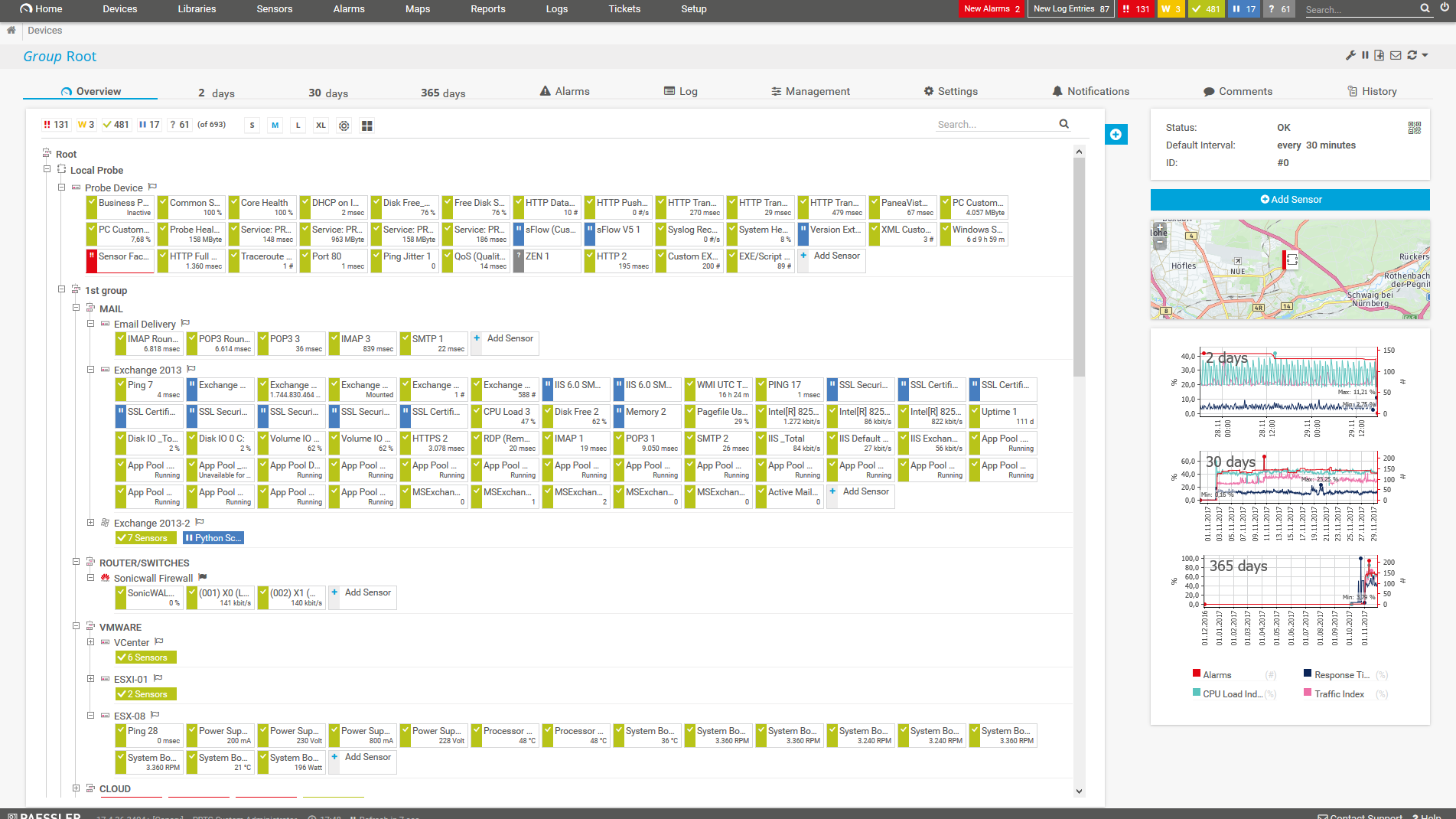
    PRTG Screenshot device tree view

    Device tree view of the complete monitoring setup

    PRTG screenshot map entire it infrastructure

    Custom PRTG dashboard for keeping an eye on the entire IT infrastructure

    PRTG screenshot graph live data traffic

    Live traffic data graph in PRTG

    Start monitoring your home network with PRTG and see how it can make your network more reliable and your job easier.

    Free download
    PRODUCT OVERVIEW

    IT experts agree: Paessler PRTG is a great solution for IT infrastructure monitoring

    PCMag

    “All-around winning
     network monitor”

    IT Brief

    “The real beauty of PRTG is the endless possibilities it offers”

    ITPro

    “PRTG Network Monitor 
    is very hard to beat”

    PRTG comes in different flavors

    PRTG Network Monitor

    Our classic PRTG Network Monitor is ideal for small and medium-sized infrastructures with smaller or less complex networks, as well as home networks. You can test it for free for 30 days with an unlimited number of sensors. Afterwards, it reverts to the Freeware Edition with 100 sensors.

    See pricing

    PRTG Hosted Monitor

    In search of a provider to host your monitoring? If so, then PRTG Hosted Monitor is the solution for you. Take advantage of the full range of PRTG features via cloud. You can test it for free for 10 days. However, PRTG Hosted Monitor does not include a fully free version.

    See pricing.

    Explore our preconfigured PRTG sensors for home network monitoring

    PRTG comes with more than 250 native sensor types for monitoring your entire on-premises, cloud, and hybrid cloud environment out of the box. Check out some examples below!

    Ping v2

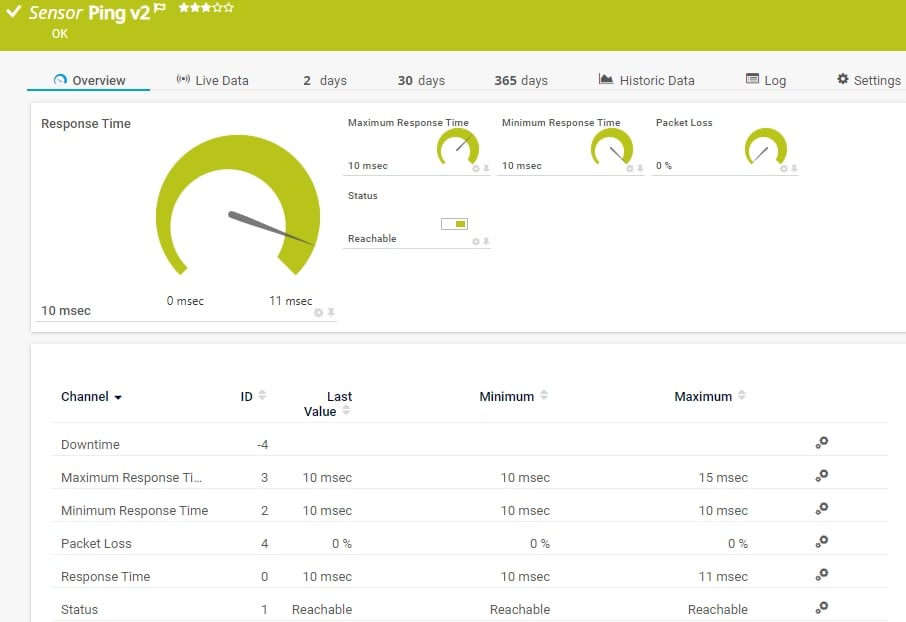
    The Ping v2 sensor sends an Internet Control Message Protocol (ICMP) echo request ("ping") from the probe system to the parent device to monitor its availability. It can show the following:

    • Response time

    • Packet loss

    • Target status

    • Minimum and maximum ping time

    Ping v2
    Ping v2

    WMI Battery

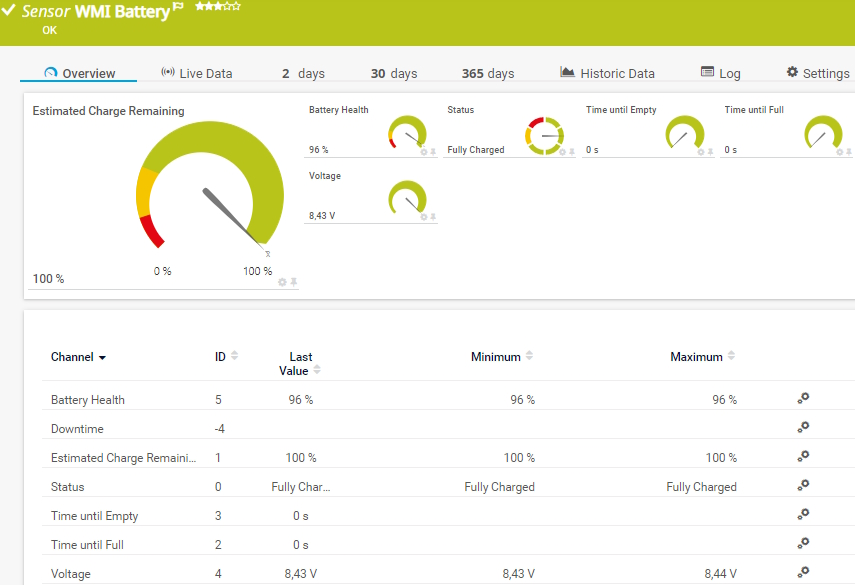
    The WMI Battery sensor monitors the available capacity and the state of connected batteries or uninterruptible power supplies (UPSs) of a Windows-based device. It can show the following:

    • Battery health and status
    • Estimated remaining charge
    • Time until the battery is empty
    • Time until the battery is fully charged
    • Voltage
    WMI Battery
    WMI Battery

    SSL Certificate

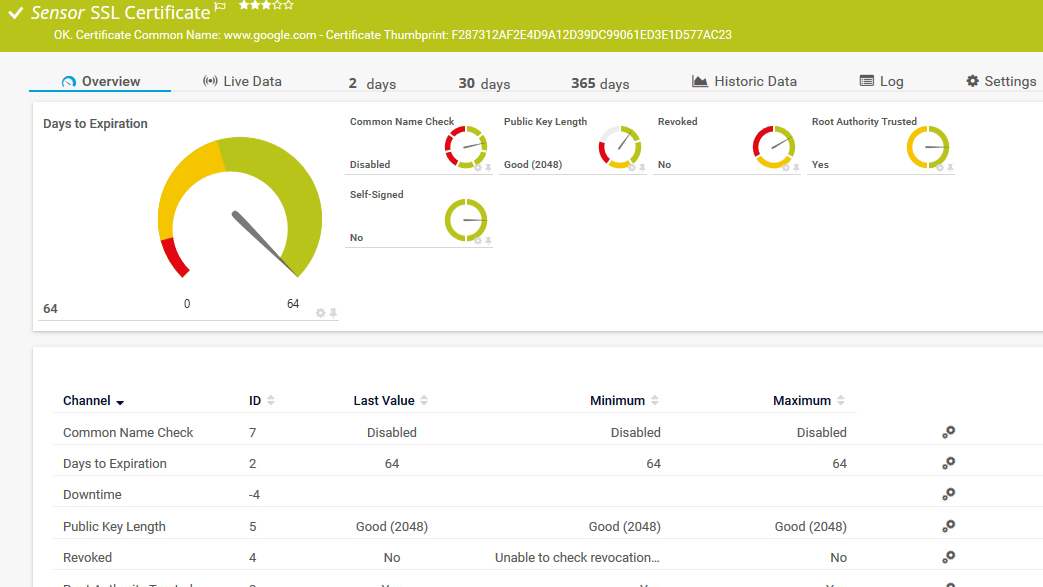
    The SSL Certificate sensor monitors the certificate of a Secure Sockets Layer (SSL)/Transport Layer Security (TLS) secured connection. It can show the following:

    • If the common name or subject-alternative names match the host address or SNI
    • Days to expiration
    • Public key length
    • If the certificate has been revoked and if it is trusted as root authority
    • If a self-signed certificate is used
    SSL Certificate
    SSL Certificate

    Port v2

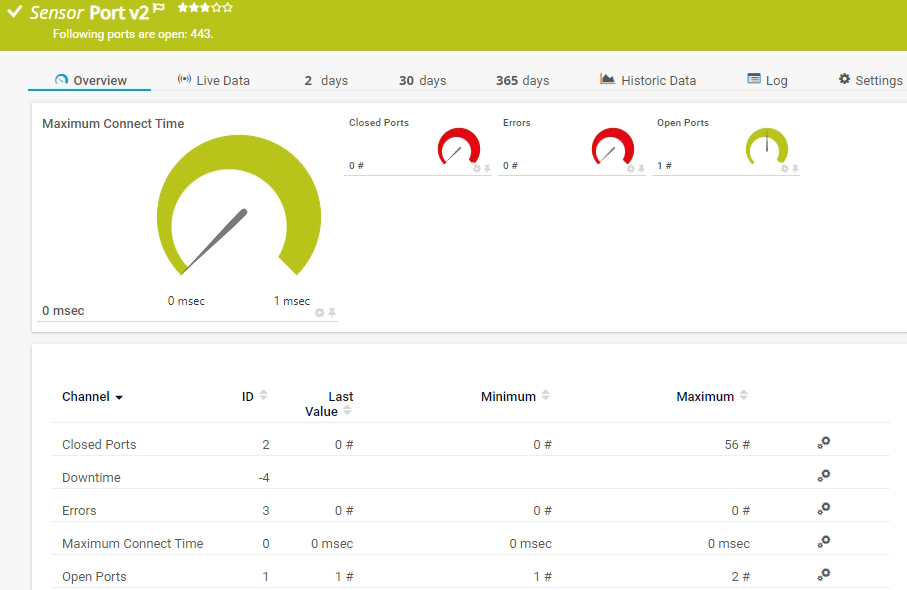
    The Port v2 sensor monitors a network service by connecting to one or more of its TCP/IP ports. It can show the following:

    • Number of open and closed ports
    • Number of errors
    • Maximum time until a request to connect to a port was accepted
    Port v2
    Port v2

    See the PRTG Manual for a list of all available sensor types.

    PRTG Is Compatible With All Major Vendors, Products, and Systems

    compatible with all major vendors, products, and systems

    Find the root cause of the problem with our PRTG home network monitoring solution

    Real-time notifications mean faster troubleshooting so that you can act before more serious issues occur.

    Free download
    PRODUCT OVERVIEW

    ”Adopting PRTG has been like going from being in the dark to being in the light. Before, we had limited visibility into what was happening in the infrastructure and in the network. Now, however, thanks to the comprehensive dashboard and real-time notifications, we receive constant updates on the status of facilities and services, and our way of working has gone from passive to proactive.”

    Luca Meneghesso, Senior IT infrastructure and Security Specialist
    Banca Profilo

    ”GESAC increasingly focuses on innovation to improve the quality of services offered and the experience of passengers handled every day by Naples Airport. Thanks to PRTG, we finally have unified, automatic, and continuous monitoring of the airport network and can guarantee quick and timely interventions.”

    Domenico Ciervo, GESAC ICT Manager
    Naples International Airport

    ”As an international company, PRTG is ideal for us. If something went down half way across the world, we wouldn’t be woken up – we can rely on PRTG to identify the problem and alert us before it occurs – enabling the right person, in the right time zone to resolve the problem. At the end of the day, if we’re to provide an internal network experience for our employees that meets expectations, we need a tool like PRTG to be successful.”

    Barry Kelly, Systems Engineer
    Skyscanner

    “I would recommend PRTG because it has helped us significantly improve service uptime by highlighting important alerts that would otherwise result in a system failure or service disruption if action was not taken. Thanks to PRTG, we can ensure that The Ritz London’s network and IT systems are five-star, just like the hotel.”

    Richard Isted, IT Manager
    The Ritz London

    Your home network monitor at a glance – even on the go

    Set up PRTG in minutes and use it on almost any mobile device.

    device overview

    Create innovative solutions with Paessler’s IT partners

    Partnering with innovative IT vendors, Paessler unleashes synergies to create
    new and additional benefits for joined customers.

    Martello

    Martello 

    By integrating PRTG with Martello iQ, you can add a fast analytics layer to improve uptime, visualize your IT environment, and integrate all of your IT systems into a single pane of glass.

    Read more
    Plixer

    Plixer

    Paessler and Plixer provide a complete solution adding flow and metadata analysis to a powerful network monitoring tool.

    Read more
    Siemon

    Siemon

    Siemon and Paessler bring together intelligent building technology and advanced monitoring and make your vision of intelligent buildings and data centers become reality.

    Read more

    PRTG makes home network monitoring as easy as it gets

    Custom alerts and data visualization let you quickly identify downtime and prevent real outages.

    Free download
    PRODUCT OVERVIEW
    Paessler PRTG

    Paessler PRTG

    Network Monitoring Software – Version 26.1.116.1532 (February 9th, 2026)

    Hosting icon

    Hosting

    Download for Windows and cloud-based version PRTG Hosted Monitor available

    Languages icon

    Languages

    English, German, Spanish, French, Portuguese, Dutch, Russian, Japanese, and Simplified Chinese

    test

    Monitor everything

    Network devices, bandwidth, servers, applications, virtual environments, remote systems, IoT, and more

    test

    Pricing

    Choose the PRTG Network Monitor subscription that's best for you

    Discover more monitoring insights and stories

    Content illustration

    Powerful stories from the monitoring world

    • Customer success story: Bosch Energy and Building Solutions with PRTG
    • Monitoring FortiGate Firewalls with Paessler PRTG
    • Video: Making the lives of sysadmins easier
    Support illustration

    Resources to master your monitoring challenges

    • PRTG Manual: Maps - Paessler
    • Use case: setting up home bandwidth monitoring?
    • PRTG switched the HTTP server to 127.0.0.1 but not the sensor
    Solution illustration

    Solutions for all your monitoring needs

    • Free Network Monitoring
    • Monitoring Networks
    • Remote Work Monitoring

    Home Network Monitoring: FAQ


    What is network monitoring

    Network monitoring refers to the monitoring of an entire network environment. Its goal is to allow sysadmins to work in a better, quicker, and more efficient manner. Network monitoring focuses on parameters such as bandwidth consumption and the availability of network devices.

    Some of the monitored devices include the local and internet-based systems in an IT environment, such as databases, applications, clouds, servers, and network infrastructures. Network monitoring allows admins to ensure their networks run smoothly, effectively, and free of errors.

    What should I monitor in my (home) network?

    The mere implementation of a network monitor is not enough. The key to effective network monitoring in real time is to ensure that your tool has been configured to monitor your network's “vital signs”: availability, speed, and usage.

    • Network availability: Monitoring this allows both internal and external parties to access the services, including websites, and you can determine whether the mail servers and leased lines are working.
    • Network speed: Using bandwidth monitoring prevents your websites and network services from losing visitors or frustrate users due to slow-loading pages, files, or images.
    • Network usage: Monitoring usage enables you to accurately assess CPU load and learn what sort of work the servers are doing at different times of the day.
    • General network status: Check the status of your entire network with just a glance to free up time for other tasks. If a malfunction occurs or the status of a device changes, you'll be notified immediately and can take action at once.
    • Network devices: Large networks contain devices from a variety of manufacturers: switches, servers, workstations, and routers. Most monitoring tools only monitor the devices of specific manufacturers or require expensive add-ons. However, PRTG covers nearly every manufacturer.
    • Network traffic: PRTG shows you which applications, connections, and data types are putting the greatest strain on your network. In the event of disruptions or overloads, PRTG triggers the alarm at once.
    Is PRTG free?

    Paessler PRTG Network Monitor offers a free 30-day trial that includes all monitoring, alerting, and reporting features as well as historical data analysis. There’s also a freeware edition of PRTG that is free of charge for up to 100 PRTG sensors (or monitored aspects). If your trial period expires or you need more than 100 sensors, you have to purchase a commercial license.

    Which protocols does PRTG support for monitoring my home network?

    PRTG supports all common protocols and technologies, such as SNMP, WMI and Windows performance counters, SSH, HTTP and HTTPS, ping, FTP, SSL, packet sniffing, NetFlow, REST, and more.

    What is a sensor in PRTG?

    In PRTG, “sensors” are the basic monitoring elements. One sensor usually monitors one measured value in your network, for example the traffic of a switch port, the CPU load of a server, or the free space on a disk drive. On average, you need about 5-10 sensors per device or one sensor per switch port.

    We asked: would you recommend PRTG? Over 95% of our customers say yes!

    Paessler conducted trials in over 600 IT departments worldwide to tune its network monitoring software closer to the needs of sysadmins. The result of the survey: over 95% of the participants would recommend PRTG – or already have.

    recommendation

    Still not convinced?

    Love

    More than 500,000 sysadmins love PRTG

    Paessler PRTG is used by companies of all sizes. Sysadmins love PRTG because it makes their job a whole lot easier.

    PRTG

    Monitor your entire IT infrastructure

    Bandwidth, servers, virtual environments, websites, VoIP services – PRTG keeps an eye on your entire network.

    test

    Try Paessler PRTG for free

    Everyone has different monitoring needs. That’s why we let you try PRTG for free.

    PRTG Logo

    Start monitoring your home network with PRTG and see how it can make your network more reliable and your job easier.

    Free download
    PRODUCT OVERVIEW

    Products

    • Paessler PRTG
      Paessler PRTGMonitor your whole IT infrastructure
      • PRTG Network Monitor
      • PRTG Enterprise Monitor
      • PRTG Hosted Monitor
      • PRTG UVexplorer
      • PRTG extensions
        Extensions for Paessler PRTGExtend your monitoring to a new level
    • Icon Features
      FeaturesExplore all monitoring features

    Monitoring with PRTG

    • Network monitoring
    • Bandwidth monitoring
    • SNMP monitoring
    • Network mapping
    • Wi-Fi monitoring
    • Server monitoring
    • Network traffic analyzer
    • NetFlow monitoring
    • Syslog server

    Useful Links

    • PRTG Manual
    • Knowledge Base
    • Customer Success Stories
    • About Paessler
    • Subscribe to newsletter
    • PRTG Support
    • PRTG Consulting
    • PRTG Feedback & Roadmap

    Contact

    Paessler GmbH
    Thurn-und-Taxis-Str. 14, 
    90411 Nuremberg 
    Germany

    [email protected]

    +49 911 93775-0

    • Contact us
    ©2026 Paessler GmbHTerms & ConditionsPrivacy PolicyImprintReport VulnerabilityDownload & InstallSitemap
    MRTG for Windows MRTG for Windows MRTG for Windows