• Company
    • About Us
    • Case Studies
    • Press Center
    • Careers
    • Blog
    • Contact us
  • Contact us
  • Login
 
  • English
    • Deutsch
    • Español
    • Français
    • Italiano
    • Português
Paessler
                    - The Monitoring Experts
  • Products
    • Paessler PRTG
      Paessler PRTGMonitor your whole IT infrastructure
      • PRTG Network Monitor
      • PRTG Enterprise Monitor
      • PRTG Hosted Monitor
      • PRTG UVexplorer
      • PRTG extensionsExtensions for Paessler PRTGExtend your monitoring to a new level
    • Icon Features
      FeaturesExplore all monitoring features
      • Maps & dashboards
      • Alerts & notifications
      • Multiple user interfaces
      • Distributed monitoring
      • Customizable reporting
  • Solutions
    • Industries
      IndustriesMonitor various industry sectors
      • Industrial
      • Healthcare
      • Data Center
      • Education
      • Finance
      • Government
    • IT Topics
      IT TopicsMonitor all areas of IT
      • Network Monitoring
      • Bandwidth Monitoring
      • SNMP Monitor
      • Network Mapping
      • WiFi Monitoring
      • Server Monitoring
  • Pricing
  • Resources
    • Getting Started
      Getting StartedModules for self-paced learning
    • How-to Guides
      How-to GuidesGet the most out of PRTG
    • Videos & Webinars
      Videos & WebinarsLearn from Paessler experts
    • IT  Knowledge
      IT KnowledgeExpand your IT knowledge
    • PRTG Manual
      PRTG ManualFull documentation
    • Knowledge Base
      Knowledge BaseShare community knowledge
    • PRTG Sensor Hub
      PRTG Sensor HubGet sensors, scripts & templates
    • Trainings
      PRTG TrainingLearn how to work with PRTG
  • Partners
    • Icon Handshake
      Become a PartnerFor resellers and channel partners
    • Icon MSP
      Become an MSPDeliver monitoring as a managed service
    • icon partner
      Partner PortalLog in to your partner account
    • Deal Registration
      Deal RegistrationRegister your sales opportunities
    • icon search
      Find a PartnerFind partners selling Paessler products
    • icon technology
      Technology AlliancesSee Paessler technology partnerships
    • Partner HubTools for Your Success
  • Company
    • About Us
    • Case Studies
    • Press Center
    • Careers
    • Blog
    • Contact us
  • Contact us
  • Login
  • English
    • Deutsch
    • Español
    • Français
    • Italiano
    • Português
  • Get a quote
  • Free trial
  1. Home>
  2. IT Topics>
  3. Hardware>
  4. Inventory Management Monitoring

Inventory Management Monitoring with PRTG

Optimize asset inventory management processes with comprehensive monitoring

  • Manage stock levels and streamline order processes more efficiently
  • Reduce long-term inventory costs and capital commitments
  • Detect problems with your IT assets immediately to avoid costly downtime
Free download
PRODUCT OVERVIEW

Our Users Give Top Ratings for Monitoring With Paessler PRTG

Gartner peer insights
spiceworks
G2
Capterra

PRTG inventory management monitoring: What you will find on this page

Table of content

    PRTG makes IT asset management monitoring as easy as it gets

    Custom alerts and data visualization let you quickly identify and prevent issues with inventory management processes and your entire IT infrastructure.

    Free download
    PRODUCT OVERVIEW

    The benefits of inventory management monitoring with PRTG

    backup icon

    Continuous monitoring

    Paessler PRTG is the perfect tool for automatically keeping track of your inventory management system. It provides for continuous monitoring and immediately alerts you via real-time notifications to avoid customer complaints, for example, because stock levels are low.

    With PRTG monitoring, you’ll optimize your inventory management, improve your processes, reduce the cost of storing goods, and increase the satisfaction of your customers.

    boost icon

    Efficient optimization

    PRTG makes your inventory management system more efficient and effective. It monitors and optimizes your asset management processes by allowing you to constantly check whether everything is working as it should:

    • Is your inventory planning correct?
    • Are minimum inventory levels met?
    • Can customers place orders without problems?
    • Do end-to-end processes work without malfunctions and interruptions?
    • Are the environmental conditions (temperature, humidity) suitable in the warehouses?
    search icon

    Automatic asset discovery

    Automate the discovery of assets and various endpoints in your warehouse and your entire IT and OT network infrastructure – as long as they’re connected to the internet.

    With PRTG’s user-friendly Auto-Discovery feature, you can easily define IP ranges in your subnet to discover network devices such as servers, routers, switches, and firewalls, as well as inventory systems and OT assets, which PRTG then adds to your monitoring setup.

    What inventory tracking looks like in PRTG

    Diagnose network issues by continuously tracking software and hardware assets. Show asset lifecycle parameters, software license expiration dates and warranty depreciation, stock levels based on serial numbers, and other key metrics in real time. Visualize monitoring data in clear graphs and dashboards to identify problems more easily. Gain the overview you need to troubleshoot nventory management tools and processes, as well as issues with your entire IT infrastructure.
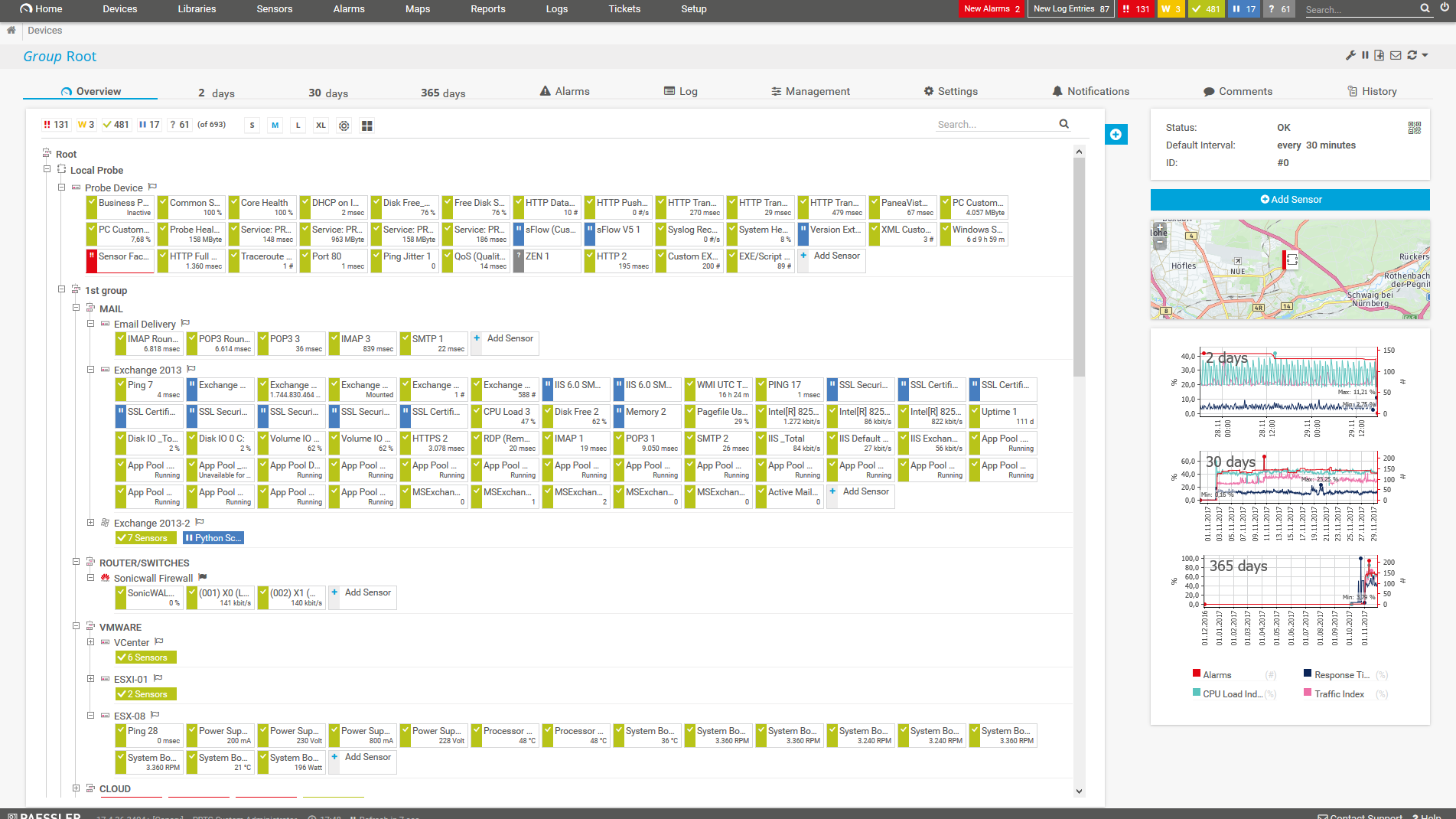
    PRTG Screenshot device tree view

    Device tree view of the complete monitoring setup

    PRTG screenshot map entire it infrastructure

    Custom PRTG dashboard for keeping an eye on the entire IT infrastructure

    PRTG screenshot graph live data traffic

    Live traffic data graph in PRTG

    Start managing your IT inventory with PRTG and see how it can make your network more reliable and your job easier.

    Free download
    PRODUCT OVERVIEW

    IT experts agree: Paessler PRTG is a great solution for IT infrastructure monitoring

    PCMag

    “All-around winning
     network monitor”

    IT Brief

    “The real beauty of PRTG is the endless possibilities it offers”

    ITPro

    “PRTG Network Monitor 
    is very hard to beat”

    4 reasons why PRTG is the inventory management tool of your choice

    maps icon

    All-in-one network monitoring

    With PRTG, you get more than data usage monitoring, you get comprehensive monitoring of your entire network, from server rooms to hardware to applications and processes.

    If you’re tired of that frustrated feeling from not having enough network visibility, PRTG is for you. Have everything you need to know about your network and devices (including data usage) at the tip of your fingers. Literally.

    watch icon

    Customizable thresholds

    Keep a constant eye on your stock by entering minimum inventory levels and defining threshold values for the inventories of specific goods.

    If a threshold is exceeded, PRTG will inform you at once so you can immediately take action and (for example) order more goods.

    alarm icon

    Real-time alerts & notifications

    With PRTG, you get to decide how your team is notified when problems arise. Choose from Microsoft Teams, push notifications to mobile devices, good old emails, or other means.

    As an inventory manager, you’ll always be able to stay on top of issues and react quickly.

    statistic icon

    Informed data-based decisions

    PRTG comes with a wealth of historical monitoring data that you can compare with live inventory data to determine ways to optimize your inventory management tasks.

    For example, you can identify when inventory levels tend to get lower and adjust your forecasting and planning accordingly.

    PRTG Is Compatible With All Major Vendors, Products, and Systems

    compatible with all major vendors, products, and systems

    PRTG makes IT asset management monitoring as easy as it gets

    Custom alerts and data visualization let you quickly identify and prevent issues with inventory management processes and your entire IT infrastructure.

    Free download
    PRODUCT OVERVIEW

    “From a server perspective, we're monitoring all of the key components of our service such as CPU usage, RAM disk space, the Windows services that it's running, and network connectivity of that server. In terms of networks, we’re monitoring all of our switches, firewalls, and access points. It’s really useful to be able to easily pull performance metrics from the PRTG dashboard.”

    Ollie Kerslake, Infrastructure Lead
    Riverford Organic Farmers

    “The tool has given us greater control over all types of devices connected to the network (switches, IP telephony, security cameras, IoT, WiFi) that previously remained opaque when dealing with service incidents. This has improved our ability to diagnose and resolve problems, which has translated into greater efficiency and a better user experience in both internal and public services.”

    Jordi Tolosà Bel, New Technologies Technician
    Vinaroz City Council

    “Our objective was to be able to monitor the health of our most critical servers containing data and applications, but also the flows and bandwidth between headquarters, our 50 servers in the cloud and the 15 servers at our production sites. For us, it is essential to have a proactive approach to understand where the weaknesses of the IT system are to be able to improve them.”

    Marc Boullier, CIO
    Carambar & Co

    Your IT inventory management monitor at a glance – even on the go

    PRTG is set up in a matter of minutes and can be used on a wide variety of mobile devices.

    device overview
    Gartner peer insights

    “Excellent tool for detailed monitoring. Alarms and notifications work greatly. Equipment addition is straight forward and server initial setup is very easy. ...feel safe to purchase it if you intend to monitor a large networking landscape.”

    Read the complete review at Gartner Peer Insights

    Create innovative solutions with Paessler’s IT partners

    Partnering with innovative IT vendors, Paessler unleashes synergies to create
    new and additional benefits for joined customers.

    Osirium

    Osirium

    Osirium’s experienced management team has an outstanding track record in cybersecurity and automation, establishing its headquarters near Reading, UK.

    Read more
    Plixer

    Plixer

    Paessler and Plixer provide a complete solution adding flow and metadata analysis to a powerful network monitoring tool.

    Read more
    ScriptRunner

    ScriptRunner

    With ScriptRunner Paessler integrates a powerful event automation platform into PRTG Network Monitor.

    Read more

    Find the root cause of the problem with our PRTG inventory management solution

    Real-time notifications mean faster troubleshooting so that you can act before more serious issues occur.

    Free download
    PRODUCT OVERVIEW
    Paessler PRTG

    Paessler PRTG

    Network Monitoring Software – Version 26.1.116.1532 (February 9th, 2026)

    Hosting icon

    Hosting

    Download for Windows and cloud-based version PRTG Hosted Monitor available

    Languages icon

    Languages

    English, German, Spanish, French, Portuguese, Dutch, Russian, Japanese, and Simplified Chinese

    test

    Monitor everything

    Network devices, bandwidth, servers, applications, virtual environments, remote systems, IoT, and more

    test

    Pricing

    Choose the PRTG Network Monitor subscription that's best for you

    Discover more monitoring insights and stories

    Content illustration

    Powerful stories from the monitoring world

    • Hardware Asset Management: Complete Guide to IT Equipment ...
    • ERP Monitoring with PRTG: Keep Your Enterprise Resource ...
    • Customer success story Somnitec
    Support illustration

    Resources to master your monitoring challenges

    • PRTG Apps for Mobile Network Monitoring
    • Understanding Basic Concepts
    • How can I speed up PRTG—especially for large installations?
    Solution illustration

    Solutions for all your monitoring needs

    • Computer Inventory Management
    • Asset Management Software
    • Monitoring Hardware

    Inventory Management Monitoring: FAQ


    What is inventory management?

    Inventory management is an element of logistics. It involves managing your company’s flow of goods, and maintaining an overview of its merchandise and materials – in other words, its inventory. A critical part of the supply chain, inventory management also plays an important role in relation to customers. In particular, its goals include reducing stockpiles, optimizing services, and increasing customer satisfaction.

    What does an inventory manager do?

    Inventory managers are responsible for managing the inventory of a company by keeping an eye on current stock levels, when and which products need to be reordered, quantities that need to be reordered, and where products are stored.

    To optimize their inventory, inventory managers are faced with three main tasks:

    1. Demand planning: Inventory managers predict the demand for products in order to prepare a company for orders and keep customers happy.
    2. Inventory planning: Inventory managers determine the optimal number of products to be ordered, as well as the best time to order them.
    3. Procurement planning: Here, the goal is to determine the best way to fulfill inventory, demand, and procurement requirements to meet the objectives of the company.
    Why is inventory management important?

    Large inventories are often associated with substantial amounts of capital. These stockpiles result in higher costs, lower liquidity, and an increased risk of theft or damage. Small inventories, on the other hand, can lead to shortages and unhappy customers. Inventory management is therefore crucial to supply chains. In particular, it helps with having maximum control of the flow of goods, reducing inventory costs, and resulting in optimal profitability thanks to accurate planning.

    What are the advantages of inventory management software?

    By managing your inventory with asset management software, you’ll be able to skip several time-consuming steps that are often prone to errors, for example the manual completion of Excel spreadsheets, or manually counting stock and placing orders.

    When combined with a monitoring tool like Paessler PRTG, inventory management software helps to optimize your inventory management. It replaces error-prone methods such as one-step calculations and rules of thumb. This in turn reduces costs and increases customer satisfaction. Inventory management software performs calculations and automatically keeps track of all the important workflows involved in inventory management, for example tracking purchase orders, end-to-end processes, inventory tracking, storage, demand planning and analysis, reporting, and much more.

    What is a sensor in PRTG?

    In PRTG, “sensors” are the basic monitoring elements. One sensor usually monitors one measured value in your network, for example the traffic of a switch port, the CPU load of a server, or the free space on a disk drive. On average, you need about 5-10 sensors per device or one sensor per switch port.

    We asked: would you recommend PRTG? Over 95% of our customers say yes!

    Paessler conducted trials in over 600 IT departments worldwide to tune its network monitoring software closer to the needs of sysadmins. The result of the survey: over 95% of the participants would recommend PRTG – or already have.

    recommendation

    Still not convinced?

    Love

    More than 500,000 sysadmins love PRTG

    Paessler PRTG is used by companies of all sizes. Sysadmins love PRTG because it makes their job a whole lot easier.

    PRTG

    Monitor your entire IT infrastructure

    Bandwidth, servers, virtual environments, websites, VoIP services – PRTG keeps an eye on your entire network.

    test

    Try Paessler PRTG for free

    Everyone has different monitoring needs. That’s why we let you try PRTG for free.

    PRTG Logo

    Start managing your IT inventory with PRTG and see how it can make your network more reliable and your job easier.

    Free download
    PRODUCT OVERVIEW

    Products

    • Paessler PRTG
      Paessler PRTGMonitor your whole IT infrastructure
      • PRTG Network Monitor
      • PRTG Enterprise Monitor
      • PRTG Hosted Monitor
      • PRTG UVexplorer
      • PRTG extensions
        Extensions for Paessler PRTGExtend your monitoring to a new level
    • Icon Features
      FeaturesExplore all monitoring features

    Monitoring with PRTG

    • Network monitoring
    • Bandwidth monitoring
    • SNMP monitoring
    • Network mapping
    • Wi-Fi monitoring
    • Server monitoring
    • Network traffic analyzer
    • NetFlow monitoring
    • Syslog server

    Useful Links

    • PRTG Manual
    • Knowledge Base
    • Customer Success Stories
    • About Paessler
    • Subscribe to newsletter
    • PRTG Support
    • PRTG Consulting
    • PRTG Feedback & Roadmap

    Contact

    Paessler GmbH
    Thurn-und-Taxis-Str. 14, 
    90411 Nuremberg 
    Germany

    [email protected]

    +49 911 93775-0

    • Contact us
    ©2026 Paessler GmbHTerms & ConditionsPrivacy PolicyImprintReport VulnerabilityDownload & InstallSitemap
    MRTG for Windows MRTG for Windows MRTG for Windows