• Company
    • About Us
    • Case Studies
    • Press Center
    • Careers
    • Blog
    • Contact us
  • Contact us
  • Login
 
  • English
    • Deutsch
    • Español
    • Français
    • Italiano
    • Português
Paessler
                    - The Monitoring Experts
  • Products
    • Paessler PRTG
      Paessler PRTGMonitor your whole IT infrastructure
      • PRTG Network Monitor
      • PRTG Enterprise Monitor
      • PRTG Hosted Monitor
      • PRTG UVexplorer
      • PRTG extensionsExtensions for Paessler PRTGExtend your monitoring to a new level
    • Icon Features
      FeaturesExplore all monitoring features
      • Maps & dashboards
      • Alerts & notifications
      • Multiple user interfaces
      • Distributed monitoring
      • Customizable reporting
  • Solutions
    • Industries
      IndustriesMonitor various industry sectors
      • Industrial
      • Healthcare
      • Data Center
      • Education
      • Finance
      • Government
    • IT Topics
      IT TopicsMonitor all areas of IT
      • Network Monitoring
      • Bandwidth Monitoring
      • SNMP Monitor
      • Network Mapping
      • WiFi Monitoring
      • Server Monitoring
  • Pricing
  • Resources
    • Getting Started
      Getting StartedModules for self-paced learning
    • How-to Guides
      How-to GuidesGet the most out of PRTG
    • Videos & Webinars
      Videos & WebinarsLearn from Paessler experts
    • IT  Knowledge
      IT KnowledgeExpand your IT knowledge
    • PRTG Manual
      PRTG ManualFull documentation
    • Knowledge Base
      Knowledge BaseShare community knowledge
    • PRTG Sensor Hub
      PRTG Sensor HubGet sensors, scripts & templates
    • Trainings
      PRTG TrainingLearn how to work with PRTG
  • Partners
    • Icon Handshake
      Become a PartnerFor resellers and channel partners
    • Icon MSP
      Become an MSPDeliver monitoring as a managed service
    • icon partner
      Partner PortalLog in to your partner account
    • Deal Registration
      Deal RegistrationRegister your sales opportunities
    • icon search
      Find a PartnerFind partners selling Paessler products
    • icon technology
      Technology AlliancesSee Paessler technology partnerships
    • Partner HubTools for Your Success
  • Company
    • About Us
    • Case Studies
    • Press Center
    • Careers
    • Blog
    • Contact us
  • Contact us
  • Login
  • English
    • Deutsch
    • Español
    • Français
    • Italiano
    • Português
  • Get a quote
  • Free trial
  1. Home>
  2. IT Topics>
  3. Data Center>
  4. Data Center Humidity Monitoring

Data Center Humidity Monitoring with PRTG

Continuously track server room humidity levels as well as other environmental conditions

  • Measure the relative humidity of your data center facilities 24/7
  • Monitor humidity in industrial IT and IIoT environments
  • Prevent costly equipment failure due to hardware damage
Free download
PRODUCT OVERVIEW

Our Users Give Top Ratings for Monitoring With Paessler PRTG

Gartner peer insights
spiceworks
G2
Capterra

PRTG data center humidity monitoring: What you will find on this page

Table of content

    PRTG makes data center humidity monitoring as easy as it gets

    Custom alerts and data visualization let you quickly identify and prevent potential threats to your critical infrastructure.

    Free download
    PRODUCT OVERVIEW

    5 reasons why to choose PRTG as your data center humidity monitoring tool

    Customizable & easy to use

    Paessler PRTG is intuitive to use and customize. Not only can you set your own humidity thresholds, but you can also customize the intervals at which data is recorded.

    In fact, you can even choose your notification methods like push notification, SMS, email, and more, designate who receives alerts, and limit alerts to specific time periods (for example, only during business hours).

    Reliable and comprehensive

    Our comprehensive monitoring system keeps an eye on all the environmental values in your data center, including temperature, energy consumption, or water leaks.

    If a threshold value is exceeded, PRTG immediately sends you an alert. This allows you to immediately take action in the event of potentially dangerous changes in the conditions of the computer room or the entire data center building.

    Optimizes resource usage

    PRTG is much more than just a troubleshooting tool. Its monitoring data provides you with valuable insight into ways to optimize your data center’s environmental conditions.

    Use hardware humidity sensors and temperature sensors, for example, at strategic points in your facilities to collect data, and integrate it into your monitoring. This way, you can keep an optimal room temperature and humidity level for your hardware, and even reduce energy consumption.  

    Monitors your entire network

    PRTG is an all-in-one network monitoring tool that goes beyond humidity levels to monitor your local and remote networks, as well as your entire IT infrastructure. It constantly checks hardware, applications, services, data traffic, availability, performance, databases, and much more.

    This means you have a complete overview of your network and the physical security of your data center facilities, all in a single pane of glass. No need to switch between multiple tools.

    Offers multiple features

    PRTG can be the single solution you’ve been looking for, as each subscription also includes:

    • Customizable reports, on demand or scheduled
    • Custom maps and dashboards for viewing monitoring data
    • Multiple notification options, including escalation levels
    • Simplified configuration with automatic network discovery

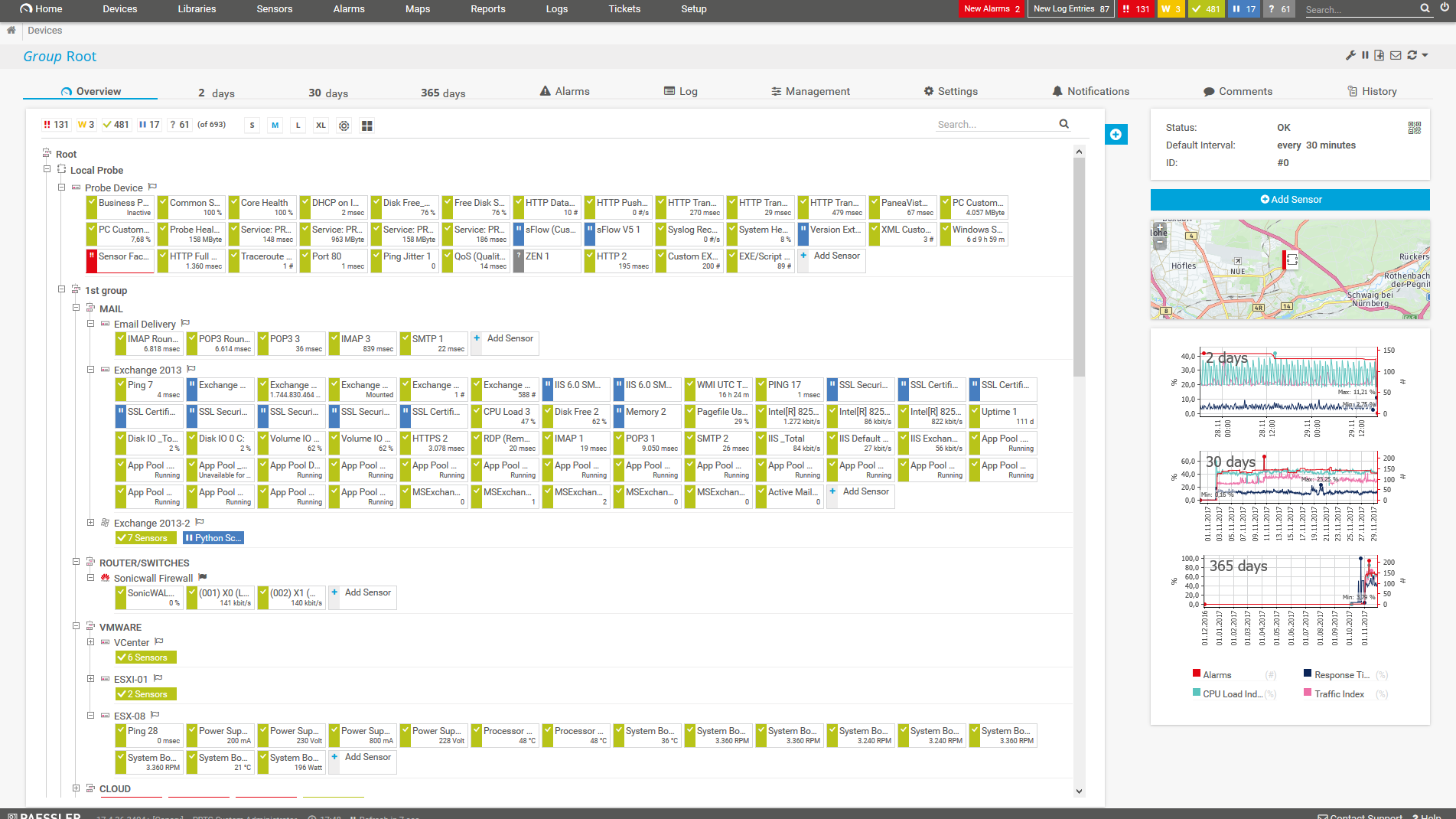
    What data center humidity monitoring looks like in PRTG

    Diagnose network issues by continuously tracking data center cooling systems and the humidity in server rooms and enclosures. Show uptime, humidity levels, temperature ranges, and other key metrics in real time. Visualize monitoring data in clear graphs and dashboards to identify problems more easily. Gain the overview you need to troubleshoot problems due to moisture or too dry air.
    PRTG Screenshot device tree view

    Device tree view of the complete monitoring setup

    PRTG screenshot map entire it infrastructure

    Custom PRTG dashboard for keeping an eye on the entire IT infrastructure

    PRTG screenshot graph live data traffic

    Live traffic data graph in PRTG

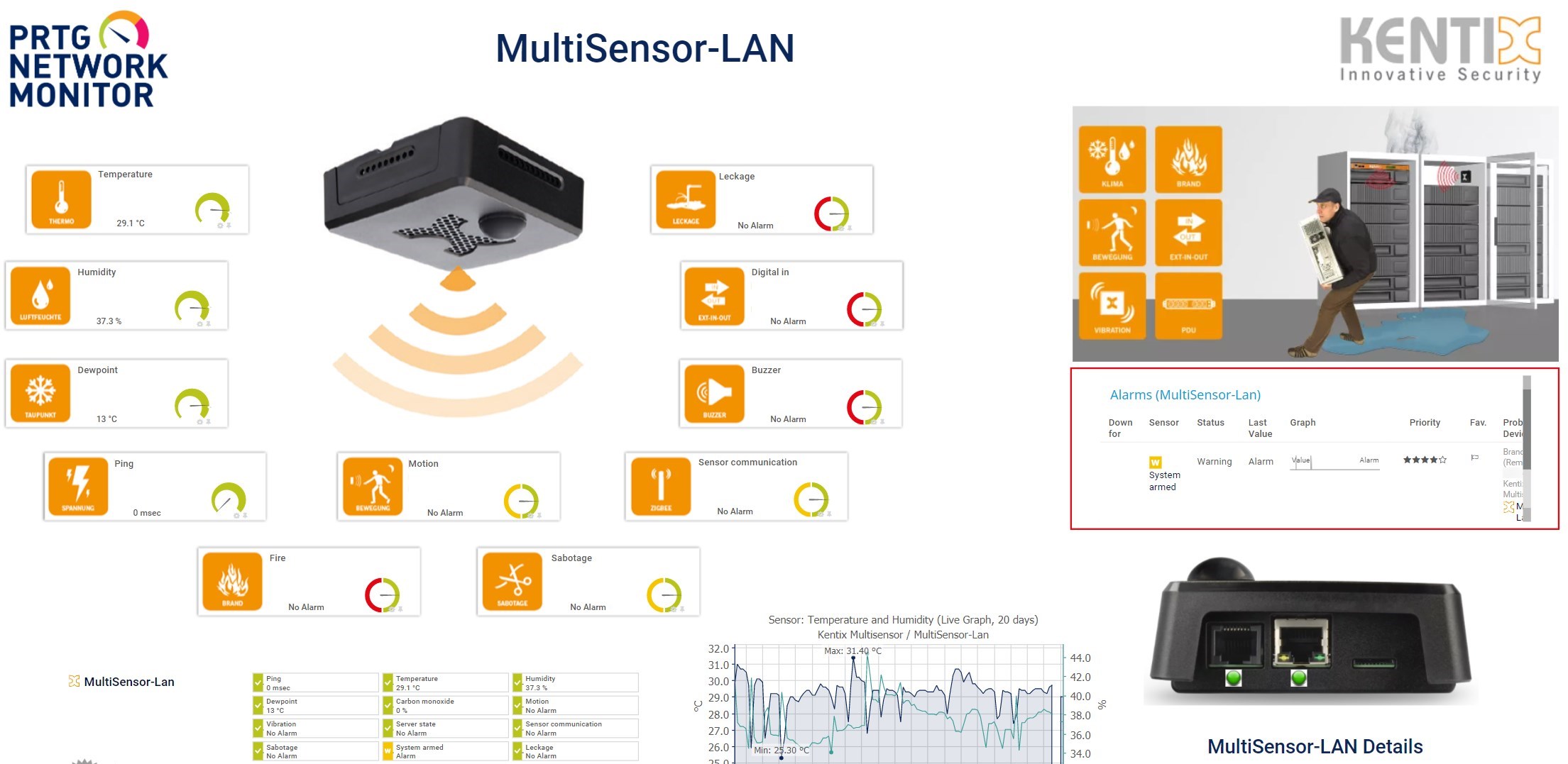
    Map_Kentix-Multisensor

    Kentix MultiSensor map in PRTG

    Start monitoring humidity in your data center environment with PRTG and see how it can make your network more reliable and your job easier.

    Free download
    PRODUCT OVERVIEW

    IT experts agree: Paessler PRTG is a great solution for IT infrastructure monitoring

    PCMag

    “All-around winning
     network monitor”

    IT Brief

    “The real beauty of PRTG is the endless possibilities it offers”

    ITPro

    “PRTG Network Monitor 
    is very hard to beat”

    Explore our preconfigured PRTG sensors for data center humidity monitoring

    PRTG comes with more than 250 native sensor types for monitoring your entire on-premises, cloud, and hybrid cloud environment out of the box. Check out some examples below!

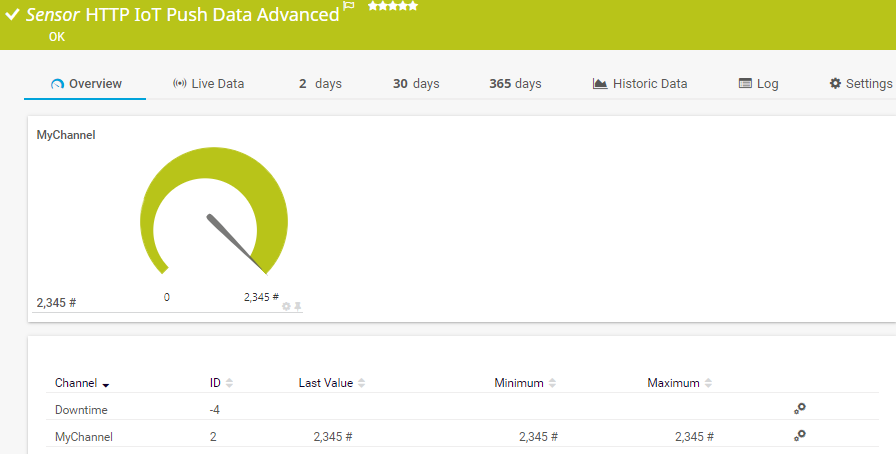
    HTTP IoT Push Data Advanced

    The HTTP IoT Push Data Advanced sensor displays data from messages that are received from Internet of Things (IoT) capable devices and that are pushed via an HTTPS request to PRTG. It can show the following:

    • Downtime
    • Data received from the message encoded in valid XML or JSON in several channels
    HTTP IoT Push Data Advanced
    HTTP IoT Push Data Advanced

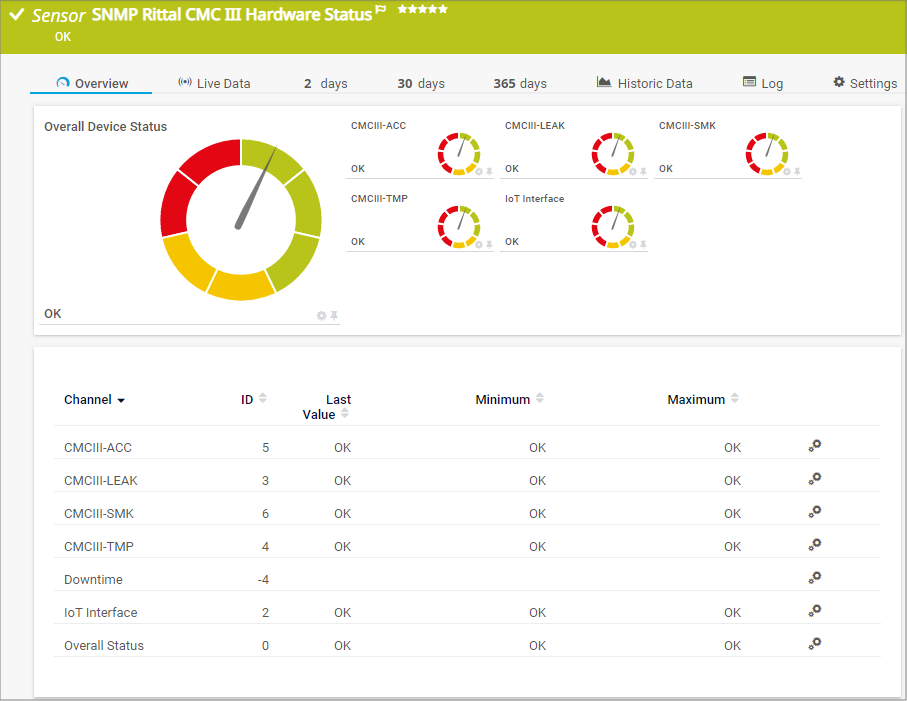
    SNMP Rittal CMC III Hardware Status

    The SNMP Rittal CMC III Hardware Status sensor monitors the overall status of Rittal data center hardware, for example Rittal Computer Multi Control version 3 (CMC III) processing units, Rittal power distribution units (PDU), or Rittal IoT interfaces. It can show the following:

    • Overall device status
    • Attached external sensor status
    SNMP Rittal CMC III Hardware Status
    SNMP Rittal CMC III Hardware Status

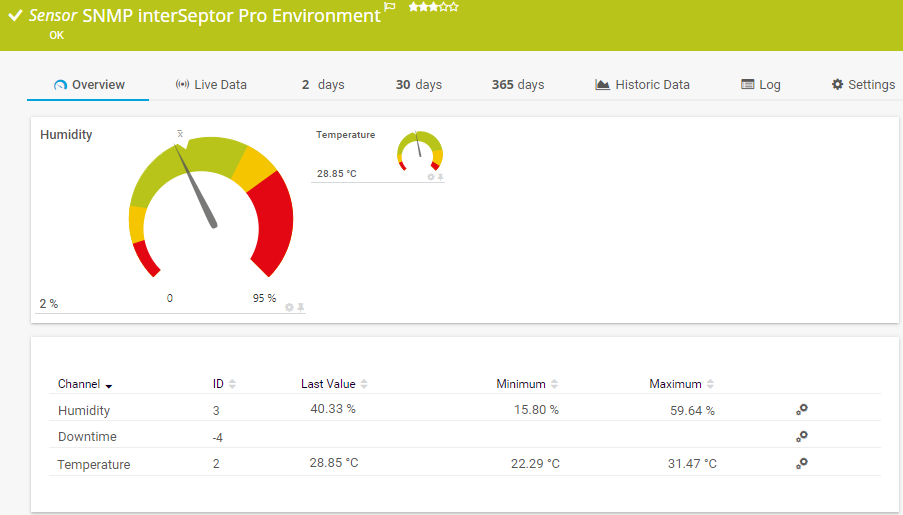
    SNMP interSeptor Pro Environment

    The SNMP interSeptor Pro Environment sensor queries data from a Jacarta interSeptor Pro environmental monitoring system. It can show the following:

    • Humidity
    • Temperature
    SNMP interSeptor Pro Environment
    SNMP interSeptor Pro Environment

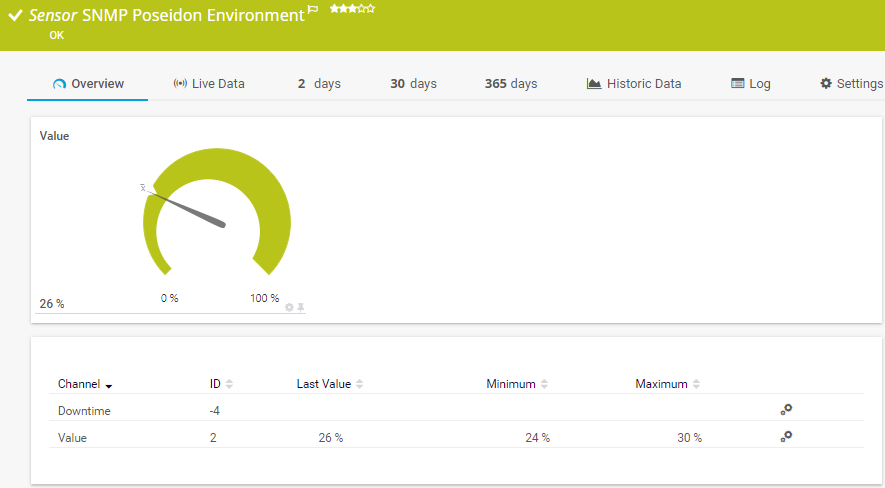
    SNMP Poseidon Environment

    The SNMP Poseidon Environment sensor monitors performance counters for environmental measurements on Poseidon hardware. It can show the following:

    • Humidity
    • Temperature
    SNMP Poseidon Environment
    SNMP Poseidon Environment

    See the PRTG Manual for a list of all available sensor types.

    PRTG Is Compatible With All Major Vendors, Products, and Systems

    compatible with all major vendors, products, and systems

    PRTG makes data center humidity monitoring as easy as it gets

    Custom alerts and data visualization let you quickly identify and prevent potential threats to your critical infrastructure.

    Free download
    PRODUCT OVERVIEW

    “In all our tests, PRTG was significantly more reliable and, above all, faster than classic DCIM solutions. We need a solution that gives us a real-time overview of the status of all the data centers we monitor and does not make us wait for what feels like minutes with every click. With PRTG, we have found that solution.”

    Ronald Kok, CEO
    All IT Rooms

    “PRTG is an easy-to-use and comprehensive solution to monitor our Industrial Automation DataCenter (IADC)”

    Benjamin Lauterlein, Product Manager
    Siemens AG

    “We went to the market and looked for a tool that was cost effective, but more importantly, could monitor most or all the items in the data center. PRTG was this tool.”

    Lydia Muzar
    CLICK-into

    Your data center humidity monitor at a glance – even on the go

    PRTG is set up in a matter of minutes and can be used on a wide variety of mobile devices.

    device overview
    Gartner peer insights

    “Excellent tool for detailed monitoring. Alarms and notifications work greatly. Equipment addition is straight forward and server initial setup is very easy. ...feel safe to purchase it if you intend to monitor a large networking landscape.”

    Read the complete review at Gartner Peer Insights

    Create innovative solutions with Paessler’s IT partners

    Partnering with innovative IT vendors, Paessler unleashes synergies to create
    new and additional benefits for joined customers.

    Rittal

    Rittal

    IT that works constitutes a business-critical basis for a company's success. Availability and security must be defined for the respective purpose and closely monitored – by OT and IT alike.

    Read more
    KnowledgeRiver

    KnowledgeRiver

    Combining their tools to a powerful solution for advanced analysis and automation, KnowledgeRiver and Paessler enable IT teams to ensure best performance for their infrastructure and networks.

    Read more
    Siemon

    Siemon

    Siemon and Paessler bring together intelligent building technology and advanced monitoring and make your vision of intelligent buildings and data centers become reality.

    Read more

    Find the root cause of the problem with our PRTG data center monitoring solution

    Real-time notifications mean faster troubleshooting so that you can act before more serious issues occur.

    Free download
    PRODUCT OVERVIEW
    Paessler PRTG

    Paessler PRTG

    Network Monitoring Software – Version 26.1.116.1532 (February 9th, 2026)

    Hosting icon

    Hosting

    Download for Windows and cloud-based version PRTG Hosted Monitor available

    Languages icon

    Languages

    English, German, Spanish, French, Portuguese, Dutch, Russian, Japanese, and Simplified Chinese

    test

    Monitor everything

    Network devices, bandwidth, servers, applications, virtual environments, remote systems, IoT, and more

    test

    Pricing

    Choose the PRTG Network Monitor subscription that's best for you

    Discover more monitoring insights and stories

    Content illustration

    Powerful stories from the monitoring world

    • All data centers at a glance - Paessler Blog
    • Increase the security of your data center with PRTG - Paessler Blog
    • Data Center Monitoring with PRTG: See Everything That Matters
    Support illustration

    Resources to master your monitoring challenges

    • How can I monitor temperatures, humidity, and other environmental ...
    • I want to monitor my Rittal data center hardware. How can I do that?
    • How can I monitor external temperature and humidity sensors on my ...
    Solution illustration

    Solutions for all your monitoring needs

    • Data Center Temperature Monitoring
    • Monitoring Data Centers
    • Data Center Monitoring

    Data Center Humidity Monitoring: FAQ


    What are the benefits of monitoring humidity in data centers?

    Monitoring humidity in data centers is crucial for maintaining an optimal environment for sensitive electronic equipment. Here are the benefits of monitoring humidity levels:

    • Preventing electrostatic discharge (ESD) due to low humidity
    • Avoiding condensation damage due to high humidity
    • Optimizing cooling strategies for balanced airflows
    • Upholding warranty requirements by manufacturers
    • Prolonging hardware life by reducing wear and tear caused by corrosion
    • Ensuring uninterrupted performance and data integrity by protecting sensitive components
    • Saving operational costs by optimizing energy and resource usage
    • Providing real-time alerts when humidity deviates from optimal ranges
    What causes humidity to rise in data centers?

    Data centers and production facilities are subject to regular fluctuations in temperature and humidity. There are several factors that cause the relative humidity in a data center to rise. For one thing, moisture can accumulate due to insufficient or intentionally low ventilation. Evaporation of water and evaporation from materials can also occur. Even emissions from hardware, equipment, and machinery increase humidity.

    What is the best humidity level for server rooms and data centers?

    The ideal humidity level for server rooms and data centers typically falls within the range of 40% to 60% relative humidity (RH), as recommended by the American Society of Heating, Refrigerating, and Air-Conditioning Engineers (ASHRAE).

    Why is it important to protect data centers from humidity?

    Systems and server racks in the server room are highly sensitive to environmental conditions. These rooms must therefore be monitored digitally to ensure their relative humidity always falls within an acceptable range.

    The relative humidity in the server room is too low:

    If the air is too dry, physical devices can become charged with static electricity. In the event of a static discharge, hardware can become damaged. If a server room stays too dry for too long, systems and servers can crash and cause downtime.

    The relative humidity in the server room is too high:

    High humidity in the server room can cause metal hardware to corrode. Corroded IT equipment, transformers, generators, and other devices must be replaced. High humidity can also cause condensation to form on hardware, potentially leading to short circuits. Furthermore, humidity is famous for causing mold, which can cause long-term damage to buildings and be extremely expensive to remove.

    What is a sensor in PRTG?

    In PRTG, “sensors” are the basic monitoring elements. One sensor usually monitors one measured value in your network, for example the traffic of a switch port, the CPU load of a server, or the free space on a disk drive. On average, you need about 5-10 sensors per device or one sensor per switch port.

    We asked: would you recommend PRTG? Over 95% of our customers say yes!

    Paessler conducted trials in over 600 IT departments worldwide to tune its network monitoring software closer to the needs of sysadmins. The result of the survey: over 95% of the participants would recommend PRTG – or already have.

    recommendation

    Still not convinced?

    Love

    More than 500,000 sysadmins love PRTG

    Paessler PRTG is used by companies of all sizes. Sysadmins love PRTG because it makes their job a whole lot easier.

    PRTG

    Monitor your entire IT infrastructure

    Bandwidth, servers, virtual environments, websites, VoIP services – PRTG keeps an eye on your entire network.

    test

    Try Paessler PRTG for free

    Everyone has different monitoring needs. That’s why we let you try PRTG for free.

    PRTG Logo

    Start monitoring humidity in your data center environment with PRTG and see how it can make your network more reliable and your job easier.

    Free download
    PRODUCT OVERVIEW

    Products

    • Paessler PRTG
      Paessler PRTGMonitor your whole IT infrastructure
      • PRTG Network Monitor
      • PRTG Enterprise Monitor
      • PRTG Hosted Monitor
      • PRTG UVexplorer
      • PRTG extensions
        Extensions for Paessler PRTGExtend your monitoring to a new level
    • Icon Features
      FeaturesExplore all monitoring features

    Monitoring with PRTG

    • Network monitoring
    • Bandwidth monitoring
    • SNMP monitoring
    • Network mapping
    • Wi-Fi monitoring
    • Server monitoring
    • Network traffic analyzer
    • NetFlow monitoring
    • Syslog server

    Useful Links

    • PRTG Manual
    • Knowledge Base
    • Customer Success Stories
    • About Paessler
    • Subscribe to newsletter
    • PRTG Support
    • PRTG Consulting
    • PRTG Feedback & Roadmap

    Contact

    Paessler GmbH
    Thurn-und-Taxis-Str. 14, 
    90411 Nuremberg 
    Germany

    [email protected]

    +49 911 93775-0

    • Contact us
    ©2026 Paessler GmbHTerms & ConditionsPrivacy PolicyImprintReport VulnerabilityDownload & InstallSitemap
    Solutions Solutions Solutions