




• Company
    • About Us
    • Case Studies
    • Press Center
    • Careers
    • Blog
    • Contact us
  • Contact us
  • Login
 
  • English
    • Deutsch
    • Español
    • Français
    • Italiano
    • Português
Paessler
                    - The Monitoring Experts
  • Products
    • Paessler PRTG
      Paessler PRTGMonitor your whole IT infrastructure
      • PRTG Network Monitor
      • PRTG Enterprise Monitor
      • PRTG Hosted Monitor
      • PRTG UVexplorer
      • PRTG extensionsExtensions for Paessler PRTGExtend your monitoring to a new level
    • Icon Features
      FeaturesExplore all monitoring features
      • Maps & dashboards
      • Alerts & notifications
      • Multiple user interfaces
      • Distributed monitoring
      • Customizable reporting
  • Solutions
    • Industries
      IndustriesMonitor various industry sectors
      • Industrial
      • Healthcare
      • Data Center
      • Education
      • Finance
      • Government
    • IT Topics
      IT TopicsMonitor all areas of IT
      • Network Monitoring
      • Bandwidth Monitoring
      • SNMP Monitor
      • Network Mapping
      • WiFi Monitoring
      • Server Monitoring
  • Pricing
  • Resources
    • Getting Started
      Getting StartedModules for self-paced learning
    • How-to Guides
      How-to GuidesGet the most out of PRTG
    • Videos & Webinars
      Videos & WebinarsLearn from Paessler experts
    • IT  Knowledge
      IT KnowledgeExpand your IT knowledge
    • PRTG Manual
      PRTG ManualFull documentation
    • Knowledge Base
      Knowledge BaseShare community knowledge
    • PRTG Sensor Hub
      PRTG Sensor HubGet sensors, scripts & templates
    • Trainings
      PRTG TrainingLearn how to work with PRTG
  • Partners
    • Icon Handshake
      Become a PartnerFor resellers and channel partners
    • Icon MSP
      Become an MSPDeliver monitoring as a managed service
    • icon partner
      Partner PortalLog in to your partner account
    • Deal Registration
      Deal RegistrationRegister your sales opportunities
    • icon search
      Find a PartnerFind partners selling Paessler products
    • icon technology
      Technology AlliancesSee Paessler technology partnerships
    • Partner HubTools for Your Success
  • Company
    • About Us
    • Case Studies
    • Press Center
    • Careers
    • Blog
    • Contact us
  • Contact us
  • Login
  • English
    • Deutsch
    • Español
    • Français
    • Italiano
    • Português
  • Get a quote
  • Free trial
  1. Home>
  2. IT Topics>
  3. Comparison>
  4. PRTG vs Other Network Monitoring Software

Paessler PRTG vs other network monitoring software

There’s no better alternative to our powerful network monitoring tool

  • Monitor your entire IT infrastructure with a single tool
  • Get a cost-effective solution with all monitoring features included
  • PRTG alternatives such as SolarWinds or Nagios in direct comparison
Free download
PRODUCT OVERVIEW

Our Users Give Top Ratings for Monitoring With Paessler PRTG

Gartner peer insights
spiceworks
G2
Capterra

PRTG vs. other monitoring tools: What you’ll find on this page

Table of content

    PRTG makes network monitoring as easy as it gets

    Custom alerts and data visualization let you quickly identify and prevent all kinds of network issues.

    Free download
    PRODUCT OVERVIEW

    PRTG compared: 3 major advantages at a a glance

    Icon Watch

    One tool for your entire network

    Hardware, applications, network traffic, bandwidth usage: PRTG keeps an eye on everything. And that’s important, because just one malfunctioning switch can cause disruptions – and require hours of troubleshooting. A clear advantage of PRTG over “smaller” alternatives.

    Icon ThumbUp

    All-in-one infrastructure monitoring

    Customizable, threshold-based alerts and notifications, in-depth reporting, custom network mapping, and all monitoring features: with PRTG, everything is included. No need to pay extra for costly add-ons or modules to get a full picture of your IT infrastructure.

    test

    Flexible licensing, great pricing

    Want to start small? Good idea! Thanks to our flexible subscription licensing, you can upgrade whenever you please. Each PRTG license is based on the number of sensors in use. You pay for exactly for what you need to monitor your network.

    What network monitoring looks like in PRTG

    Diagnose network issues by continuously tracking the health, availability, and performance of your entire IT infrastructure. Show hardware parameters, application performance, network traffic, bandwidth usage, and other key metrics in real time. Visualize data in clear graphs and dashboards to identify problems more easily. Gain the overview you need to troubleshoot all kinds of issues in your network.
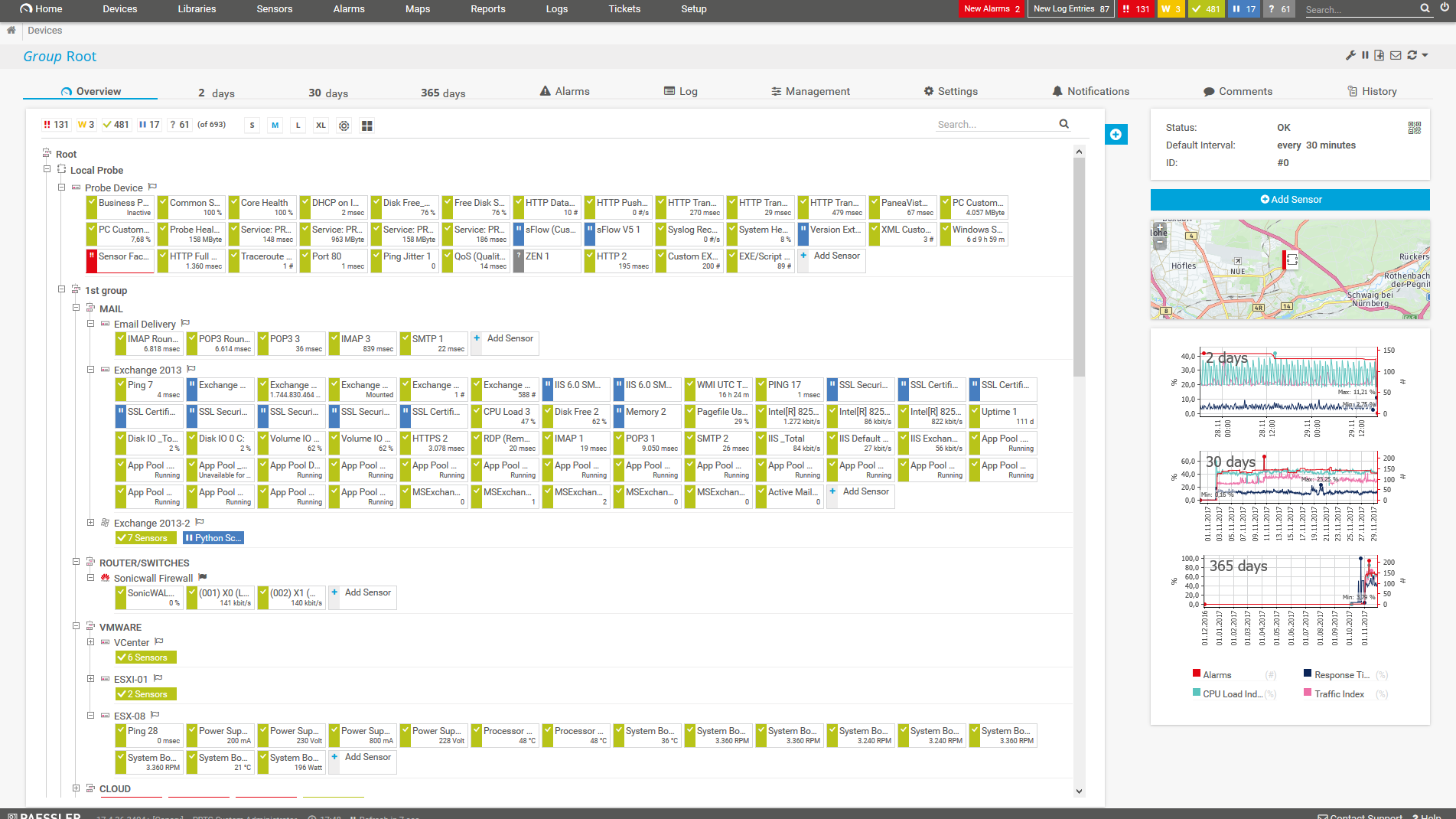
    PRTG Screenshot device tree view

    Device tree view of the complete monitoring setup

    PRTG screenshot map entire it infrastructure

    Custom PRTG dashboard for keeping an eye on the entire IT infrastructure

    PRTG screenshot graph live data traffic

    Live traffic data graph in PRTG

    IT experts agree: Paessler PRTG is a great solution for IT infrastructure monitoring

    PCMag

    “All-around winning
     network monitor”

    IT Brief

    “The real beauty of PRTG is the endless possibilities it offers”

    ITPro

    “PRTG Network Monitor 
    is very hard to beat”

    Need help making a decision? 

    You are interested to know if PRTG could be an alternative to your current implementation?

    Contact Sales

    Faster. More user-friendly. More cost-effective. Why PRTG alternatives don’t compare

    We believe in PRTG. 100%. That’s why we also compared our products with other monitoring software on the market. See what PRTG offers.

    PRTG vs. Nagios

    The basic version of the open-source tool Nagios is free of charge. But most users spent many hours to set up and customize the tool. In case of problems, browsing through forums is often the only solution.

    Comparison with Nagios

    PRTG vs. SolarWinds

    SolarWinds might be interesting for extremely complex network environments. But it also means you need to invest in higher costs for a platform made up of different modules and add-ons (that cost extra).

    Comparison with SolarWinds

    PRTG vs. Zabbix

    Zabbix is open-source software with a strong community support. But it requires lots of manual configuration work to install and set it up. You also need to install agents on the monitored systems.

    Comparison with Zabbix

    PRTG vs. ManageEngine

    PRTG and ManageEngine might seem similar at first. However, with ManageEngine, you have to choose between individual functions and purchase several modules to access the full range of features.

    Comparison with ManageEngine

    PRTG vs. WhatsUp Gold

    WhatsUp Gold might be your choice if you need good network mapping capabilities for networks which aren’t that complex. But to get the full set of monitoring features, you need to invest in costly add-ons.

    Comparison with WhatsUp Gold

    PRTG vs. Ethereal

    Ethereal is a legacy packet sniffing tool acquired by Wireshark. It lacks more comprehensive network monitoring and traffic analysis features which let you keep a close eye on your entire infrastructure.

    Comparison with Ethereal

    PRTG vs. Cacti

    Cacti is a free network monitoring tool offers bandwidth and traffic monitoring via SNMP and displays data in charts. It may not be enough if you are hoping to analyze network bandwidth in more detail.

    Comparison with Cacti

    PRTG vs. Auvik

    Auvik is a cloud-based monitoring & mapping tool that is relatively easy to install and configure. However, many monitoring features need to be purchased as extra modules, which can quickly drive up costs.

    Comparison with Auvik

    PRTG vs. LogicMonitor

    LogicMonitor might be your choice if your organization is cloud-first and relies heavily on cloud services. However, LogicMonitor’s out-of-the-box monitoring functionality is much more limited.

    Comparison with LogicMonitor

    PRTG vs. Checkmk

    Checkmk is a comprehensive network monitoring tool, but it uses open-source add-ons for some functions. This means additional work in setting up, operating, and maintaining the monitoring systems.

    Comparison with Checkmk

    PRTG vs. SCOM

    Microsoft SCOM is based on the installation of agents. Management Packs that you must buy additionally expand the monitoring offering, which is more specialized in Microsoft applications.

    Comparison with SCOM

    PRTG vs. VMware vROps

    VMware vRealize Operations provides information on the performance of your vSphere environment. However, it cannot monitor components such as server hardware along with your entire network.

    Comparison with VMware vRops

    PRTG Enterprise Monitor vs. DX Spectrum

    DX Spectrum is highly scalable and suitable for monitoring dynamic, complex IT infrastructures. But it also needs one server installation for each monitoring functionality, which makes it extremely expensive.

    Comparison with DX Spectrum

    PRTG Enterprise Monitor vs. SolarWinds

    SolarWinds is a module-based platform. But this also means that scaling your monitoring can quickly cost hundreds of thousands of dollars if you want to get a comprehensive software bundle.

    Comparison with SolarWinds

    PRTG vs. Icinga

    Icinga is an open-source monitoring tool offering flexibility but requiring advanced technical knowledge. Its setup and maintenance can be complex, especially for teams lacking dedicated Linux expertise.

    Comparison with Icinga

    PRTG Is Compatible With All Major Vendors, Products, and Systems

    compatible with all major vendors, products, and systems

    PRTG makes network monitoring as easy as it gets

    Custom alerts and data visualization let you quickly identify and prevent all kinds of network issues.

    Free download
    PRODUCT OVERVIEW

    “With SolarWinds, Cacti, and SNMPC we needed three different monitoring systems to gain overview about all our systems and devices. None of these offered mobile apps which ended up being the reason why we moved to PRTG. Finding out that PRTG was able to replace all three tools was a huge additional benefit for us and helps us to save a lot of time and money.”

    Stein Erik Høybakk, Senior Network Engineer
    TAFJORD

    “PRTG totally blows away similar and popular server-based monitoring software, for example Nagios and Pandora FMS. Both of these competing applications were difficult to set up and use, and the interfaces felt poorly designed, hokey, and I couldn’t imagine using the interfaces of these products on a daily basis.”

    Clayton Hill, System Administrator
    ateamonsite.com

    “One of PRTG's greatest strengths is certainly its very good user-friendliness. Beyond that, the ability of the software to group all sources of information in a single point is useful. This is how we connect physical equipment, applications, or our VMware Cloud Director consoles to PRTG. The ease of use is incomparable compared to the free solution that we previously used.”

    Eric Laurent, Head of Information Systems
    LNA Santé

    “The fact that we were able to replace SCOM and Control-M with PRTG and simultaneously expand our monitoring is nothing short of extraordinary. Thanks to significant improvements in performance, the integration of all monitoring (including that of databases and SAP services) into PRTG, numerous automation options, and the consolidation of all locations into the centralized monitoring system, we have been able to greatly relieve our help desk and provide for the most reliable and comprehensive of monitoring services.”

    Mirco Blöchliger
    Somnitec AG

    “WhatsUp Gold wasn’t organized in a way I wanted it to be organized. To me, PRTG was much more logical in terms of the user interface and the implementation.”

    Mark Crawford, Network Engineer
    Virginia Tech College

    “We had been monitoring our environment with LogicMonitor, but it was inflexible and unreliable. It did not offer a wide enough range of sensor types, and had the additional downside of needing connectivity. PRTG, on the other hand, provides much needed insight into the health of our systems and applications, and gives us advance notice of potential issues.”

    Adrian DuPre, Vice President of IT services
    Trupanion

    “For its easy-to-use interface, configuration, and graphical environment, PRTG is immensely better compared with the competition, for example Zabbix is very tedious to configure and it took us months versus hours with PRTG.”

    Matías Nogueira, Director of Engineering
    Teletipos

    Your monitoring alternative PRTG at a glance – even on the go

    Set up PRTG in minutes and use it on almost any mobile device.

    device overview

    Find the root cause of the problem with our PRTG network monitoring solution

    Real-time notifications mean faster troubleshooting so that you can act before more serious issues occur.

    Free download
    PRODUCT OVERVIEW

    Create innovative solutions with Paessler’s IT partners

    Partnering with innovative IT vendors, Paessler unleashes synergies to create
    new and additional benefits for joined customers.

    IP Fabric

    IP Fabric

    Combining PRTG’s broad monitoring feature set with IP Fabric’s automated network assurance creates a new level of network visibility and reliability.

    Read more
    Plixer

    Plixer

    Paessler and Plixer provide a complete solution adding flow and metadata analysis to a powerful network monitoring tool.

    Read more
    ScriptRunner

    ScriptRunner

    With ScriptRunner Paessler integrates a powerful event automation platform into PRTG Network Monitor.

    Read more
    Paessler PRTG

    Paessler PRTG

    Network Monitoring Software – Version 26.1.116.1532 (February 9th, 2026)

    Hosting icon

    Hosting

    Download for Windows and cloud-based version PRTG Hosted Monitor available

    Languages icon

    Languages

    English, German, Spanish, French, Portuguese, Dutch, Russian, Japanese, and Simplified Chinese

    test

    Monitor everything

    Network devices, bandwidth, servers, applications, virtual environments, remote systems, IoT, and more

    test

    Pricing

    Choose the PRTG Network Monitor subscription that's best for you

    PRTG vs other network monitoring software: FAQ


    Should I choose PRTG or a different monitoring solution?

    Should I choose PRTG or a different monitoring solution?

    Choosing between Paessler PRTG and other monitoring tools depends on several factors, such as your specific network monitoring needs, budget, and technical resources available in your organization.

    PRTG is ideal:

    • If you prefer an all-in-one solution with ease of use and minimal setup time.
    • If you need sophisticated, customizable visualizations like dashboards and network maps.
    • If you want remote monitoring included to keep an eye on an unlimited number of remote locations and networks at no extra cost.
    • If you prefer high scalability and a software tailored to large, complex environments.
    • If you want to get real-time alerting, custom notifications, and automated reporting.
    • If you need quick integration of the devices of different manufacturers like Dell, Cisco, HPE, AWS, and many more.
    • If you want to have the choice between an on-premises or a cloud-based SaaS solution.
    • If you want to monitor Windows, Linux, and macOS environments.
    • If you want a straightforward licensing model at a comparatively low price.
    Do I need any special knowledge to use PRTG?

    PRTG is used by full-time IT managers and system administrators in IT teams of all sizes. Although our software is easy to use and you don’t need to have deep programming skills to set up your monitoring environment, you still might have technical questions if your learning curve is rising.

    In this case, there are many helpful resources like the Paessler Knowledge Base, which contains thousands of tips on how to use PRTG.

    What’s included in the free edition of PRTG?

    With our free monitoring tool, you get:

    • A freeware monitoring solution with up to 100 sensors for life
    • Server monitoring, application monitoring, NetFlow monitoring, and all other monitoring capabilities included
    • Free alerting, reporting, and mapping features

    With the freeware edition of PRTG, you can get started with network monitoring in a matter of minutes. Our auto-discovery function detects all network devices within a given IP address range and automatically incorporates them into your monitoring environment.

    What is the price of the paid version of PRTG? What does it include?

    PRTG’s flexible, cost-effective subscription licensing makes it easy to scale as needed. You pay only for the number of sensors you need. After your 30-day free trial of the unlimited version of PRTG, you can still use the free version with 100 free sensors. 

    Review our pricing

    What is a sensor in PRTG?

    In PRTG, “sensors” are the basic monitoring elements. One sensor usually monitors one measured value in your network, for example the traffic of a switch port, the CPU load of a server, or the free space on a disk drive. On average, you need about 5-10 sensors per device or one sensor per switch port.

    We asked: would you recommend PRTG? Over 95% of our customers say yes!

    Paessler conducted trials in over 600 IT departments worldwide to tune its network monitoring software closer to the needs of sysadmins. The result of the survey: over 95% of the participants would recommend PRTG – or already have.

    recommendation
    PRTG Logo

    Need help making a decision? 

    You are interested to know if PRTG could be an alternative to your current implementation?

    Contact Sales

    Products

    • Paessler PRTG
      Paessler PRTGMonitor your whole IT infrastructure
      • PRTG Network Monitor
      • PRTG Enterprise Monitor
      • PRTG Hosted Monitor
      • PRTG UVexplorer
      • PRTG extensions
        Extensions for Paessler PRTGExtend your monitoring to a new level
    • Icon Features
      FeaturesExplore all monitoring features

    Monitoring with PRTG

    • Network monitoring
    • Bandwidth monitoring
    • SNMP monitoring
    • Network mapping
    • Wi-Fi monitoring
    • Server monitoring
    • Network traffic analyzer
    • NetFlow monitoring
    • Syslog server

    Useful Links

    • PRTG Manual
    • Knowledge Base
    • Customer Success Stories
    • About Paessler
    • Subscribe to newsletter
    • PRTG Support
    • PRTG Consulting
    • PRTG Feedback & Roadmap

    Contact

    Paessler GmbH
    Thurn-und-Taxis-Str. 14, 
    90411 Nuremberg 
    Germany

    [email protected]

    +49 911 93775-0

    • Contact us
    ©2026 Paessler GmbHTerms & ConditionsPrivacy PolicyImprintReport VulnerabilityDownload & InstallSitemap
    MRTG for Windows MRTG for Windows MRTG for Windows

