• Company
    • About Us
    • Case Studies
    • Press Center
    • Careers
    • Blog
    • Contact us
  • Contact us
  • Login
 
  • English
    • Deutsch
    • Español
    • Français
    • Italiano
    • Português
Paessler
                    - The Monitoring Experts
  • Products
    • Paessler PRTG
      Paessler PRTGMonitor your whole IT infrastructure
      • PRTG Network Monitor
      • PRTG Enterprise Monitor
      • PRTG Hosted Monitor
      • PRTG UVexplorer
      • PRTG extensionsExtensions for Paessler PRTGExtend your monitoring to a new level
    • Icon Features
      FeaturesExplore all monitoring features
      • Maps & dashboards
      • Alerts & notifications
      • Multiple user interfaces
      • Distributed monitoring
      • Customizable reporting
  • Solutions
    • Industries
      IndustriesMonitor various industry sectors
      • Industrial
      • Healthcare
      • Data Center
      • Education
      • Finance
      • Government
    • IT Topics
      IT TopicsMonitor all areas of IT
      • Network Monitoring
      • Bandwidth Monitoring
      • SNMP Monitor
      • Network Mapping
      • WiFi Monitoring
      • Server Monitoring
  • Pricing
  • Resources
    • Getting Started
      Getting StartedModules for self-paced learning
    • How-to Guides
      How-to GuidesGet the most out of PRTG
    • Videos & Webinars
      Videos & WebinarsLearn from Paessler experts
    • IT  Knowledge
      IT KnowledgeExpand your IT knowledge
    • PRTG Manual
      PRTG ManualFull documentation
    • Knowledge Base
      Knowledge BaseShare community knowledge
    • PRTG Sensor Hub
      PRTG Sensor HubGet sensors, scripts & templates
    • Trainings
      PRTG TrainingLearn how to work with PRTG
  • Partners
    • Icon Handshake
      Become a PartnerFor resellers and channel partners
    • Icon MSP
      Become an MSPDeliver monitoring as a managed service
    • icon partner
      Partner PortalLog in to your partner account
    • Deal Registration
      Deal RegistrationRegister your sales opportunities
    • icon search
      Find a PartnerFind partners selling Paessler products
    • icon technology
      Technology AlliancesSee Paessler technology partnerships
    • Partner HubTools for Your Success
  • Company
    • About Us
    • Case Studies
    • Press Center
    • Careers
    • Blog
    • Contact us
  • Contact us
  • Login
  • English
    • Deutsch
    • Español
    • Français
    • Italiano
    • Português
  • Get a quote
  • Free trial
  1. Home>
  2. IT Topics>
  3. Application>
  4. Operating System Monitoring

Operating System Monitoring with PRTG

One monitoring environment, no matter the operating system you use

  • Monitor Windows, Linux, macOS, and other Unix-based and proprietary OS
  • Get automatically alerted when there's risk of underperformance
  • Agentless deployment saves time, hassle, and system resources
Free download
PRODUCT OVERVIEW

Our Users Give Top Ratings for Monitoring With Paessler PRTG

Gartner peer insights
spiceworks
G2
Capterra

PRTG operating system monitoring: What you will find on this page

Table of content

    PRTG makes OS monitoring as easy as it gets

    Custom alerts and data visualization let you quickly identify and prevent performance issues on Windows, Linux, macOS, and other UNIX-based and proprietary operating systems.

    Free download
    PRODUCT OVERVIEW

    Conquer the OS smorgasbord

    Windows may be the backbone of most enterprise networks, but it's unlikely to be the only operating system you're dealing with… even if your organization doesn't have a bring-your-own-device-to-work policy. 

    You likely have Linux and Unix-based web, database, and application servers. Plus hybrid cloud environments, and routers, switches, and firewalls running on proprietary operating systems like Cisco iOS. 

    As a sysadmin, you're usually faced with one of two options: pick which operating systems to monitor (if you like living on the edge), or deploy specialized monitoring tools for every OS on your network and complicate your life further. 

    But there's also a third way. With Paessler PRTG, you can monitor every network component, regardless of which OS it runs on, from one place. It's simpler. It tracks all your key operating system health stats round the clock. And, best of all, it's as flexible and versatile as you need it to be.
    Table of content

    4 reasons why to choose PRTG as your operating system monitoring tool

    icon configuration

    Fast setup

    Get up and running in minutes, with minimal intervention. Install PRTG with a few clicks and define an IP address range. 

    The Auto-Discovery functionality adds every device in that IP range to your monitoring environment, based on built-in device templates, and assigns the appropriate sensors. Job done.

    icon alarm

    Automatic alerts

    Pick your parameters and let PRTG do the work. Select your preferred performance thresholds, and you'll get alerted when a network component is at risk of breaching them. 

    This way, you can fix the issues pronto before you're flooded with error messages (and colleagues' complaints).

    icon maps

    Wide compatibility

    Stop switching between monitoring environments and get a clearer picture of your network's performance and health. 

    Whichever operating systems you want to keep an eye on, PRTG brings everything together in one clear, intuitive interface you can tailor to your organization's exact requirements.

    icon statistics

    Resource-light

    No need to install specialized software agents or clients (though you can use it as an agent-based monitor if you want to). 

    Our agentless monitoring software uses protocols like SNMP, SSH, WMI, and Windows performance counters for collecting metrics even from remote systems, so it doesn't hoover up precious system resources.

    What operating system monitoring looks like in PRTG

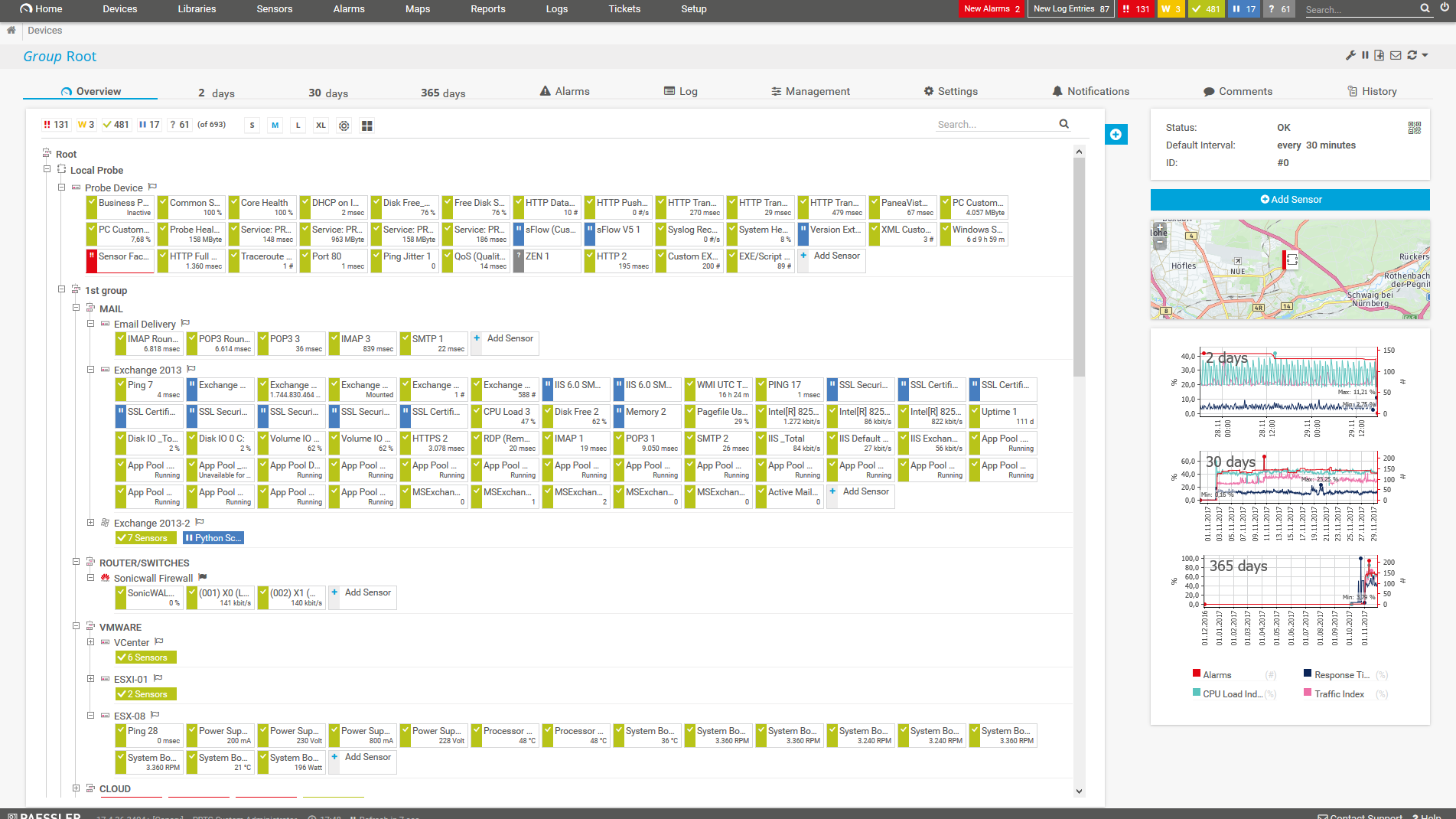
    Diagnose network issues by continuously tracking various proprietary operating systems. Show CPU load, network traffic, memory usage, physical disk space, bandwidth, and other key system metrics in real time. Visualize monitoring data in clear graphs and dashboards to identify problems more easily. Gain the overview you need to troubleshoot underperformance, security loopholes, and other hardware, software, and network issues.
    PRTG Screenshot device tree view

    Device tree view of the complete monitoring setup
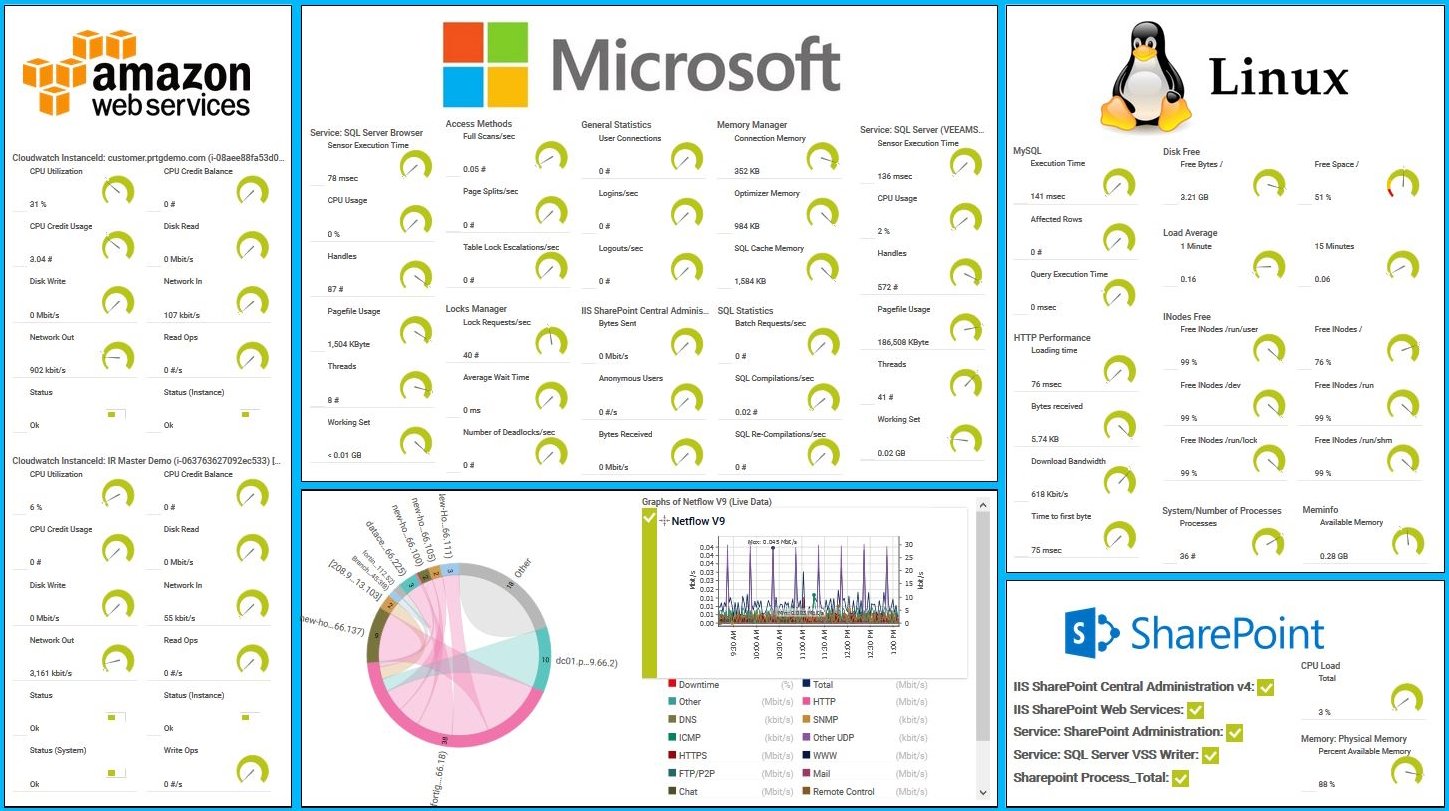
    Unified monitoring of AWS, Linux, and Windows services via PRTG custom map

    Unified monitoring of AWS, Linux, and Windows services via PRTG custom map

    PRTG screenshot map entire it infrastructure

    Custom PRTG dashboard for keeping an eye on the entire IT infrastructure

    PRTG screenshot graph live data traffic

    Live traffic data graph in PRTG

    Start monitoring operating systems with PRTG and see how it can make your network more reliable and your job easier.

    Free download
    PRODUCT OVERVIEW

    IT experts agree: Paessler PRTG is a great solution for IT infrastructure monitoring

    PCMag

    “All-around winning
     network monitor”

    IT Brief

    “The real beauty of PRTG is the endless possibilities it offers”

    ITPro

    “PRTG Network Monitor 
    is very hard to beat”

    A unified view of your OS data with all the flexibility you need

    PRTG tracks network components using more than 250 preconfigured sensor types. This means they work right out of the box, connecting seamlessly to your devices, and pulling data into your monitoring environment straight away.

    icon Windows

    Windows monitoring

    Monitor CPU usage, traffic, memory, hard drives, and much more on your Windows servers. 

    PRTG even analyzes Windows services and applications such as Microsoft IIS, SharePoint, Active Directory, and Microsoft SQL, Windows Event Log files, and the Windows Security Center.

    icon Linux

    Linux monitoring

    PRTG keeps an eye on popular distributions such as Ubuntu, Debian, CentOS, RedHat, and SUSE, and can also read data from other Linux distributions. 

    Monitor various health and performance parameters of your Linux network 24/7.

    icon Apple

    Mac OS X monitoring

    PRTG also monitors macOS. Although it forms the basis for only the smallest of networks, macOS is often installed on workstations and sometimes even on servers. 

    Here too, PRTG uses the SNMP protocol. Certain macOS systems (such as Yosemite - version 10.10) can also be monitored via SSH.

    icon laptop

    Other operating systems

    Many network devices have their own operating systems. There are SonicWall firewalls, IBM servers, and Hyper-V virtualization solutions, to name just a few. 

    The big advantage of PRTG is that it comes with sensors for specific manufacturers, as well as sensors that you can customize using the PRTG API.

    Explore our preconfigured PRTG sensors for monitoring operating systems

    PRTG comes with more than 250 native sensor types for monitoring your entire on-premises, cloud, and hybrid cloud environment out of the box. Check out some examples below!

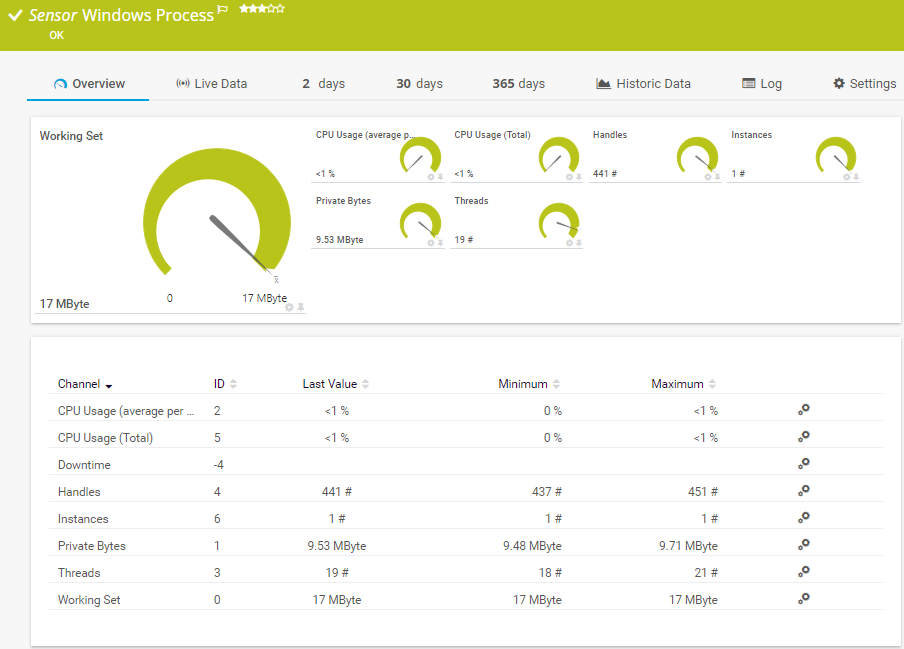
    Windows Process

    The Windows Process sensor monitors a Windows process via Windows Management Instrumentation (WMI) or Windows performance counters. It can show the following:

    • Average and total CPU usage
    • Number of instances
    • Number of handles and threads
    • Private bytes
    • Working set
    Windows Process
    Windows Process

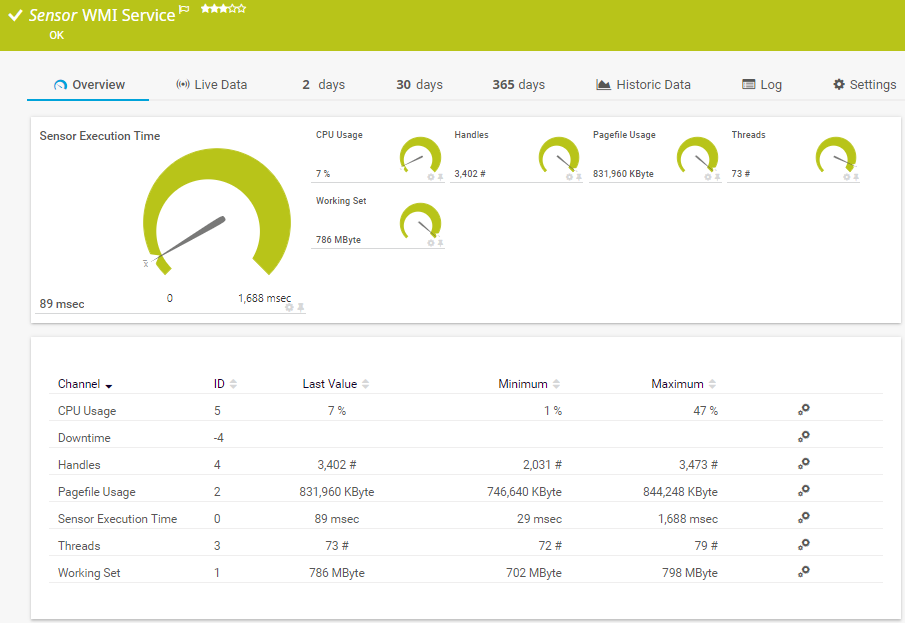
    WMI Service

    The WMI Service sensor monitors a Windows service. It can show the following:

    • CPU usage
    • Number of handles and threads
    • Pagefile usage
    • Execution time of the monitoring request
    • Working set
    WMI Service
    WMI Service

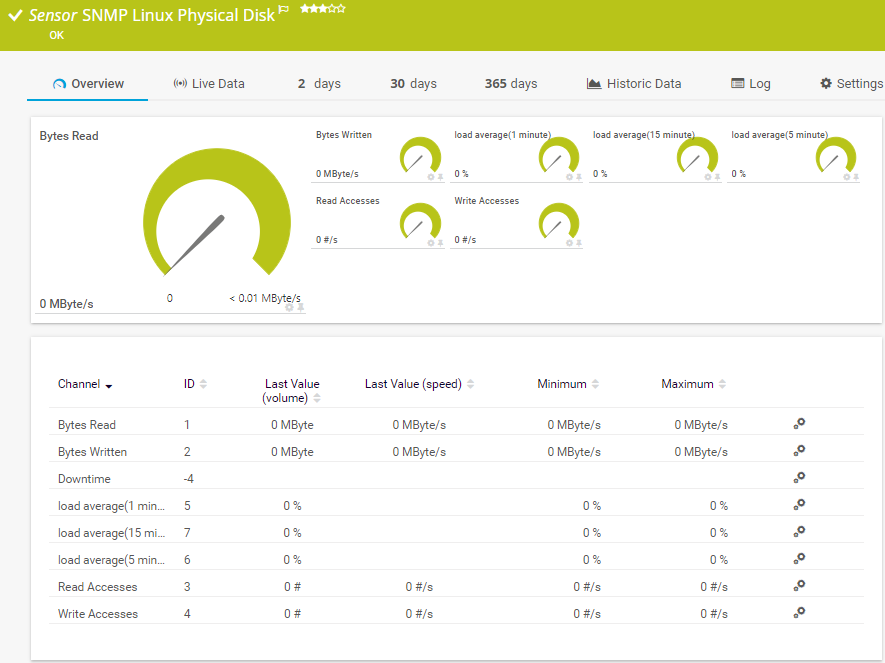
    SNMP Linux Physical Disk

    The SNMP Linux Physical Disk sensor monitors the input/output (I/O) on disks of a Linux/Unix system. It can show the following:

    • Number of bytes read and written
    • Load average (1 minute, 5 and 15 minutes)
    • Number of read and write accesses
    SNMP Linux Physical Disk
    SNMP Linux Physical Disk

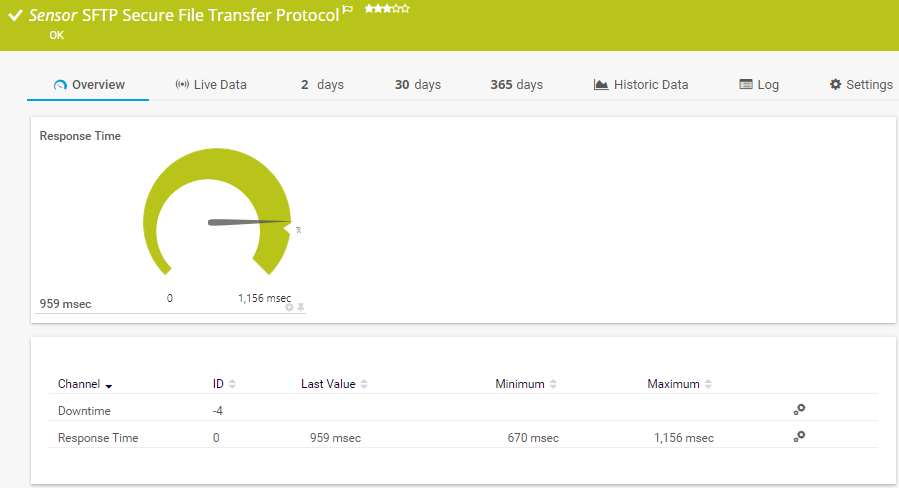
    SFTP Secure File Transfer Protocol

    The SFTP Secure File Transfer Protocol sensor monitors File Transfer Protocol (FTP) servers of a Linux/Unix system via the Secure Shell (SSH) File Transfer Protocol (FTP over SSH). It can show the following:

    • Downtime
    • Response time
    SFTP Secure File Transfer Protocol<
    SFTP Secure File Transfer Protocol<

    See the PRTG Manual for a list of all available sensor types.

    PRTG Is Compatible With All Major Vendors, Products, and Systems

    compatible with all major vendors, products, and systems

    PRTG makes OS monitoring as easy as it gets

    Custom alerts and data visualization let you quickly identify and prevent performance issues on Windows, Linux, macOS, and other UNIX-based and proprietary operating systems.

    Free download
    PRODUCT OVERVIEW

    “Since using PRTG, we have matured how we report out overall application uptime, maintenance, and mean time between failure for all critical applications to our board of directors. PRTG allows us to not just look at a single event, but to leverage historical data to prevent future failures and to measure how we are making improve­ments over time.”

    Bill Sorrells, CTO
    Dayton Children's Hospital

    “We have found these sophisticated levels of monitoring to be highly effective, improving the end user’s experience of the systems and applications in use, giving us the opportunity to provide a proactive resolution rather than having the end user raise issues.”

    Saif Akil, Head of Service Management
    Acurus

    “Before PRTG, applications and hardware all gave messages, but all separately, so we had to search through hundreds of e-mails to find the problem. It was always only afterwards that we saw that something was going on within the infrastructure. To mitigate the issue, we also considered other software. PRTG stood out because of its user-friendliness, flexibility and minimal consultancy investment.”

    Wim Vandenberghe, ICT Manager
    Soenen Golfkarton

    Your operating system monitor at a glance – even on the go

    PRTG is set up in a matter of minutes and can be used on a wide variety of mobile devices.

    device overview

    Create innovative solutions with Paessler’s IT partners

    Partnering with innovative IT vendors, Paessler unleashes synergies to create
    new and additional benefits for joined customers.

    IP Fabric

    IP Fabric

    Combining PRTG’s broad monitoring feature set with IP Fabric’s automated network assurance creates a new level of network visibility and reliability.

    Read more
    Plixer

    Plixer

    Paessler and Plixer provide a complete solution adding flow and metadata analysis to a powerful network monitoring tool.

    Read more
    ScriptRunner

    ScriptRunner

    With ScriptRunner Paessler integrates a powerful event automation platform into PRTG Network Monitor.

    Read more

    Find the root cause of the problem with our PRTG operating system performance monitoring solution

    Real-time notifications mean faster troubleshooting so that you can act before more serious issues occur.

    Free download
    PRODUCT OVERVIEW
    Paessler PRTG

    Paessler PRTG

    Network Monitoring Software – Version 26.1.116.1532 (February 9th, 2026)

    Hosting icon

    Hosting

    Download for Windows and cloud-based version PRTG Hosted Monitor available

    Languages icon

    Languages

    English, German, Spanish, French, Portuguese, Dutch, Russian, Japanese, and Simplified Chinese

    test

    Monitor everything

    Network devices, bandwidth, servers, applications, virtual environments, remote systems, IoT, and more

    test

    Pricing

    Choose the PRTG Network Monitor subscription that's best for you

    Discover more monitoring insights and stories

    Content illustration

    Powerful stories from the monitoring world

    • Bringing the monitoring power of Paessler PRTG to new operating ...
    • How to Enable SNMP on Windows, Linux & macOS - Paessler Blog
    • Monitor an IBM i (OS/400) server as easily as any other server
    Support illustration

    Resources to master your monitoring challenges

    • PRTG Manual: Detailed System Requirements - Paessler
    • PRTG Manual: System Requirements - Paessler
    • Dell Server System Health monitor - OpenManage (OMSA) vs iDrac
    Solution illustration

    Solutions for all your monitoring needs

    • Monitoring Applications
    • PRTG On Linux - Paessler
    • Linux Network Monitoring

    Operating System Monitoring: FAQ


    What is an operating system?

    An operating system (OS) is software that manages the hardware and software resources of a computer or device. It acts as an intermediary between users and the computer hardware. The primary functions of an operating system include:

    • Managing hardware resources: The OS controls and allocates resources like the CPU, memory, disk drives, and peripherals (e.g., printers, monitors).
    • File management: It organizes and controls how data is stored, retrieved, and managed on storage devices like hard drives or SSDs.
    • Process management: The OS manages the execution of multiple programs, scheduling processes, and handling tasks like multitasking and process synchronization.
    • User interface: The OS provides a user interface, which can be graphical (GUI) or command-line (CLI), allowing users to interact with the computer.
    • Security and access control: It enforces security measures, managing user permissions and protecting the system from unauthorized access.
    • Device management: The OS controls the use of peripheral devices through drivers, ensuring that hardware components function properly.

    Examples of operating systems include Windows, macOS, Linux, and Android. Each of these systems is designed to handle the specific needs of different types of devices, from personal computers to smartphones and servers.

    Why should I monitor operating systems?

    Monitoring operating systems is crucial for several reasons, especially in environments where reliability, security, and performance are essential. Here’s why you should monitor operating systems:

    Performance optimization

    • Monitoring helps track CPU, memory, and disk usage, ensuring that resources are used efficiently and identifying bottlenecks that could slow down the system.
    • Regular monitoring can detect system health issues like overheating, excessive resource usage, or hardware failures before they lead to system crashes or slowdowns.

    Security

    • Monitoring can alert you to unusual activities, such as unauthorized access attempts or abnormal process behavior, which could indicate a security breach or malware infection.
    • It helps in keeping track of the system's update status, ensuring that all security patches and updates are applied in a timely manner to protect against vulnerabilities.

    Reliability and availability

    • By continuously monitoring the system, you can identify and address issues before they lead to downtime, ensuring that critical services remain available.
    • Monitoring logs and system events can help detect and troubleshoot errors early, reducing the impact on system availability.

    Troubleshooting

    • When issues arise, having monitoring data available helps in quickly identifying the root cause, making troubleshooting faster and more effective.
    • Monitoring allows you to track and analyze historical performance and identify patterns that may be causing recurring issues.

    User experience

    • For systems that provide services to users, monitoring ensures that the quality of service remains high, leading to better user satisfaction.
    • By keeping track of system response times, monitoring helps ensure that users experience minimal delays and interruptions.
    Which Windows versions does PRTG support?

    PRTG officially supports the following Windows versions:

    • Windows Server 2022
    • Windows Server 2019
    • Windows Server 2016
    • Windows 11
    • Windows 10
    Which Linux and macOS distributions does PRTG support?

    We've successfully tested our SSH and SNMP sensors on the following operating systems:

    • CentOS Linux release 7.2.1511 (Core) based on RedHat
    • openSUSE 42.1 (x86_64) (Malachite)
    • Ubuntu 16.04 LTS
    • Debian GNU/Linux 8
    • Mac OS X 10.10.5 (Yosemite)
    • Gentoo
    • Red Hat Enterprise
    • Open Solaris

    Our sensors may also work well on other distributions (though we haven't specifically tested them). SNMP sensors work on most operating systems.

    Can I install PRTG on Linux or macOS?

    Yes and no. The central PRTG server can only be installed on a Windows server. But, once you've installed the PRTG server, you can use the brand-new multi-platform probe (a remote probe type in PRTG) that also runs on Linux. With this probe, you can monitor and manage your complete IT infrastructure from your Linux system.

    What is a sensor in PRTG?

    In PRTG, “sensors” are the basic monitoring elements. One sensor usually monitors one measured value in your network, for example the traffic of a switch port, the CPU load of a server, or the free space on a disk drive. On average, you need about 5-10 sensors per device or one sensor per switch port.

    We asked: would you recommend PRTG? Over 95% of our customers say yes!

    Paessler conducted trials in over 600 IT departments worldwide to tune its network monitoring software closer to the needs of sysadmins. The result of the survey: over 95% of the participants would recommend PRTG – or already have.

    recommendation

    Still not convinced?

    Love

    More than 500,000 sysadmins love PRTG

    Paessler PRTG is used by companies of all sizes. Sysadmins love PRTG because it makes their job a whole lot easier.

    PRTG

    Monitor your entire IT infrastructure

    Bandwidth, servers, virtual environments, websites, VoIP services – PRTG keeps an eye on your entire network.

    test

    Try Paessler PRTG for free

    Everyone has different monitoring needs. That’s why we let you try PRTG for free.

    PRTG Logo

    Start monitoring operating systems with PRTG and see how it can make your network more reliable and your job easier.

    Free download
    PRODUCT OVERVIEW

    Products

    • Paessler PRTG
      Paessler PRTGMonitor your whole IT infrastructure
      • PRTG Network Monitor
      • PRTG Enterprise Monitor
      • PRTG Hosted Monitor
      • PRTG UVexplorer
      • PRTG extensions
        Extensions for Paessler PRTGExtend your monitoring to a new level
    • Icon Features
      FeaturesExplore all monitoring features

    Monitoring with PRTG

    • Network monitoring
    • Bandwidth monitoring
    • SNMP monitoring
    • Network mapping
    • Wi-Fi monitoring
    • Server monitoring
    • Network traffic analyzer
    • NetFlow monitoring
    • Syslog server

    Useful Links

    • PRTG Manual
    • Knowledge Base
    • Customer Success Stories
    • About Paessler
    • Subscribe to newsletter
    • PRTG Support
    • PRTG Consulting
    • PRTG Feedback & Roadmap

    Contact

    Paessler GmbH
    Thurn-und-Taxis-Str. 14, 
    90411 Nuremberg 
    Germany

    [email protected]

    +49 911 93775-0

    • Contact us
    ©2026 Paessler GmbHTerms & ConditionsPrivacy PolicyImprintReport VulnerabilityDownload & InstallSitemap
    PRTG Network Monitor PRTG Network Monitor PRTG Network Monitor