• Company
    • About Us
    • Case Studies
    • Press Center
    • Careers
    • Blog
    • Contact us
  • Contact us
  • Login
 
  • English
    • Deutsch
    • Español
    • Français
    • Italiano
    • Português
Paessler
                    - The Monitoring Experts
  • Products
    • Paessler PRTG
      Paessler PRTGMonitor your whole IT infrastructure
      • PRTG Network Monitor
      • PRTG Enterprise Monitor
      • PRTG Hosted Monitor
      • PRTG UVexplorer
      • PRTG extensionsExtensions for Paessler PRTGExtend your monitoring to a new level
    • Icon Features
      FeaturesExplore all monitoring features
      • Maps & dashboards
      • Alerts & notifications
      • Multiple user interfaces
      • Distributed monitoring
      • Customizable reporting
  • Solutions
    • Industries
      IndustriesMonitor various industry sectors
      • Industrial
      • Healthcare
      • Data Center
      • Education
      • Finance
      • Government
    • IT Topics
      IT TopicsMonitor all areas of IT
      • Network Monitoring
      • Bandwidth Monitoring
      • SNMP Monitor
      • Network Mapping
      • WiFi Monitoring
      • Server Monitoring
  • Pricing
  • Resources
    • Getting Started
      Getting StartedModules for self-paced learning
    • How-to Guides
      How-to GuidesGet the most out of PRTG
    • Videos & Webinars
      Videos & WebinarsLearn from Paessler experts
    • IT  Knowledge
      IT KnowledgeExpand your IT knowledge
    • PRTG Manual
      PRTG ManualFull documentation
    • Knowledge Base
      Knowledge BaseShare community knowledge
    • PRTG Sensor Hub
      PRTG Sensor HubGet sensors, scripts & templates
    • Trainings
      PRTG TrainingLearn how to work with PRTG
  • Partners
    • Icon Handshake
      Become a PartnerFor resellers and channel partners
    • Icon MSP
      Become an MSPDeliver monitoring as a managed service
    • icon partner
      Partner PortalLog in to your partner account
    • Deal Registration
      Deal RegistrationRegister your sales opportunities
    • icon search
      Find a PartnerFind partners selling Paessler products
    • icon technology
      Technology AlliancesSee Paessler technology partnerships
    • Partner HubTools for Your Success
  • Company
    • About Us
    • Case Studies
    • Press Center
    • Careers
    • Blog
    • Contact us
  • Contact us
  • Login
  • English
    • Deutsch
    • Español
    • Français
    • Italiano
    • Português
  • Get a quote
  • Free trial
  1. Home>
  2. IT Topics>
  3. Industrial IT>
  4. SCADA Integration

SCADA Integration with PRTG

Watch the watcher & keep your SCADA system stable and reliable

  • Collect real-time data from your IT as well as your OT network
  • Keep an eye on the availability and health of the SCADA system hardware
  • Receive custom alerts and notifications for proactive troubleshooting
Free download
PRODUCT OVERVIEW

Paessler PRTG is trusted by 500,000 users worldwide

Siemens
Truma
Bosch
rexroth
SMS group

PRTG SCADA integration: What you will find on this page

Table of content

    PRTG makes SCADA integration as easy as it gets

    Custom alerts and data visualization let you quickly identify and prevent industrial IT and OT network issues.

    Free download
    PRODUCT OVERVIEW

    Ensure your SCADA systems are up and running, with PRTG

    SCADA systems play a crucial role in OT networks that rely heavily on industrial automation. If they go down, the results will be costly.

    However, while SCADA systems provide data about OT and production systems, this is only part of the picture. What about the hardware that supports the SCADA system? Or the status of Industrial PCs that are used in the industrial environment?

    Paessler PRTG is comprehensive monitoring software that provides a holistic overview of your IT and OT – all in one place. Use it alongside control and execution systems (MES, DCS, Historian, BMS) to provide even more value for operators, engineers, and technicians.
    Table of content

    3 reasons why PRTG is the SCADA monitoring tool of your choice

    Icon maps

    Get the full picture of your converged IT and OT

    In addition to OT metrics collected by SCADA systems, there are many other data points that are important for understanding an industrial environment.

    PRTG collects real-time data from many areas of your infrastructure, for example:

    • The health of switches (including metrics like port status and packet loss)
    • The status of your UPS
    • The memory and CPU usage of industrial PCs
    • The health of industrial gateways
    • The status of common IT devices like printers, servers, and much more.
    Icon Healthcare

    Monitor the condition of your SCADA hardware

    PIt’s also vital that you keep an eye on the availability and health of the hardware that your SCADA system runs on to make sure it works smoothly and efficiently.

    PRTG lets you monitor SCADA data such as the CPU load, memory, storage space, performance, related databases and other metrics from the environment that your SCADA runs in.

    Using SNMP, PRTG can also ensure that the systems themselves are up and running and provide alerts in the case of issues.

    Icon Alarm

    Receive custom alerts at different escalation levels

    While a SCADA system already provides you with alarms when things go wrong in your OT network, PRTG can add a different level of alerting to ensure that nothing gets missed – such as warnings about the servers that the SCADA system runs on.

    With PRTG, you can set thresholds so you’re alerted when conditions deviate from what is considered “normal”.

    PRTG can also notify the right teams with targeted escalation notifications using various methods such as SMS, email, in-app push messages, and more.

    What SCADA integration looks like in PRTG

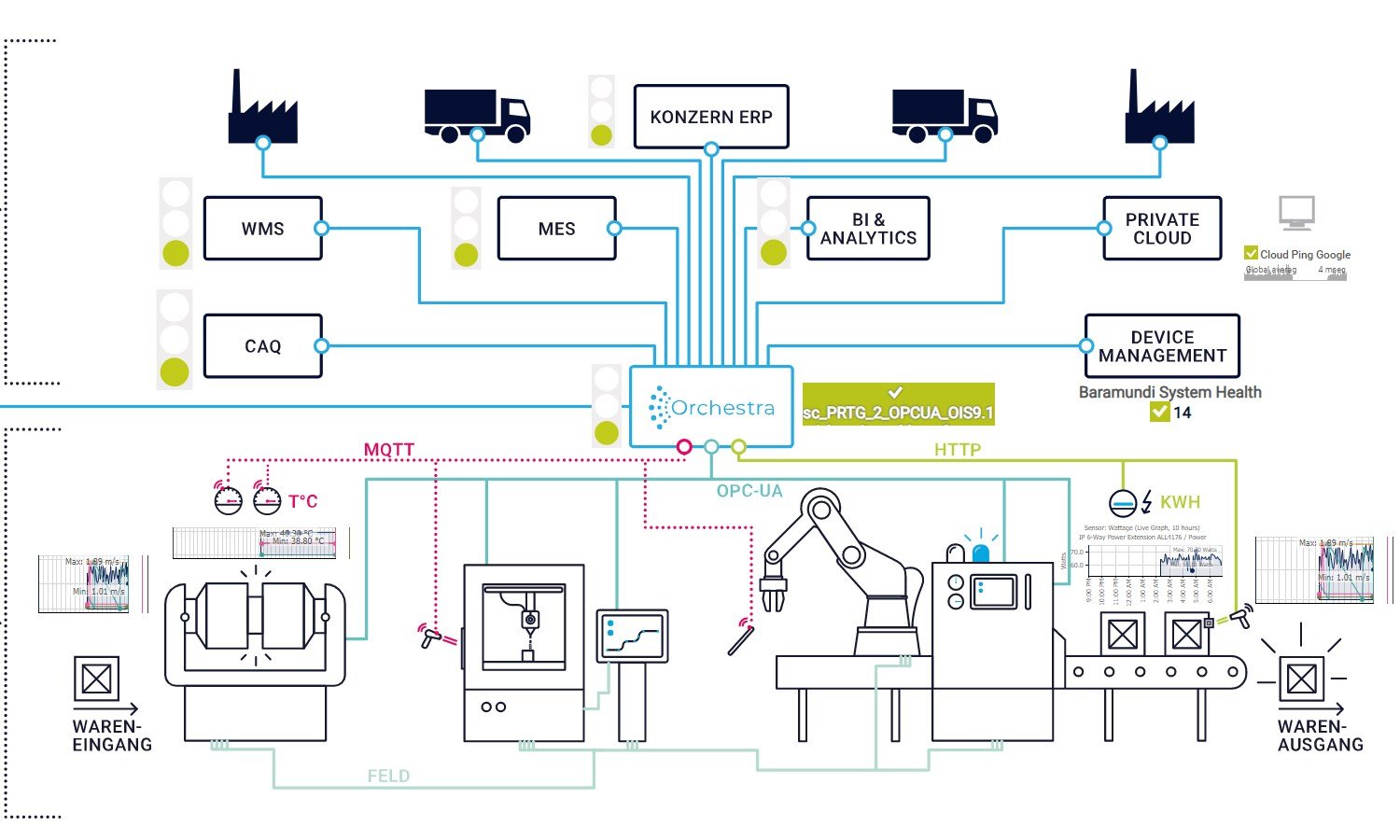
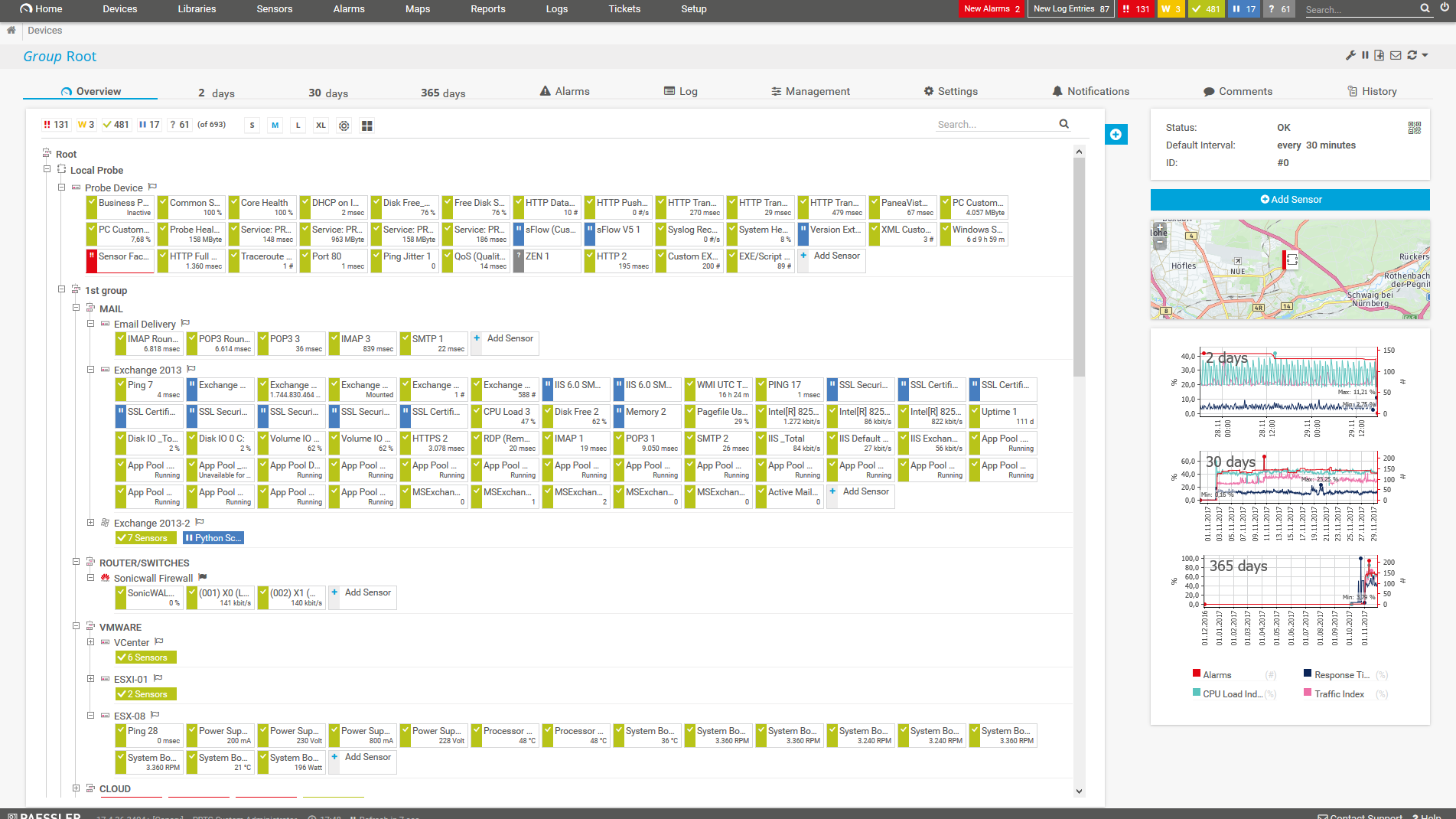
    Diagnose network issues by continuously tracking your IT and OT networks. Show SCADA system status, health, and performance in real time. Visualize monitoring data in clear graphs and dashboards to identify problems more easily. Gain the overview you need to troubleshoot issues on the production floor.
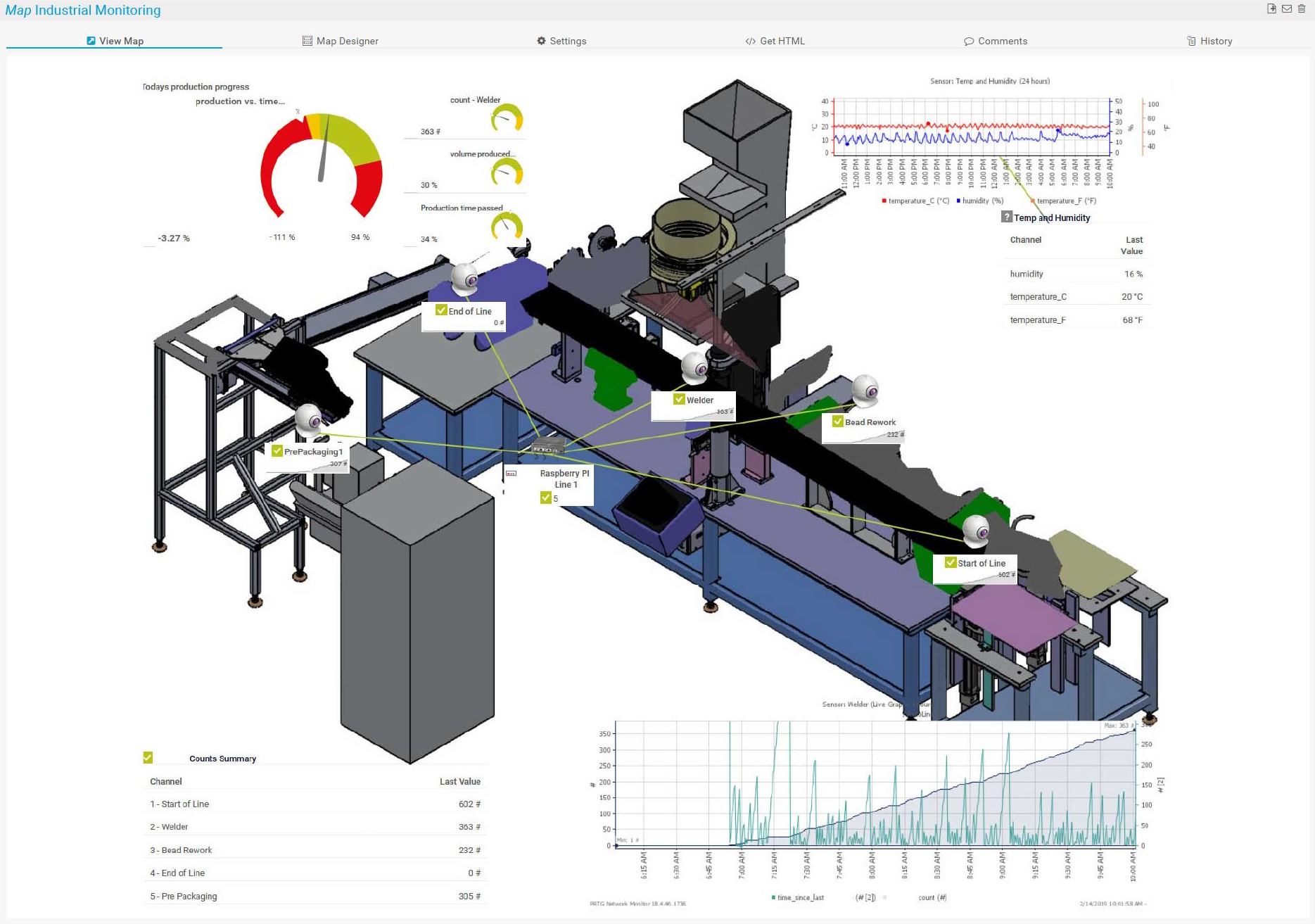
    Map industrial monitoring in PRTG
    Map industrial monitoring in PRTG

    Map industrial Orchestra in PRTG
    Map industrial Orchestra in PRTG

    PRTG Screenshot device tree view

    Device tree view of the complete monitoring setup

    PRTG screenshot map entire it infrastructure

    Custom PRTG dashboard for keeping an eye on the entire IT infrastructure

    PRTG screenshot graph live data traffic

    Live traffic data graph in PRTG

    Start monitoring SCADA systems with PRTG and see how it can make your network more reliable and your job easier.

    Free download
    PRODUCT OVERVIEW

    An award-winning extension for Paessler PRTG to bridge IT and OT, as voted by readers

    computer automation

    Awarded 3rd place in the 
    Software & IT category

    ned innovation award

    Winner in the Software & 
    Computers category

    Explore our preconfigured PRTG sensors for SCADA integration

    PRTG comes with more than 250 native sensor types for monitoring your entire on-premises, cloud, and hybrid cloud environment out of the box. Check out some examples below!

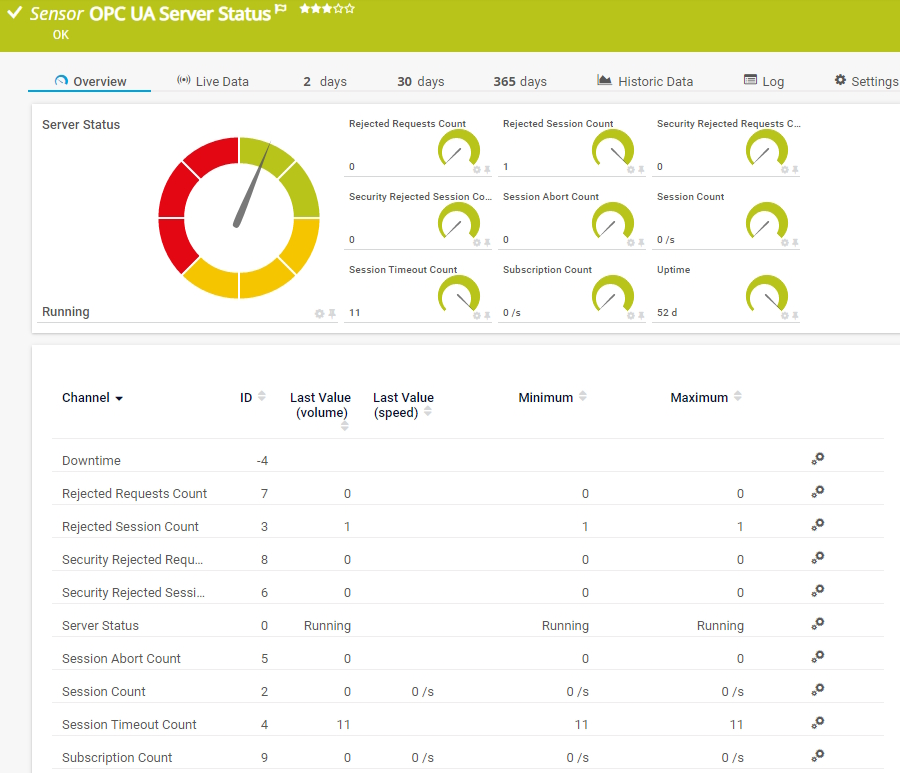
    OPC UA Server Status

    The OPC UA Server Status sensor monitors the server status, uptime, and diagnostic information of an OPC Unified Architecture (OPC UA) server. It can show the following:

    • Server status
    • Uptime
    • Number of rejected requests and sessions
    • Number of security-rejected requests and sessions
    • Number of subscriptions, sessions, session timeouts, and session aborts
    OPC UA Server Status
    OPC UA Server Status

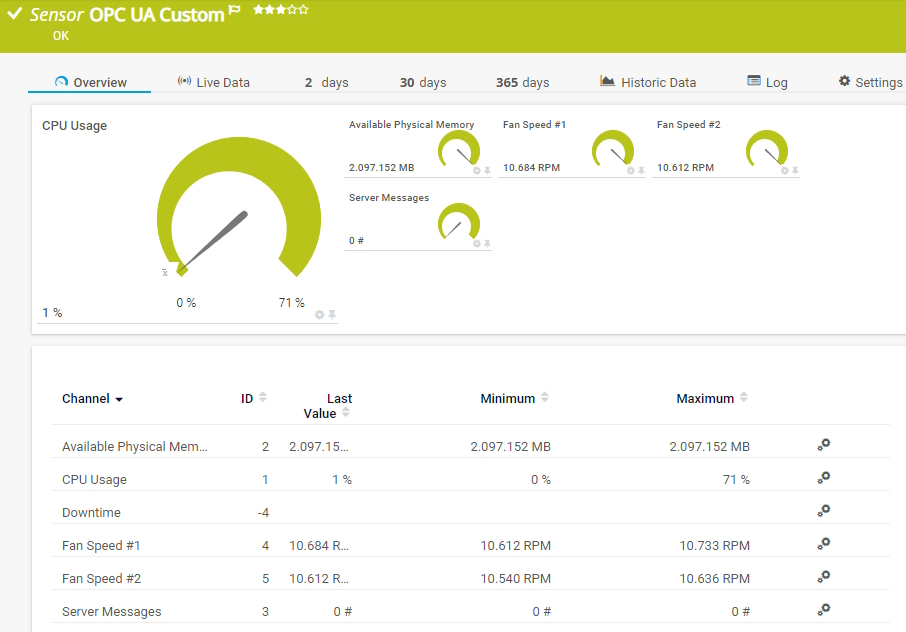
    OPC UA Custom

    The OPC UA Custom sensor monitors up to ten numeric values returned by specific OPC Unified Architecture (OPC UA) NodeIDs. It can show the following:

    • Downtime
    • Returned numeric values in up to ten channels
    OPC UA Custom
    OPC UA Custom

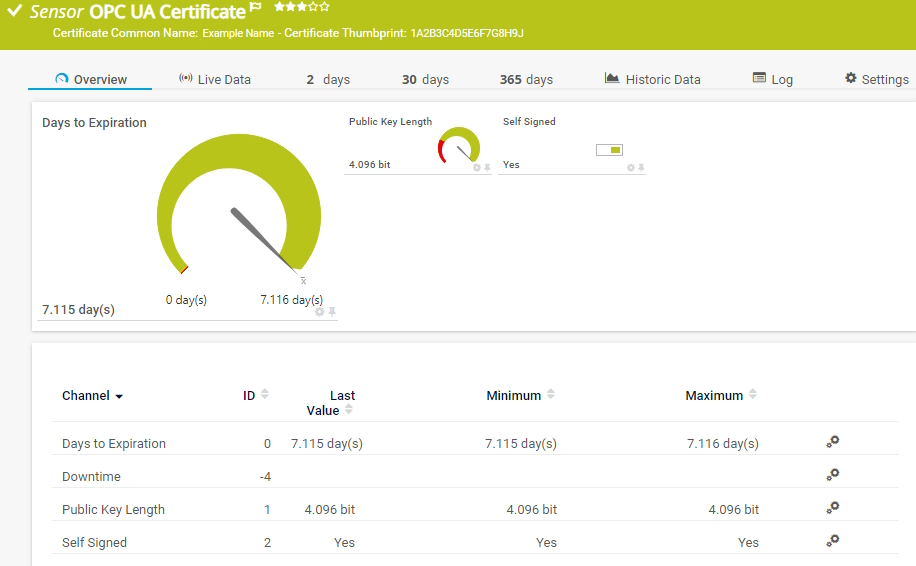
    OPC UA Certificate

    The OPC UA Certificate sensor monitors the certificate of an OPC Unified Architecture (OPC UA) server. It can show the following:

    • Number of days to expiration
    • Public key length
    • If a self-signed certificate is used
    OPC UA Certificate
    OPC UA Certificate

    See the PRTG Manual for a list of all available sensor types.

    PRTG Is Compatible With All Major Vendors, Products, and Systems

    compatible with all major vendors, products, and systems

    PRTG makes SCADA system integration as easy as it gets

    Custom alerts and data visualization let you quickly identify and prevent industrial IT and OT network issues.

    Free download
    PRODUCT OVERVIEW

    “PRTG has become an essential part of the entire plant production process, from planning to acceptance by the customer. So much so that we are currently toying with the idea of expanding our portfolio to offer support for plants, even after they are operational.”

    Frank Schweisfurth
    SMS group

    “We have known PRTG for many years. We have selected this solution because it integrates natively into the industrial operational technology environments that we offer to our customers in the region.”

    Miguel Ángel López Ávila, General Manager
    SE3

    “We appreciate the flexibility of PRTG and how it grows together with the company, supporting our needs to also digitalize the factory floor and monitor not only standard IT infrastructure but also factory equipment.”

    Sandeep Rai, Network and Security Team Lead
    Nobia AB

    “In the past, the enterprise and the industrial network were completely separated with very different requirements, such as security versus productivity. We see that within OT, monitoring is not widely used yet for several reasons, but processes are depending on IT systems more and more. The need for a reliable OT network is growing rapidly, and that’s where PRTG comes in.”

    Pascal Vercammen, Digitalization & IT Department Manager
    Process Automation Solutions

    Your SCADA integration monitor at a glance – even on the go

    PRTG is set up in a matter of minutes and can be used on a wide variety of mobile devices.

    device overview
    Gartner peer insights

    “Excellent tool for detailed monitoring. Alarms and notifications work greatly. Equipment addition is straight forward and server initial setup is very easy. ...feel safe to purchase it if you intend to monitor a large networking landscape.”

    Read the complete review at Gartner Peer Insights

    Create innovative solutions with Paessler’s IT partners

    Partnering with innovative IT vendors, Paessler unleashes synergies to create
    new and additional benefits for joined customers.

    NetBrain

    NetBrain

    Integrating monitoring results from PRTG into NetBrain maps makes the foundation for network automation.

    Read more
    Rittal

    Rittal

    IT that works constitutes a business-critical basis for a company's success. Availability and security must be defined for the respective purpose and closely monitored – by OT and IT alike.

    Read more
    ScriptRunner

    ScriptRunner

    With ScriptRunner Paessler integrates a powerful event automation platform into PRTG Network Monitor.

    Read more

    Find the root cause of the problem with our PRTG SCADA integration solution

    Real-time notifications mean faster troubleshooting so that you can act before more serious issues occur.

    Free download
    PRODUCT OVERVIEW
    Paessler PRTG

    Paessler PRTG

    Network Monitoring Software – Version 26.1.116.1532 (February 9th, 2026)

    Hosting icon

    Hosting

    Download for Windows and cloud-based version PRTG Hosted Monitor available

    Languages icon

    Languages

    English, German, Spanish, French, Portuguese, Dutch, Russian, Japanese, and Simplified Chinese

    test

    Monitor everything

    Network devices, bandwidth, servers, applications, virtual environments, remote systems, IoT, and more

    test

    Pricing

    Choose the PRTG Network Monitor subscription that's best for you

    Discover more monitoring insights and stories

    Content illustration

    Powerful stories from the monitoring world

    • From SCADA to Sensors: How PRTG delivers end-to-end monitoring ...
    • What Is SCADA? – IT Explained
    • OT Network Monitoring Made Easy: SCADA, Modbus, OPC UA, and ...
    Support illustration

    Resources to master your monitoring challenges

    • I run PRTG on VMware. How can I obtain best performance?
    • Quick Start Guide
    • How can I move or migrate a PRTG installation to a different system or server?
    Solution illustration

    Solutions for all your monitoring needs

    • Bandwidth Monitoring
    • NetFlow Monitoring
    • Network Mapping

    SCADA Integration: FAQ


    What is a SCADA system?

    Supervisory Control and Data Acquisition (SCADA) systems are made up of SCADA software and hardware components that are used to supervise and control industrial processes.

    SCADA systems monitor data in real time and give users a human-machine interface (HMI) for providing process commands to components such as control valves, actuators, motors, and more.

    They are crucial for industrial organizations since they help to maintain efficiency, process data for smarter decisions, and communicate system issues to help mitigate downtime.

    How do SCADA systems work?

    SCADA systems are connected to Programmable Logic Controllers (PLCs) and Remote Terminal Units (RTUs), which in turn gather data from sensors and devices in a plant.

    This gathered data can be used for automated responses (such as reducing pressure in a system when it gets too high), insights into the production process, and for triggering alarms when there is a failure.

    Where are SCADA systems used?

    SCADA systems are used by a wide variety of companies and organizations. They can be implemented to monitor and control power grids, water treatment plants, processes on a production floor, and more. Metrics that are monitored include everything from pressure, power utilization and production time, ,to facility processes heating, ventilation, and HVAC systems of buildings.

    Which SCADA systems can I integrate with PRTG?

    With PRTG, you can monitor every SCADA system itself that supports OPC UA.

    To bring PRTG alarms and metrics directly into your SCADA system, you need our product extension Paessler PRTG OPC UA Server. The following integrations have already been tested:

    • Ignition
    • atvise® scada
    • SIMATIC WinCC (TIA Portal)
    • SIMATIC WinCC Open Architecture
    • AVEVA Edge
    • FactoryTalk View (SE/ME)
    • PcVue
    • GENESIS64
    • FlowChief
    • VTscada
    What is a sensor in PRTG?

    In PRTG, “sensors” are the basic monitoring elements. One sensor usually monitors one measured value in your network, for example the traffic of a switch port, the CPU load of a server, or the free space on a disk drive. On average, you need about 5-10 sensors per device or one sensor per switch port.

    We asked: would you recommend PRTG? Over 95% of our customers say yes!

    Paessler conducted trials in over 600 IT departments worldwide to tune its network monitoring software closer to the needs of sysadmins. The result of the survey: over 95% of the participants would recommend PRTG – or already have.

    recommendation

    Still not convinced?

    Love

    More than 500,000 sysadmins love PRTG

    Paessler PRTG is used by companies of all sizes. Sysadmins love PRTG because it makes their job a whole lot easier.

    PRTG

    Monitor your entire IT infrastructure

    Bandwidth, servers, virtual environments, websites, VoIP services – PRTG keeps an eye on your entire network.

    test

    Try Paessler PRTG for free

    Everyone has different monitoring needs. That’s why we let you try PRTG for free.

    PRTG Logo

    Start monitoring SCADA systems with PRTG and see how it can make your network more reliable and your job easier.

    Free download
    PRODUCT OVERVIEW

    Products

    • Paessler PRTG
      Paessler PRTGMonitor your whole IT infrastructure
      • PRTG Network Monitor
      • PRTG Enterprise Monitor
      • PRTG Hosted Monitor
      • PRTG UVexplorer
      • PRTG extensions
        Extensions for Paessler PRTGExtend your monitoring to a new level
    • Icon Features
      FeaturesExplore all monitoring features

    Monitoring with PRTG

    • Network monitoring
    • Bandwidth monitoring
    • SNMP monitoring
    • Network mapping
    • Wi-Fi monitoring
    • Server monitoring
    • Network traffic analyzer
    • NetFlow monitoring
    • Syslog server

    Useful Links

    • PRTG Manual
    • Knowledge Base
    • Customer Success Stories
    • About Paessler
    • Subscribe to newsletter
    • PRTG Support
    • PRTG Consulting
    • PRTG Feedback & Roadmap

    Contact

    Paessler GmbH
    Thurn-und-Taxis-Str. 14, 
    90411 Nuremberg 
    Germany

    [email protected]

    +49 911 93775-0

    • Contact us
    ©2026 Paessler GmbHTerms & ConditionsPrivacy PolicyImprintReport VulnerabilityDownload & InstallSitemap
    IP Monitoring Tool IP Monitoring Tool IP Monitoring Tool