
• Company
    • About Us
    • Case Studies
    • Press Center
    • Events
    • Careers
    • Blog
    • Contact us
  • Contact us
  • Login
 
  • English
    • Deutsch
    • Español
    • Français
    • Italiano
    • Português
Paessler
                    - The Monitoring Experts
  • Products
    • Paessler PRTG
      Paessler PRTGMonitor your whole IT infrastructure
      • PRTG Network Monitor
      • PRTG Enterprise Monitor
      • PRTG Hosted Monitor
      • PRTG extensionsExtensions for Paessler PRTGExtend your monitoring to a new level
    • Icon Features
      FeaturesExplore all monitoring features
      • Maps & dashboards
      • Alerts & notifications
      • Multiple user interfaces
      • Distributed monitoring
      • Customizable reporting
  • Solutions
    • Industries
      IndustriesMonitor various industry sectors
      • Industrial
      • Healthcare
      • Data Center
      • Education
      • Finance
      • Government
    • IT Topics
      IT TopicsMonitor all areas of IT
      • Network Monitoring
      • Bandwidth Monitoring
      • SNMP Monitor
      • Network Mapping
      • WiFi Monitoring
      • Server Monitoring
  • Pricing
  • Resources
    • Getting Started
      Getting StartedModules for self-paced learning
    • How-to Guides
      How-to GuidesGet the most out of PRTG
    • Videos & Webinars
      Videos & WebinarsLearn from Paessler experts
    • IT  Knowledge
      IT KnowledgeExpand your IT knowledge
    • PRTG Manual
      PRTG ManualFull documentation
    • Knowledge Base
      Knowledge BaseShare community knowledge
    • PRTG Sensor Hub
      PRTG Sensor HubGet sensors, scripts & templates
    • Trainings
      PRTG TrainingLearn how to work with PRTG
  • Partners
    • icon star
      New Partners and MSPBecome a new partner or MSP
    • icon partner
      Partner PortalLog in to your partner account
    • Deal Registration
      Deal RegistrationRegister your sales opportunities
    • icon search
      Find a PartnerFind partners selling Paessler products
    • icon technology
      Technology AlliancesSee Paessler technology partnerships
  • Company
    • About Us
    • Case Studies
    • Press Center
    • Events
    • Careers
    • Blog
    • Contact us
  • Contact us
  • Login
  • English
    • Deutsch
    • Español
    • Français
    • Italiano
    • Português
  • Get a quote
  • Free trial
  1. Home>
  2. Tools>
  3. MIB Importer
mib importer logo


Monitoring SNMP devices using vendor supplied MIB data files

With this freeware tool you can import MIB (Management Information Base) files and convert them into OID libraries for PRTG.

Free download

Please download the current version of the MIB Importer (for PRTG 12 or later) to get the latest features. 
Please uninstall previous versions before you install a new one.
Import of SNMP-MIB files into Paessler Monitoring Applications

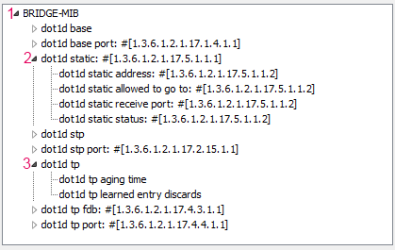
Tree View of OIDs Organized in Agents (1), Tables (2), and Groups of Single Values (3)

Tree View of OIDs Organized in Agents (1), Tables (2), and Groups of Single Values (3)

Many network devices and programs come with so-called MIB files that describe the parameters and readings that are available for monitoring via SNMP. With MIB Importer you can import these MIB files (supplied by the vendor of your devices) and convert them into OID libraries (OIDLIB) for PRTG Network Monitor.

Then you can easily set up SNMP Library sensors using the new OIDLIB files.
mib importer manual

A few words about MIB files

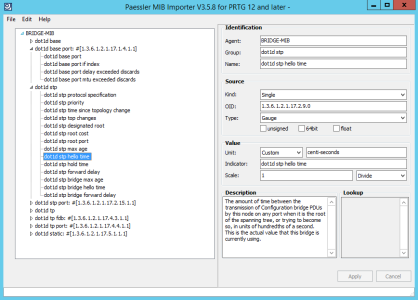
OID Library Opened in the MIB Importer

OID Library Opened in the MIB Importer

MIB files are hardware and operating system–independent information files that tell network management systems how to retrieve in-depth data using the SNMP protocol from network devices like routers, switches, network printers, disk arrays (even air conditioners) as well as many server software products (database servers, etc.).

MIB files describe the available readings in tables, values, and registers using a special text format, Abstract Syntax Notation One (ASN.1).
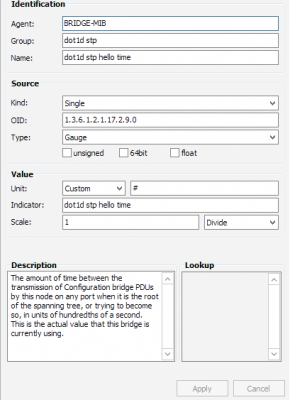
Properties of an OID

Properties of an OID

Because MIB files are written in this highly abstract definition language, they need to be translated into a more software-compliant form so that PRTG can work quickly and seamlessly with the data. This is the task of the MIB Importer, which translates MIB files into Paessler's XML-based OID library format.

MIB files are usually provided by the manufacturers of network devices and services (for example, Cisco MIBs can be found here). Please visit your vendor's website or contact their support to get the MIB file for your specific device.

History

  • V3.5.8 (Dec 7th, 2017): Drag and drop support for the MIB Importer! You can now simply drag your MIB and OIDLIB files to the MIB Importer and open them by dropping.
  • V3.5.7b (Oct 17th, 2017): Fixed an issue with the MIB Splitter
  • V3.5.7 Maintenance release (May 29th, 2017)
  • V3.5.6 Maintenance release (Nov 17th, 2016)
  • V3.5.5 (Sept 27th, 2016): The installer is now signed to confirm its integrity, so you can be sure that it really comes from us, the Paessler AG.
  • V3.5.5 (Sept 19th, 2016): You can now create negative lookups with the MIB Importer.
  • V3.5.4 (July 22nd, 2016): PRTG "lookups" can now be generated from "TEXTUAL-CONVENTION" types in your MIB files.
  • V3.5.3 Maintenance release (May 10th, 2016)
  • V3.5.2 Maintenance release (May 4th, 2016)
  • V3.4.8 Alpha update (Jan 17th, 2014)
    • Enhanced compatibility
  • V3.4.7 Alpha update (Sept 13th, 2013)
    • Enhanced compatibility
  • V3.4.6 Alpha update (Mar 12th, 2013)
    • Enhanced compatibility
  • V3.4.5 Alpha update (Mar 8th, 2013)
    • Fixed support for Lookup definitions
  • V3.0 Alpha (Feb 5th, 2013)
    • Alpha version release with enhanced MIB support
mib importer logo
Free download

MIB Importer 3.5.8  (3.9 MB)

This program is provided as a freeware and thus for free for Paessler customers, mainly as an add-on for PRTG. Please understand that we cannot provide in-depth support for this program.

Products

  • Paessler PRTG
    Paessler PRTGMonitor your whole IT infrastructure
    • PRTG Network Monitor
    • PRTG Enterprise Monitor
    • PRTG Hosted Monitor
    • PRTG extensions
      Extensions for Paessler PRTGExtend your monitoring to a new level
  • Icon Features
    FeaturesExplore all monitoring features

Monitoring with PRTG

  • Network monitoring
  • Bandwidth monitoring
  • SNMP monitoring
  • Network mapping
  • Wi-Fi monitoring
  • Server monitoring
  • Network traffic analyzer
  • NetFlow monitoring
  • Syslog server

Useful Links

  • PRTG Manual
  • Knowledge Base
  • Customer Success Stories
  • About Paessler
  • Subscribe to newsletter
  • PRTG Support
  • PRTG Consulting
  • PRTG Feedback & Roadmap

Contact

Paessler GmbH
Thurn-und-Taxis-Str. 14, 
90411 Nuremberg 
Germany

[email protected]

+49 911 93775-0

  • Contact us
©2025 Paessler GmbHTerms & ConditionsPrivacy PolicyImprintReport VulnerabilityDownload & InstallSitemap
MQTT MQTT MQTT