• Company
    • About Us
    • Case Studies
    • Press Center
    • Events
    • Careers
    • Blog
    • Contact us
  • Contact us
  • Login
 
  • English
    • Deutsch
    • Español
    • Français
    • Italiano
    • Português
Paessler
                    - The Monitoring Experts
  • Products
    • Paessler PRTG
      Paessler PRTGMonitor your whole IT infrastructure
      • PRTG Network Monitor
      • PRTG Enterprise Monitor
      • PRTG Hosted Monitor
      • PRTG extensionsExtensions for Paessler PRTGExtend your monitoring to a new level
    • Icon Features
      FeaturesExplore all monitoring features
      • Maps & dashboards
      • Alerts & notifications
      • Multiple user interfaces
      • Distributed monitoring
      • Customizable reporting
  • Solutions
    • Industries
      IndustriesMonitor various industry sectors
      • Industrial
      • Healthcare
      • Data Center
      • Education
      • Finance
      • Government
    • IT Topics
      IT TopicsMonitor all areas of IT
      • Network Monitoring
      • Bandwidth Monitoring
      • SNMP Monitor
      • Network Mapping
      • WiFi Monitoring
      • Server Monitoring
  • Pricing
  • Resources
    • Getting Started
      Getting StartedModules for self-paced learning
    • How-to Guides
      How-to GuidesGet the most out of PRTG
    • Videos & Webinars
      Videos & WebinarsLearn from Paessler experts
    • IT  Knowledge
      IT KnowledgeExpand your IT knowledge
    • PRTG Manual
      PRTG ManualFull documentation
    • Knowledge Base
      Knowledge BaseShare community knowledge
    • PRTG Sensor Hub
      PRTG Sensor HubGet sensors, scripts & templates
    • Trainings
      PRTG TrainingLearn how to work with PRTG
  • Partners
    • icon star
      New Partners and MSPBecome a new partner or MSP
    • icon partner
      Partner PortalLog in to your partner account
    • Deal Registration
      Deal RegistrationRegister your sales opportunities
    • icon search
      Find a PartnerFind partners selling Paessler products
    • icon technology
      Technology AlliancesSee Paessler technology partnerships
  • Company
    • About Us
    • Case Studies
    • Press Center
    • Events
    • Careers
    • Blog
    • Contact us
  • Contact us
  • Login
  • English
    • Deutsch
    • Español
    • Français
    • Italiano
    • Português
  • Get a quote
  • Free trial
  1. Home>
  2. Tools>
  3. WMI Tester
Wmi tester logo


Testing the accessibility of WMI counters

WMI stands for "Windows Management Instrumentation" and is the technology from Microsoft for monitoring and management of Windows based systems.

Free download

If you run into problems while accessing a remote PC via WMI, please review our guide to troubleshooting WMI issues.
Basic Usage

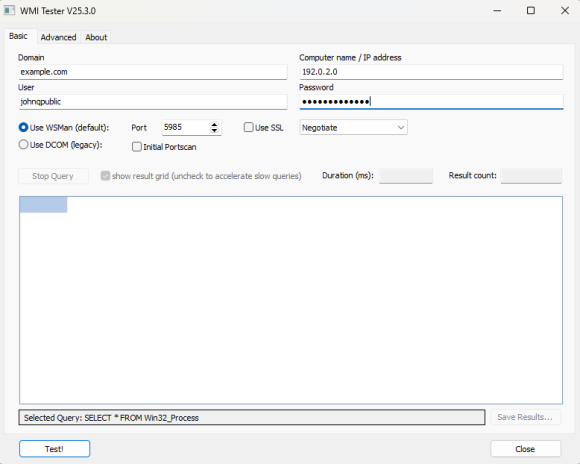
WMI Tester main screen

WMI Tester main screen

WMI works like a database and offers a variety of useful monitoring values of computers running Microsoft Windows. Products like Paessler's PRTG Network Monitor make use of the WMI functionality to monitor computers in network environments. WMI allows a process to read out data for many Windows configuration parameters as well as current system status values. Access can take place locally or remotely via a network connection. WMI is based on COM and DCOM and is integrated in Windows 2000, XP, 2003, Vista and later.

As WMI access over a network is not quite trivial, the Paessler WMI Tester is a tool for testing the accessibility of WMI in a quick and easy-to-use way.

After starting Paessler WMI Tester you can enter the following data:

  • Domain: the Windows domain in which the computer you want to test is in. Leave empty when testing your own machine or a domainless machine (i.e. a standalone computer or a computer in a workgroup).
  • Host: the name of the computer you want to test. Leave empty when testing your own machine.
  • User: the name of the user that is allowed to log in on the machine you want to test. You MUST leave this empty when testing your own machine.
  • Password: the password of the user. You MUST leave this empty when testing your own machine.

Now click the “Test!” button. After a short time you will either see a result table showing information about the Windows system on the machine or an error message if something went wrong.

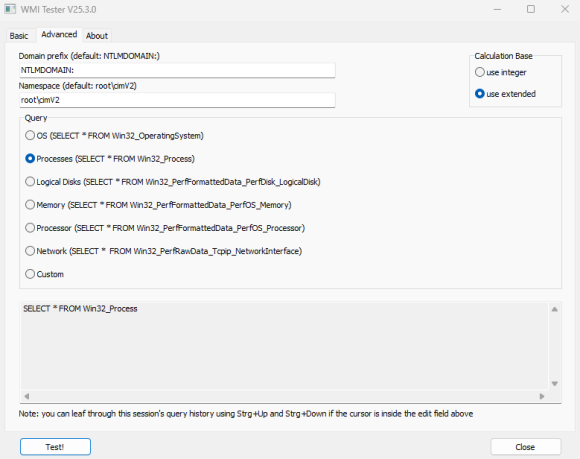
Advanced Usage

WMI Tester advanced tab

WMI Tester advanced tab

On this tab you can enter:

  • Domain prefix: will be added internally to the Host name (usually you can leave this at NTLMDOMAIN)
  • Namespace: the name space the WMI query will use, standard is root\CIMV2
  • Query: choose between six predefined query sets (operating system, processes, logical disks, memory, processor, network) or enter your own query (if you know how WMI works!)

History

  • V2.3.3.8 (Sept 5th, 2017): Maintenance release
  • V2.3.3.7 (Jan 12th, 2017): Maintenance release
  • V2.3.2.7 (May 4th, 2016): Maintenance release
  • V2.3 (Feb 5th, 2013): Updated contact data
  • V2.1 (Dec 21st, 2009): Updated
  • V2.0.1 (Dec 2008): Updated
  • V1.1.2 (Oct 10th, 2007): Initial Release
Icon WMI Tester
Free download
Manual (PDF)

WMI Tester (2.3 MB)

This program is provided as a freeware and thus for free for Paessler customers, mainly as an add-on for PRTG. Please understand that we cannot provide technical support for this program.

Products

  • Paessler PRTG
    Paessler PRTGMonitor your whole IT infrastructure
    • PRTG Network Monitor
    • PRTG Enterprise Monitor
    • PRTG Hosted Monitor
    • PRTG extensions
      Extensions for Paessler PRTGExtend your monitoring to a new level
  • Icon Features
    FeaturesExplore all monitoring features

Monitoring with PRTG

  • Network monitoring
  • Bandwidth monitoring
  • SNMP monitoring
  • Network mapping
  • Wi-Fi monitoring
  • Server monitoring
  • Network traffic analyzer
  • NetFlow monitoring
  • Syslog server

Useful Links

  • PRTG Manual
  • Knowledge Base
  • Customer Success Stories
  • About Paessler
  • Subscribe to newsletter
  • PRTG Support
  • PRTG Consulting
  • PRTG Feedback & Roadmap

Contact

Paessler GmbH
Thurn-und-Taxis-Str. 14, 
90411 Nuremberg 
Germany

[email protected]

+49 911 93775-0

  • Contact us
©2025 Paessler GmbHTerms & ConditionsPrivacy PolicyImprintReport VulnerabilityDownload & InstallSitemap
Brother Printer Errors Brother Printer Errors Brother Printer Errors