
- English
- Deutsch
- Español
- Français
- Italiano
- Português
A network performance test tool is only useful if it gives you data you can actually act on. Not just a snapshot from one moment, but a continuous record across all your devices and links. That means multiple measurement methods, historical data you can go back to, and coverage that doesn't leave gaps. The combination of ICMP, SNMP, flow protocols like NetFlow, jFlow, sFlow, and IPFIX, plus QoS sensors and HTTP response monitoring is what separates a monitoring setup from a one-time test.
Paessler PRTG brings all of these into one interface, covering on-premises, hybrid, and multi-site environments. It keeps collecting whether or not you're actively looking. Real-time data and historical records, all in the same place. PRTG collects network performance data from Cisco, Juniper, HP/Aruba, Ubiquiti, Dell, and other SNMP-capable routers, switches, and firewalls. Measurement methods include ICMP, SNMP v1/v2c/v3, NetFlow, jFlow, sFlow, IPFIX, WMI, and packet sniffing.

PRTG collects interface utilization, traffic breakdowns by protocol and source, and device-level resource data in parallel. Cross-referencing these lets you narrow down which segment or device is most likely involved. The analysis is yours; PRTG gives you the data to do it. That matters because having visibility across multiple collection points turns every performance question into something answerable. Is it the WAN uplink? A device saturating a segment? High latency on a critical path? A server hitting resource limits? With data from multiple points simultaneously, you work from evidence instead of assumptions, and identifying bottlenecks becomes a structured process.
Performance degrades, users report it, you check, and everything looks normal. The problem was real, but it's gone. Because PRTG polls at configurable intervals, every data point is stored, so when a complaint references a specific time window, you look at the historical graph: did latency spike? Did packet loss occur? Did an interface hit high utilization?
Worth noting: PRTG is scanning-based, not streaming. A spike shorter than your scanning interval may not be captured. At standard 1-minute intervals, though, the vast majority of user-impacting events will show up. Test results are timestamped and available hours, days, and weeks later, not just during the moment you happen to be watching.
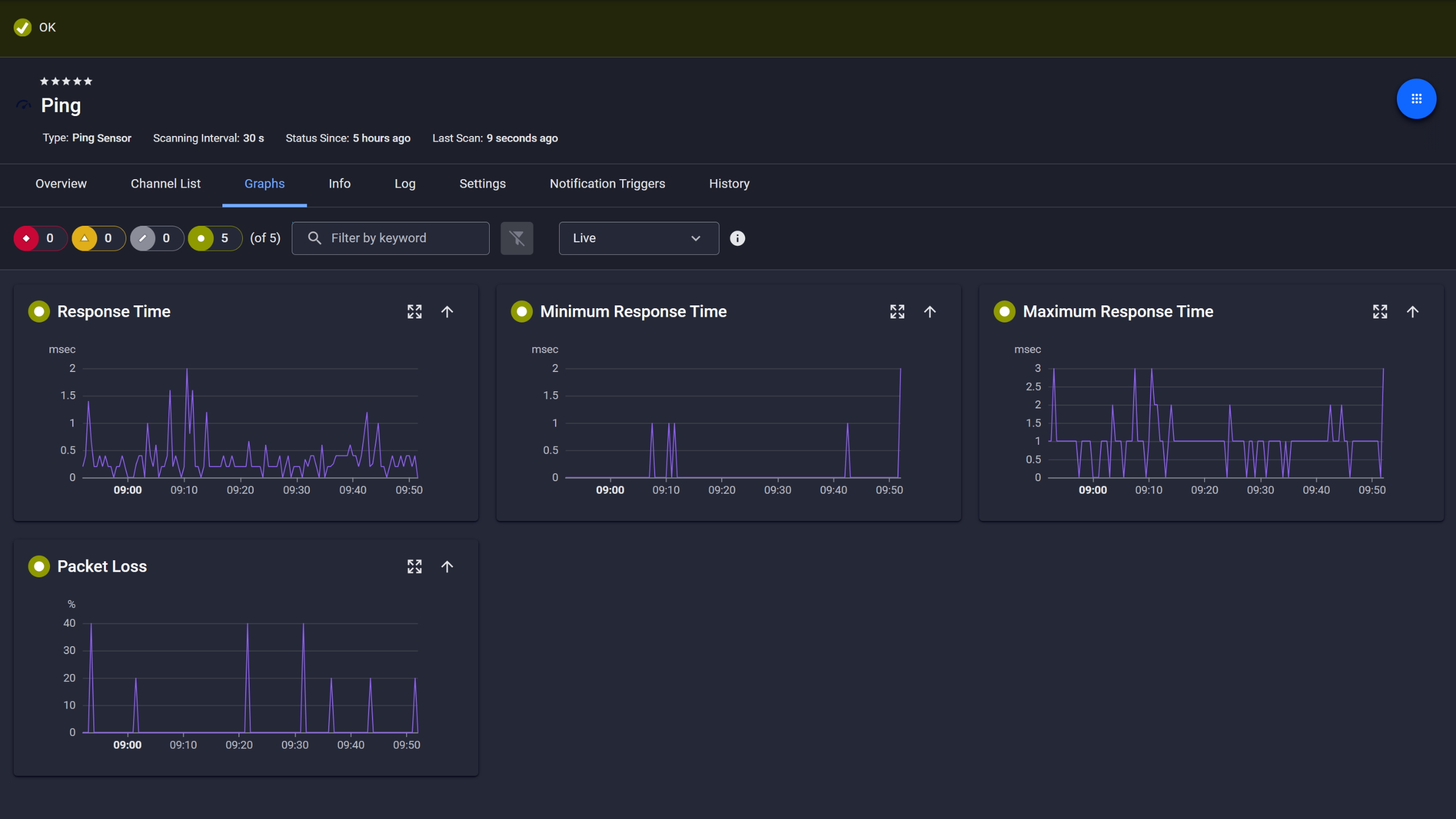
Ping response and packet loss

Live graphs, real-time performance data
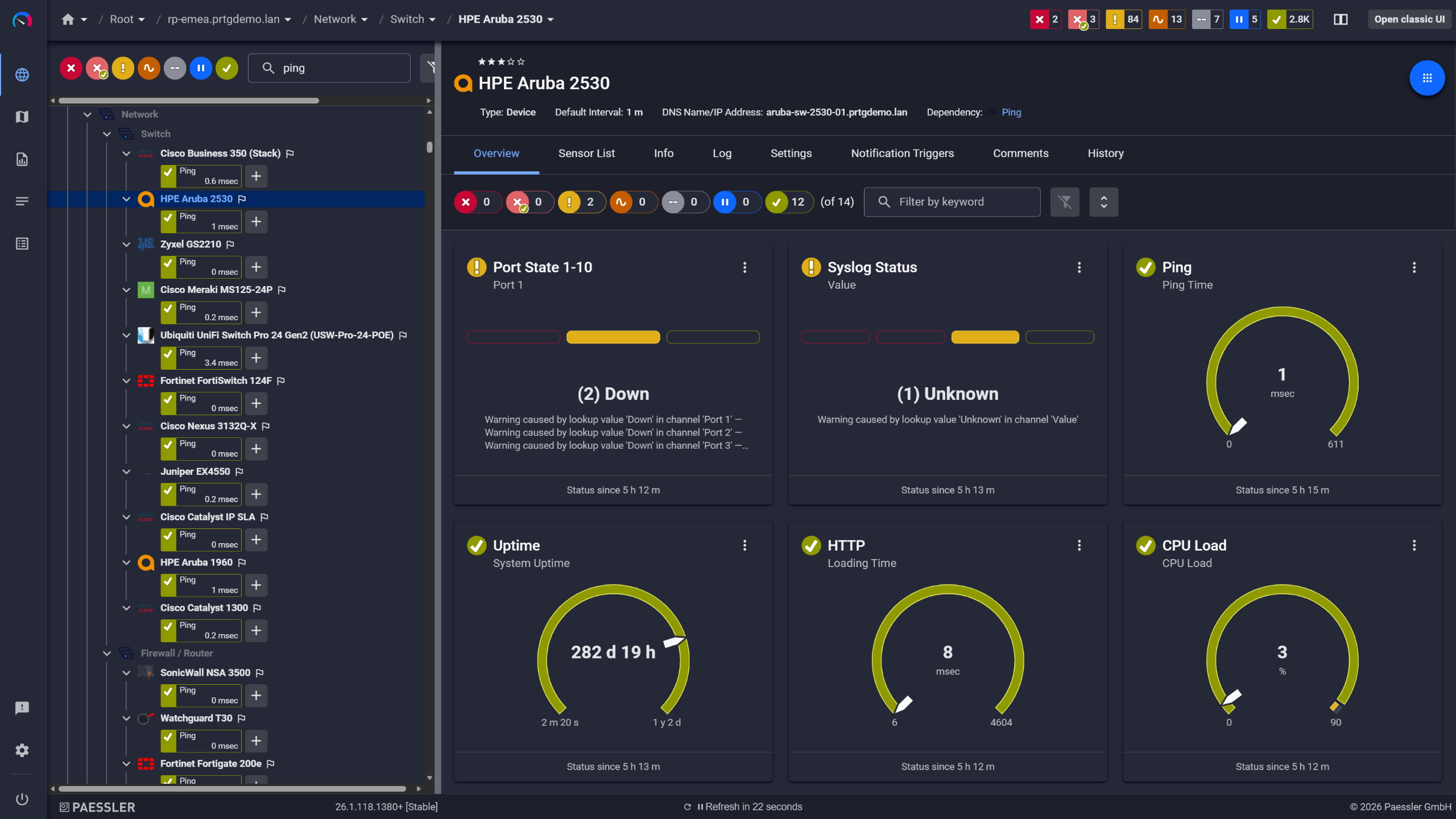
Network switches monitored across vendors
Threshold alerting only works if you know what normal looks like first. That's what the historical reports are for.
PRTG builds a performance record from the moment monitoring starts. Compare utilization and response times across weeks, identify what normal looks like for each link and device, then set thresholds so PRTG notifies you when values go outside the limits you define. There's no automatic anomaly detection. You set the thresholds based on what you know about your environment. Was network speed always this low on that WAN link? Are ping times to that server creeping up since the last application rollout? The data answers those questions. Without it, they stay open.
Start monitoring your infrastructure in minutes. No professional services, no complex configuration, no risk.
Having ping, flow data, interface counters, and browser-based speed results on the same timeline makes a real difference. When every data source shares one view, you stop switching between tools and start seeing connections directly.
PRTG brings all of these methods into one interface. All sensor data shares the same timeline, stored historically and visualized together. What used to require multiple tools is one dashboard. The correlation that previously happened in your head now happens on screen.

Scheduled reports, always on time
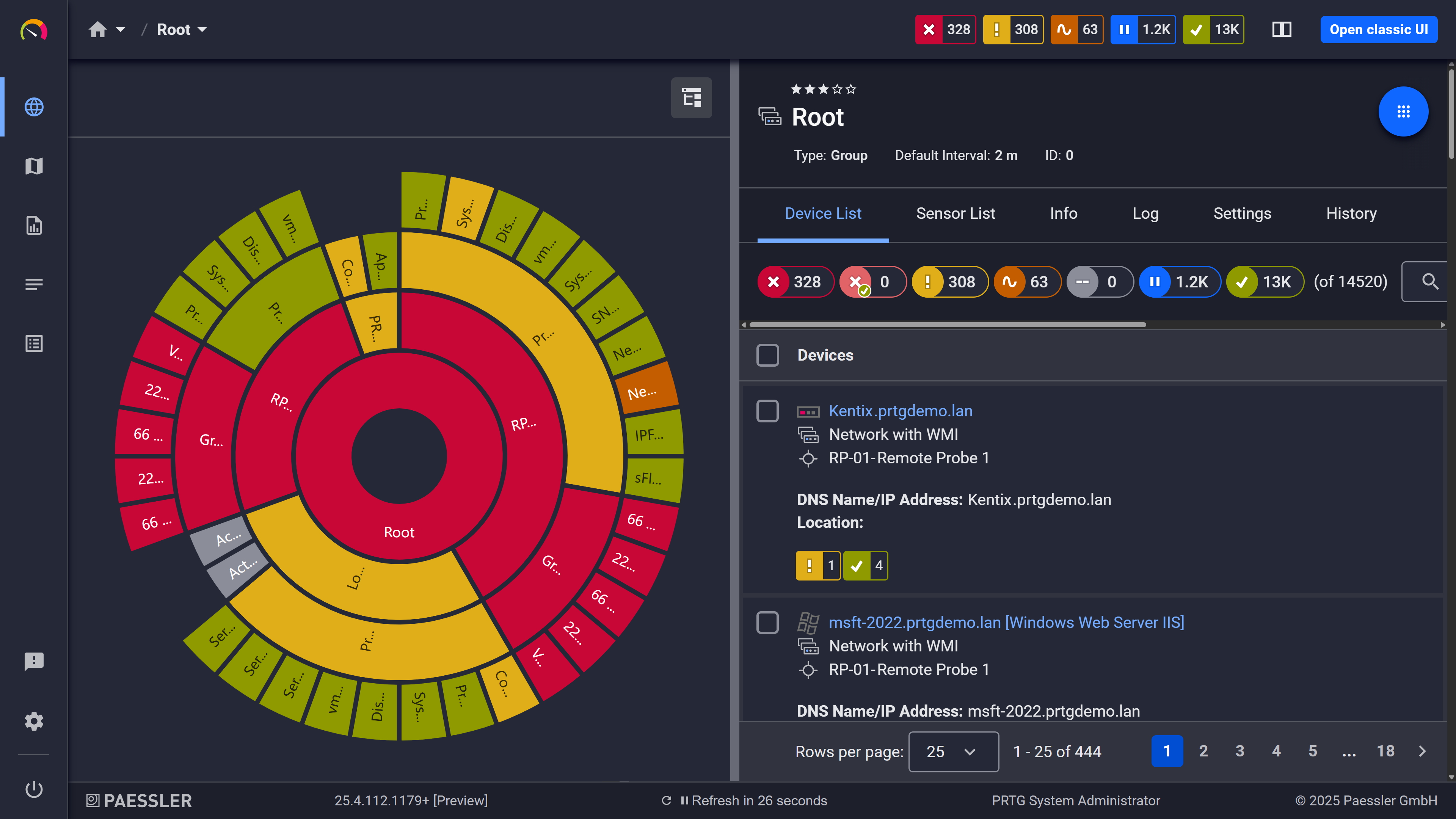
Your entire network, visualized instantly

Full device list, instant overview
A remote site reports degraded connectivity. You can't immediately tell whether the problem is local (a switch, an access point, an overloaded server) or whether it's the WAN link between the sites reaching capacity.
PRTG's remote probe architecture puts a Windows-based remote probe at each site, monitoring local devices independently and reporting to the central PRTG instance. With QoS Round Trip sensors configured between probe endpoints, you get continuous latency, jitter, and packet loss data for that path. One important note: PRTG monitors between your probe endpoints. It doesn't trace every intermediate hop in the ISP routing path. For hop-by-hop path analysis, a dedicated path-tracing tool is the right choice.
PRTG uses several complementary methods to collect performance data. The right combination depends on what your devices support and what you need to measure. Most environments use more than one of these at the same time.
FEATURE | Done Manually Done Manually | With PRTG With PRTG |
|---|---|---|
Performance data availability | Done Manually Only during active test sessions | With PRTG 24/7, stored for historical access |
Test results for intermittent issues | Done Manually Missed if you're not testing at that moment | With PRTG Captured in historical graphs regardless of when it happened |
Threshold alerting | Done Manually Manual check required | With PRTG Automatic, alerts sent when limits are exceeded |
Data from multiple sources | Done Manually Separate tools, no shared timeline | With PRTG ICMP, SNMP, Flow, WMI, all in one timestamped view |
Multi-site coverage | Done Manually Requires on-site access or VPN CLI per location | With PRTG Remote probes report to central PRTG instance |
Choose the PRTG Network Monitor subscription that's best for you.
| License Name | License description | Price | License Details | Get started | Pricing Details | |
|---|---|---|---|---|---|---|
| PRTG 500 | $200 | per month paid annually | Buy nowBuy now | Enough to monitor multiple aspects of 50 devices | ||
| PRTG 1000 | $358 | per month paid annually | Buy nowBuy now | Enough to monitor multiple aspects of 100 devices | ||
| PRTG 2500 | $742 | per month paid annually | Buy nowBuy now | Enough to monitor multiple aspects of 250 devices | ||
| PRTG 5000 | $1,300 | per month paid annually | Buy nowBuy now | Enough to monitor multiple aspects of 500 devices | ||
| PRTG 10000 | $1,642 | per month paid annually | Buy nowBuy now | Enough to monitor multiple aspects of 1000 devices |

The main difference is time coverage. On-demand network testing tools (a CLI ping, iPerf, an Ookla speed test) tell you what conditions look like during the test. That's it. PRTG polls at regular intervals and stores every result, so you have a historical record you can go back to even for events that happened days ago. Point-in-time testing is useful for capacity validation or benchmarking. Continuous monitoring is what you need for troubleshooting, identifying bottlenecks, baselining, and ongoing visibility.
Latency, packet loss, jitter, download speed and upload speed per interface (Mbps/Gbps), traffic volume by protocol, interface error rates, and HTTP response times. Here's how those metrics map to sensors:
None of PRTG's standard network performance methods generate traffic. SNMP polling reads MIB counters directly from the device. Flow monitoring receives metadata that your router or switch exports passively. Packet sniffing reads headers of packets passing the local network adapter, read-only. No active load is added to the network by any of these methods. Worth noting if you're already planning to use flow: enabling export on the device side does add a small processing overhead there, but that's a device-level configuration, not something PRTG introduces.
iPerf is an open-source tool that generates active TCP or UDP traffic for load testing scenarios or to measure maximum throughput on a link. You run it when you need to know what a link can actually handle under load. It runs on Linux, Windows, and macOS, and Android and iOS apps are available as well. PRTG does something different: it monitors real traffic behavior over time and stores the test results passively. They're complementary. iPerf answers "what's the ceiling?" and PRTG answers "what's actually happening, and what was happening yesterday?"
Yes, within scope. The HTTP v2 sensor measures response times and availability for internal and external URLs. The Cloud HTTP v2 sensor checks external endpoints from PRTG Cloud locations distributed across four continents. The Ping v2 sensor can target any IP address, including your ISP gateway, which makes it useful for spotting high latency or packet loss on the path to the internet.
Unlike a one-time internet speed test, PRTG monitors these endpoints continuously and stores every result, so you can see whether a slowdown is a recurring pattern or an isolated event.
What PRTG doesn't do: full ISP path tracing or intermediate hop analysis. It tests reachability and response time to the endpoints you define. For hop-by-hop path analysis, a dedicated traceroute or path-tracing tool is the right choice.
ICMP, SNMP v1/v2c/v3, NetFlow, IPFIX, sFlow, jFlow, TCP, WMI, and packet sniffing. No proprietary agent is required for SNMP- or flow-capable devices.
PRTG monitors the network-facing side of your wireless infrastructure: traffic volume, error rates, and availability from SNMP-capable access points. Client-side wireless metrics are a different story. RF signal strength, air quality, per-client WLAN data — those require dedicated wireless LAN tools. If you need visibility into both, PRTG and a WLAN-specific tool cover different layers and don't really overlap.
Auto-discovery scans an IP range and adds reachable devices by IP address automatically. It works best for devices in the same network segment as the probe. With more than 250 preconfigured sensor types, standard ICMP and SNMP monitoring starts without any scripting, and time to first data is typically minutes after installation.
Flow monitoring and QoS path monitoring take longer: flow requires configuration on the network device, and QoS Round Trip monitoring requires a remote probe at each measurement endpoint. For basic availability and interface monitoring, you're up and running quickly.
Network Monitoring Software – Version 26.1.116.1532 (February 9th, 2026)
Download for Windows and cloud-based version PRTG Hosted Monitor available
English, German, Spanish, French, Portuguese, Dutch, Russian, Japanese, and Simplified Chinese
Network devices, bandwidth, servers, applications, virtual environments, remote systems, IoT, and more
Choose the PRTG Network Monitor subscription that's best for you



