• Company
    • About Us
    • Case Studies
    • Press Center
    • Careers
    • Blog
    • Contact us
  • Contact us
  • Login
 
  • English
    • Deutsch
    • Español
    • Français
    • Italiano
    • Português
Paessler
                    - The Monitoring Experts
  • Products
    • Paessler PRTG
      Paessler PRTGMonitor your whole IT infrastructure
      • PRTG Network Monitor
      • PRTG Enterprise Monitor
      • PRTG Hosted Monitor
      • PRTG UVexplorer
      • PRTG extensionsExtensions for Paessler PRTGExtend your monitoring to a new level
    • Icon Features
      FeaturesExplore all monitoring features
      • Maps & dashboards
      • Alerts & notifications
      • Multiple user interfaces
      • Distributed monitoring
      • Customizable reporting
  • Solutions
    • Industries
      IndustriesMonitor various industry sectors
      • Industrial
      • Healthcare
      • Data Center
      • Education
      • Finance
      • Government
    • IT Topics
      IT TopicsMonitor all areas of IT
      • Network Monitoring
      • Bandwidth Monitoring
      • SNMP Monitor
      • Network Mapping
      • WiFi Monitoring
      • Server Monitoring
  • Pricing
  • Resources
    • Getting Started
      Getting StartedModules for self-paced learning
    • How-to Guides
      How-to GuidesGet the most out of PRTG
    • Videos & Webinars
      Videos & WebinarsLearn from Paessler experts
    • IT  Knowledge
      IT KnowledgeExpand your IT knowledge
    • PRTG Manual
      PRTG ManualFull documentation
    • Knowledge Base
      Knowledge BaseShare community knowledge
    • PRTG Sensor Hub
      PRTG Sensor HubGet sensors, scripts & templates
    • Trainings
      PRTG TrainingLearn how to work with PRTG
  • Partners
    • Icon Handshake
      Become a PartnerFor resellers and channel partners
    • Icon MSP
      Become an MSPDeliver monitoring as a managed service
    • icon partner
      Partner PortalLog in to your partner account
    • Deal Registration
      Deal RegistrationRegister your sales opportunities
    • icon search
      Find a PartnerFind partners selling Paessler products
    • icon technology
      Technology AlliancesSee Paessler technology partnerships
    • Partner HubTools for Your Success
  • Company
    • About Us
    • Case Studies
    • Press Center
    • Careers
    • Blog
    • Contact us
  • Contact us
  • Login
  • English
    • Deutsch
    • Español
    • Français
    • Italiano
    • Português
  • Get a quote
  • Free trial

Complete jFlow Monitoring

See exactly which IPs, applications, and protocols are consuming your bandwidth, and where.

Free download
PRODUCT OVERVIEW

How do you collect and analyze jFlow data from Juniper devices?

jFlow is Juniper Networks' built-in flow monitoring protocol. Juniper routers, switches, and firewalls running JunOS collect data on every traffic flow passing through them and export that data as flow records to a flow collector. The result is a detailed breakdown of network traffic by IP address, port number, protocol, and application group. Interface totals alone don't show you which conversations are actually happening on your network. 

Paessler PRTG acts as the flow collector, receiving jFlow data via UDP and making it available for analysis, alerting, and reporting. Beyond jFlow v5, PRTG also supports IPFIX, NetFlow, and sFlow, so it works across mixed-vendor environments without requiring separate tools for each protocol. Supported devices and protocols include: Juniper MX routers, EX switches, SRX firewalls, vSRX, and vMX (JunOS); Cisco routers and switches (NetFlow); multi-vendor environments via IPFIX and sFlow; plus SNMP Traffic v2 monitoring as a complementary method for devices without flow export.

Download PRTG Trial

What you will find on this page

  • PRTG jFlow Monitoring Benefits
  • How to Monitor jFlow
  • Manual jFlow Monitoring vs. PRTG
  • FAQs

PRTG is compatible with all major vendors, products, and systems

compatible with all major vendors, products, and systems

What PRTG's jFlow Monitoring Gives You

Understand What's Using Your Bandwidth

jFlow goes deeper than SNMP interface counters by breaking traffic down to the IP, port, and application level. That means you see exactly which conversations are driving bandwidth utilization on any monitored interface. PRTG's jFlow v5 sensor receives flow records exported from your Juniper devices via UDP and organizes the data into Toplists (Top Talkers, Top Connections, and Top Protocols), breaking traffic down by sender and destination IP, port, and protocol. Traffic is also categorized by application group: web, file transfer, mail, network infrastructure, and remote access applications. No CLI queries, no guesswork, just the traffic analysis you need to act on. 

  • Top Talkers, Top Connections, Top Protocols, ranked per sensor on demand  
  • Traffic categorized by application group: web (WWW), file transfer (FTP), mail (IMAP, POP3, SMTP), network infrastructure (DHCP, DNS, ICMP), remote access applications  
  • Breakdown by destination port and protocol  
  • Threshold-based alerts when bandwidth crosses a configured limit  
  • Per-device/interface breakdown, depending on how flow export is configured on the device 

One Flow Collector for Your Entire Network, Regardless of The Vendor

Most networks run multiple vendors. Juniper handles core routing, Cisco covers access, and other network devices export sFlow. A unified flow collector brings all of that into one place, giving you consistent visibility across every device regardless of the protocol it exports. PRTG includes dedicated sensors for jFlow v5, NetFlow, IPFIX, and sFlow, so all flow data is processed in one monitoring tool and visible in a single dashboard. No additional collector software needed, no manual correlation between data sources. 

  • jFlow v5 sensor 
  • IPFIX sensor 
  • NetFlow sensor 
  • sFlow sensor 
  • All data visible in a single dashboard, no separate tools required 
  • No additional collector software needed 
PRTG web interface showing live performance graphs for a Probe Health sensor

Live graphs, real-time performance data
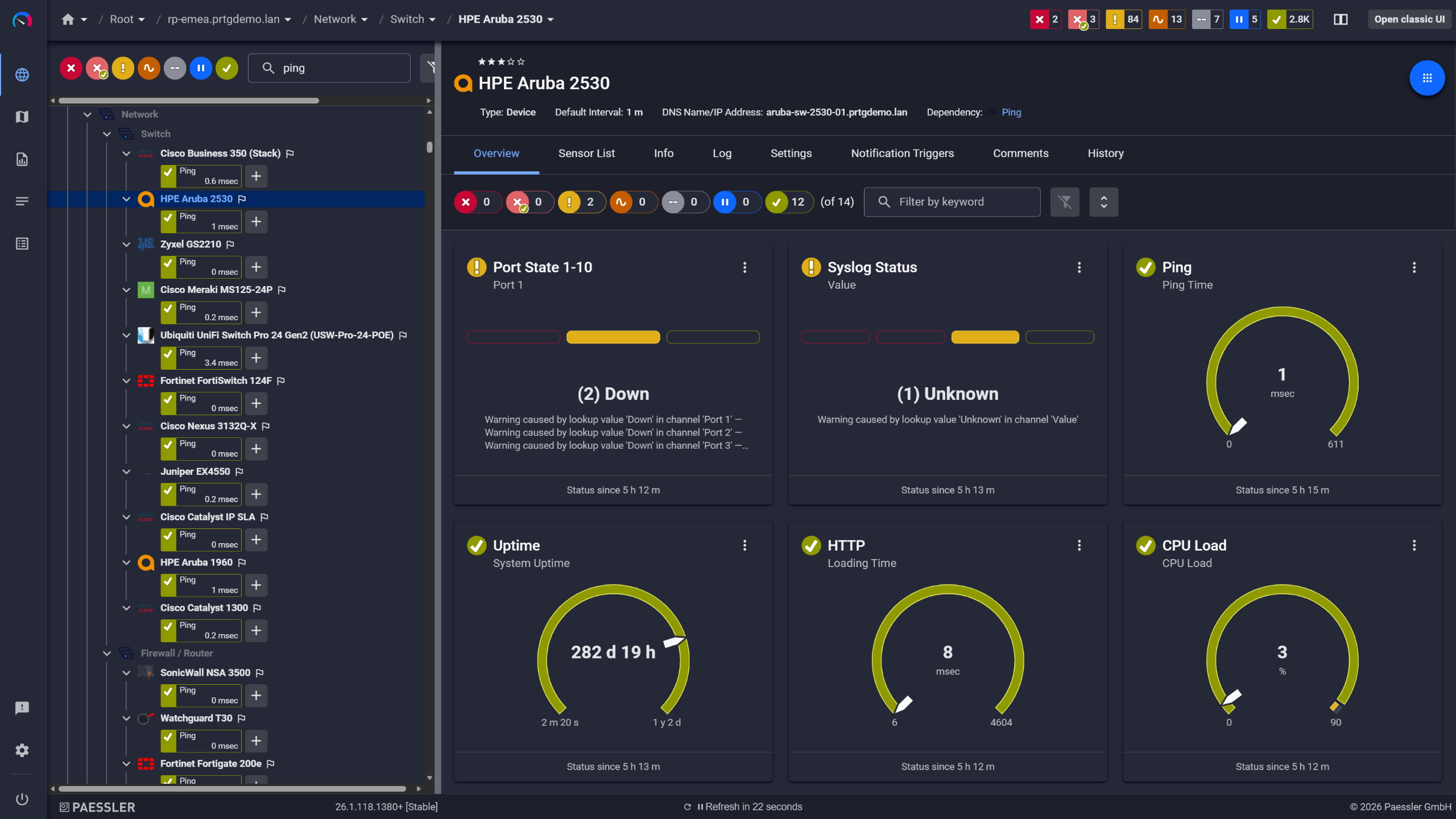
PRTG device overview for an HPE Aruba 2530 switch with port state, ping, and CPU sensors

Network switches monitored across vendors

PRTG web interface showing device tree and full device list with sensor status badges

Full device list, instant overview

Automated Alerts on Every Traffic Threshold You Set

Active alerting on traffic thresholds means your team sees bandwidth changes as they happen and can respond while application performance is still intact, rather than reacting after the fact. PRTG monitors jFlow data continuously and sends alerts when traffic on a monitored interface or IP address crosses a defined threshold, via email, SMS, or push notification. If an issue persists, PRTG can repeat notifications at configured intervals. Monitoring covers WAN links, firewall interfaces, and internal segments equally.  

  • Configurable bandwidth thresholds per sensor 
  • Alert channels: email, SMS, push notification (iOS/Android) 
  • Current status on all monitored Juniper devices 
  • Repeat notifications if an issue persists 
  • WAN links, firewall interfaces, and internal segments all covered 

See Why IT Professionals Trust PRTG

Start monitoring your infrastructure in minutes. No professional services, no complex configuration, no risk.

Free download
PRODUCT OVERVIEW

Traffic Data That Makes Capacity Decisions Straightforward

Justifying a WAN upgrade, or arguing against one, requires more than a current utilization snapshot. You need peak usage patterns, sustained load over time, and growth trends that are hard to pull together manually. PRTG retains historical jFlow data per interface, so bandwidth utilization trends over days, weeks, or months are always available on any monitored connection. That data is exportable, making it practical to share with leadership or service providers when backing up a capacity planning decision with real numbers.  

  • Historical bandwidth trend graphs per interface 
  • Peak utilization tracking 
  • WAN link capacity analysis 
  • Data retained long-term; retention period depends on your PRTG configuration 
  • Exportable for reporting to leadership or service providers 
PRTG reports list showing scheduled monitoring reports with run times and sensor counts

Scheduled reports, always on time

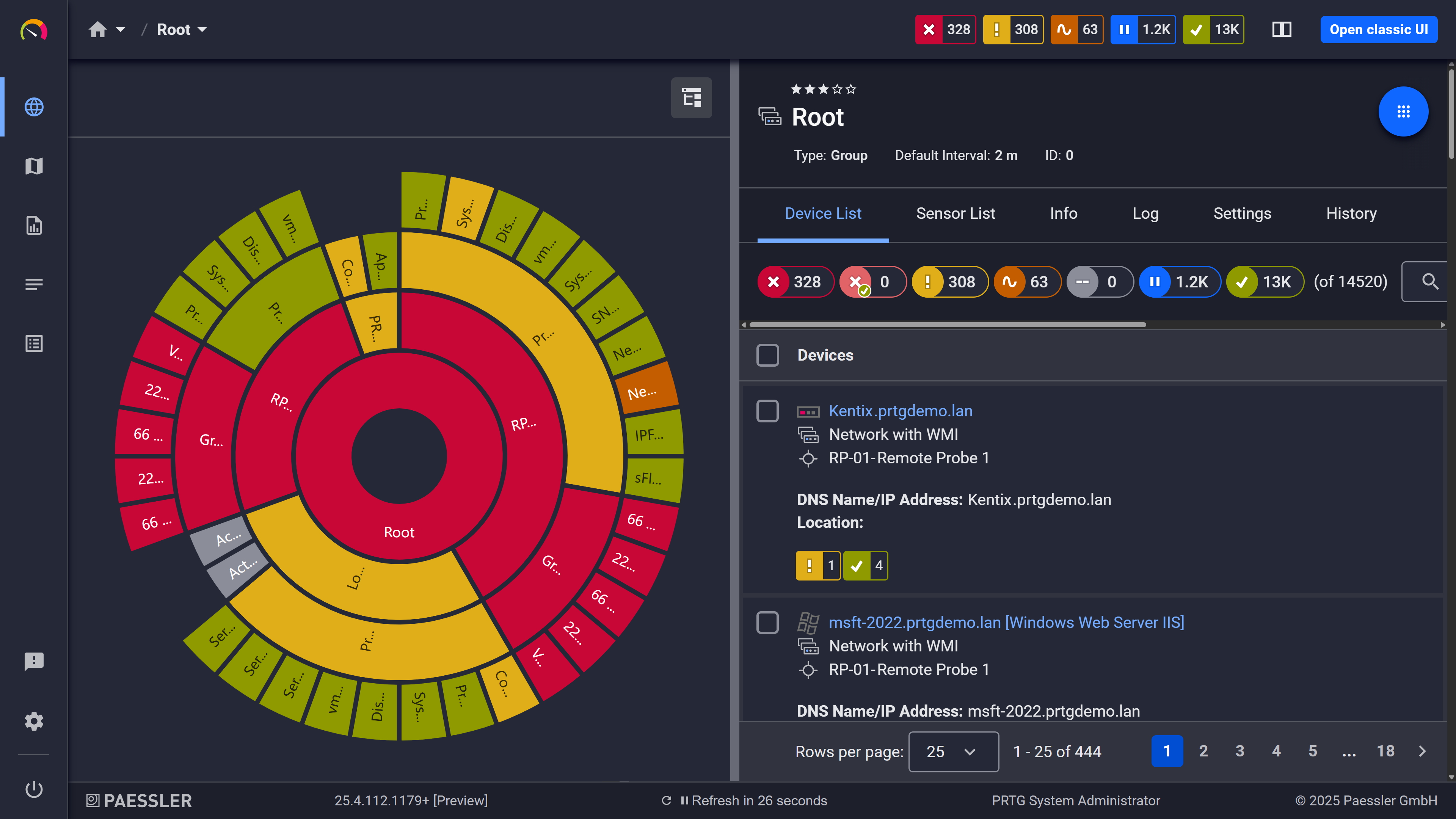
PRTG sunburst chart visualizing the full network hierarchy with color-coded sensor status

Your entire network, visualized instantly
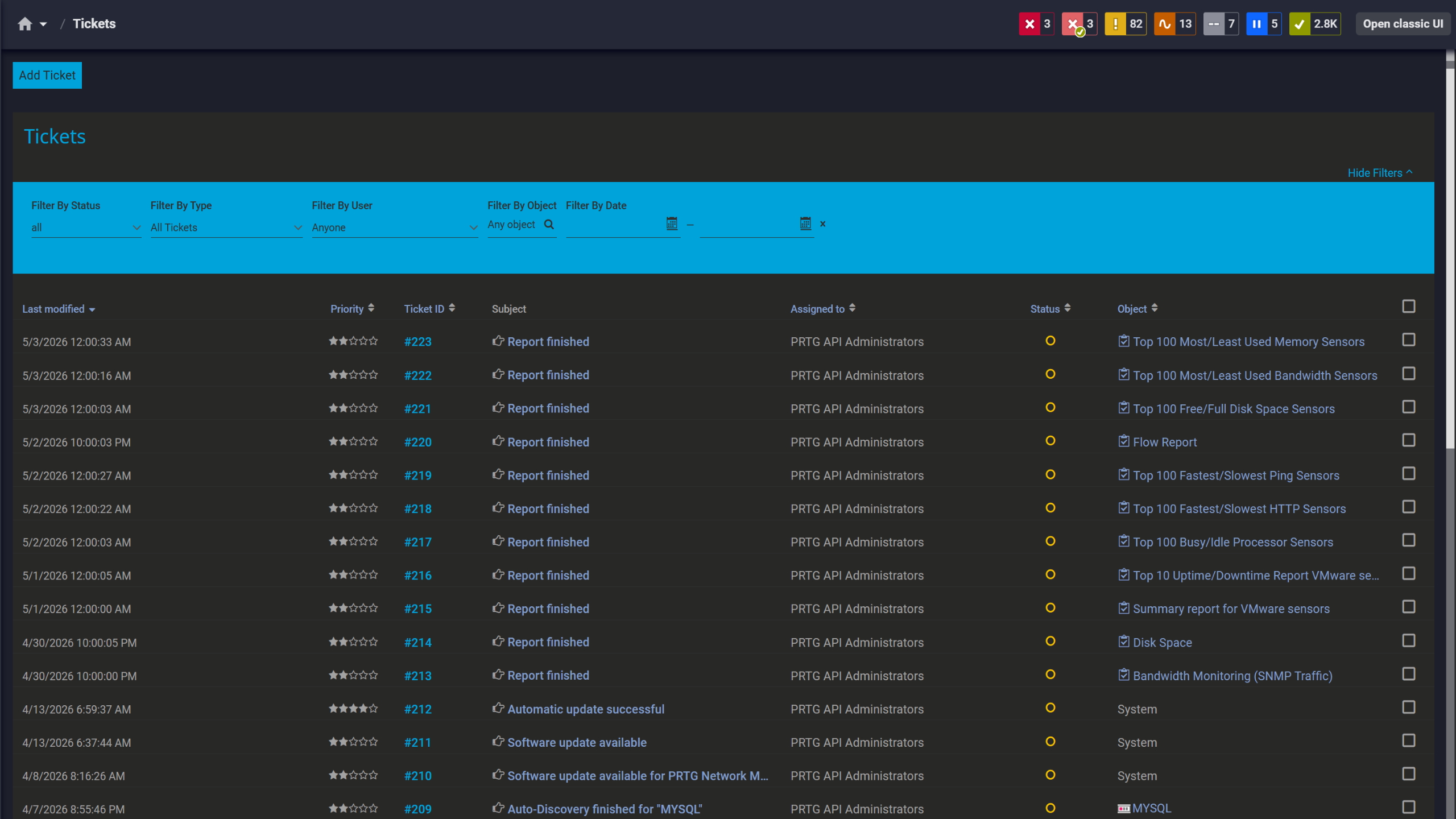
PRTG tickets list showing system notifications, report completions, and update alerts

Tickets keep your team aligned

How PRTG Monitors jFlow Traffic 

Here's a look at the sensors, protocols, and methods PRTG uses to collect and process jFlow data. This isn't a configuration guide. It's the technical overview you need to assess whether PRTG fits your environment.

jFlow v5 Sensors 

Juniper devices running JunOS export flow records to PRTG via UDP. The jFlow v5 sensor receives that data and categorizes traffic into predefined channel groups: web, file transfer, mail protocols, network infrastructure services (DHCP, DNS, ICMP), and remote access applications. Several filter options let you control how traffic is divided into channels.

For environments where the standard grouping doesn't fit, PRTG also includes a jFlow v5 (Custom) sensor. It works with the same flow records but lets you define your own channel definitions, giving you full control over how traffic is categorized and displayed.

IPFIX Sensor

IPFIX (Internet Protocol Flow Information Export) is the IETF open standard for flow export. Juniper devices support IPFIX alongside or instead of jFlow, depending on the platform and JunOS version. PRTG's IPFIX sensor handles both IPv4 and IPv6 flow records and supports a broader field set than the jFlow v5 sensor, which gives you more flexibility in what data the device exports and PRTG collects. 

If your Juniper devices support IPFIX export, it's worth considering as the primary flow monitoring method, especially in larger or more complex environments where the broader field set and IPv6 support matter more.

Sampling & Performance

On high-traffic links, exporting a flow record for every active traffic flow can generate significant data volume. Enabling sampling on the device (exporting only every n-th packet rather than all of them) reduces export volume and lowers the processing load on the PRTG probe. The trade-off is granularity: sampled data gives you a representative view of traffic patterns, not a complete record of every flow. 

Paessler rates all xFlow sensors as very high performance impact. The per-probe limit applies across all of them: 50 sensors maximum for jFlow v5, IPFIX, and NetFlow alike. Scale beyond that and you'll need additional remote probes. 

Worth noting: IPFIX has an advantage in larger Juniper environments because of its broader field set and native IPv6 support. That's a reason to prefer it over jFlow v5 where your devices support it, not a difference in how many sensors you can run per probe.

SNMP Complement

Not every device supports flow export, and not every interface needs that level of detail. SNMP Traffic v2 monitoring covers interface-level totals: traffic in, traffic out, packet counts, errors, and discards. No flow export configuration needed on the device. 

Running SNMP Traffic v2 alongside your jFlow sensors is a useful way to cover interfaces that aren't set up for flow export, or to keep a lightweight eye on segments where application-level breakdown isn't needed. Also good for catching bottlenecks on devices where flow monitoring isn't available at all.

free downLoad

jFlow Traffic Analysis: Manual Methods vs. PRTG

Capability

Without PRTG

Without PRTG

With PRTG

With PRTG

Identify top bandwidth consumers

Without PRTG
not included

CLI queries per device, per incident

With PRTG
included

Top Talkers, Top Connections, Top Protocols, per sensor on demand

Multi-protocol flow collection

Without PRTG
not included

Separate tools per vendor

With PRTG
included

jFlow v5, NetFlow, IPFIX, sFlow in one place

Historical bandwidth trend analysis

Without PRTG
not included

Custom logging scripts or manual export

With PRTG
included

Stored automatically, visualized in graphs

Threshold alerting on traffic

Without PRTG
not included

Manual checks or custom scripting

With PRTG
included

Configurable per sensor, alerts sent automatically

Application-type traffic breakdown

Without PRTG
not included

Not available via SNMP alone

With PRTG
included

Native via jFlow v5 and IPFIX sensor channel groups

free downLoad

“We strive to equip our systems with state-of-the-art technology to safeguard our educational practices for the future. Part of this includes ensuring that all our systems run smoothly at all times. On any given day, we rarely have time to keep an eye on all our systems. We therefore decided to monitor our school’s IT environment with a centralized network monitoring tool.”

Stefan Roschewitz, IT administrator
BBS Holzminden

“We want to include the tool in our set of solutions in order to solve problems more proactively in our technology infrastructure. PRTG has exceeded all our expectations because it is a reliable, extremely easy-to-use solution. There is no doubt that it lives up to the renowned quality of German technology.”

Esbin Saúl Lázaro García, IT Infrastructure and Security Engineer
Hospital El Pilar

“The reactivity, know-how, and technical solutions of Paessler are outstanding in every situation. For me, no monitoring tool compares to PRTG.”

Andreas Reimann, Senior Networking Communication Architect
Zurich Airport

Paessler PRTG Network Monitor licenses & pricing

Choose the PRTG Network Monitor subscription that's best for you.

License NameLicense descriptionPriceLicense DetailsGet startedPricing Details
PRTG 500$200per month paid annuallyBuy nowBuy now

Enough to monitor multiple aspects of 50 devices

PRTG 1000$358per month paid annuallyBuy nowBuy now

Enough to monitor multiple aspects of 100 devices

PRTG 2500$742per month paid annuallyBuy nowBuy now

Enough to monitor multiple aspects of 250 devices

PRTG 5000$1,300per month paid annuallyBuy nowBuy now

Enough to monitor multiple aspects of 500 devices

PRTG 10000$1,642per month paid annuallyBuy nowBuy now

Enough to monitor multiple aspects of 1000 devices

Over 100,000 Customers Worldwide Love Paessler  

customer success stories

 jFlow Monitoring: Frequently Asked Questions


What is jFlow and how does it differ from NetFlow and sFlow?

jFlow is Juniper Networks' flow monitoring protocol, built into JunOS. Like NetFlow (Cisco's equivalent), it exports data on every traffic flow passing through a network device: source and destination IP addresses, port numbers, protocol, and traffic volume. That data goes to a flow collector for analysis. 

NetFlow and jFlow work the same way in concept; the difference is vendor origin. NetFlow is Cisco's implementation, jFlow is Juniper's. sFlow works differently: rather than exporting data on every flow, it uses statistical sampling, capturing only a fraction of packets, which makes it more resource-efficient on high-speed networks but less granular. IPFIX is the IETF open standard derived from NetFlow v9 and is now supported across multiple vendors, including Juniper.

Which Juniper devices support jFlow export?

jFlow is available on Juniper devices running JunOS. That covers MX series routers, EX series switches, SRX series firewalls, and virtual platforms like vSRX and vMX. Whether a device exports jFlow v5 or IPFIX depends on the platform and JunOS version. Check your device documentation to confirm what your hardware supports and what export format makes sense for your setup.

Does PRTG support jFlow v5 and IPFIX from the same Juniper device?

Yes. PRTG has separate sensors for jFlow v5 and IPFIX, and both can run within the same PRTG instance. If your Juniper device supports both export formats, you can use both sensors. In practice, you'd typically choose one. The jFlow v5 sensor uses predefined channel groups; the IPFIX sensor supports more flexible field mapping, handles IPv4 and IPv6 flow records, and gives you more control over what data the device exports. Both sensor types share the same per-probe limit of up to 50 sensors. Your choice between them comes down to device support, field set requirements, and how your JunOS version exports data.

How does PRTG receive jFlow data? What's involved in the setup?

On the Juniper device side, you configure flow export to point to the IP address of your PRTG probe on the UDP port you want to use. On the PRTG side, you add a jFlow v5 or IPFIX sensor to the device and set the matching UDP port. PRTG starts receiving and processing flow records as soon as the export is active and the sensor is configured. No separate flow collector software is needed. PRTG handles that functionality directly.

Can PRTG monitor jFlow and NetFlow at the same time in a mixed-vendor environment?

Yes. All xFlow sensors in PRTG (jFlow v5, NetFlow, IPFIX, and sFlow) can run simultaneously within the same PRTG instance. Each sensor handles its own protocol independently, and data from all sources is available in a single dashboard. This makes PRTG a solid flow collector for environments with Juniper and Cisco devices running side by side, along with anything else exporting sFlow or IPFIX.

What exactly does PRTG display from jFlow data?

From jFlow exports, PRTG shows:  

  • Bandwidth consumption per connection and in aggregate  
  • Traffic breakdown by sender and destination IP address, port number, and protocol  
  • Traffic categorized by application group (web, file transfer, mail, network infrastructure, remote access applications)  
  • Top Talkers, Top Connections, and Top Protocols via Toplists   
  • Historical bandwidth utilization data per interface 
What is a jFlow sampling rate and when should I use it?

By default, jFlow exports a flow record for every active traffic flow passing through the device. On high-traffic links, this can generate a large volume of flow records and put real load on both the Juniper device and the PRTG probe. Enabling sampling tells the device to export only every n-th packet (for example, one in every 100), which reduces that load significantly. 

The trade-off is precision. With sampled data, low-volume flows may not appear in the data at all, and traffic volume figures are estimates rather than exact counts. Sampling makes sense on high-bandwidth links where full export isn't practical. For links with moderate traffic, full flow export typically works fine and gives you more accurate jFlow data to work with.

How many jFlow sensors can I run in PRTG?

Both jFlow v5 and IPFIX sensors have a very high performance impact. Paessler recommends a maximum of 50 of either sensor type per probe. For deployments that exceed that, distributing monitoring across additional PRTG remote probes is the standard scaling path. 

If you're choosing between jFlow v5 and IPFIX for a larger Juniper environment, the deciding factors are device and JunOS version support, the field set you need, and IPv6 requirements. Not a difference in per-probe limits. Where your Juniper devices support IPFIX export and you need broader data flexibility, IPFIX is generally the stronger long-term choice. NetFlow sensors carry the same per-probe limit of 50.

Paessler PRTG

Paessler PRTG

Network Monitoring Software – Version 26.1.116.1532 (February 9th, 2026)

Hosting icon

Hosting

Download for Windows and cloud-based version PRTG Hosted Monitor available

Languages icon

Languages

English, German, Spanish, French, Portuguese, Dutch, Russian, Japanese, and Simplified Chinese

test

Monitor everything

Network devices, bandwidth, servers, applications, virtual environments, remote systems, IoT, and more

test

Pricing

Choose the PRTG Network Monitor subscription that's best for you

Discover more monitoring insights and stories

Content illustration

Powerful stories from the monitoring world

  • Your Switch Doesn't Support Flow? We Show How You Can Monitor ...
  • sFlow vs. NetFlow: The ultimate comparison for network monitoring ...
  • Examples of IT Scenarios You Can Monitor with PRTG 100 for Free
Support illustration

Resources to master your monitoring challenges

  • PRTG Manual: jFlow v5 Sensor - Paessler
  • Jflow Monitoring
  • PRTG Manual: jFlow v5 (Custom) Sensor - Paessler
Solution illustration

Solutions for all your monitoring needs

  • jFlow Monitoring
  • Protocol Monitoring
  • NetFlow Monitoring
PRTG Logo

Start Monitoring with PRTG and see how it can make your network more reliable and your job easier.

Free download
PRODUCT OVERVIEW

Products

  • Paessler PRTG
    Paessler PRTGMonitor your whole IT infrastructure
    • PRTG Network Monitor
    • PRTG Enterprise Monitor
    • PRTG Hosted Monitor
    • PRTG UVexplorer
    • PRTG extensions
      Extensions for Paessler PRTGExtend your monitoring to a new level
  • Icon Features
    FeaturesExplore all monitoring features

Monitoring with PRTG

  • Network monitoring
  • Bandwidth monitoring
  • SNMP monitoring
  • Network mapping
  • Wi-Fi monitoring
  • Server monitoring
  • Network traffic analyzer
  • NetFlow monitoring
  • Syslog server

Useful Links

  • PRTG Manual
  • Knowledge Base
  • Customer Success Stories
  • About Paessler
  • Subscribe to newsletter
  • PRTG Support
  • PRTG Consulting
  • PRTG Feedback & Roadmap

Contact

Paessler GmbH
Thurn-und-Taxis-Str. 14, 
90411 Nuremberg 
Germany

[email protected]

+49 911 93775-0

  • Contact us
©2026 Paessler GmbHTerms & ConditionsPrivacy PolicyImprintReport VulnerabilityDownload & InstallSitemap
References References References