Custom alerts and data visualization let you quickly identify and prevent all kinds of network issues.
Question: How many times have you been busy configuring firewalls and routers, tracking down possible malware, or looking up a python script on Github, only to have to drop everything because compliance wanted proof you backed up data for disaster recovery, or accounts wanted SLA data?
Answer: Probably far too many times. Far, far too many.
Which is where Paessler PRTG comes in. Its biggest advantage over Nmap, of course, is that it's a full-stack solution, while Nmap's scanning tools are designed for a limited set of specific use cases like port scanning, network scanning, and vulnerability scanning.
But, just as important, PRTG is easy and intuitive for beginners and everyone else. Which means compliance, accounts, and other non-techy teams can get what they need from your monitoring data by themselves, without depending on you. And you'll have more time to focus without interruptions. Win-win.
Simplicity and ease of use benefit everyone. It means accounts, compliance, the C-suite, and other non-techies can get what they need from your network monitoring solution without you having to drop everything to do it for them.
And, as a sysadmin, it's great because — let's face it — nobody likes to tear their hair out on a daily basis just to do basic tasks.
Quick installation with automatic network discovery and smart setup for instant monitoring
Custom dashboard creation via drag & drop with easy-to-read visualized overviews
Different user interfaces for web, desktop, and mobile apps for monitoring on the go
Network of qualified implementation partners to support you with a smooth migration to PRTG
Diagnose network issues by continuously tracking the health, availability, and performance of your entire IT infrastructure. Show hardware parameters, application performance, network traffic, bandwidth usage, and other key metrics in real time. Visualize data in clear graphs and dashboards to identify problems more easily. Gain the overview you need to troubleshoot all kinds of issues in your network.
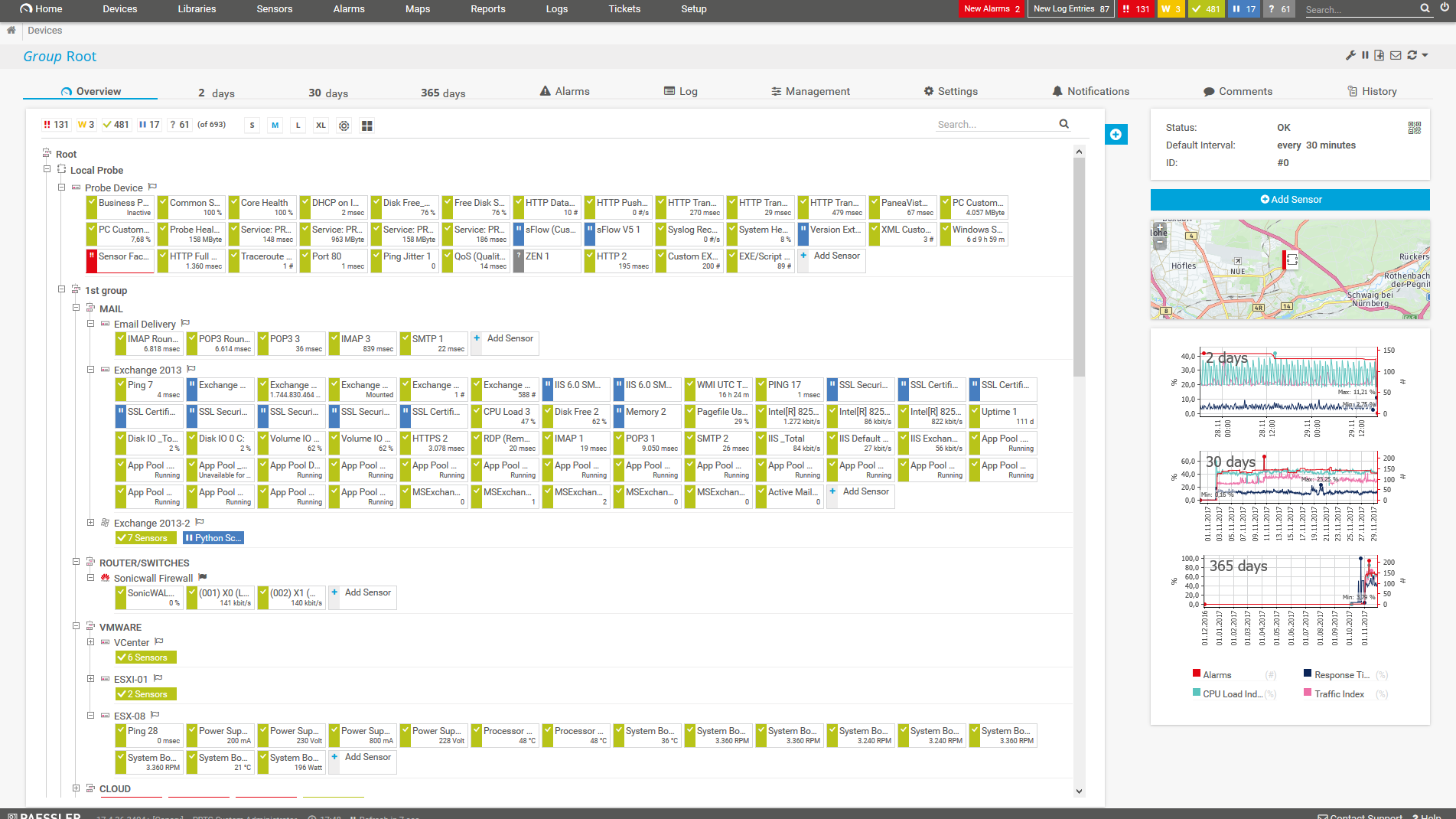
Device tree view of the complete monitoring setup

Custom PRTG dashboard for keeping an eye on the entire IT infrastructure

Live traffic data graph in PRTG
FEATURE | PRTG PRTG | Nmap Nmap |
|---|---|---|
One tool for your entire network | PRTG All monitoring features included | Nmap Limited to network discovery, port-scanning, and security audits |
Easy setup, intuitive monitoring | PRTG User-friendly interfaces for web, desktop, and mobile | Nmap Command-line focused, GUI available |
Automatic network discover | PRTG Included | Nmap Included |
Real-time alerts & notifications | PRTG Advanced, highly customizable alerting via different notification methods | Nmap Not supported |
Custom maps & dashboards | PRTG Custom dashboard creation via drag & drop | Nmap Not supported |
Agentless monitoring | PRTG No need to install agents on the monitored systems | Nmap Supported |
On-premises or cloud-based | PRTG Flexible deployment options available | Nmap On-prem deployment only |
Enterprise version | PRTG Available | Nmap Not available |
Freeware version | PRTG Available for up to 100 sensors, free for life | Nmap Fully free, forever |
Distributed network monitoring | PRTG Monitoring an unlimited number of remote locations included | Nmap Not supported |
Server & application monitoring | PRTG Out-of-the-box integration, no extra cost | Nmap Not supported |
Network performance monitoring | PRTG Out-of-the-box integration, no extra cost | Nmap Limited to basic scanning; doesn't support dedicated monitoring |
Bandwidth monitoring | PRTG Out-of-the-box integration, no extra cost | Nmap Not supported |
Network traffic analyzer | PRTG Out-of-the-box integration, no extra costs | Nmap Limited to port and host scanning |
Cloud services monitoring | PRTG Out-of-the-box integration, no extra cost | Nmap Not supported |
Virtual infrastructure monitoring | PRTG Out-of-the-box integration, no extra cost | Nmap Not supported |
Storage resource monitoring | PRTG Out-of-the-box integration, no extra cost | Nmap Not supported |
Database monitoring | PRTG Out-of-the-box integration, no extra cost | Nmap Not supported |
Web performance monitoring | PRTG Out-of-the-box integration, no extra cost | Nmap Not supported |
Supports leading technologies | PRTG SNMP, flow protocols, packet sniffing, WMI, HTTP, ping, SQL, and much more | Nmap Limited to scanning protocols like TCP/IP, UDP, and ICMP |
Create your own scripts | PRTG Own PRTG API included for custom sensors and scripts | Nmap Supported, but limited compared to PRTG |
Includes technical support | PRTG Expert support included, no extra costs | Nmap Community support only |

“All-around winning
network monitor”

“The real beauty of PRTG is the endless possibilities it offers”

“PRTG Network Monitor
is very hard to beat”
PRTG offers powerful monitoring and straightforward operation. So get excited about what matters — advanced monitoring capabilities, robust cybersecurity, complete network visibility — without having to hold everyone else's hands while they get to grips with the graphical user interface. PRTG is comprehensive, powerful, and super-simple to use.
Whether you're deploying PRTG on premises, in the cloud, or as a hybrid setup, getting started couldn't be quicker or easier. The system automatically detects all the hardware and software devices connected to your network and assigns the right sensors. You can use the monitoring environment as is or customize every aspect, so it suits your exact requirements.
Why rely on ad hoc Nmap scans when you can track your network round the clock? PRTG supports all major monitoring protocols, including Flow technologies, SSH, SNMP, and WMI, so there's no need to mess around with third-party plugins. Plus, you can automate alerts with custom thresholds and notifications, so nothing will ever fall through the cracks.
It’s not just a security scanner or port scanner. 250+ preconfigured sensors can monitor every hardware, software, and environmental metric imaginable, out of the box — bandwidth, DNS, web servers, operating systems, and more. Can't find sensors for specific metrics? Build a custom sensor using python script, PowerShell, REST, or .exe.
Always know exactly how much you'll pay. PRTG uses sensor-based pricing, which means you pay based on how many metrics you want to monitor, never to access advanced features. You can access our full suite of monitoring capabilities even on the free plan, so you can get started at no cost and scale as you grow.
You are interested to know if PRTG could be an alternative to your Nmap implementation?
PRTG is set up in a matter of minutes and can be used on a wide variety of mobile devices.

We also compared PRTG with other monitoring tools:
Zenoss as an open-source solution requires complex and technical expertise. PRTG delivers comprehensive full-stack observability with user-friendly interfaces and transparent pricing.
Kentik specializes in network observability and traffic flows but isn't full stack, requiring additional tools for complete infrastructure monitoring. PRTG offers truly end-to-end, all-in-one monitoring that simplifies workflows and optimizes performance.
N-able excels at RMM and endpoint management for MSPs but requires hands-on management with complex, expensive pricing. PRTG provides unified network monitoring with transparent, predictable, and cost-effective pricing.
Pandora FMS offers flexible monitoring but comes with complex pricing and a steep learning curve. PRTG delivers transparent sensor-based pricing and intuitive monitoring through a unified interface.
Real-time notifications mean faster troubleshooting so that you can act before more serious issues occur.
Partnering with innovative IT vendors, Paessler unleashes synergies to create
new and additional benefits for joined customers.

Combining their tools to a powerful solution for advanced analysis and automation, KnowledgeRiver and Paessler enable IT teams to ensure best performance for their infrastructure and networks.

Combining PRTG’s broad monitoring feature set with IP Fabric’s automated network assurance creates a new level of network visibility and reliability.

With ScriptRunner Paessler integrates a powerful event automation platform into PRTG Network Monitor.
Network Monitoring Software – Version 26.1.116.1532 (February 9th, 2026)
Download for Windows and cloud-based version PRTG Hosted Monitor available
English, German, Spanish, French, Portuguese, Dutch, Russian, Japanese, and Simplified Chinese
Network devices, bandwidth, servers, applications, virtual environments, remote systems, IoT, and more
Choose the PRTG Network Monitor subscription that's best for you
Choosing between Paessler PRTG and Nmap depends on several factors, such as your specific network monitoring needs, budget, and technical resources available in your organization.
PRTG is ideal:
Nmap might be your choice:
At the risk of sounding like we're dodging the question, it depends.
Need surgical, ad hoc network scanning, vulnerability scanning, and penetration testing capabilities? Use Nmap. It does both effectively, and it's free and open source, so it wins hands down for identifying open ports and analyzing your attack surface.
But if you have a large, complex network, or stability and reliability are critical, for example because they impact your organization's continued ability to do business, PRTG is the way to go. Far from being just a network scanner or vulnerability scanner, it's a full-stack solution that monitors all your most important health and performance variables round the clock and alerts you automatically when something doesn't look quite right. Oh, and it's extremely easy to set up and use, too. We even have a Linux-compatible cloud-hosted solution.
Nmap's open source, command-line interface will be instantly familiar to any IT professional, but beginners and non-techies may struggle, and you'll only have access to community-based support if you get stuck. Something to think about if any colleagues outside your core IT team will need access to scan results.
PRTG, on the other hand, is so easy even somebody who wouldn't know a router from a toaster can get to grips with it fast. Setup automation means you only have to key in an IP address range — our Auto-Discovery tool will do the rest. And you can create custom top lists, graphs, dashboards, and other visualizations that enable anyone to zoom in on the right data quickly and easily.
Nmap is fully free and open source. The tradeoff is that it's a specialized tool focused on network scanning, port scanning, and security auditing, not a full-stack network monitoring solution, and only comes with community support.
Bottom line: as your IT infrastructure expands and your needs become more complex, you'll likely have to invest in third-party tools and additional Nmap alternatives, which will drive up costs and still won't give you a complete picture of your network's health and performance, since you'll need to switch between multiple screens.
PRTG, on the other hand, is an end-to-end network monitoring solution. It can do network mapping, port scanning, vulnerability scanning, and security audits, and monitor other hardware, software, and environmental variables. Both on-premises and in the cloud. PRTG's first 100 sensors are free, for life, so you can get started at no cost.
When you're ready to scale, our sensor-based pricing means you only pay for the metrics you want to monitor. This keeps costs predictable and, because you'll already have a PRTG monitoring environment set up, you won't need to juggle multiple screens and integrations.
In PRTG, “sensors” are the basic monitoring elements. One sensor usually monitors one measured value in your network, for example the traffic of a switch port, the CPU load of a server, or the free space on a disk drive. On average, you need about 5-10 sensors per device or one sensor per switch port.
Paessler conducted trials in over 600 IT departments worldwide to tune its network monitoring software closer to the needs of sysadmins. The result of the survey: over 95% of the participants would recommend PRTG – or already have.


You are interested to know if PRTG could be an alternative to your Nmap implementation?