• Company
    • About Us
    • Case Studies
    • Press Center
    • Careers
    • Blog
    • Contact us
  • Contact us
  • Login
 
  • English
    • Deutsch
    • Español
    • Français
    • Italiano
    • Português
Paessler
                    - The Monitoring Experts
  • Products
    • Paessler PRTG
      Paessler PRTGMonitor your whole IT infrastructure
      • PRTG Network Monitor
      • PRTG Enterprise Monitor
      • PRTG Hosted Monitor
      • PRTG UVexplorer
      • PRTG extensionsExtensions for Paessler PRTGExtend your monitoring to a new level
    • Icon Features
      FeaturesExplore all monitoring features
      • Maps & dashboards
      • Alerts & notifications
      • Multiple user interfaces
      • Distributed monitoring
      • Customizable reporting
  • Solutions
    • Industries
      IndustriesMonitor various industry sectors
      • Industrial
      • Healthcare
      • Data Center
      • Education
      • Finance
      • Government
    • IT Topics
      IT TopicsMonitor all areas of IT
      • Network Monitoring
      • Bandwidth Monitoring
      • SNMP Monitor
      • Network Mapping
      • WiFi Monitoring
      • Server Monitoring
  • Pricing
  • Resources
    • Getting Started
      Getting StartedModules for self-paced learning
    • How-to Guides
      How-to GuidesGet the most out of PRTG
    • Videos & Webinars
      Videos & WebinarsLearn from Paessler experts
    • IT  Knowledge
      IT KnowledgeExpand your IT knowledge
    • PRTG Manual
      PRTG ManualFull documentation
    • Knowledge Base
      Knowledge BaseShare community knowledge
    • PRTG Sensor Hub
      PRTG Sensor HubGet sensors, scripts & templates
    • Trainings
      PRTG TrainingLearn how to work with PRTG
  • Partners
    • Icon Handshake
      Become a PartnerFor resellers and channel partners
    • Icon MSP
      Become an MSPDeliver monitoring as a managed service
    • icon partner
      Partner PortalLog in to your partner account
    • Deal Registration
      Deal RegistrationRegister your sales opportunities
    • icon search
      Find a PartnerFind partners selling Paessler products
    • icon technology
      Technology AlliancesSee Paessler technology partnerships
    • Partner HubTools for Your Success
  • Company
    • About Us
    • Case Studies
    • Press Center
    • Careers
    • Blog
    • Contact us
  • Contact us
  • Login
  • English
    • Deutsch
    • Español
    • Français
    • Italiano
    • Português
  • Get a quote
  • Free trial
  1. Home>
  2. IT Topics>
  3. Performance>
  4. Duplicate Packets Monitoring

Duplicate Packets Monitoring with PRTG

Streamline your network & eliminate duplicate packets

  • Pinpoint and resolve issues with duplicate packets and packet retransmission
  • Reduce network congestion and improve VoIP and video conferencing quality
  • Receive customizable alerts and notifications in real time
Free download
PRODUCT OVERVIEW

Our Users Give Top Ratings for Monitoring With Paessler PRTG

Gartner peer insights
spiceworks
G2
Capterra

PRTG duplicate packets monitoring: What you will find on this page

Table of content

    PRTG makes duplicate packets monitoring as easy as it gets

    Custom alerts and data visualization let you quickly identify and prevent duplicate packet issues.

    Free download
    PRODUCT OVERVIEW

    Maintain your network’s integrity: Eliminate duplicate packets

    Strong and healthy networks are the foundation of any modern business. If your network is unintentionally overloaded with unnecessary network packets, you and your team are the ones to experience the trouble firsthand.

    Network connections are slow, print jobs don’t go through, there are constant problems with video calls – and your inbox is flooded with complaints from annoyed colleagues. This of course on top of the already increased workload of troubleshooting and tweaking configurations…

    Enter Paessler PRTG: Our monitoring software helps you identify and eliminate network issues like duplicate packets before your colleagues call. Enjoy some extra time for your other important tasks.
    Table of content

    4 reasons why PRTG is the duplicate packets monitoring tool of your choice

    By continuously monitoring your network, PRTG detects anomalies, including unnecessary packet duplication, and allows you to take immediate corrective action.

    Icon time

    Monitor your network's data in real time

    Track your network traffic and packet flow as it happens and make sure you spot duplicate packets in the moment they occur. The graphical display in the PRTG dashboard lets you keep an eye on critical developments at all times – with one glance only.

    Icon alarm bell

    Customize alerts & notifications

    Configure duplicate packet alerts in your network monitoring setup, so you’re notified immediately when a problem occurs. Customize your notification thresholds to suit the specific needs of your environment.

    Icon magnifying glass

    Analyze your data with precision

    Gain comprehensive insight into your bandwidth performance and identify patterns that lead to duplicate packet problems. PRTG’s detailed reporting allows you to analyze data trends and optimize your response strategy.

    Icon emoji

    Integrate duplicate packet monitoring with ease

    PRTG can be easily integrated into your existing network. Thanks to PRTG’s preconfigured sensors for analyzing packet headers and detecting packet duplicates and other issues, you get a detailed overview of the state of your infrastructure and your network devices.

    What duplicate packet monitoring looks like in PRTG

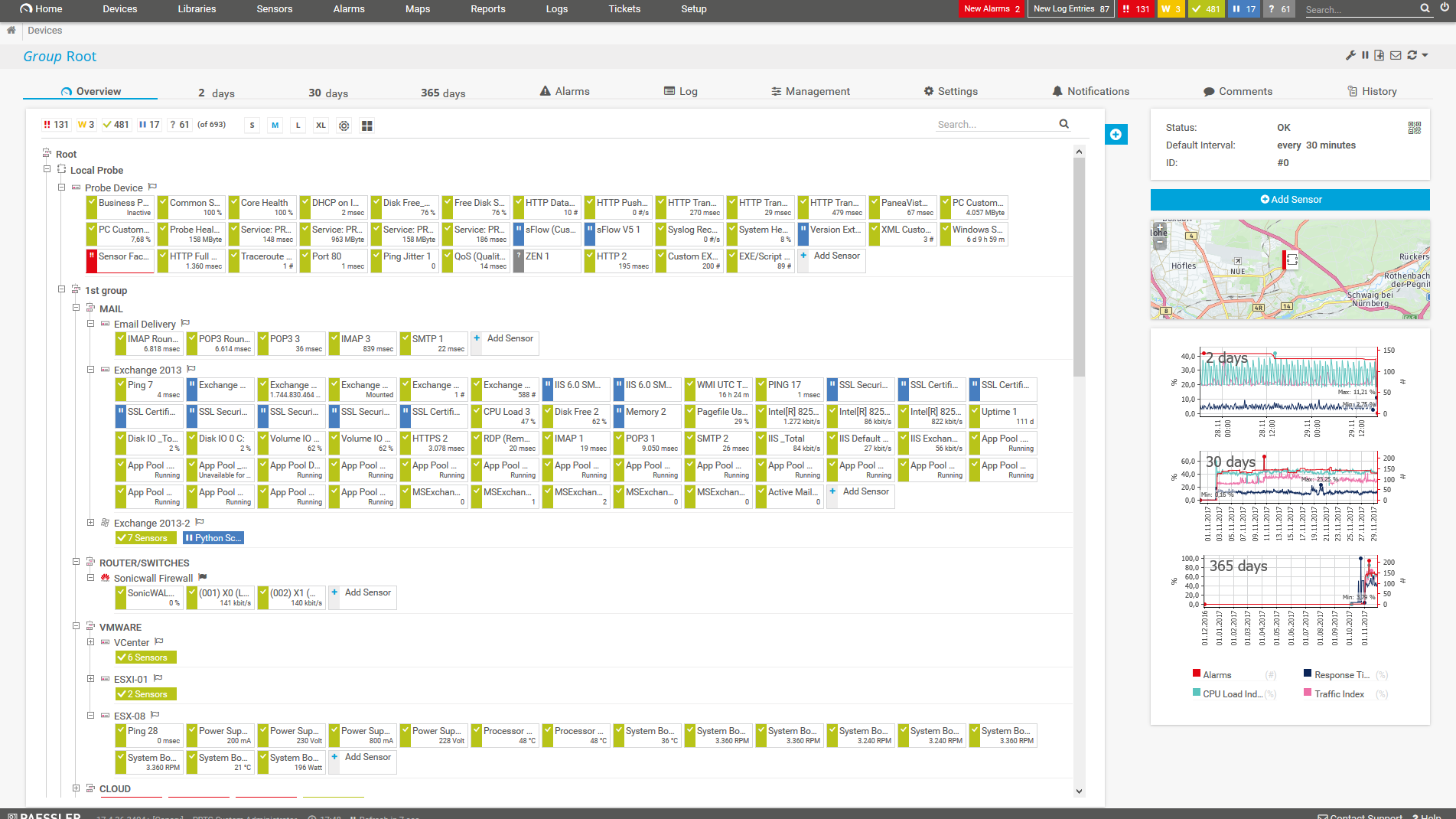
    Diagnose network issues by continuously tracking network throughput and network traffic on your routers and switch ports. Show duplicate traffic, TCP packets that are corrupted, lost, or out of sequence, and other key metrics in real time. Visualize monitoring data in clear graphs and dashboards to identify problems more easily. Gain the network visibility you need to troubleshoot duplicate packets and other issues with packet transmission.
    PRTG Screenshot device tree view

    Device tree view of the complete monitoring setup

    PRTG screenshot map entire it infrastructure

    Custom PRTG dashboard for keeping an eye on the entire IT infrastructure

    PRTG screenshot graph live data traffic

    Live traffic data graph in PRTG

    Start duplicate packet monitoring with PRTG and see how it can make your network more reliable and your job easier.

    Free download
    PRODUCT OVERVIEW

    IT experts agree: Paessler PRTG is a great solution for IT infrastructure monitoring

    PCMag

    “All-around winning
     network monitor”

    IT Brief

    “The real beauty of PRTG is the endless possibilities it offers”

    ITPro

    “PRTG Network Monitor 
    is very hard to beat”

    Duplicate packets monitoring and more: What PRTG can do for your IT environment

    Using PRTG duplicate packets monitoring not only optimizes your network performance but also improves the overall digital experience for you and your colleagues.

    Icon technical devices

    Reduce network congestion

    Eliminate duplicate packets with the help of PRTG. Free up valuable bandwidth and ensure smoother network operations.

    Icon boost arrows

    Improved application performance

    Ensure that applications, especially real-time services such as VoIP and video conferencing, run efficiently without compromising quality of service.

    Icon packet

    Increased network reliability

    Maintain high network reliability and user satisfaction by proactively addressing potential problems caused by packet duplication.

    Icon Piggy bank

    Have noticeable cost savings

    Optimize your network performance with PRTG to reduce the need for unnecessary bandwidth upgrades and enjoy significant cost savings.

    Explore our preconfigured PRTG sensors for duplicate packet monitoring & troubleshooting

    PRTG comes with more than 250 native sensor types for monitoring your entire on-premises, cloud, and hybrid cloud environment out of the box. Check out some examples below!

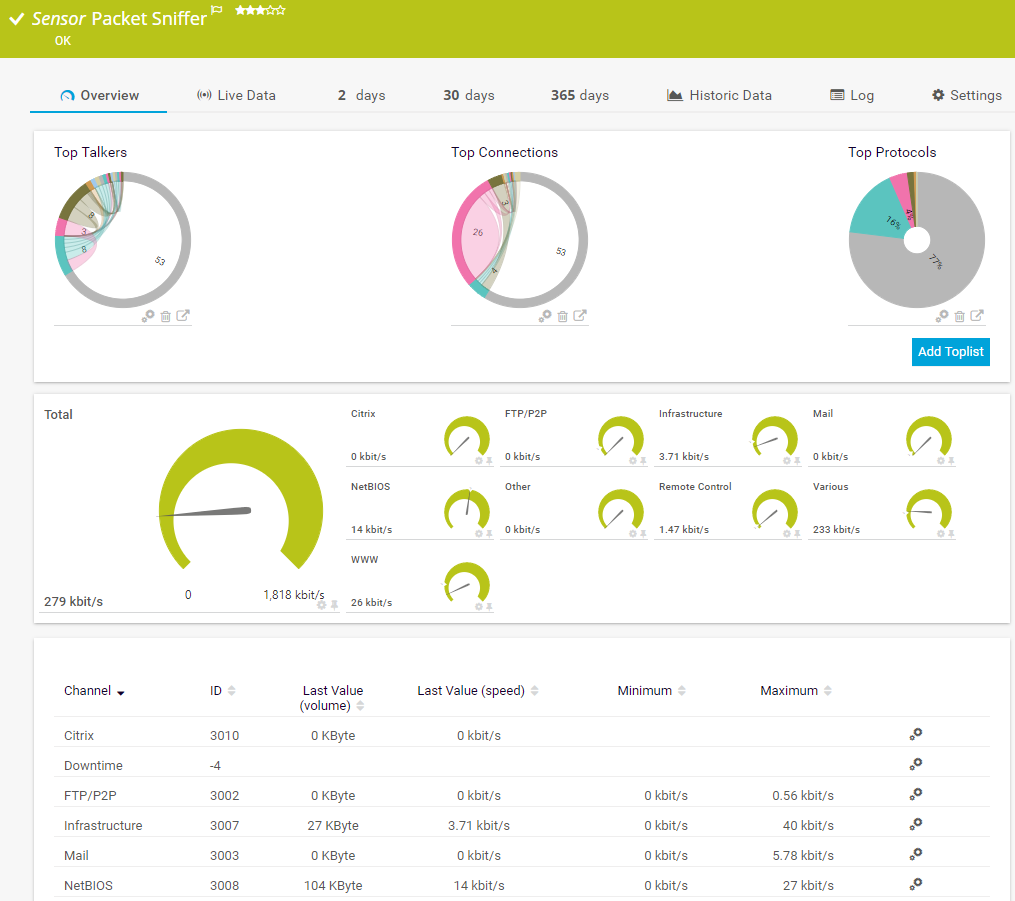
    Packet Sniffer

    The Packet Sniffer sensor monitors the headers of data packets that pass a local network card using a built-in packet sniffer. You can choose from predefined channels. It can show the following and more:

    • Traffic from Citrix applications
    • Traffic from file transfer (FTP/P2P) and various other protocols (UDP, TCP)
    • Traffic from network services (DHCP, DNS, Ident, ICMP, SNMP)
    • Internet mail traffic (IMAP, POP3, SMTP)
    • Traffic from remote control applications (RDP, SSH, Telnet, Virtual Network Computing (VNC))
    Packet Sniffer
    Packet Sniffer

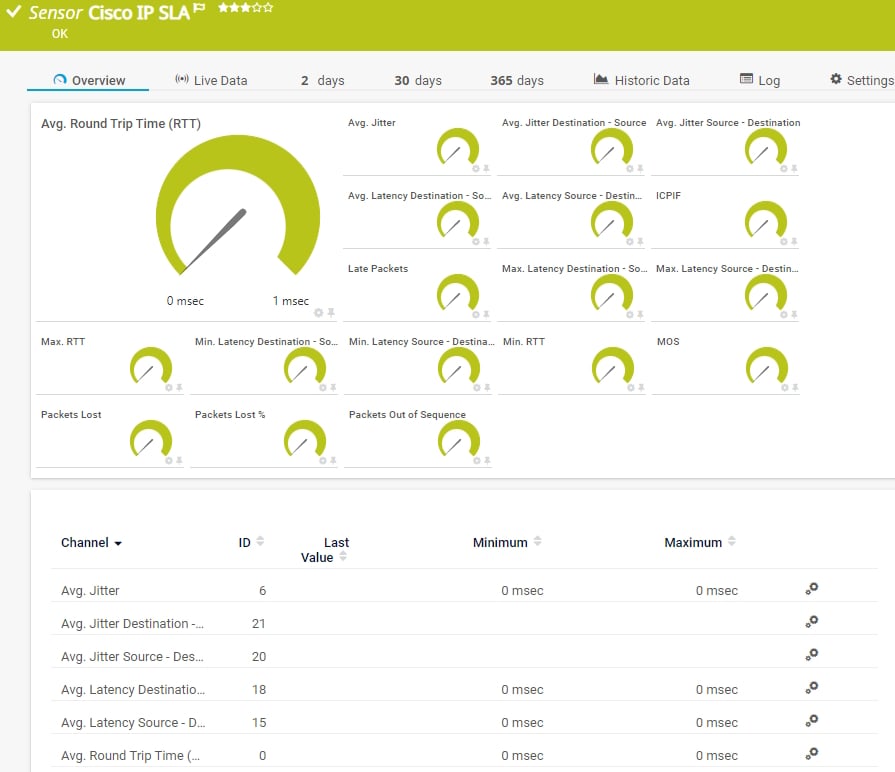
    Cisco IP SLA

    The Cisco IP SLA sensor monitors Voice over IP (VoIP) network parameters using IP service level agreements (SLA) from Cisco. It can show the following:

    • Average jitter
    • Average, minimum, and maximum latency and RTT (round-trip time)
    • The ICPIF
    • The MOS
    • Number of lost, out-of-sequence, and late packets
    Cisco IP SLA
    Cisco IP SLA

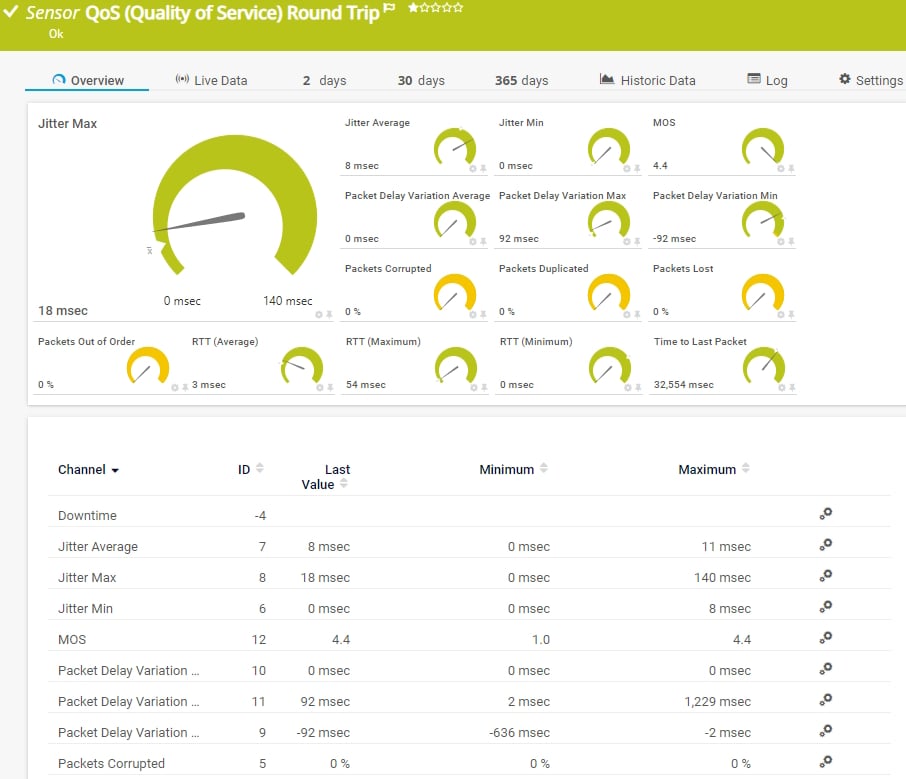
    QoS (Quality of Service) Round Trip

    The QoS (Quality of Service) Round Trip sensor monitors parameters regarding the quality of a network connection between two probes. It can show the following:

    • Average, minimum, and maximum jitter
    • Average, minimum, and maximum packet delay variation
    • Average, minimum, and maximum round trip time (RTT)
    • Corrupted, duplicated, lost, and out-of-sequence packets
    • The MOS
    (Quality of Service) Round Trip
    (Quality of Service) Round Trip

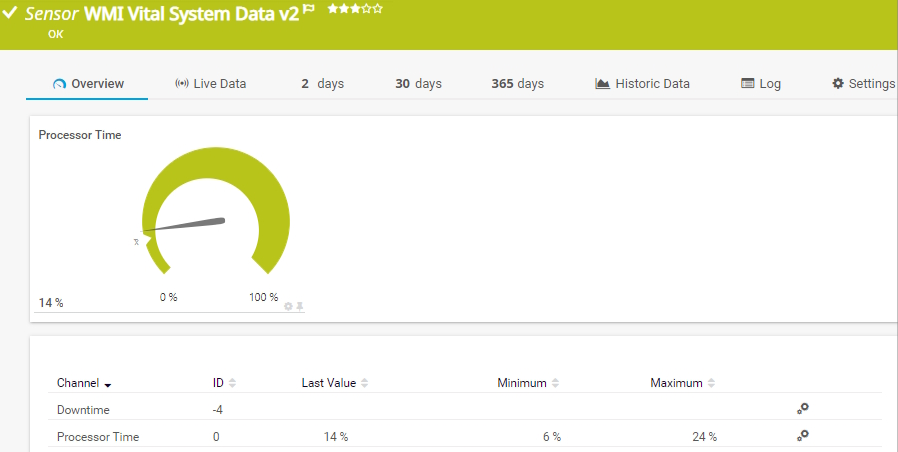
    WMI Vital System Data (V2)

    The WMI Vital System Data (V2) sensor monitors vital Windows system parameters. It can show the following:

    • CLR memory bytes in all heaps
    • Committed bytes and total number of bytes per second
    • Number of thrown CLR exceptions and outbound packet errors
    • Free physical and total user memory
    • CPU user time
    WMI Vital System Data (V2)
    WMI Vital System Data (V2)

    See the PRTG Manual for a list of all available sensor types.

    PRTG Is Compatible With All Major Vendors, Products, and Systems

    compatible with all major vendors, products, and systems

    PRTG makes duplicate packets monitoring as easy as it gets

    Custom alerts and data visualization let you quickly identify and prevent duplicate packet issues.

    Free download
    PRODUCT OVERVIEW

    “PRTG helps us to keep control of our IT by making issues visible immediately – and everywhere. We always have an eye on the performance and availability of our IT and can react in time if any failures occur. On a long-term perspective, the monitoring data helps us with capacity planning so that we can deliver the required resources for our own systems as well as for our customers, without wasting money on unwarranted redundancies.”

    Stein Erik Høybakk, Senior Network Engineer
    TAFJORD

    “All our production and business processes depend on SAP. But, of course, IT and production systems also play a crucial role in securing these processes. By incorporating SAP, production, and IT into one centralized monitoring system, we can quickly detect critical drops in performance and identify the causes of these issues. In fact, thanks to PRTG and itesys, this couldn’t be any easier.”

    Andreas Schmidt, Senior Systems Engineer
    Truma

    “Any downtime could be detrimental to our customers. We also strive to provide the best possible service to our customers. PRTG allows us to see the health and performance of the network. Using these measurements we can make decisions on how to repair a piece of equipment before it fails and causes a service interruption.”

    James Ott Jr., Communications System Technician and IT Administrator
    Federal Radio

    Your network packet broker at a glance – even on the go

    PRTG is set up in a matter of minutes and can be used on a wide variety of mobile devices.

    device overview
    Gartner peer insights

    “Excellent tool for detailed monitoring. Alarms and notifications work greatly. Equipment addition is straight forward and server initial setup is very easy. ...feel safe to purchase it if you intend to monitor a large networking landscape.”

    Read the complete review at Gartner Peer Insights

    Create innovative solutions with Paessler’s IT partners

    Partnering with innovative IT vendors, Paessler unleashes synergies to create
    new and additional benefits for joined customers.

    IP Fabric

    IP Fabric

    Combining PRTG’s broad monitoring feature set with IP Fabric’s automated network assurance creates a new level of network visibility and reliability.

    Read more
    Martello

    Martello 

    By integrating PRTG with Martello iQ, you can add a fast analytics layer to improve uptime, visualize your IT environment, and integrate all of your IT systems into a single pane of glass.

    Read more
    ScriptRunner

    ScriptRunner

    With ScriptRunner Paessler integrates a powerful event automation platform into PRTG Network Monitor.

    Read more

    Find the root cause of the problem with our PRTG duplicate packets monitoring solution

    Real-time notifications mean faster troubleshooting so that you can act before more serious issues occur.

    Free download
    PRODUCT OVERVIEW
    Paessler PRTG

    Paessler PRTG

    Network Monitoring Software – Version 26.1.116.1532 (February 9th, 2026)

    Hosting icon

    Hosting

    Download for Windows and cloud-based version PRTG Hosted Monitor available

    Languages icon

    Languages

    English, German, Spanish, French, Portuguese, Dutch, Russian, Japanese, and Simplified Chinese

    test

    Monitor everything

    Network devices, bandwidth, servers, applications, virtual environments, remote systems, IoT, and more

    test

    Pricing

    Choose the PRTG Network Monitor subscription that's best for you

    Discover more monitoring insights and stories

    Content illustration

    Powerful stories from the monitoring world

    • Customer success story: Riverford & PRTG
    • Understanding MQTT architecture: a deep dive
    • Easy ways to quickly test your bandwidth
    Support illustration

    Resources to master your monitoring challenges

    • What the difference between packet delay variation and jitter
    • does the PRTG can check for packet loss? - Paessler Helpdesk
    • PRTG Manual: QoS (Quality of Service) Round Trip Sensor - Paessler
    Solution illustration

    Solutions for all your monitoring needs

    • CPU Monitoring
    • IP Monitoring
    • SNMP Monitoring

    Duplicate Packets Monitoring: FAQ


    What are duplicate packets and how do they affect my network?

    Duplicate packets are copies of data packets that exist and travel unnecessarily within a network, causing problems such as increased latency or reduced bandwidth. They can disrupt normal operations and slow your network speed, resulting in quality-of-service issues for applications like VoIP or video conferencing.

    How can I detect duplicate packets in my network traffic?

    You can detect duplicate packets by monitoring your network traffic and using monitoring solutions such as PRTG. These applications can analyze the packet flow and QoS parameters between hosts and network devices to identify patterns and anomalies that may indicate a duplication problem.

    What issues do duplicate packets cause in a network?

    Duplicate packets can cause several issues in a network, including:

    • Network congestion: Duplicate packets take up valuable bandwidth, leading to congestion and therefore slower data transmissions.
    • VoIP and video conferencing quality loss: Real-time communications are directly affected by duplicate packets or packet loss. The result – high latency and dropped calls.
    • Overloaded network infrastructure: Excessive data processing requests put a strain on network resources and degrade the overall performance of your network.
    Why should I monitor duplicate packets in port mirroring?

    Port mirroring is a network feature that allows the traffic from one or more ports (or an entire VLAN) to be copied to another port. This copied traffic can then be analyzed by a monitoring device, such as a network analyzer or an intrusion detection system (IDS).

    With mirrored ports, duplicate packets can occur if:

    • Traffic from multiple ports or VLANs is mirrored to the same monitoring port, potentially causing overlap in the mirrored traffic.
    • The network uses asymmetric routing (where inbound and outbound traffic takes different paths), the mirrored traffic might capture both directions, leading to duplicates.

    Best practices for avoiding duplicate packets include:

    • Traffic filtering: To avoid duplicate packets, carefully configure port mirroring to target only the necessary traffic.
    • Packet deduplication: Some network monitoring tools offer deduplication features that can automatically filter out duplicate packets before analysis.
    • Asymmetry monitoring: Be aware of the network topology and routing to minimize the risk of capturing duplicate packets from asymmetric paths.
    What should I do if I detect duplicate packets?

    Once you have identified duplicate packets, you should analyze your network configurations for errors, check your network devices for faulty hardware, and review traffic logs to determine the cause.

    How can PRTG help me monitor and prevent duplicate packets?

    PRTG provides real-time traffic analysis and customizable alerts to help you quickly identify duplicate packets. PRTG's multiple deployment and configuration options help you understand traffic patterns and enable you to make proactive adjustments to prevent future duplicates.

    What is a sensor in PRTG?

    In PRTG, “sensors” are the basic monitoring elements. One sensor usually monitors one measured value in your network, for example the traffic of a switch port, the CPU load of a server, or the free space on a disk drive. On average, you need about 5-10 sensors per device or one sensor per switch port.

    We asked: would you recommend PRTG? Over 95% of our customers say yes!

    Paessler conducted trials in over 600 IT departments worldwide to tune its network monitoring software closer to the needs of sysadmins. The result of the survey: over 95% of the participants would recommend PRTG – or already have.

    recommendation

    Still not convinced?

    Love

    More than 500,000 sysadmins love PRTG

    Paessler PRTG is used by companies of all sizes. Sysadmins love PRTG because it makes their job a whole lot easier.

    PRTG

    Monitor your entire IT infrastructure

    Bandwidth, servers, virtual environments, websites, VoIP services – PRTG keeps an eye on your entire network.

    test

    Try Paessler PRTG for free

    Everyone has different monitoring needs. That’s why we let you try PRTG for free.

    PRTG Logo

    Start duplicate packet monitoring with PRTG and see how it can make your network more reliable and your job easier.

    Free download
    PRODUCT OVERVIEW

    Products

    • Paessler PRTG
      Paessler PRTGMonitor your whole IT infrastructure
      • PRTG Network Monitor
      • PRTG Enterprise Monitor
      • PRTG Hosted Monitor
      • PRTG UVexplorer
      • PRTG extensions
        Extensions for Paessler PRTGExtend your monitoring to a new level
    • Icon Features
      FeaturesExplore all monitoring features

    Monitoring with PRTG

    • Network monitoring
    • Bandwidth monitoring
    • SNMP monitoring
    • Network mapping
    • Wi-Fi monitoring
    • Server monitoring
    • Network traffic analyzer
    • NetFlow monitoring
    • Syslog server

    Useful Links

    • PRTG Manual
    • Knowledge Base
    • Customer Success Stories
    • About Paessler
    • Subscribe to newsletter
    • PRTG Support
    • PRTG Consulting
    • PRTG Feedback & Roadmap

    Contact

    Paessler GmbH
    Thurn-und-Taxis-Str. 14, 
    90411 Nuremberg 
    Germany

    [email protected]

    +49 911 93775-0

    • Contact us
    ©2026 Paessler GmbHTerms & ConditionsPrivacy PolicyImprintReport VulnerabilityDownload & InstallSitemap
    Graylog Alternative Graylog Alternative Graylog Alternative