• Company
    • About Us
    • Case Studies
    • Press Center
    • Careers
    • Blog
    • Contact us
  • Contact us
  • Login
 
  • English
    • Deutsch
    • Español
    • Français
    • Italiano
    • Português
Paessler
                    - The Monitoring Experts
  • Products
    • Paessler PRTG
      Paessler PRTGMonitor your whole IT infrastructure
      • PRTG Network Monitor
      • PRTG Enterprise Monitor
      • PRTG Hosted Monitor
      • PRTG UVexplorer
      • PRTG extensionsExtensions for Paessler PRTGExtend your monitoring to a new level
    • Icon Features
      FeaturesExplore all monitoring features
      • Maps & dashboards
      • Alerts & notifications
      • Multiple user interfaces
      • Distributed monitoring
      • Customizable reporting
  • Solutions
    • By TeamFor your organization size
      • Small Business IT
      • Mid-Market IT
      • Enterprise IT
      • MSP Network Monitoring
    • Industries
      By IndustryFor your business sector
      • Industrial
      • Healthcare
      • Government
      • Education
      • Data Center
      • Finance
    • IT Topics
      By Use CaseFor every technical scenario
      • Network Monitoring
      • Server Monitoring
      • OT Monitoring
      • Distributed Monitoring
      • Network Topology Mapping
      • SNMP Monitoring
      • Bandwidth Monitoring
  • Pricing
  • Resources
    • Getting Started
      Getting StartedModules for self-paced learning
    • How-to Guides
      How-to GuidesGet the most out of PRTG
    • Videos & Webinars
      Videos & WebinarsLearn from Paessler experts
    • IT  Knowledge
      IT KnowledgeExpand your IT knowledge
    • PRTG Manual
      PRTG ManualFull documentation
    • Knowledge Base
      Knowledge BaseShare community knowledge
    • PRTG Sensor Hub
      PRTG Sensor HubGet sensors, scripts & templates
    • Trainings
      PRTG TrainingLearn how to work with PRTG
  • Partners
    • Icon Handshake
      Become a PartnerFor resellers and channel partners
    • Icon MSP
      Become an MSPDeliver monitoring as a managed service
    • icon partner
      Partner PortalLog in to your partner account
    • Deal Registration
      Deal RegistrationRegister your sales opportunities
    • icon search
      Find a PartnerFind partners selling Paessler products
    • icon technology
      Technology AlliancesSee Paessler technology partnerships
    • Partner HubTools for Your Success
  • Company
    • About Us
    • Case Studies
    • Press Center
    • Careers
    • Blog
    • Contact us
  • Contact us
  • Login
  • English
    • Deutsch
    • Español
    • Français
    • Italiano
    • Português
  • Get a quote
  • Free trial
  1. Home>
  2. Company>
  3. Case Studies>
  4. LNA Santé

72 Sites, No On-Site IT: How LNA Santé Keeps Nursing Home Infrastructure Running with PRTG

Challenge: Managing a fully remote IT infrastructure across nursing homes and rehabilitation clinics with no on-site IT staff at most locations 

download PDF
Logo LNA Santé

COMPANY
LNA Santé

INDUSTRY
Healthcare

COMPANY SIZE
Enterprise

COUNTRY
France

SCALE
72 facilities, 6,500+ employees

Icon Sensor

13,500+ sensors across 72 facilities, managed from a single platform

Icon watch

Problems detected and resolved before nursing staff are impacted

Icon graph

Monthly staff satisfaction surveys show rising perceived IT performance

Icon document

SLA monitoring planned as next step to formalize service quality targets

The problem

LNA Santé operates 72 facilities across France and Belgium: nursing homes, rehabilitation centers, a psychiatric clinic, and home hospitalization units. None have dedicated IT staff on-site. Every server, application, and network connection is managed remotely from a central data center. 

When something fails, nursing staff notice first. By then, the impact on care has already started. Eric Laurent, Head of Information Systems at LNA Santé, needed monitoring that would catch problems before users did, and let the team act fast from a distance. 

The previous tool was open source and could no longer be maintained at the scale the organization had grown to. 

What changed with PRTG

LNA Santé deployed PRTG with the help of Sensor Factory, a monitoring specialist in Nantes. The initial deployment covered 80% of monitoring needs out of the box. Sensor Factory built custom sensors for the remaining 20%, covering applications and components not natively supported. 

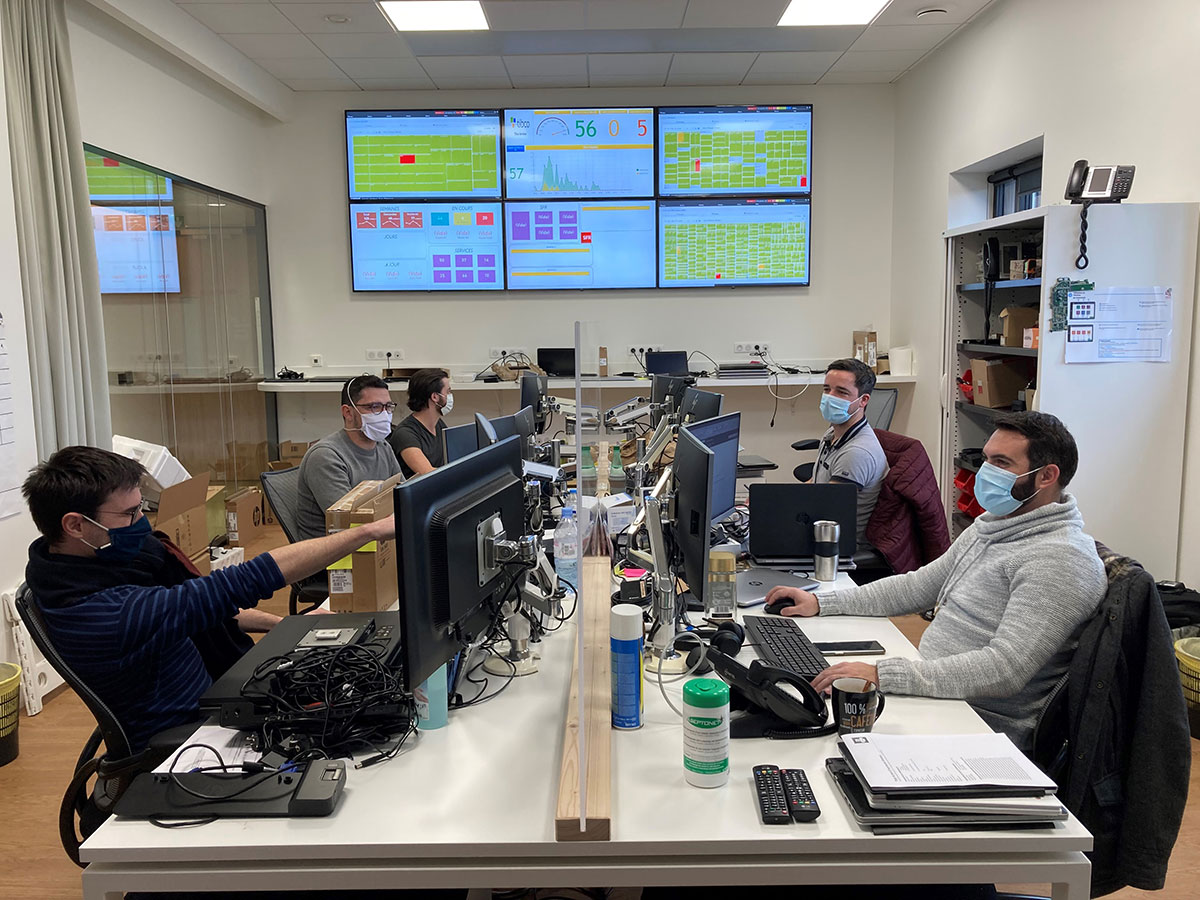
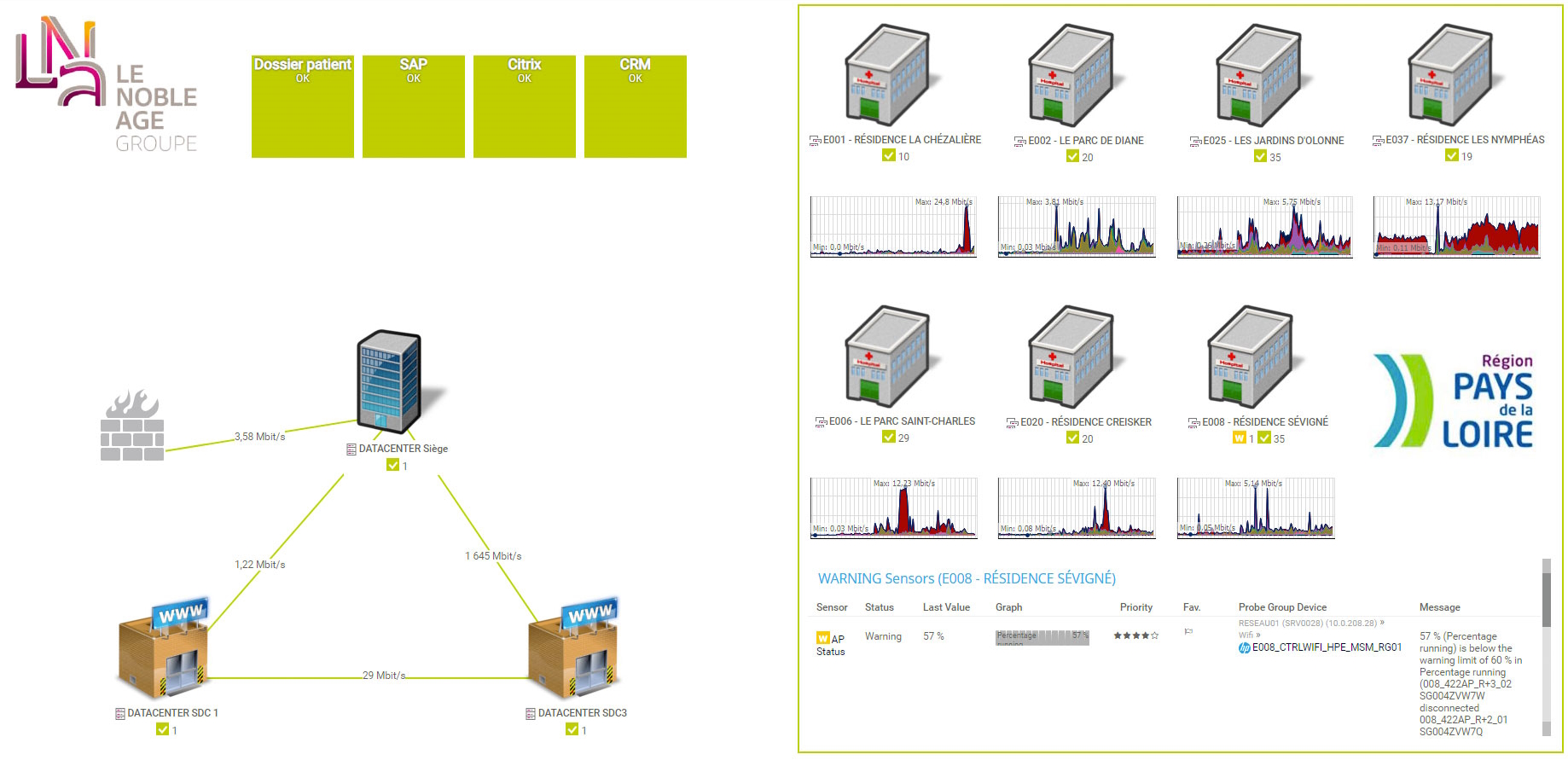
Today, more than 13,500 sensors monitor infrastructure, networks, telephony, applications, and VMware Cloud Director consoles across all 72 sites. Technicians receive configurable alerts when something malfunctions. Two dashboards display a live color-coded health summary on large screens at headquarters, green or red per facility, updated in real time. 

Problems are often resolved before users notice anything is wrong. 

Given that not all of the locations have IT personnel onsite, the entire IT management takes place remotely. This requires total control over applications and data passing through the network, which are crucial for the nursing staff. Availability is an essential issue that has quickly required the deployment of a monitoring solution.

Eric Laurent, Head of Information Systems
LNA Santé
PRTG Logo

PRTG monitors distributed healthcare infrastructure, applications, and networks from one platform.

CONTACT SALES
LNA Santé: Screenshot Map Site Overview
LNA Santé Office

Discover more monitoring insights and stories

Solution illustration

Solutions for all your monitoring needs

  • Paessler PRTG vs other network monitoring software
  • LAN Monitoring
  • Bandwidth Monitoring
Content illustration

Powerful stories from the monitoring world

  • Customer success stories - Paessler
  • The Ritz London benefits from clearer IT visibility 24 hours a day
  • Video: Making the lives of sysadmins easier
Support illustration

Resources to master your monitoring challenges

  • Quick Start Guide
  • I run PRTG on VMware. How can I obtain best performance?
  • How can I use the PRTG Application Programming Interface (API)?
Explore All Case Studies

Products

  • Paessler PRTG
    Paessler PRTGMonitor your whole IT infrastructure
    • PRTG Network Monitor
    • PRTG Enterprise Monitor
    • PRTG Hosted Monitor
    • PRTG UVexplorer
    • PRTG extensions
      Extensions for Paessler PRTGExtend your monitoring to a new level
  • Icon Features
    FeaturesExplore all monitoring features

Monitoring with PRTG

  • Network monitoring
  • Bandwidth monitoring
  • SNMP monitoring
  • Network mapping
  • Wi-Fi monitoring
  • Server monitoring
  • Network traffic analyzer
  • NetFlow monitoring
  • Syslog server

Useful Links

  • PRTG Manual
  • Knowledge Base
  • Customer Success Stories
  • About Paessler
  • Subscribe to newsletter
  • PRTG Support
  • PRTG Consulting
  • PRTG Feedback & Roadmap

Contact

Paessler GmbH
Thurn-und-Taxis-Str. 14, 
90411 Nuremberg 
Germany

[email protected]

+49 911 93775-0

  • Contact us
©2026 Paessler GmbHTerms & ConditionsPrivacy PolicyImprintReport VulnerabilityDownload & InstallSitemap
How to buy How to buy How to buy