
Last reviewed: 10/2026


PRTG uses sensor-based licensing: each value you monitor, like a server's CPU load or a switch port's traffic, counts as one sensor, and every license includes every feature with no separate modules to add on later. According to our 2026 survey of 1,088 IT teams, 60.2% of midmarket customers picked PRTG specifically because it's one tool that covers everything, rather than paying for and juggling several. Unlimited remote probes come with your license too, so a second office or a new site never adds a licensing cost. Wireshark's software really is free, and that stays true, what you're paying for with PRTG is the continuous monitoring and alerting layer around it, not a paid version of the same thing.
PRTG checks thresholds continuously and sends an alert the moment one is crossed, often before anyone has to notice a problem on their own. That shift from reactive to proactive is the main reason IT teams add PRTG to their toolkit. PRTG's own Packet Sniffer sensor extends that continuous view down to traffic and protocol statistics, reading packet headers to spot a bandwidth hog or an unusual pattern early. For a deep, packet-by-packet look at a single issue, Wireshark's full protocol dissection is still the right tool to reach for, and plenty of teams keep it running right alongside PRTG.
PRTG's auto-discovery scans a network segment, identifies each device, and builds a matching set of sensors automatically, and it does this at every location where you add a remote probe. Those remote probes come with your license at no extra cost, so a second site or a tenth one doesn't change what you pay for the platform itself. For healthcare, manufacturing, energy, and public-sector teams juggling several sites or a mix of IT and OT, that means one dashboard instead of a separate capture at every location. It's still worth pairing with a focused packet capture on-site when a specific device needs that level of detail.
FEATURE | PRTG PRTG | Wireshark Wireshark |
|---|---|---|
Cover network, servers, applications, and databases with one license | PRTG Included in one license, no per-layer add-ons | Wireshark Out of scope, a protocol analyzer only |
Get proactive, multi-channel alerts without scripting your own | PRTG Built-in email, SMS, push, Slack, and Teams alerts | Wireshark No alerting, only color-coding and flagged packets |
Monitor unlimited remote sites without extra licensing | PRTG Remote probes included in every license | Wireshark Captures only at the local interface it's running on |
Keep months of historical trend data without managing capture files yourself | PRTG Built-in historical graphs and retention | Wireshark Capture files only, stored and managed manually |
Getting notified the moment a device or service goes down | PRTG Threshold-based alert fires automatically | Wireshark No notification exists until a capture is running |
Diagnosing a slow application across the network | PRTG Historical graph shows exactly when it started | Wireshark Full packet-level detail once capturing at the right point |
Tracing a specific protocol-level or payload issue | PRTG Limited: Packet Sniffer sensor reads headers only, not full payload | Wireshark Full protocol dissection across 3,000+ protocols |
PRTG uses sensor-based licensing: you choose a license by the number of sensors you need, and every feature ships in every license, with no separate modules to buy as you grow. Wireshark stays free at any scale, since there's no infrastructure to license, only a tool you run when you need it. If your environment is small, PRTG's freeware edition covers up to 100 sensors at no cost, the closest thing to Wireshark's price tag.
| License Name | License description | Price | License Details | Get started | Pricing Details | |
|---|---|---|---|---|---|---|
| PRTG 500 | $200 | per month paid annually | Buy nowBuy now | Enough to monitor multiple aspects of 50 devices | ||
| PRTG 1000 | $358 | per month paid annually | Buy nowBuy now | Enough to monitor multiple aspects of 100 devices | ||
| PRTG 2500 | $742 | per month paid annually | Buy nowBuy now | Enough to monitor multiple aspects of 250 devices | ||
| PRTG 5000 | $1,300 | per month paid annually | Buy nowBuy now | Enough to monitor multiple aspects of 500 devices | ||
| PRTG 10000 | $1,642 | per month paid annually | Buy nowBuy now | Enough to monitor multiple aspects of 1000 devices |
”GESAC increasingly focuses on innovation to improve the quality of services offered and the experience of passengers handled every day by Naples Airport. Thanks to PRTG, we finally have unified, automatic, and continuous monitoring of the airport network and can guarantee quick and timely interventions.”
PRTG gives you one dashboard for your whole network, built automatically once auto-discovery finishes its first scan. Every device, alert, and historical trend lives in the same place, from a single switch port to a cloud service. Here's what that looks like in practice.
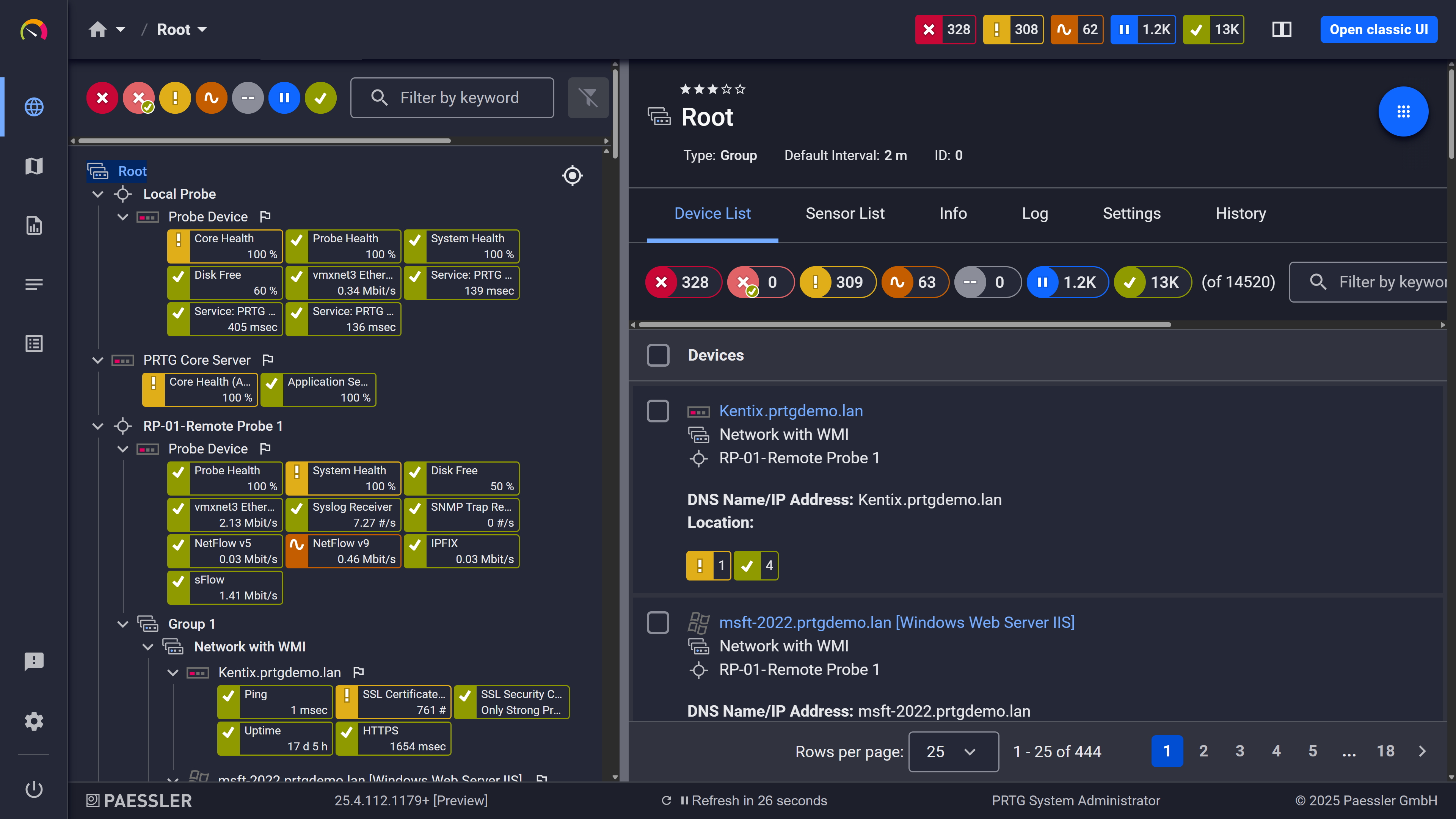
Device tree view: your full infrastructure, organized automatically after auto-discovery
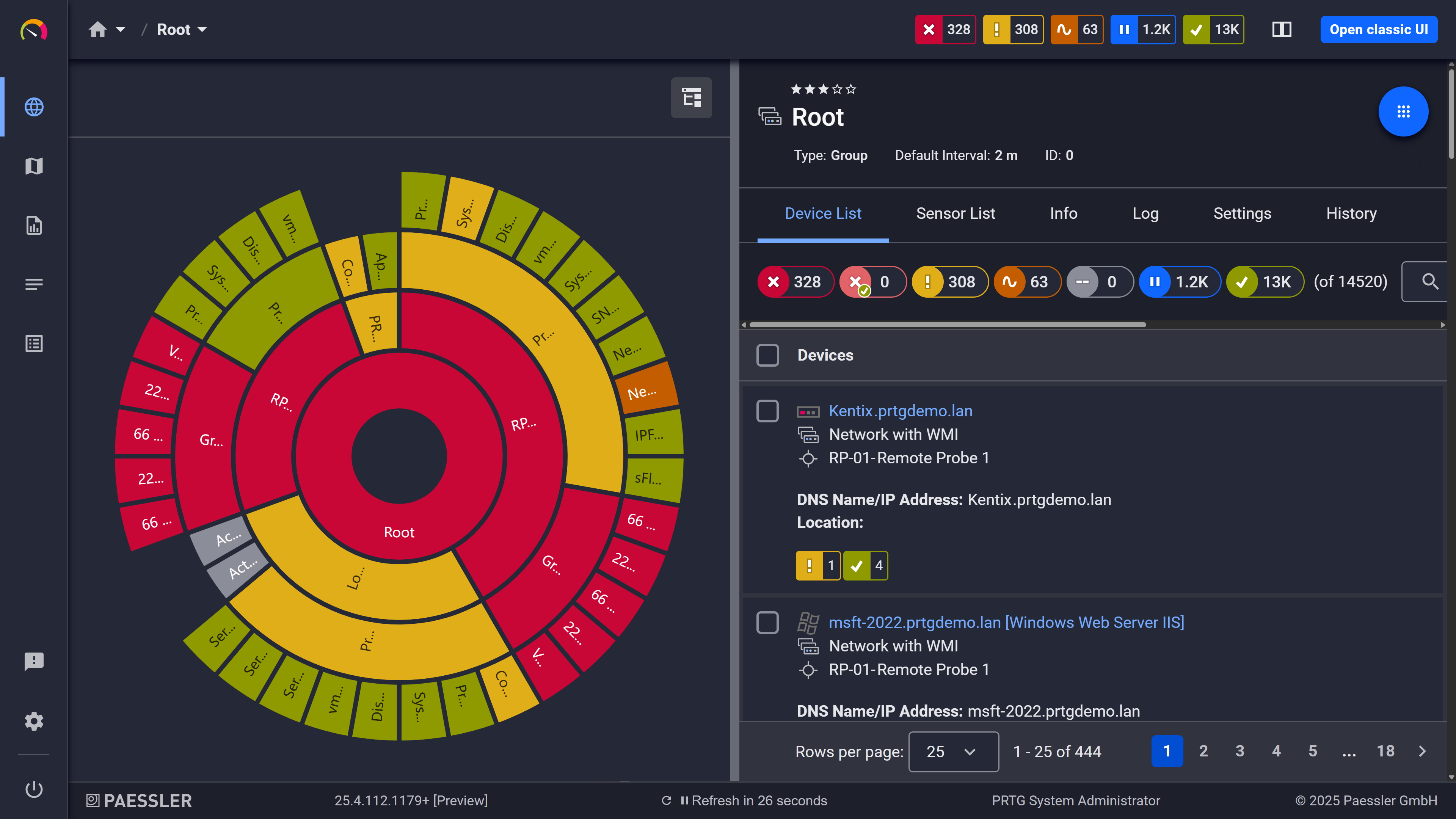
Custom dashboard: your easy-to-grasp overview built from your own sensors
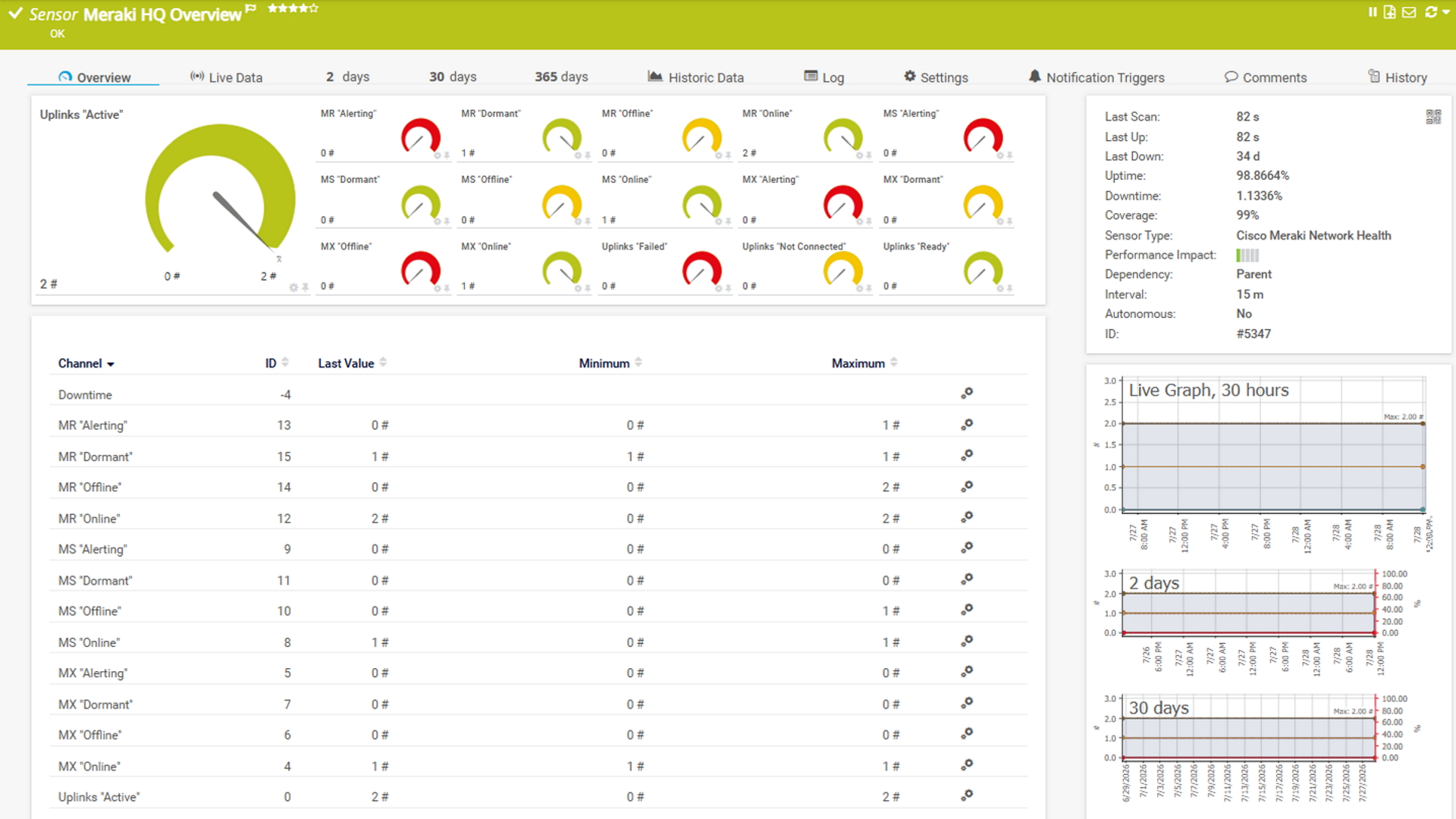
Sensor traffic: live sensor data, updated on your configured scan interval
There's no existing PRTG setup to migrate away from here, just your live network to bring under watch, and that matters most if you're covering more than one site: 55.3% of decentralized enterprises in our 2026 survey of 1,088 IT teams monitor distributed sites or remote offices, more than any other segment. PRTG's auto-discovery reads what's running and builds monitoring directly from it in four steps, with Wireshark staying exactly where it's always been.
Start with your live network, not an export. There's no exported device list to check against here, since Wireshark doesn't keep one. Install PRTG alongside it from day one: the two don't conflict, and Wireshark stays installed right where it already is.
Let auto-discovery build your baseline. Enter your IP ranges and device credentials (e.g. for protocols like SNMP or WMI), and PRTG's auto-discovery scans the network segments, identifies device types, and creates suitable sensors from built-in device templates. Since there's no old device list to check against, use Wireshark itself as the spot check: a short capture on a busy segment will show you the same devices auto-discovery just found.
Build alerts from what you already know, not from an old config. What carries over here isn't a configuration file, it's your own knowledge: the traffic patterns, ports, and devices you already know matter, because you've been watching them in Wireshark. Turn that knowledge into PRTG's notification templates and triggers.
Tune PRTG, and keep Wireshark exactly where it is. Run PRTG for a few weeks and adjust thresholds, schedules, and notification triggers until the alerts match how your team actually wants to be woken up. Build the dashboards and reports your team and leadership rely on day to day. Wireshark doesn't get decommissioned here: keep it installed for the moments an alert tells you something needs a closer, packet-level look.
Yes, most teams keep both. PRTG handles the continuous, always-on side of monitoring: alerts, historical trends, and visibility across every site. Wireshark stays useful for the moments when you need to look inside a specific packet or protocol exchange in detail.
PRTG's closest Wireshark equivalent is the Packet Sniffer sensor, which reads packet headers continuously to show Top Talkers, Top Connections, and Top Protocols, enough to spot a bandwidth hog or an unusual traffic pattern early. Wireshark inspects full packet payloads for deep, protocol-level troubleshooting, a level of detail PRTG's sensor isn't built for.
Not for deep packet inspection. PRTG's strength is continuous, always-on monitoring across your whole infrastructure, while Wireshark's strength is examining traffic in full detail at a single point. Most teams use PRTG to know when and where to look, then reach for Wireshark, or keep both running side by side.
PRTG offers a freeware edition with up to 100 sensors at no cost, which covers a small environment. Beyond that, PRTG uses sensor-based licensing, so you pay based on how much you monitor. Wireshark stays free at any scale, since it has no sensor count or infrastructure to license.
A sensor is PRTG's basic monitoring element, and it typically tracks one measured value, like a switch port's traffic or a server's CPU load. Most devices need around 5 to 10 sensors for solid coverage. PRTG includes more than 250 pre-configured sensor types out of the box.
They're built for different depths. PRTG's Packet Sniffer sensor reads header-level traffic for monitoring and alerting, not full protocol dissection. Wireshark decodes traffic across thousands of protocols in detail, which is exactly what makes it the stronger choice for hands-on troubleshooting rather than day-to-day monitoring.
Yes. PRTG's auto-discovery and remote probes extend monitoring to any site with a network connection, and remote probes come with your license at no extra cost. All locations show up in the same device tree and dashboards, so you're not switching between separate setups per site.
Yes. In our 2026 survey of 1,088 IT teams, 92.8% rated their day-to-day monitoring with PRTG as good or excellent. That's the kind of tool you want running continuously alongside the deep-dive work Wireshark and similar tools are built for.
We also compared PRTG with other monitoring tools:
Auvik is a cloud-based monitoring & mapping tool that is relatively easy to install and configure. However, many monitoring features need to be purchased as extra modules, which can quickly drive up costs.
New Relic offers strong asset performance management and observability, but full IT infrastructure monitoring can be costly and requires a fair amount of manual configuration.
Comparison with New Relic
Site24x7 is a robust all-in-one monitoring tool, but its cloud-only model and pricing can be costly and impractical for large, complex IT setups or on-premises monitoring needs.
Zabbix is open-source software with a strong community support. But it requires lots of manual configuration work to install and set it up. You also need to install agents on the monitored systems.
Start a 30-day trial with unlimited sensors, no commitment required.
Tell us your device count and we'll send you a quote.
See PRTG in a live demo with one of our monitoring experts.
