• Company
    • About Us
    • Press Center
    • Careers
    • Blog
    • IT Knowledge
    • Contact us
  • Contact us
  • Login
 
  • English
    • Deutsch
    • Español
    • Français
    • Italiano
    • Português
Paessler
                    - The Monitoring Experts
  • Products
    • Paessler PRTG
      Paessler PRTGMonitor your whole IT infrastructure
      • PRTG Network Monitor
      • PRTG Enterprise Monitor
      • PRTG Hosted Monitor
      • PRTG UVexplorer
      • PRTG extensionsExtensions for Paessler PRTGExtend your monitoring to a new level
    • Icon Features
      FeaturesExplore all monitoring features
      • Maps & dashboards
      • Alerts & notifications
      • Multiple user interfaces
      • Distributed monitoring
      • Customizable reporting
  • Solutions
    • By TeamFor your organization size
      • Small Business IT
      • Mid-Market IT
      • Enterprise IT
      • MSP Network Monitoring
    • Industries
      By IndustryFor your business sector
      • Industrial
      • Healthcare
      • Energy
      • Government
      • Education
      • Data Center
      • Finance
    • IT Topics
      By Use CaseFor every technical scenario
      • Network Monitoring
      • Server Monitoring
      • OT Monitoring
      • Distributed Monitoring
      • Network Topology Mapping
      • SNMP Monitoring
      • Bandwidth Monitoring
  • Pricing
  • Resources
    • Getting Started
      Getting StartedModules for self-paced learning
    • How-to Guides
      How-to GuidesGet the most out of PRTG
    • Videos & Webinars
      Videos & WebinarsLearn from Paessler experts
    • Case StudiesProven results across industries
    • PRTG Manual
      PRTG ManualFull documentation
    • Knowledge Base
      Knowledge BaseShare community knowledge
    • PRTG Sensor Hub
      PRTG Sensor HubGet sensors, scripts & templates
    • Trainings
      PRTG TrainingLearn how to work with PRTG
  • Partners
    • Icon Handshake
      Become a PartnerFor resellers and channel partners
    • Icon MSP
      Become an MSPDeliver monitoring as a managed service
    • icon partner
      Partner PortalLog in to your partner account
    • Deal Registration
      Deal RegistrationRegister your sales opportunities
    • icon search
      Find a PartnerFind partners selling Paessler products
    • icon technology
      Technology AlliancesSee Paessler technology partnerships
    • Partner HubTools for Your Success
  • Company
    • About Us
    • Press Center
    • Careers
    • Blog
    • IT Knowledge
    • Contact us
  • Contact us
  • Login
  • English
    • Deutsch
    • Español
    • Français
    • Italiano
    • Português
  • Get a quote
  • Free trial
  1. Home>
  2. Company>
  3. Case Studies>
  4. Port of Douala

600 cameras, radar systems, and generator fuel levels: how the Port of Douala monitors everything with PRTG

Challenge: All port operations computerized; IT, security systems, and power supply must stay online 24/7

download PDF
Logo Port of Douala

COMPANY
Port of Douala

INDUSTRY
Travel & Transportation

COMPANY SIZE
Midsized Company

COUNTRY
Cameroon

SCALE
Port IT, security, and power infrastructure, multi-team

Icon Centralized Monitoring

IT, security, and power monitored from one PRTG platform across all three teams

Icon Radar

600+ cameras and radar systems monitored; technicians dispatched immediately on failure

Icon Industry

Generators monitored for fuel, temperature, oil pressure, battery, and engine hours

The problem

The Port of Douala is the gateway to Central Africa, serving landlocked countries including Chad and the Central African Republic. All operational processes are computerized. When IT fails, cargo operations stop.

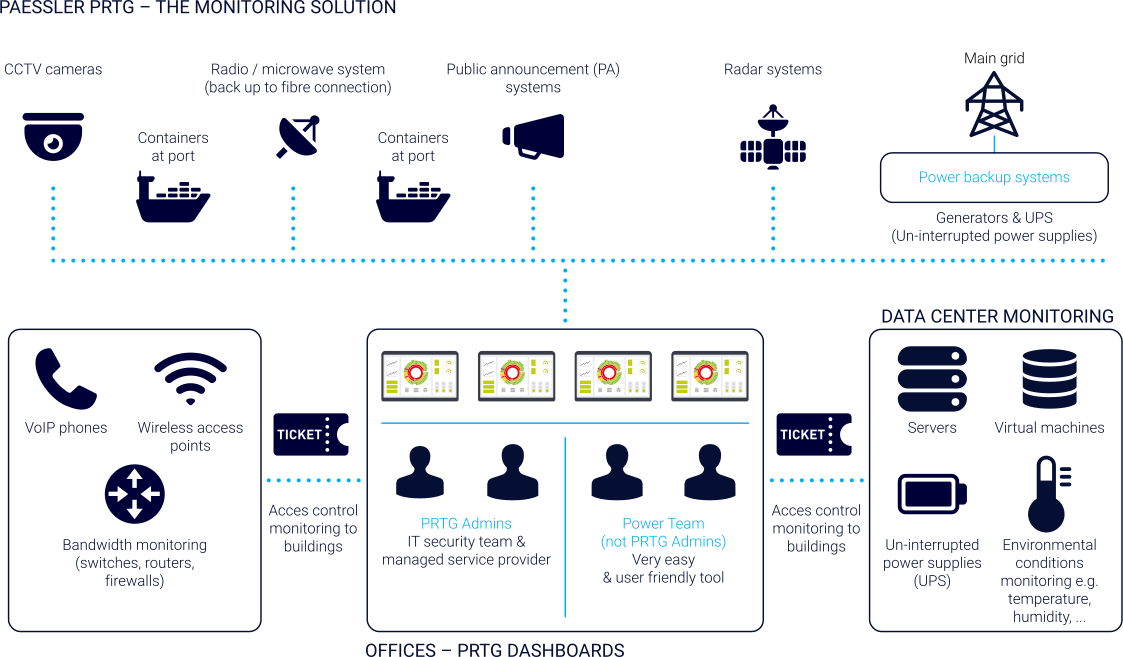
Three separate teams manage the environment: an IT team covering servers, network, and communications; a security team for radar systems, cameras, and access control; and a power team managing the main grid, UPS, and generators. Each team has different expertise and needs different views.

No single solution covered all three layers. The teams needed one platform serving IT experts and power technicians alike.

What changed with PRTG

PRTG was chosen after a several-month evaluation for its versatility: IT, security, and power in one platform, with expert-level detail for IT staff and simplified dashboards for the power team.

IT monitoring covers servers, VMs, switches, routers, firewalls, bandwidth, Wi-Fi, and VoIP. A microwave fallback link is monitored alongside the primary fiber connection.

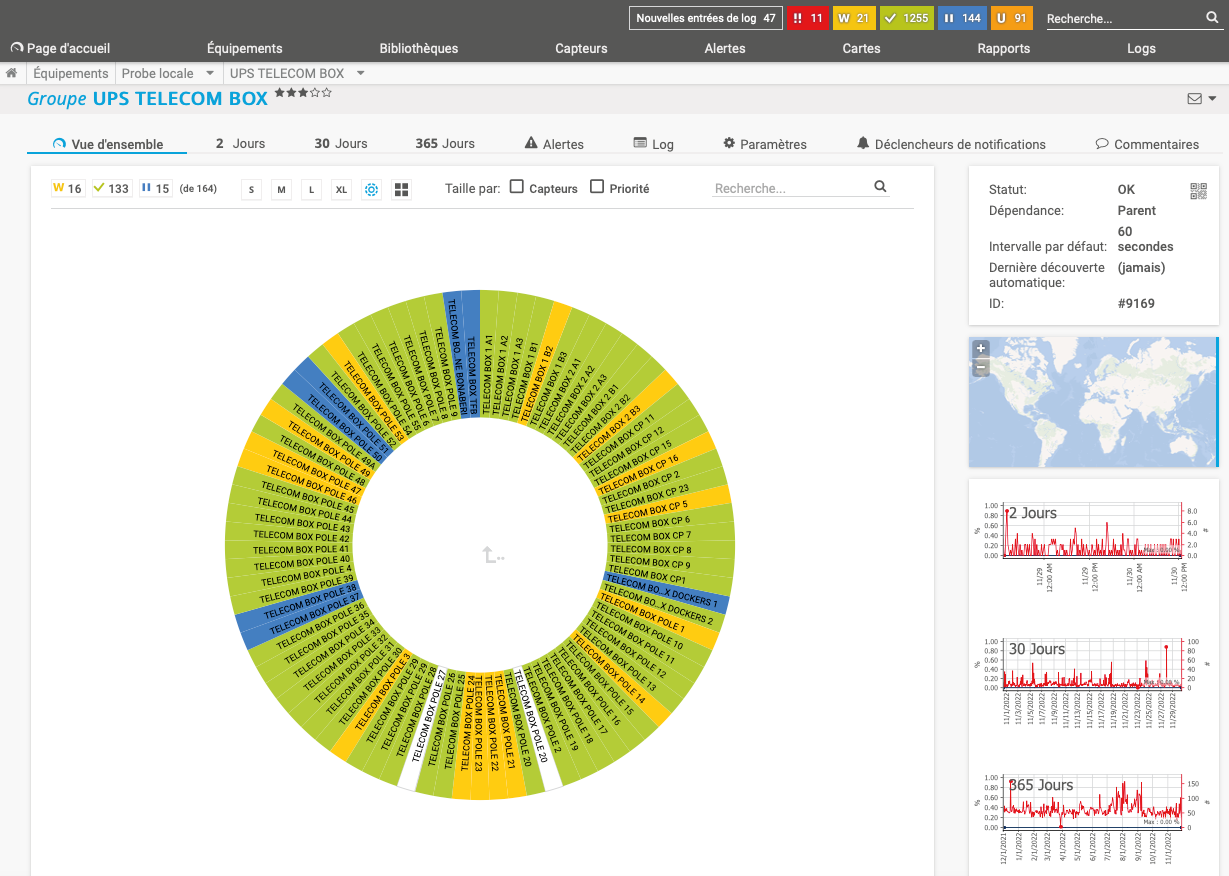
Security monitoring covers over 600 cameras, radar systems, access control readers, door status, and the public announcement system.

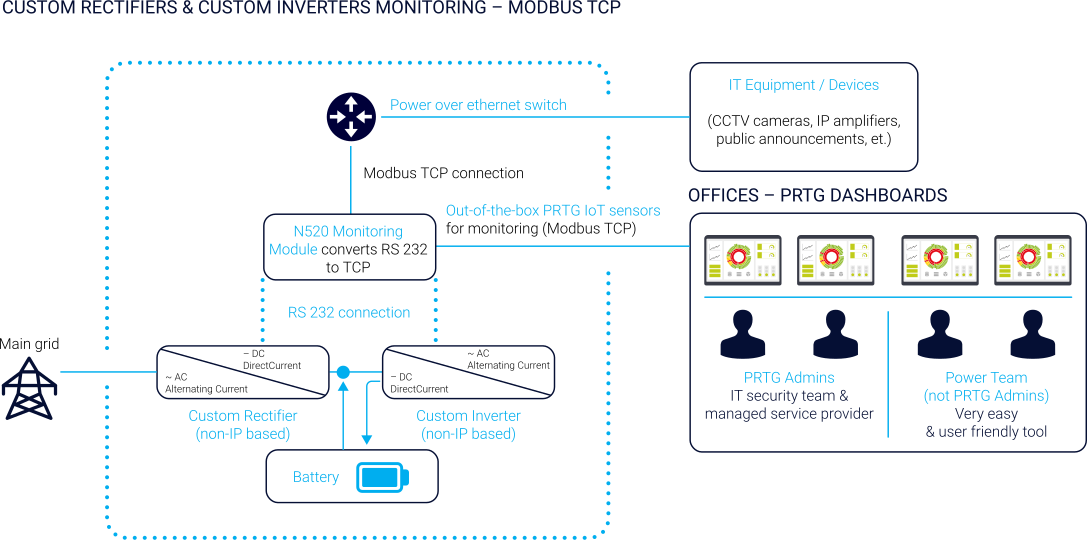
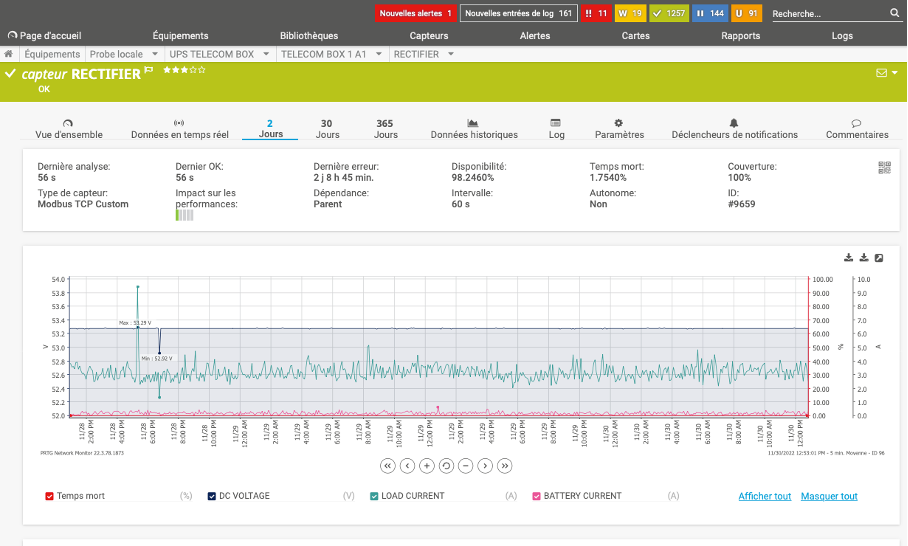
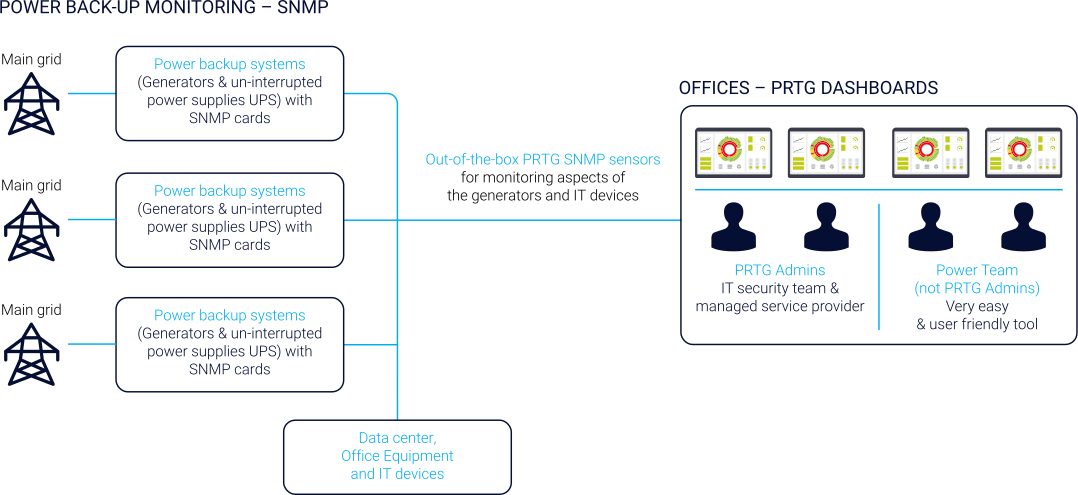
Power monitoring uses Modbus TCP and SNMP for custom non-IP rectifiers and inverters alongside UPS systems. Generators are tracked for fuel level, temperature, oil pressure, battery, and engine hours.

When mains power drops, the alert shows the grid is offline, not a false generator alarm.

With PRTG, we found a monitoring solution that can monitor all of our relevant systems and devices and provide each colleague with exactly the information they need – in a way that they can understand, whether they are IT experts or power technicians.

Bertin Pokaa, Maintenance Team Leader
Port of Douala
PRTG Logo

PRTG gives critical infrastructure operators unified visibility across IT, security, and power from a single platform.

CONTACT SALES
infographic port of doula case study
case study port of douala screenshot sunburst view
infographic port of doula case study
case study port of douala screenshot rectifier monitoring
infographic port of doula case study

Discover more monitoring insights and stories

Solution illustration

Solutions for all your monitoring needs

  • Bandwidth Monitoring
  • Database Monitoring
  • Server Monitoring
Content illustration

Powerful stories from the monitoring world

  • Customer success stories - Paessler
  • IT monitoring secures the gateway to Central Africa - Paessler Blog
  • Video: Making the lives of sysadmins easier
Support illustration

Resources to master your monitoring challenges

  • How can I speed up PRTG—especially for large installations?
  • PRTG Apps for Mobile Network Monitoring
  • Understanding Basic Concepts
Explore All Case Studies

Products

  • Paessler PRTG
    Paessler PRTGMonitor your whole IT infrastructure
    • PRTG Network Monitor
    • PRTG Enterprise Monitor
    • PRTG Hosted Monitor
    • PRTG UVexplorer
    • PRTG extensions
      Extensions for Paessler PRTGExtend your monitoring to a new level
  • Icon Features
    FeaturesExplore all monitoring features

Monitoring with PRTG

  • Network monitoring
  • Bandwidth monitoring
  • SNMP monitoring
  • Network mapping
  • Wi-Fi monitoring
  • Server monitoring
  • Network traffic analyzer
  • NetFlow monitoring
  • Syslog server

Useful Links

  • PRTG Manual
  • Knowledge Base
  • Customer Success Stories
  • About Paessler
  • Subscribe to newsletter
  • PRTG Support
  • PRTG Consulting
  • PRTG Feedback & Roadmap

Contact

Paessler GmbH
Thurn-und-Taxis-Str. 14, 
90411 Nuremberg 
Germany

[email protected]

+49 911 93775-0

  • Contact us
©2026 Paessler GmbHTerms & ConditionsPrivacy PolicyImprintTrust CenterDownload & InstallSitemap
SaaS SaaS SaaS