

• Company
    • About Us
    • Case Studies
    • Press Center
    • Careers
    • Blog
    • Contact us
  • Contact us
  • Login
 
  • English
    • Deutsch
    • Español
    • Français
    • Italiano
    • Português
Paessler
                    - The Monitoring Experts
  • Products
    • Paessler PRTG
      Paessler PRTGMonitor your whole IT infrastructure
      • PRTG Network Monitor
      • PRTG Enterprise Monitor
      • PRTG Hosted Monitor
      • PRTG extensionsExtensions for Paessler PRTGExtend your monitoring to a new level
    • Icon Features
      FeaturesExplore all monitoring features
      • Maps & dashboards
      • Alerts & notifications
      • Multiple user interfaces
      • Distributed monitoring
      • Customizable reporting
  • Solutions
    • Industries
      IndustriesMonitor various industry sectors
      • Industrial
      • Healthcare
      • Data Center
      • Education
      • Finance
      • Government
    • IT Topics
      IT TopicsMonitor all areas of IT
      • Network Monitoring
      • Bandwidth Monitoring
      • SNMP Monitor
      • Network Mapping
      • WiFi Monitoring
      • Server Monitoring
  • Pricing
  • Resources
    • Getting Started
      Getting StartedModules for self-paced learning
    • How-to Guides
      How-to GuidesGet the most out of PRTG
    • Videos & Webinars
      Videos & WebinarsLearn from Paessler experts
    • IT  Knowledge
      IT KnowledgeExpand your IT knowledge
    • PRTG Manual
      PRTG ManualFull documentation
    • Knowledge Base
      Knowledge BaseShare community knowledge
    • PRTG Sensor Hub
      PRTG Sensor HubGet sensors, scripts & templates
    • Trainings
      PRTG TrainingLearn how to work with PRTG
  • Partners
    • icon star
      Become a PartnerNew Resellers or MSPs
    • icon partner
      Partner PortalLog in to your partner account
    • Deal Registration
      Deal RegistrationRegister your sales opportunities
    • icon search
      Find a PartnerFind partners selling Paessler products
    • icon technology
      Technology AlliancesSee Paessler technology partnerships
    • Partner HubTools for Your Success
  • Company
    • About Us
    • Case Studies
    • Press Center
    • Careers
    • Blog
    • Contact us
  • Contact us
  • Login
  • English
    • Deutsch
    • Español
    • Français
    • Italiano
    • Português
  • Get a quote
  • Free trial
  1. Home>
  2. Company>
  3. Case Studies>
  4. National Theatre

Paessler PRTG makes dramatic contribution to National Theatre

Logo National Theatre

COMPANY
National Theatre

INDUSTRY
Media & Entertainment

INSTALLATION SIZE
Small and mid-sized installation

LOCATION
England

About National Theatre

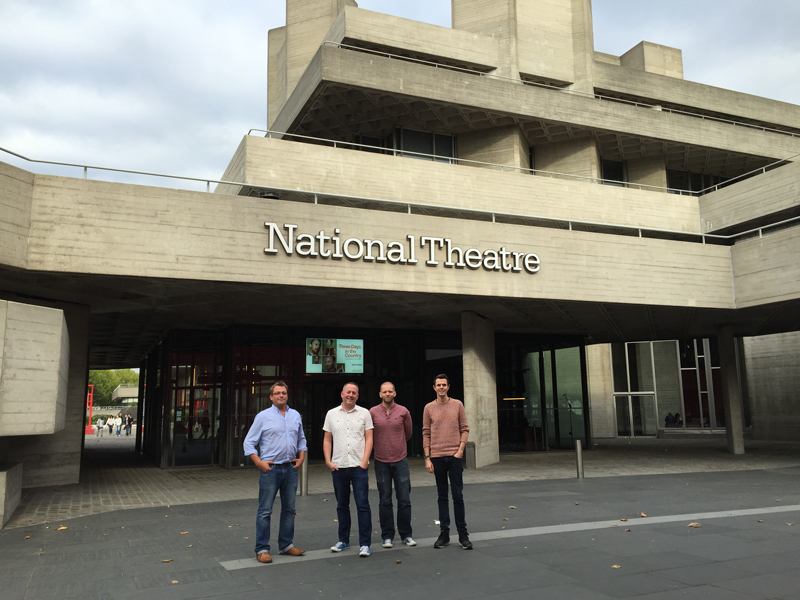
The National Theatre in London is a globally renowned performing arts venue and has played host to some of the world's most notable theatrical productions, from Hamlet and King Lear to The History Boys and War Horse, since its opening in 1963. Employing more than 1,000 people and with a turnover of approximately £117 million in 2014-15, the organisation takes the business of putting on theatrical performances extremely seriously.

There are around 24 performances in a typical week across the National Theatre's three spaces, and the job of lighting control manager Daniel Murfin is to ensure that each of them goes according to plan. The lighting control system he oversees is underpinned by a complex network of control desks, devices and managed switches, and as Daniel puts it, "It's essential that we're able to respond quickly if equipment fails as there may be several thousand people watching a performance. Time really is of the essence."

Implementing monitoring

Two years ago the lighting department decided to implement a network monitoring solution to keep track of the various operations that go into providing lighting for the all of the performances. As well as being able to support a wide range of devices, the solution allows devices to be easily grouped so that notifications about different parts of the network can be sent to the relevant people, without bothering them with notifications on areas outside their area of responsibility. Importantly, the lighting department chose a tool that would be easily understandable for non-technical users, meaning that even staff who are non-IT specialists can use it.

Daniel first came across Paessler PRTG Network Monitor through online research, and when testing the product was immediately struck by its ease of use, advanced features, and the scalability of its licensing, which he knew would allow the National Theatre to rapidly grow its network. PRTG's cost effectiveness and the fact that it is easily configurable and flexible only served to reinforce it as the most appropriate solution on the market.

"PRTG offers really good functionality, and the pricing model means that we can extend as we grow the network", said Daniel. "Many of our users are non-technical and use it purely as a troubleshooting tool, such as to access geographic maps that show which devices are online so that they can quickly identify which device is at fault."

PRTG means that I can be confident the network is up and running smoothly, so that we can concentrate on making world class theatre.

Daniel Murfin, Lighting control manager
National Theatre

Making the difference

Daniel has been delighted with the benefits that PRTG has been able to deliver. In the first instance, being able to pinpoint increases in bandwidth has been particularly useful. In one particular case, a change to the software used by theatre's lighting desks caused an unnecessary spike in network traffic, leading to some lighting control devices exceeding their 10Mbps limit and subsequently affecting network performance. PRTG was able to narrow the problem down to an exact day, and let the software manufacturer know which version the problem started in.

In addition, Daniel says that less of his day is now spent troubleshooting, because PRTG lets him know directly when there is a fault.  It also helps him to narrow down the source of the issue, thereby saving time. All in all, he estimates that 40% of the time that he previously spent troubleshooting has now been freed up, allowing him to take on a much broader role within the lighting department, which covers many areas outside of managing the network.

"With PRTG I now have the time to focus on other areas of my role - including training lighting programmers, dealing with special projects, application development, product development, and supporting lighting designers," said Daniel.

Asked whether he would recommend PRTG to colleagues or peers, Daniel is unequivocal in his endorsement. As well as praising PRTG itself, he added that Paessler's support team is excellent, and is always provided a quick response, further reinforcing his enthusiasm for the product.

National Theatre London

Conclusion

PRTG is now an essential part of The National Theatre's centralised services, and has grown from a 400 sensor installation across two of the complex's three theatres, to around 1,700 sensors across all three theatres, benefiting from the fact that only one license is required to monitor several remote locations. This represents an increase of over 300% in two years, and Daniel is looking to add to this number all the time.

Ultimately, the peace of mind that PRTG provides to behind-the-scenes operations at the National Theatre is invaluable, especially when it comes to what it does best. As Daniel says, "PRTG means that I can be confident the network is up and running smoothly, so that we can concentrate on making world class theatre."

Discover more monitoring insights and stories

Solution illustration

Solutions for all your monitoring needs

  • IP Monitoring
  • NetFlow Monitoring
  • Network Mapping
Content illustration

Powerful stories from the monitoring world

  • Customer success story Total Uptime & PRTG
  • Customer success stories
  • Easy ways to quickly test your bandwidth
Support illustration

Resources to master your monitoring challenges

  • PRTG Apps for Mobile Network Monitoring
  • I run PRTG on VMware. How can I obtain best performance?
  • How can I use the PRTG Application Programming Interface (API)?
Explore All Case Studies
PRTG Logo
FREE DOWNLOAD

Unlimited use of PRTG for 30 days. After 30 days PRTG reverts to the freeware edition.
You can upgrade to a paid license at any time.

Products

  • Paessler PRTG
    Paessler PRTGMonitor your whole IT infrastructure
    • PRTG Network Monitor
    • PRTG Enterprise Monitor
    • PRTG Hosted Monitor
    • PRTG extensions
      Extensions for Paessler PRTGExtend your monitoring to a new level
  • Icon Features
    FeaturesExplore all monitoring features

Monitoring with PRTG

  • Network monitoring
  • Bandwidth monitoring
  • SNMP monitoring
  • Network mapping
  • Wi-Fi monitoring
  • Server monitoring
  • Network traffic analyzer
  • NetFlow monitoring
  • Syslog server

Useful Links

  • PRTG Manual
  • Knowledge Base
  • Customer Success Stories
  • About Paessler
  • Subscribe to newsletter
  • PRTG Support
  • PRTG Consulting
  • PRTG Feedback & Roadmap

Contact

Paessler GmbH
Thurn-und-Taxis-Str. 14, 
90411 Nuremberg 
Germany

[email protected]

+49 911 93775-0

  • Contact us
©2026 Paessler GmbHTerms & ConditionsPrivacy PolicyImprintReport VulnerabilityDownload & InstallSitemap
Cisco Monitoring Cisco Monitoring Cisco Monitoring


