• Company
    • About Us
    • Case Studies
    • Press Center
    • Careers
    • Blog
    • Contact us
  • Contact us
  • Login
 
  • English
    • Deutsch
    • Español
    • Français
    • Italiano
    • Português
Paessler
                    - The Monitoring Experts
  • Products
    • Paessler PRTG
      Paessler PRTGMonitor your whole IT infrastructure
      • PRTG Network Monitor
      • PRTG Enterprise Monitor
      • PRTG Hosted Monitor
      • PRTG UVexplorer
      • PRTG extensionsExtensions for Paessler PRTGExtend your monitoring to a new level
    • Icon Features
      FeaturesExplore all monitoring features
      • Maps & dashboards
      • Alerts & notifications
      • Multiple user interfaces
      • Distributed monitoring
      • Customizable reporting
  • Solutions
    • Industries
      IndustriesMonitor various industry sectors
      • Industrial
      • Healthcare
      • Data Center
      • Education
      • Finance
      • Government
    • IT Topics
      IT TopicsMonitor all areas of IT
      • Network Monitoring
      • Bandwidth Monitoring
      • SNMP Monitor
      • Network Mapping
      • WiFi Monitoring
      • Server Monitoring
  • Pricing
  • Resources
    • Getting Started
      Getting StartedModules for self-paced learning
    • How-to Guides
      How-to GuidesGet the most out of PRTG
    • Videos & Webinars
      Videos & WebinarsLearn from Paessler experts
    • IT  Knowledge
      IT KnowledgeExpand your IT knowledge
    • PRTG Manual
      PRTG ManualFull documentation
    • Knowledge Base
      Knowledge BaseShare community knowledge
    • PRTG Sensor Hub
      PRTG Sensor HubGet sensors, scripts & templates
    • Trainings
      PRTG TrainingLearn how to work with PRTG
  • Partners
    • Icon Handshake
      Become a PartnerFor resellers and channel partners
    • Icon MSP
      Become an MSPDeliver monitoring as a managed service
    • icon partner
      Partner PortalLog in to your partner account
    • Deal Registration
      Deal RegistrationRegister your sales opportunities
    • icon search
      Find a PartnerFind partners selling Paessler products
    • icon technology
      Technology AlliancesSee Paessler technology partnerships
    • Partner HubTools for Your Success
  • Company
    • About Us
    • Case Studies
    • Press Center
    • Careers
    • Blog
    • Contact us
  • Contact us
  • Login
  • English
    • Deutsch
    • Español
    • Français
    • Italiano
    • Português
  • Get a quote
  • Free trial
  1. Home>
  2. IT Topics>
  3. Performance>
  4. Bandwidth Control

Enhance Network Efficiency through Bandwidth Control with PRTG

Effective bandwidth control is essential for maintaining optimal network performance

  • Enjoy seamless scalability – no superpowers required
  • Customize your dashboards because one size fits no one in IT
  • Automate routine tasks and reclaim your coffee breaks
Free download
PRODUCT OVERVIEW

Our Users Give Top Ratings for Monitoring With Paessler PRTG

Gartner peer insights
spiceworks
G2
Capterra

PRTG bandwidth control: What you will find on this page

Table of content

    PRTG makes controlling bandwidth as easy as it gets

    Custom alerts and data visualization let you quickly identify and prevent bandwidth bottlenecks.

    Free download
    PRODUCT OVERVIEW

    Take control of your network bandwidth with PRTG

    Implementing proper bandwidth control helps prevent network congestion and ensures critical applications have the resources they need. Without good bandwidth management, your network might slow down to a crawl, causing delays, frustrating users, and overworking your IT team. But don't worry! With Paessler PRTG, you can take control of your bandwidth. It helps you manage network traffic, allocate bandwidth wisely, and stop bottlenecks before they become a problem, ensuring everything runs efficiently.

    Monitor bandwidth usage and counter bottlenecks in real time

    PRTG is your traffic radar that lets you zero in on the culprits sitting in the slow lane. It allows you to track your bandwidth usage in real time, providing up-to-the-second data on network performance and insights into which applications, IP addresses, and endpoints are consuming the most resources. Whether you're managing VoIP calls, VPN connections, or bustling Wi-Fi traffic, PRTG keeps your network running smoothly without a hitch. Real-time bandwidth control allows administrators to respond immediately to changing network conditions.

    Prevent traffic jams: keep your network flowing smoothly

    Sudden traffic spikes, misbehaving devices, or hardware hiccups can cause network bottlenecks that slow everything to a crawl. But with PRTG's bandwidth monitoring and analysis tools, you can spot these issues before they wreak havoc on your network.

    PRTG gives you the data you need to optimize performance and prevent slowdowns, whether you're tackling DNS quirks, router glitches, or WAN woes. By understanding where bottlenecks are brewing, you can make smart adjustments to keep your network flowing smoothly. Proactive bandwidth control strategies help prevent network bottlenecks before they impact users.

    Implement quality of service (QoS) policies to prioritize traffic

    Not all network traffic is equal; some applications are more critical and need extra bandwidth. With PRTG, you can implement QoS policies to ensure important services get priority over less essential traffic.

    This means high-priority tasks like VoIP or video conferencing get the bandwidth they need, improving performance and minimizing delays – think of it as giving the fast lane on your network highway to the vehicles that really need to get through quickly. QoS is a key component of effective bandwidth control that ensures mission-critical applications receive priority.

    Control bandwidth allocation across devices and applications

    Ever had that one user or application that seems to hog all the bandwidth, leaving everyone else crawling along at a snail's pace? PRTG gives you full control over how bandwidth is allocated across your network to prevent this scenario; you can set bandwidth limits on specific IP addresses or applications, ensuring that no single endpoint or app consumes more than its fair share.

    This ability to throttle traffic where necessary keeps bandwidth hogs in check, maintaining peak efficiency across your network. Granular bandwidth control at the application and device level maximizes network efficiency.

    Simplify bandwidth management with automated alerts

    In network management, being proactive beats being reactive any day; PRTG's real-time monitoring is backed by a robust, customizable alert system – if bandwidth usage spikes unexpectedly or an endpoint exceeds its bandwidth limit, PRTG notifies you instantly via email, SMS, or push notification.

    This allows you to respond to issues before they impact network performance, reducing downtime, and preventing larger problems from arising; think of it as an early warning system that keeps you one step ahead of potential network disasters.

    What bandwidth controlling looks like in PRTG

    Diagnose network issues by continuously tracking the amount of bandwidth that flows through your network devices. Advanced bandwidth controlling requires visibility into all network traffic patterns and usage trends. Show bandwidth consumption by IP address, protocol, or port, and other key metrics in real time. Visualize monitoring data in clear graphs and dashboards to identify problems more easily. Gain the overview you need to troubleshoot network performance issues.

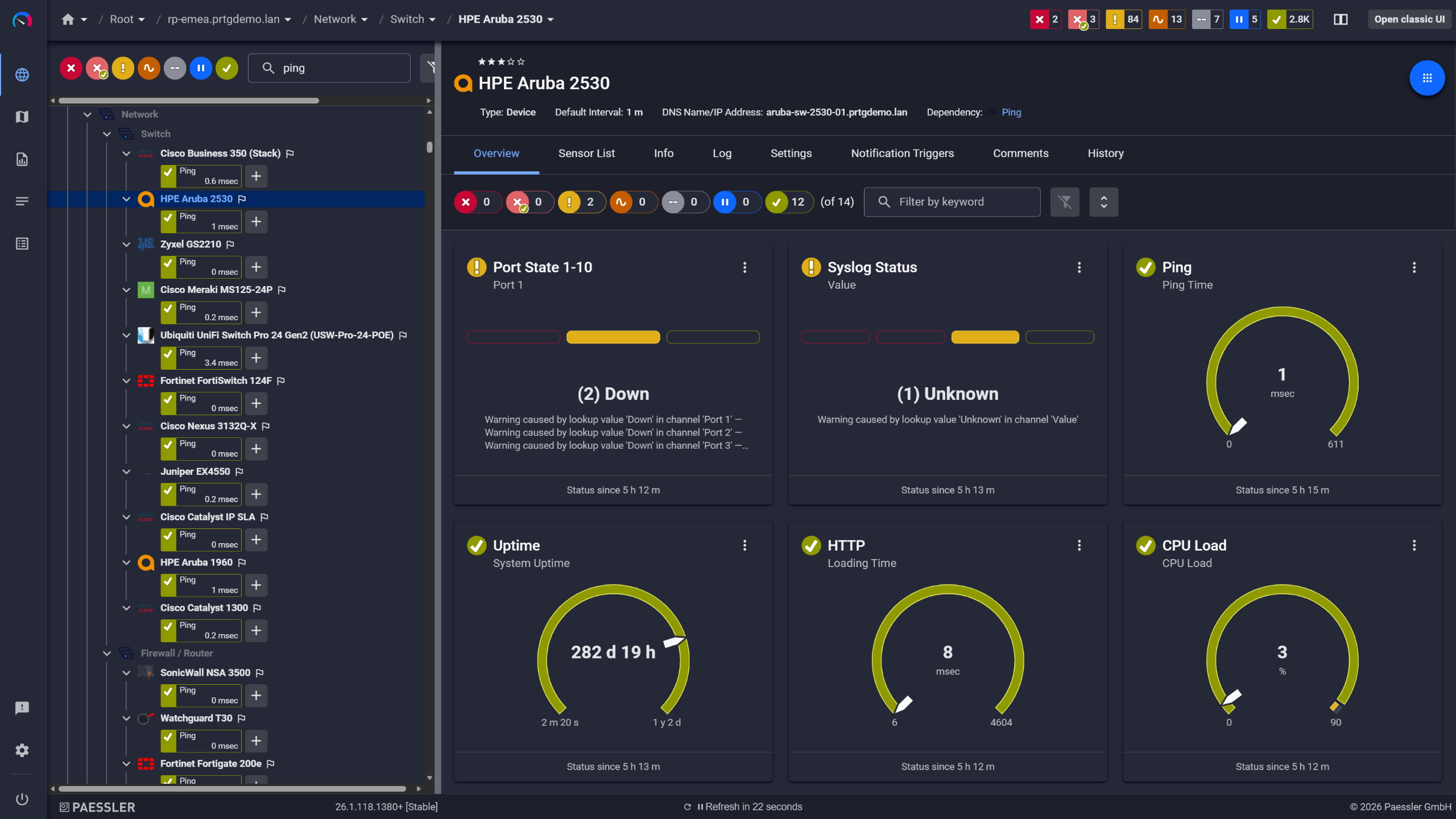
    PRTG Screenshot device tree view

    Device tree view of the complete monitoring setup

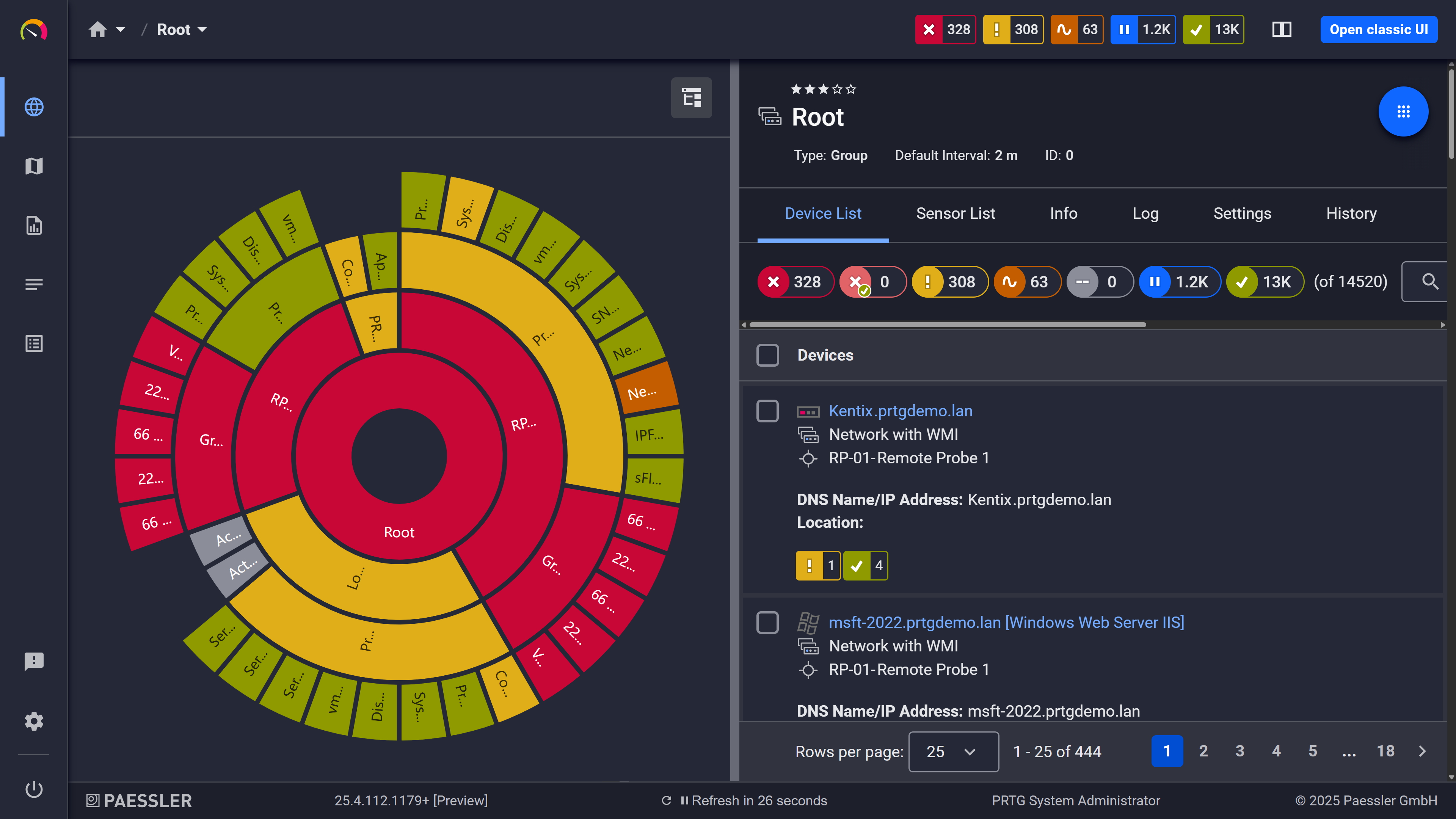
    PRTG screenshot map entire it infrastructure

    Custom PRTG dashboard for keeping an eye on the entire IT infrastructure

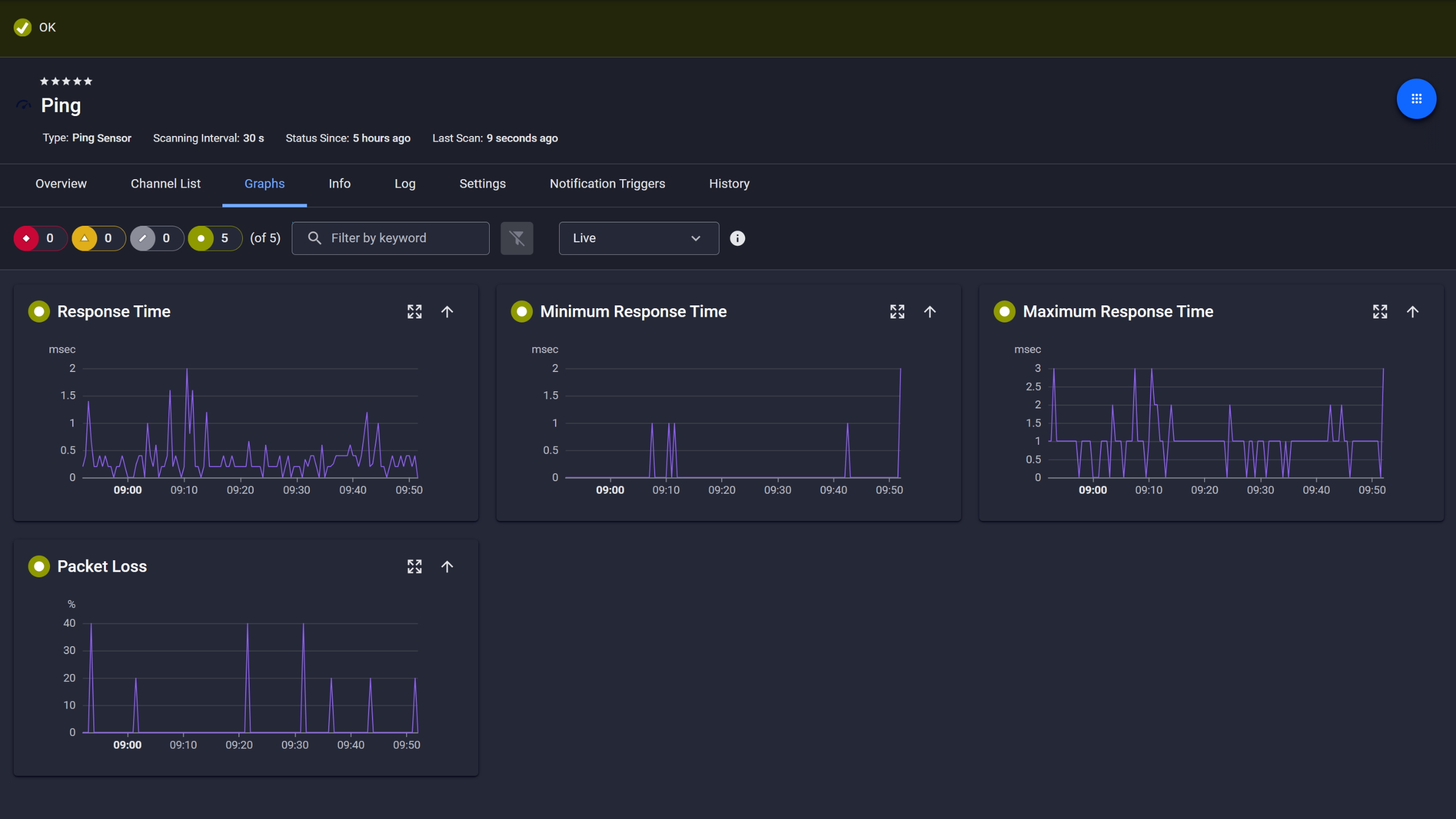
    PRTG screenshot graph live data traffic

    Live traffic data graph in PRTG

    Start monitoring bandwidth with PRTG and see how it can make your network more reliable and your job easier.

    Free download
    PRODUCT OVERVIEW

    IT experts agree: Paessler PRTG is a great solution for IT infrastructure monitoring

    PCMag

    “All-around winning
     network monitor”

    IT Brief

    “The real beauty of PRTG is the endless possibilities it offers”

    ITPro

    “PRTG Network Monitor 
    is very hard to beat”

    5 reasons to choose PRTG as your bandwidth controller tool

    Real-time bandwidth monitoring

    With PRTG, you get an up-to-the-second view of how your bandwidth is being used. When you control your bandwidth effectively, you improve application performance and user satisfaction throughout your organization.

    From individual IP addresses to applications and protocols, you'll always have a clear picture of where your bandwidth is going.

    This level of detail allows for more precise control and analysis, ensuring that you're not left in the dark when it comes to network performance.

    Comprehensive traffic analysis

    PRTG's bandwidth analyzer doesn't just tell you how much bandwidth is being used – it breaks down network traffic and provides detailed reports that help you understand your network's bandwidth utilization in depth.

    This comprehensive analysis allows you to make data-driven decisions for better bandwidth management, optimizing performance across the board.

    Flexible QoS and throttling options

    Not only can you implement QoS policies to prioritize critical traffic, but you can also throttle non-essential traffic to prevent congestion.

    Whether you're managing Wi-Fi, VPN, or WAN traffic, PRTG gives you the tools to ensure network performance remains high. It's like having a customizable toolkit that adapts to your specific needs.

    Easy-to-use bandwidth management tools

    Let's be honest – no one wants to wrestle with a complicated interface when trying to manage their network. PRTG's intuitive interface makes it easy to set bandwidth limits, prioritize traffic, and monitor network performance.

    With customizable dashboards and reports, you can keep an eye on your network's health at a glance. Plus, you can ensure that no resource is being over- or under-utilized, maximizing efficiency.

    Scalable for networks of all sizes

    Whether you're managing a small office network or a sprawling enterprise infrastructure, PRTG scales to meet your needs.

    From monitoring network bandwidth across remote access connections to managing high-traffic WAN environments, PRTG adapts to any size or complexity of network.

    It's a solution that grows with you, ensuring you're always equipped to handle your network challenges.

    Explore our preconfigured PRTG sensors for bandwidth controlling

    PRTG comes with more than 250 native sensor types for monitoring your entire on-premises, cloud, and hybrid cloud environment out of the box. Check out some examples below!

    SNMP Traffic v2

    The SNMP Traffic v2 sensor monitors bandwidth and traffic on a device. It can show the following:

    • Number of incoming and outgoing broadcast, multicast, unicast, and non-unicast packets
    • Number of incoming and outgoing discards and errors
    • Total, incoming, and outgoing traffic
    • Number of incoming, unknown protocols
    SNMP Traffic v2
    SNMP Traffic v2

    Packet Sniffer

    The Packet Sniffer sensor monitors the headers of data packets that pass a local network card using a built-in packet sniffer. You can choose from predefined channels. It can show the following and more:

    • Traffic from Citrix applications
    • Traffic from file transfer (FTP/P2P) and various other protocols (UDP, TCP)
    • Traffic from network services (DHCP, DNS, Ident, ICMP, SNMP)
    • Internet mail traffic (IMAP, POP3, SMTP)
    • Traffic from remote control applications (RDP, SSH, Telnet, Virtual Network Computing (VNC))
    Packet Sniffer
    Packet Sniffer

    NetFlow v9

    The NetFlow v9 sensor receives traffic data from a NetFlow v9-compatible device and shows the traffic by type. This sensor has several filter options to divide traffic into different channels. It can show the following and more:

    • Traffic from Citrix applications
    • Traffic from file transfer (FTP/P2P) and various other protocols (UDP, TCP)
    • Traffic from network services (DHCP, DNS, Ident, ICMP, SNMP)
    • Internet mail traffic (IMAP, POP3, SMTP)
    • Traffic from remote control applications (RDP, SSH, Telnet, Virtual Network Computing (VNC))
    NetFlow v9
    NetFlow v9

    Windows Network Card

    The Windows Network Card sensor monitors the bandwidth usage and traffic of a network interface via Windows Management Instrumentation (WMI) or Windows performance counters. It can show the following:

    • Number of incoming and outgoing discards, errors, and unicast and non-unicast packets
    • Total, incoming, and outgoing traffic
    • Number of packets total, sent, and received
    • Number of unknown protocols
    Windows Network Card
    Windows Network Card

    See the PRTG Manual for a list of all available sensor types.

    PRTG Is Compatible With All Major Vendors, Products, and Systems

    compatible with all major vendors, products, and systems

    Find the root cause of the problem with our PRTG bandwidth monitoring solution

    Real-time notifications mean faster troubleshooting so that you can act before more serious issues occur.

    Free download
    PRODUCT OVERVIEW

    “PRTG helps us to keep control of our IT by making issues visible immediately – and everywhere. We always have an eye on the performance and availability of our IT and can react in time if any failures occur. On a long-term perspective, the monitoring data helps us with capacity planning so that we can deliver the required resources for our own systems as well as for our customers, without wasting money on unwarranted redundancies.”

    Stein Erik Høybakk, Senior Network Engineer
    TAFJORD

    “All our production and business processes depend on SAP. But, of course, IT and production systems also play a crucial role in securing these processes. By incorporating SAP, production, and IT into one centralized monitoring system, we can quickly detect critical drops in performance and identify the causes of these issues. In fact, thanks to PRTG and itesys, this couldn’t be any easier.”

    Andreas Schmidt, Senior Systems Engineer
    Truma

    “Any downtime could be detrimental to our customers. We also strive to provide the best possible service to our customers. PRTG allows us to see the health and performance of the network. Using these measurements we can make decisions on how to repair a piece of equipment before it fails and causes a service interruption.”

    James Ott Jr., Communications System Technician and IT Administrator
    Federal Radio

    Your bandwidth controller at a glance – even on the go

    PRTG is set up in a matter of minutes and can be used on a wide variety of mobile devices.

    device overview

    Create innovative solutions with Paessler’s IT partners

    Partnering with innovative IT vendors, Paessler unleashes synergies to create
    new and additional benefits for joined customers.

    Rittal

    Rittal

    IT that works constitutes a business-critical basis for a company's success. Availability and security must be defined for the respective purpose and closely monitored – by OT and IT alike.

    Read more
    NetBrain

    NetBrain

    Integrating monitoring results from PRTG into NetBrain maps makes the foundation for network automation.

    Read more
    ScriptRunner

    ScriptRunner

    With ScriptRunner Paessler integrates a powerful event automation platform into PRTG Network Monitor.

    Read more
    Paessler PRTG

    Paessler PRTG

    Network Monitoring Software – Version 26.1.116.1532 (February 9th, 2026)

    Hosting icon

    Hosting

    Download for Windows and cloud-based version PRTG Hosted Monitor available

    Languages icon

    Languages

    English, German, Spanish, French, Portuguese, Dutch, Russian, Japanese, and Simplified Chinese

    test

    Monitor everything

    Network devices, bandwidth, servers, applications, virtual environments, remote systems, IoT, and more

    test

    Pricing

    Choose the PRTG Network Monitor subscription that's best for you

    Discover more monitoring insights and stories

    Content illustration

    Powerful stories from the monitoring world

    • Everything there is to know about managing your WiFi bandwidth
    • What is bandwidth usage and how to monitor it effectively
    • Easy ways to quickly test your bandwidth - Paessler Blog
    Support illustration

    Resources to master your monitoring challenges

    • Bandwidth Errors – Common Codes and Messages - Paessler
    • PRTG Manual: Notifications Based on Sensor Limits Step by Step
    • PRTG Manual: Monitoring via SNMP - Paessler
    Solution illustration

    Solutions for all your monitoring needs

    • Server Monitoring
    • LAN Monitoring
    • Bandwidth Monitoring

    Bandwidth Control: FAQ


    How does PRTG help manage network bandwidth?

    PRTG helps manage network bandwidth by monitoring usage in real time and providing detailed insights into which applications, devices, or IP addresses are consuming the most bandwidth. It allows you to set limits, throttle traffic, and prioritize critical applications to ensure optimal network performance. With PRTG, you can visualize bandwidth usage patterns, identify potential issues, and make informed decisions to optimize your network.

    Does PRTG support QoS policies?

    Yes, PRTG fully supports quality of service (QoS) policies. It allows you to implement these policies to prioritize traffic for critical applications like VoIP or video conferencing. By doing so, you ensure that essential services always have the bandwidth they need to function smoothly, even during peak usage times. This prioritization is key to maintaining high-quality performance for your most important applications.

    Can PRTG be used for WAN and VPN bandwidth monitoring?

    Absolutely! PRTG is designed to handle all types of network connections, including WAN, VPN, and Wi-Fi. It provides detailed monitoring of traffic across these connections, helping you maintain control over bandwidth utilization in even the most complex network environments. Whether you're supporting remote workers via VPN or managing data flow across multiple sites with WAN, PRTG has you covered.

    Does PRTG provide real-time alerts for bandwidth issues?

    Yes, PRTG's customizable alert system notifies you immediately when bandwidth usage exceeds predefined thresholds. This proactive approach allows you to take corrective action before bandwidth issues lead to network slowdowns or outages. You can set up alerts to be delivered via email, SMS, or push notifications, ensuring you're always in the loop, no matter where you are.

    Is it possible to monitor bandwidth on a per-device basis?

    Yes, PRTG can monitor bandwidth at the device level, allowing you to track usage for individual IP addresses, endpoints, and network devices. This enables more precise control over network traffic and resource allocation. By understanding the bandwidth consumption of specific devices, you can identify and address issues like unauthorized usage or inefficient applications.

    What makes bandwidth control features from PRTG different from basic traffic shaping tools?

    Unlike basic tools that only limit traffic, bandwidth control capabilities from PRTG provide deep visibility into network usage patterns before implementing restrictions. This intelligence-driven approach to bandwidth controlling helps identify the root causes of congestion rather than simply capping speeds. PRTG combines real-time monitoring with historical analysis to enable smarter bandwidth control decisions. The solution also integrates with other network management functions, creating a comprehensive approach to network optimization.

    Can PRTG help control your bandwidth across multiple locations?

    Yes, PRTG excels at helping you control your bandwidth across distributed networks. The centralized monitoring platform provides visibility into traffic patterns at all locations, allowing for consistent bandwidth control policies enterprise-wide. Remote probes collect data from each site while maintaining a unified view of network performance. This comprehensive approach to bandwidth control ensures consistent application performance regardless of user location, making it ideal for organizations with branch offices or remote workers.

    What is a sensor in PRTG?

    In PRTG, “sensors” are the basic monitoring elements. One sensor usually monitors one measured value in your network, for example the traffic of a switch port, the CPU load of a server, or the free space on a disk drive. On average, you need about 5-10 sensors per device or one sensor per switch port.

    We asked: would you recommend PRTG? Over 95% of our customers say yes!

    Paessler conducted trials in over 600 IT departments worldwide to tune its network monitoring software closer to the needs of sysadmins. The result of the survey: over 95% of the participants would recommend PRTG – or already have.

    recommendation

    Still not convinced?

    Love

    More than 500,000 sysadmins love PRTG

    Paessler PRTG is used by companies of all sizes. Sysadmins love PRTG because it makes their job a whole lot easier.

    PRTG

    Monitor your entire IT infrastructure

    Bandwidth, servers, virtual environments, websites, VoIP services – PRTG keeps an eye on your entire network.

    test

    Try Paessler PRTG for free

    Everyone has different monitoring needs. That’s why we let you try PRTG for free.

    PRTG Logo

    Start monitoring bandwidth with PRTG and see how it can make your network more reliable and your job easier.

    Free download
    PRODUCT OVERVIEW

    Products

    • Paessler PRTG
      Paessler PRTGMonitor your whole IT infrastructure
      • PRTG Network Monitor
      • PRTG Enterprise Monitor
      • PRTG Hosted Monitor
      • PRTG UVexplorer
      • PRTG extensions
        Extensions for Paessler PRTGExtend your monitoring to a new level
    • Icon Features
      FeaturesExplore all monitoring features

    Monitoring with PRTG

    • Network monitoring
    • Bandwidth monitoring
    • SNMP monitoring
    • Network mapping
    • Wi-Fi monitoring
    • Server monitoring
    • Network traffic analyzer
    • NetFlow monitoring
    • Syslog server

    Useful Links

    • PRTG Manual
    • Knowledge Base
    • Customer Success Stories
    • About Paessler
    • Subscribe to newsletter
    • PRTG Support
    • PRTG Consulting
    • PRTG Feedback & Roadmap

    Contact

    Paessler GmbH
    Thurn-und-Taxis-Str. 14, 
    90411 Nuremberg 
    Germany

    [email protected]

    +49 911 93775-0

    • Contact us
    ©2026 Paessler GmbHTerms & ConditionsPrivacy PolicyImprintReport VulnerabilityDownload & InstallSitemap
    MRTG for Windows MRTG for Windows MRTG for Windows