• Company
    • About Us
    • Case Studies
    • Press Center
    • Careers
    • Blog
    • Contact us
  • Contact us
  • Login
 
  • English
    • Deutsch
    • Español
    • Français
    • Italiano
    • Português
Paessler
                    - The Monitoring Experts
  • Products
    • Paessler PRTG
      Paessler PRTGMonitor your whole IT infrastructure
      • PRTG Network Monitor
      • PRTG Enterprise Monitor
      • PRTG Hosted Monitor
      • PRTG UVexplorer
      • PRTG extensionsExtensions for Paessler PRTGExtend your monitoring to a new level
    • Icon Features
      FeaturesExplore all monitoring features
      • Maps & dashboards
      • Alerts & notifications
      • Multiple user interfaces
      • Distributed monitoring
      • Customizable reporting
  • Solutions
    • Industries
      IndustriesMonitor various industry sectors
      • Industrial
      • Healthcare
      • Data Center
      • Education
      • Finance
      • Government
    • IT Topics
      IT TopicsMonitor all areas of IT
      • Network Monitoring
      • Bandwidth Monitoring
      • SNMP Monitor
      • Network Mapping
      • WiFi Monitoring
      • Server Monitoring
  • Pricing
  • Resources
    • Getting Started
      Getting StartedModules for self-paced learning
    • How-to Guides
      How-to GuidesGet the most out of PRTG
    • Videos & Webinars
      Videos & WebinarsLearn from Paessler experts
    • IT  Knowledge
      IT KnowledgeExpand your IT knowledge
    • PRTG Manual
      PRTG ManualFull documentation
    • Knowledge Base
      Knowledge BaseShare community knowledge
    • PRTG Sensor Hub
      PRTG Sensor HubGet sensors, scripts & templates
    • Trainings
      PRTG TrainingLearn how to work with PRTG
  • Partners
    • Icon Handshake
      Become a PartnerFor resellers and channel partners
    • Icon MSP
      Become an MSPDeliver monitoring as a managed service
    • icon partner
      Partner PortalLog in to your partner account
    • Deal Registration
      Deal RegistrationRegister your sales opportunities
    • icon search
      Find a PartnerFind partners selling Paessler products
    • icon technology
      Technology AlliancesSee Paessler technology partnerships
    • Partner HubTools for Your Success
  • Company
    • About Us
    • Case Studies
    • Press Center
    • Careers
    • Blog
    • Contact us
  • Contact us
  • Login
  • English
    • Deutsch
    • Español
    • Français
    • Italiano
    • Português
  • Get a quote
  • Free trial

Proactive Uptime Monitoring Tool

Know when something goes down before your users do, across your entire infrastructure.  

Free download
PRODUCT OVERVIEW

What should an uptime monitoring tool actually cover?  

A real uptime monitoring tool polls devices and services continuously using the right protocols, delivers alerts the moment something drops, and keeps historical data so you can report on it later. The full stack needs coverage: servers, network devices, VMs, and web-facing endpoints, all in one place. Paessler PRTG does exactly that, from one install, with one dashboard.  

Supported technologies: Servers (Windows/Linux) · Routers · Switches · Firewalls · VMs (VMware/Hyper-V) · Cloud services (AWS, Azure) · DNS · SMTP · TCP endpoints · HTTP/HTTPS · SSL certificates  

Download PRTG Trial

What you will find on this page

  • Cover Your Entire Infrastructure
  • How PRTG Monitors Uptime
  • Uptime Monitoring: With and Without PRTG
  • FAQs

PRTG is compatible with all major vendors, products, and systems

compatible with all major vendors, products, and systems

Uptime Monitoring That Covers Your Entire Infrastructure

Get Alerted First, Every Time 

PRTG continuously polls your devices and services and sends a notification the moment something stops responding, so the right person gets alerted before anyone else notices. Alert routing is configurable per device, group, or severity level, which means the network team gets network alerts and the server team gets server alerts, not everyone gets everything. If the first notification doesn't reach anyone, escalation contacts can be set to kick in after a defined delay. The result is a structured alert chain that works without manual coordination.  
  • Configurable polling intervals per device or sensor
  • Notifications via email, SMS, push notification, and webhooks (compatible with Slack, PagerDuty, and similar services)
  • Alert routing by device, group, location, or severity
  • Maintenance windows to suppress alerts during planned work
  • iOS and Android apps for on-call alerting on the go
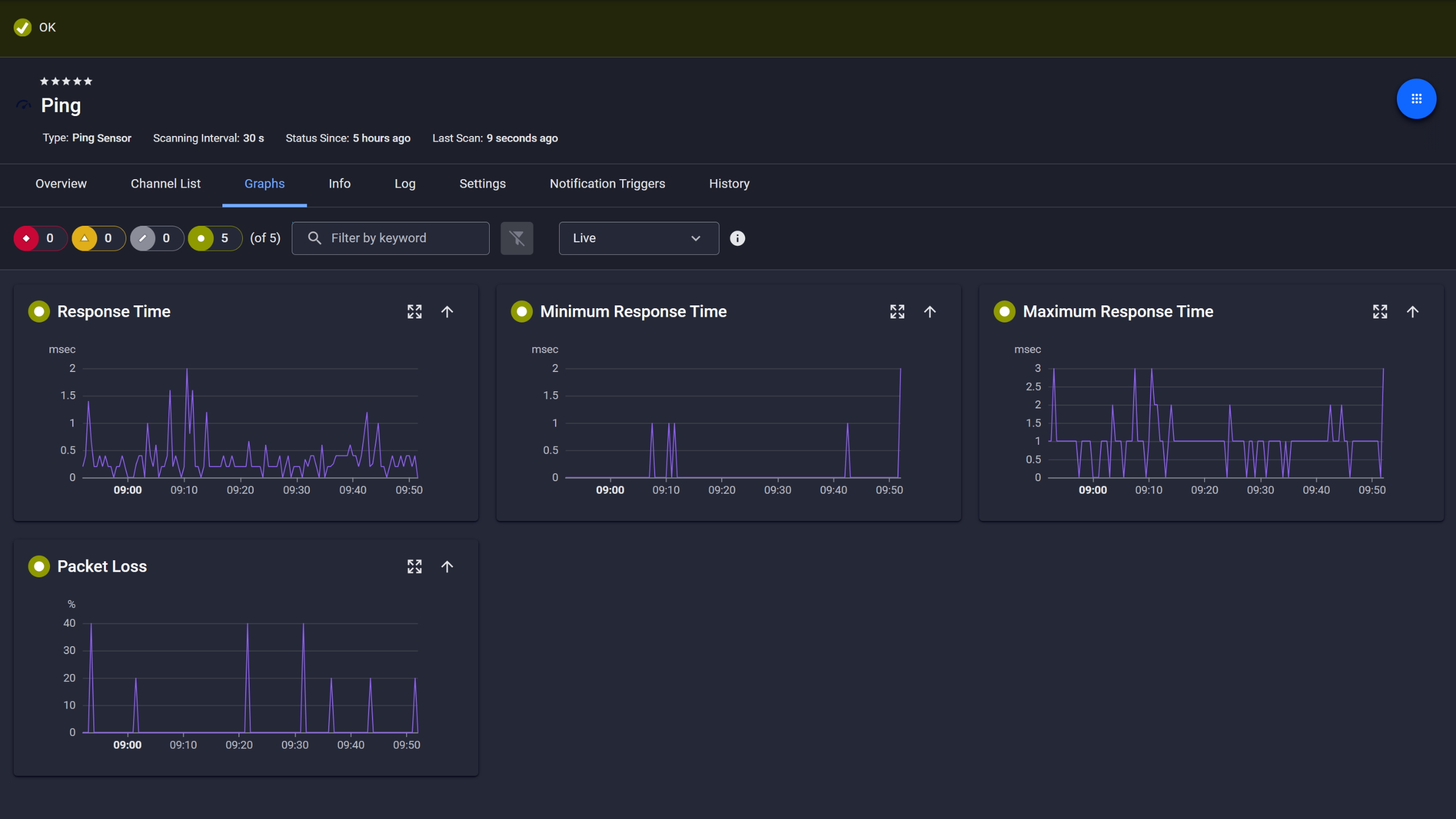
PRTG Ping sensor graphs showing response time, min, max, and packet loss over time

Ping response and packet loss

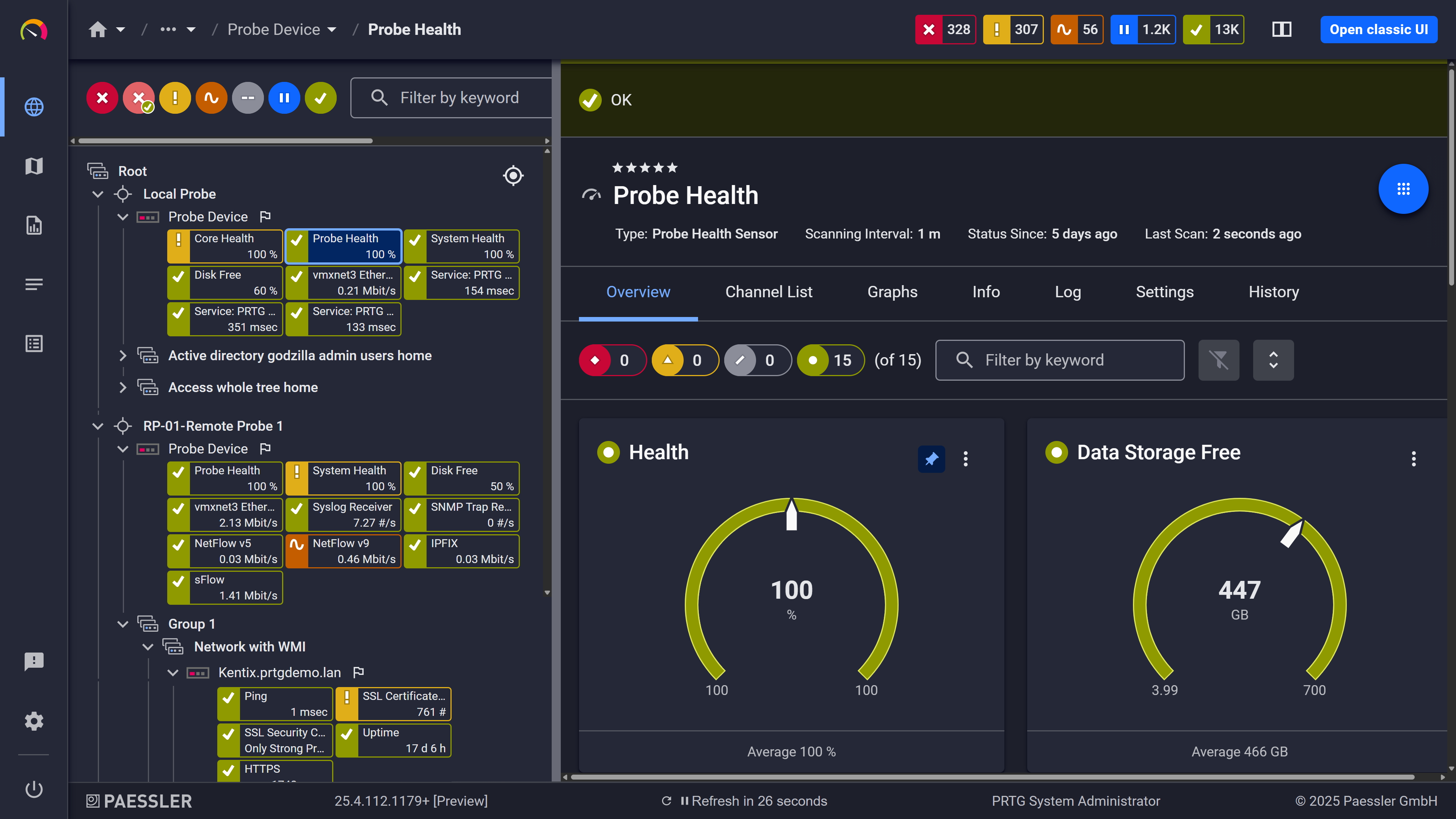
PRTG web interface showing Probe Health sensor with health and storage gauge widgets

Probe health at a glance

PRTG web interface showing live performance graphs for a Probe Health sensor

Live graphs, real-time performance data

One tool for a mixed stack 

Windows servers, Cisco switches, Linux systems, VMware, a few things in Azure. Keeping all of that in a single monitoring solution is the hard part. PRTG handles it through auto-discovery and device templates for major vendors. No extra software to install on monitored devices, minimal manual entry. Also auto-discovery runs on a schedule, so devices added to a monitored IP range get picked up automatically without anyone touching the configuration. One dashboard, no blind spots from tool fragmentation.  

  • Covers servers, network devices, VMs, and cloud services from one install
  • Auto-discovery scans IP ranges and adds devices without manual entry
  • Preconfigured sensors for Cisco, Dell, HPE, VMware, AWS, Azure, plus integrations with your existing workflows via API and webhooks
  • REST Custom sensor for querying SaaS and custom API endpoints (requires REST configuration file)
  • Extend coverage with custom sensors (Python, PowerShell, PRTG API) where native sensors don't cover your environment. Requires scripting.

See Why IT Professionals Trust PRTG

Start monitoring your infrastructure in minutes. No professional services, no complex configuration, no risk.

Free download
PRODUCT OVERVIEW

Availability history that's actually there when you need it  

PRTG logs sensor states over time with timestamps, based on configured scanning intervals, starting when a sensor becomes active. No separate logging configuration, no manual export schedule. That gives you the raw data for post-mortems, SLA documentation, troubleshooting, and incident management without anyone manually tracking anything. Availability records are there on demand, whether for a routine management review, an audit, or an incident debrief. The data is structured, timestamped, and ready whenever it's needed. 

  • Full sensor state history logged automatically with timestamps
  • Per-device and per-group availability reports
  • PRTG SLA Reporter for structured SLA documentation (separate extension, historical reporting only, not real-time SLA alerting)
  • Exportable data for root cause analysis in external tools
  • Scheduled reports for periodic infrastructure health reviews
PRTG reports list showing scheduled monitoring reports with run times and sensor counts

Scheduled reports, always on time

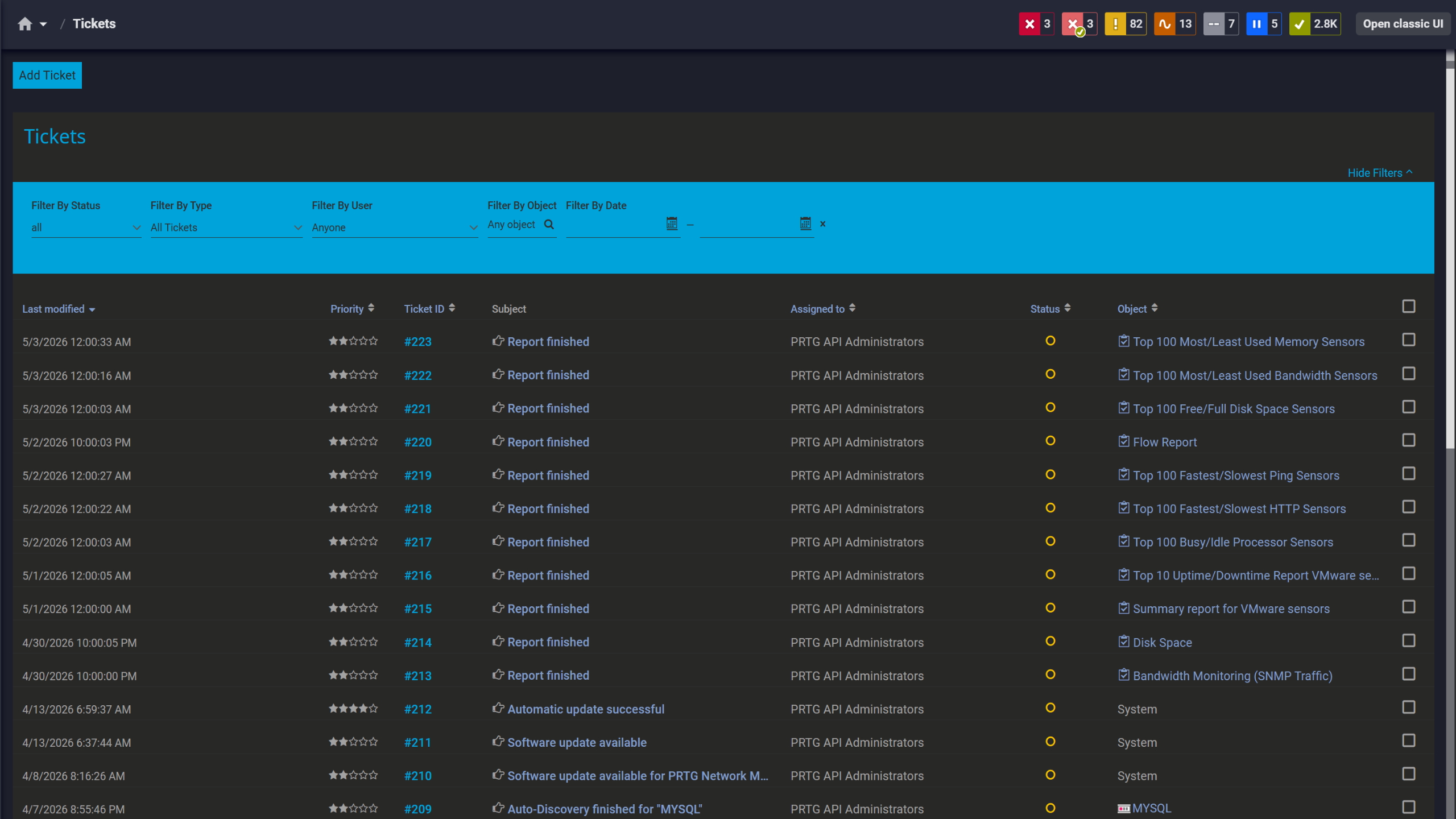
PRTG tickets list showing system notifications, report completions, and update alerts

Tickets keep your team aligned

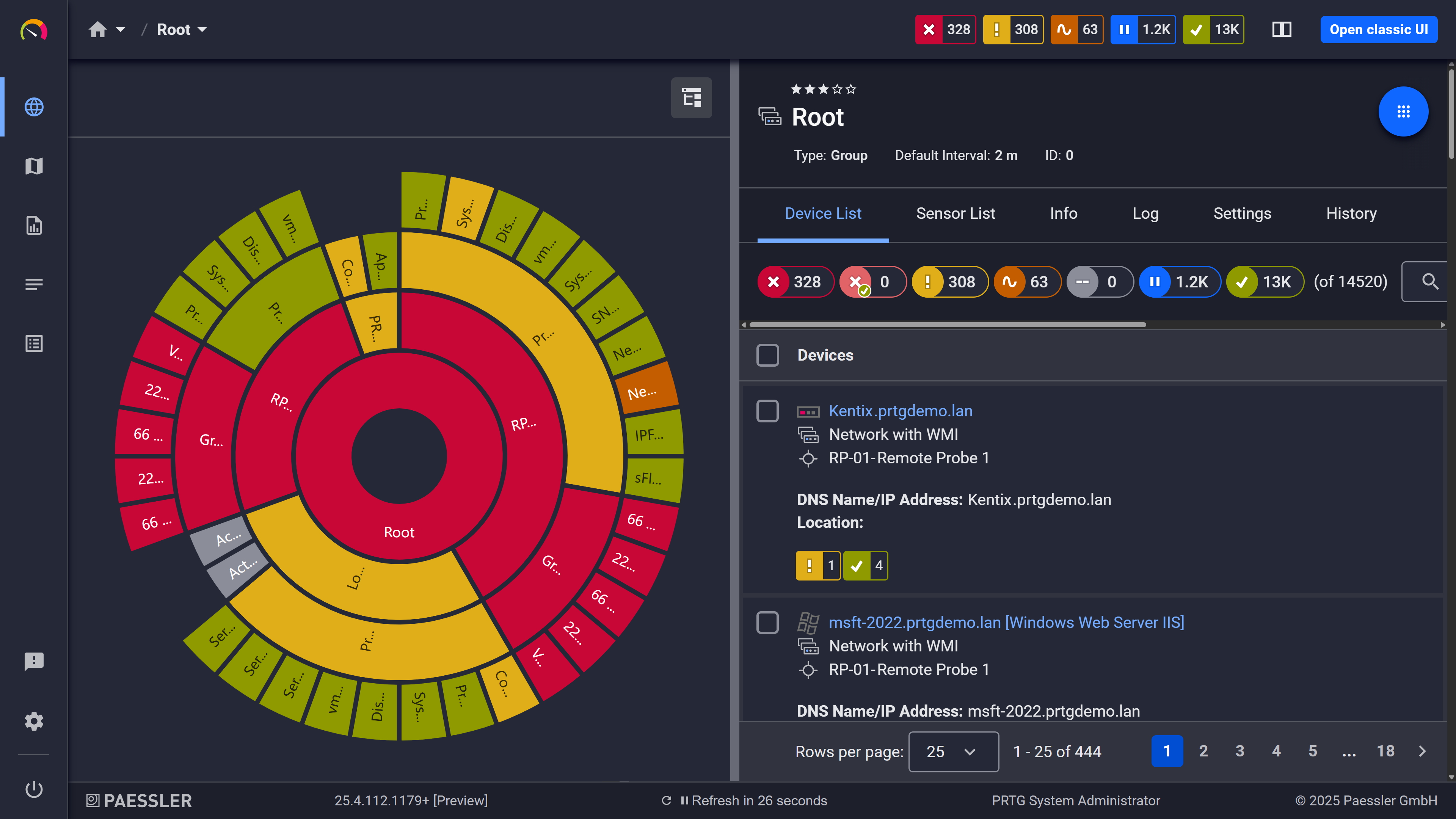
PRTG sunburst chart visualizing the full network hierarchy with color-coded sensor status

Your entire network, visualized instantly

Spot Trends Before They Become Problems 

A device that reboots every three weeks looks like a one-off until you have the trend data. PRTG stores response times, latency, packet loss, and availability continuously. Thresholds work in two tiers: a warning level fires before the metric hits the error level, giving you an early signal while there's still time to act. That's how you catch a metric drifting consistently before it becomes an incident, with enough lead time to investigate and resolve it on your terms. 

  • Continuous historical data for all monitored metrics
  • Configurable warning and error thresholds per sensor
  • Latency and response time trend graphs
  • Data export to optimize capacity planning in external tools
  • Scheduled reports for identifying recurring performance bottlenecks

How PRTG Monitors Uptime

PRTG covers device reachability, system uptime, service availability, and web health checks through purpose-built sensors. Learn more about how these sensors help you achieve your uptime goals.  

Device reachability  

The Ping v2 sensor sends ICMP echo requests and measures response time, packet loss, and min/max ping time per cycle. This is the most direct method for uptime checks: returns a clear up or down status every poll. Also useful for tracking latency trends over time, not just live status.

Network device uptime

The SNMP Uptime v2 sensor reads the sysUpTime OID directly from SNMP-capable devices: routers, switches, firewalls, and any endpoint exposing SNMP v1/v2c/v3. Reports the time since the device's last reboot, and PRTG tracks sensor downtime separately in graphs and reports. No agent required on the target device. Works across a wide range of vendors, which in practice means most things you already have. 

Windows server uptime  

The Windows System Uptime Sensor connects via WMI or Windows performance counters to report uptime and downtime on Windows servers. No agent installation needed. Works on domain-joined and standalone systems. 

TCP Port Checks 

The Port sensor and Port v2 sensor check whether a specific TCP port is open and accepting connections. That covers SMTP (port 25/587), DNS (port 53), RDP, and custom application ports, confirming not just that a device is reachable, but that service functionality is intact. It is useful for website monitoring, mail server checks, and general endpoint availability. 

Web Certificate Health 

The SSL Certificate sensor tracks certificate validity and alerts before expiry, so an expired certificate doesn't cause surprise website downtime. HTTP sensors (HTTP, HTTP v2, HTTP Advanced) check website availability, HTTP status codes, and response time. Content matching is available in HTTP Advanced for more granular website monitoring. For full page speed measurement including all page resources, the HTTP Full Web Page sensor covers that. 

free downLoad

Uptime Monitoring: With and Without PRTG

Capability

Without PRTG

Without PRTG

With PRTG

With PRTG

Downtime detection 

Without PRTG
not included

User reports it via helpdesk 

With PRTG
included

Detected within one polling cycle, notification sent automatically 

Multi-protocol coverage 

Without PRTG
not included

Separate tool per device type 

With PRTG
included

SNMP, WMI, ICMP, TCP: one installation 

Availability history 

Without PRTG
not included

Manual extraction from logs or tickets 

With PRTG
included

Stored automatically, reportable per device or group 

Alert routing 

Without PRTG
not included

Manual call/email chains 

With PRTG
included

Configured per device, severity, or schedule 

New device coverage 

Without PRTG
not included

Manually added to each tool 

With PRTG
included

Auto-discovery scans IP range and adds sensors 

Reporting and workflows 

Without PRTG
not included

Manual, disconnected 

With PRTG
included

Automate reports, export data, scheduled delivery 

free downLoad

“I would recommend PRTG because it has helped us significantly improve service uptime by highlighting important alerts that would otherwise result in a system failure or service disruption if action was not taken. Thanks to PRTG, we can ensure that The Ritz London’s network and IT systems are five-star, just like the hotel.”

Richard Isted, IT Manager
The Ritz London

Ultimately, people do better when they focus on the solution, not the tool. This is the mantra we live by at Skyscanner. Without PRTG, we’d still be spending half a day or more on monitoring our internal tools.

Barry Kelly, Systems Engineer
Skyscanner

Adopting PRTG has been like going from being in the dark to being in the light. Before, we had limited visibility into what was happening in the infrastructure and in the network. Now, however, thanks to the comprehensive dashboard and real-time notifications, we receive constant updates on the status of facilities and services, and our way of working has gone from passive to proactive.

Luca Meneghesso, senior IT infrastructure and security specialist
Banca Profilo

Paessler PRTG Network Monitor licenses & pricing

Choose the PRTG Network Monitor subscription that's best for you.

License NameLicense descriptionPriceLicense DetailsGet startedPricing Details
PRTG 500$200per month paid annuallyBuy nowBuy now

Enough to monitor multiple aspects of 50 devices

PRTG 1000$358per month paid annuallyBuy nowBuy now

Enough to monitor multiple aspects of 100 devices

PRTG 2500$742per month paid annuallyBuy nowBuy now

Enough to monitor multiple aspects of 250 devices

PRTG 5000$1,300per month paid annuallyBuy nowBuy now

Enough to monitor multiple aspects of 500 devices

PRTG 10000$1,642per month paid annuallyBuy nowBuy now

Enough to monitor multiple aspects of 1000 devices

Over 100,000 Customers Worldwide Love Paessler  

customer success stories

 Uptime Monitoring: Frequently Asked Questions


What's the difference between uptime monitoring and availability monitoring?

Practically speaking, they mean the same thing: is this device, service, or endpoint reachable, or not? Uptime monitoring refers to continuous polling for status. Availability monitoring can extend to include uptime percentages, SLA reporting, and historical trends, and in PRTG, both run on the same sensor infrastructure. The uptime data feeds directly into availability reports, so there's no separate setup for that. 

Which protocols does PRTG use for uptime checks?

ICMP via the Ping v2 sensor, SNMP via the SNMP Uptime v2 sensor, WMI via the Windows System Uptime Sensor, and TCP via the Port and Port v2 sensors. Dedicated SMTP and DNS sensors handle service-level checks; HTTP and HTTPS sensors cover website availability. Most work out of the box once you add a device and configure the relevant credentials. 

Can PRTG monitor uptime across multiple locations or remote sites?

Yes, through remote probes, lightweight components installed at remote sites that report back to the central PRTG server. Each probe monitors local devices independently, so distributed monitoring works even across network boundaries or limited WAN connections. This is the standard approach for organizations running infrastructure across multiple offices, branches, or sites, and it works well for that. 

Can PRTG monitor SaaS services and cloud endpoints for availability?

PRTG has native sensors for AWS (via CloudWatch) and Azure. For other SaaS services and custom API endpoints, the REST Custom sensor can monitor REST APIs by querying an endpoint and mapping JSON/XML responses to channels. This typically requires a REST configuration file and may require additional setup depending on authentication and response structure. For simpler checks, HTTP and HTTPS sensors work against any web-accessible endpoint without additional configuration. 

What does the free plan include for uptime monitoring?

100 sensors, no time limit, no credit card required. That covers uptime monitoring across your most critical devices, services, and endpoints. Pricing scales by sensor count as your environment grows, with no feature gating between tiers. 

How is PRTG different from tools like UptimeRobot?

UptimeRobot is a hosted uptime monitoring service built around external website checks from the cloud. PRTG installs in your own environment and covers servers, network devices, VMs, cloud services, and websites from a single platform. Where UptimeRobot tells you a URL is down, PRTG can tell you which device, service, or port caused it. SNMP, WMI, ICMP, TCP, HTTP, API monitoring, historical reporting: it's a broader infrastructure monitoring solution for teams who need visibility into what's affecting user experience, not just whether a URL responds. 

Paessler PRTG

Paessler PRTG

Network Monitoring Software – Version 26.1.116.1532 (February 9th, 2026)

Hosting icon

Hosting

Download for Windows and cloud-based version PRTG Hosted Monitor available

Languages icon

Languages

English, German, Spanish, French, Portuguese, Dutch, Russian, Japanese, and Simplified Chinese

test

Monitor everything

Network devices, bandwidth, servers, applications, virtual environments, remote systems, IoT, and more

test

Pricing

Choose the PRTG Network Monitor subscription that's best for you

Discover more monitoring insights and stories

Content illustration

Powerful stories from the monitoring world

  • Uptime vs Availability: Why IT Teams Need Both Metrics for True ...
  • Building network reliability: Beyond uptime to true resilience
  • Proactive IT Support: How Real-Time Monitoring Reduces ...
Support illustration

Resources to master your monitoring challenges

  • PRTG Manual: Windows System Uptime Sensor - Paessler
  • PRTG Manual: SNMP System Uptime Sensor - Paessler
  • PRTG Manual: SNMP Uptime v2 Sensor - Paessler
Solution illustration

Solutions for all your monitoring needs

  • Uptime Monitoring
  • Downtime Monitoring
  • Availability Monitoring
PRTG Logo

Start Monitoring with PRTG and see how it can make your network more reliable and your job easier.

Free download
PRODUCT OVERVIEW

Products

  • Paessler PRTG
    Paessler PRTGMonitor your whole IT infrastructure
    • PRTG Network Monitor
    • PRTG Enterprise Monitor
    • PRTG Hosted Monitor
    • PRTG UVexplorer
    • PRTG extensions
      Extensions for Paessler PRTGExtend your monitoring to a new level
  • Icon Features
    FeaturesExplore all monitoring features

Monitoring with PRTG

  • Network monitoring
  • Bandwidth monitoring
  • SNMP monitoring
  • Network mapping
  • Wi-Fi monitoring
  • Server monitoring
  • Network traffic analyzer
  • NetFlow monitoring
  • Syslog server

Useful Links

  • PRTG Manual
  • Knowledge Base
  • Customer Success Stories
  • About Paessler
  • Subscribe to newsletter
  • PRTG Support
  • PRTG Consulting
  • PRTG Feedback & Roadmap

Contact

Paessler GmbH
Thurn-und-Taxis-Str. 14, 
90411 Nuremberg 
Germany

[email protected]

+49 911 93775-0

  • Contact us
©2026 Paessler GmbHTerms & ConditionsPrivacy PolicyImprintReport VulnerabilityDownload & InstallSitemap
SNMP, MIBs and OIDs SNMP, MIBs and OIDs SNMP, MIBs and OIDs