
• Company
    • About Us
    • Case Studies
    • Press Center
    • Careers
    • Blog
    • Contact us
  • Contact us
  • Login
 
  • English
    • Deutsch
    • Español
    • Français
    • Italiano
    • Português
Paessler
                    - The Monitoring Experts
  • Products
    • Paessler PRTG
      Paessler PRTGMonitor your whole IT infrastructure
      • PRTG Network Monitor
      • PRTG Enterprise Monitor
      • PRTG Hosted Monitor
      • PRTG UVexplorer
      • PRTG extensionsExtensions for Paessler PRTGExtend your monitoring to a new level
    • Icon Features
      FeaturesExplore all monitoring features
      • Maps & dashboards
      • Alerts & notifications
      • Multiple user interfaces
      • Distributed monitoring
      • Customizable reporting
  • Solutions
    • By TeamFor your organization size
      • Small Business IT
      • Mid-Market IT
      • Enterprise IT
      • MSP Network Monitoring
    • Industries
      By IndustryFor your business sector
      • Industrial
      • Healthcare
      • Government
      • Education
      • Data Center
      • Finance
    • IT Topics
      By Use CaseFor every technical scenario
      • Network Monitoring
      • Server Monitoring
      • OT Monitoring
      • Distributed Monitoring
      • Network Topology Mapping
      • SNMP Monitoring
      • Bandwidth Monitoring
  • Pricing
  • Resources
    • Getting Started
      Getting StartedModules for self-paced learning
    • How-to Guides
      How-to GuidesGet the most out of PRTG
    • Videos & Webinars
      Videos & WebinarsLearn from Paessler experts
    • IT  Knowledge
      IT KnowledgeExpand your IT knowledge
    • PRTG Manual
      PRTG ManualFull documentation
    • Knowledge Base
      Knowledge BaseShare community knowledge
    • PRTG Sensor Hub
      PRTG Sensor HubGet sensors, scripts & templates
    • Trainings
      PRTG TrainingLearn how to work with PRTG
  • Partners
    • Icon Handshake
      Become a PartnerFor resellers and channel partners
    • Icon MSP
      Become an MSPDeliver monitoring as a managed service
    • icon partner
      Partner PortalLog in to your partner account
    • Deal Registration
      Deal RegistrationRegister your sales opportunities
    • icon search
      Find a PartnerFind partners selling Paessler products
    • icon technology
      Technology AlliancesSee Paessler technology partnerships
    • Partner HubTools for Your Success
  • Company
    • About Us
    • Case Studies
    • Press Center
    • Careers
    • Blog
    • Contact us
  • Contact us
  • Login
  • English
    • Deutsch
    • Español
    • Français
    • Italiano
    • Português
  • Get a quote
  • Free trial
  1. Home>
  2. Company>
  3. Case Studies>
  4. VID Specialized University

A force multiplier: how VID Specialized University shifted from reactive to proactive IT with PRTG 

Challenge: Reactive IT team managing university and healthcare foundation with no proactive monitoring

download PDF
Logo VID Specialized University

COMPANY
VID Specialized University

INDUSTRY
Education

COMPANY SIZE
Midsized Company

COUNTRY
Norway

SCALE
6,000+ students and staff, 200 servers, 15 Foundation sites

Icon sensor

200 servers monitored around the clock across campuses and foundation sites

Icon timer

Response times reduced from 2-3 days to near-immediate

Icon Okay

Early morning service provider incident resolved before the working day began

The problem

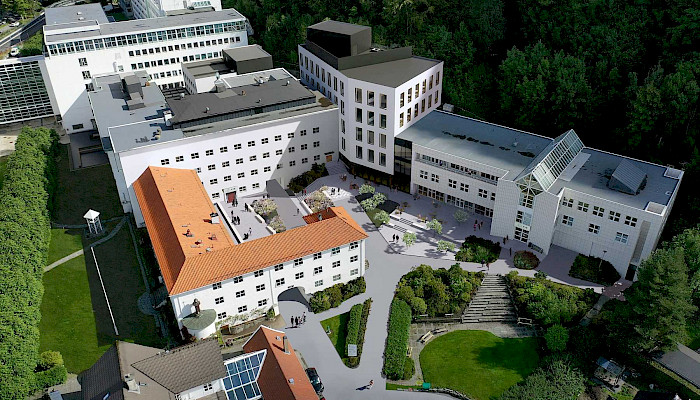
VID Specialized University is Norway's third-largest private higher education institution, with programs in nursing, occupational therapy, social education, and theology. Its IT team also supports the parent Diakonhjemmet Foundation, which runs pharmacies, nursing homes, and care facilities across 15 sites.

The team operated entirely reactively. Issues only surfaced when users complained. Response times lagged two to three days. No time remained to modernize a decade-old infrastructure.

The small team needed a single point of oversight across both the university and foundation networks.

What changed with PRTG

PRTG was integrated into around 75% of VID's systems, covering 200 servers and distributed locations across all campuses and foundation sites. Four probes enable round-the-clock monitoring at no additional licensing cost.

The PRTG mobile app lets engineers monitor and respond from anywhere. In one early incident, an alert arrived early in the morning after a service provider change. The team identified the issue and restored service before the working day began. That kind of response was impossible before PRTG.

User complaints dropped significantly and response times fell from multiple days to near-immediate. The team gained headroom to focus on cloud adoption, campus consolidation, and upgrading legacy systems.

PRTG is also being integrated with VID's ticketing system to automate IT service management.

For us, PRTG is what the military refers to as a ‘force multiplier’. We can achieve so much more by taking a proactive approach that delivers a seamless service for our community while also freeing time to concentrate on digital innovation. As a non-profit organization, we are focused on creating value for society. And, as an IT team, our role is to enable our community to do more with technology. With PRTG we have found a cost-effective, seamless solution that creates huge value not just in terms of massively improved service levels, but also in providing our IT colleagues with a better working experience where they feel in control.

Steinar Grande, Senior Executive Officer, IT Support
VID Specialized University
PRTG Logo

PRTG gives lean university IT teams the proactive visibility they need to serve their communities and focus on innovation.

CONTACT SALES
VID Specialized University
VID Specialized University interior

Discover more monitoring insights and stories

Solution illustration

Solutions for all your monitoring needs

  • Educational IT Monitoring
  • VMware Horizon Monitoring
  • Healthcare IT Monitoring
Content illustration

Powerful stories from the monitoring world

  • Customer success stories - Paessler
  • Customer success story SISAP
  • How LUMC monitors all its IT systems with Paessler PRTG ...
Support illustration

Resources to master your monitoring challenges

  • How can I speed up PRTG—especially for large installations?
  • How can I move or migrate a PRTG installation to a different system or server?
  • I run PRTG on VMware. How can I obtain best performance?
Explore All Case Studies

Products

  • Paessler PRTG
    Paessler PRTGMonitor your whole IT infrastructure
    • PRTG Network Monitor
    • PRTG Enterprise Monitor
    • PRTG Hosted Monitor
    • PRTG UVexplorer
    • PRTG extensions
      Extensions for Paessler PRTGExtend your monitoring to a new level
  • Icon Features
    FeaturesExplore all monitoring features

Monitoring with PRTG

  • Network monitoring
  • Bandwidth monitoring
  • SNMP monitoring
  • Network mapping
  • Wi-Fi monitoring
  • Server monitoring
  • Network traffic analyzer
  • NetFlow monitoring
  • Syslog server

Useful Links

  • PRTG Manual
  • Knowledge Base
  • Customer Success Stories
  • About Paessler
  • Subscribe to newsletter
  • PRTG Support
  • PRTG Consulting
  • PRTG Feedback & Roadmap

Contact

Paessler GmbH
Thurn-und-Taxis-Str. 14, 
90411 Nuremberg 
Germany

[email protected]

+49 911 93775-0

  • Contact us
©2026 Paessler GmbHTerms & ConditionsPrivacy PolicyImprintReport VulnerabilityDownload & InstallSitemap
Brother Printer Errors Brother Printer Errors Brother Printer Errors