

• Company
    • About Us
    • Case Studies
    • Press Center
    • Careers
    • Blog
    • Contact us
  • Contact us
  • Login
 
  • English
    • Deutsch
    • Español
    • Français
    • Italiano
    • Português
Paessler
                    - The Monitoring Experts
  • Products
    • Paessler PRTG
      Paessler PRTGMonitor your whole IT infrastructure
      • PRTG Network Monitor
      • PRTG Enterprise Monitor
      • PRTG Hosted Monitor
      • PRTG extensionsExtensions for Paessler PRTGExtend your monitoring to a new level
    • Icon Features
      FeaturesExplore all monitoring features
      • Maps & dashboards
      • Alerts & notifications
      • Multiple user interfaces
      • Distributed monitoring
      • Customizable reporting
  • Solutions
    • Industries
      IndustriesMonitor various industry sectors
      • Industrial
      • Healthcare
      • Data Center
      • Education
      • Finance
      • Government
    • IT Topics
      IT TopicsMonitor all areas of IT
      • Network Monitoring
      • Bandwidth Monitoring
      • SNMP Monitor
      • Network Mapping
      • WiFi Monitoring
      • Server Monitoring
  • Pricing
  • Resources
    • Getting Started
      Getting StartedModules for self-paced learning
    • How-to Guides
      How-to GuidesGet the most out of PRTG
    • Videos & Webinars
      Videos & WebinarsLearn from Paessler experts
    • IT  Knowledge
      IT KnowledgeExpand your IT knowledge
    • PRTG Manual
      PRTG ManualFull documentation
    • Knowledge Base
      Knowledge BaseShare community knowledge
    • PRTG Sensor Hub
      PRTG Sensor HubGet sensors, scripts & templates
    • Trainings
      PRTG TrainingLearn how to work with PRTG
  • Partners
    • icon star
      Become a PartnerNew Resellers or MSPs
    • icon partner
      Partner PortalLog in to your partner account
    • Deal Registration
      Deal RegistrationRegister your sales opportunities
    • icon search
      Find a PartnerFind partners selling Paessler products
    • icon technology
      Technology AlliancesSee Paessler technology partnerships
    • Partner HubTools for Your Success
  • Company
    • About Us
    • Case Studies
    • Press Center
    • Careers
    • Blog
    • Contact us
  • Contact us
  • Login
  • English
    • Deutsch
    • Español
    • Français
    • Italiano
    • Português
  • Get a quote
  • Free trial
  1. Home>
  2. Company>
  3. Case Studies>
  4. Pepe Jeans

Pepe Jeans finds the right fit with Paessler PRTG

download PDF
Logo Pepe Jeans

COMPANY
Pepe Jeans

INDUSTRY
Retail

INSTALLATION SIZE
Large installation

LOCATION
England

About Pepe Jeans

Since its establishment in 1973, international clothing retailer, Pepe Jeans, centres all its efforts on achieving total consumer satisfaction. In a bid to meet the growing demands of its online retail and increasingly connected customers, the team sought software that efficiently monitors and maintains the bandwidth and health status of its network. In a bid to streamline its IT efforts, the business was investing in costly and time intensive tools.

Senior IT Network Engineer at Pepe Jeans, Xavier Marchador, was searching for a useful solution that could monitor a wide range of devices, with an easy and intuitive interface, and on-hand support – to pre-empt any issues. Xavier acknowledges: “The main reasons for implementing monitoring software were to establish a network base line, track the health status of devices, monitor bandwidth usage in communication lines, and create weather maps with live information of remote delegations.”

Enter PRTG

"The software’s ability to monitor bandwidth and health status, create alarms and notifications based on events and thresholds, and more importantly, to be able to do it from a GUI, as well as full support of CISCO devices, was what attracted us to Paessler PRTG Network Monitor”, says Xavier Marchador.

PRTG has become an essential tool in our daily tasks. Not only is the software great but also the people behind it. We've contacted their support many times to request assistance, and their attention has always been excellent.

Xavier Marchador, Senior IT Network Engineer
Pepe Jeans

Implementing monitoring

For Pepe Jeans, monitoring is treated as an ongoing process and a necessity, not a single, one-time project. As a result, the company is currently using 6,000 sensors to monitor both LAN and WAN, as well as a remote probe to monitor 350 locations. 

With the help of PRTG, Pepe Jeans can check the health status of a device, pinpointing the source of network issues before any potential downtime.

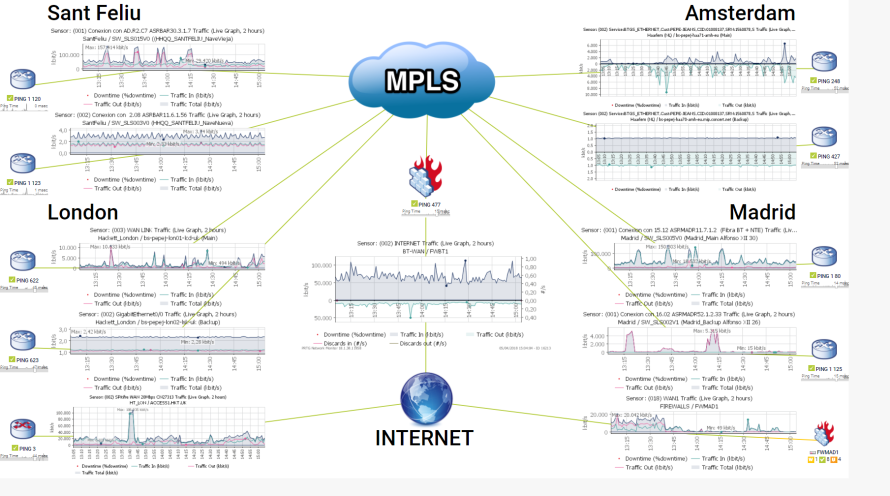
The software helps to analyse trends in bandwidth usage and hardware obsolescence. Subsequently, the company has replaced devices that were constantly triggering alarms and requesting WAN lines review due to interface flapping in communication devices. Moreover, as a global company, Pepe Jeans utilises the weather map feature to source information regarding WAN links of every remote office.

Global PRTG map Pepe Jeans main offices

Conclusion

Xavier concludes: “Without PRTG it would not be possible to get this information in a reasonable time, and solving the problems would take even longer. Thus, spending resources in troubleshooting rather than in projects that are more important for the business.”

“From triggering alarms to creating new maps, PRTG offers a solution for all requirements.”

Discover more monitoring insights and stories

Solution illustration

Solutions for all your monitoring needs

  • Network Monitoring Tool
  • SNMP Monitoring
  • Server Monitoring
Content illustration

Powerful stories from the monitoring world

  • Customer success story Compuquip & PRTG
  • Customer success stories
  • 5 PRTG Customer Stories You Might Not Know
Support illustration

Resources to master your monitoring challenges

  • How can I speed up PRTG—especially for large installations?
  • I run PRTG on VMware. How can I obtain best performance?
  • How can I move or migrate a PRTG installation to a different system or server?
Explore All Case Studies
PRTG Logo
FREE DOWNLOAD

Unlimited use of PRTG for 30 days. After 30 days PRTG reverts to the freeware edition.
You can upgrade to a paid license at any time.

Products

  • Paessler PRTG
    Paessler PRTGMonitor your whole IT infrastructure
    • PRTG Network Monitor
    • PRTG Enterprise Monitor
    • PRTG Hosted Monitor
    • PRTG extensions
      Extensions for Paessler PRTGExtend your monitoring to a new level
  • Icon Features
    FeaturesExplore all monitoring features

Monitoring with PRTG

  • Network monitoring
  • Bandwidth monitoring
  • SNMP monitoring
  • Network mapping
  • Wi-Fi monitoring
  • Server monitoring
  • Network traffic analyzer
  • NetFlow monitoring
  • Syslog server

Useful Links

  • PRTG Manual
  • Knowledge Base
  • Customer Success Stories
  • About Paessler
  • Subscribe to newsletter
  • PRTG Support
  • PRTG Consulting
  • PRTG Feedback & Roadmap

Contact

Paessler GmbH
Thurn-und-Taxis-Str. 14, 
90411 Nuremberg 
Germany

[email protected]

+49 911 93775-0

  • Contact us
©2026 Paessler GmbHTerms & ConditionsPrivacy PolicyImprintReport VulnerabilityDownload & InstallSitemap
Home Home Home


