

• Company
    • About Us
    • Case Studies
    • Press Center
    • Careers
    • Blog
    • Contact us
  • Contact us
  • Login
 
  • English
    • Deutsch
    • Español
    • Français
    • Italiano
    • Português
Paessler
                    - The Monitoring Experts
  • Products
    • Paessler PRTG
      Paessler PRTGMonitor your whole IT infrastructure
      • PRTG Network Monitor
      • PRTG Enterprise Monitor
      • PRTG Hosted Monitor
      • PRTG extensionsExtensions for Paessler PRTGExtend your monitoring to a new level
    • Icon Features
      FeaturesExplore all monitoring features
      • Maps & dashboards
      • Alerts & notifications
      • Multiple user interfaces
      • Distributed monitoring
      • Customizable reporting
  • Solutions
    • Industries
      IndustriesMonitor various industry sectors
      • Industrial
      • Healthcare
      • Data Center
      • Education
      • Finance
      • Government
    • IT Topics
      IT TopicsMonitor all areas of IT
      • Network Monitoring
      • Bandwidth Monitoring
      • SNMP Monitor
      • Network Mapping
      • WiFi Monitoring
      • Server Monitoring
  • Pricing
  • Resources
    • Getting Started
      Getting StartedModules for self-paced learning
    • How-to Guides
      How-to GuidesGet the most out of PRTG
    • Videos & Webinars
      Videos & WebinarsLearn from Paessler experts
    • IT  Knowledge
      IT KnowledgeExpand your IT knowledge
    • PRTG Manual
      PRTG ManualFull documentation
    • Knowledge Base
      Knowledge BaseShare community knowledge
    • PRTG Sensor Hub
      PRTG Sensor HubGet sensors, scripts & templates
    • Trainings
      PRTG TrainingLearn how to work with PRTG
  • Partners
    • icon star
      Become a PartnerNew Resellers or MSPs
    • icon partner
      Partner PortalLog in to your partner account
    • Deal Registration
      Deal RegistrationRegister your sales opportunities
    • icon search
      Find a PartnerFind partners selling Paessler products
    • icon technology
      Technology AlliancesSee Paessler technology partnerships
    • Partner HubTools for Your Success
  • Company
    • About Us
    • Case Studies
    • Press Center
    • Careers
    • Blog
    • Contact us
  • Contact us
  • Login
  • English
    • Deutsch
    • Español
    • Français
    • Italiano
    • Português
  • Get a quote
  • Free trial
  1. Home>
  2. Company>
  3. Case Studies>
  4. AXA Gulf

AXA Gulf insures against application downtime with Paessler PRTG

download PDF
Logo AXA Gulf

COMPANY
AXA Gulf

INDUSTRY
Financial Services

INSTALLATION SIZE
Large installation

LOCATION
France

About AXA Gulf

AXA, one of the largest global insurers, is a worldwide leader in Insurance and Asset Management with a purpose of empowering people to live better lives. In the Gulf region, AXA has been present for almost 70 years, offering a wide range of insurance products and services for corporate, SME and individual customers.

AXA is one of the largest global insurers in the world. Its portfolio includes car, travel, life, home, and health insurance products and services, meeting the needs of businesses and consumers alike.

The company has been present in the Gulf for almost 70 years and is one of the largest international players in the region, covering the UAE, Oman, Bahrain, and Qatar. It has 25 branches across the Gulf, with a workforce of over 800 employees serving over one million customers.

The challenge

Insurance is a 24/7 business, people need to be able to get in touch at any hour of the day regarding their policies, cover, and claims, so technology downtime is not an option – the company can’t afford to stand still for even a minute.

The systems team at AXA Gulf is responsible for running the business’ data centers and ensuring the corporate systems and applications are up and running at all times. The team has a detailed checklist of performance indicators which it reviews on a daily basis to ensure the business’ data centers and applications are running as they should be.

The checklist encompasses the key areas that can impact applications and data center performance including memory and disk space, storage, hardware and servers, WAN, ping rates, application URLs, and temperature and humidity. Historically, this was a manual process which was often challenging and always time-consuming.

The insights that PRTG gives us means we are much more efficient in our daily checking of application and systems performance.

Suresh Lakshmikanthan, IT System Administrator
AXA Gulf

Entering PRTG

AXA Gulf made the move to using Paessler PRTG Network Monitor in 2017 and worked with Paessler’s UAE partner, GWC Networks, to implement the platform.

With PRTG’s sensors collecting data from the entire business’ technology infrastructure, AXA Gulf now has much better insights into how its data centers and applications are running. It’s able to monitor performance from a central dashboard to present an overview of key performance indicators. The team can easily review the daily checklist and can see at a glance when potential issues flag up on the dashboard during the working day.

Out of hours, alerts can be shared via email or a mobile app to the relevant team members to ensure they are aware of any issue. This round the clock approach to monitoring puts the team in a strong position to take insightful action to address any potential issues before they impact the business, whatever the time of day.

Given downtime is such an issue to the business, the team has a responsibility to report application issues to the senior management team. If issues do occur for any reason, the team is able to access historical data in order to identify what led to the problem and prepare reports and actions plans to share with the management team.

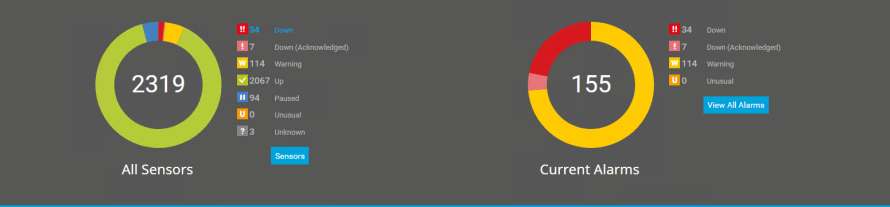
Sensors and alarms status from AXA Gulf’s PRTG installation

Conclusion

The use of PRTG across AXA Gulf’s applications and data centers has had a huge impact on reducing potential downtime across the business. For starters, the team is able to complete its daily checklist much more quickly and easily than before, freeing up time which is a valuable resource for any business.

In addition, with the PRTG dashboard and alert system, it now has much better visibility throughout the day and night on potential issues that it can then quickly prioritise and address before they become big problems.

Discover more monitoring insights and stories

Solution illustration

Solutions for all your monitoring needs

  • Network Monitoring Tool
  • IP Monitoring
  • LAN Monitoring
Content illustration

Powerful stories from the monitoring world

  • Customer success stories
  • AXA Gulf insures against application downtime with Paessler
  • Foxtons benefits from clearer visibility and a deeper insight into its ...
Support illustration

Resources to master your monitoring challenges

  • How can I speed up PRTG—especially for large installations?
  • Device and Sensor Setup
  • PRTG Apps for Mobile Network Monitoring
Explore All Case Studies
PRTG Logo
FREE DOWNLOAD

Unlimited use of PRTG for 30 days. After 30 days PRTG reverts to the freeware edition.
You can upgrade to a paid license at any time.

Products

  • Paessler PRTG
    Paessler PRTGMonitor your whole IT infrastructure
    • PRTG Network Monitor
    • PRTG Enterprise Monitor
    • PRTG Hosted Monitor
    • PRTG extensions
      Extensions for Paessler PRTGExtend your monitoring to a new level
  • Icon Features
    FeaturesExplore all monitoring features

Monitoring with PRTG

  • Network monitoring
  • Bandwidth monitoring
  • SNMP monitoring
  • Network mapping
  • Wi-Fi monitoring
  • Server monitoring
  • Network traffic analyzer
  • NetFlow monitoring
  • Syslog server

Useful Links

  • PRTG Manual
  • Knowledge Base
  • Customer Success Stories
  • About Paessler
  • Subscribe to newsletter
  • PRTG Support
  • PRTG Consulting
  • PRTG Feedback & Roadmap

Contact

Paessler GmbH
Thurn-und-Taxis-Str. 14, 
90411 Nuremberg 
Germany

[email protected]

+49 911 93775-0

  • Contact us
©2026 Paessler GmbHTerms & ConditionsPrivacy PolicyImprintReport VulnerabilityDownload & InstallSitemap
Sophos Firewall Errors Sophos Firewall Errors Sophos Firewall Errors


