• Company
    • About Us
    • Case Studies
    • Press Center
    • Careers
    • Blog
    • Contact us
  • Contact us
  • Login
 
  • English
    • Deutsch
    • Español
    • Français
    • Italiano
    • Português
Paessler
                    - The Monitoring Experts
  • Products
    • Paessler PRTG
      Paessler PRTGMonitor your whole IT infrastructure
      • PRTG Network Monitor
      • PRTG Enterprise Monitor
      • PRTG Hosted Monitor
      • PRTG extensionsExtensions for Paessler PRTGExtend your monitoring to a new level
    • Icon Features
      FeaturesExplore all monitoring features
      • Maps & dashboards
      • Alerts & notifications
      • Multiple user interfaces
      • Distributed monitoring
      • Customizable reporting
  • Solutions
    • Industries
      IndustriesMonitor various industry sectors
      • Industrial
      • Healthcare
      • Data Center
      • Education
      • Finance
      • Government
    • IT Topics
      IT TopicsMonitor all areas of IT
      • Network Monitoring
      • Bandwidth Monitoring
      • SNMP Monitor
      • Network Mapping
      • WiFi Monitoring
      • Server Monitoring
  • Pricing
  • Resources
    • Getting Started
      Getting StartedModules for self-paced learning
    • How-to Guides
      How-to GuidesGet the most out of PRTG
    • Videos & Webinars
      Videos & WebinarsLearn from Paessler experts
    • IT  Knowledge
      IT KnowledgeExpand your IT knowledge
    • PRTG Manual
      PRTG ManualFull documentation
    • Knowledge Base
      Knowledge BaseShare community knowledge
    • PRTG Sensor Hub
      PRTG Sensor HubGet sensors, scripts & templates
    • Trainings
      PRTG TrainingLearn how to work with PRTG
  • Partners
    • icon star
      Become a PartnerNew Resellers or MSPs
    • icon partner
      Partner PortalLog in to your partner account
    • Deal Registration
      Deal RegistrationRegister your sales opportunities
    • icon search
      Find a PartnerFind partners selling Paessler products
    • icon technology
      Technology AlliancesSee Paessler technology partnerships
    • Partner HubTools for Your Success
  • Company
    • About Us
    • Case Studies
    • Press Center
    • Careers
    • Blog
    • Contact us
  • Contact us
  • Login
  • English
    • Deutsch
    • Español
    • Français
    • Italiano
    • Português
  • Get a quote
  • Free trial
  1. Home>
  2. Company>
  3. Case Studies>
  4. GRUPOTEC

GRUPOTEC keeps an eye on solar energy production with Paessler PRTG

download PDF
Logo GRUPOTEC

COMPANY
GRUPOTEC

INDUSTRY
Energy & Utilities

INSTALLATION SIZE
Small and mid-sized installation

LOCATION
Spain

About GRUPOTEC

Since its foundation in 1997, Spanish engineering company GRUPOTEC has become one of the world's leading manufacturers and operators of solar plants for customers around the world. GRUPOTEC also operates a total of 20 solar parks in Spain, UK, France, Caribbean, Kenya, and other countries.

To monitor the parks, GRUPOTEC uses classic industrial SCADA systems on site, which are implemented by local partners. Any faults that occur locally must be detected immediately and communicated to the control center located at the GRUPOTEC headquarters in Spain. The cause of the malfunction must be identified so that the problem can be rectified as quickly as possible. GRUPOTEC is responsible for the IT networks, communications, and all elements of the park.

Solar park of GRUPOTEC

The long journey to PRTG

To meet the challenges mentioned above, a higher-level IT monitoring system was needed to properly monitor and consolidate the IT environments of the different plants. Initially, the company developed its own solution based on the open-source solution Nagios. However, this proved to be unsuitable because it was too complex, costly, and limited in its options. Soon, the costs for implementation and maintenance exceeded the license costs that a more easily deployable, commercial monitoring solution would have cost.

In 2017, GRUPOTEC therefore turned to Nunsys, a Spanish IT services company that has been providing GRUPOTEC with reliable support and advice for many years. Nunsys has been working with Paessler, maker of monitoring software, for more than 12 years. Because of its trust in Nunsys, Grupotec spared itself a long and complex evaluation by following the recommendation of Nunsys’s experts – they implemented Paessler PRTG Network Monitor as their new IT monitoring solution.

Oscar Cervera, IT Manager at GRUPOTEC, recalls: “When we get advice from the expert, we follow it. So once again, our trust in Nunsys saved us a lot of time and effort. PRTG proved to be the right solution for our task from the very beginning. The migration from Nagios to PRTG was quick and smooth, and we soon discovered that we could do high-level SCADA development much more easily with PRTG than with Nagios.”

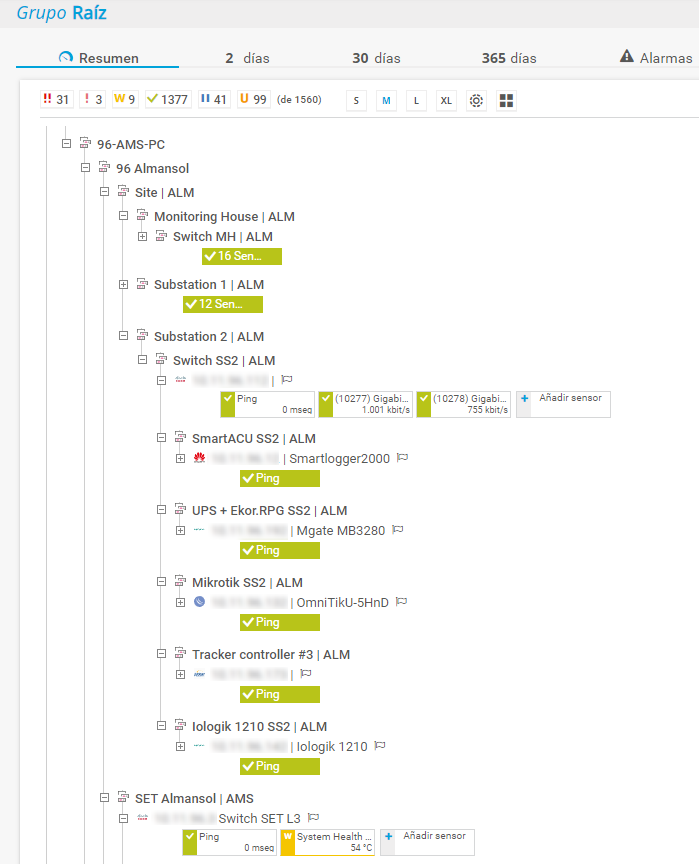
Device tree overview of GRUPOTEC in PRTG

IT monitoring to secure communication

Within a few days, all solar parks were integrated into the central monitoring with PRTG, and GRUPOTEC began to expand the monitoring beyond checking communication availability.

To ensure reliable communication within the solar parks, there is a redundant fiber optic infrastructure in all of them and a firewall that controls both internal and external communication. In addition, all plants are connected to the headquarters via VPN.

Depending on the size, from 2 to 20 switches per plant and several firewalls are used. These devices are mainly integrated into the general supervision via SNMP, which monitors the bandwidth of the network devices as well as various hardware parameters.

“At the beginning of the 30-day free trial period, we had already done much of the migration from Nagios to PRTG and implemented many new and useful features. After purchasing the license, we then only had to enter the license key and could continue working without interruption. In my opinion, this is how a migration should work: Without any risk and with minimal effort,” explained Oscar Cervera, IT Manager at Grupotec.

At the beginning of the 30-day free trial period, we had already done much of the migration from Nagios to PRTG and implemented many new and useful features. After purchasing the license, we then only had to enter the license key and could continue working without interruption. In my opinion, this is how a migration should work: without any risk and with minimal effort.


Oscar Cervera, IT Manager
GRUPOTEC

SLAs, processes, and maps

Once the most important systems and components from both IT and production had been integrated into the overall monitoring system, the monitoring had to be optimized to ensure that interrelationships were immediately recognizable and that, in the event of disruptions, the cause could be quickly localized, evaluated and, if necessary, remedied. To achieve this, GRUPOTEC relies primarily on two features in PRTG: the Business Process sensor and the Maps.

The Business Process sensor allows the results of several sensors (measuring points in PRTG) to be combined in one sensor and weighted using individual formulas. For example, PRTG can localize faults in the fiber optic network by correlating data from the connected switches and marking the affected lines in the event of a fault.

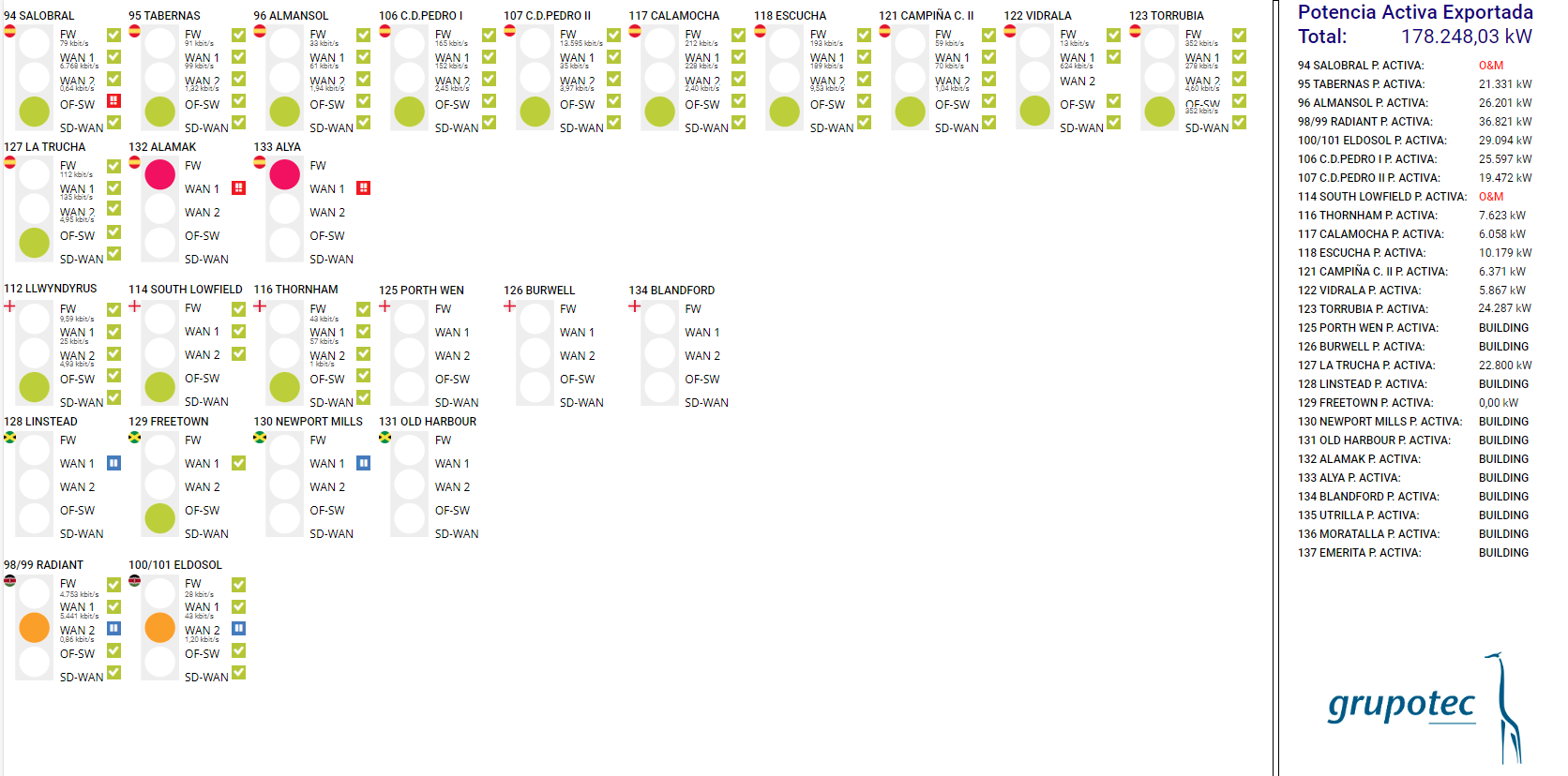
The Business Process sensor can aggregate multiple switch line systems to alert of faults when there are redundant lines. Everything together, switches, lines and the superordinate processes, can be represented in individual dashboards, which are called maps in PRTG. This enables a quick visual check and, in the event of a fault, the source of the fault can be easily localized.

Custom PRTG dashboard at GRUPOTEC

Oscar Cervera explains what this means for Grupotec: “As the operator of the solar parks, we are subject to strict SLAs that demand 99% availability of the communications. Outages must therefore be rectified immediately, otherwise we face penalties. Thanks to the Business Process sensor in PRTG, in the event of an outage we can now see at one glance whether we need to intervene immediately or whether the problem can wait until the next routine maintenance, since the backup is still available. With solar farms spread across Kenya, Spain and England, this is a key advantage.”

Monitoring the industrial components

Efficient root cause analysis in the event of faults is only possible if the entire plant is monitored, i.e. both the industrial components and the IT network and infrastructure. However, the SCADA systems used in the solar plants focus more on the industrial side and the collection of production data via data loggers, and thus do not provide much information on the network components.

With PRTG, GRUPOTEC also monitors these controllers and, thanks to Modbus compatibility, extracts all the information needed.

The TCP/IP and Modbus TCP sensors are used for this purpose. In this way, the team at GRUPOTEC headquarters has an overall view of the power generation of solar parks, as well as other parameters, regardless of which SCADA system is in use.

Conclusion

Cervera concludes: “The fact that we can use PRTG to monitor not only the IT components but also the solar technology represents an enormous added value for us: We have consolidated the different SCADA systems into a single platform that provides us with a global vision. In addition, thanks to the consolidation of data from IT and production, we can locate faults immediately and intervene in a targeted manner.”

Discover more monitoring insights and stories

Solution illustration

Solutions for all your monitoring needs

  • Solar Energy Production Monitoring
  • Network Mapping
  • Database Monitoring
Content illustration

Powerful stories from the monitoring world

  • Customer success story Volkswind and PRTG
  • Customer success story Oettinger Davidoff & PRTG
  • Customer success story SMIGHT & PRTG
Support illustration

Resources to master your monitoring challenges

  • PRTG Apps for Mobile Network Monitoring
  • I run PRTG on VMware. How can I obtain best performance?
  • How can I use the PRTG Application Programming Interface (API)?
Explore All Case Studies
PRTG Logo
FREE DOWNLOAD

Unlimited use of PRTG for 30 days. After 30 days PRTG reverts to the freeware edition.
You can upgrade to a paid license at any time.

Products

  • Paessler PRTG
    Paessler PRTGMonitor your whole IT infrastructure
    • PRTG Network Monitor
    • PRTG Enterprise Monitor
    • PRTG Hosted Monitor
    • PRTG extensions
      Extensions for Paessler PRTGExtend your monitoring to a new level
  • Icon Features
    FeaturesExplore all monitoring features

Monitoring with PRTG

  • Network monitoring
  • Bandwidth monitoring
  • SNMP monitoring
  • Network mapping
  • Wi-Fi monitoring
  • Server monitoring
  • Network traffic analyzer
  • NetFlow monitoring
  • Syslog server

Useful Links

  • PRTG Manual
  • Knowledge Base
  • Customer Success Stories
  • About Paessler
  • Subscribe to newsletter
  • PRTG Support
  • PRTG Consulting
  • PRTG Feedback & Roadmap

Contact

Paessler GmbH
Thurn-und-Taxis-Str. 14, 
90411 Nuremberg 
Germany

[email protected]

+49 911 93775-0

  • Contact us
©2026 Paessler GmbHTerms & ConditionsPrivacy PolicyImprintReport VulnerabilityDownload & InstallSitemap
PRTG Hosted Monitor PRTG Hosted Monitor PRTG Hosted Monitor