• Company
    • About Us
    • Case Studies
    • Press Center
    • Careers
    • Blog
    • Contact us
  • Contact us
  • Login
 
  • English
    • Deutsch
    • Español
    • Français
    • Italiano
    • Português
Paessler
                    - The Monitoring Experts
  • Products
    • Paessler PRTG
      Paessler PRTGMonitor your whole IT infrastructure
      • PRTG Network Monitor
      • PRTG Enterprise Monitor
      • PRTG Hosted Monitor
      • PRTG extensionsExtensions for Paessler PRTGExtend your monitoring to a new level
    • Icon Features
      FeaturesExplore all monitoring features
      • Maps & dashboards
      • Alerts & notifications
      • Multiple user interfaces
      • Distributed monitoring
      • Customizable reporting
  • Solutions
    • Industries
      IndustriesMonitor various industry sectors
      • Industrial
      • Healthcare
      • Data Center
      • Education
      • Finance
      • Government
    • IT Topics
      IT TopicsMonitor all areas of IT
      • Network Monitoring
      • Bandwidth Monitoring
      • SNMP Monitor
      • Network Mapping
      • WiFi Monitoring
      • Server Monitoring
  • Pricing
  • Resources
    • Getting Started
      Getting StartedModules for self-paced learning
    • How-to Guides
      How-to GuidesGet the most out of PRTG
    • Videos & Webinars
      Videos & WebinarsLearn from Paessler experts
    • IT  Knowledge
      IT KnowledgeExpand your IT knowledge
    • PRTG Manual
      PRTG ManualFull documentation
    • Knowledge Base
      Knowledge BaseShare community knowledge
    • PRTG Sensor Hub
      PRTG Sensor HubGet sensors, scripts & templates
    • Trainings
      PRTG TrainingLearn how to work with PRTG
  • Partners
    • icon star
      Become a PartnerNew Resellers or MSPs
    • icon partner
      Partner PortalLog in to your partner account
    • Deal Registration
      Deal RegistrationRegister your sales opportunities
    • icon search
      Find a PartnerFind partners selling Paessler products
    • icon technology
      Technology AlliancesSee Paessler technology partnerships
    • Partner HubTools for Your Success
  • Company
    • About Us
    • Case Studies
    • Press Center
    • Careers
    • Blog
    • Contact us
  • Contact us
  • Login
  • English
    • Deutsch
    • Español
    • Français
    • Italiano
    • Português
  • Get a quote
  • Free trial
  1. Home>
  2. Company>
  3. Case Studies>
  4. Oettinger Davidoff

With Paessler PRTG, Oettinger Davidoff turns monitoring into teamwork

download PDF
Logo Oettinger Davidoff

COMPANY
Oettinger Davidoff

INDUSTRY
Retail

INSTALLATION SIZE
Large installation

LOCATION
Switzerland

About Oettinger Davidoff

Oettinger Davidoff has stood for luxury in the form of exquisite cigars and high-quality cigar accessories for more than 148 years. To keep such a company competitive in today’s market, a smoothly functioning IT environment is a must.

In the past, Oettinger Davidoff used Microsoft System Center Operations Manager (SCOM) for this purpose. Due to the complexity of the product, only a specialist in the Oettinger Davidoff IT team was able to integrate new devices and systems into SCOM. According to Oettinger Davidoff, SCOM was also relatively expensive and proved somewhat vulnerable when monitoring the company’s network and cloud services.

Furthermore, the team was less than thrilled with how monitoring results were displayed by the solution. Despite these many drawbacks, the team was hesitant to switch to a new monitoring system; the effort seemed too great, and there simply wasn’t enough time given their daily workload.

However, when time-critical emails arrived up to 12 hours late over a period of several days without the IT team having been informed by the monitoring solution, the team had to take action. The cause was issues with MS Office 365 – one of SCOM's weak points, according to the SCOM specialist.

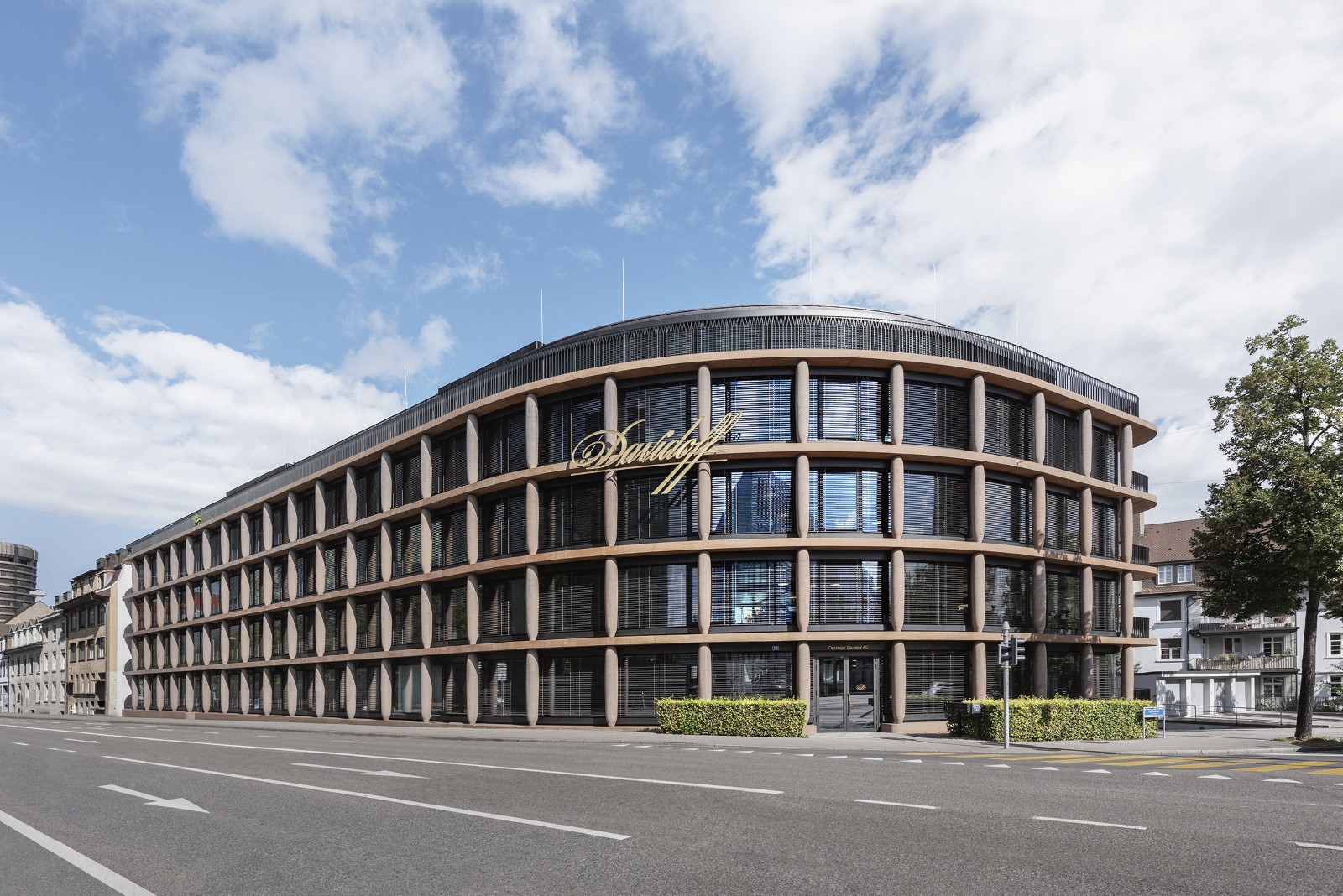
Case Study Oettinger Davidoff Headquarters

Researching other monitoring tools than SCOM

Once it was clear that a change was inevitable, Oettinger Davidoff began evaluating new tools. Various systems were very quickly ruled out due to their complexity. Azure Monitor was ideal for the cloud environment, but would have required the company to use a second solution for its on-premises systems. Since the goal was to simplify the monitoring, this was out of the question.

The company finally opted for Paessler PRTG, primarily due to the software’s intuitive operation, push notifications, and mobile apps for Android and iOS.

PRTG comes with countless default functions and is so easy and intuitive to use that my coworkers can relieve me of many of my monitoring duties. This helps reduce my workload considerably. Many other tasks can be automated by way of custom scripts, which also saves me a great deal of time. Although the switch from MS SCOM to PRTG is not entirely complete, PRTG already makes our day-to-day work a whole lot easier.

The monitoring expert
Oettinger Davidoff

Monitoring globally distributed sites and cloud services

Today, the Oettinger Davidoff IT team monitors its network and infrastructure in the Azure Cloud as well as at all the company’s locations (Switzerland, Florida, Honduras, and the Dominican Republic).

PRTG remote probes have proven an efficient and cost-effective solution for monitoring the company’s distributed networks: at no additional cost, Oettinger Davidoff can deploy any number of these probes, which are Windows services installed on-site to monitor the local network and infrastructure and send TSL-encrypted monitoring data back to the main PRTG server in Basel, Switzerland.

Worldwide, Oettinger Davidoff now monitors more than 250 servers on-site and in the cloud, as well as 200+ network devices such as firewalls, access points, and switches. Its monitoring also covers various Azure and Microsoft 365 services:

“With PRTG, we can comprehensively monitor our email services in the cloud, and ensure that – as the team in charge – we are immediately informed in the event of a malfunction and can quickly take actions to fix it. It wasn’t until we started using PRTG that we realized how error-ridden our Microsoft cloud service can be. We’ve also benefited greatly from the software’s Azure and Microsoft 365 Subscription Cost sensors,” explains the monitoring expert at Oettinger Davidoff.

In addition to monitoring the infrastructure, network, and cloud with preconfigured PRTG sensors, the monitoring expert of the Oettinger Davidoff IT team has also created several custom sensors based on PowerShell scripts which he uses (for example) to monitor automation processes implemented with SS&C Blue Prism. During run cycles, these sensors store timestamps and other runtime information in text files.

The preconfigured or custom sensors monitor the text files and trigger alerts if certain critical content (defined in advance) is detected. Other custom scripts/sensors created by Oettinger Davidoff scan all the servers within the Active Directory for Windows services that are currently in use. A general list and a server-specific list exclude those services that are not to be considered.

As a result, the Oettinger Davidoff IT team is always informed whether all the Windows services that should be running are actually running.

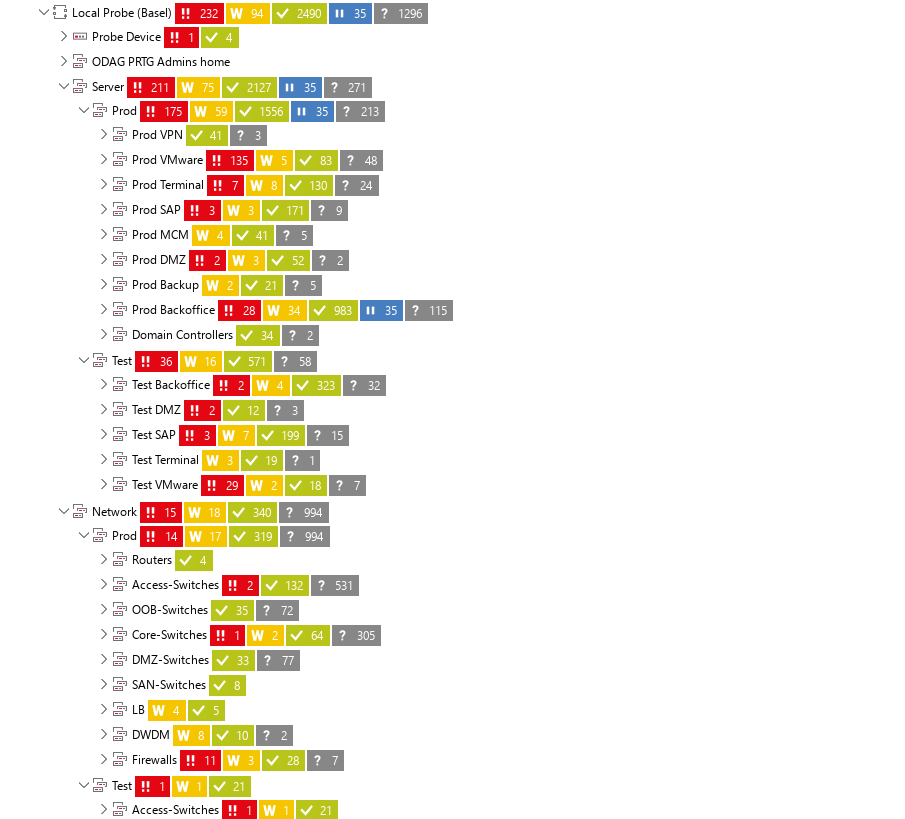
Case Study Oettinger Davidoff Device Tree
PRTG provides a hierarchical overview of Oettinger Davidoff's IT
Case Study Oettinger Davidoff Device Tree

PRTG provides a hierarchical overview of Oettinger Davidoff's IT

No bottleneck – workload distributed on many shoulders

The responsible IT engineer continues: “PRTG comes with countless default functions and is so easy and intuitive to use that my coworkers can relieve me of many of my monitoring duties. This helps reduce my workload considerably. Many other tasks can be automated by way of custom scripts, which also saves me a great deal of time. Although the switch from MS SCOM to PRTG is not entirely complete, PRTG already makes our day-to-day work a whole lot easier.”

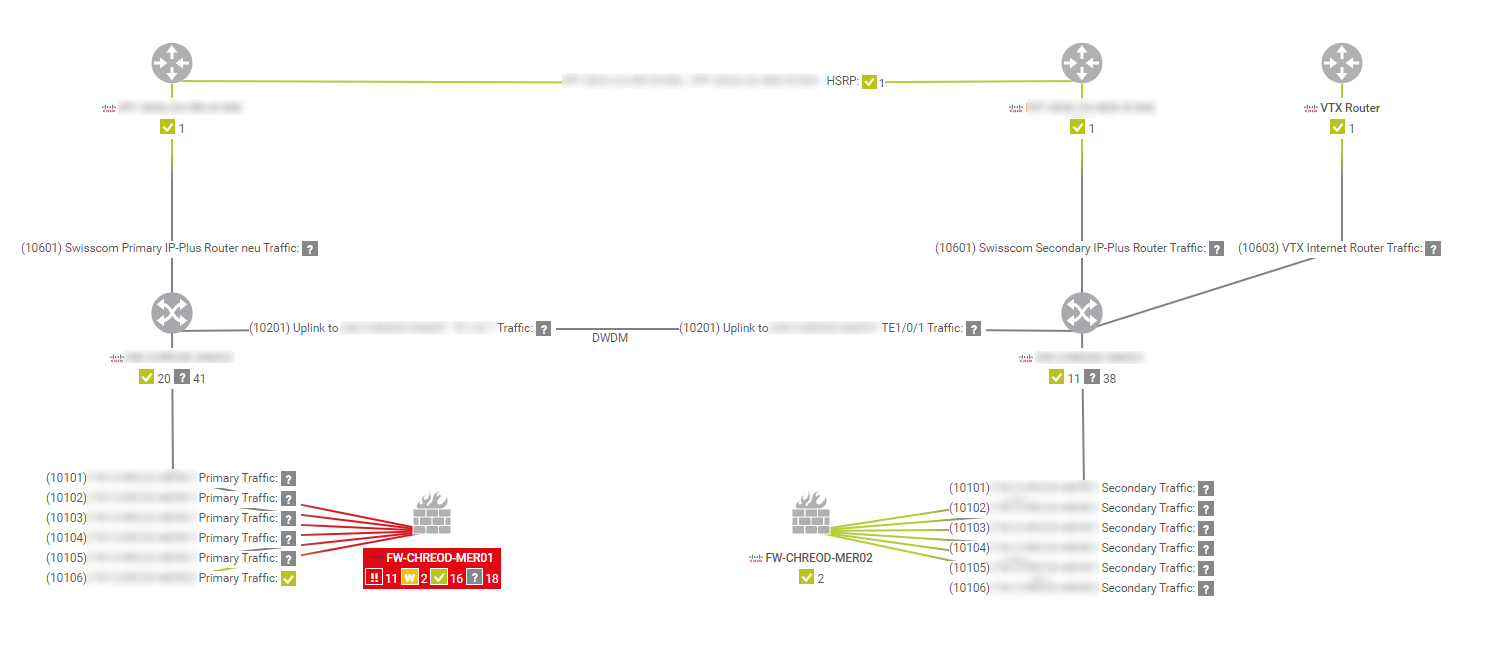
In the future, Oettinger Davidoff plans to not only integrate more systems into the monitoring, but also create more maps. PRTG maps are dashboards that are manually created via drag & drop and published as HTML pages. Oettinger Davidoff has branches around the world, some with multiple floors. Each of these locations has a centrally managed LAN/WLAN.

Oettinger Davidoff plans to create a map that displays all the access points and switches at all the locations, including all the floors. This custom map will help the team to immediately identify anomalies and improve their understanding of correlations, and thereby prevent disruptions before failures occur.

Case Study Oettinger Davidoff Map Website
A detailed map in PRTG provides an overview of the performance and availability of the Oettinger Davidoff network.
Case Study Oettinger Davidoff Map Website

A detailed map in PRTG provides an overview of the performance and availability of the Oettinger Davidoff network.

Conclusion

The IT engineer sums up the benefits of the switch to PRTG: “We can now monitor all our relevant devices and systems with a single solution, whether they be in the cloud, at one of our branches, or in our main data center. PRTG from Paessler provides us with clear-cut, reliable information and immediately alerts us via push notification in the event of an emergency. Thanks to its ease of use and customizable scripts and sensors, PRTG has enabled us to automate many tasks or distribute them among the team. This reduces my workload and makes everyone on the team responsible for our systems, which ultimately results in less stress and more reliable systems.”

Discover more monitoring insights and stories

Solution illustration

Solutions for all your monitoring needs

  • UCAAS Monitoring
  • Monitoring as a Service
  • Hybrid Cloud Monitoring
Content illustration

Powerful stories from the monitoring world

  • Customer success story Compuquip & PRTG
  • Customer success stories
  • Sending Notifications Via Microsoft Teams
Support illustration

Resources to master your monitoring challenges

  • Understanding Basic Concepts
  • How can I use the PRTG Application Programming Interface (API)?
  • I run PRTG on VMware. How can I obtain best performance?
Explore All Case Studies
PRTG Logo
FREE DOWNLOAD

Unlimited use of PRTG for 30 days. After 30 days PRTG reverts to the freeware edition.
You can upgrade to a paid license at any time.

Products

  • Paessler PRTG
    Paessler PRTGMonitor your whole IT infrastructure
    • PRTG Network Monitor
    • PRTG Enterprise Monitor
    • PRTG Hosted Monitor
    • PRTG extensions
      Extensions for Paessler PRTGExtend your monitoring to a new level
  • Icon Features
    FeaturesExplore all monitoring features

Monitoring with PRTG

  • Network monitoring
  • Bandwidth monitoring
  • SNMP monitoring
  • Network mapping
  • Wi-Fi monitoring
  • Server monitoring
  • Network traffic analyzer
  • NetFlow monitoring
  • Syslog server

Useful Links

  • PRTG Manual
  • Knowledge Base
  • Customer Success Stories
  • About Paessler
  • Subscribe to newsletter
  • PRTG Support
  • PRTG Consulting
  • PRTG Feedback & Roadmap

Contact

Paessler GmbH
Thurn-und-Taxis-Str. 14, 
90411 Nuremberg 
Germany

[email protected]

+49 911 93775-0

  • Contact us
©2026 Paessler GmbHTerms & ConditionsPrivacy PolicyImprintReport VulnerabilityDownload & InstallSitemap
PRTG Hosted Monitor PRTG Hosted Monitor PRTG Hosted Monitor