• Company
    • About Us
    • Case Studies
    • Press Center
    • Careers
    • Blog
    • Contact us
  • Contact us
  • Login
 
  • English
    • Deutsch
    • Español
    • Français
    • Italiano
    • Português
Paessler
                    - The Monitoring Experts
  • Products
    • Paessler PRTG
      Paessler PRTGMonitor your whole IT infrastructure
      • PRTG Network Monitor
      • PRTG Enterprise Monitor
      • PRTG Hosted Monitor
      • PRTG extensionsExtensions for Paessler PRTGExtend your monitoring to a new level
    • Icon Features
      FeaturesExplore all monitoring features
      • Maps & dashboards
      • Alerts & notifications
      • Multiple user interfaces
      • Distributed monitoring
      • Customizable reporting
  • Solutions
    • Industries
      IndustriesMonitor various industry sectors
      • Industrial
      • Healthcare
      • Data Center
      • Education
      • Finance
      • Government
    • IT Topics
      IT TopicsMonitor all areas of IT
      • Network Monitoring
      • Bandwidth Monitoring
      • SNMP Monitor
      • Network Mapping
      • WiFi Monitoring
      • Server Monitoring
  • Pricing
  • Resources
    • Getting Started
      Getting StartedModules for self-paced learning
    • How-to Guides
      How-to GuidesGet the most out of PRTG
    • Videos & Webinars
      Videos & WebinarsLearn from Paessler experts
    • IT  Knowledge
      IT KnowledgeExpand your IT knowledge
    • PRTG Manual
      PRTG ManualFull documentation
    • Knowledge Base
      Knowledge BaseShare community knowledge
    • PRTG Sensor Hub
      PRTG Sensor HubGet sensors, scripts & templates
    • Trainings
      PRTG TrainingLearn how to work with PRTG
  • Partners
    • icon star
      Become a PartnerNew Resellers or MSPs
    • icon partner
      Partner PortalLog in to your partner account
    • Deal Registration
      Deal RegistrationRegister your sales opportunities
    • icon search
      Find a PartnerFind partners selling Paessler products
    • icon technology
      Technology AlliancesSee Paessler technology partnerships
    • Partner HubTools for Your Success
  • Company
    • About Us
    • Case Studies
    • Press Center
    • Careers
    • Blog
    • Contact us
  • Contact us
  • Login
  • English
    • Deutsch
    • Español
    • Français
    • Italiano
    • Português
  • Get a quote
  • Free trial
  1. Home>
  2. Company>
  3. Case Studies>
  4. ASAC Comunicaciones

ASAC Comunicaciones improves their service to customers with Paessler PRTG

download PDF
Logo Company ASAC Comunicaciones

COMPANY
ASAC Comunicaciones

INDUSTRY
Consulting, Services and MSP (Managed Service Providers)

INSTALLATION SIZE
Large installation

LOCATION
Spain

About ASAC Comunicaciones

Asac Comunicaciones S.L. was founded in 1996 in Asturias (Spain). It is an IT consulting company and MSP in Asturias, Spain. They offer a broad portfolio of pro­ducts and services to their customers, who are mostly from the public sector, such as municipalities and county councils.

Video: Monitoring with PRTG at Asac Comunicaciones

Going open source for data center monitoring

ASAC assembled their first data center in 2008, and a few years later they deployed a second one in a separate building. It was at this time that they realized they needed a good monitoring system to monitor the data center infrastructure, including physical servers, Operating Systems, cloud applications, and more. 

At the time, it was unclear to ASAC how much they should invest in a commercial monitoring solution, and so they decided on an open-source solution called Zenoss. However, it was not long before they realized that an open-source solution did not meet their requirements. Firstly, there was no official support from the manufacturer, and no option for receiving technical training for the employees using it. Secondly, Zenoss is Linux-based and required that the technicians invest many hours in self-training, testing, and solving problems. 

Another problem with Zenoss was that there were not many native applications or plugins to monitor certain devices or environments, such as switches, cabinets, and virtual environments. This made monitoring these aspects for their customers very complicated for ASAC.

All of these issues were already a challenge when ASAC employed only a few people working on monitoring systems, but the problems were compounded when the monitoring team grew to 10 people. The long learning curve, the requirement for specialized technical skills, and the lack of scalability meant that the open-source tool was not actually “free”.

One of ASAC's data centers in Asturias

Evaluating a commercial monitoring tool  

Having come to the realization that their open-source tool was costing the equivalent of a commercial tool, they decided to evaluate several commercial solutions. On their list of tools they considered were ManageEngine, WhatsUp Gold and Zabbix Commercial, but in the end they opted for Paessler PRTG.

There were several reasons for this choice: 

  • PRTG is easy to use, intuitive, and new employees were able to work with it after only a short training period
  • ASAC could give their customers access to PRTG and also had the ability to specify the type of access
  • PRTG comes with a multitude of native sensors to monitor almost all the device types ASAC had in their data centers
  • Paessler offers excellent technical support
  • It is quick and easy to implement PRTG for a customer by deploying a remote probe on the customer’s site
  • Paessler continuously and actively improves PRTG with new versions regularly coming out with new sensors and functionality

The tool has given us greater control over all types of devices connected to the network (switches, IP telephony, security cameras, IoT, WiFi) that previously remained opaque when dealing with service incidents. This has improved our ability to diagnose and resolve problems, which has translated into greater efficiency and a better user experience in both internal and public services.

Jordi Tolosà Bel, New Technologies Technician
Vinaroz City Council (ASAC customer)

PRTG allows us to have all our machines and processes of the control centers and satellite tracking ground stations monitored in real time and remotely. The truth is that it has been very easy to configure and manage. It has also saved us a lot of time and work investigating incidents in the operational systems because as soon as an alarm is triggered, it sends it to us by e-mail and then we go straight to resolve the anomaly.


Iván Lora Fernandez, Head of Operational Facilities
INTA Torrejón Space Center (ASAC customer)

What ASAC is monitoring with PRTG

ASAC decided on a PRTG license and implemented it in 2013. Two years later they upgraded to a larger license and early in 2022, they upgraded again – this time to the largest license of PRTG Network Monitor.

They use five PRTG servers to structure their monitoring setup and scale their constantly growing monitoring implementation up as needed. 

Their monitoring covers their virtual environment (with over 150 virtual hosts and 1,500 virtual machines), networking devices (such as firewalls, load balancers and cabinets), storage devices (including backup systems), and databases. They also monitor physical metrics such as the temperature and humidity of data centers, the energy consumption of the data center room, the availability of the CCTV system, and more.

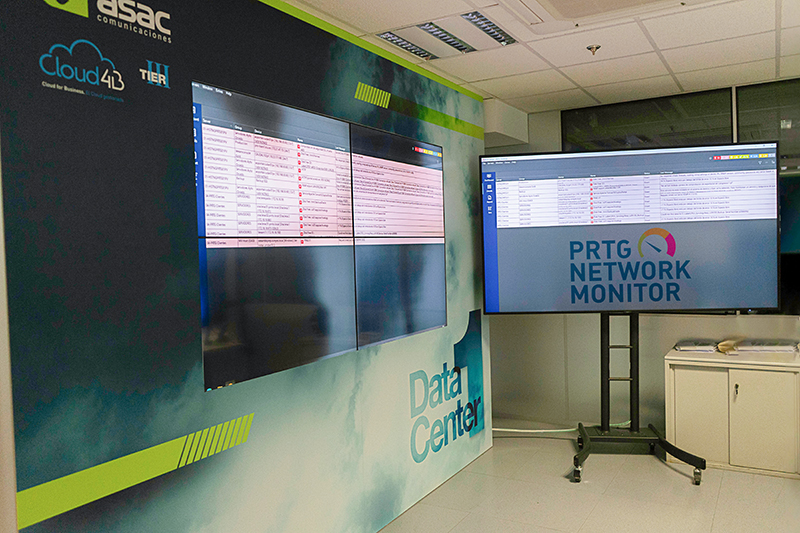
One consolidated PRTG dashboard for the ASAC support team

The advantage of customization & flexibility

Aside from the core functionality that PRTG offers, ASAC also makes use of some of the more customizable features to increase flexibility. An example of this is notifications: ASAC monitors Apache servers with PRTG, and PRTG triggers a notification if an Apache server goes down. This is standard, but ASAC also uses the “Execute a Program” notification function to automatically run a script when an Apache server is down. The script connects to the Apache server and restarts the services. This way, PRTG solves the problem automatically and immediately when it occurs. 

They also make use of custom sensors to monitor Oracle DB using specific queries.

One dashboard for the support team

One of the biggest benefits of monitoring in PRTG is that ASAC is able to consolidate all its monitoring data into a single dashboard. Specifically: the dashboard visualizes the critical alarms and is the source that the 24x7 support team uses to monitor the data centers.

This means they have only one dashboard that delivers all the information their support team needs to keep track of any issue that occurs anywhere in the infrastructure. 

Optimization of energy consumption

In terms of resource reduction, there was another unexpected benefit.

PRTG allows ASAC to monitor the energy consumption of all the PDUs in each rack. This information makes it possible to know the consumption per rack or client, to distribute the load to different PDUs if needed, and to monitor in which time slots the energy consumption is the highest.

Regarding monitoring of environmental factors (like temperature, humidity, CO2, and others): PRTG is able to monitor the APC platform, which facilitates measuring the temperature of the sensors distributed by the DPC, the battery and energy level of the UPSs, and more.

The use of PRTG reports and tags make it possible to review the average consumption of these items on a monthly basis to determine the time frames which require expanded or new resources.

ASAC performs advanced monitoring of the components of their data center, including virtualization servers, storage cabinets or networking.

Virtualization servers:

  • average CPU consumption
  • average RAM consumption

Storage:

  • disk consumption

Networking:

  • consumption of bandwidth in uplink links
  • number of ports used

Unexpected benefits

There were also some features that ASAC now uses, but that were not part of their initial requirements. 

“The reporting feature was not a requirement of our initial needs,” says Mario Corpas Granda, Systems Director at ASAC, “but we saw that the reporting was very flexible. The use of tags allowed us to make reports much faster and to be able to modify them without having to do manual adjustments.” A good example of this, according to Mario, is to imagine a client who has 10 servers, and then they add a new server; in this scenario, Mario can just apply tags to the server to ensure that it will be included in the monthly report for the client. ASAC now uses over 140 reports internally. 

Another unexpected benefit came when Paessler released new Veeam Backup sensors for PRTG. Previously, ASAC was monitoring security backups using over 600 IMAP sensors. Mario explains how it worked before: “Before these new sensors were available, the Veeam Backup sent an email with the status of the task or job, and then PRTG captured that email and then generated a series of alerts so that our support team would know if the backup was done on time.” With the new Veeam Backup Sensor, however, things became easier: PRTG can directly monitor the status of the tasks and the execution time. In this case, the constant improvements Paessler does to PRTG was able to improve the services ASAC offers its customers.

Discover more monitoring insights and stories

Solution illustration

Solutions for all your monitoring needs

  • Apache Monitoring
  • Oracle Monitoring
  • Database Monitoring
Content illustration

Powerful stories from the monitoring world

  • Customer success story ESA & PRTG
  • Customer success story Muenster Airport & PRTG
  • Customer success stories
Support illustration

Resources to master your monitoring challenges

  • How can I move or migrate a PRTG installation to a different system or server?
  • PRTG Apps for Mobile Network Monitoring
  • How can I use the PRTG Application Programming Interface (API)?
Explore All Case Studies
PRTG Logo
FREE DOWNLOAD

Unlimited use of PRTG for 30 days. After 30 days PRTG reverts to the freeware edition.
You can upgrade to a paid license at any time.

Products

  • Paessler PRTG
    Paessler PRTGMonitor your whole IT infrastructure
    • PRTG Network Monitor
    • PRTG Enterprise Monitor
    • PRTG Hosted Monitor
    • PRTG extensions
      Extensions for Paessler PRTGExtend your monitoring to a new level
  • Icon Features
    FeaturesExplore all monitoring features

Monitoring with PRTG

  • Network monitoring
  • Bandwidth monitoring
  • SNMP monitoring
  • Network mapping
  • Wi-Fi monitoring
  • Server monitoring
  • Network traffic analyzer
  • NetFlow monitoring
  • Syslog server

Useful Links

  • PRTG Manual
  • Knowledge Base
  • Customer Success Stories
  • About Paessler
  • Subscribe to newsletter
  • PRTG Support
  • PRTG Consulting
  • PRTG Feedback & Roadmap

Contact

Paessler GmbH
Thurn-und-Taxis-Str. 14, 
90411 Nuremberg 
Germany

[email protected]

+49 911 93775-0

  • Contact us
©2026 Paessler GmbHTerms & ConditionsPrivacy PolicyImprintReport VulnerabilityDownload & InstallSitemap
Sophos Firewall Errors Sophos Firewall Errors Sophos Firewall Errors