• Company
    • About Us
    • Case Studies
    • Press Center
    • Careers
    • Blog
    • Contact us
  • Contact us
  • Login
 
  • English
    • Deutsch
    • Español
    • Français
    • Italiano
    • Português
Paessler
                    - The Monitoring Experts
  • Products
    • Paessler PRTG
      Paessler PRTGMonitor your whole IT infrastructure
      • PRTG Network Monitor
      • PRTG Enterprise Monitor
      • PRTG Hosted Monitor
      • PRTG UVexplorer
      • PRTG extensionsExtensions for Paessler PRTGExtend your monitoring to a new level
    • Icon Features
      FeaturesExplore all monitoring features
      • Maps & dashboards
      • Alerts & notifications
      • Multiple user interfaces
      • Distributed monitoring
      • Customizable reporting
  • Solutions
    • Industries
      IndustriesMonitor various industry sectors
      • Industrial
      • Healthcare
      • Data Center
      • Education
      • Finance
      • Government
    • IT Topics
      IT TopicsMonitor all areas of IT
      • Network Monitoring
      • Bandwidth Monitoring
      • SNMP Monitor
      • Network Mapping
      • WiFi Monitoring
      • Server Monitoring
  • Pricing
  • Resources
    • Getting Started
      Getting StartedModules for self-paced learning
    • How-to Guides
      How-to GuidesGet the most out of PRTG
    • Videos & Webinars
      Videos & WebinarsLearn from Paessler experts
    • IT  Knowledge
      IT KnowledgeExpand your IT knowledge
    • PRTG Manual
      PRTG ManualFull documentation
    • Knowledge Base
      Knowledge BaseShare community knowledge
    • PRTG Sensor Hub
      PRTG Sensor HubGet sensors, scripts & templates
    • Trainings
      PRTG TrainingLearn how to work with PRTG
  • Partners
    • Icon Handshake
      Become a PartnerFor resellers and channel partners
    • Icon MSP
      Become an MSPDeliver monitoring as a managed service
    • icon partner
      Partner PortalLog in to your partner account
    • Deal Registration
      Deal RegistrationRegister your sales opportunities
    • icon search
      Find a PartnerFind partners selling Paessler products
    • icon technology
      Technology AlliancesSee Paessler technology partnerships
    • Partner HubTools for Your Success
  • Company
    • About Us
    • Case Studies
    • Press Center
    • Careers
    • Blog
    • Contact us
  • Contact us
  • Login
  • English
    • Deutsch
    • Español
    • Français
    • Italiano
    • Português
  • Get a quote
  • Free trial

Continuous Packet Analyzer

See which IPs, protocols, and connections are using your network. Now and over time.

Free download
PRODUCT OVERVIEW

What does a packet analyzer actually show you about your network traffic?

A network packet analyzer breaks down network traffic by IP address, protocol, and connection pair. That gives you a ranked view of who's using bandwidth and how. Two methods cover most environments: header-based packet sniffing, which reads packet headers from a local adapter directly, and flow-based collection, which receives traffic records pushed by routers and switches. Both produce Toplists, trend graphs, and historical records you can pull up whenever you need them. Header-level analysis only, not payload. This is network protocol analysis at the header level, not deep packet inspection or forensic capture.  

Paessler PRTG supports both methods in one platform. Supported flow protocols: NetFlow v5/v9, IPFIX, sFlow v5, and jFlow. Packet Sniffer traffic categories include TCP, UDP, ICMP, DHCP, DNS, SNMP, FTP/P2P, SMTP, IMAP, POP3, RDP, SSH, Telnet, VNC, and Citrix-related traffic (port-based classification).

Download PRTG Trial

What you will find on this page

  • Benefits of a Packet Analysis
  • How to Analyze Packets
  • Manual Packet Capture vs. PRTG
  • FAQs

PRTG is compatible with all major vendors, products, and systems

compatible with all major vendors, products, and systems

What PRTG's Packet Analysis Gives You

Full Bandwidth Visibility, Down to the IP Address

When users report slow response times, the total utilization graph tells you something is happening, but not where. Tracking down network issues manually, device by device, takes time that's usually not there when tickets are already open. 

PRTG collects granular traffic breakdowns continuously, so the data exists when you need it. Top Talkers, Top Connections, and Top Protocols rank network traffic in one place: by IP, by connection pair, by protocol. That's typically enough to pinpoint where a bottleneck is coming from without the manual legwork.

  • Traffic ranked by IP address (Top Talkers)
  • Traffic ranked by connection pair (Top Connections)
  • Traffic ranked by protocol (Top Protocols)
  • Flow-capable devices: covers all traffic through the device, not just what the probe adapter sees
  • Header-based packet sniffing works on networks without flow-capable hardware, though it requires a SPAN port or gateway position in switched environments

Traffic History That's There When You Need It

PRTG sensors run continuously. That's the practical foundation for everything else in this section: when an intermittent issue surfaces, the traffic data from before the incident already exists. Nobody had to start a capture session first. 

Intermittent performance issues are hard to chase precisely because the spike is usually gone by the time someone files a ticket. PRTG stores traffic data and Toplists over time within your configured retention window, so you can go back and see which IPs and protocols were active, with timestamps. The investigation starts from real data, not from memory.

  • Always-on data collection, no manual packet capture needed 
  • Historical Toplists and traffic graphs within your configured retention window 
  • Trend graphs with timestamps 
  • Covers both Packet Sniffer and Flow sensors 
PRTG web interface showing live performance graphs for a Probe Health sensor

Live graphs, real-time performance data
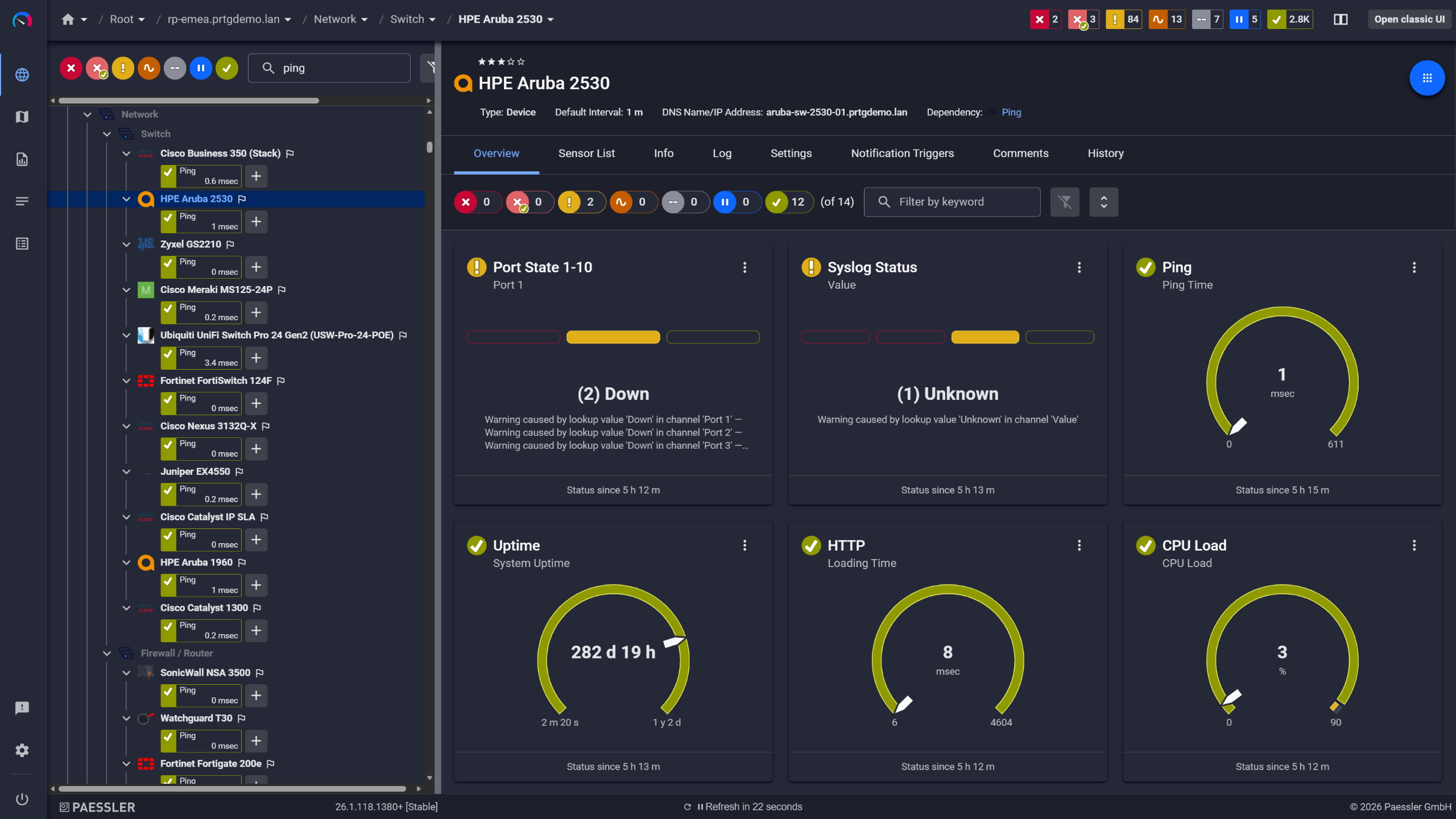
PRTG device overview for an HPE Aruba 2530 switch with port state, ping, and CPU sensors

Network switches monitored across vendors
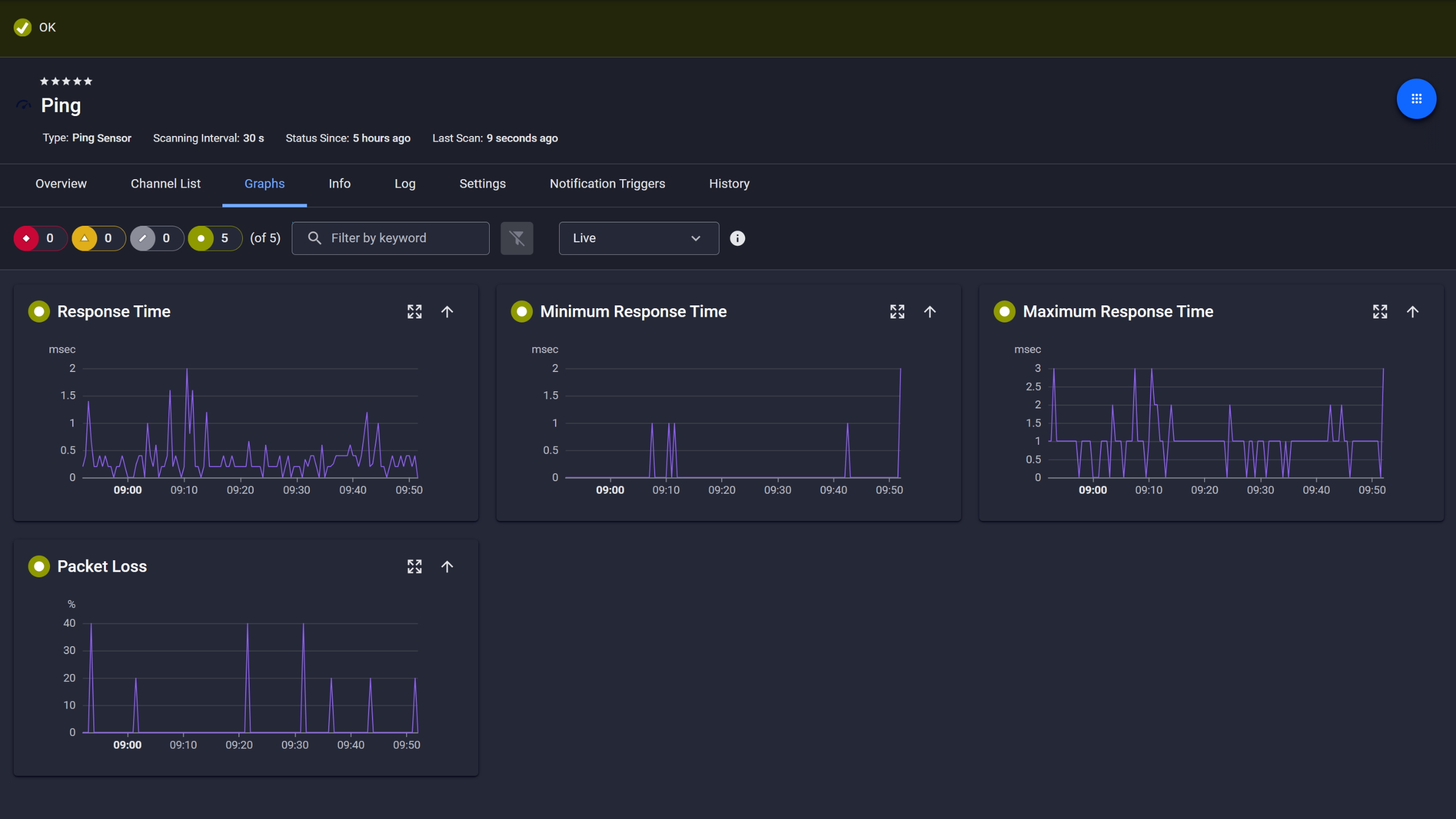
PRTG Ping sensor graphs showing response time, min, max, and packet loss over time

Ping response and packet loss

From Bandwidth Numbers to Actionable Traffic Breakdown

A backup job, a misconfigured device, and unauthorized traffic can look identical in an aggregate graph. Total utilization goes up; that's all the number tells you. The breakdown is what you need to act on it. 

With PRTG’s traffic sensors (Packet Sniffer and Flow), you can continuously break down traffic by IPs, protocols, and - depending on the sensor and channel definitions - ports. When something appears in the Toplists that doesn't belong, an unfamiliar IP or a protocol that shouldn't be active on that segment, it's visible. Your team defines the alert thresholds; PRTG sends a notification when they're crossed. Also worth noting: the Toplists surface unexpected activity even below alerting thresholds, which is useful during routine traffic checks.

Traffic breakdown by IP, port, and protocol, always visible 

Threshold alerts on traffic volume configured by your team 

Unexpected endpoints and protocol activity visible in Toplists 

Header-level protocol classification across predefined traffic categories 

See Why IT Professionals Trust PRTG

Start monitoring your infrastructure in minutes. No professional services, no complex configuration, no risk.

Free download
PRODUCT OVERVIEW

Traffic Analysis and Infrastructure Monitoring in One Platform

Most teams run traffic analysis in one tool and infrastructure monitoring in another. That works until something breaks and you need to know whether the problem is the network, the device, or a combination. Troubleshooting under pressure while cross-referencing two systems takes longer than it should. 

PRTG puts packet sniffing, flow-based traffic sensors, SNMP device monitoring, server health checks, and availability sensors together. One dashboard, one alert system, one database. When bandwidth spikes, you can check whether the affected device is also showing stress without switching tools. The metrics sit side by side.

  • Traffic sensors alongside device and server monitoring
  • Unified dashboard and maps across all monitoring data
  • Single alert system covering traffic, device health, and availability
  • Combined historical database for all sensor types
  • Supports on-premises, hybrid, and distributed environments
PRTG web interface showing device tree and full device list with sensor status badges

Full device list, instant overview

PRTG reports list showing scheduled monitoring reports with run times and sensor counts

Scheduled reports, always on time

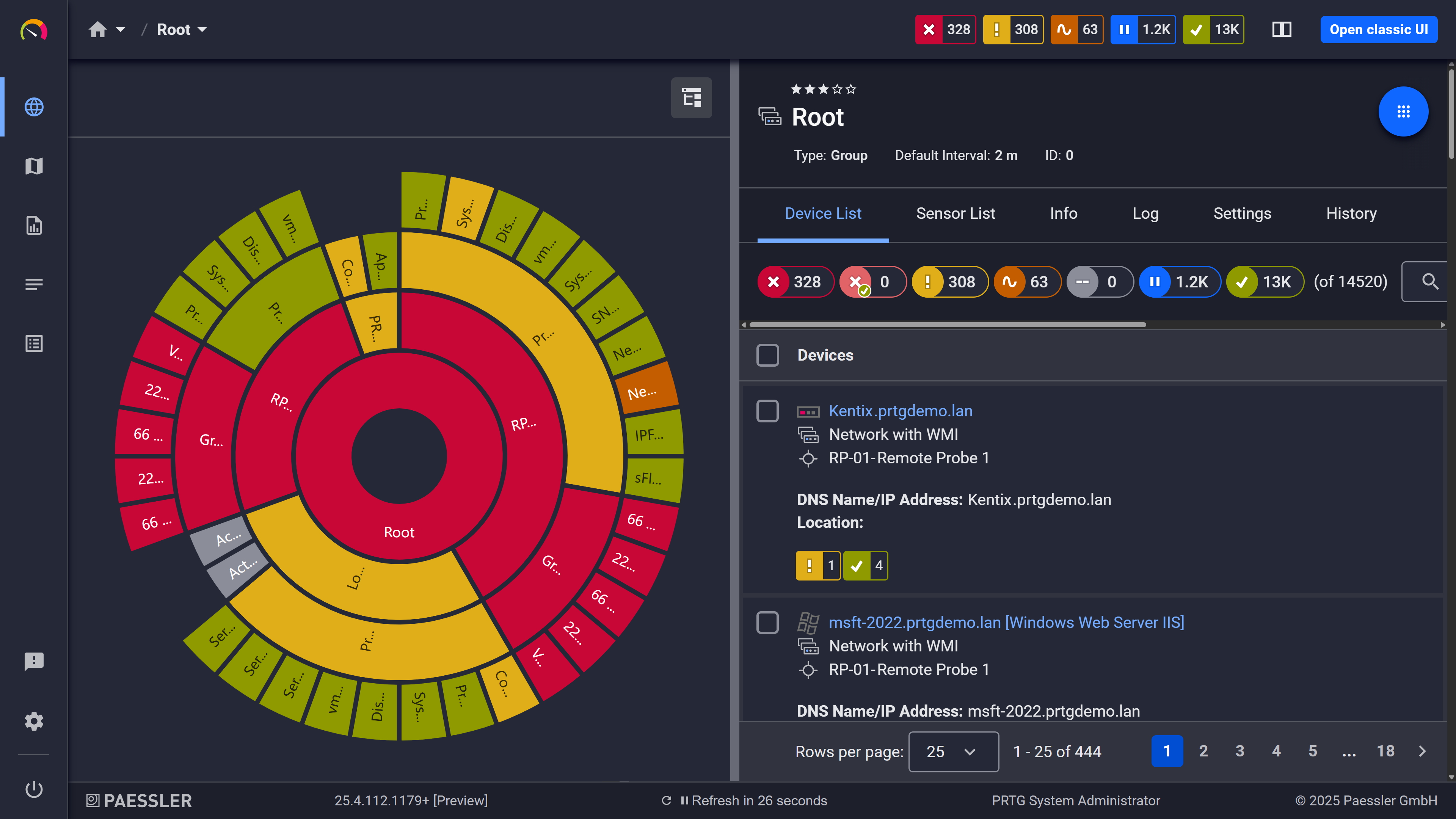
PRTG sunburst chart visualizing the full network hierarchy with color-coded sensor status

Your entire network, visualized instantly

How Packet Analyzing with PRTG Works 

PRTG uses two methods for network monitoring and packet analysis: header-based packet sniffing and flow protocol collection. Each has specific requirements and trade-offs worth understanding before you decide which fits your environment.

Packet Sniffer Sensor

The Packet Sniffer sensor reads headers from packets passing through a local network adapter. No payload inspection, no pcap-style full capture. Protocol classification is port-based, so traffic on standard ports is typically classified correctly, while the same applications on non-standard ports may not be recognized as such. HTTP on port 80 or 443 is classified as HTTP. The same traffic on a non-standard port isn't. 

Predefined channels cover TCP, UDP, ICMP, DHCP, DNS, SNMP, FTP/P2P, SMTP, IMAP, POP3, RDP, SSH, Telnet, VNC, and Citrix over Ethernet. This sensor is a good choice when your devices don't export flow data (NetFlow/IPFIX/sFlow/jFlow) and you still need traffic visibility via header-based sniffing in the probe’s network adapter. In switched networks, a monitoring port (SPAN/port mirroring) on the switch is required, or the PRTG probe needs to sit as the network gateway. Being on the same subnet isn't sufficient.

Flow Sensors

When a network device supports flow protocols, it pushes flow records directly to PRTG, covering all traffic through that device. That's a meaningful difference from packet sniffing, which only sees traffic that crosses the probe adapter. Flow is generally the better fit when you want broad coverage across the network. 

Standard sensors use predefined channel definitions. Custom variants let you define your own channels for specific applications, ports, or traffic segments. One thing worth knowing about sFlow specifically: it samples every n-th packet rather than analyzing full traffic. That's an acceptable trade-off in most environments, but if you're in a high-volume network and precision matters more than resource efficiency, it's relevant. Supported protocols: NetFlow v5/v9, IPFIX, sFlow v5, jFlow.

Toplists

Every Packet Sniffer and Flow sensor includes Toplists. Three default views: Top Talkers (bandwidth by IP), Top Connections (bandwidth by connection pair), Top Protocols (bandwidth by protocol). You can define additional custom Toplists to match specific traffic patterns. All are accessible from the sensor overview tab.

Custom Channels

The Packet Sniffer (Custom) sensor and Custom NetFlow/IPFIX sensors support user-defined channels. When predefined protocol categories don't match your traffic mix, for example you want to isolate traffic from a specific application, VLAN, or port range, you can define it as its own monitored channel with its own metrics. Useful for teams that need granular visibility without adding separate packet analysis tools to the stack.

Traffic Alerting

Any channel can have threshold-based alerting: total bandwidth, a protocol category, or a custom-defined channel. Thresholds are set per channel by your team. When a threshold is crossed, PRTG sends a notification via email, SMS, or push. No automated remediation. PRTG notifies; your team acts.

free downLoad

Ad-Hoc Packet Capture vs. PRTG Packet Analyzer

FEATURE

Ad-hoc capture

Ad-hoc capture

With PRTG

With PRTG

Investigating past incidents

Ad-hoc capture
not included

No capture = no data (and someone had to remember to start one)

With PRTG
included

Historical Toplists and traffic graphs within your retention window

Finding bandwidth hogs

Ad-hoc capture
not included

Manual filter and analysis every time. Not practical for daily visibility.

With PRTG
included

Top Talkers by IP, immediately visible

Infrastructure correlation

Ad-hoc capture
not included

Separate from device/server monitoring

With PRTG
included

Same platform as SNMP, server, and availability data

Ongoing visibility

Ad-hoc capture
not included

Requires someone to start a capture

With PRTG
included

Runs unattended, 24/7

free downLoad

“All our production and business processes depend on SAP. But, of course, IT and production systems also play a crucial role in securing these processes. By incorporating SAP, production, and IT into one centralized monitoring system, we can quickly detect critical drops in performance and identify the causes of these issues. In fact, thanks to PRTG and itesys, this couldn’t be any easier.”

Andreas Schmidt, Senior Systems Engineer
Truma

“Any downtime could be detrimental to our customers. We also strive to provide the best possible service to our customers. PRTG allows us to see the health and performance of the network. Using these measurements we can make decisions on how to repair a piece of equipment before it fails and causes a service interruption.”

James Ott Jr., Communications System Technician and IT Administrator
Federal Radio

“PRTG helps us to keep control of our IT by making issues visible immediately – and everywhere. We always have an eye on the performance and availability of our IT and can react in time if any failures occur. On a long-term perspective, the monitoring data helps us with capacity planning so that we can deliver the required resources for our own systems as well as for our customers, without wasting money on unwarranted redundancies.”

Stein Erik Høybakk, Senior Network Engineer
TAFJORD

Paessler PRTG Network Monitor licenses & pricing

Choose the PRTG Network Monitor subscription that's best for you.

License NameLicense descriptionPriceLicense DetailsGet startedPricing Details
PRTG 500$200per month paid annuallyBuy nowBuy now

Enough to monitor multiple aspects of 50 devices

PRTG 1000$358per month paid annuallyBuy nowBuy now

Enough to monitor multiple aspects of 100 devices

PRTG 2500$742per month paid annuallyBuy nowBuy now

Enough to monitor multiple aspects of 250 devices

PRTG 5000$1,300per month paid annuallyBuy nowBuy now

Enough to monitor multiple aspects of 500 devices

PRTG 10000$1,642per month paid annuallyBuy nowBuy now

Enough to monitor multiple aspects of 1000 devices

Over 100,000 Customers Worldwide Love Paessler  

customer success stories

 Packet Analyzer: Frequently Asked Questions


What's the difference between packet sniffing and flow monitoring — and which one does PRTG use?

The core difference is where the data comes from. A packet sniffer reads headers from packets physically crossing a local network adapter, so it only sees what passes that adapter. Flow monitoring works the other way: the network device itself generates flow records for all traffic it handles and pushes them to PRTG. That means flow coverage isn't limited by what the probe can see. 

PRTG supports both. Which one makes sense depends on your hardware. Packet sniffing is the right choice when devices don't support flow protocols. Flow is generally the better fit for broader coverage, and if your routers and switches already export NetFlow, IPFIX, sFlow, or jFlow, that's usually the easier path anyway.

Does PRTG perform deep packet inspection (DPI)?

No. The packet sniffer reads headers only. Payload content isn't inspected, and protocol classification is port-based, so PRTG identifies traffic by port number, not by what's inside the packet. HTTP on port 80 or 443 is classified correctly. HTTP on a non-standard port won't be classified as HTTP. 

If your use case requires full payload inspection or pcap-level analysis, Wireshark or a dedicated DPI tool is the right choice. PRTG is built for continuous traffic visibility and network performance monitoring.

Do I need a SPAN port or managed switch to use PRTG's packet sniffer?

In a switched network: yes. Switches only forward traffic to the addressed port, so the PRTG probe only sees its own traffic unless you configure a monitoring port (SPAN/port mirroring) on the switch, which mirrors traffic to the probe's port. The alternative is to position the PRTG probe as the network gateway so all traffic passes through it. Being on the same subnet isn't sufficient in a switched environment. 

If SPAN isn't practical, flow-based monitoring is the workable alternative. NetFlow, IPFIX, sFlow, and jFlow don't require SPAN because the device pushes flow data directly to PRTG.

How does PRTG compare to Wireshark for routine network traffic monitoring?

Wireshark captures and decodes individual packets. That's what it's for: protocol-level debugging, inspecting a specific packet exchange, tracing handshake failures. PRTG doesn't do that, and it's not trying to. 

What PRTG does is run continuously in the background, collecting traffic data 24/7, building Toplists, storing trend graphs, firing notifications when thresholds are crossed. Nobody has to start a session. For always-on bandwidth visibility and historical records across your network, that's the tool. For decoding a specific exchange or inspecting payload, use Wireshark. They don't really compete for the same use case, which is probably worth knowing before choosing one over the other.

Can PRTG alert me when traffic from an unexpected IP or protocol appears?

Yes, with threshold configuration. PRTG doesn't detect anomalies automatically. It sends a notification when a value crosses a threshold your team has set. For unexpected traffic sources, you'd configure an alert on the relevant channel: a total bandwidth threshold, a custom channel for a specific port range, or a protocol category. When traffic crosses that threshold, PRTG sends the notification. 

Also useful: the Toplists surface unexpected endpoints and protocol activity visually, even below alerting thresholds. Teams doing regular traffic checks often catch things there first.

How long does PRTG store historical traffic data and Toplist records?

Historic sensor data (graphs and channel values) is stored in PRTG's internal database with a default retention of 365 days, configurable up to 9,999 days. Older intervals are progressively averaged over time to keep storage manageable. 

Toplist records are stored separately and follow their own retention setting. The default is 30 days for both Flow and Packet Sniffer sensors, configurable in PRTG's system settings. Unlike sensor data, Toplist records aren't averaged. They're kept for the full retention period and then removed. One thing to be aware of in high-traffic environments: Toplist data is also pruned automatically when the database reaches 2 GB, which may happen before the configured retention period is up. For long-term archiving or deeper historical analysis, exporting to an external system is the recommended approach.

Paessler PRTG

Paessler PRTG

Network Monitoring Software – Version 26.1.116.1532 (February 9th, 2026)

Hosting icon

Hosting

Download for Windows and cloud-based version PRTG Hosted Monitor available

Languages icon

Languages

English, German, Spanish, French, Portuguese, Dutch, Russian, Japanese, and Simplified Chinese

test

Monitor everything

Network devices, bandwidth, servers, applications, virtual environments, remote systems, IoT, and more

test

Pricing

Choose the PRTG Network Monitor subscription that's best for you

Discover more monitoring insights and stories

Content illustration

Powerful stories from the monitoring world

  • What Is Packet Sniffing? – IT Explained
  • Sensor of the Week: Packet Sniffer Sensor - Paessler Blog
  • No Budget? No Problem! The Poor Man's Guide to Monitoring ...
Support illustration

Resources to master your monitoring challenges

  • PRTG Manual: Packet Sniffer Sensor - Paessler
  • PRTG Manual: Packet Sniffer (Custom) Sensor - Paessler
  • PRTG Manual: Monitoring Bandwidth via Packet Sniffing - Paessler
Solution illustration

Solutions for all your monitoring needs

  • Packet Capture
  • Optimize Your Network Monitoring with PRTG's Packet Analyzer
  • Monitoring Performance
PRTG Logo

Start Monitoring with PRTG and see how it can make your network more reliable and your job easier.

Free download
PRODUCT OVERVIEW

Products

  • Paessler PRTG
    Paessler PRTGMonitor your whole IT infrastructure
    • PRTG Network Monitor
    • PRTG Enterprise Monitor
    • PRTG Hosted Monitor
    • PRTG UVexplorer
    • PRTG extensions
      Extensions for Paessler PRTGExtend your monitoring to a new level
  • Icon Features
    FeaturesExplore all monitoring features

Monitoring with PRTG

  • Network monitoring
  • Bandwidth monitoring
  • SNMP monitoring
  • Network mapping
  • Wi-Fi monitoring
  • Server monitoring
  • Network traffic analyzer
  • NetFlow monitoring
  • Syslog server

Useful Links

  • PRTG Manual
  • Knowledge Base
  • Customer Success Stories
  • About Paessler
  • Subscribe to newsletter
  • PRTG Support
  • PRTG Consulting
  • PRTG Feedback & Roadmap

Contact

Paessler GmbH
Thurn-und-Taxis-Str. 14, 
90411 Nuremberg 
Germany

[email protected]

+49 911 93775-0

  • Contact us
©2026 Paessler GmbHTerms & ConditionsPrivacy PolicyImprintReport VulnerabilityDownload & InstallSitemap
CCTV CCTV CCTV