
Last reviewed: 10/2026


WhatsUp Gold licenses by device, while PRTG licenses by sensor, where each sensor is one aspect you monitor, such as a switch port, a URL, or a CPU load, and every sensor type comes with every license. That gives you control over how detailed your monitoring gets and where. According to our 2026 survey of 1,088 IT teams, 60.2% of midmarket respondents chose PRTG because one tool covers everything. To size your license, list what matters most first: monitoring every port on a 48-port switch uses more sensors than monitoring its uplinks.
Enter the IP ranges and credentials you already use in WhatsUp Gold, and PRTG's auto-discovery pings each range, identifies the devices that respond through SNMP, WMI, and other protocols, and creates sensors from built-in device templates. Small networks take a few minutes, and larger networks up to a few hours. You can also schedule auto-discovery for individual network segments, so new devices join your monitoring as they appear. Auto-discovery finds every device that answers a ping, and you design your own maps in the Map Designer to show how those devices connect.
Compare how WhatsUp Gold and PRTG each bring remote sites together: what you install and license at every site, and where you see all locations. In PRTG, a remote probe at each site collects data locally and sends it to your central PRTG core server, and every license includes unlimited probes. You see all locations in one web interface, and classic remote probes update themselves when you update the PRTG core server. Install each probe once on a Windows system, or use multi-platform probes for Linux, Raspberry Pi, and NAS systems, which you update separately.
FEATURE | PRTG PRTG | WhatsUp Gold WhatsUp Gold |
|---|---|---|
Cover network, servers, and virtualization with one license | PRTG Every sensor type and monitoring feature is included in every license, from SNMP to VMware, Hyper-V, and Nutanix. | WhatsUp Gold Limited: Virtualization Monitoring is included from the Enterprise tier up; Business covers standard network monitoring. |
Run monitoring without a separate database server | PRTG The built-in database is included in every license and needs no extra configuration or maintenance. | WhatsUp Gold Limited: SQL Server Express is included by default; the sizing table lists a dedicated SQL Server for profiles above 100 devices. |
Check status and handle alerts from your phone | PRTG PRTG apps for iOS and Android show alarms, acknowledge them, pause sensors, and deliver push notifications. | WhatsUp Gold Limited: Browser access through the WhatsUp Gold 360 cloud portal, included with Enterprise and Enterprise Plus subscriptions; WhatsUp Gold lists no official iOS or Android app. |
Monitor branch offices and remote sites from one console | PRTG A remote probe at each site reports to one central PRTG core server, with an unlimited number of probes in every license. | WhatsUp Gold Distributed Mode: a central installation collects data from a WhatsUp Gold installation at each remote site. |
Analyze bandwidth and traffic flows | PRTG NetFlow, jFlow, sFlow, and IPFIX sensors break traffic down into Top Talkers, Top Connections, and Top Protocols. | WhatsUp Gold Network Traffic Analysis Plus (NTA+) covers flow analysis and is part of the Enterprise Plus tier. |
Alert the on-call engineer before users notice | PRTG Preconfigured warning and error thresholds trigger notifications to the right person or team by email, SMS, push, Microsoft Teams, or Slack. | WhatsUp Gold Action Policies and the Alert Center send notifications by email, SMS, Teams, and Slack. |
See how devices connect and review configuration changes | PRTG Limited: The Map Designer builds maps by hand. PRTG UVexplorer, a separate product with its data surfaced inside PRTG, adds automatic topology, config backup, and change alerts through scheduled discoveries. | WhatsUp Gold Automatic Layer 2 and Layer 3 topology maps are included; Configuration Management is part of the Enterprise Plus tier. |
Build dashboards and scheduled reports | PRTG Limited: Reports run from templates, on demand or on a schedule, and dashboards come from the Map Designer; CSV or XML exports feed deeper analysis in external tools. | WhatsUp Gold Per-user dashboards, plus scheduled report exports by email as HTML, Excel, CSV, or text. |
PRTG is sized by sensors, so the license you choose follows the monitoring you set up, and every license includes all monitoring features, alerting, and reporting. Your subscription also covers every new version, with new features and security improvements, and with an active subscription you can move up to a larger license at any time. If you're planning a WhatsUp Gold replacement, compare the license sizes below to find the one that fits your setup.
| License Name | License description | Price | License Details | Get started | Pricing Details | |
|---|---|---|---|---|---|---|
| PRTG 500 | $200 | per month paid annually | Buy nowBuy now | Enough to monitor multiple aspects of 50 devices | ||
| PRTG 1000 | $358 | per month paid annually | Buy nowBuy now | Enough to monitor multiple aspects of 100 devices | ||
| PRTG 2500 | $742 | per month paid annually | Buy nowBuy now | Enough to monitor multiple aspects of 250 devices | ||
| PRTG 5000 | $1,300 | per month paid annually | Buy nowBuy now | Enough to monitor multiple aspects of 500 devices | ||
| PRTG 10000 | $1,642 | per month paid annually | Buy nowBuy now | Enough to monitor multiple aspects of 1000 devices |
“WhatsUp Gold wasn’t organized in a way I wanted it to be organized. To me, PRTG was much more logical in terms of the user interface and the implementation.”
PRTG shows your infrastructure as a device tree, a sunburst, or a treemap, so you can pick the view that fits the question. Maps and dashboards come from the drag-and-drop Map Designer, with more than 300 widgets. These four views show what you work with from the first discovery on.
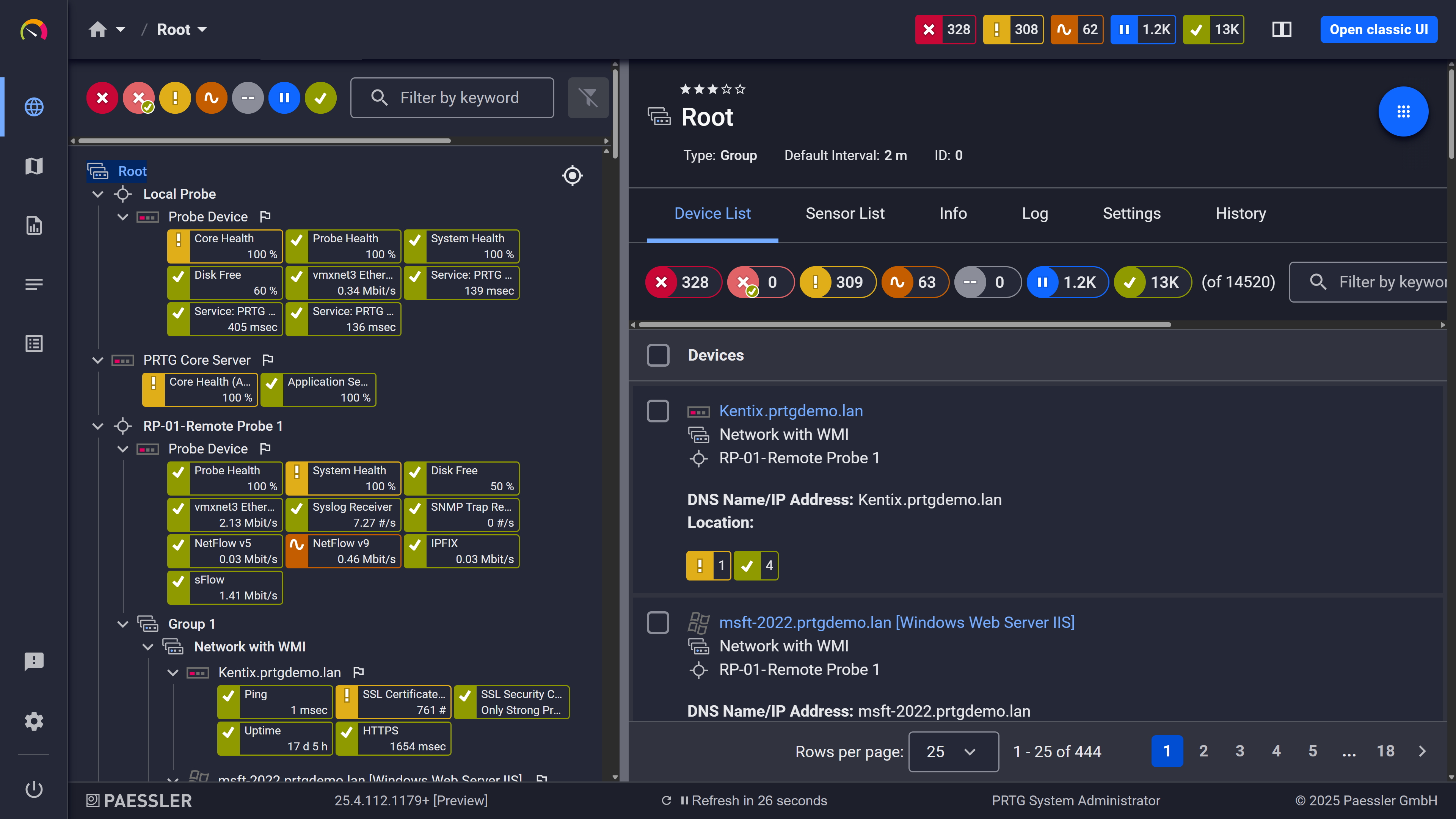
Device tree view: your full infrastructure, organized automatically after auto-discovery
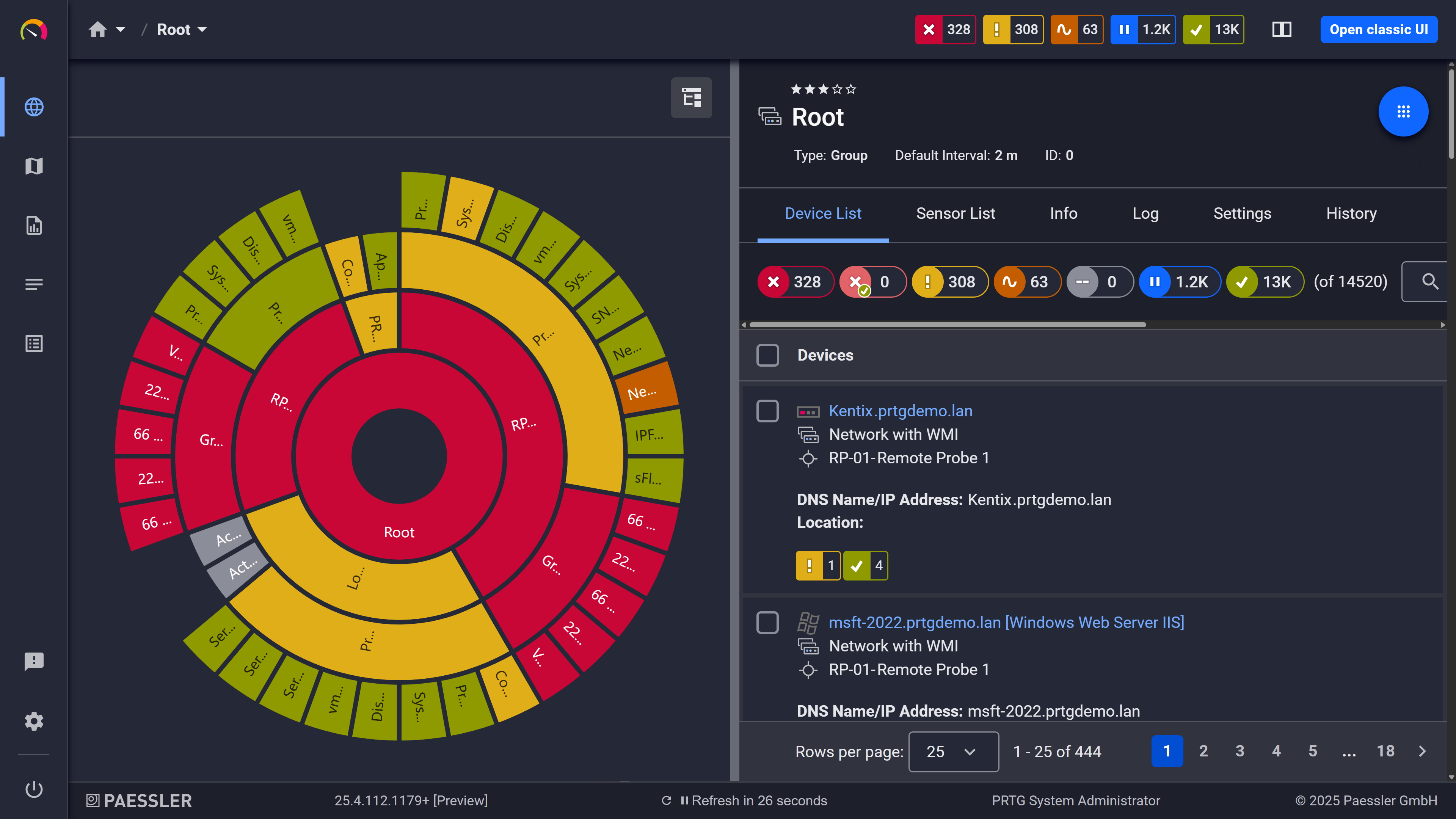
Custom dashboard: your easy-to-grasp overview built from your own sensors
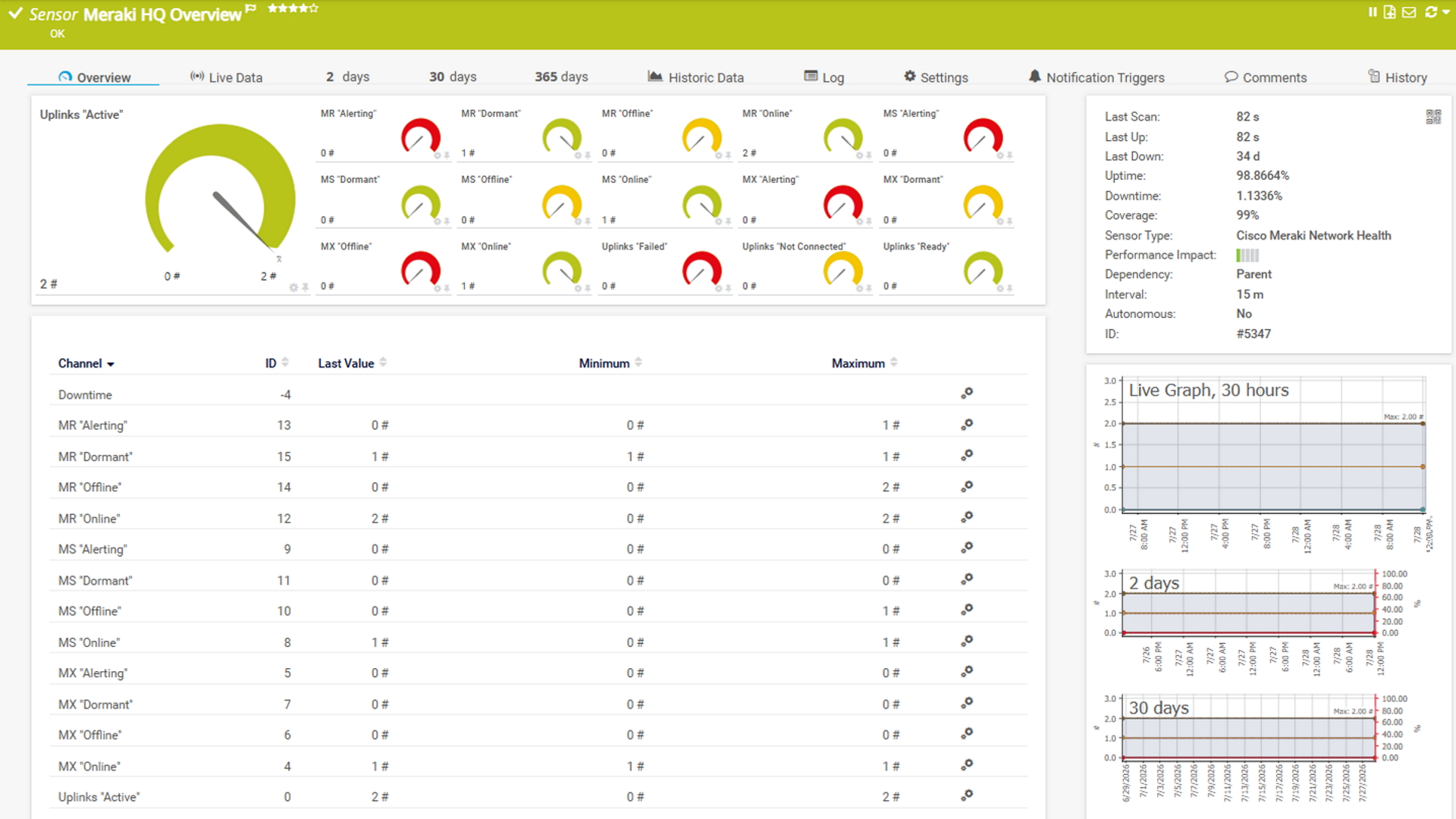
Sensor traffic: live sensor data, updated on your configured scan interval
Switching to PRTG follows one simple principle: your live network is the source. PRTG's auto-discovery reads what actually exists and rebuilds your monitoring directly from it. Four steps take you from your current setup to a running PRTG installation.
Have a list of hostnames or IP addresses of your current devices. This can be from your own documentation, or get it from your current monitoring tool. In WhatsUp Gold, use the Export Data option on a device report, such as Device State Summary for your top-level device group, to save the list as CSV. This list is your completeness checklist for the entire switch. Then install PRTG alongside your current tool: both can run in parallel during the transition.
Enter your IP ranges and device credentials (e.g. for protocols like SNMP or WMI). PRTG's auto-discovery scans the network segments, identifies device types, and creates suitable sensors from built-in device templates. The rebuild comes from your live network, so it reflects what is really there. Compare the result against your device list from step 1 and add any sensors auto-discovery could not infer.
What you know maps cleanly to PRTG. Scalability pollers and remote installations become remote probes, devices stay devices, active, performance, and passive monitors become sensors, device groups become groups, and action policies become notifications. Then recreate your alerting workflows with PRTG's notification templates and triggers.
Compare alerts side by side for a few weeks. Adjust thresholds and schedules, and build the maps and reports your team and leadership rely on. Decommission the old tool once PRTG has proven itself in daily operation.
A tool switch is the ideal moment to find out what your old setup wasn't watching. Paessler PRTG UVexplorer, a separate product whose data is surfaced inside PRTG, runs scheduled discoveries that build a multi-vendor topology map and asset inventory of what actually exists on your network. Compare that inventory against what WhatsUp Gold was monitoring, and close any blind spots before they carry over. After cutover, the same point-in-time snapshot confirms that your PRTG rebuild caught everything.
Yes. Ipswitch developed WhatsUp Gold, and Progress Software completed its acquisition of Ipswitch in May 2019. Today the product is sold as Progress WhatsUp Gold, and that is the version this page compares with PRTG.
Compare what a license covers, how much effort the first discovery takes, how remote sites connect, and how alerts and reports reach your team. As a WhatsUp Gold alternative, PRTG includes every sensor type in each license, builds devices and sensors through auto-discovery, and connects sites through remote probes. Maps and dashboards come from the drag-and-drop Map Designer, so build your own during the trial.
Start with the 30-day trial, which allows an unlimited number of sensors. Run auto-discovery on your IP ranges, review the sensors it creates, and delete the ones you don't need. The remaining count shows which license size fits, and it grows with the detail you choose, such as monitoring every switch port instead of only the uplinks.
PRTG rebuilds instead of importing: auto-discovery creates the devices and sensors from your live network, and you recreate your alerting with notification templates and triggers. Running both tools side by side gives you time to confirm coverage before you retire WhatsUp Gold.
Since June 2026, PRTG support comes in three tiers. Essential is included with PRTG 500 and 1000 and offers 8x5 availability, online support, chat support, live remote support, and unlimited support cases. Advanced comes with PRTG 2500, 5000, 10000, and PRTG Hosted Monitor, and Enterprise comes with PRTG Enterprise Monitor.
Yes. PRTG has NetFlow, jFlow, sFlow, and IPFIX sensors, plus a Packet Sniffer sensor, and each one breaks traffic down into Top Talkers, Top Connections, and Top Protocols. Toplists give you quick answers about which IP addresses, connections, and protocols use your bandwidth.
PRTG sends notifications by email, SMS or pager message, push notification through the PRTG apps for iOS and Android, Microsoft Teams, or Slack. You can assign different methods to different teams and escalation levels, and Paessler recommends at least two methods per trigger so a failed email still reaches a phone. In our 2026 survey, 87.4% of respondents gave PRTG's alerting quality one of the top two ratings.
Both tools let you schedule reports, so test the ones you send most often during your trial. PRTG creates reports on demand or on a schedule from preconfigured templates and exports them as HTML or PDF, and historic data exports as CSV or XML. Dashboards and maps come from the drag-and-drop Map Designer, so plan a little time to build the views your team needs.
We also compared PRTG with other monitoring tools:
Wazuh offers robust open-source SIEM/XDR but requires extensive configuration and is security-focused only. PRTG provides comprehensive network monitoring covering threats, compliance, and performance.
N-able excels at RMM and endpoint management for MSPs but requires hands-on management with complex, expensive pricing. PRTG provides unified network monitoring with transparent, predictable, and cost-effective pricing.
Pandora FMS offers flexible monitoring but comes with complex pricing and a steep learning curve. PRTG delivers transparent sensor-based pricing and intuitive monitoring through a unified interface.
Pingdom is the go-to tool for web performance monitoring. But what it has in synthetic monitoring and real user monitoring functionality, it lacks in other areas. For a golden source of truth that covers every aspect of your network's health and performance, PRTG is the better choice.
Start a 30-day trial with unlimited sensors, no commitment required.
Tell us your device count and we'll send you a quote.
See PRTG in a live demo with one of our monitoring experts.
