• Company
    • About Us
    • Case Studies
    • Press Center
    • Careers
    • Blog
    • Contact us
  • Contact us
  • Login
 
  • English
    • Deutsch
    • Español
    • Français
    • Italiano
    • Português
Paessler
                    - The Monitoring Experts
  • Products
    • Paessler PRTG
      Paessler PRTGMonitor your whole IT infrastructure
      • PRTG Network Monitor
      • PRTG Enterprise Monitor
      • PRTG Hosted Monitor
      • PRTG UVexplorer
      • PRTG extensionsExtensions for Paessler PRTGExtend your monitoring to a new level
    • Icon Features
      FeaturesExplore all monitoring features
      • Maps & dashboards
      • Alerts & notifications
      • Multiple user interfaces
      • Distributed monitoring
      • Customizable reporting
  • Solutions
    • Industries
      IndustriesMonitor various industry sectors
      • Industrial
      • Healthcare
      • Data Center
      • Education
      • Finance
      • Government
    • IT Topics
      IT TopicsMonitor all areas of IT
      • Network Monitoring
      • Bandwidth Monitoring
      • SNMP Monitor
      • Network Mapping
      • WiFi Monitoring
      • Server Monitoring
  • Pricing
  • Resources
    • Getting Started
      Getting StartedModules for self-paced learning
    • How-to Guides
      How-to GuidesGet the most out of PRTG
    • Videos & Webinars
      Videos & WebinarsLearn from Paessler experts
    • IT  Knowledge
      IT KnowledgeExpand your IT knowledge
    • PRTG Manual
      PRTG ManualFull documentation
    • Knowledge Base
      Knowledge BaseShare community knowledge
    • PRTG Sensor Hub
      PRTG Sensor HubGet sensors, scripts & templates
    • Trainings
      PRTG TrainingLearn how to work with PRTG
  • Partners
    • Icon Handshake
      Become a PartnerFor resellers and channel partners
    • Icon MSP
      Become an MSPDeliver monitoring as a managed service
    • icon partner
      Partner PortalLog in to your partner account
    • Deal Registration
      Deal RegistrationRegister your sales opportunities
    • icon search
      Find a PartnerFind partners selling Paessler products
    • icon technology
      Technology AlliancesSee Paessler technology partnerships
    • Partner HubTools for Your Success
  • Company
    • About Us
    • Case Studies
    • Press Center
    • Careers
    • Blog
    • Contact us
  • Contact us
  • Login
  • English
    • Deutsch
    • Español
    • Français
    • Italiano
    • Português
  • Get a quote
  • Free trial
  1. Home>
  2. IT Topics>
  3. Virtualization>
  4. Nutanix Monitoring

Nutanix Monitoring with PRTG

Boost the performance of your Nutanix hyperconverged infrastructure

  • Keep a constant eye on Nutanix clusters and hypervisors
  • Ensure optimal performance of your Nutanix HCI
  • Receive customizable alerts and notifications in real time
Free download
PRODUCT OVERVIEW

Our Users Give Top Ratings for Monitoring With Paessler PRTG

Gartner peer insights
spiceworks
G2
Capterra

PRTG Nutanix monitoring: What you will find on this page

Table of content

    PRTG makes Nutanix monitoring as easy as it gets

    Custom alerts and data visualization let you quickly identify and prevent Nutanix performance issues.

    Free download
    PRODUCT OVERVIEW

    Why Nutanix monitoring with PRTG is important

    Hyperconverged infrastructure (HCI) is extremely complex. If just one of its components malfunctions, the entire system can become paralyzed and the hyperconverged environment can go offline.

    But how do you keep an eye on such versatile virtual infrastructure?

    Paessler PRTG can monitor your entire Nutanix HCI, including virtual storage, computer, and network units. Use our all-in-one network monitoring software to also ensure the optimal performance of your Nutanix environment.

    Table of content

    3 benefits of PRTG Nutanix performance monitoring

    one

    Monitor Nutanix out-of-the-box

    PRTG offers preconfigured Nutanix sensors that let you easily integrate your Nutanix-based infrastructure into your monitoring environment using SNMP – alongside your classic network devices such as routers, switches, servers, or firewalls.

    two

    Check I/O operations of clusters

    In HCI environments, storage components are usually responsible for the biggest drops in performance. That’s why PRTG also constantly checks the IOPs performance data of your Nutanix clusters, including bandwidth and latency, as well as the number of I/O commands per second.

    three

    Keep a constant eye on hypervisors

    Of course, your Nutanix hypervisors also play an important role when analyzing HCI performance data. With PRTG, you can constantly track parameters such as the processor load, individual I/O performance data, packet loss, and the number of active virtual machines (VMs).

    What Nutanix monitoring looks like in PRTG

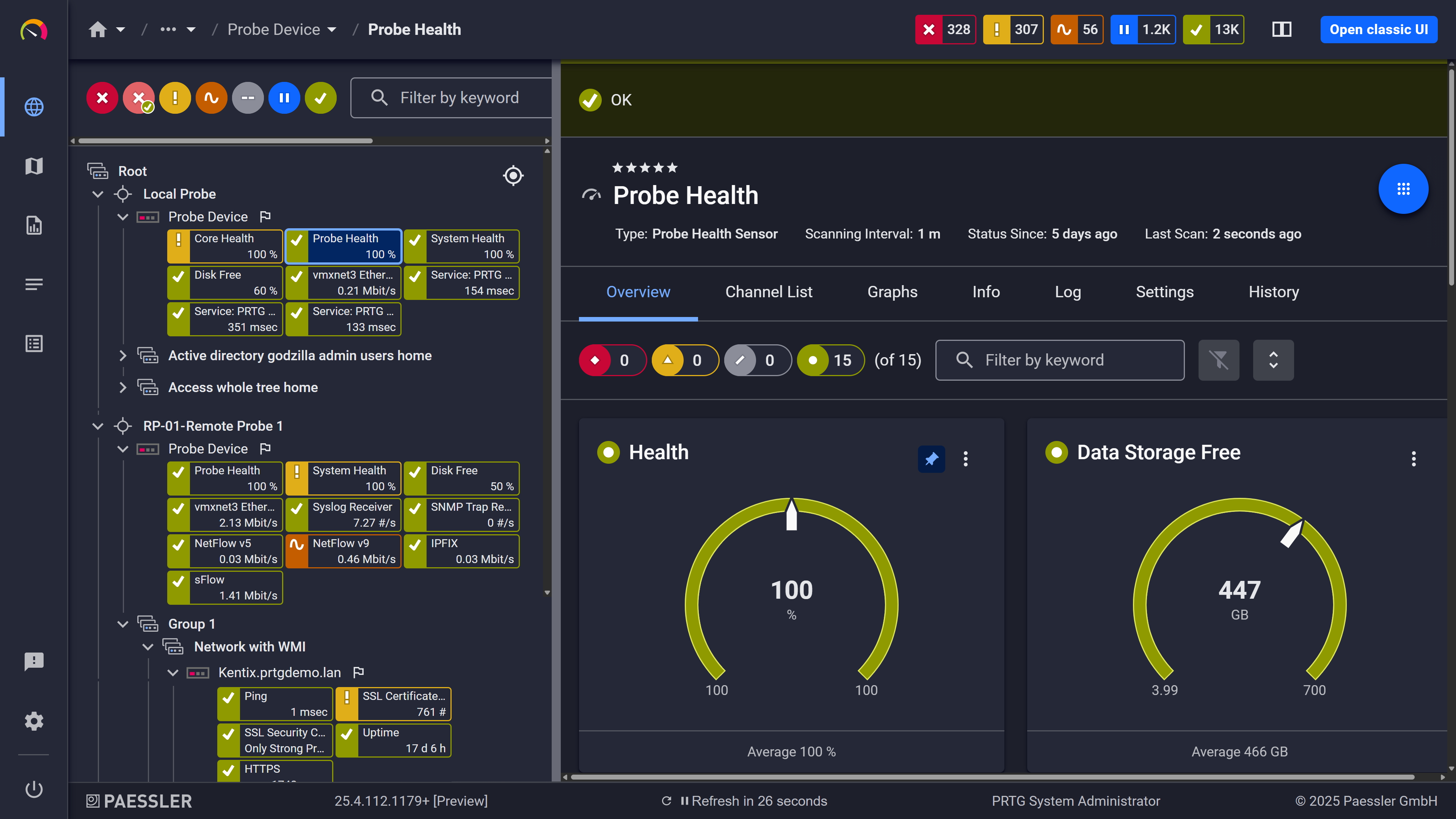
    Diagnose network issues by continuously tracking the status and performance of your Nutanix HCI. Show response time, bandwidth usage, latency, packet loss, CPU usage, virtual machine count, and other key metrics in real time. Visualize monitoring data in clear graphs and dashboards to identify problems more easily. Gain the overview you need to troubleshoot issues with your Nutanix clusters and hypervisors.

    PRTG Screenshot device tree view

    Device tree view of the complete monitoring setup

    PRTG screenshot map entire it infrastructure

    Custom PRTG dashboard for keeping an eye on the entire IT infrastructure

    PRTG screenshot graph live data traffic

    Live traffic data graph in PRTG

    map-ms-nutanix-vmware

    Start monitoring Nutanix virtualization with PRTG and see how it can make your network more reliable and your job easier.

    Free download
    PRODUCT OVERVIEW

    IT experts agree: Paessler PRTG is a great solution for IT infrastructure monitoring

    PCMag

    “All-around winning
     network monitor”

    IT Brief

    “The real beauty of PRTG is the endless possibilities it offers”

    ITPro

    “PRTG Network Monitor 
    is very hard to beat”

    3 reasons why PRTG is the Nutanix monitoring tool of your choice

    Watch

    Keep an eye on your entire IT stack

    PRTG monitors your complete IT infrastructure – no matter if you have an on-premises Windows or Linux, cloud, or hyperconverged environment. Watch Nutanix cluster performance alongside everything else: every PRTG subscription includes all monitoring features.

    Alarm

    Customize alerts and notifications

    Sit back, relax, and let PRTG do the monitoring and alerting for you. If there is an issue with your Nutanix resources or any other problem in your network, PRTG alerts you immediately via email, SMS, push notification, and other methods – always based on your individual threshold values.

    Maps

    Monitor Nutanix in a single pane of glass

    Gone are the days where you have to manually check the status of every Nutanix component. PRTG provides you with a central overview in an easy-to-read dashboard. Or create your own, customized maps and dashboards that show your Nutanix monitoring metrics the way you want.

    Explore our preconfigured PRTG sensors for Nutanix monitor

    PRTG comes with more than 250 native sensor types for monitoring your entire on-premises, cloud, and hybrid cloud environment out of the box. Check out some examples below!

    SNMP Nutanix Hypervisor

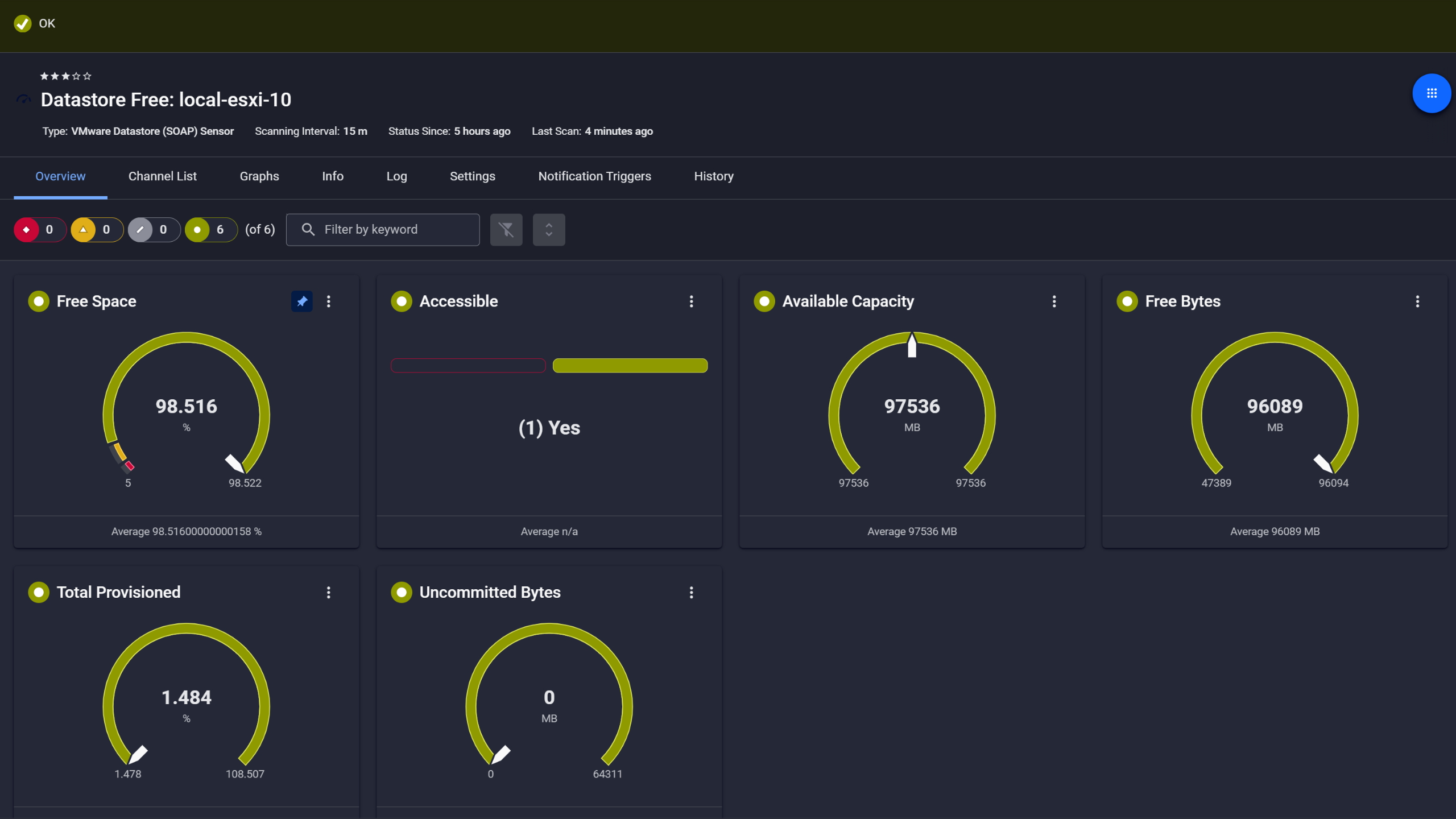
    The SNMP Nutanix Hypervisor sensor monitors a Nutanix hypervisor. It can show the following:

    • Number of bytes sent and received
    • CPU usage
    • Bandwidth, latency, and read and write speed of I/O operations
    • Number of dropped incoming and outgoing packages
    • Number of VMs
    SNMP Nutanix Hypervisor
    SNMP Nutanix Hypervisor

    SNMP Nutanix Cluster Health

    The SNMP Nutanix Cluster Health sensor monitors the status and the performance of a Nutanix cluster. It can show the following:

    • Bandwidth and latency of I/O operations
    • Number of I/O operations
    • Nutanix cluster status
    SNMP Nutanix Cluster Health
    SNMP Nutanix Cluster Health

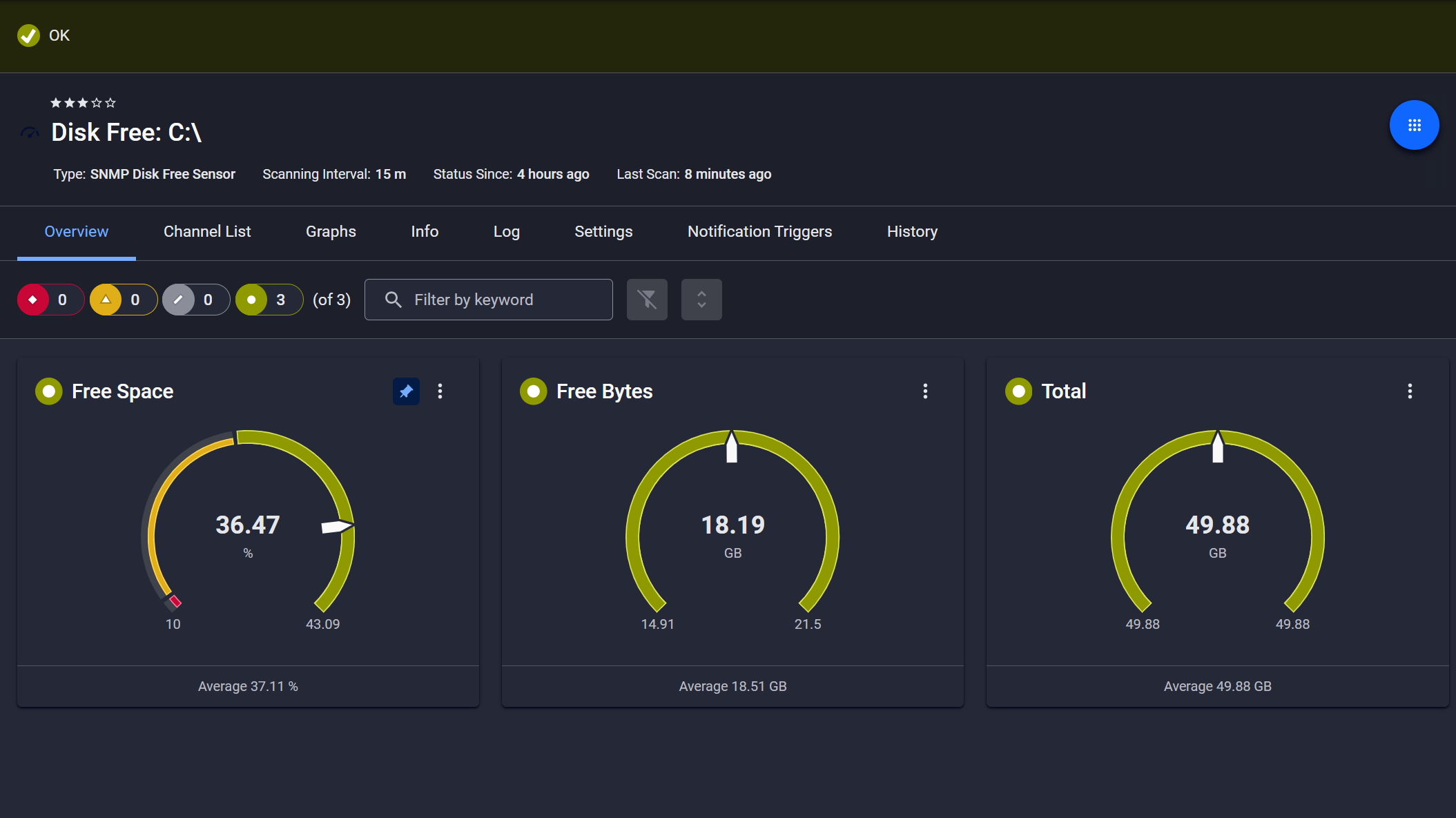
    Ping v2

    The Ping v2 sensor sends an Internet Control Message Protocol (ICMP) echo request ("ping") from the probe system to the parent device to monitor its availability. It can show the following:

    • Response time

    • Packet loss

    • Target status

    • Minimum and maximum ping time

    Ping v2
    Ping v2

    See the PRTG Manual for a list of all available sensor types.

    PRTG Is Compatible With All Major Vendors, Products, and Systems

    compatible with all major vendors, products, and systems

    PRTG makes Nutanix monitoring as easy as it gets

    Custom alerts and data visualization let you quickly identify and prevent Nutanix performance issues.

    Free download
    PRODUCT OVERVIEW

    “With PRTG, you get a centralized, intuitive, all-in-one tool that monitors the entire infrastructure. In the event of an error, the software immediately informs you by email. If you don’t hear from PRTG, you can sit back and relax, knowing everything is in order. Shortly after implementing PRTG, we were able to identify and eliminate performance bottlenecks in our VMware environment and load problems in our network.”

    Steffen Ille, Head of Infrastructure, Service Center for Computer Systems and Communication
    Bauhaus University Weimar

    “The demands on our entire IT infrastructure have grown steadily in recent years. An important step towards the optimization of this environment involved the virtualization of our digital landscape. In order to maintain the required transparency and the uninterrupted performance of all our systems, we needed a powerful network monitoring tool. For us, the most important selection criteria were price-performance ratio and ease of use. PRTG met all our expectations and has proven to be an indispensable part of our network management.”

    Daniel Baumgartner, Network Administrator
    Volkswind

    Your Nutanix monitor at a glance – even on the go

    PRTG is set up in a matter of minutes and can be used on a wide variety of mobile devices.

    device overview
    Gartner peer insights

    “Excellent tool for detailed monitoring. Alarms and notifications work greatly. Equipment addition is straight forward and server initial setup is very easy. ...feel safe to purchase it if you intend to monitor a large networking landscape.”

    Read the complete review at Gartner Peer Insights

    Create innovative solutions with Paessler’s IT partners

    Partnering with innovative IT vendors, Paessler unleashes synergies to create
    new and additional benefits for joined customers.

    NetBrain

    NetBrain

    Integrating monitoring results from PRTG into NetBrain maps makes the foundation for network automation.

    Read more
    IP Fabric

    IP Fabric

    Combining PRTG’s broad monitoring feature set with IP Fabric’s automated network assurance creates a new level of network visibility and reliability.

    Read more
    KnowledgeRiver

    KnowledgeRiver

    Combining their tools to a powerful solution for advanced analysis and automation, KnowledgeRiver and Paessler enable IT teams to ensure best performance for their infrastructure and networks.

    Read more

    Find the root cause of the problem with our PRTG Nutanix monitoring solution

    Real-time notifications mean faster troubleshooting so that you can act before more serious issues occur.

    Free download
    PRODUCT OVERVIEW
    Paessler PRTG

    Paessler PRTG

    Network Monitoring Software – Version 26.1.116.1532 (February 9th, 2026)

    Hosting icon

    Hosting

    Download for Windows and cloud-based version PRTG Hosted Monitor available

    Languages icon

    Languages

    English, German, Spanish, French, Portuguese, Dutch, Russian, Japanese, and Simplified Chinese

    test

    Monitor everything

    Network devices, bandwidth, servers, applications, virtual environments, remote systems, IoT, and more

    test

    Pricing

    Choose the PRTG Network Monitor subscription that's best for you

    Discover more monitoring insights and stories

    Content illustration

    Powerful stories from the monitoring world

    • Sending Notifications Via Microsoft Teams
    • Customer success story: Bosch Energy and Building Solutions with PRTG
    • Understanding MQTT architecture: a deep dive
    Support illustration

    Resources to master your monitoring challenges

    • PRTG Manual: SNMP Nutanix Cluster Health Sensor - Paessler
    • [IMPLEMENTED] Monitoring Nutanix
    • PRTG Manual: IPMI System Health Sensor - Paessler
    Solution illustration

    Solutions for all your monitoring needs

    • Monitoring Virtualization
    • VM Management
    • Virtual Server Monitoring

    Nutanix Monitoring: FAQ


    What is Nutanix?

    Nutanix is an enterprise cloud computing company that provides a software-defined platform designed to modernize data centers and simplify IT infrastructure management. Nutanix pioneered the concept of hyper-converged infrastructure (HCI). Nutanix’s HCI platform integrates compute (CPU and memory), storage, and virtualization into a single appliance or software layer, making it easier for businesses to manage and scale. Nutanix runs on its proprietary Acropolis Operating System (AOS) and developed its own native hypervisor, called AHV. Nutanix-native tools for monitoring and management include Nutanix Prism Element and Prism Central.

    What is hyperconverged infrastructure?

    Hyperconverged infrastructure (HCI) is mainly used in large data centers and multi/hybrid cloud environments. It allows for existing hardware and software to be converged into a single system that can be managed with appropriate tools. New digital workplaces can therefore be set up more quickly and existing resources used more efficiently.

    What are the benefits of monitoring Nutanix?

    Monitoring Nutanix infrastructure provides numerous benefits that enhance the performance, efficiency, and overall management of the IT environment. Here are the key benefits of monitoring Nutanix:

    • Early detection of problems: Monitoring allows IT teams to detect issues such as hardware failures, network bottlenecks, or performance degradation before they impact users.
    • Proactive troubleshooting: Automated alerts provide real-time notifications when problems arise, allowing administrators to take immediate corrective action.
    • Reduced downtime: Proactively addressing issues through monitoring minimizes the risk of downtime, ensuring higher availability of critical applications and services.
    • Improved resource utilization: Monitoring helps track the usage of compute, storage, and network resources. IT teams can identify underutilized resources and reallocate them to optimize performance.
    • Application performance: Nutanix monitoring provides insights into virtual machine (VM) performance, ensuring that applications running on the platform have sufficient resources to meet demand.
    • Data-driven decision-making: Monitoring data supports informed decisions about hardware upgrades, resource allocation, and scaling strategies based on actual usage patterns.
    How does PRTG monitor Nutanix components?

    PRTG comes with preconfigured Nutanix sensors for monitoring Nutanix clusters and hypervisors. These sensors pull data via SNMP (Simple Network Management Protocol), which must be properly configured in the Nutanix environment. Nutanix only supports SNMP v3.

    What is a sensor in PRTG?

    In PRTG, “sensors” are the basic monitoring elements. One sensor usually monitors one measured value in your network, for example the traffic of a switch port, the CPU load of a server, or the free space on a disk drive. On average, you need about 5-10 sensors per device or one sensor per switch port.

    We asked: would you recommend PRTG? Over 95% of our customers say yes!

    Paessler conducted trials in over 600 IT departments worldwide to tune its network monitoring software closer to the needs of sysadmins. The result of the survey: over 95% of the participants would recommend PRTG – or already have.

    recommendation

    Still not convinced?

    Love

    More than 500,000 sysadmins love PRTG

    Paessler PRTG is used by companies of all sizes. Sysadmins love PRTG because it makes their job a whole lot easier.

    PRTG

    Monitor your entire IT infrastructure

    Bandwidth, servers, virtual environments, websites, VoIP services – PRTG keeps an eye on your entire network.

    test

    Try Paessler PRTG for free

    Everyone has different monitoring needs. That’s why we let you try PRTG for free.

    PRTG Logo

    Start monitoring Nutanix virtualization with PRTG and see how it can make your network more reliable and your job easier.

    Free download
    PRODUCT OVERVIEW

    Products

    • Paessler PRTG
      Paessler PRTGMonitor your whole IT infrastructure
      • PRTG Network Monitor
      • PRTG Enterprise Monitor
      • PRTG Hosted Monitor
      • PRTG UVexplorer
      • PRTG extensions
        Extensions for Paessler PRTGExtend your monitoring to a new level
    • Icon Features
      FeaturesExplore all monitoring features

    Monitoring with PRTG

    • Network monitoring
    • Bandwidth monitoring
    • SNMP monitoring
    • Network mapping
    • Wi-Fi monitoring
    • Server monitoring
    • Network traffic analyzer
    • NetFlow monitoring
    • Syslog server

    Useful Links

    • PRTG Manual
    • Knowledge Base
    • Customer Success Stories
    • About Paessler
    • Subscribe to newsletter
    • PRTG Support
    • PRTG Consulting
    • PRTG Feedback & Roadmap

    Contact

    Paessler GmbH
    Thurn-und-Taxis-Str. 14, 
    90411 Nuremberg 
    Germany

    [email protected]

    +49 911 93775-0

    • Contact us
    ©2026 Paessler GmbHTerms & ConditionsPrivacy PolicyImprintReport VulnerabilityDownload & InstallSitemap
    Graylog Alternative Graylog Alternative Graylog Alternative