

COMPANY
Zurich Airport
INDUSTRY
Travel & Transportation
INSTALLATION SIZE
Small and mid-sized installation
LOCATION
Switzerland
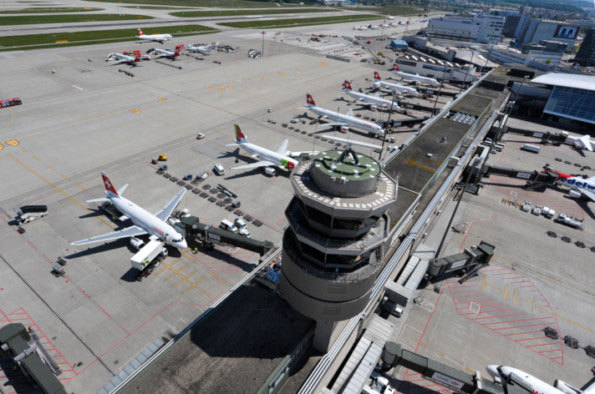
Zurich Airport is Switzerland’s gateway to the world. More than 25 million passengers departed, arrived, or changed planes there in 2014, making the airport the most important traffic hub and meeting center in the region. Zurich Airport is driven by around 280 companies that employ over 25,000 workers. Flughafen Zürich AG operates the airport as a semi-public company and concessionaire of the Swiss Confederation. In 2014, the company of 1,600 employees generated sales of 963.5 million Swiss francs and 205.9 million Swiss francs in profits. 33.3% of the share package belongs to the canton, and 5% to the city of Zurich.
As Switzerland’s largest airport, Zurich Airport must pay special attention to ensure all its processes and electronic systems are always running smoothly. In order to prevent failures, the IT team relies on PRTG Network Monitor from Paessler AG. By deploying more than 4,500 measuring points (sensors) in the infrastructure, the team can immediately detect a malfunction and assign the appropriate workers to resolve the issue. PRTG also monitors video servers – which has helped, among other things, to identify a bug in the video software.
So what led the team to install PRTG? On the one hand, its need to react more quickly to errors, and on the other, its obligation to provide sufficient evidence of services rendered within the context of increasingly stringent service-level agreements (SLAs).
Previously, the IT team had used a number of monitoring solutions, including CiscoWorks, Nagios, and the HP Network Node Manager. It also used tools developed by the team. However, none of these solutions were suitable for ad-hoc monitoring by the operations and engineering teams.
During its search for a tool, the IT team was especially impressed by the quick & easy setup and use of PRTG, which are made possible by so-called “sensors”, or predefined measuring points that allow for the straightforward integration of devices and applications into the monitoring environment. Flughafen Zürich AG uses PRTG IP SLA sensors to monitor network performance from one central location, as well as various WMI, SNMP, and ping sensors (4,500+ sensors in total, and the number keeps growing). The monitoring software runs as a physical installation on a 19” server from HPE (G8) equipped with Windows 2012. PRTG is integrated into the airport’s trouble ticket system, thereby optimizing workflows in the event of alarms and malfunctions.
Thanks to the IP SLA sensors built into PRTG, Flughafen Zürich AG can comprehensively monitor the performance of its network, both quickly and with precision.
The reactivity, know-how, and technical solutions of Paessler support are outstanding in every situation. For me, no monitoring tool compares to PRTG.
In addition to overall network performance, the airport operator uses PRTG to monitor a variety of different things: video surveillance, for example, is a fundamental part of the airport’s security system. Several video servers record video data from over 100 IP cameras at the airport. For the IT team, managing the network, hardware, and software of this system is not always easy. In particular, if images from the cameras are blurry, it can be difficult to determine which component failed to process the incoming data when needed. In this specific case, the team used PRTG to measure a variety of parameters (such as the network load, system service status, RAM load, processor load, and write speed) to determine that the problem stemmed from the software, which was causing the service in Windows to remain in the “Started” state even though it was no longer performing its task. The monitoring was expanded after the bug was fixed, and is now an integral and effective part of the operator’s comprehensive and end-to-end monitoring system.
Thanks to its multi-client capabilities, PRTG enables Flughafen Zürich AG to set up a private area that only authorized users can access, in addition to the public area that all PRTG users can view. As a result, the company can provide admins with a “playground” to thoroughly test new devices and applications before they go live.
As an internal service provider, the IT team offers “monitoring as a service” with PRTG for administrators and support teams. The former have the option of creating their own groups, devices, and sensors for a specific domain: the admins are responsible for their own monitoring, while the IT team runs PRTG. Support teams need a different service. For these teams, the IT team makes use of PRTG “libraries,” which provide the respective support team with an overview of the devices under its care, thereby allowing it to create its own schedules and notifications.
In addition, PRTG has completely replaced Nagios and the monitoring tools developed by the IT team. For Zurich Airport, the technical support provided by Paessler played a major role in its decision to go with PRTG: “Many of our contacts experience the same consistent quality of service,” explains Andreas Reimann, Senior Networking Communication Architect at Zurich Airport. “The reactivity, know-how, and technical solutions of Paessler support are outstanding in every situation. For me, no monitoring tool compares to PRTG. With Paessler by our side, we now feel confident expanding our network and systems.”
For the IT team at Flughafen Zürich AG, PRTG – with its excellent usability and numerous customizable features – has more than fulfilled the requirements of a suitable monitoring tool. In addition to solving specific problems, PRTG allows for the comprehensive ad-hoc monitoring of the entire network. As a result, the tool has made everyday network-related tasks at Zurich Airport more efficient and improved the quality of service.




Unlimited use of PRTG for 30 days. After 30 days PRTG reverts to the freeware edition.
You can upgrade to a paid license at any time.