Paessler
                    - The Monitoring Experts
  • Free download
  1. Home>
  2. LP>
  3. Healthcare IT Monitoring
PRTG Logo

All-in-one medical
device & healthcare IT
infrastructure monitoring

  • Central overview of both your classic IT and healthcare IT in a single monitoring tool
  • Performance, availability, and security monitoring of medical devices & hospital routines
  • Full support of common standards and protocols used in the healthcare industry
free download
OverviewbenefitsChallengessensorscustomer stories

5 reasons why experts monitor healthcare IT with PRTG

Modern hospitals are highly digitalized – and the availability of patient data is at the core of this digitalization. As classic IT systems & healthcare IT are converging, having a central monitoring overview like Paessler PRTG becomes more crucial than ever.

  • Get out-of-the-box support for common healthcare IT protocols (DICOM C-ECHO, DICOM C-FIND, HL7)
  • Collect monitoring data from modalities, mobile health devices, PACS, HIS, RIS, and more
  • Keep an eye on healthcare workflows and hospital processes including data transfer
  • Visualize your healthcare IT environment in custom dashboards for a central overview
  • Extend the functionality of your medical equipment’s built-in monitoring features

Hundreds of thousands of customers worldwide love Paessler PRTG

customer success stories


What customers say about us

Why PRTG is the healthcare IT monitoring tool of your choice

setup

Make use of built-in technology support

  • Connect to communication servers or integration engines via REST API
  • Use DICOM to monitor, for example, image data from MRTs, CTs, or X-Ray devices
  • Integrate your HIS, RIS, and LIMS into your central monitoring overview
lock

Ensure the security of healthcare data

  • Enhance network security by monitoring firewalls, intrusion detection systems & more
  • Securely check the transfer of patient data & the involved medical devices via HL7
  • Monitor data type, volume, and device state – PRTG has no access to personal data
icon of a magnifying glass with arrows pointing towards it

Monitor both healthcare & classic IT

  • Watch not only your medical equipment, but also the underlying IT infrastructure
  • Monitor the health of hardware such as switches, servers, and storage systems
  • Keep an eye on Wi-Fi usage, access points, and application performance
alarmbell

Receive custom PRTG alerts in real time

  • Define warning thresholds to be alerted before a more serious issue occurs
  • Set notification triggers to inform the right people at the right time
  • Choose from notification methods such as SMS, email, or push notification
setup

Visualize your data in custom dashboards

  • Create customized dashboards in HTML format with our drag & drop editor
  • Visualize single medical devices, entire hospital floors, or eHealth processes
  • Share dashboards on hospital IT center screens or for specific teams only

Discover some of our preconfigured PRTG sensors for monitoring healthcare IT.

What healthcare IT monitoring looks like in PRTG

Diagnose issues with your healthcare devices by continuously monitoring your hardware, bandwidth, and availability. Show hospital workflows in real time and visualize data in graphic maps & dashboards to identify problems more easily. Gain the visibility you need to troubleshoot issues with your hospital computers.
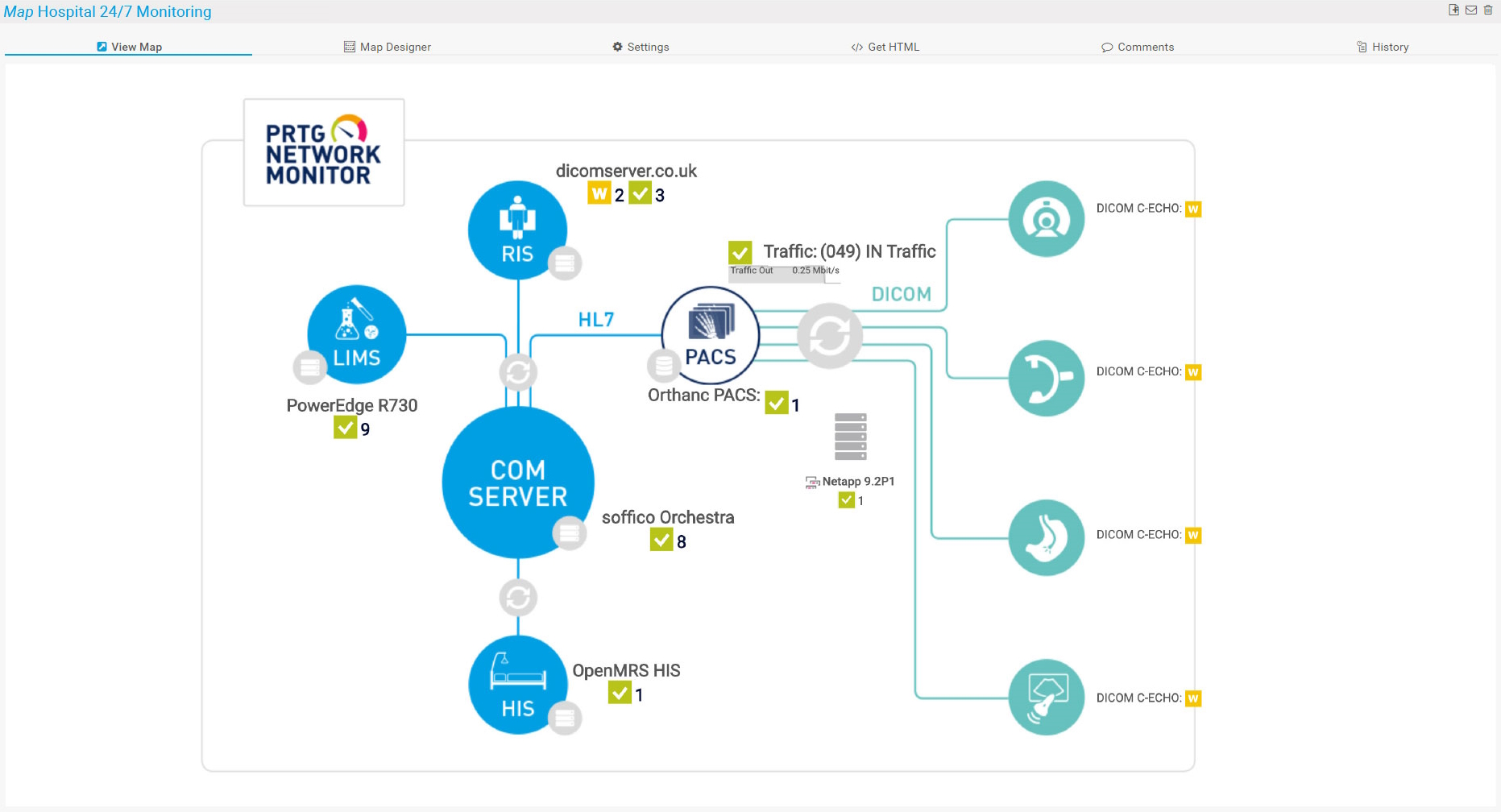
Detailed overview screenshot of monitoring healthcare IT in PRTG

PRTG dashboard for a high-level healthcare IT infrastructure overview
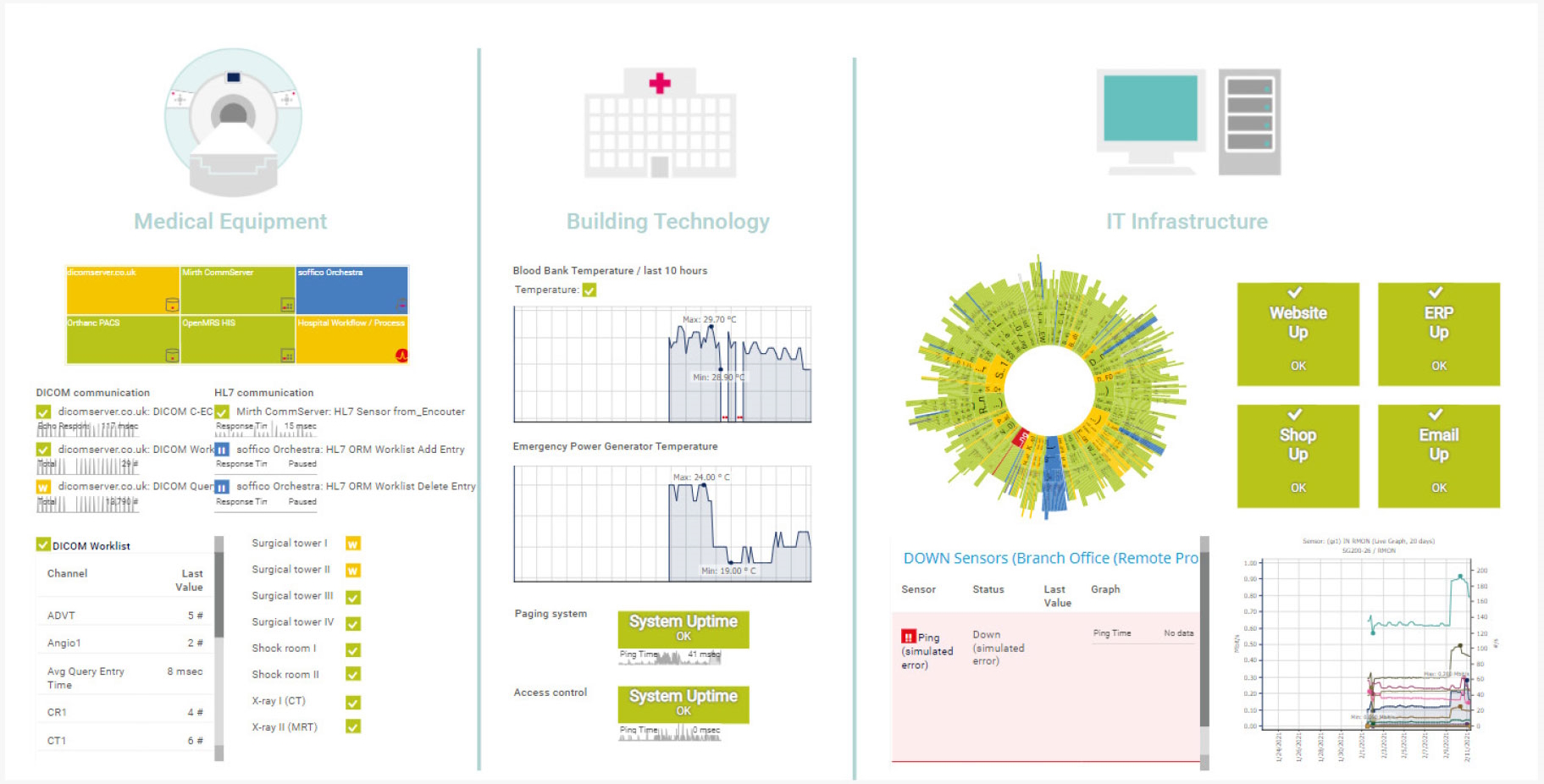
Detailed in-depth screenshot of monitoring healthcare IT in PRTG

Consolidated monitoring of medical equipment, building technology, and classic IT infrastructure
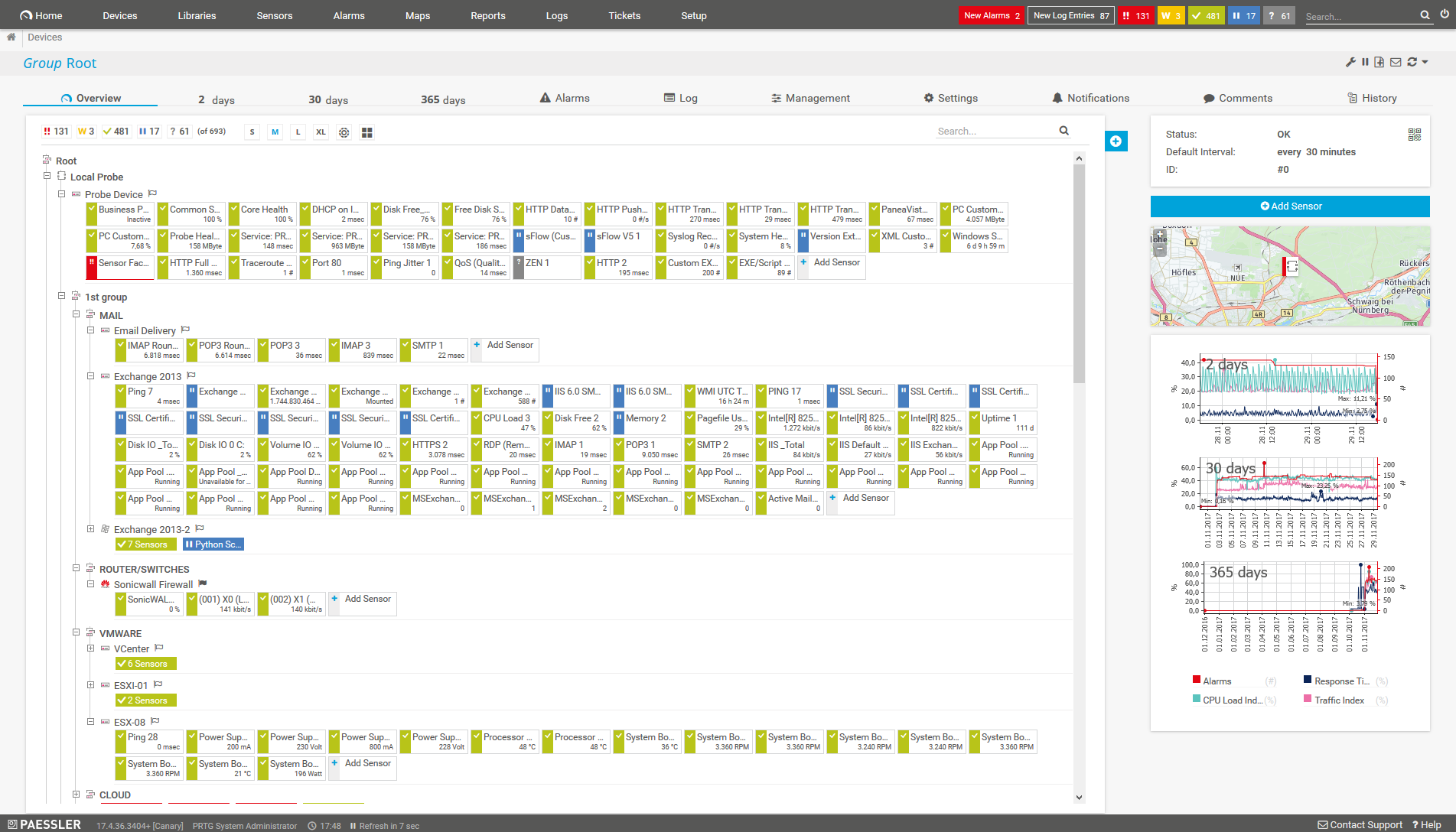
Detailed screenshot of the device tree monitoring overview in PRTG

Device tree monitoring overview in PRTG

Start monitoring your healthcare IT systems & medical devices with PRTG and see how it will make hospital routines easier and the transfer of patient data more secure.

free downLoad

Our users give top ratings for monitoring with Paessler PRTG

Gartner peer insights
spiceworks
G2
Capterra

5 use cases for monitoring your digital medical equipment


tbd

With PRTG, you get a centralized monitoring solution that is a perfect fit for monitoring both classic IT (servers, databases, computers, email, etc.) and healthcare IT (medical devices, hospital systems, specific technologies).

But what exactly can you monitor in a typical hospital setup, for example? Find out about some use cases for medical monitoring in a healthcare environment.

Watch the Integration Engine

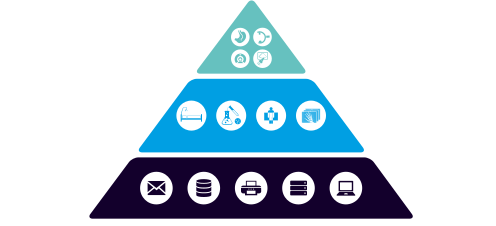
The integration engine is the central communication server of the IT environment. It receives messages from different systems, translates them into formats that other systems can understand, and distributes the messages further via multiple technologies, including HL7, DICOM, Fast Healthcare Interoperability Resources (FHIR) and HTTP-based requests.

To make sure that the Integration Engine is up and running and processing messages correctly, you should watch the following aspects:

  • Hardware: monitor available disk space, memory, CPU load etc.
  • Messages: monitor the number of processed messages, errors in the messages etc.
  • Latency: monitor the read and write latency to connected databases

Keep an eye on your PACS

The Picture Archive and Communication System, or PACS, is an image sharing platform and as such, a central repository for images generated from devices like MRTs or video endoscopies. These images are stored on the PACS so they can be accessed or transferred by other workstations or devices. To make sure that images are stored and can be accessed correctly, you should keep an eye on different aspects of the PACS.

These aspects can be:

  • Hardware: monitor available disk space, memory, signs of overheating etc.
  • Latency: monitor the latency of read and write tasks
  • Log files: monitor the number of PACS errors, failed authentication attempts etc.
  • Interfaces: monitor availability and responsiveness of workstations that access PACS data

Monitor the different modalities

Modalities refer to healthcare equipment that is used for creating medical images, for example X-ray, Computer Tomography (CT), or Magnetic Resonance Imaging (MRI). Modalities use the DICOM standard to take images, connect to a PACS, and send the images there to store them. Each modality has an associated worklist that contains a list of scheduled jobs as well as patient data.

To make sure that medical devices are reachable and the data transfer works as expected, you should keep an eye on the following:

  • Availability: monitor C-ECHO requests to make sure devices are up & running
  • Performance: monitor the response times of C-ECHO requests
  • Worklists: monitor the number of worklist items to identify bottlenecks or other issues
  • Storage: check for locally stored medical images to identify storage issues with the PACS

Check health information exchange

Digital medical devices, interfaces, and systems don’t run in isolation. Patient data like X-Ray or ultrasound images, laboratory or specialist results, the patient’s history, or details of the patient’s primary care physician are transported via the hospital’s system infrastructure, which consists of different subsystems.

Examples can be:

  • Master patient data is managed via the Hospital Information System (HIS)
  • Laboratory data is stored in the Laboratory Information System (LIMS)
  • Radiology data is managed via the Radiology Information System (RIS.

All these health information exchange (HIE) systems use different technologies to transfer data. To bring the information from all these systems together, including data transfer and data traffic, you can set up a Business Process sensor in PRTG for each hospital workflow that you want to keep an eye on.

Monitor custom healthcare IT cases

In addition to our preconfigured eHealth sensors, PRTG offers a REST Custom sensor, with which you can practically integrate everything in the healthcare IT sector that you want to monitor via REST API.

Here are some examples:

  • Changes in and issues with electronic documentation, for example on-premises or cloud-based EHRs (Electronic Health Records)
  • Service level agreements made with HISPs (health information service providers)
  • Availability and status of mobile health (mHealth) devices such as wearable sensors and mobile workstations
  • Triggering of reminders and alerts in CDS (clinical decision support) processes
  • Business & clinical intelligence applications that are used for financial and operational aspects of healthcare environments

Preconfigured PRTG sensors for monitoring your healthcare IT environment

Beyond out-of-the-box support for all classic IT standards, PRTG offers a RESTful API as well as DICOM and HL7 support. Easily integrate medical devices, mobile health workstations, and healthcare IT communication processes into your monitoring with our preconfigured PRTG sensors.

DICOM Bandwidth

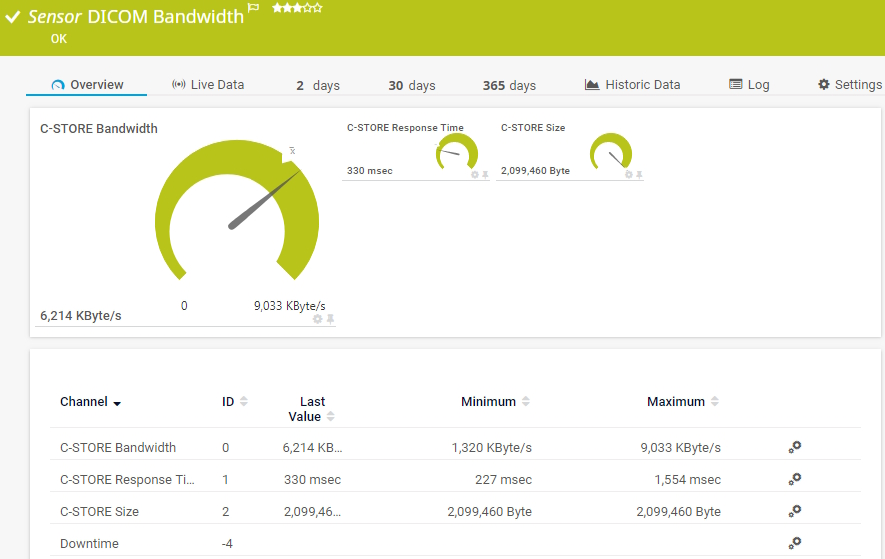
The DICOM Bandwidth sensor monitors the bandwidth usage of a C-STORE request to a Digital Imaging and Communications in Medicine (DICOM) capable device. It can show the following:

  • Bandwidth usage of the sent files
  • Response time of the C-STORE request
  • Total size of the sent files
DICOM Bandwidth
DICOM Bandwidth

DICOM C-ECHO

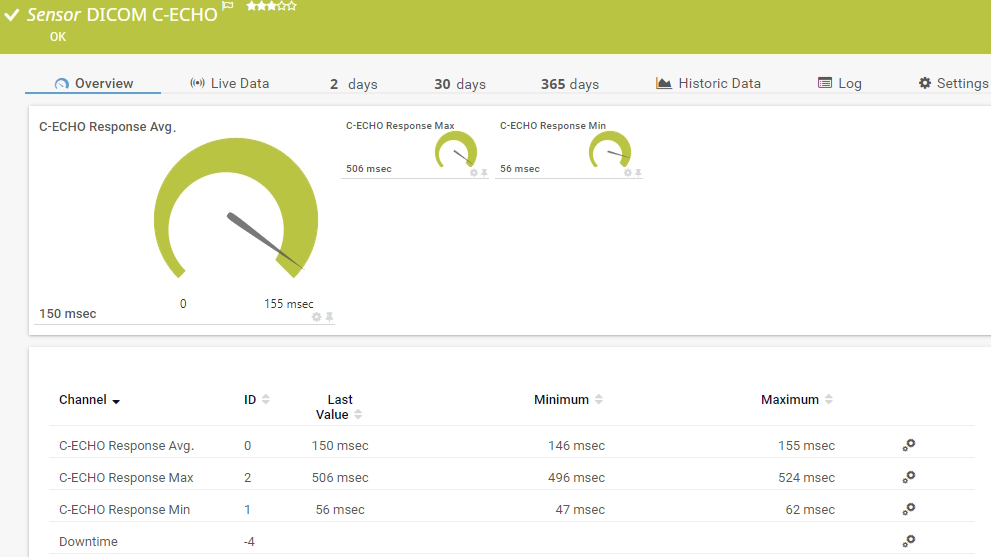
The DICOM C-ECHO sensor monitors the availability of Digital Imaging and Communications in Medicine (DICOM) capable systems and devices by sending C-ECHO requests to the target system. C-ECHO is also known as DICOM-Ping. It can show the following:

  • Average response time of the C-ECHO request
  • Minimum response time of the C-ECHO request
  • Maximum response time of the C-ECHO request
DICOM C-ECHO
DICOM C-ECHO

HL7

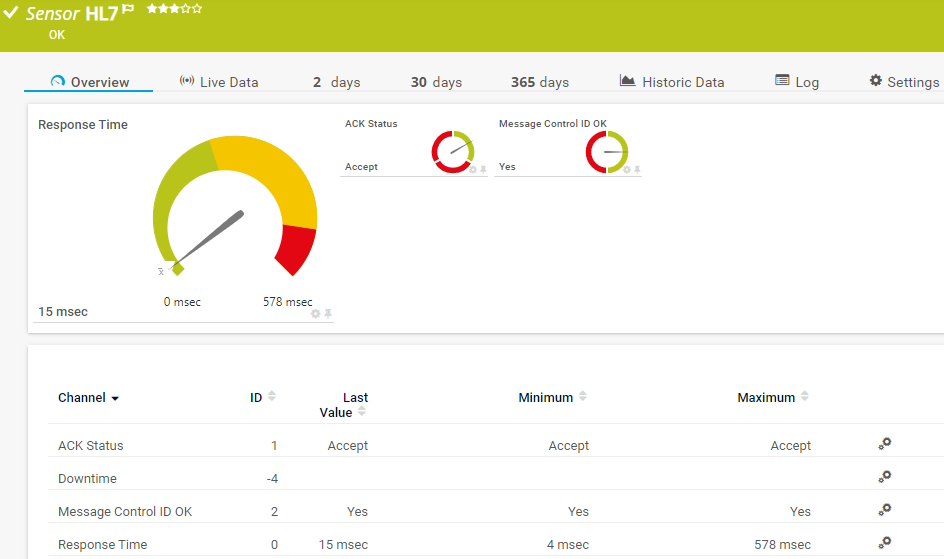
The HL7 sensor monitors the availability of Health Level 7 (HL7) interfaces. It sends an HL7 message to the target device and checks for a valid response. It can show the following:

  • Acknowledgment (ACK) status
  • Message control ID status
  • Response time
HL7
HL7

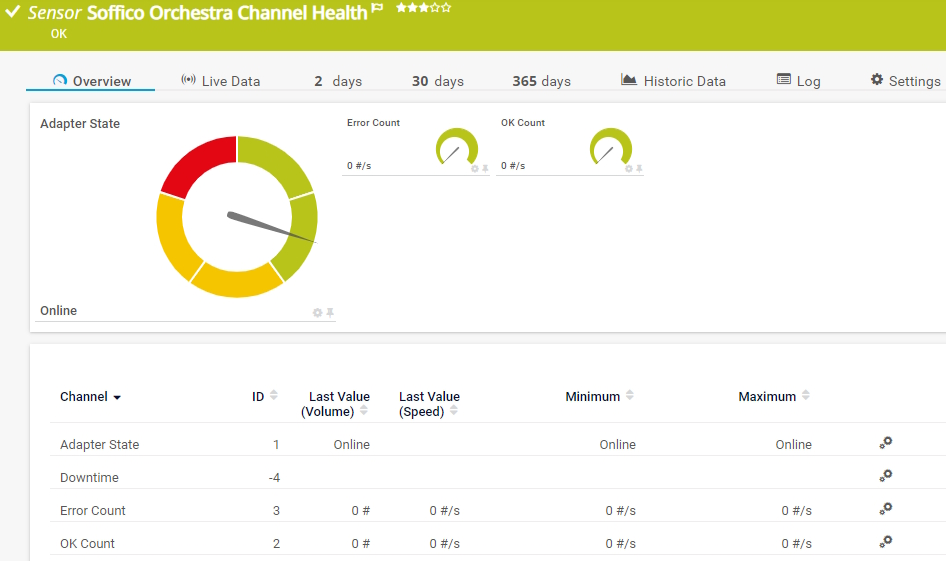
Soffico Orchestra Channel Health

The Soffico Orchestra Channel Health sensor monitors the state and the overall number of successful or unsuccessful channel calls. It can show the following:

  • Adapter status
  • Number of errors
  • Number of OKs
Soffico Orchestra Channel Healt

See the PRTG Manual for a list of all available sensor types.
Start monitoring your healthcare IT systems & medical devices with PRTG and see how it will make hospital routines easier and the transfer of patient data more secure.

free downLoad

“With PRTG's healthcare IT sensors, we have have a close view on the current device status of, for example, MRTs, CTs, ultrasound devices and video endoscopes. We monitor the most unstable link in a chain of DICOM routers. As soon as PRTG raises the alarm, we know that we have to intervene.”

Stefan Theisel, IT employee
Jena University Hospital

“It’s the power of flexibility that makes PRTG a serious proposition. This means departments can decide for themselves what they want to monitor. In Radiotherapy they went completely wild! That’s something I like to see. The freedom to organize things yourself is a real advantage.”

Willem Bouwman, Technical Applications Manager
Leiden University Medical Center

“With a Hospital Information System the size of Confluent, it's very difficult to monitor it alone, and after developing an 'in-house' tool that gave satisfaction but was ultimately very limited, I decided to opt for a global monitoring solution. PRTG suited us immediately, and the licensing was just what we needed.”

Anthony Duhil, Infrastructure and Security Manager
Private Hospital of Confluent
Preview picture for the Paessler whitepaper Healthcare IT - a monitoring priner

Monitor healthcare IT: Get your free white paper

This white paper introduces Paessler PRTG as a complete and reliable solution for monitoring your healthcare IT systems.

Get an overview of what a typical healthcare IT environment looks like and which standards and protocols are used; and learn about the challenges that IT professionals in the healthcare sector face and how PRTG can help them overcome these challenges.

Get free Whitepaper

Success stories from our customers

Companies around the world trust PRTG Network Monitor when it comes to ensuring that their IT systems run smoothly.

Brand logo of HammondCare

HammondCare uses Paessler PRTG for proactively monitoring its IT infrastructure

HammondCare is a not-for-profit independent aged care and health services provider for residential care, home care, community health and hospital care. It monitors the IT infrastructure at their 76 sites with the use of Paessler PRTG to be able to respond proactively to incidents rather than awaiting site-based staff to report problems, which previously took hours and resulted in greater business outages.

Read full case study

Brand logo of Austrian Red Cross

The Austrian Red Cross not only saves lives but also resources with Paessler PRTG

The Red Cross needs a steady flow of blood reserves to be able to save lives. In Austria, this blood is collected, managed, and distributed at the Red Cross Blood Donation Center in Linz. To promptly detect errors (and prevent potential damage and failures), the responsible IT team keeps a constant eye on the availability and performance of the entire IT infrastructure with the help of Paessler PRTG.

Read full case study

Brand logo of LUMC
Brand logo of LUMC

How the LUMC can monitor all its IT systems thanks to Paessler PRTG

LUMC is a modern university medical center for research, education and patient care with a high-quality profile and a strong scientific orientation. LUMC chose Paessler PRTG because of its ability to monitor medical equipment as well as the health of the entire network 24 hours a day and also, by extension, the health of the patients.

Read full case study

Create innovative solutions with Paessler’s IT partners

Partnering with innovative IT vendors, Paessler unleashes synergies to create
new and additional benefits for joined customers.

©2025 Paessler GmbHTerms & ConditionsPrivacy PolicyImprintReport VulnerabilityDownload & InstallSitemap
Hardware Monitoring Tool Hardware Monitoring Tool Hardware Monitoring Tool