Paessler sFlow Tester
Testing sFlow Export Configurations
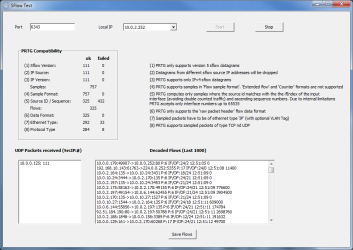
The sFlow Tester is a small program that simply dumps the data of all sFlow packets that a computer receives from an sFlow enabled router. This can be useful when debugging bandwidth monitoring configurations based on the common sFlow protocol (version 5).
First, the sFlow protocol must be enabled and configured on the router. The router must be given the IP address of the computer running sFlow tester, so that the UDP data packets with sFlow data are sent to this computer.
Instructions
- Download the ZIP file below and start sFlow5Tester.exe.
- Enter the "Port" number and select the "Local IP" address that you have configured as sFlow packet target in your router. The drop down list will show all IPs available on the current computer.
- Click on "Start".
- For each packet the computer receives, you should now see activity in the areas "PRTG Compatibility" and "Decoded Flows".
How to Interpret Data
- PRTG Compatibility: Shows the number of received sFlow packets and categorizes all sFlow 5 packets the same way the PRTG sFlow sensor does. This helps understand how flow packets are handled by PRTG's sensor. Usually, you should see most packet counts in the ok column. Packet counts in the failed column doesn't necessarily mean a malfunction, but merely indicates that these packets will not be accounted by PRTG. This can be due to a wrong sFlow version, or because PRTG generally drops packets containing aggregated data, or packets with an unsupported ethernet or protocol type, sample format, etc.
- UDP Packets received (SrcIP:#): Shows the number of received packets for each IP address from which the program has received UDP packets. This field should at least show the IP address of one sFlow router. If you configure more than one router to send sFlow packets to the computer on the specified port, you may see several combinations of IP address and count.
- Decoded Flows (Last 1000): Shows the last thousand sFlow packets in decoded format. Each line contains information about one packet. This includes source and target IP address and protocol information (6=TCP, 17=UDP).
Notes
This Freeware program is provided free for Paessler customers, mainly as a diagnostic tool for users of PRTG Network Monitor. Please understand that we can not provide support for the program.
History
- March 3rd 2011: sFlow5Tester V1.0 Initial Release