

For testing purposes, Multi Server Simulator simulates large, virtual HTTP, FTP, SMTP, or DNS server networks, as well as SNMP-based network switches using a standard Windows PC. It is an indispensable tool for the evaluation and testing of network management and network testing tools.
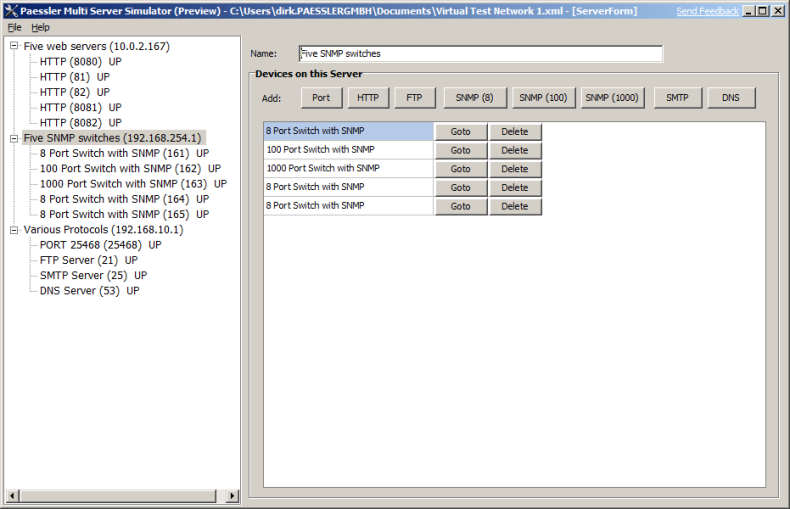
Using a standard Windows PC you can create large virtual networks using Multi Server Simulator. You are able to create as many servers and virtual switches as desired – limited only by the number of available IP addresses and TCP ports (as well as network and system performance).
Available Virtual Device Types:
Setting up a network 100 servers and 20 switches (with thousands of ports) network merely takes a few minutes, much faster than installing and configuring normal server software on a PC.
The program will automatically discover all available IP addresses on the local machine. Select an IP address and click on one of the protocol buttons to add a virtual server. It will show up in the tree view on the right, beneath its IP address. Click a server to go to the configuration settings. When done with the configuration, enable the "Up/Down" checkbox to start the server.
The web server always answers with one of two HTML blocks (intervals and repetition can be set by the user)
Simulates an FTP server that accepts login requests and sends the number of available files
Accepts SMTP protocol connections with and without authentication
Resolves DNS requests for the DNS name "localhost" with IP address 127.0.0.1; other DNS names cause an error message
Accepts TCP connections on the specified TCP port
Works on 32-bit and 64-bit versions of Windows Vista, 2008, 2012 and Windows 7, 8
Please use the following name and key (expires January 31st, 2100).
Name:
Multiserver Simulator
Version:
0.1 (26.5.2009) for Windows Server 2008, Windows Server 2012, Windows 7, Windows 8, Windows 10
Key:
01EUM6-JB6XN1-YWGDC8-6WK8TP-ZUA59D-GK4DDW-YTB299-NKYBZ9-01E58P-YV9V0B
Multi Server Simulator Installer (3 MB)
Multi Server Simulator is currently available as a public preview version. Please consider this software a pre-release beta version that may contain bugs. After installation enter the Multiserver Simulator name and a license key to work with the program.