
• Company
    • About Us
    • Case Studies
    • Press Center
    • Events
    • Careers
    • Blog
    • Contact us
  • Contact us
  • Login
 
  • English
    • Deutsch
    • Español
    • Français
    • Italiano
    • Português
Paessler
                    - The Monitoring Experts
  • Products
    • Paessler PRTG
      Paessler PRTGMonitor your whole IT infrastructure
      • PRTG Network Monitor
      • PRTG Enterprise Monitor
      • PRTG Hosted Monitor
      • PRTG extensionsExtensions for Paessler PRTGExtend your monitoring to a new level
    • Icon Features
      FeaturesExplore all monitoring features
      • Maps & dashboards
      • Alerts & notifications
      • Multiple user interfaces
      • Distributed monitoring
      • Customizable reporting
  • Solutions
    • Industries
      IndustriesMonitor various industry sectors
      • Industrial
      • Healthcare
      • Data Center
      • Education
      • Finance
      • Government
    • IT Topics
      IT TopicsMonitor all areas of IT
      • Network Monitoring
      • Bandwidth Monitoring
      • SNMP Monitor
      • Network Mapping
      • WiFi Monitoring
      • Server Monitoring
  • Pricing
  • Resources
    • Getting Started
      Getting StartedModules for self-paced learning
    • How-to Guides
      How-to GuidesGet the most out of PRTG
    • Videos & Webinars
      Videos & WebinarsLearn from Paessler experts
    • IT  Knowledge
      IT KnowledgeExpand your IT knowledge
    • PRTG Manual
      PRTG ManualFull documentation
    • Knowledge Base
      Knowledge BaseShare community knowledge
    • PRTG Sensor Hub
      PRTG Sensor HubGet sensors, scripts & templates
    • Trainings
      PRTG TrainingLearn how to work with PRTG
  • Partners
    • icon star
      New Partners and MSPBecome a new partner or MSP
    • icon partner
      Partner PortalLog in to your partner account
    • Deal Registration
      Deal RegistrationRegister your sales opportunities
    • icon search
      Find a PartnerFind partners selling Paessler products
    • icon technology
      Technology AlliancesSee Paessler technology partnerships
  • Company
    • About Us
    • Case Studies
    • Press Center
    • Events
    • Careers
    • Blog
    • Contact us
  • Contact us
  • Login
  • English
    • Deutsch
    • Español
    • Français
    • Italiano
    • Português
  • Get a quote
  • Free trial
  1. Home>
  2. Tools>
  3. SNMP Tester
snmp tester Logo


Simple debugging tool for monitoring configurations that use SNMP

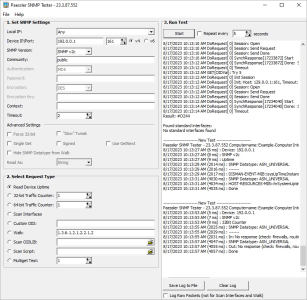
With SNMP Tester, you can run simple SNMP requests against a device in your network. This test program is based on the SNMP technologies built into PRTG Network Monitor.
Free Download

Instructions

SNMP Tester
SNMP Tester

The idea of this program is to have a tool that enables you to debug SNMP activities to find communication and/or data issues in SNMP monitoring configurations. If the SNMP connection works with this test program, it also works with PRTG.

1. Click the Free Download button above to download the setup file for the current version of SNMP Tester.

2. Execute the file Paessler SNMP Tester Setup.exe.

3. Follow the steps in the Paessler SNMP Tester Setup Wizard.

For more information on how to use SNMP Tester, see the SNMP Tester Manual.

Expand your know-how: our SNMP email course

You're interested in learning more about SNMP – but little by little instead of having to digest an entire white paper at once? Then sign up here for our free, four-part email course. This course is a great way to develop your expertise on network monitoring via SNMP.

To the snmp email course

History

  • V24.4.102 (Nov 6th, 2024): Maintenance release
    • The IPv6 field for OIDLIB scan and Scan for Interfaces is now properly used when necessary.
    • Non-printable characters in the log are now correctly encoded in hexadecimal format, which was not the case in some instances.
  • V23.3.87 (Aug 17th, 2023): Paessler SNMP Tester now supports SNMP v3 ciphers for encryption and authentication methods which are as follows:SHA-224, SHA-256, SHA-384, SHA-512 and AES-192, AES-256.
  • V20.2.4 (June 4th, 2020): We added the option Use GetNext to the advanced settings. With this option, you can perform SNMP GETNEXT requests on a target device to test and debug your SNMP activities.
  • V20.1.58 (Mar 18th, 2020): Maintenance release
    • New versioning system that follows the PRTG versioning (year.quarter.build)
    • Installer and executable are now signed to confirm their integrity.
    • Several minor fixes and improvements
  • V5.2.3 (Apr 18th, 2016): Maintenance release
  • V5.2.2 (Mar 9th, 2016): Maintenance release
  • V5.2.1 (Oct 19th, 2015): Support for hex bytes as return value type (for example, for MAC addresses)
  • V5.2 (Aug 13th, 2015): SNMP Tester can now show the data type of an SNMP value
  • V5.1.3 (July 1st, 2014): Fixed an error caused by very long OIDs
  • V5.1.2 (Jan 17th, 2014): When checking "Uptime", the tester now uses two different OIDs
  • V5.1 (Aug 5th, 2013): New stable version
  • V5.0.11 Beta (Apr 30th, 2013): Beta version with enhanced options
  • V5.0.10 Beta (Mar 20th, 2013): Beta version with enhanced options
  • V5.0.9 Beta (Mar 11th, 2013): Beta version with enhanced options
  • V5.0 Beta (Feb 5th, 2013): Beta version with enhanced options
  • V3.2 (Dec 2009): Added option to run scan every x seconds
  • V3.1f (Aug 2009): Maintenance release
  • V3.1b (May 2009): Maintenance release
  • V3.1 (Apr 2009): Added option to enable Single Get, added more debug output when scanning interfaces
  • V3.0 (Nov 2008): Updated for compatibility with PRTG 7, added OIDLIB support
  • V2.2 (Apr 2006): Improved error handling, minor bugfixes
  • V2.1 (Apr 2006): Enhanced SNMP management
  • V2.0 (Mar 2006): Added support for SNMP Version 2c and 3
  • V1.2 (Nov 2005): Added "Scan Interfaces" option
  • V1.1 (Oct 2005): Initial release
snmp tester Logo
Free download

SNMP Tester (5 MB)

SNMP Tester is a diagnostic tool that is provided as freeware to users of PRTG Network Monitor. Please understand that we cannot provide extended support for this tool.

Products

  • Paessler PRTG
    Paessler PRTGMonitor your whole IT infrastructure
    • PRTG Network Monitor
    • PRTG Enterprise Monitor
    • PRTG Hosted Monitor
    • PRTG extensions
      Extensions for Paessler PRTGExtend your monitoring to a new level
  • Icon Features
    FeaturesExplore all monitoring features

Monitoring with PRTG

  • Network monitoring
  • Bandwidth monitoring
  • SNMP monitoring
  • Network mapping
  • Wi-Fi monitoring
  • Server monitoring
  • Network traffic analyzer
  • NetFlow monitoring
  • Syslog server

Useful Links

  • PRTG Manual
  • Knowledge Base
  • Customer Success Stories
  • About Paessler
  • Subscribe to newsletter
  • PRTG Support
  • PRTG Consulting
  • PRTG Feedback & Roadmap

Contact

Paessler GmbH
Thurn-und-Taxis-Str. 14, 
90411 Nuremberg 
Germany

[email protected]

+49 911 93775-0

  • Contact us
©2025 Paessler GmbHTerms & ConditionsPrivacy PolicyImprintReport VulnerabilityDownload & InstallSitemap
Brother Printer Errors Brother Printer Errors Brother Printer Errors