• Company
    • About Us
    • Case Studies
    • Press Center
    • Careers
    • Blog
    • Contact us
  • Contact us
  • Login
 
  • English
    • Deutsch
    • Español
    • Français
    • Italiano
    • Português
Paessler
                    - The Monitoring Experts
  • Products
    • Paessler PRTG
      Paessler PRTGMonitor your whole IT infrastructure
      • PRTG Network Monitor
      • PRTG Enterprise Monitor
      • PRTG Hosted Monitor
      • PRTG UVexplorer
      • PRTG extensionsExtensions for Paessler PRTGExtend your monitoring to a new level
    • Icon Features
      FeaturesExplore all monitoring features
      • Maps & dashboards
      • Alerts & notifications
      • Multiple user interfaces
      • Distributed monitoring
      • Customizable reporting
  • Solutions
    • Industries
      IndustriesMonitor various industry sectors
      • Industrial
      • Healthcare
      • Data Center
      • Education
      • Finance
      • Government
    • IT Topics
      IT TopicsMonitor all areas of IT
      • Network Monitoring
      • Bandwidth Monitoring
      • SNMP Monitor
      • Network Mapping
      • WiFi Monitoring
      • Server Monitoring
  • Pricing
  • Resources
    • Getting Started
      Getting StartedModules for self-paced learning
    • How-to Guides
      How-to GuidesGet the most out of PRTG
    • Videos & Webinars
      Videos & WebinarsLearn from Paessler experts
    • IT  Knowledge
      IT KnowledgeExpand your IT knowledge
    • PRTG Manual
      PRTG ManualFull documentation
    • Knowledge Base
      Knowledge BaseShare community knowledge
    • PRTG Sensor Hub
      PRTG Sensor HubGet sensors, scripts & templates
    • Trainings
      PRTG TrainingLearn how to work with PRTG
  • Partners
    • Icon Handshake
      Become a PartnerFor resellers and channel partners
    • Icon MSP
      Become an MSPDeliver monitoring as a managed service
    • icon partner
      Partner PortalLog in to your partner account
    • Deal Registration
      Deal RegistrationRegister your sales opportunities
    • icon search
      Find a PartnerFind partners selling Paessler products
    • icon technology
      Technology AlliancesSee Paessler technology partnerships
    • Partner HubTools for Your Success
  • Company
    • About Us
    • Case Studies
    • Press Center
    • Careers
    • Blog
    • Contact us
  • Contact us
  • Login
  • English
    • Deutsch
    • Español
    • Français
    • Italiano
    • Português
  • Get a quote
  • Free trial
  1. Home>
  2. IT Topics>
  3. Database>
  4. Database Monitoring Tool

Database Monitoring with PRTG

Scalable database observability for multiple database providers

  • All-in-one database monitoring from a single pane of glass
  • Monitor Oracle SQL, Microsoft SQL, MySQL, PostgreSQL & more
  • Avoid downtimes and optimize database performance
Free download
PRODUCT OVERVIEW

Our Users Give Top Ratings for Monitoring With Paessler PRTG

Gartner peer insights
spiceworks
G2
Capterra

PRTG database monitoring: What you will find on this page

Table of content

    PRTG makes database monitoring as easy as it gets

    Custom alerts and data visualization let you quickly identify and prevent database server performance issues.

    Free download
    PRODUCT OVERVIEW

    Effective database monitoring with PRTG: The basics

    Business operations are almost always based on information that is stored and managed in SQL databases. If you’re a database administrator, you certainly know that for a business to be successful, these database instances must always be up and running to avoid costly downtime.

    The challenge: Database downtimes

    Database downtime, or crashes, are caused by hardware errors, faulty configurations, or insufficient disk space or memory. Corrupted databases with defective files can also lead to problems.

    If a downtime occurs, time is of the essence to prevent data loss and costly interruptions of business services and processes.

    The solution: Real-time database monitoring

    Paessler PRTG helps ensure your databases are always available and operating at optimal performance. With its customizable alarm system, you’re informed promptly of any issues before bigger problems arise.

    This way, you can quickly resolve the database issue and keep your operations running smoothly.

    Table of content

    5 reasons to use Paessler PRTG as your database monitoring tool

    A quick, concise overview

    Query data from your database without lengthy connection or response times. PRTG displays the database request’s execution time on your database dashboard in real time.

    This includes database availability and database performance, vital elements to your business operations.

    Detailed views defined by you

    PRTG is the only database monitoring tool that lets you monitor specific data sets from your databases with individually configured sensors and SQL queries that you define yourself.

    This enables you to optimize your data storage and processing, as well as your business processes.

    Designed for many vendors

    PRTG comes with preconfigured sensors for many common database manufacturers, including MySQL, Microsoft SQL, Oracle SQL, and PostgreSQL.

    If you use a different database, you can easily write your own custom sensor – or you use our brand-new product extension PRTG Database Observer for extended database activity monitoring.

    Custom, in-depth reports

    Use PRTG to analyze and monitor specific data sets in your databases. Just create database reports on demand or via schedule, and include raw or accumulated data, as well as data graphs, as required.

    This way, trend analysis and database capacity planning are easier than ever.

    Individual data visualization

    View your database monitoring data from the central dashboard, or create custom PRTG dashboards and maps to visualize your setup the way you need.

    PRTG includes an easy-to-use drag & drop map editor with which displaying your database infrastructure for public or internal use is no problem at all.

    What database monitoring looks like in PRTG

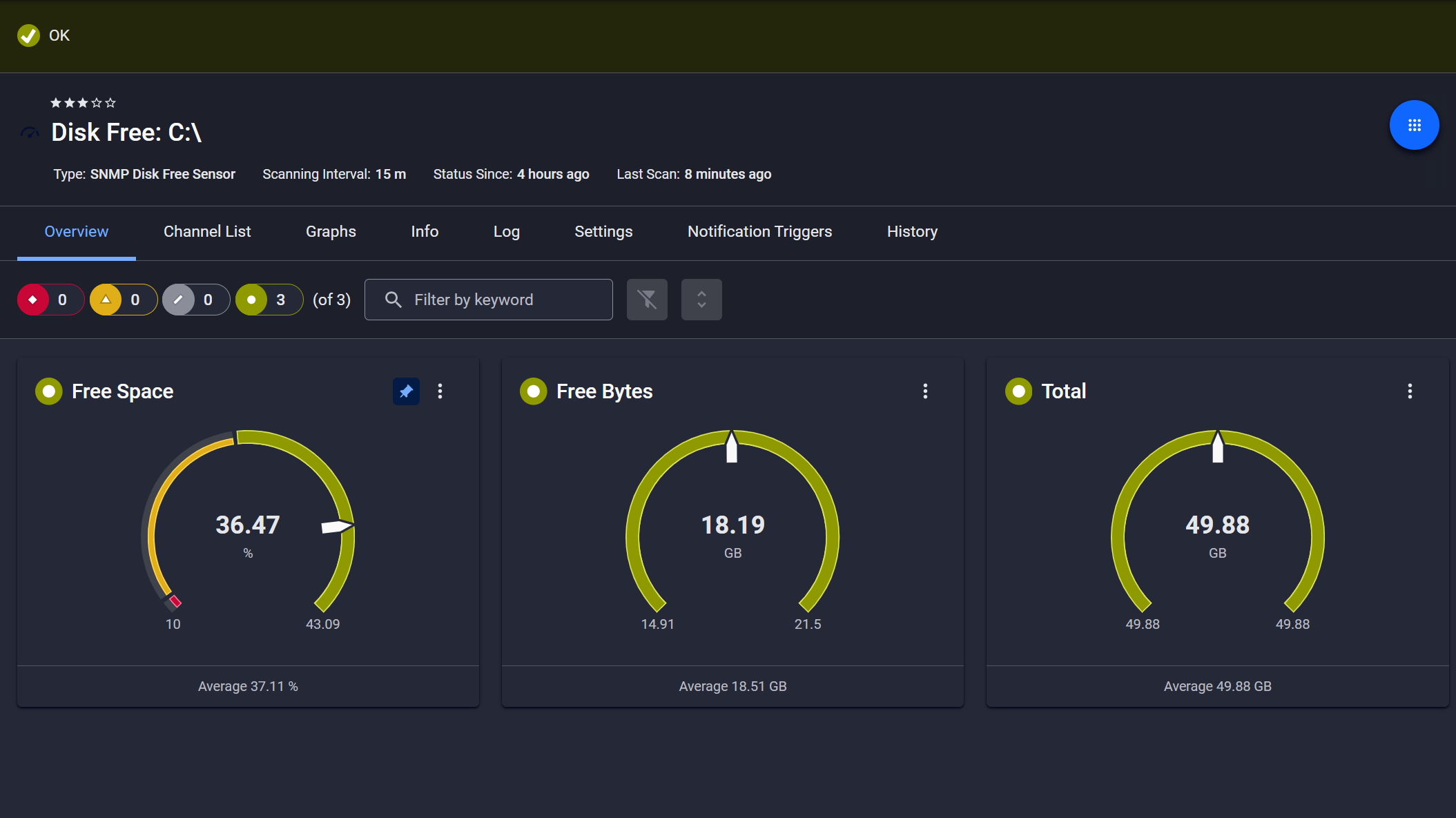
    Diagnose network issues by continuously tracking the performance and health of your database servers. Show execution time, CPU usage, availability, tablespace size, and other key performance metrics in real time. Visualize monitoring data in clear graphs and dashboards to identify problems more easily. Gain the overview you need to troubleshoot all kinds of issues with your database environments.

    Custom PRTG map for Windows Domain Databases

    Custom PRTG map for Windows Domain Databases

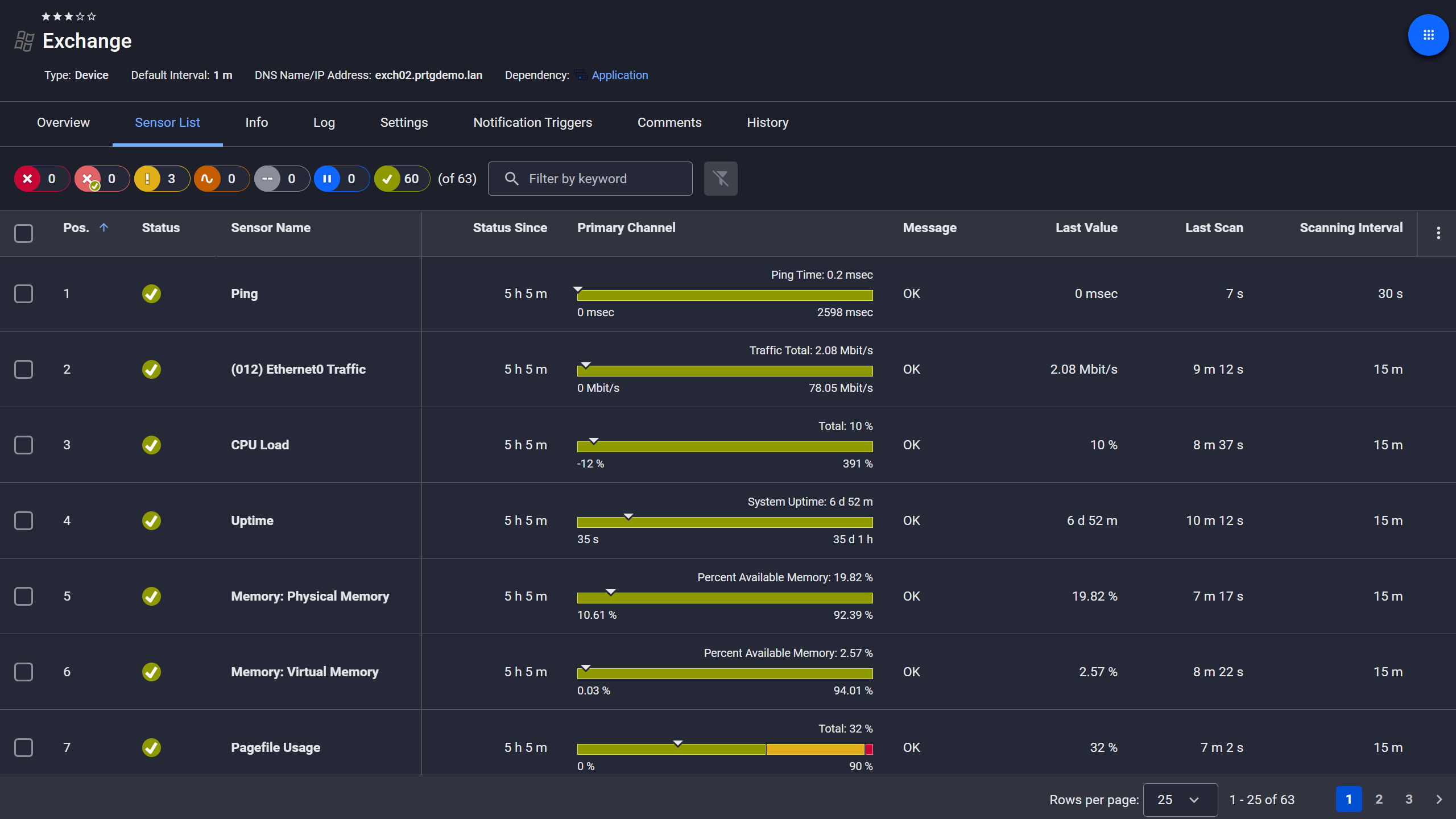
    PRTG Screenshot device tree view

    Device tree view of the complete monitoring setup

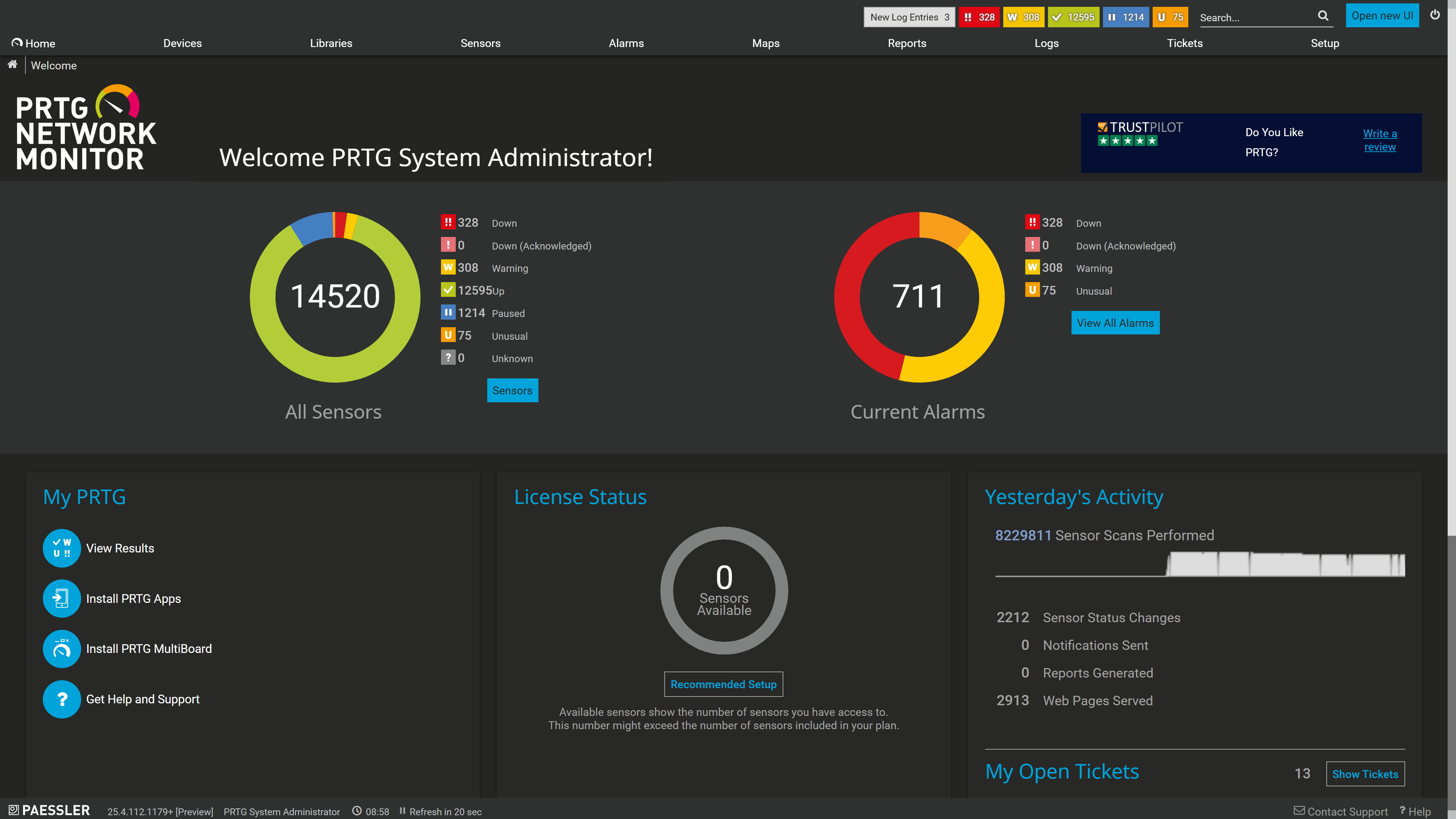
    PRTG screenshot map entire it infrastructure

    Custom PRTG dashboard for keeping an eye on the entire IT infrastructure

    Live traffic data graph in PRTG

    Start monitoring databases with PRTG and see how it can make your network more reliable and your job easier.

    Free download
    PRODUCT OVERVIEW

    IT experts agree: Paessler PRTG is a great solution for IT infrastructure monitoring

    PCMag

    “All-around winning
     network monitor”

    IT Brief

    “The real beauty of PRTG is the endless possibilities it offers”

    ITPro

    “PRTG Network Monitor 
    is very hard to beat”

    3 use cases for database monitoring with PRTG

    Icon Boost

    Optimize database efficiency

    Bad database performance always impacts your business-critical infrastructure. Thus, it is important to monitor database performance and database activity round the clock.

    PRTG helps you check the query execution time on your database servers and notifies you in case of slow performance.

    Icon Settings

    Check database scalability

    It’s no secret that databases are growing hugely over time.

    Use our database monitor PRTG to make sure that you always know when database space is beginning to run low so that you can expand existing database space or set up new ones in time and prevent database crashes.

    Icon Search

    Watch database processes

    With our PRTG database monitoring software, you can easily keep an eye on various database transactions. If these transactions do not work as expected, this might also point to a problem somewhere else in your network.

    To find the root cause of an issue, PRTG provides a wealth of historical data for detailed analysis.

    Explore our preconfigured PRTG sensors for database monitoring

    PRTG comes with more than 250 native sensor types for monitoring your entire on-premises, cloud, and hybrid cloud environment out of the box. Check out some examples below!

    Oracle SQL v2

    The Oracle SQL v2 sensor monitors a database on an Oracle server and executes a query. It can show the following:

    • Number of rows addressed by the query
    • Execution time of the entire request
    • Execution time of the specified query
    Oracle SQL v2
    Oracle SQL v2

    PostgreSQL

    The PostgreSQL sensor monitors a database on a PostgreSQL server and executes a query. It can show the following:

    • Number of rows addressed by the query
    • Execution time of the entire request
    • Execution time of the specified query
    PostgreSQL
    PostgreSQL

    MySQL v2

    The MySQL v2 sensor monitors a database on a MySQL server and executes a query. It can show the following:

    • Number of rows addressed by the query
    • Execution time of the entire request
    • Execution time of the specified query
    MySQL v2
    MySQL v2

    Microsoft Azure SQL Database

    The Microsoft Azure SQL Database sensor monitors the metrics of an Azure SQL Database (single database or elastic pool) in a Microsoft Azure subscription. It can show the following:

    • Number of failed connections and deadlocks
    • CPU and data space usage
    • Data I/O and log I/O operations
    • (e)DTUs, used (e)DTUs, and (e)DTU limit
    Microsoft Azure SQL Database
    Microsoft Azure SQL Database

    See the PRTG Manual for a list of all available sensor types.

    PRTG Is Compatible With All Major Vendors, Products, and Systems

    compatible with all major vendors, products, and systems

    PRTG makes database monitoring as easy as it gets

    Custom alerts and data visualization let you quickly identify and prevent database server issues.

    Free download
    PRODUCT OVERVIEW

    “We set up PRTG to read the event logs of the service. If the service is no longer able to access the database, then this information is recorded in the service’s EventLog and immediately detected by PRTG via WMI. The software then automatically triggers a script that restarts the service. The service reestablishes its connection to the database and the problem is solved.”

    David Jungwirth
    Austrian Red Cross

    “Thanks to significant improvements in performance, the integration of all monitoring (including that of databases and SAP services) into PRTG, numerous automation options, and the consolidation of all locations into the centralized monitoring system, we have been able to greatly relieve our help desk and provide for the most reliable and comprehensive of monitoring services.”

    Mirco Blöchliger
    Somnitec AG

    “We are currently using 4,500 sensors across the whole hospital which monitor physical servers, virtual machines, physical switches, ports, special devices such as ventilators and we also started writing some scripts which check SQL databases. So far PRTG has led to faster problem resolution, which has helped reduce downtime, made the team more efficient and, as a consequence, has freed up time for other projects.”

    Uri Inbar, Director of IT
    ALYN Hospital

    Your database monitor at a glance – even on the go

    PRTG is set up in a matter of minutes and can be used on a wide variety of mobile devices.

    device overview
    Gartner peer insights

    “Excellent tool for detailed monitoring. Alarms and notifications work greatly. Equipment addition is straight forward and server initial setup is very easy. ...feel safe to purchase it if you intend to monitor a large networking landscape.”

    Read the complete review at Gartner Peer Insights

    Create innovative solutions with Paessler’s IT partners

    Partnering with innovative IT vendors, Paessler unleashes synergies to create
    new and additional benefits for joined customers.

    NetBrain

    NetBrain

    Integrating monitoring results from PRTG into NetBrain maps makes the foundation for network automation.

    Read more
    Plixer

    Plixer

    Paessler and Plixer provide a complete solution adding flow and metadata analysis to a powerful network monitoring tool.

    Read more
    UVnetworks

    UVnetworks

    UVexplorer integrates tightly with PRTG to bring fast and accurate network discovery, detailed device inventory, and automatic network mapping to the PRTG platform.

    Read more

    Find the root cause of the problem with our PRTG database monitoring solution

    Real-time notifications mean faster troubleshooting so that you can act before more serious issues occur.

    Free download
    PRODUCT OVERVIEW
    Paessler PRTG

    Paessler PRTG

    Network Monitoring Software – Version 26.1.116.1532 (February 9th, 2026)

    Hosting icon

    Hosting

    Download for Windows and cloud-based version PRTG Hosted Monitor available

    Languages icon

    Languages

    English, German, Spanish, French, Portuguese, Dutch, Russian, Japanese, and Simplified Chinese

    test

    Monitor everything

    Network devices, bandwidth, servers, applications, virtual environments, remote systems, IoT, and more

    test

    Pricing

    Choose the PRTG Network Monitor subscription that's best for you

    Discover more monitoring insights and stories

    Content illustration

    Powerful stories from the monitoring world

    • Monitoring databases is vital – and with PRTG it's easy - Paessler Blog
    • PRTG Tutorial: Microsoft Azure SQL Database sensor - Paessler
    • Why Monitoring a Database requires an IT-Professional
    Support illustration

    Resources to master your monitoring challenges

    • PRTG Manual: Monitoring Databases - Paessler
    • PRTG Manual: Microsoft Azure SQL Database Sensor - Paessler
    • PRTG Manual: Exchange Database (PowerShell) Sensor - Paessler
    Solution illustration

    Solutions for all your monitoring needs

    • Oracle Monitoring
    • Database Performance Monitoring
    • SQL Server Monitoring

    Database Monitoring: FAQ


    What is database monitoring?

    Database monitoring involves tracking and analyzing the performance, health, and activity of a database system in real-time. It helps identify and address issues such as slow queries, resource bottlenecks, and potential failures to ensure optimal database performance and reliability. Database monitoring tools often provide insights into metrics like response times, throughput, and resource utilization.

    What are the benefits of database monitoring tools?

    Using a database monitoring software like PRTG has several benefits, for example:

    • Performance optimization: Database monitoring tools help identify and address performance bottlenecks. This ensures efficient query execution and optimal use of system resources.
    • Proactive issue detection: By continuously monitoring database metrics, these tools can detect and alert on potential issues before they escalate. This allows administrators to take preventive measures.
    • Resource management: Database monitoring tools provide insights into resource utilization, which enables administrators to allocate resources effectively, scale infrastructure as needed, and avoid unnecessary downtime.
    • Security and compliance: Monitoring tools contribute to security by identifying unusual activities or potential security breaches.
    • Capacity planning: By analyzing historical trends and current usage patterns, database monitoring tools assist in capacity planning. This allows organizations to anticipate future resource needs and make informed decisions about scaling infrastructure.
    What database types are there?

    Databases can be categorized into various types based on their data model, structure, and usage. Some common types of databases include:

    • Relational Databases (RDBMS): Organize data into tables with predefined relationships between them. Examples include MySQL, PostgreSQL, and Oracle Database.
    • NoSQL Databases: Designed to handle unstructured or semi-structured data and provide flexible schema designs. Types include document-oriented (e.g., MongoDB), key-value stores (e.g., Redis), and column-family stores (e.g., Apache Cassandra).
    • Object-Oriented Databases (OODBMS): Store data in the form of objects, encapsulating data and behavior. They are well-suited for object-oriented programming paradigms.
    • Graph databases: Optimize for storing and querying data with complex relationships, represented as a graph. Examples include Neo4j and Amazon Neptune.
    • Time-series databases: Specialized for handling time-stamped data, such as sensor readings or financial market data. InfluxDB and OpenTSDB are examples.
    • Spatial databases: Designed for storing and querying spatial data, supporting geographical information systems (GIS). PostGIS is an example.
    • In-memory databases: Store data in the system's main memory (RAM) for faster retrieval and processing. Examples include Redis (also a NoSQL database) and SAP HANA.
    • Multi-model databases: Support multiple data models within a single database system, allowing users to choose the most appropriate model for their needs.

    These categories highlight the diversity of databases, each suited to specific use cases and data management requirements.

    How does an SQL database work?

    In an SQL database, data is organized into tables, each with predefined columns and data types. SQL (Structured Query Language) is used to define, manipulate, and query the data. When a query is executed, the database management system (DBMS) interprets and optimizes the SQL statements to interact with the underlying data.

    The DBMS processes queries using algorithms to efficiently retrieve, update, or delete records. Additionally, SQL databases enforce data integrity through constraints like primary keys, foreign keys, and unique constraints, ensuring consistency and reliability in the stored data.

    What is a sensor in PRTG?

    In PRTG, “sensors” are the basic monitoring elements. One sensor usually monitors one measured value in your network, for example the traffic of a switch port, the CPU load of a server, or the free space on a disk drive. On average, you need about 5-10 sensors per device or one sensor per switch port.

    We asked: would you recommend PRTG? Over 95% of our customers say yes!

    Paessler conducted trials in over 600 IT departments worldwide to tune its network monitoring software closer to the needs of sysadmins. The result of the survey: over 95% of the participants would recommend PRTG – or already have.

    recommendation

    Still not convinced?

    Love

    More than 500,000 sysadmins love PRTG

    Paessler PRTG is used by companies of all sizes. Sysadmins love PRTG because it makes their job a whole lot easier.

    PRTG

    Monitor your entire IT infrastructure

    Bandwidth, servers, virtual environments, websites, VoIP services – PRTG keeps an eye on your entire network.

    test

    Try Paessler PRTG for free

    Everyone has different monitoring needs. That’s why we let you try PRTG for free.

    PRTG Logo

    Start database monitoring with PRTG and see how it can make your network more reliable and your job easier.

    Free download
    PRODUCT OVERVIEW

    Products

    • Paessler PRTG
      Paessler PRTGMonitor your whole IT infrastructure
      • PRTG Network Monitor
      • PRTG Enterprise Monitor
      • PRTG Hosted Monitor
      • PRTG UVexplorer
      • PRTG extensions
        Extensions for Paessler PRTGExtend your monitoring to a new level
    • Icon Features
      FeaturesExplore all monitoring features

    Monitoring with PRTG

    • Network monitoring
    • Bandwidth monitoring
    • SNMP monitoring
    • Network mapping
    • Wi-Fi monitoring
    • Server monitoring
    • Network traffic analyzer
    • NetFlow monitoring
    • Syslog server

    Useful Links

    • PRTG Manual
    • Knowledge Base
    • Customer Success Stories
    • About Paessler
    • Subscribe to newsletter
    • PRTG Support
    • PRTG Consulting
    • PRTG Feedback & Roadmap

    Contact

    Paessler GmbH
    Thurn-und-Taxis-Str. 14, 
    90411 Nuremberg 
    Germany

    [email protected]

    +49 911 93775-0

    • Contact us
    ©2026 Paessler GmbHTerms & ConditionsPrivacy PolicyImprintReport VulnerabilityDownload & InstallSitemap
    Finance Finance Finance