• Company
    • About Us
    • Case Studies
    • Press Center
    • Careers
    • Blog
    • Contact us
  • Contact us
  • Login
 
  • English
    • Deutsch
    • Español
    • Français
    • Italiano
    • Português
Paessler
                    - The Monitoring Experts
  • Products
    • Paessler PRTG
      Paessler PRTGMonitor your whole IT infrastructure
      • PRTG Network Monitor
      • PRTG Enterprise Monitor
      • PRTG Hosted Monitor
      • PRTG UVexplorer
      • PRTG extensionsExtensions for Paessler PRTGExtend your monitoring to a new level
    • Icon Features
      FeaturesExplore all monitoring features
      • Maps & dashboards
      • Alerts & notifications
      • Multiple user interfaces
      • Distributed monitoring
      • Customizable reporting
  • Solutions
    • Industries
      IndustriesMonitor various industry sectors
      • Industrial
      • Healthcare
      • Data Center
      • Education
      • Finance
      • Government
    • IT Topics
      IT TopicsMonitor all areas of IT
      • Network Monitoring
      • Bandwidth Monitoring
      • SNMP Monitor
      • Network Mapping
      • WiFi Monitoring
      • Server Monitoring
  • Pricing
  • Resources
    • Getting Started
      Getting StartedModules for self-paced learning
    • How-to Guides
      How-to GuidesGet the most out of PRTG
    • Videos & Webinars
      Videos & WebinarsLearn from Paessler experts
    • IT  Knowledge
      IT KnowledgeExpand your IT knowledge
    • PRTG Manual
      PRTG ManualFull documentation
    • Knowledge Base
      Knowledge BaseShare community knowledge
    • PRTG Sensor Hub
      PRTG Sensor HubGet sensors, scripts & templates
    • Trainings
      PRTG TrainingLearn how to work with PRTG
  • Partners
    • Icon Handshake
      Become a PartnerFor resellers and channel partners
    • Icon MSP
      Become an MSPDeliver monitoring as a managed service
    • icon partner
      Partner PortalLog in to your partner account
    • Deal Registration
      Deal RegistrationRegister your sales opportunities
    • icon search
      Find a PartnerFind partners selling Paessler products
    • icon technology
      Technology AlliancesSee Paessler technology partnerships
    • Partner HubTools for Your Success
  • Company
    • About Us
    • Case Studies
    • Press Center
    • Careers
    • Blog
    • Contact us
  • Contact us
  • Login
  • English
    • Deutsch
    • Español
    • Français
    • Italiano
    • Português
  • Get a quote
  • Free trial
  1. Home>
  2. IT Topics>
  3. Performance>
  4. Web Server Performance Monitoring

Web Server Performance Monitoring with PRTG

Rev up the performance of your online presence

  • Keep a constant eye on web server availability, health and performance
  • Monitor Apache, Nginx, and IIS web servers, or AWS web services out of the box
  • Receive real-time alerts as soon as PRTG detects a potential disruption
Free download
PRODUCT OVERVIEW

Our Users Give Top Ratings for Monitoring With Paessler PRTG

Gartner peer insights
spiceworks
G2
Capterra

PRTG web server performance monitoring: What you will find on this page

Table of content

    PRTG makes web server performance monitoring as easy as it gets

    Custom alerts and data visualization let you quickly identify and prevent slow-performing web servers and web applications.

    Free download
    PRODUCT OVERVIEW

    PRTG web server performance monitoring performs admirably

    Your online presence is important, and so is the hardware and software it runs on: your web server. To make sure your infrastructure delivers optimal performance and remains reliable, you need a comprehensive monitoring software. Paessler PRTG provides you with the insights and control you need to maintain high performance, minimize downtime, and optimize end-user experience.

    Icon Watch

    Server surveillance: where big brother meets big data

    Welcome to PRTG's performance monitoring – the security agency for your web server, minus the whole controversy. This digital special agent gets the goods on the most important factors to a smooth operation.

    Memory allocation, throughput, and I/O operations are all prime suspects and kept under close watch. Our customizable dashboards make watching these questionable factors a simple matter. 

    Icon Server

    Prevent server downtime with a quick heads-up

    Sometimes it can feel like you need a crystal ball to run your network. PRTG acts as a dedicated team of “digital psychics” for your IT infrastructure – our software analyzes critical metrics such as server health, disk usage, and response time.

    And when your performance thresholds are crossed, alerts you instantly. This quick heads-up lets you respond in record time, squashing issues before they get out of hand.

    Icon Boost

    Keep your web server faster than user patience

    Slow web servers are digital snail races – briefly amusing before users flee in boredom. Enter PRTG, your server's support in the sprint against impatience.

    When your server shows any indication of performance issues, PRTG helps diagnose whether it's HTTP gridlock, data processing, or webpage delivery failures. You end up with a web server that delivers content quickly, keeping users on your page longer than their attention spans typically allow.

    Icon Maps

    Be a data whisperer with dashboards that speak volumes

    Turn your raw metrics into visual clarity. PRTG's intuitive, customizable dashboards are a window into your web server's inner workings and turn monitoring data into a feast for your analytical mind.

    With a glance, you can diagnose your web server's health and performance quickly. Whether you're tracking response times or hunting for hidden resource hogs, PRTG's visualizations make complex data simple to understand and react to.

    What web server performance monitoring looks like in PRTG

    Diagnose network issues by continuously tracking the availability, health, and performance of your web servers and other endpoints. Show uptime, load times, bandwidth utilization, latency, the number of requests, disk space, and other key metrics in real time. Visualize monitoring data in clear graphs and dashboards to identify problems more easily. Gain the overview you need to troubleshoot slow-performing web servers and prevent bottlenecks and outages.
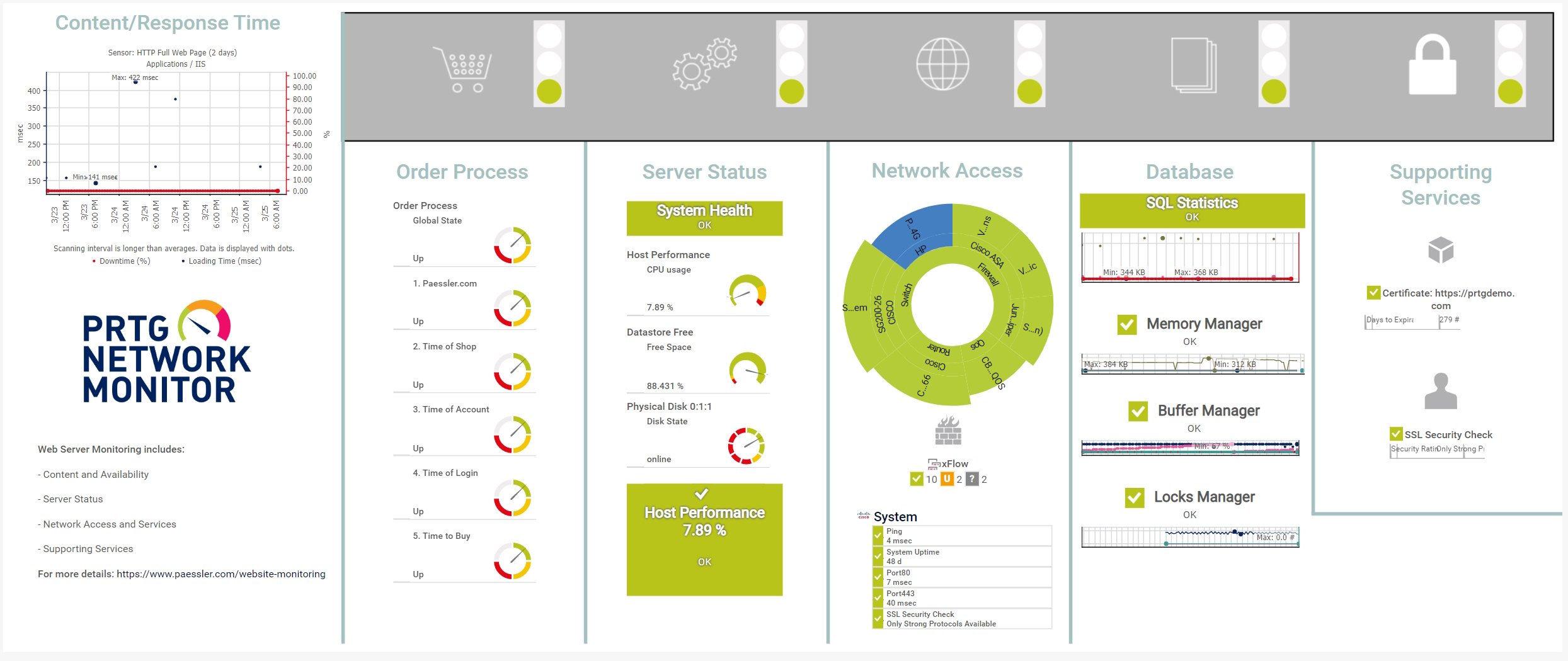
    prtg-screenshot-map-web-server-website-monitoring

    Custom PRTG dashboard for web servers
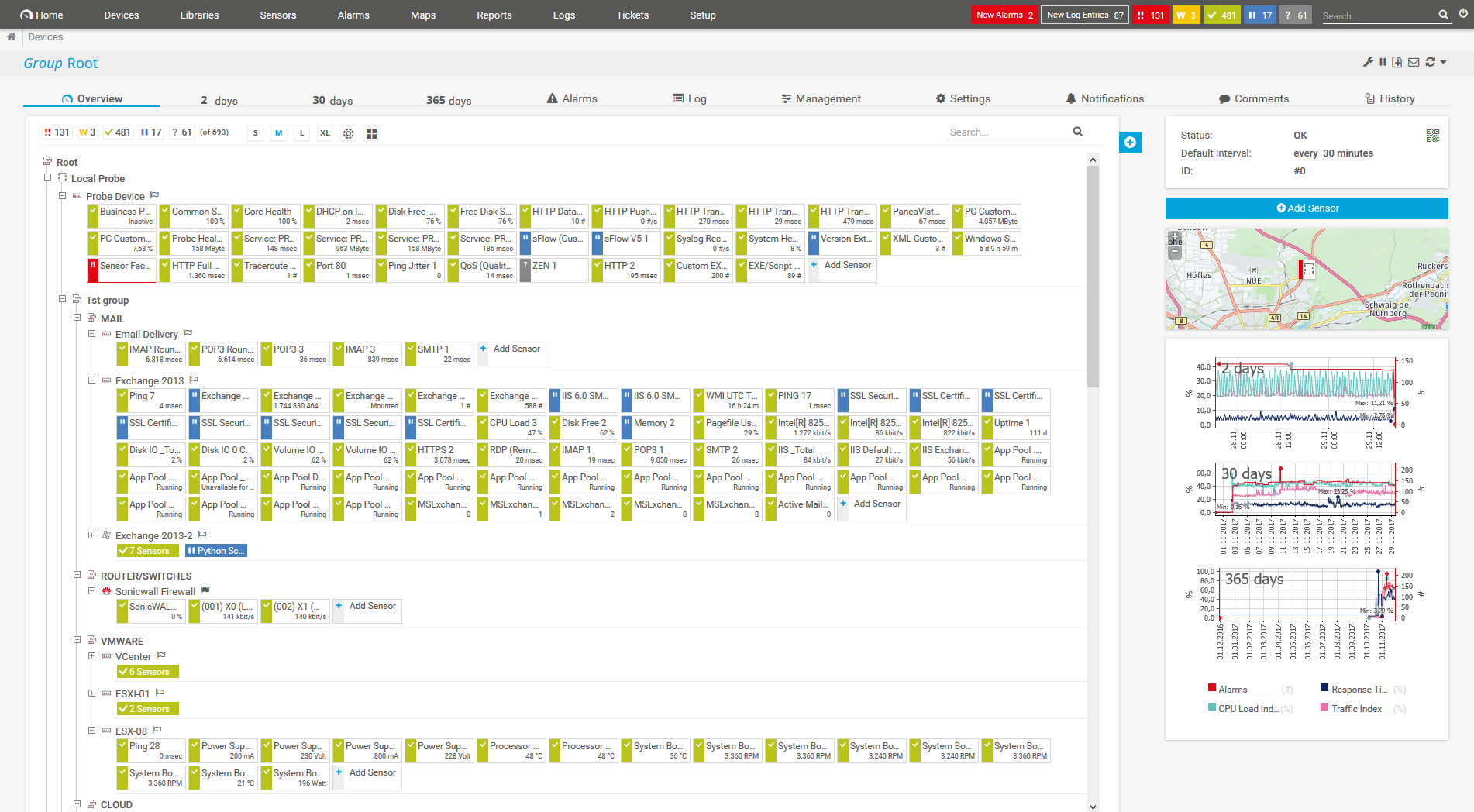
    PRTG Screenshot device tree view

    Device tree view of the complete monitoring setup

    PRTG screenshot map entire it infrastructure

    Custom PRTG dashboard for keeping an eye on the entire IT infrastructure

    PRTG screenshot map web server website monitoring

    Web server website monitoring map in PRTG

    Start web server performance monitoring with PRTG and see how it can make your network more reliable and your job easier.

    Free download
    PRODUCT OVERVIEW

    IT experts agree: Paessler PRTG is a great solution for IT infrastructure monitoring

    PCMag

    “All-around winning
     network monitor”

    IT Brief

    “The real beauty of PRTG is the endless possibilities it offers”

    ITPro

    “PRTG Network Monitor 
    is very hard to beat”

    5 more reasons why to choose PRTG as your web server performance monitoring tool

    Comprehensive infrastructure oversight

    PRTG offers more than just web server monitoring – it's a complete solution for your entire IT infrastructure. From a single platform, you can monitor everything, including network devices like servers, routers, and switches, to applications and websites.

    This simplifies your monitoring management, reduces tool sprawl, and provides a holistic overview of your digital ecosystem.

    Real-time alerts and instant notifications

    In the fast-paced world of IT, immediate awareness is of utmost importance. PRTG delivers real-time statistics and instant notifications, keeping you informed about your web server's performance at all times.

    When issues arise – a sudden traffic spike, CPU usage surge, or unexpected downtime – PRTG alerts you immediately. This rapid response capability allows you to address problems swiftly, often before users are impacted.

    Proactive performance management

    PRTG goes beyond reactive monitoring by offering proactive performance management. By setting custom thresholds for key metrics, you receive alerts before potential problems escalate into critical issues.

    This forward-thinking approach helps maintain high uptime, optimize server performance, and prevent many issues from developing in the first place. It's an essential tool for IT teams focused on preventive maintenance and continuous improvement.

    Versatile and customizable monitoring

    PRTG's flexibility makes it suitable for a wide range of environments, from on-premises servers to cloud infrastructures and hybrid setups. It supports multiple operating systems including Windows and Linux, and is compatible with popular web server applications such as Apache, Nginx, and IIS.

    You can customize sensors, dashboards, and alerts to match your specific requirements and focus on the metrics that matter most to your operations.

    User-friendly implementation & operation

    Despite its powerful functionality, our software is designed with ease of use in mind. The user-friendly interface simplifies installation, while an agentless monitoring setup allows for quick deployment.

    You can start monitoring your web server's performance without lengthy setup procedures or extensive training. The intuitive dashboards make it easy to understand and manage your web server's performance, even for team members without specialized monitoring expertise.

    Explore our preconfigured PRTG sensors for web server performance monitoring

    PRTG comes with more than 250 native sensor types for monitoring your entire on-premises, cloud, and hybrid cloud environment out of the box. Check out some examples below!

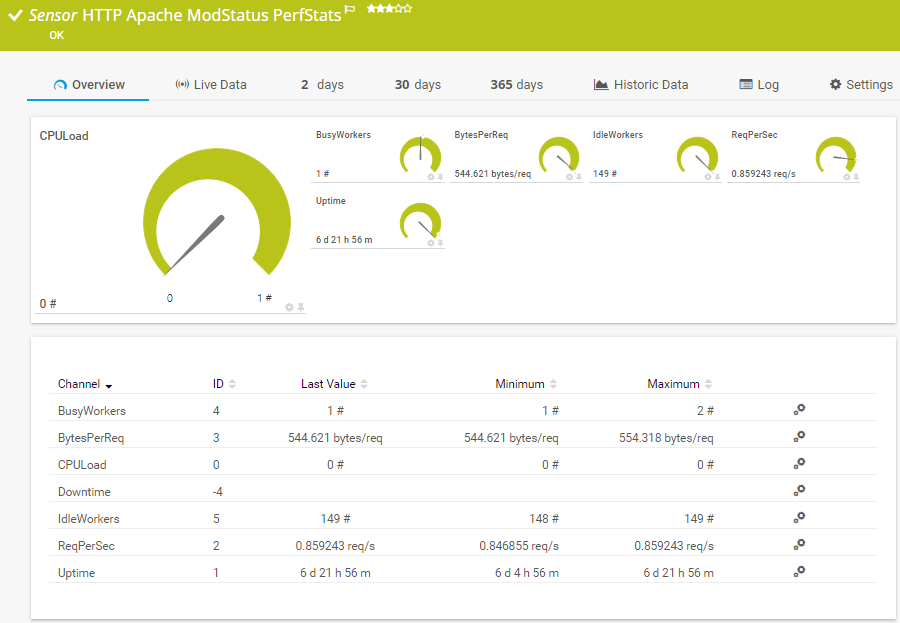
    HTTP Apache ModStatus PerfStats

    The HTTP Apache ModStatus PerfStats sensor monitors performance statistics of an Apache web server via mod_status over HTTP. It can show the following:

    • Number of busy and idle worker threads
    • Number of bytes per request
    • Number of requests
    • CPU load
    • Uptime
    HTTP Apache ModStatus PerfStats
    HTTP Apache ModStatus PerfStats

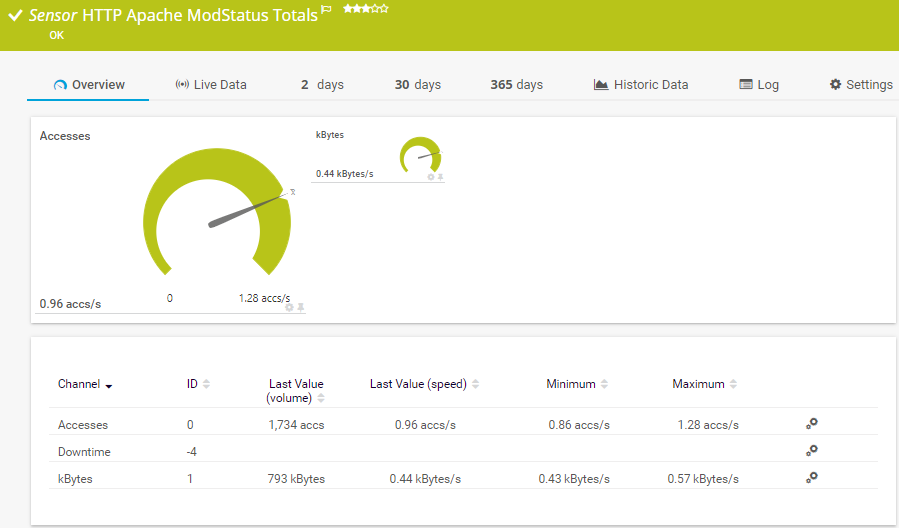
    HTTP Apache ModStatus Totals

    The HTTP Apache ModStatus Totals sensor monitors the activity of an Apache web server using mod_status over HTTP. It can show the following:

    • Number of accesses
    • Data transferred
    HTTP Apache ModStatus Totals
    HTTP Apache ModStatus Totals

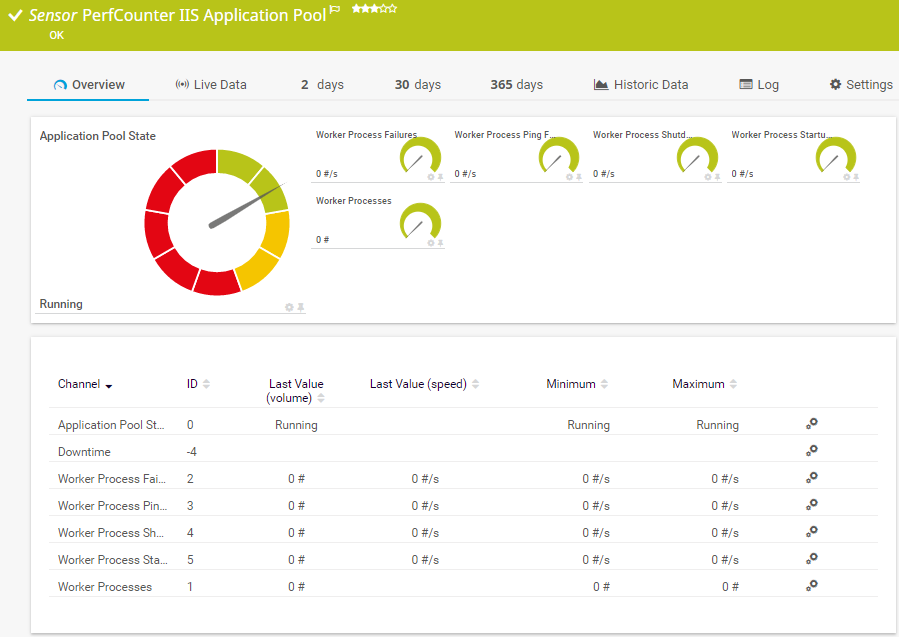
    PerfCounter IIS Application Pool

    The PerfCounter IIS Application Pool sensor monitors a Microsoft Internet Information Services (IIS) application pool via Windows performance counters. It can show the following:

    • Overall application pool status
    • Number of failures in worker processes
    • Number of failures in worker process pings, startups, and shutdowns
    • Number of worker processes
    PerfCounter IIS Application Poo
    PerfCounter IIS Application Poo

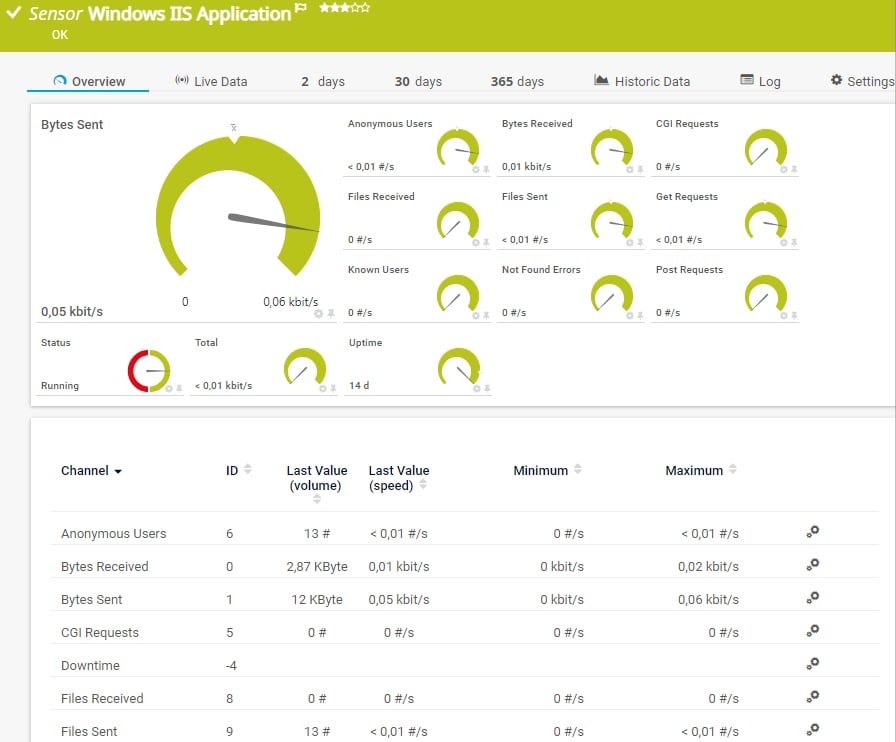
    Windows IIS Application

    The Windows IIS Application sensor monitors a Microsoft Internet Information Services (IIS) server via Windows Management Instrumentation (WMI). It can also monitor applications that use IIS, such as Microsoft SharePoint or Microsoft Reporting Services (SSRS). It can show the following and more:

    • Number of anonymous and known users
    • Number of bytes and files sent and received
    • Number of CGI, GET, and POST requests
    • Web service status
    • Uptime
    Windows IIS Applicatio
    Windows IIS Applicatio

    See the PRTG Manual for a list of all available sensor types.

    PRTG Is Compatible With All Major Vendors, Products, and Systems

    compatible with all major vendors, products, and systems

    PRTG makes web server performance monitoring as easy as it gets

    Custom alerts and data visualization let you quickly identify and prevent slow-performing web servers and web applications.

    Free download
    PRODUCT OVERVIEW

    “PRTG helps us to keep control of our IT by making issues visible immediately – and everywhere. We always have an eye on the performance and availability of our IT and can react in time if any failures occur. On a long-term perspective, the monitoring data helps us with capacity planning so that we can deliver the required resources for our own systems as well as for our customers, without wasting money on unwarranted redundancies.”

    Stein Erik Høybakk, Senior Network Engineer
    TAFJORD

    “All our production and business processes depend on SAP. But, of course, IT and production systems also play a crucial role in securing these processes. By incorporating SAP, production, and IT into one centralized monitoring system, we can quickly detect critical drops in performance and identify the causes of these issues. In fact, thanks to PRTG and itesys, this couldn’t be any easier.”

    Andreas Schmidt, Senior Systems Engineer
    Truma

    “Any downtime could be detrimental to our customers. We also strive to provide the best possible service to our customers. PRTG allows us to see the health and performance of the network. Using these measurements we can make decisions on how to repair a piece of equipment before it fails and causes a service interruption.”

    James Ott Jr., Communications System Technician and IT Administrator
    Federal Radio

    Your web server performance monitor at a glance – even on the go

    PRTG is set up in a matter of minutes and can be used on a wide variety of mobile devices.

    device overview
    Gartner peer insights

    “Excellent tool for detailed monitoring. Alarms and notifications work greatly. Equipment addition is straight forward and server initial setup is very easy. ...feel safe to purchase it if you intend to monitor a large networking landscape.”

    Read the complete review at Gartner Peer Insights

    Create innovative solutions with Paessler’s IT partners

    Partnering with innovative IT vendors, Paessler unleashes synergies to create
    new and additional benefits for joined customers.

    Rittal

    Rittal

    IT that works constitutes a business-critical basis for a company's success. Availability and security must be defined for the respective purpose and closely monitored – by OT and IT alike.

    Read more
    NetBrain

    NetBrain

    Integrating monitoring results from PRTG into NetBrain maps makes the foundation for network automation.

    Read more
    ScriptRunner

    ScriptRunner

    With ScriptRunner Paessler integrates a powerful event automation platform into PRTG Network Monitor.

    Read more

    Find the root cause of the problem with our PRTG web server performance monitoring solution

    Real-time notifications mean faster troubleshooting so that you can act before more serious issues occur.

    Free download
    PRODUCT OVERVIEW
    Paessler PRTG

    Paessler PRTG

    Network Monitoring Software – Version 26.1.116.1532 (February 9th, 2026)

    Hosting icon

    Hosting

    Download for Windows and cloud-based version PRTG Hosted Monitor available

    Languages icon

    Languages

    English, German, Spanish, French, Portuguese, Dutch, Russian, Japanese, and Simplified Chinese

    test

    Monitor everything

    Network devices, bandwidth, servers, applications, virtual environments, remote systems, IoT, and more

    test

    Pricing

    Choose the PRTG Network Monitor subscription that's best for you

    Discover more monitoring insights and stories

    Content illustration

    Powerful stories from the monitoring world

    • Windows Server Monitoring Best Practices: How to Keep Your ...
    • Application Performance Monitoring with PRTG: Complete APM Guide
    • New Freeware Offering: Webserver Stress Tool - Paessler Blog
    Support illustration

    Resources to master your monitoring challenges

    • PRTG Manual: Monitoring via HTTP - Paessler
    • PRTG Manual: User Interface - Paessler
    • PRTG Manual: Available Sensor Types - Paessler
    Solution illustration

    Solutions for all your monitoring needs

    • NetFlow Monitoring
    • CPU Monitoring
    • IP Monitoring

    Web Server Performance Monitoring: FAQ


    What is a web server?

    A web server is a system—typically a combination of software and hardware—that delivers web content to users over the internet. Its primary role is to respond to requests made by web browsers (or clients) by serving up web pages and resources like images, videos, or files. Components of a web server include:

    • Hardware: This refers to the physical machine (server) that stores the website's data and handles requests. It could be a powerful computer in a data center, or it could be a virtual server in the cloud.
    • Software: The software component is what actually processes requests from web browsers and serves the appropriate content.
    What is web server performance monitoring?

    Web server performance monitoring is the process of continuously tracking and analyzing the performance, health, and availability of web servers to ensure they function properly and efficiently. It involves using monitoring tools like Paessler PRTG and techniques to detect potential issues, like downtime, slow response times, or resource overload, before they negatively impact users or the business. Monitored metrics include:

    • Uptime/downtime: Tracks whether the server is operational and available. Downtime refers to periods when the server is inaccessible.
    • Response time: Measures how quickly the server responds to user requests. Slow response times could indicate a problem, such as high load, resource exhaustion, or network issues.
    • CPU usage: Monitors how much processing power the server is using. High CPU usage could affect performance and cause delays.
    • Memory usage: Tracks how much RAM is being used. If the server runs out of memory, it might crash or become unresponsive.
    • Network traffic: Measures the amount of data transferred between the server and users. Spikes in traffic might suggest an issue like a DDoS attack or increased user activity.
    • Error rates: Monitors the rate at which the server generates errors. A spike in errors can indicate server misconfiguration or failure.
    • Connections: Tracks the number of concurrent connections to the server. Too many open connections can overwhelm the server.
    Why should I monitor web server performance?

    Monitoring web server performance is essential for ensuring the availability, reliability, and efficiency of websites or web-based applications. Here are the key reasons why it’s important:

    • Maximize uptime and availability: For businesses relying on online presence, maintaining high uptime (close to 100%) is critical for customer trust and engagement.
    • Improve user experience: Slow-loading pages or server errors can drive users away, increasing bounce rates and reducing customer satisfaction.
    • Detect and resolve Issues proactively: Proactive monitoring allows you to spot potential problems before they affect users.
    • Boost website performance (SEO benefits): Search engines, like Google, use page load times as a ranking factor. If your web server responds slowly, it can negatively affect your site's search engine ranking, reducing your online visibility.
    • Mitigate security threats: Monitoring helps detect unusual patterns of activity, such as sudden traffic spikes that might indicate a Distributed Denial of Service (DDoS) attack, or repeated failed login attempts that could signal a brute force attack.
    • Cost savings: By monitoring performance, you can prevent costly breakdowns and outages that might require emergency fixes or cause lost revenue.
    Does PRTG support monitoring for different web server applications?

    Yes! PRTG offers comprehensive monitoring for a wide range of web server applications, including Apache, Nginx, IIS, and more. Whether you’re running on Windows, Linux, or a mixed environment, PRTG provides the flexibility to monitor all key metrics relevant to your web server’s performance.

    Can PRTG monitor cloud-based web servers?

    Absolutely. PRTG is fully equipped to monitor web servers hosted on cloud platforms like AWS, Azure, and more. It can track performance metrics, uptime, and response time for both cloud and on-premises servers, providing a unified view of your entire infrastructure.

    Is it possible to monitor server performance remotely?

    Yes, PRTG enables remote monitoring of your web server’s performance. With mobile apps and secure web access, you can keep an eye on your server’s health and receive alerts no matter where you are. This ensures you stay informed about any potential issues, even when you’re not on-site.

    What is a sensor in PRTG?

    In PRTG, “sensors” are the basic monitoring elements. One sensor usually monitors one measured value in your network, for example the traffic of a switch port, the CPU load of a server, or the free space on a disk drive. On average, you need about 5-10 sensors per device or one sensor per switch port.

    We asked: would you recommend PRTG? Over 95% of our customers say yes!

    Paessler conducted trials in over 600 IT departments worldwide to tune its network monitoring software closer to the needs of sysadmins. The result of the survey: over 95% of the participants would recommend PRTG – or already have.

    recommendation

    Still not convinced?

    Love

    More than 500,000 sysadmins love PRTG

    Paessler PRTG is used by companies of all sizes. Sysadmins love PRTG because it makes their job a whole lot easier.

    PRTG

    Monitor your entire IT infrastructure

    Bandwidth, servers, virtual environments, websites, VoIP services – PRTG keeps an eye on your entire network.

    test

    Try Paessler PRTG for free

    Everyone has different monitoring needs. That’s why we let you try PRTG for free.

    PRTG Logo

    Start web server performance monitoring with PRTG and see how it can make your network more reliable and your job easier.

    Free download
    PRODUCT OVERVIEW

    Products

    • Paessler PRTG
      Paessler PRTGMonitor your whole IT infrastructure
      • PRTG Network Monitor
      • PRTG Enterprise Monitor
      • PRTG Hosted Monitor
      • PRTG UVexplorer
      • PRTG extensions
        Extensions for Paessler PRTGExtend your monitoring to a new level
    • Icon Features
      FeaturesExplore all monitoring features

    Monitoring with PRTG

    • Network monitoring
    • Bandwidth monitoring
    • SNMP monitoring
    • Network mapping
    • Wi-Fi monitoring
    • Server monitoring
    • Network traffic analyzer
    • NetFlow monitoring
    • Syslog server

    Useful Links

    • PRTG Manual
    • Knowledge Base
    • Customer Success Stories
    • About Paessler
    • Subscribe to newsletter
    • PRTG Support
    • PRTG Consulting
    • PRTG Feedback & Roadmap

    Contact

    Paessler GmbH
    Thurn-und-Taxis-Str. 14, 
    90411 Nuremberg 
    Germany

    [email protected]

    +49 911 93775-0

    • Contact us
    ©2026 Paessler GmbHTerms & ConditionsPrivacy PolicyImprintReport VulnerabilityDownload & InstallSitemap
    Finance Finance Finance