


Paessler
                    - The Monitoring Experts
  • Free download

Network Analyzer PRTG

Unleash your inner IT detective with powerful network traffic analysis

  • Analyze all elements of your network
  • Speed up your troubleshooting
  • Make resource planning more efficient
free download

Our Users Give Top Ratings for Monitoring With Paessler PRTG

Gartner peer insights
spiceworks
G2
Capterra

PRTG makes network analysis as easy as it gets

Custom alerts and data visualization let you quickly identify and prevent issues with your network traffic.

free downLoad

Track down and wipe out network performance issues with PRTG’s network analyzer

Performance degradation is a constant concern for any admin. If persistent slowdowns, outages, or over-provisioning plague your IT department, have no fear – your high-tech sleuth tools are here. Paessler PRTG’s powerful network analyzer gives you the forensic insight to quickly locate and solve your network performance problems. 

Uncover traffic clues

Finding out why you’re experiencing slow network performance can be challenging. PRTG’s network analyzer tool has your back, monitoring every aspect of your network traffic.

Like a high-powered magnifying glass, PRTG gives you granular insight into which devices and applications consume the most resources, from data packets to bandwidth usage.

Set traps with alerts

Turn your network traffic into a honeypot and catch bad actors before they go rogue. PRTG lets you set personalized alerts for your unique IT environment and needs.

Define thresholds for low to high sensitivity and choose specific stakeholders to notify at each level of escalation. With this early warning system, you can proactively address issues before users are affected.

Visualize the evidence

Data is useful, but visualized data is an easy-to-read roadmap to higher network performance and lower degradation.

PRTG helps you visualize your traffic data with customizable dashboards and maps. Quickly identify problem areas and trends to easier troubleshoot and remove repeat offenders for a faster network.

Secure your network gems

When your company data is at risk, you can’t afford unusual traffic patterns and security threats to go unnoticed. PRTG plays a vital role in fundamental network security monitoring.

Your canine sidekick, PRTG sniffs out potential threats and alerts you to suspicious activity. With SSL encryption and advanced security features, PRTG makes sure your network gems are always protected.

Scale your investigations

IT infrastructures are organic, with a constant flux of network devices, applications, and processes. You need network analysis that scales and expands with you so change is constantly covered.

Whether you’re managing a small business network or overseeing a large enterprise infrastructure, PRTG can match your growth. Consistent performance monitoring no matter the size and complexity of the network? Yes, please!

What network data analysis looks like in PRTG

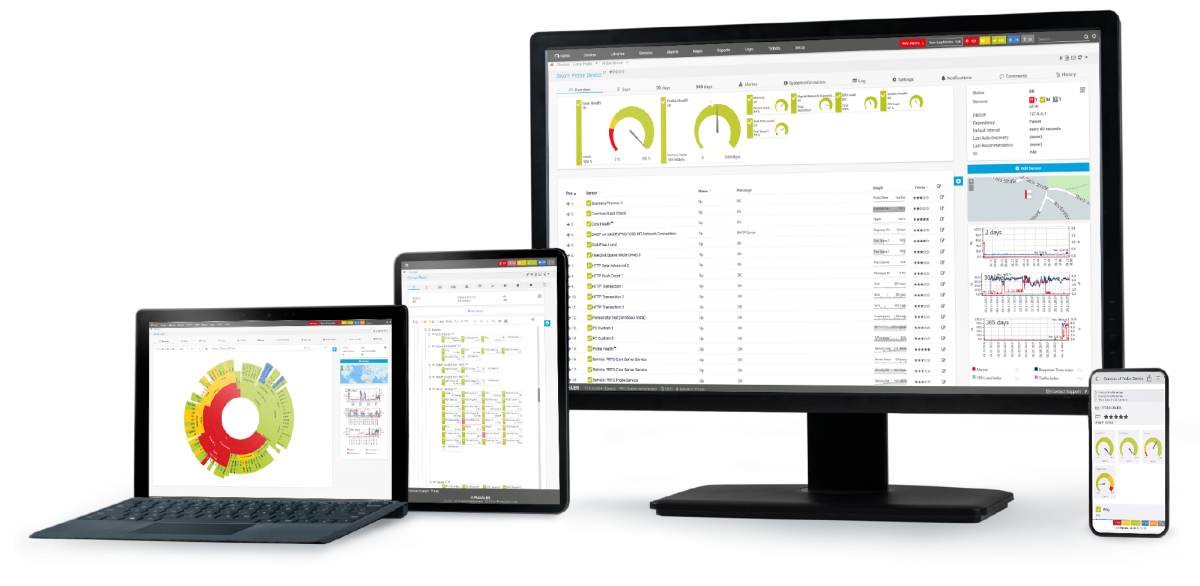
Diagnose network issues by continuously tracking the traffic that flows through your network. Show bandwidth usage, latency, packet loss, VoIP parameters, and other key metrics in real time. Visualize monitoring data in clear graphs and dashboards to identify problems more easily. Gain the overview you need to troubleshoot network congestion, bottlenecks, and other issues in your network.
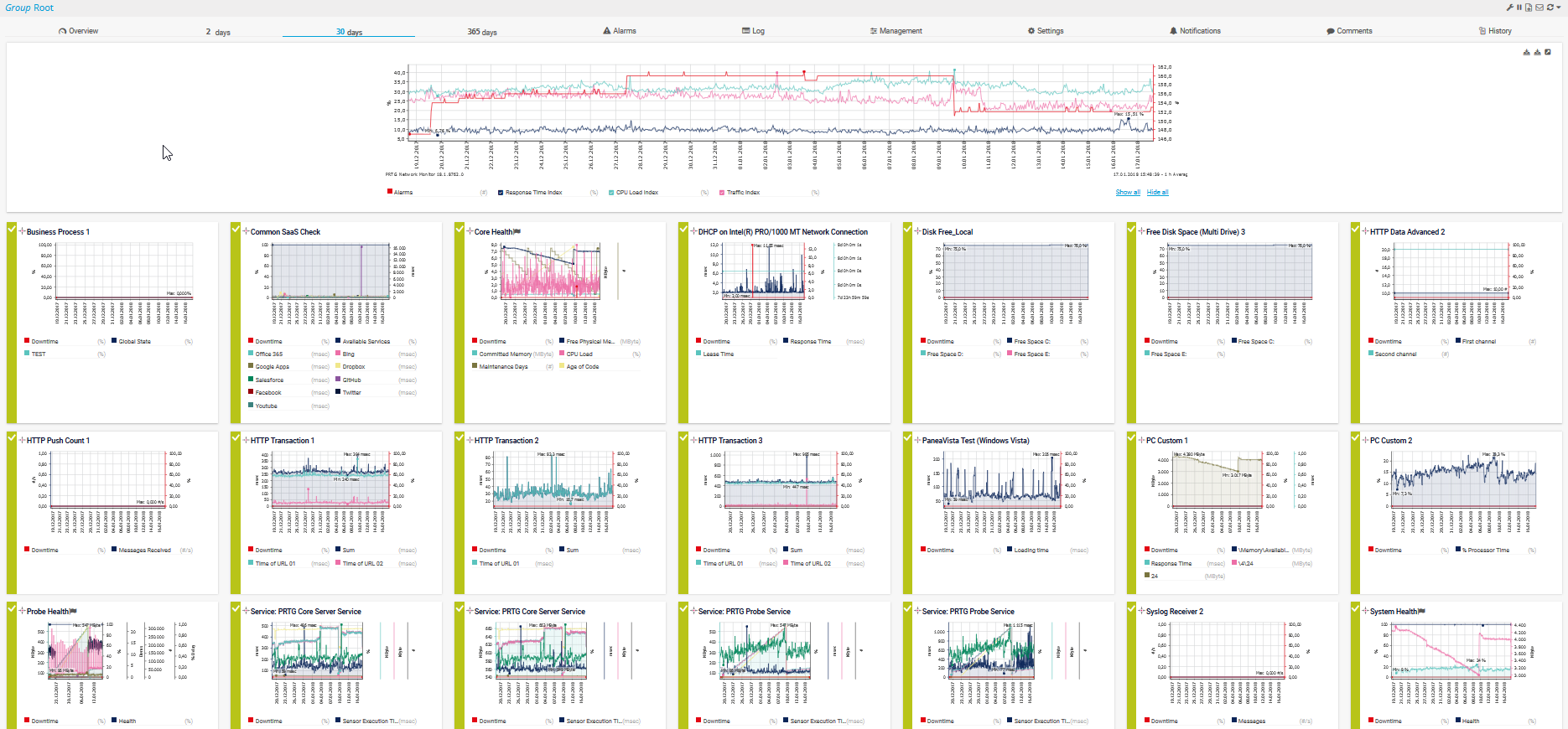
graph historical data 30 days device overview

Graph of historical data for 30 days

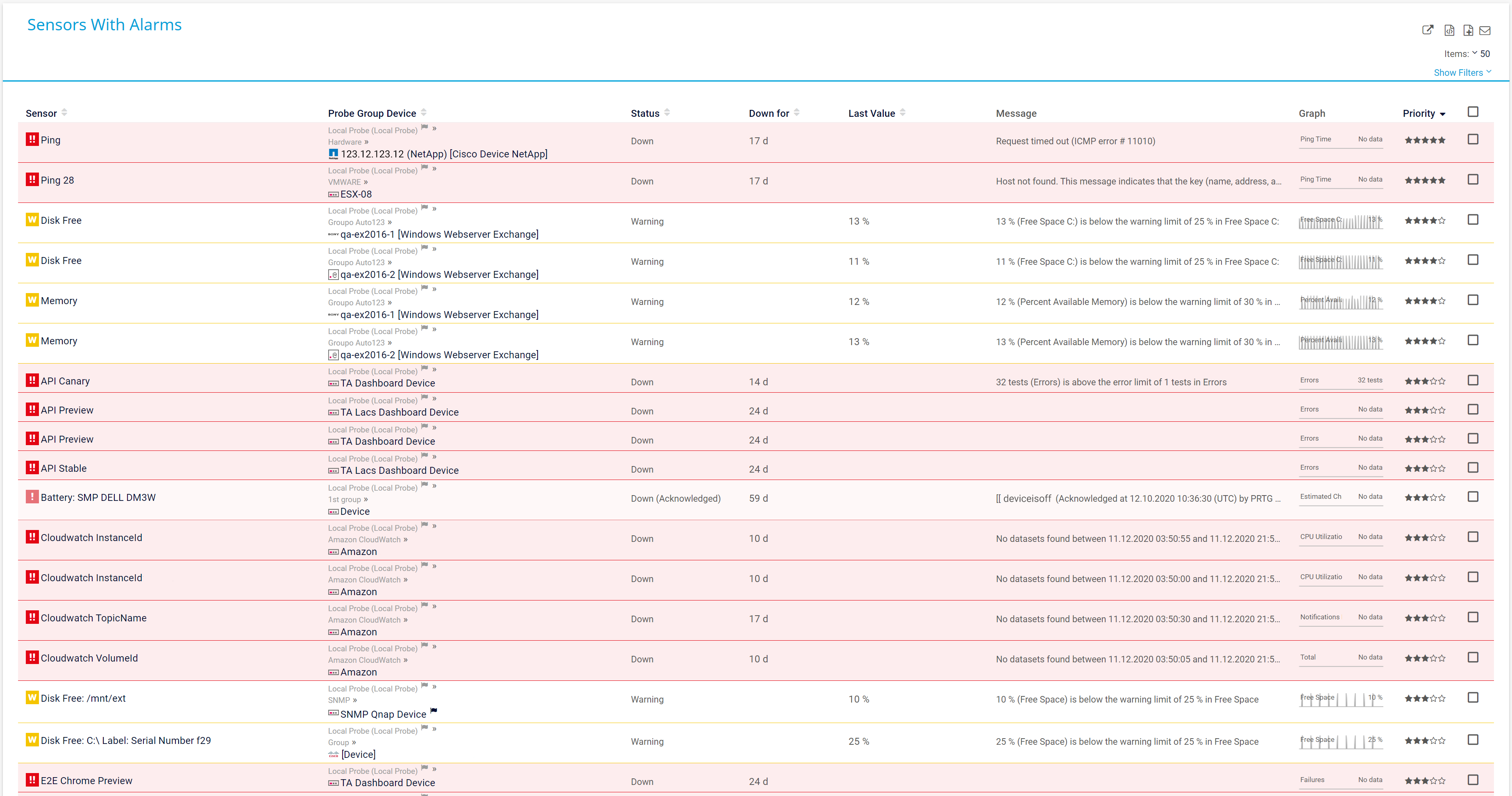
Alarm overview sensors

Alarm overview of all sensors in PRTG
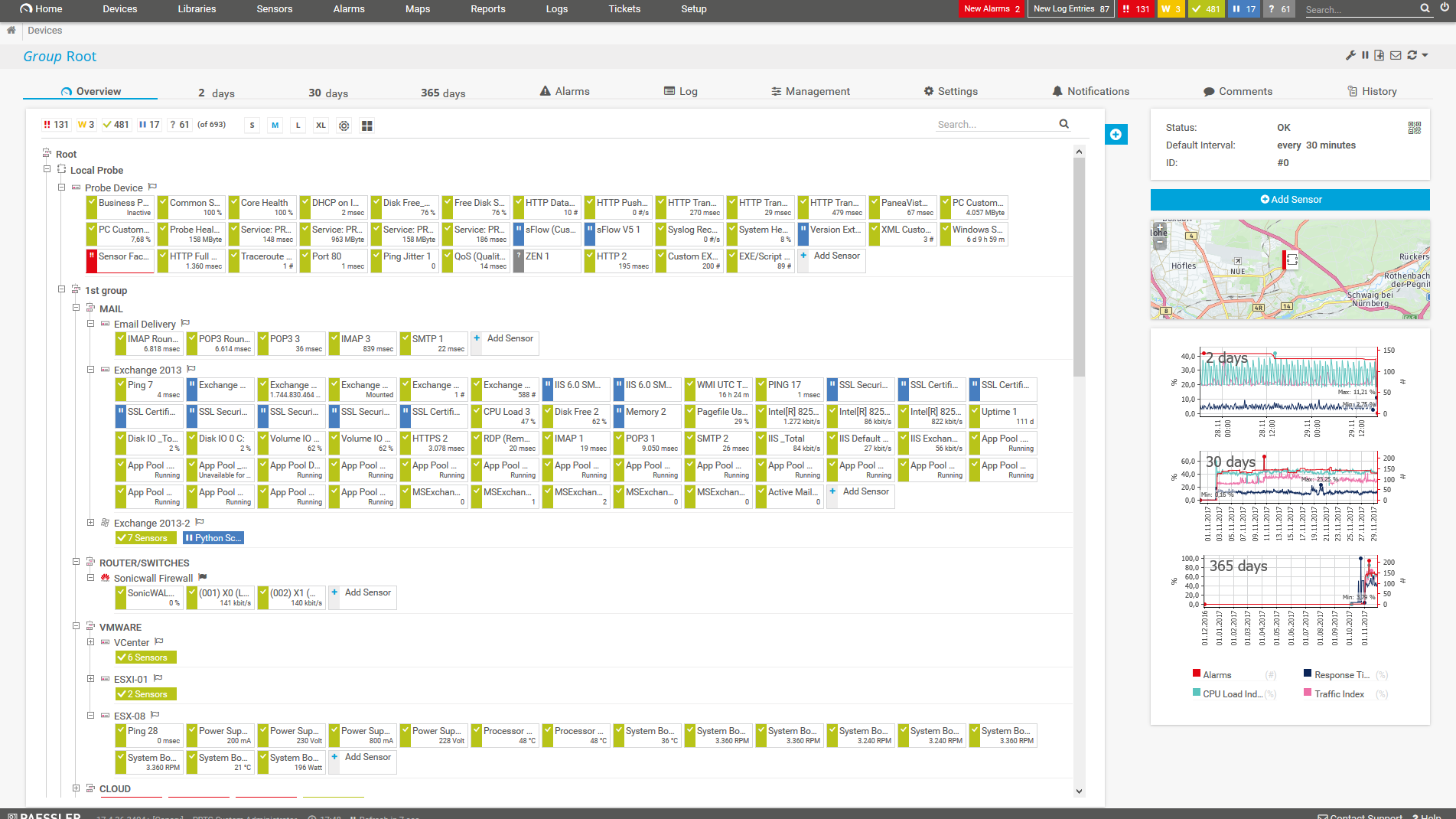
PRTG Screenshot device tree view

Device tree view of the complete monitoring setup
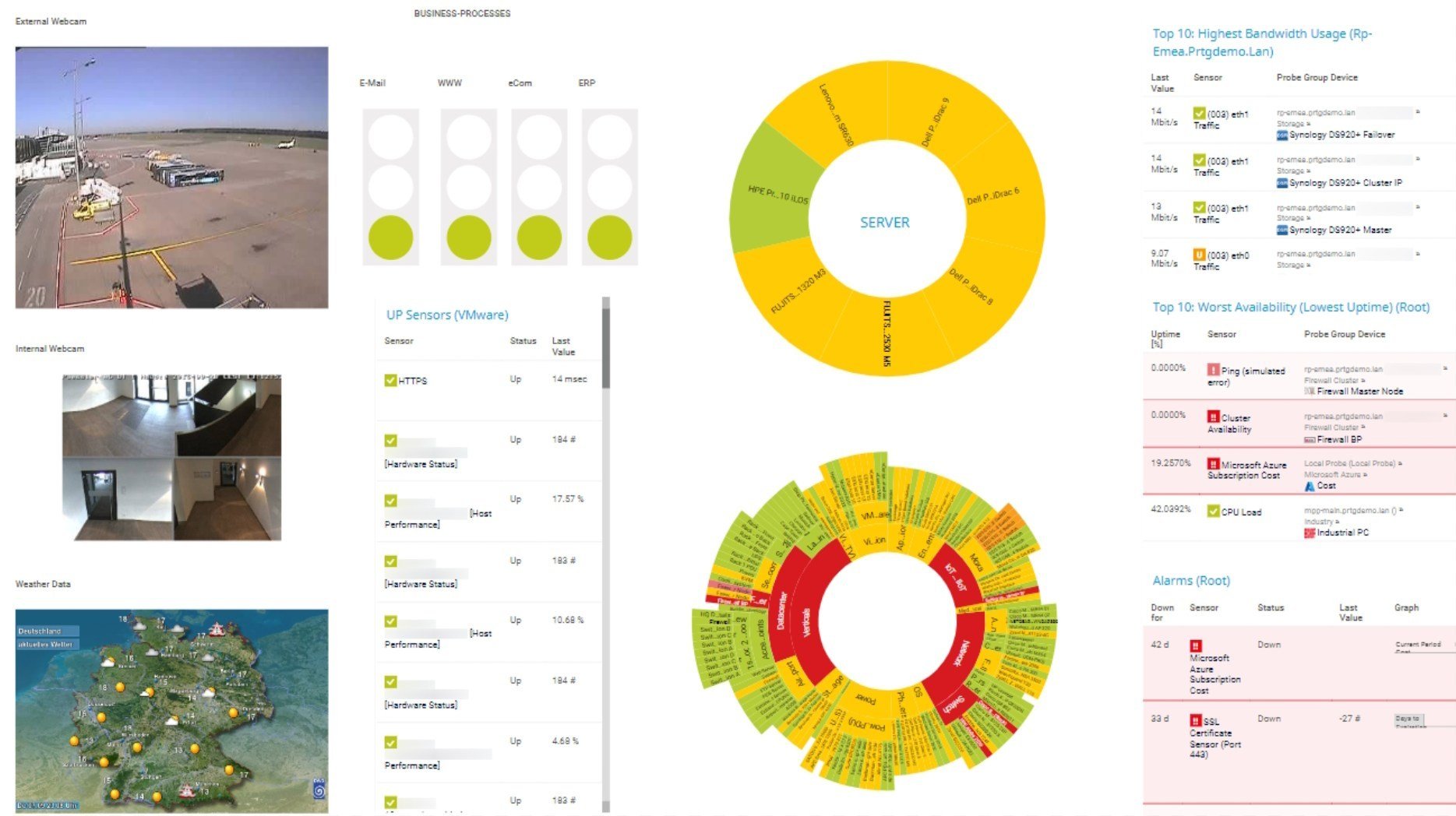
PRTG screenshot map entire it infrastructure

Custom PRTG dashboard for keeping an eye on the entire IT infrastructure

Start analyzing your network traffic with PRTG and see how it can make your network more reliable and your job easier.

free downLoad

IT experts agree: Paessler PRTG is a great solution for IT infrastructure monitoring

PCMag

“All-around winning
 network monitor”

IT Brief

“The real beauty of PRTG is the endless possibilities it offers”

ITPro

“PRTG Network Monitor 
is very hard to beat”

4 reasons to choose PRTG as your network analysis tool

icon gauge

Leave no stone unturned

PRTG monitors every data packet, hiccup, and jitter, making sure no suspicious activity goes unnoticed. Repeat offenders of bandwidth hogging? Unwanteds checking for chinks in the system? Need to know which servers are regularly overloaded?

We hear you, and we didn’t stop at network traffic analysis. A comprehensive IT monitoring system, PRTG helps you monitor your entire IT infrastructure: hybrid, cloud, or on-premises.

icon search

Easily navigate your investigations

A complex system can be baffling, but PRTG has a notoriously friendly user interface that even a novice can navigate. Everything is neatly arranged and accessible. You can tailor your view to see only the most relevant information, which makes solving The Case of the Network Anomaly straightforward. Your team spends less time trying to figure out how to use PRTG and more time optimizing network performance.

icon document

Automate detailed reports

Every successful detective writes a report to analyze past cases and predict future occurrences. PRTG’s extensive reporting functionality let you dig into historical data, traffic and bandwidth reports, error and event logs, and many other data points.

Reduce meeting time and make your CTO happier with reports that show exactly what the stakeholder needs to know.

icon alarm

Avoid hardware and software fights

IT environments are infamous for having multiple vendor services that don’t always work well together (we’re looking at you, Amazon, and Microsoft).

PRTG stands out with the ability to smoothly integrate into the broader IT spectrum; all your servers, routers, services, ticketing systems, applications, and processes talk to you harmoniously.

PRTG makes network analysis as easy as it gets

Custom alerts and data visualization let you quickly identify and prevent issues with your network traffic.

free downLoad

”Adopting PRTG has been like going from being in the dark to being in the light. Before, we had limited visibility into what was happening in the infrastructure and in the network. Now, however, thanks to the comprehensive dashboard and real-time notifications, we receive constant updates on the status of facilities and services, and our way of working has gone from passive to proactive.”

Luca Meneghesso, Senior IT infrastructure and Security Specialist
Banca Profilo

”GESAC increasingly focuses on innovation to improve the quality of services offered and the experience of passengers handled every day by Naples Airport. Thanks to PRTG, we finally have unified, automatic, and continuous monitoring of the airport network and can guarantee quick and timely interventions.”

Domenico Ciervo, GESAC ICT Manager
Naples International Airport

”As an international company, PRTG is ideal for us. If something went down half way across the world, we wouldn’t be woken up – we can rely on PRTG to identify the problem and alert us before it occurs – enabling the right person, in the right time zone to resolve the problem. At the end of the day, if we’re to provide an internal network experience for our employees that meets expectations, we need a tool like PRTG to be successful.”

Barry Kelly, Systems Engineer
Skyscanner

“I would recommend PRTG because it has helped us significantly improve service uptime by highlighting important alerts that would otherwise result in a system failure or service disruption if action was not taken. Thanks to PRTG, we can ensure that The Ritz London’s network and IT systems are five-star, just like the hotel.”

Richard Isted, IT Manager
The Ritz London

Your network analyzer at a glance – even on the go

PRTG is set up in a matter of minutes and can be used on a wide variety of mobile devices.
device overview

Find the root cause of the problem with our PRTG network analyzer

Real-time notifications mean faster troubleshooting so that you can act before more serious issues occur.

free downLoad

Network Analyzer: FAQ


What is a network analyzer?

In IT, the network analyzer is a tool that records and analyzes the traffic on your network. PRTG can monitor several types of wired and wireless networks, including WiFi networks.

How does a network analyzer work?

A network analyzer breaks down traffic by different parameters and presents data flows as diagrams or tables. PRTG helps you break down traffic by connection, protocol, and IP address to identify the top talkers in your network. This helps identify and solve problems in your IT environment.

Why is network analysis important?

Network analysis keeps your IT environment running faster, with better performance, higher security, faster issue resolution, and less downtime. In turn, this creates a better use experience and helps ensure business continuity.

What types of data can a network analyzer capture?

A network analyzer looks at a wide range of data that travels across a network. This includes:

  • Packet data
  • Bandwidth usage
  • Traffic flow data
  • Latency and response times
  • Error rates and packet loss
  • Device and interface statistics
  • Application layer data
  • Security events
  • User activity
  • Traceroute diagnostics
  • DNS queries
Can a network analyzer help with network security?

Yes! Network analysis plays a large role in security. A network analyzer is always on, so it monitors 24/7/365. Ever vigilant, this guard dog safeguards your network through traffic monitoring, intrusion detection, bandwidth and resource usage monitoring, user activity monitoring, real-time alerts, and more. In the event of a security breach, network analysis becomes your forensic analysis tool for locating and wiping out the offender.

What protocols does PRTG's network analyzer support?

Monitor your network via SNMP, flow protocols (NetFlow, jFlow, sFlow, IPFIX), SSH, WMI, or ping. PRTG also supports Industrial IT & OT technologies, such as OPC UA, MQTT, or Modbus. Use the powerful PRTG API for custom integrations (for example, via Python, PowerShell, or REST).

What is a sensor in PRTG?

In PRTG, “sensors” are the basic monitoring elements. One sensor usually monitors one measured value in your network, for example the traffic of a switch port, the CPU load of a server, or the free space on a disk drive. On average, you need about 5-10 sensors per device or one sensor per switch port.

Still not convinced?

Love

More than 500,000 sysadmins love PRTG

Paessler PRTG is used by companies of all sizes. Sysadmins love PRTG because it makes their job a whole lot easier.

PRTG

Monitor your entire IT infrastructure

Bandwidth, servers, virtual environments, websites, VoIP services – PRTG keeps an eye on your entire network.

test

Try Paessler PRTG for free

Everyone has different monitoring needs. That’s why we let you try PRTG for free.

PRTG Logo

Start analyzing your network traffic with PRTG and see how it can make your network more reliable and your job easier.

free downLoad
©2026 Paessler GmbHTerms & ConditionsPrivacy PolicyImprintTrust CenterDownload & InstallSitemap
Trial Trial Trial