



Paessler
                    - The Monitoring Experts
  • Free download

Network Management with PRTG

Professionally manage your network and test for free

  • Monitor your systems, hardware, applications, and your entire network
  • Receive custom alerts and notifications in the event of errors and malfunctions
  • Get 100 sensors free for life, all functionality included, no strings attached
free download

Our Users Give Top Ratings for Monitoring With Paessler PRTG

Gartner peer insights
spiceworks
G2
Capterra

PRTG makes network management as easy as it gets

Custom alerts and data visualization let you quickly identify and prevent network outages and downtime.

free downLoad

Free network management software PRTG – at your fingertips

If you’re looking for free network monitoring tools but don’t want to limit yourself with regards to the feature set, Paessler PRTG Network Monitor has you covered.

Its free edition comes with 100 sensors free for life. Apart from NetFlow sensors, which are only available in the commercial editions, the free version offers the full functionality (server monitoring, application monitoring, performance test tools, VMware monitoring, VoIP monitoring, and much more).

Need more than 100 sensors to monitor a larger IT infrastructure? No problem. PRTG is easily scalable – see our commercial licenses and pricing here.

And if you’re still unsure, we throw in a fully-featured, 30-day trial with an unlimited number of sensors so that you can try out everything. No strings attached.
Table of content

What can I monitor with PRTG network management software?

Our all-in-one network monitoring software helps you monitor, maintain and provision your computer networks. It offers comprehensive performance and fault management for networks and servers and monitors networks for technical problems caused by overloaded servers, crashed connections, or users.

Icon Gage

Bandwidth monitoring & management

With PRTG, you can easily break down the bandwidth utilization of your devices by different parameters, such as IP address, port number, or protocol. Immediately identify bandwidth bottlenecks and the applications, servers, and users that are using up your bandwidth.

Icon Maps

Network availability monitoring

Continuously check whether your servers, websites, and other endpoints are available and reachable using Ping. By knowing your systems' uptimes and downtimes, you can immediately detect faults or system slowdowns, which also helps MSPs meet their Service Level Agreements (SLAs).

Icon Boost

Network performance monitoring

Monitor network speed, CPU load, memory usage, website loading times, response time, round-trip times (RTT), and many other parameters that influence the performance of your infrastructure and, ultimately, business processes. Use PRTG to make sure that your network stays stable and reliable.

What network management looks like in PRTG

Diagnose network issues by continuously tracking the status and performance of your network using SNMP, WMI, SSH, packet sniffing, flow protocols, and other technologies. Show uptime, disk health, CPU usage, and other key metrics in real time. Visualize monitoring data in clear graphs and dashboards to identify problems more easily. Gain the overview you need to troubleshoot your on-premises, cloud, and virtual infrastructure.
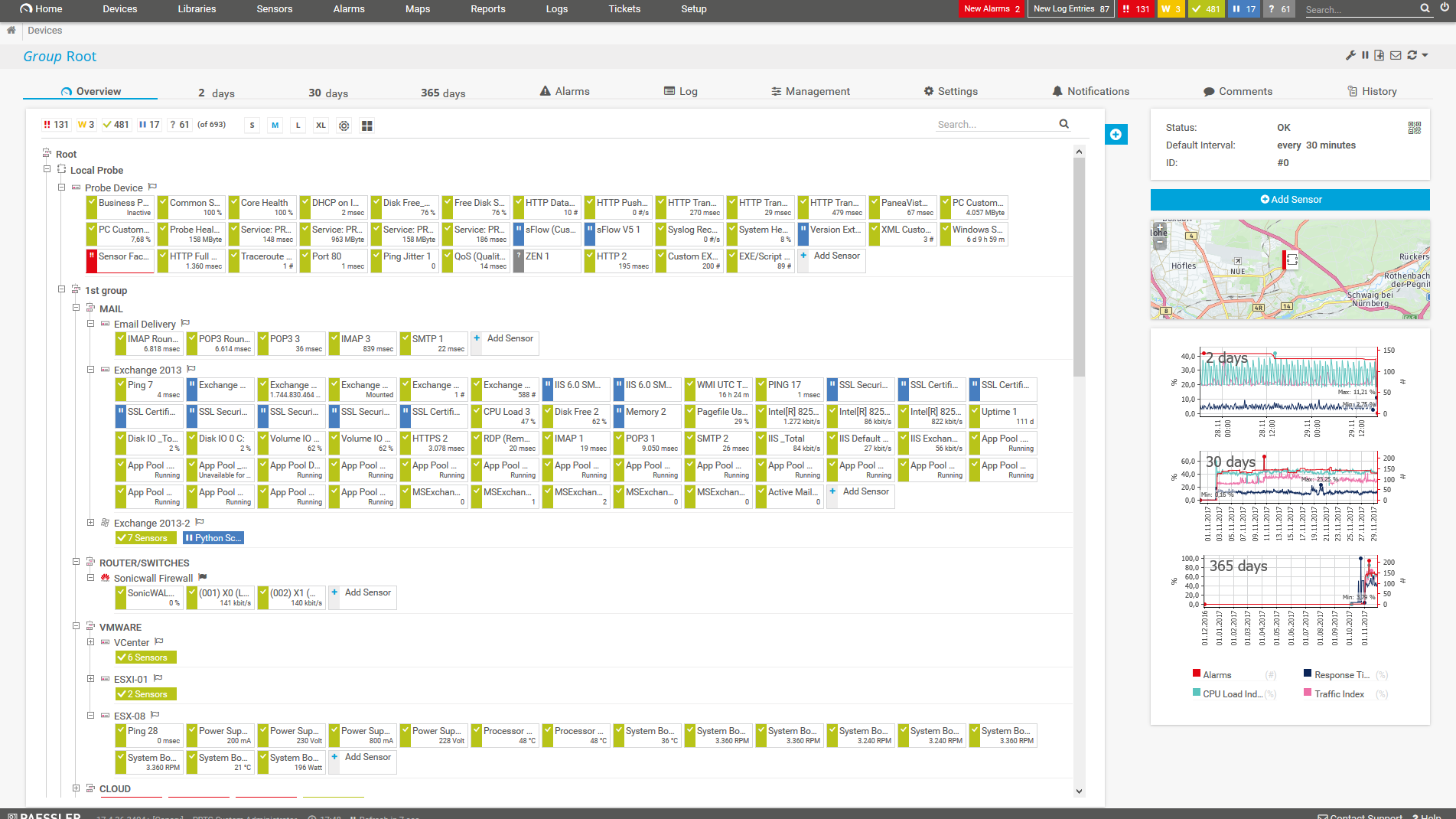
PRTG Screenshot device tree view

Device tree view of the complete monitoring setup
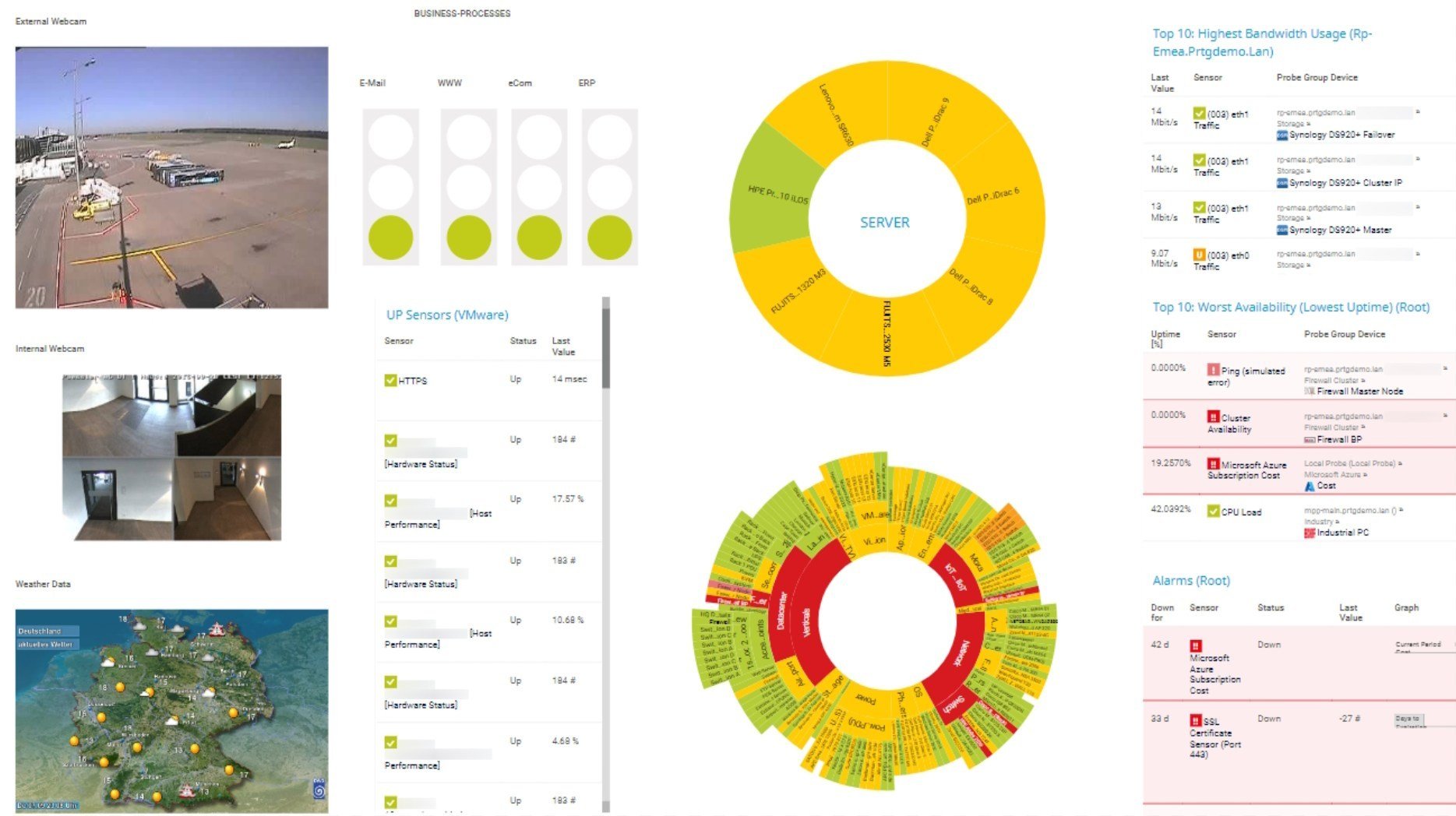
PRTG screenshot map entire it infrastructure

Custom PRTG dashboard for keeping an eye on the entire IT infrastructure
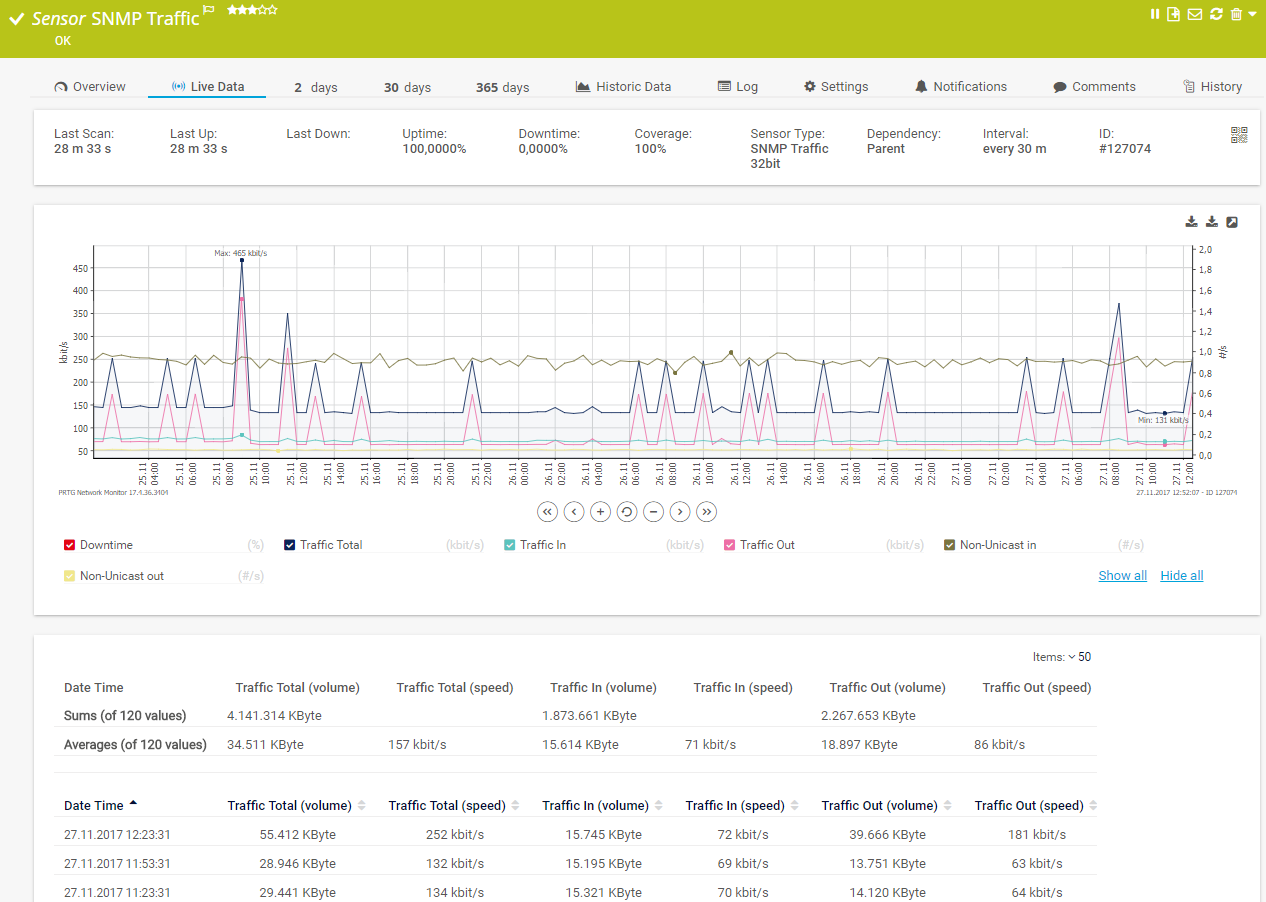
PRTG screenshot graph live data traffic

Live traffic data graph in PRTG

Start managing your network with PRTG and see how it can make your network more reliable and your job easier.

free downLoad

IT experts agree: Paessler PRTG is a great solution for IT infrastructure monitoring

PCMag

“All-around winning
 network monitor”

IT Brief

“The real beauty of PRTG is the endless possibilities it offers”

ITPro

“PRTG Network Monitor 
is very hard to beat”

4 reasons why to choose PRTG as your network management software

check

Protect your network from damage

Use PRTG’s network management tools to help guard against faults and system errors so end users and customers can access information quickly and seamlessly.

Check the availability and performance of servers, workstations, databases, firewalls, and other endpoints, and analyze bandwidth usage and network traffic in detail. By having reliable data about the health, performance, and usage of your network, you can effectively manage and optimize it.

check

Receive real-time alerts and notifications

PRTG network management software sends you an instant alert that helps you troubleshoot network issues if one of your devices does not respond, an unusual event is registered, or a set threshold is crossed.

Define your individual error limits, configure notification triggers, choose from various notification channels such as SMS, email, push, syslog message, and many more – and let PRTG do the rest for you.

icon uptime

Save time with automated actions

No time to or no idea how to get started with your network management system? No problem. PRTG comes with a powerful Auto-Discovery feature that automatically detects devices in your network and lists them in a comprehensive device tree overview.

What’s more: You can configure PRTG to take a certain action in case of an alarm, for example restart Windows services or execute an external script. This way, network management can take care of many frequent network problems without any intervention from your side.

icon dashboard

Get comprehensive network overviews

As a sysadmin, it’s no great news for you that network management doesn’t work without an overview of all network devices. PRTG lets you easily create structured network topology maps as well as custom dashboards via drag and drop.

Or generate comprehensive reports from PRTG’s wealth of historical data, including activity diagrams and charts that show all network usage parameters over time – for enhanced network optimization and future capacity planning.

PRTG makes network management as easy as it gets

Custom alerts and data visualization let you quickly identify and prevent network outages and downtime.

free downLoad

”Adopting PRTG has been like going from being in the dark to being in the light. Before, we had limited visibility into what was happening in the infrastructure and in the network. Now, however, thanks to the comprehensive dashboard and real-time notifications, we receive constant updates on the status of facilities and services, and our way of working has gone from passive to proactive.”

Luca Meneghesso, Senior IT infrastructure and Security Specialist
Banca Profilo

”GESAC increasingly focuses on innovation to improve the quality of services offered and the experience of passengers handled every day by Naples Airport. Thanks to PRTG, we finally have unified, automatic, and continuous monitoring of the airport network and can guarantee quick and timely interventions.”

Domenico Ciervo, GESAC ICT Manager
Naples International Airport

”As an international company, PRTG is ideal for us. If something went down half way across the world, we wouldn’t be woken up – we can rely on PRTG to identify the problem and alert us before it occurs – enabling the right person, in the right time zone to resolve the problem. At the end of the day, if we’re to provide an internal network experience for our employees that meets expectations, we need a tool like PRTG to be successful.”

Barry Kelly, Systems Engineer
Skyscanner

“I would recommend PRTG because it has helped us significantly improve service uptime by highlighting important alerts that would otherwise result in a system failure or service disruption if action was not taken. Thanks to PRTG, we can ensure that The Ritz London’s network and IT systems are five-star, just like the hotel.”

Richard Isted, IT Manager
The Ritz London

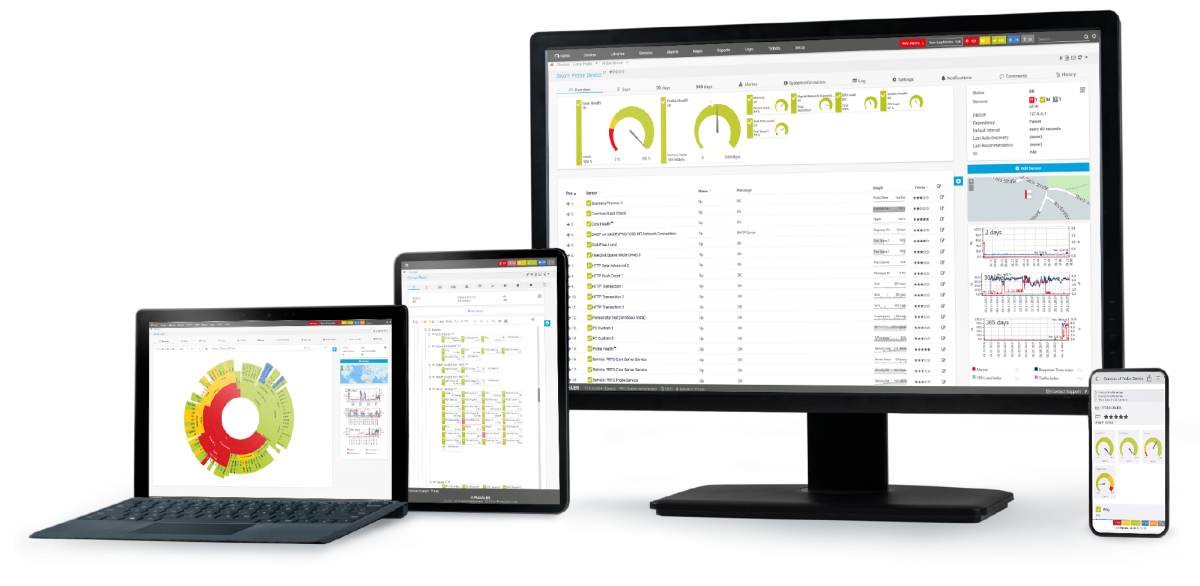
Your network manager at a glance – even on the go

PRTG is set up in a matter of minutes and can be used on a wide variety of mobile devices.
device overview

Find the root cause of the problem with our PRTG network management solution

Real-time notifications mean faster troubleshooting so that you can act before more serious issues occur.

free downLoad

Network Management: FAQ


What is network management?

Network management is the process of administering, managing, and operating a data network using various tools, technologies, and procedures. It involves a wide range of tasks aimed at ensuring that the network runs efficiently, securely, and reliably. Key aspects of network management include:

  • Network monitoring: Continuous observation of the network to track performance, detect issues, and gather data on traffic, usage, and errors. Protocols like SNMP (Simple Network Management Protocol) are often used to monitor network devices such as routers, switches, and servers.
  • Fault management: Detecting, isolating, and resolving network problems to minimize downtime and ensure smooth operation. This includes identifying network failures or malfunctions and taking corrective actions.
  • Configuration management: Managing the configuration of network devices and systems, including updates, changes, and documentation. This ensures that the network operates according to the organization's policies and that configurations are standardized across devices.
  • Performance management: Analyzing and optimizing the performance of the network to meet the required quality of service (QoS) levels. This involves managing bandwidth, latency, throughput, and ensuring that the network can handle the required load.
  • Security management: Implementing and enforcing security policies to protect the network from unauthorized access, cyberattacks, and other security threats. This includes managing firewalls, intrusion detection systems (IDS), encryption, and other security measures.
  • Cost management: Tracking the usage of network resources to understand costs and resource allocation. This can include billing for network usage, managing bandwidth quotas, and analyzing usage patterns.
  • Network provisioning: The process of configuring network resources to ensure that users and devices have access to the network services they require. This can involve setting up new connections, assigning IP addresses, and configuring VLANs (Virtual Local Area Networks).
Why should I use a network management tool?

Using a network management tool like Paessler PRTGG offers several significant benefits that can enhance the efficiency, reliability, and security of your network.

  • Improved network visibility: A network management tool provides a comprehensive view of your entire network, including all connected devices, traffic flow, and performance metrics. This visibility helps you understand what's happening in real-time and enables quicker identification of issues.
  • Proactive issue detection: Network management tools can monitor the network continuously and alert you to potential problems before they become critical. Early detection of issues, such as unusual traffic patterns or failing devices, allows you to address them proactively, reducing downtime and service disruptions.
  • Simplified configuration management: Managing network configurations across multiple devices can be complex and error-prone. Network management tools streamline this process by automating configuration tasks, ensuring consistency, and providing version control to track changes.
  • Efficient troubleshooting: When issues arise, network management tools can quickly pinpoint the root cause by analyzing logs, performance data, and device status. This reduces the time required for troubleshooting and allows for faster resolution of problems.
  • Scalability: As your network grows, managing it manually becomes increasingly difficult. Network management tools are designed to scale with your network, making it easier to manage larger, more complex environments.
What’s included in the free edition of PRTG?

With our free monitoring tool, you get:

  • A freeware monitoring solution for up to 100 sensors for life
  • Monitoring of hardware, software, network performance, data traffic included
  • Free alarm, reports, and mapping features

With the freeware edition of PRTG, you can get started with network monitoring in a matter of minutes. Our auto-discovery function detects all the devices within a given IP address range and automatically incorporates them into your monitoring environment.

What is the price of the paid version of PRTG? What does it include?

PRTG’s flexible licensing makes it easy to scale up or down as needed. You pay only for the number of sensors you need. After your 30-day free trial of the unlimited version of PRTG, you can still use the free version with 100 free sensors.

What is a sensor in PRTG?

In PRTG, “sensors” are the basic monitoring elements. One sensor usually monitors one measured value in your network, for example the traffic of a switch port, the CPU load of a server, or the free space on a disk drive. On average, you need about 5-10 sensors per device or one sensor per switch port.

Still not convinced?

Love

More than 500,000 sysadmins love PRTG

Paessler PRTG is used by companies of all sizes. Sysadmins love PRTG because it makes their job a whole lot easier.

PRTG

Monitor your entire IT infrastructure

Bandwidth, servers, virtual environments, websites, VoIP services – PRTG keeps an eye on your entire network.

test

Try Paessler PRTG for free

Everyone has different monitoring needs. That’s why we let you try PRTG for free.

PRTG Logo

Start managing your network with PRTG and see how it can make your network more reliable and your job easier.

free downLoad
©2026 Paessler GmbHTerms & ConditionsPrivacy PolicyImprintTrust CenterDownload & InstallSitemap
Enterprise IT Enterprise IT Enterprise IT