• Company
    • About Us
    • Case Studies
    • Press Center
    • Careers
    • Blog
    • Contact us
  • Contact us
  • Login
 
  • English
    • Deutsch
    • Español
    • Français
    • Italiano
    • Português
Paessler
                    - The Monitoring Experts
  • Products
    • Paessler PRTG
      Paessler PRTGMonitor your whole IT infrastructure
      • PRTG Network Monitor
      • PRTG Enterprise Monitor
      • PRTG Hosted Monitor
      • PRTG UVexplorer
      • PRTG extensionsExtensions for Paessler PRTGExtend your monitoring to a new level
    • Icon Features
      FeaturesExplore all monitoring features
      • Maps & dashboards
      • Alerts & notifications
      • Multiple user interfaces
      • Distributed monitoring
      • Customizable reporting
  • Solutions
    • Industries
      IndustriesMonitor various industry sectors
      • Industrial
      • Healthcare
      • Data Center
      • Education
      • Finance
      • Government
    • IT Topics
      IT TopicsMonitor all areas of IT
      • Network Monitoring
      • Bandwidth Monitoring
      • SNMP Monitor
      • Network Mapping
      • WiFi Monitoring
      • Server Monitoring
  • Pricing
  • Resources
    • Getting Started
      Getting StartedModules for self-paced learning
    • How-to Guides
      How-to GuidesGet the most out of PRTG
    • Videos & Webinars
      Videos & WebinarsLearn from Paessler experts
    • IT  Knowledge
      IT KnowledgeExpand your IT knowledge
    • PRTG Manual
      PRTG ManualFull documentation
    • Knowledge Base
      Knowledge BaseShare community knowledge
    • PRTG Sensor Hub
      PRTG Sensor HubGet sensors, scripts & templates
    • Trainings
      PRTG TrainingLearn how to work with PRTG
  • Partners
    • Icon Handshake
      Become a PartnerFor resellers and channel partners
    • Icon MSP
      Become an MSPDeliver monitoring as a managed service
    • icon partner
      Partner PortalLog in to your partner account
    • Deal Registration
      Deal RegistrationRegister your sales opportunities
    • icon search
      Find a PartnerFind partners selling Paessler products
    • icon technology
      Technology AlliancesSee Paessler technology partnerships
    • Partner HubTools for Your Success
  • Company
    • About Us
    • Case Studies
    • Press Center
    • Careers
    • Blog
    • Contact us
  • Contact us
  • Login
  • English
    • Deutsch
    • Español
    • Français
    • Italiano
    • Português
  • Get a quote
  • Free trial
  1. Home>
  2. IT Topics>
  3. Network>
  4. Network Management Software

Network Management with PRTG

Professionally manage your network and test for free

  • Monitor your systems, hardware, applications, and your entire network
  • Receive custom alerts and notifications in the event of errors and malfunctions
  • Get 100 sensors free for life, all functionality included, no strings attached
Free download
PRODUCT OVERVIEW

Our Users Give Top Ratings for Monitoring With Paessler PRTG

Gartner peer insights
spiceworks
G2
Capterra

PRTG network management: What you will find on this page

Table of content

    PRTG makes network management as easy as it gets

    Custom alerts and data visualization let you quickly identify and prevent network outages and downtime.

    Free download
    PRODUCT OVERVIEW

    Free network management software PRTG – at your fingertips

    If you’re looking for free network monitoring tools but don’t want to limit yourself with regards to the feature set, Paessler PRTG Network Monitor has you covered.

    Its free edition comes with 100 sensors free for life. Apart from NetFlow sensors, which are only available in the commercial editions, the free version offers the full functionality (server monitoring, application monitoring, performance test tools, VMware monitoring, VoIP monitoring, and much more).

    Need more than 100 sensors to monitor a larger IT infrastructure? No problem. PRTG is easily scalable – see our commercial licenses and pricing here.

    And if you’re still unsure, we throw in a fully-featured, 30-day trial with an unlimited number of sensors so that you can try out everything. No strings attached.
    Table of content

    What can I monitor with PRTG network management software?

    Our all-in-one network monitoring software helps you monitor, maintain and provision your computer networks. It offers comprehensive performance and fault management for networks and servers and monitors networks for technical problems caused by overloaded servers, crashed connections, or users.

    Icon Gage

    Bandwidth monitoring & management

    With PRTG, you can easily break down the bandwidth utilization of your devices by different parameters, such as IP address, port number, or protocol. Immediately identify bandwidth bottlenecks and the applications, servers, and users that are using up your bandwidth.

    Icon Maps

    Network availability monitoring

    Continuously check whether your servers, websites, and other endpoints are available and reachable using Ping. By knowing your systems' uptimes and downtimes, you can immediately detect faults or system slowdowns, which also helps MSPs meet their Service Level Agreements (SLAs).

    Icon Boost

    Network performance monitoring

    Monitor network speed, CPU load, memory usage, website loading times, response time, round-trip times (RTT), and many other parameters that influence the performance of your infrastructure and, ultimately, business processes. Use PRTG to make sure that your network stays stable and reliable.

    What network management looks like in PRTG

    Diagnose network issues by continuously tracking the status and performance of your network using SNMP, WMI, SSH, packet sniffing, flow protocols, and other technologies. Show uptime, disk health, CPU usage, and other key metrics in real time. Visualize monitoring data in clear graphs and dashboards to identify problems more easily. Gain the overview you need to troubleshoot your on-premises, cloud, and virtual infrastructure.
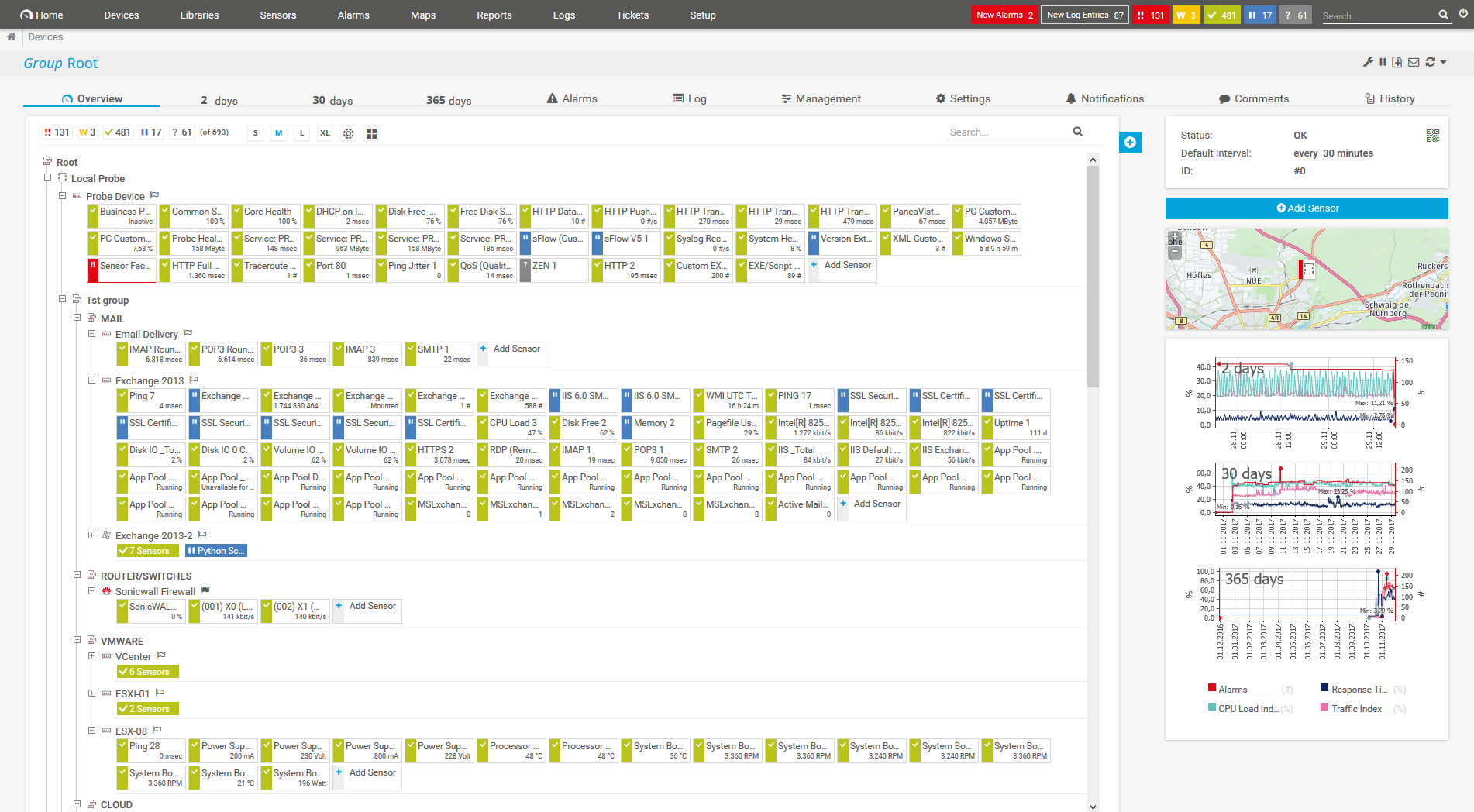
    PRTG Screenshot device tree view

    Device tree view of the complete monitoring setup

    PRTG screenshot map entire it infrastructure

    Custom PRTG dashboard for keeping an eye on the entire IT infrastructure

    PRTG screenshot graph live data traffic

    Live traffic data graph in PRTG

    Start managing your network with PRTG and see how it can make your network more reliable and your job easier.

    Free download
    PRODUCT OVERVIEW

    IT experts agree: Paessler PRTG is a great solution for IT infrastructure monitoring

    PCMag

    “All-around winning
     network monitor”

    IT Brief

    “The real beauty of PRTG is the endless possibilities it offers”

    ITPro

    “PRTG Network Monitor 
    is very hard to beat”

    4 reasons why to choose PRTG as your network management software

    check

    Protect your network from damage

    Use PRTG’s network management tools to help guard against faults and system errors so end users and customers can access information quickly and seamlessly.

    Check the availability and performance of servers, workstations, databases, firewalls, and other endpoints, and analyze bandwidth usage and network traffic in detail. By having reliable data about the health, performance, and usage of your network, you can effectively manage and optimize it.

    check

    Receive real-time alerts and notifications

    PRTG network management software sends you an instant alert that helps you troubleshoot network issues if one of your devices does not respond, an unusual event is registered, or a set threshold is crossed.

    Define your individual error limits, configure notification triggers, choose from various notification channels such as SMS, email, push, syslog message, and many more – and let PRTG do the rest for you.

    icon uptime

    Save time with automated actions

    No time to or no idea how to get started with your network management system? No problem. PRTG comes with a powerful Auto-Discovery feature that automatically detects devices in your network and lists them in a comprehensive device tree overview.

    What’s more: You can configure PRTG to take a certain action in case of an alarm, for example restart Windows services or execute an external script. This way, network management can take care of many frequent network problems without any intervention from your side.

    icon dashboard

    Get comprehensive network overviews

    As a sysadmin, it’s no great news for you that network management doesn’t work without an overview of all network devices. PRTG lets you easily create structured network topology maps as well as custom dashboards via drag and drop.

    Or generate comprehensive reports from PRTG’s wealth of historical data, including activity diagrams and charts that show all network usage parameters over time – for enhanced network optimization and future capacity planning. And with the integrated network device scanner, you can automatically discover and keep track of all devices in your network.

     

    PRTG Is Compatible With All Major Vendors, Products, and Systems

    compatible with all major vendors, products, and systems

    PRTG makes network management as easy as it gets

    Custom alerts and data visualization let you quickly identify and prevent network outages and downtime.

    Free download
    PRODUCT OVERVIEW

    ”Adopting PRTG has been like going from being in the dark to being in the light. Before, we had limited visibility into what was happening in the infrastructure and in the network. Now, however, thanks to the comprehensive dashboard and real-time notifications, we receive constant updates on the status of facilities and services, and our way of working has gone from passive to proactive.”

    Luca Meneghesso, Senior IT infrastructure and Security Specialist
    Banca Profilo

    ”GESAC increasingly focuses on innovation to improve the quality of services offered and the experience of passengers handled every day by Naples Airport. Thanks to PRTG, we finally have unified, automatic, and continuous monitoring of the airport network and can guarantee quick and timely interventions.”

    Domenico Ciervo, GESAC ICT Manager
    Naples International Airport

    ”As an international company, PRTG is ideal for us. If something went down half way across the world, we wouldn’t be woken up – we can rely on PRTG to identify the problem and alert us before it occurs – enabling the right person, in the right time zone to resolve the problem. At the end of the day, if we’re to provide an internal network experience for our employees that meets expectations, we need a tool like PRTG to be successful.”

    Barry Kelly, Systems Engineer
    Skyscanner

    “I would recommend PRTG because it has helped us significantly improve service uptime by highlighting important alerts that would otherwise result in a system failure or service disruption if action was not taken. Thanks to PRTG, we can ensure that The Ritz London’s network and IT systems are five-star, just like the hotel.”

    Richard Isted, IT Manager
    The Ritz London

    Your network manager at a glance – even on the go

    PRTG is set up in a matter of minutes and can be used on a wide variety of mobile devices.

    device overview
    Gartner peer insights

    “Excellent tool for detailed monitoring. Alarms and notifications work greatly. Equipment addition is straight forward and server initial setup is very easy. ...feel safe to purchase it if you intend to monitor a large networking landscape.”

    Read the complete review at Gartner Peer Insights

    Create innovative solutions with Paessler’s IT partners

    Partnering with innovative IT vendors, Paessler unleashes synergies to create
    new and additional benefits for joined customers.

    IP Fabric

    IP Fabric

    Combining PRTG’s broad monitoring feature set with IP Fabric’s automated network assurance creates a new level of network visibility and reliability.

    Read more
    Plixer

    Plixer

    Paessler and Plixer provide a complete solution adding flow and metadata analysis to a powerful network monitoring tool.

    Read more
    UVnetworks

    UVnetworks

    UVexplorer integrates tightly with PRTG to bring fast and accurate network discovery, detailed device inventory, and automatic network mapping to the PRTG platform.

    Read more

    Find the root cause of the problem with our PRTG network management solution

    Real-time notifications mean faster troubleshooting so that you can act before more serious issues occur.

    Free download
    PRODUCT OVERVIEW
    Paessler PRTG

    Paessler PRTG

    Network Monitoring Software – Version 26.1.116.1532 (February 9th, 2026)

    Hosting icon

    Hosting

    Download for Windows and cloud-based version PRTG Hosted Monitor available

    Languages icon

    Languages

    English, German, Spanish, French, Portuguese, Dutch, Russian, Japanese, and Simplified Chinese

    test

    Monitor everything

    Network devices, bandwidth, servers, applications, virtual environments, remote systems, IoT, and more

    test

    Pricing

    Choose the PRTG Network Monitor subscription that's best for you

    Discover more monitoring insights and stories

    Content illustration

    Powerful stories from the monitoring world

    • Easy ways to quickly test your bandwidth
    • Video: Quick overview of PRTG
    • Sending Notifications Via Microsoft Teams
    Support illustration

    Resources to master your monitoring challenges

    • PRTG Manual: PRTG Apps for Mobile Network Monitoring - Paessler
    • PRTG Manual: SNMP HPE ProLiant Network Interface Sensor
    • PRTG Manual: Monitoring via SNMP - Paessler
    Solution illustration

    Solutions for all your monitoring needs

    • IP Monitoring
    • LAN Monitoring
    • Database Monitoring

    Network Management: FAQ


    What is network management?

    Network management is the process of administering, managing, and operating a data network using various tools, technologies, and procedures. It involves a wide range of tasks aimed at ensuring that the network runs efficiently, securely, and reliably. Key aspects of network management include:

    • Network monitoring: Continuous observation of the network to track performance, detect issues, and gather data on traffic, usage, and errors. Protocols like SNMP (Simple Network Management Protocol) are often used to monitor network devices such as routers, switches, and servers.
    • Fault management: Detecting, isolating, and resolving network problems to minimize downtime and ensure smooth operation. This includes identifying network failures or malfunctions and taking corrective actions.
    • Configuration management: Managing the configuration of network devices and systems, including updates, changes, and documentation. This ensures that the network operates according to the organization's policies and that configurations are standardized across devices.
    • Performance management: Analyzing and optimizing the performance of the network to meet the required quality of service (QoS) levels. This involves managing bandwidth, latency, throughput, and ensuring that the network can handle the required load.
    • Security management: Implementing and enforcing security policies to protect the network from unauthorized access, cyberattacks, and other security threats. This includes managing firewalls, intrusion detection systems (IDS), encryption, and other security measures.
    • Cost management: Tracking the usage of network resources to understand costs and resource allocation. This can include billing for network usage, managing bandwidth quotas, and analyzing usage patterns.
    • Network provisioning: The process of configuring network resources to ensure that users and devices have access to the network services they require. This can involve setting up new connections, assigning IP addresses, and configuring VLANs (Virtual Local Area Networks).
    Why should I use a network management tool?

    Using a network management tool like Paessler PRTGG offers several significant benefits that can enhance the efficiency, reliability, and security of your network.

    • Improved network visibility: A network management tool provides a comprehensive view of your entire network, including all connected devices, traffic flow, and performance metrics. This visibility helps you understand what's happening in real-time and enables quicker identification of issues.
    • Proactive issue detection: Network management tools can monitor the network continuously and alert you to potential problems before they become critical. Early detection of issues, such as unusual traffic patterns or failing devices, allows you to address them proactively, reducing downtime and service disruptions.
    • Simplified configuration management: Managing network configurations across multiple devices can be complex and error-prone. Network management tools streamline this process by automating configuration tasks, ensuring consistency, and providing version control to track changes.
    • Efficient troubleshooting: When issues arise, network management tools can quickly pinpoint the root cause by analyzing logs, performance data, and device status. This reduces the time required for troubleshooting and allows for faster resolution of problems.
    • Scalability: As your network grows, managing it manually becomes increasingly difficult. Network management tools are designed to scale with your network, making it easier to manage larger, more complex environments.
    What’s included in the free edition of PRTG?

    With our free monitoring tool, you get:

    • A freeware monitoring solution for up to 100 sensors for life
    • Monitoring of hardware, software, network performance, data traffic included
    • Free alarm, reports, and mapping features

    With the freeware edition of PRTG, you can get started with network monitoring in a matter of minutes. Our auto-discovery function detects all the devices within a given IP address range and automatically incorporates them into your monitoring environment.

    What is the price of the paid version of PRTG? What does it include?

    PRTG’s flexible licensing makes it easy to scale up or down as needed. You pay only for the number of sensors you need. After your 30-day free trial of the unlimited version of PRTG, you can still use the free version with 100 free sensors.

    What is a sensor in PRTG?

    In PRTG, “sensors” are the basic monitoring elements. One sensor usually monitors one measured value in your network, for example the traffic of a switch port, the CPU load of a server, or the free space on a disk drive. On average, you need about 5-10 sensors per device or one sensor per switch port.

    We asked: would you recommend PRTG? Over 95% of our customers say yes!

    Paessler conducted trials in over 600 IT departments worldwide to tune its network monitoring software closer to the needs of sysadmins. The result of the survey: over 95% of the participants would recommend PRTG – or already have.

    recommendation

    Still not convinced?

    Love

    More than 500,000 sysadmins love PRTG

    Paessler PRTG is used by companies of all sizes. Sysadmins love PRTG because it makes their job a whole lot easier.

    PRTG

    Monitor your entire IT infrastructure

    Bandwidth, servers, virtual environments, websites, VoIP services – PRTG keeps an eye on your entire network.

    test

    Try Paessler PRTG for free

    Everyone has different monitoring needs. That’s why we let you try PRTG for free.

    PRTG Logo

    Start managing your network with PRTG and see how it can make your network more reliable and your job easier.

    Free download
    PRODUCT OVERVIEW

    Products

    • Paessler PRTG
      Paessler PRTGMonitor your whole IT infrastructure
      • PRTG Network Monitor
      • PRTG Enterprise Monitor
      • PRTG Hosted Monitor
      • PRTG UVexplorer
      • PRTG extensions
        Extensions for Paessler PRTGExtend your monitoring to a new level
    • Icon Features
      FeaturesExplore all monitoring features

    Monitoring with PRTG

    • Network monitoring
    • Bandwidth monitoring
    • SNMP monitoring
    • Network mapping
    • Wi-Fi monitoring
    • Server monitoring
    • Network traffic analyzer
    • NetFlow monitoring
    • Syslog server

    Useful Links

    • PRTG Manual
    • Knowledge Base
    • Customer Success Stories
    • About Paessler
    • Subscribe to newsletter
    • PRTG Support
    • PRTG Consulting
    • PRTG Feedback & Roadmap

    Contact

    Paessler GmbH
    Thurn-und-Taxis-Str. 14, 
    90411 Nuremberg 
    Germany

    [email protected]

    +49 911 93775-0

    • Contact us
    ©2026 Paessler GmbHTerms & ConditionsPrivacy PolicyImprintReport VulnerabilityDownload & InstallSitemap
    PRTG app for desktop PRTG app for desktop PRTG app for desktop