

Our users give top ratings for monitoring with Paessler PRTG





Why choose PRTG Hyper-V performance monitoring

- Increase the stability and reliability of your Hyper-V virtual environment with Paessler PRTG
- What Hyper-V monitoring looks like in PRTG
- 3 reasons why PRTG is the perfect Microsoft Hyper-V monitoring tool
- Use these 5 preconfigured PRTG sensors to monitor Hyper-V out-of-the-box
- Hyper-V monitoring: FAQ
PRTG makes Hyper-V monitoring easy
Custom alerts and data visualization make it easy to monitor, identify, and prevent virtualization issues.
Increase the stability and reliability of your Hyper-V virtual environment with Paessler PRTG
Hyper-V is a virtualization platform from Microsoft that enables users to create and manage virtual machines on Windows-based systems. It uses a hypervisor to manage both physical hardware and virtual machines, which allows the VMs to run independently from the underlying hardware.
 How PRTG defines sensors
In PRTG, “sensors” are the basic monitoring elements. One sensor usually monitors one measured value in your network, e.g. the traffic of a switch port, the CPU load of a server, the free space of a disk drive. On average you need about 5-10 sensors per device or one sensor per switch port.
Virtualization in modern IT infrastructures: Many benefits, but also drabacks
Virtualization with solutions such as Microsoft Hyper-V has become increasingly important in modern IT infrastructures, as it allows multiple virtual machines to run on a single physical server. This not only improves resource utilization but also reduces costs while at the same time boosting the flexibility of your business.
Virtualization also comes with some drawbacks, however, such as a more complex IT environment and performance overhead due to an additional layer of software between the physical hardware and the virtual machines. Also, a critical error – whether of the network connection or the host itself – might affect several virtual servers at the same time.
Enhance your virtualization with comprehensive PRTG Hyper-V monitoring
It’s not a good idea to set up a virtualized environment without keeping an eye on CPU load, disk usage, performance, and network utilization of your VMs. Solutions for virtualization like Microsoft Hyper-V themselves usually offer only basic information about the status and performance of your virtual machines and the applications that run on them.
PRTG offers in-depth monitoring of all important data of your Hyper-V environment and arranges it into neat, customizable dashboards. Preconfigured Hyper-V sensors that you get out-of-the-box with every product license make setting up your Hyper-V monitoring very easy.
PRTG is compatible with all major vendors, products, and systems

What Hyper-V monitoring looks like in PRTG
Diagnose network issues by continuously monitoring Microsoft Hyper-V. Show all data about your virtual hosts, VMs, and services in real time and visualize data in graphic maps & dashboards to identify problems more easily. Gain the visibility you need to troubleshoot virtualization issues and prevent outages and errors.
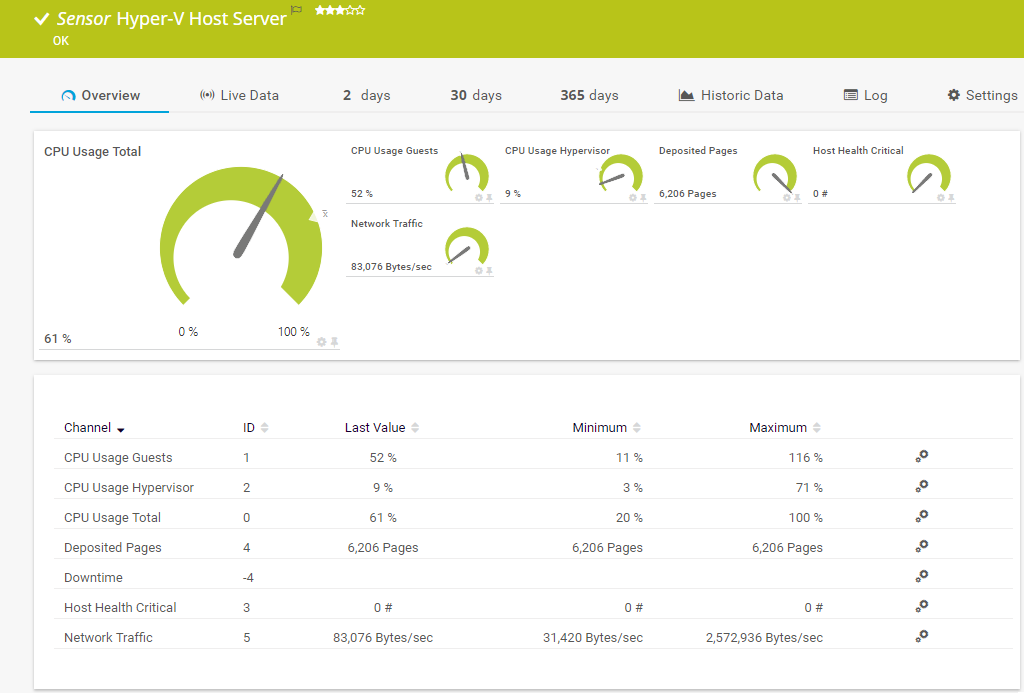
Hyper-V Host Server sensor in PRTG
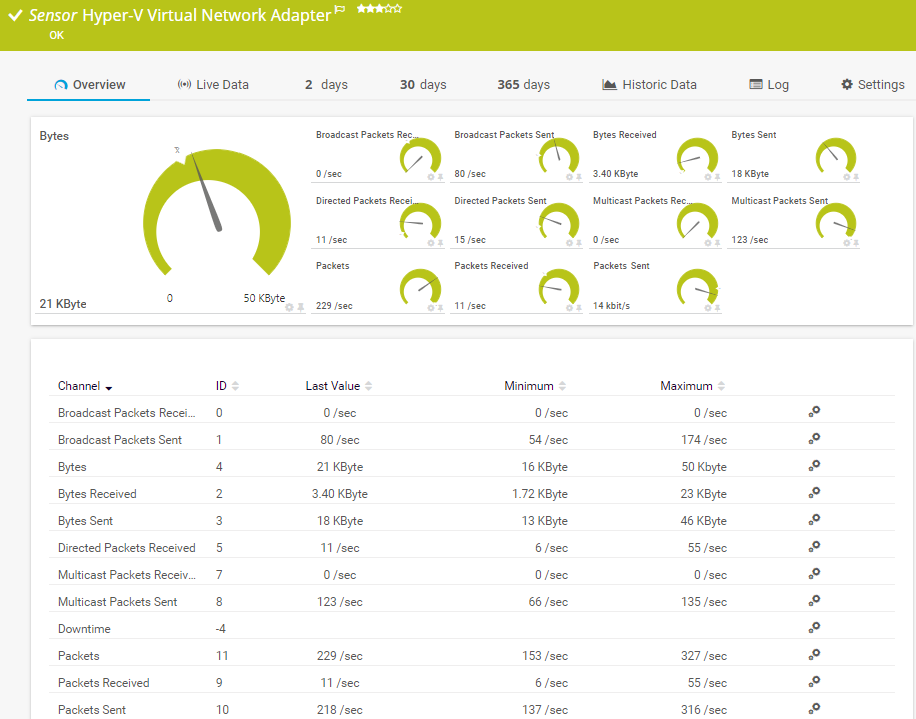
Dashboard with device overview in PRTG
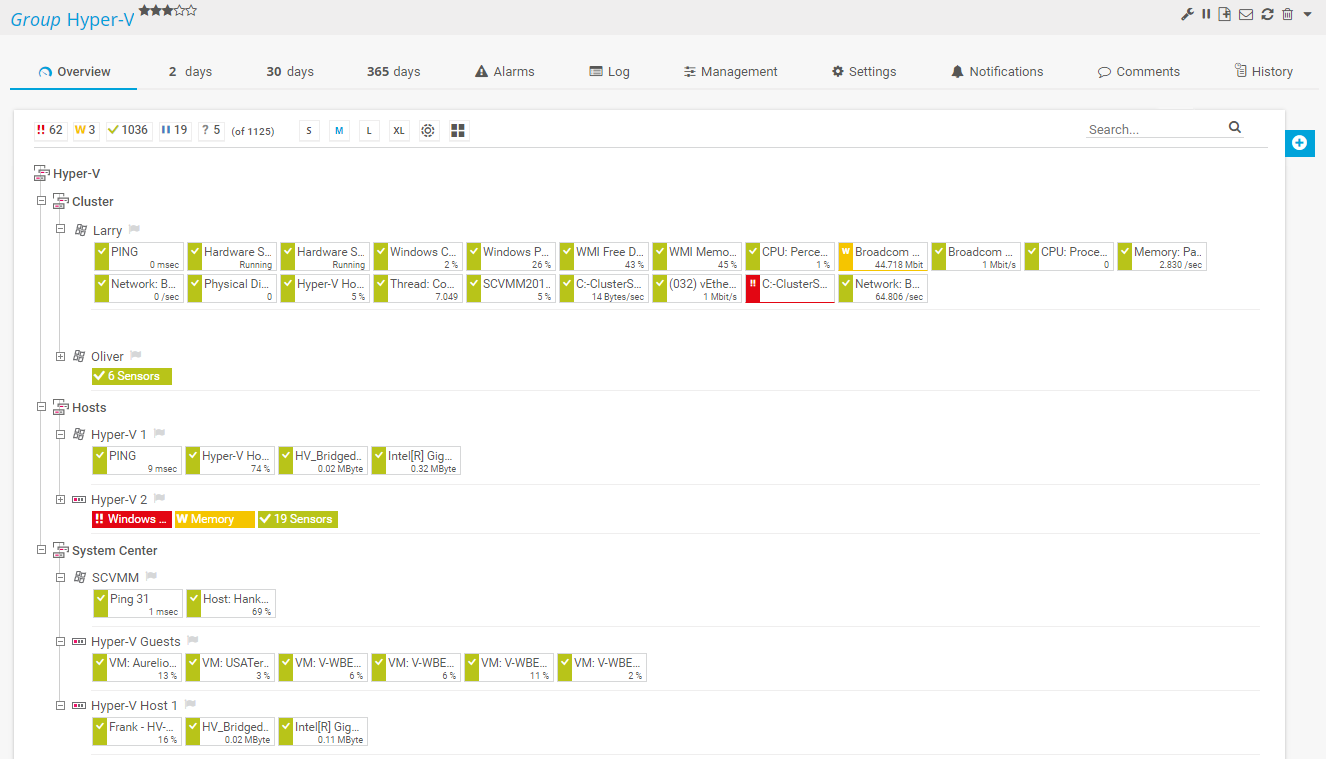
Monitoring setup for your Hyper-V environment
Your Hyper-V monitoring at a glance – even on the go
Set up PRTG in minutes and use it on almost any mobile device.
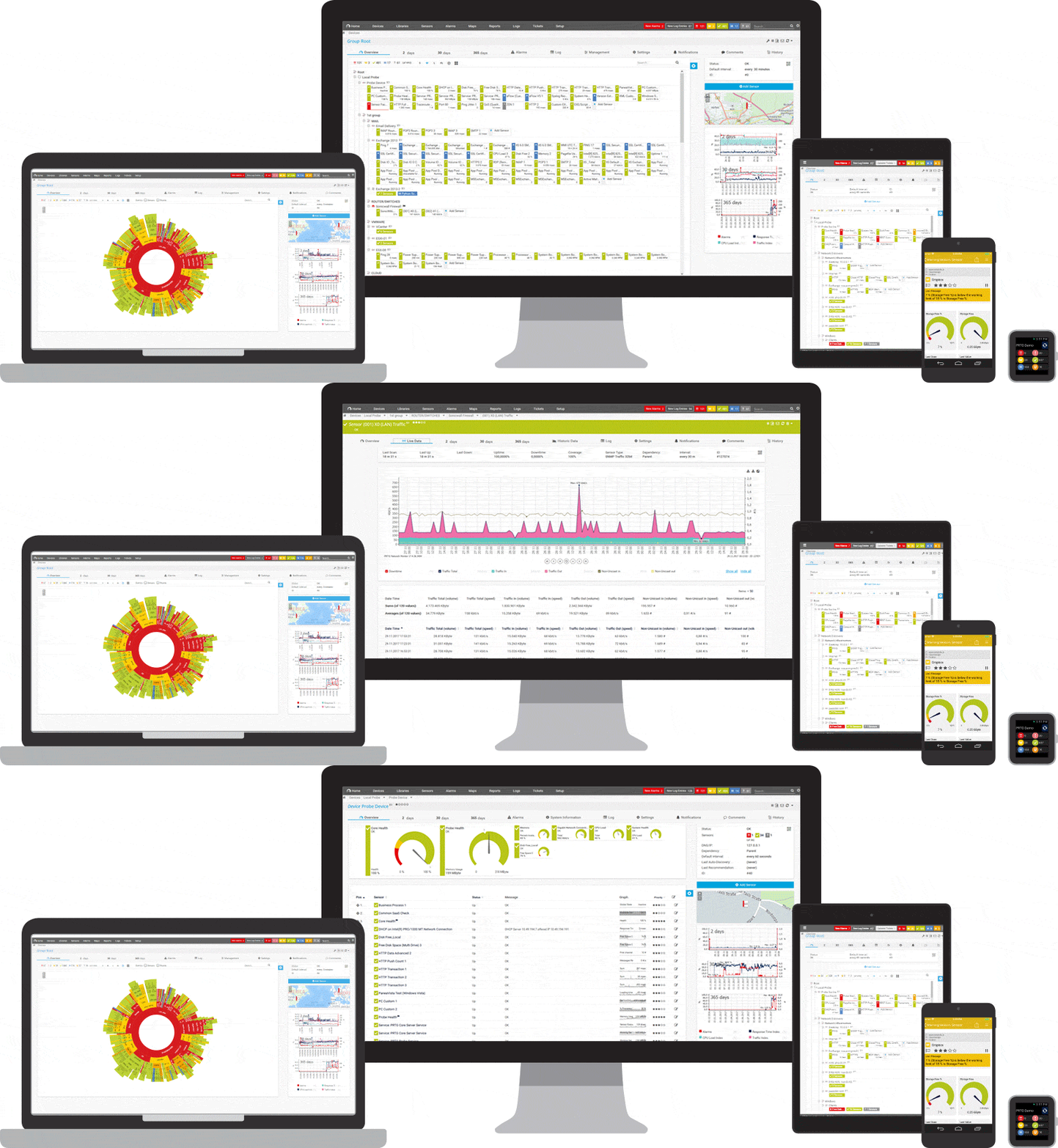

Easily find the source of the problem with our PRTG Hyper-V monitoring solution
Real-time alerts and custom notifications make it easy to solve issues with your Hyper-V environments.
3 reasons why PRTG is the perfect Microsoft Hyper-V monitoring tool
Keep an eye on all layers of your Hyper-V virtualization
PRTG monitors all aspects of your Hyper-V virtual environment. For virtual machines to run smoothly, their host must be stable and reliable. With PRTG, you can monitor, for example, the system status, disk usage, and CPU load of your Hyper-V host. To prevent errors or outages, we also recommend monitoring your most important virtual machines and the applications that run on the VMs, as well as the allocated storage.
Monitor Hyper-V via easy-to-read dashboards
With PRTG, you don’t need to manually check every single metric of your Hyper-V environment. Our monitoring software offers a centralized view that combines all your monitoring data in a user-friendly dashboard. Additionally, you can design custom maps and dashboards with our easy-to-use drag-and-drop map editor to display your Hyper-V monitoring metrics the way you want.
Customize error thresholds, alerts & notifications
If you’re tired of constantly checking if your virtual environment is working properly, just sit back & relax with PRTG – whenever a problem with your Hyper-V resources or any other issue on your network occurs, our monitoring software will immediately alert you through highly customizable notifications, for example via email, SMS, push notifications, Teams or Slack messages, and more.
Use these 5 preconfigured PRTG sensors to monitor Hyper-V out-of-the-box
Hyper-V Host Server sensor
The Hyper-V Host Server sensor monitors a Microsoft Hyper-V host server via WMI or Windows performance counters. It can show:
- CPU usage of the hypervisor, the guests, and in total
- Network traffic
- The number of deposited pages
- The number of host health-critical values
Hyper-V Virtual Machine sensor
The Hyper-V Virtual Machine sensor monitors a virtual machine that runs on a Microsoft Hyper-V host server via WMI or Windows performance counters. It can show:
- CPU usage of the hypervisor, the guests, and in total
- Disk read and write speed of the IDE
Hyper-V Virtual Storage Device sensor
The Hyper-V Virtual Storage Device sensor monitors a virtual storage device that runs on a Microsoft Hyper-V host server via WMI or Windows performance counters. It can show:
- The number of errors
- Read and write speed
Hyper-V Virtual Network Adapter sensor
The Hyper-V Virtual Network Adapter sensor monitors virtual network adapters that run on a Microsoft Hyper-V host server via WMI or Windows performance counters. It can show:
- The number of sent and received broadcast packets, directed packets, and multicast packets
- The number of bytes sent, received, and transferred in total
- The number of packets sent, received, and transferred in total
Hyper-V Cluster Shared Volume Disk Free sensor
The Hyper-V Cluster Shared Volume Disk Free sensor monitors a Microsoft Hyper-V cluster shared volume via PowerShell. It can show:
- The number of free bytes
- Free space in per cent
- Total space
Not only great for monitoring Hyper-V: Monitors other virtual environments as well
PRTG also comes with preconfigured sensors for VMware. Due to our technological expertise and the compatibility of our monitoring software with VMware products, we’ve been a member of the VMware Technology Alliance Partner Program for some years now. More on VMware monitoring with PRTG
If you work with Citrix virtual environments in addition to Hyper-V or VMware, we’ve got you covered here as well – PRTG comes with several preconfigured sensors for monitoring your hosts and virtual machines. More on Citrix monitoring with PRTG.
Start Hyper-V monitoring with PRTG and see how it can make your virtual environments more reliable and your job easier.
IT experts agree: Paessler PRTG is a great solution for IT infrastructure monitoring

“All-around winning
network monitor”

“The real beauty of PRTG is the endless possibilities it offers”

“Outstanding cloud
monitoring”
Create innovative solutions with Paessler’s partners
Partnering with innovative vendors, Paessler unleashes synergies to create
new and additional benefits for joined customers.



PRTG makes Hyper-V monitoring easy
Custom alerts and data visualization make it easy to monitor, identify, and prevent virtualization issues.
Hyper-V monitoring: FAQ
1. What is Hyper-V monitoring?
Microsoft Hyper-V monitoring with PRTG is the process of monitoring the performance and health of virtual machines, hosts, and clusters in a Hyper-V environment. This way, IT professionals can make sure that their virtual environment is running smoothly and efficiently. Typically, Hyper-V monitoring involves keeping track of metrics such as CPU usage, memory usage, disk usage, network traffic, and more to identify issues and prevent downtime.
2. How does PRTG monitor Hyper-V?
PRTG uses various preconfigured Hyper-V sensors to collect performance data of your virtual machines, hosts, and clusters. The collected monitoring data is consolidated on easy-to-read dashboards. PRTG also sends out real-time alerts when performance metrics fall below your defined thresholds so that you can take immediate action to resolve issues.
3. What are the benefits of using PRTG for Hyper-V monitoring?
PRTG comes with a range of benefits, including real-time monitoring, automatic alerts, comprehensive reporting, and user-friendly dashboards. Besides Hyper-V monitoring, PRTG also allows you to monitor other network devices and applications, which gives you a complete overview of your IT infrastructure in a single monitoring tool. What’s more: PRTG is easy to set up and can be customized to meet your specific needs.
4. What is a sensor in PRTG?
In PRTG, “sensors” are the basic monitoring elements. One sensor usually monitors one measured value in your network, for example the traffic of a switch port, the CPU load of a server, or the free space on a disk drive.
On average, you need about 5-10 sensors per device or one sensor per switch port.
Still not convinced?

More than 500,000
sysadmins love PRTG
Paessler PRTG is used by companies of all sizes. Sysadmins love PRTG because it makes their job a whole lot easier.

Monitor your entire IT infrastructure
Bandwidth, servers, virtual environments, websites, VoIP services – PRTG keeps an eye on your entire network.

Try Paessler PRTG
for free
Everyone has different monitoring needs. That’s why we let you try PRTG for free.

Start Hyper-V monitoring with PRTG and see how it can make your virtual environments more reliable and your job easier.
|
PRTG |
Network Monitoring Software - Version 24.2.94.1400 (April 10th, 2024) |
|
Hosting |
Download for Windows and cloud-based version PRTG Hosted Monitor available |
Languages |
English, German, Spanish, French, Portuguese, Dutch, Russian, Japanese, and Simplified Chinese |
Pricing |
Up to 100 sensors for free (Price List) |
Unified Monitoring |
Network devices, bandwidth, servers, applications, virtual environments, remote systems, IoT, and more |
Supported Vendors & Applications |


|