 Originally published on August 26, 2019 by Sascha Neumeier
Last updated on January 23, 2024
•
6 minute read
Many large and medium-sized companies rely on SAP as their ERP solution for business-critical areas. One reason they use SAP is for its high availability features. A system failure or a performance degradation will cause high expenditures in IT and cause work restrictions for the users and customers and using a highly available database will prevent this from happening.
Challenges of IT and SAP System Administrators
IT is responsible for securing and monitoring business-critical applications. The IT and SAP managers must ensure that the SAP systems (SAP System Monitoring) and the databases (such as SAP HANA, Sybase, MaxDB, Oracle, DB2 or MSSQL) run without problems or failures and that the company's business processes are running smoothly at all times.
An IT manager faces the following questions:
- How can SAP Basis be automated and monitored in real time 24/7?
- How can I monitor my SAP HANA database?
- How can I monitor individual SAP jobs and detect job interruptions?
- How can I see if backups failed or did not run at all?
- What is the status of the update processes in SAP?
- How do I keep track of IDocs?
- What is the current utilization of system locks and are alarms issued before the SAP system comes to a halt?
- What is the utilization percentage of the batch and dialog work processes to analyze and avoid performance bottlenecks?
- What is the spool system's status, which brings the SAP system to a standstill in the event of an overflow?
We recently wrote a blog article about how you can monitor your ERP environment with PRTG Network Monitor in general. Monitoring should cover the following areas:
- The database(s)
- The underlying hardware / virtualization
- The business processes
- Dedicated sensors
Today we look at an example from SAP and what monitoring the database(s) and its jobs in SAP can look like.
Custom PRTG Sensors for Monitoring the SAP System Landscape
With Scansor itesys provides user-defined sensors for PRTG that can monitor SAP landscapes in real time. The query is carried out via a direct query in SAP or delivered from the database to PRTG and is therefore up-to-date and precise. For this purpose, a specific monitoring user is created in the SAP system; the role and access authorizations (SAP authorization concept) are supplied with the SAP monitoring license.
SAP HANA Monitoring
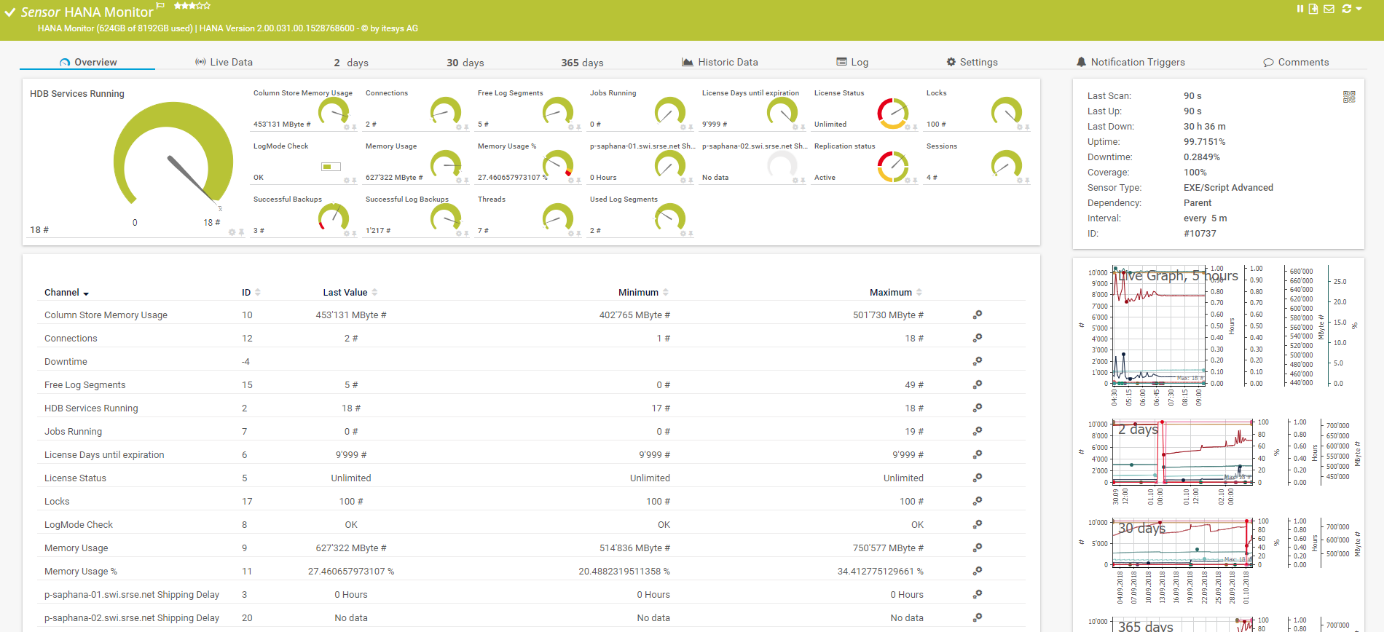
The SAP HANA sensor monitors a SAP HANA database and provides various channel values. The channels provide an overview of successful log and database backups, the status and expiration of the license, information on memory usage, status of HDB services, log segments, connections, sessions, threads, locks, the number of running jobs, and the status of the replication host.
SAP Job Monitoring
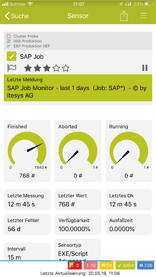 With the SAP Job sensor, it is possible to create queries to monitor several SAP jobs and their runtimes. The display provides information about canceled, completed and running jobs as well as their execution times.
The connection between SAP and PRTG Network Monitor is established via the itesys profiler. The profiler is used to connect the SAP sensors with the system and to deliver the values to the PRTG installation. The Profiler shows the number of licensed SAP sensors and the number of sensors used and gives you an overview of your license.
Start Monitoring Your SAP System with itesys Now
More information about the itesys sensors can be found at www.scansor.com/en.
Click here and download the demo version for free - 30 days full version with unlimited number of sensors.


 You there!