
 Originally published on February 12, 2009 by Dirk Paessler
Last updated on March 03, 2022
•
3 minute read
Back in August I have already posted an article which explains how complicated it is to measure the bandwidth that is actually available for you.One of the problems I mentioned was that if you want to exactly measure the available bandwidth you would have to saturate your data line and then measure the achieved bandwidth. But if you saturate your data line you are actually prohibiting all other traffic. Not a good idea for everyday life.
My recommendation was to monitor the bandwidth only every few minutes. With the upcoming version 7.1 of PRTG Network monitor we have added a new feature that makes measuring available bandwidths fairly easy. The HTTP Advanced sensor now has a new channel which shows the bandwidth in Kbit/s that was achieved while downloading a file from an HTTP URL. Now you only have to set up such a sensor, choose a URL with a medium sized file (e.g. 500 kb or 1 MB) on a server that is "close to your dataline" in a network topological perspective (i.e. very few hops between you and the server) and let it run for some time. Note: Remember that - if you download a 1 MB file every 5 minutes from a public server - you will create bandwidths costs of about 8 Gigabytes per month for the owner of the server and eventually for your dataline. So use your own server! This screenshot shows how we monitor the speed of a dataline by downloading a 1 MB file every 5 minutes. 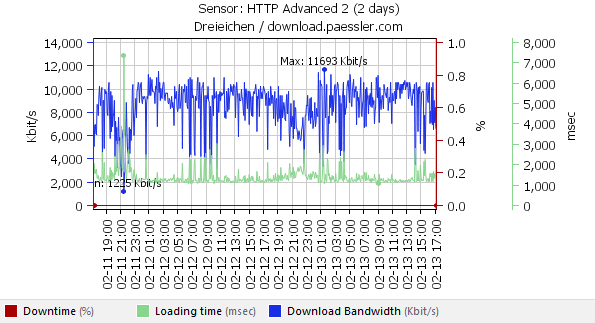
You can see that the bandwidth seems to be degraded every evening between 20:00 and 23:00 hours.


 You there!